1
Data View Generator
User’s Manual
information, then you can use the OPEN button to recover the information.
Page 2
Target: Selecting the tables and logical views to be imported
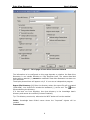
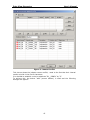
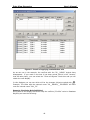
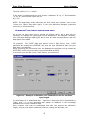
Figure 2 - Second Page of Data View Generator Wizard
In this page two windows appear; the left one shows the database tables, schemes,
logical views, etc., available to be imported according to the previously defined
connection.
Tip: The information shown in the left window depends on the user connected to
the database and the DBMS that are being used.
In AS/400 particularly, there can be seen the tables of those libraries specified in
the DataSource in the option “Default Libraries” from Tab “Server”. Remember to
begin the libraries list with a comma “,”; otherwise the following error can be
shown: “SQL0204 – QCMDEXC in XXX type *N not found”
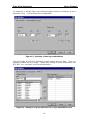
The right window will show the selected tables to be imported. The user must
select them in the left window (double clicking). It is possible to select the scheme
6