1
Occam User’s Manual
5/12/2012
5
Since variables are nominal, their values (states) are names. Normally, these will be
0,1,2… or 1,2,3… but the character “.” is also allowed, e.g., to designate missing values.
(Note that when using “.” it must be included in the cardinality of the variable.) No other
non-numeric characters are allowed as variable states. To avoid possible confusion, it is
best to start the labeling of all variables either with 0 or with 1, i.e., avoid starting one
variable with 0 and another with 1 (though Occam can handle such inconsistencies of
convention). The user should know the number of different states that occur for each
variable and indicate the cardinality of the variable correctly in the variable specification.
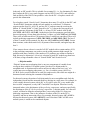
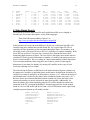
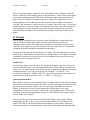
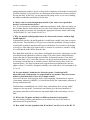
Data can be provided to Occam without frequencies, where each line (row) represents a
single case. The rows do not have to be ordered in any particular way. Occam will
generate the frequencies itself, but it needs to be told that the data do not include
frequencies, as follows:
:no-frequency
:data
0
1
0
1
0
0
0
0
1
1
1
1
0
1
1
0
0
1
1
0
0
0
1
1
0
1
1
1
1
0
1
1
0
1
0
1
Uploading data will be faster if the data provides frequencies, so if the data file is big, the
user might consider doing this operation before calling Occam.
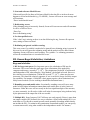
Test data specification
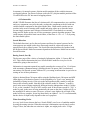
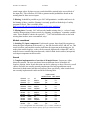
Optionally, a data file can include “test data.” Typically, test data are a fraction of the
original data that has been set aside, so that models can be measured against data that
were not used in their creation. In Search, if test data are present and the “Percent
Correct” option is checked, the report will include the performance of the models on the
test data. In Fit, the performance of the model on test data is show automatically,
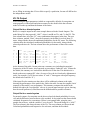
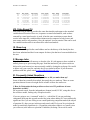
whenever test data are present. To include test data in a data file, use the “:test”
parameter, followed by lines of data in the same format used for “:data”.
:test
0
0
0
0
1
1
1
1
0
0
1
1
0
0
1
1
0
1
0
1
0
1
0
1
70
125
26
100
120
190
25
80