1
User Manual
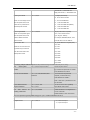
W000000,003,1,1,+8615220051108
Reply: SetTel Ok/1,1, +8615220051108
W******,004,X
Set low power alarm
X (voltage preset value)
=0 , to turn off this function
When TLT-2S voltage is lower
=1, <3.3V send SMS alert
than the preset value, it will
=2 , <3.4V send SMS alert
send one low power alert to
=3 , <3.5V send SMS alert (default )
the SOS preset number.
=4 , <3.6V send SMS alert
=5 , <3.7V send SMS alert
W******,005,XX
Set over speed alarm
XX (the preset value of speed)
When TLT-2S speeds higher
=00 , to turn off this function
than the preset value, it will
=[01, 20] (unit: 10Km/h)
send an SMS to the SOS
For example, W000000,005,08, it will
preset number.
sent alert when it is over 80Km/h
Set Geo-fence alert
W******,006,XX
XX ( preset distance to original place )
=00, close
When the TLT-2S moves out
=01, 30m
of preset scope, it will send
=02, 50m
one Geo-fence SMS to the
=03, 100m
SOS preset number.
=04, 200m
=05, 300m
=06, 500m
=07, 1000m
=08, 2000m
Presetting by SMS for GPRS tracking (Ensure that your SIM card supports GPRS connection prior to setting)
Set
Simcard phone
W******,010,sim card phone number
Tracker sim phone number.
Eg. If tracker sim phone NO. is 123456
number
Then,W000000,010,123456
Set APN for GSM simcard
W******,011,APN,APNName,APN
If no APN name and password
Password
required, just insert APN only;
APN defaulted as ‘CMNET’;
APN + APN name + password not over
39 characters.
Set IP Address and Port
W******,012,IP, Port
IP: xxx.xxx.xxx.xxx Port: [1,65534]
Open TCP function
W******,013,1
Open GPRS TCP function
W******,014,XXXXX
XXXXX should be in five digitals and in
Set
Time
Interval
for
unit of 10 seconds.
Sending GPRS Packet
XXXXX=00000, to close this function;
For more information regarding GPRS settings please refer to <GPRS Communication Protocol>
Output Control
W******,020,1,F
F =0, to close the output
=1, to open the output
- 11 -