1
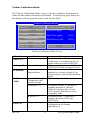
Turbine Calibration Mode
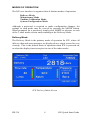
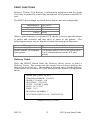
The Turbine Calibration Mode screen is used to configure all parameters
related to the turbine flowmeter calibration. Touching any gray button on
the display will bring up the edit screen for that field.
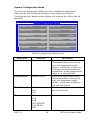
Turbine Calibration Mode
Meter SN:
Meter Size (inch): 2.00
123456789
Average K:
200.000
Min Flow (gpm):
15.0
K Method:
Average
Max Flow (gpm):
225.0
Min Delivery (lb):
220.0
K-factor Table
Last Cal:
12/22/2011
Next Cal:
12/22/2012
ICE SN:
123456789
Turbine Calibration Mode Screen
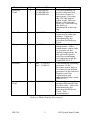
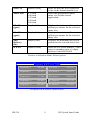
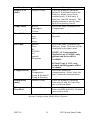
Menu Item
Meter SN
Selection
Numeric Entry
Average K
Numeric Entry
K Method
Average
Linearization
K-Factor
Table
Numeric Entry of
5 frequency and
k-factor points.
Frequency 1-5
Description
Enter the turbine serial number.
Valid entry is a number up to a 9digits between 0 and 999999999.
Enter a number between 0.001 and
99999.999 for the average k-factor.
Select flowmeter linearization
method as Average (single K) or
Linearization (5-point linearization
table)
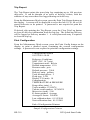
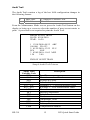
Enter the 5-point k-factor table.
Frequency points 1-5 must be a
number between 0.100 and
5000.001 and must be at least
0.015 greater than the previous
frequency entry.
K-factor points 1-5 must be a
number between 0.001 and
99999.999.
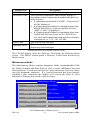
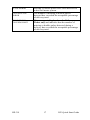
Enter the date of the last
calibration in the format
mm/dd/yyyy
K-factor 1-5
Last Cal
HP-319
Numeric Entry
8
ICE Quick Start Guide