1
Marco Cantù
Essential Pascal
2nd Edition, March 2003
(version 2.01)
APOLLO, THE GOD W ORSHIPED AT DELPHI,
IN AN ITALIAN 17TH CENTURY FRESCO.
Essential Pascal [Copyright 1995-2003 Marco Cantù] www.marcocantu.com/epascal
1
Introduction
T
he first few editions of Mastering Delphi, the best selling Delphi book I've written,
provided an introduction to the Pascal language in Delphi. Due to space constraints and
because many Delphi programmers look for more advanced information, in the latest
edition this material was completely omitted. To overcome the absence of this information, I've started
putting together this ebook, titled Essential Pascal.
This is a detailed book on Pascal, which for the moment will be available for free on my web site
(I really don't know what will happen next, I might even find a publisher). This is a work in progress, and
any feedback is welcome. The first complete version of this book, dated July '99, has been published on
the Delphi 5 Companion CD.
Note to the Second Edition
After a few years (in the early 2003), the book had a complete revision, trying to refocus it even
more on the core features of the Pascal language. Alongside, the book covers the language from the
perspective of the Delphi for Windows programmer, but also of the Kylix and Delphi for .NET
programmer. Differences among these different versions of the language will be mentioned.
This change in focus (not only Delphi with the VCL library) was another reason to change most
of the examples from visual ones to console based ones – something I plan doing but that I still haven't
done. Beside the theoretical advantage that the reader con focus even more on the language, ignoring
event handlers, methods, component, and other more advance topics, only using a console application
the code will be easily portable among the different compilers Borland has made available for Delphi in
the recent years.
Another change is that I’ve gone from an HTML-based format to a PDF based one. With the
increased bandwidth people generally have over a few years back this is really an advantage, and
distribution of a single file helps a lot. By the way, the book is now being written with OpenOffice.org.
Copyright
The text and the source code of this book is copyrighted by Marco Cantù. Of course, you can
use the programs and adapt them to your own needs, only you are not allowed to use them in books,
training material, and other copyrighted formats (unless of course you use a reasonably limited amount
and do mention the source). As you can freely print this ebook as training material, this doesn’t sound
like a real restriction to me.
Distributing the ebook is allowed only if no change is applied (beyond the distribution cost).
Rather than placing a copy of it on your website, though, add a link to the main download site,
www.marcocantu.com/epascal. The reason is that I expect the book to go over frequent changes and
updates.
Donations
Although the book is available for free to everyone, if you benefit from reading it from a
business perspective (that is, if Pascal programming is part of your job) and if you can afford it
(because you live in a wealthy country) I ask yo to donate a small sum to me, as I live on writing and
training on programming languages and tool. Donation information is available on my web site. The
currently suggested price is 5 Euros (which at the time I’m writing this is just a little over 5 US Dollars).
An alternative way of supporting me is to buy one of my books, but in that case I’ll get only a
limited fraction of the money you spend (which is the beauty of publishing an ebook). Coming to a
seminar of mine or offering me consulting work is another interesting payback.
Essential Pascal [Copyright 1995-2003 Marco Cantù] www.marcocantu.com/epascal
2
Notice that the money earned will allow me to pay for a professional editor, the web site itself,
and (of course) the time devoted to update the book.
Table of Contents
Introduction...................................................................................................................2
Note to the Second Edition................................................................................................2
Copyright......................................................................................................................2
Donations.....................................................................................................................2
The Book Structure.........................................................................................................3
Source Code..................................................................................................................5
Feedback......................................................................................................................5
Acknowledgments...........................................................................................................6
About the Author............................................................................................................6
Chapter 1: A Short History of the Pascal Language ..........................................................7
Wirth’s Pascal. ...............................................................................................................7
Turbo Pascal.................................................................................................................7
Delphi’s Pascal. ...............................................................................................................7
Chapter 2: Coding in Pascal ............................................................................................9
Comments....................................................................................................................9
Use of Uppercase.........................................................................................................10
Pretty-Printing...............................................................................................................11
Syntax Highlighting........................................................................................................11
Using Code Templates...................................................................................................12
Language Statements....................................................................................................13
Keywords....................................................................................................................13
Expressions and Operators..............................................................................................16
Conclusion...................................................................................................................17
Chapter 3: Types, Variables, and Constants....................................................................18
Variables.....................................................................................................................18
Constants....................................................................................................................19
Resource String Constants..............................................................................................19
Data Types.................................................................................................................20
Ordinal Types...............................................................................................................20
Real Types..................................................................................................................24
Date and Time.............................................................................................................25
Specific Windows Types..................................................................................................27
Typecasting and Type Conversions...................................................................................27
Conclusion...................................................................................................................29
Chapter 4
User-Defined Data Types..............................................................................................30
Named and Unnamed Types...........................................................................................30
Subrange Types...........................................................................................................31
Enumerated Types........................................................................................................31
Set Types...................................................................................................................33
Array Types................................................................................................................34
Record Types..............................................................................................................35
Pointers......................................................................................................................36
File Types...................................................................................................................38
Conclusion...................................................................................................................38
Chapter 5: Statements .................................................................................................39
Simple and Compound Statements....................................................................................39
Assignment Statements..................................................................................................39
Conditional Statements...................................................................................................40
Essential Pascal [Copyright 1995-2003 Marco Cantù] www.marcocantu.com/epascal
3
Loops in Pascal. ............................................................................................................42
The With Statement......................................................................................................45
Conclusion...................................................................................................................46
Chapter 6: Procedures and Functions.............................................................................47
Pascal Procedures and Functions......................................................................................47
Reference Parameters...................................................................................................48
Constant Parameters.....................................................................................................49
Open Array Parameters..................................................................................................49
Delphi Calling Conventions...............................................................................................52
What Is a Method?.......................................................................................................53
Forward Declarations......................................................................................................53
Procedural Types..........................................................................................................54
Function Overloading......................................................................................................56
Default Parameters.......................................................................................................58
Conclusion...................................................................................................................59
Chapter 7: Handling Strings..........................................................................................60
Types of Strings...........................................................................................................60
Using Long Strings.........................................................................................................60
Looking at Strings in Memory...........................................................................................61
Delphi Strings and Windows PChars...................................................................................62
Formatting Strings.........................................................................................................64
Conclusion...................................................................................................................66
Chapter 8: Memory.......................................................................................................67
Dynamic Arrays............................................................................................................67
Conclusion...................................................................................................................69
Chapter 9: Windows Programming.................................................................................70
Windows Handles..........................................................................................................70
External Declarations......................................................................................................71
A Windows Callback Function...........................................................................................72
A Minimal Windows Program...........................................................................................74
Conclusion...................................................................................................................75
Chapter 10: Variants.....................................................................................................76
Variants Have No Type..................................................................................................76
Variants in Depth..........................................................................................................77
Variants Are Slow!.........................................................................................................78
Conclusion...................................................................................................................79
Chapter 11: Program and Units......................................................................................80
Units..........................................................................................................................80
Units and Scope............................................................................................................81
Units as Namespaces....................................................................................................82
Units and Programs.......................................................................................................83
Conclusion...................................................................................................................83
Chapter 12: Files in the Pascal Language.......................................................................84
Routines for Working with Files.........................................................................................84
Handling Text Files........................................................................................................85
A Text File Converter.....................................................................................................86
Saving Generic Data......................................................................................................87
From Files to Streams....................................................................................................88
Conclusion...................................................................................................................88
Appendix A: Glossary....................................................................................................90
Heap (Memory)............................................................................................................90
Stack (Memory)...........................................................................................................90
More Terms for the Glossary...........................................................................................91
Appendix B: Examples...................................................................................................92
Essential Pascal [Copyright 1995-2003 Marco Cantù] www.marcocantu.com/epascal
4
Source Code
The source code of all the examples mentioned in the book is available. The code has the same
copyright as the book: Feel free to use it at will but don't publish it on other documents or site. Links
back to the Essential Pascal site (www.marcocantu.com/epascal) are welcomed.
If you go to the site you can download the source code in a single zip file, EPasCode.zip
(about 30 KB in size), and check out the list of the examples in Appendix B.
Feedback
Please let me know of any errors you find, but also of topics not clear enough for a beginner. I'll
be able to devote time to the project depending also on the feedback I receive. Let me know also which
other topics you'd like to see here.
The preferred way of sending feedback is on my public newsgroup (see my web site for login
information) in the area devoted to books. If you have troubles using the newsgroups send an email at
the address to [email protected] (putting Essential Pascal in the subject, and your request or
comment in the text).
Acknowledgments
If I'm publishing a book on the web for free, I think this is mainly due to Bruce Eckel’s
experience with Thinking in Java. I'm a friend of Bruce and think he really did a great job with that book
and few others.
As I mentioned the project to people at Borland I got a lot of positive feedback as well. And of
course I must thank the company for making first the Turbo Pascal series of compilers and now the
Delphi series of visual IDEs.
I'm starting to get some precious feedback. The first readers who helped improving this material
quite a lot are Charles Wood and Wyatt Wong. Mark Greenhaw helped with some editing of the text.
Rafael Barranco-Droege offered a lot of technical corrections and language editing. Thanks.
About the Author
Marco Cantù lives in Piacenza, Italy. After teaching the C++ language and writing C++ and
Object Windows Library books and articles, in 1995 he delved into Delphi programming. He is the author
of the Mastering Delphi book series, published by Sybex, as well as the advanced Delphi Developers
Handbook (which is hardly available any more). Marco writes articles for many magazines, including The
Delphi Magazine, speaks at Delphi and Borland conferences around the world, and teaches Delphi
classes at basic and advanced levels.
Lately he’s getting more and more involved in XML-related technologies, although mostly from
the Delphi perspective. You can find more details about Marco and his work on his web site,
www.marcocantu.com.
Essential Pascal [Copyright 1995-2003 Marco Cantù] www.marcocantu.com/epascal
5
Chapter 1:
A Short History of
the Pascal Language
T
he Object Pascal programming language we use in Delphi wasn't invented in 1995
along with the Borland visual development environment. It was simply extended
from the Object Pascal language already in use in the Borland Pascal products. But
Borland didn't invent Pascal, it only helped make it very popular and extended it a little...
Wirth’s Pascal
The Pascal language was originally designed in 1971 by Niklaus Wirth, professor at the
Polytechnic of Zurich, Switzerland. Pascal was designed as a simplified version for educational
purposes of the language Algol, which dates from 1960.
When Pascal was designed, many programming languages existed, but few were in
widespread use: FORTRAN, C, Assembler, COBOL. The key idea of the new language was order,
managed through a strong concept of data type, and requiring declarations and structured
program controls. The language was also designed to be a teaching tool for students of
programming classes.
Turbo Pascal
Borland's world-famous Pascal compiler, called Turbo Pascal, was introduced in 1983,
implementing "Pascal User Manual and Report" by Jensen and Wirth. The Turbo Pascal compiler
has been one of the best-selling series of compilers of all time, and made the language particularly
popular on the PC platform, thanks to its balance of simplicity and power.
Turbo Pascal introduced an Integrated Development Environment (IDE) where you could
edit the code (in a WordStar compatible editor), run the compiler, see the errors, and jump back
to the lines containing those errors. It sounds trivial now, but previously you had to quit the editor,
return to DOS; run the command-line compiler, write down the error lines, open the editor and
jump there.
Moreover Borland sold Turbo Pascal for 49 dollars, where Microsoft's Pascal compiler was
sold for a few hundred. Turbo Pascal's many years of success contributed to Microsoft's eventual
cancellation of its Pascal compiler product.
You can actually download a copy of the original version of Borland's Turbo Pascal from
the Borland Developer's Network web site (http://bdn.borland.com) in the Museum section.
Delphi’s Pascal
After 9 versions of Turbo and Borland Pascal compilers, which gradually extended the
language into the OOP realm, Borland released Delphi in 1995, turning Pascal into a visual
programming language. Delphi extends the Pascal language in a number of ways, including many
Essential Pascal [Copyright 1995-2003 Marco Cantù] www.marcocantu.com/epascal
6
object-oriented extensions which are different from other flavors of Object Pascal, including those
in the Borland Pascal with Objects compiler (the last incarnations of Turbo Pascal).
With Delphi 2, Borland brought the Pascal compiler to the 32-bit world, actually reengineering it to provide a code generator common with the C++ compiler. This brought to the
Pascal language many optimizations previously found only in C/C++ compilers.
With Kylix, Borland made a further step and opened to Pascal/Delphi programmers the
Linux operating system (even if only in its Intel-based incarnation). Most of the examples of this
book can be executed almost unchanged on Linux.
With the release of version 7 of Delphi (and version 3 of Kylix) Borland has formally started
to names the Pascal (or Object Pascal) language as the Delphi language. So Delphi 7 uses the
Delphi language, Kylix 3 supports both the Delphi and the C++ languages, and Borland ships a
Delphi language compiler for the Microsoft’s .NET architecture. This is mainly a cosmetic and
marketing change, probably due to the fact that the Pascal language was never popular in the US
as it used to be (and still is) in Europe and other areas of the world.
Essential Pascal [Copyright 1995-2003 Marco Cantù] www.marcocantu.com/epascal
7
Chapter 2:
Coding in Pascal
B
efore we move on to the subject of writing Pascal language statements, it is
important to highlight a couple of elements of Pascal coding style. The question
I'm addressing here is this: Besides the syntax rules, how should you write code?
There isn't a single answer to this question, since personal taste can dictate different styles.
However, there are some principles you need to know regarding comments, uppercase, spaces,
and the so-called pretty-printing. In general, the goal of any coding style is clarity. The style and
formatting decisions you make are a form of shorthand, indicating the purpose of a given piece of
code. An essential tool for clarity is consistency-whatever style you choose, be sure to follow it
throughout a project.
Comments
In Pascal, comments are enclosed in either braces or parentheses followed by a star.
Delphi also accepts the C++ style comments, which can span to the end of the line:
{this is a comment}
(* this is another comment *)
// this is a comment up to the end of the line
The first form is shorter and more commonly used. The second form was often preferred
in Europe because many European keyboards lacked the brace symbol. The third form of
comments has been borrowed from C++ and was added in Delphi 2. Comments up to the end of
the line are very helpful for short comments and for commenting out a line of code.
In the listings of the book I'll try to mark comments as italic and keywords in bold, to be consistent with the
default Delphi syntax highlighting (and that of most other editors).
Having three different forms of comments can be helpful for making nested comments. If
you want to comment out several lines of source code to disable them, and these lines contain
some real comments, you cannot use the same comment identifier:
{ ... code
{comment, creating problems}
... code }
With a second comment identifier, you can write the following code, which is correct:
{ ... code
//this comment is OK
... code }
Note that if the open brace or parenthesis-star is followed by the dollar sign ($), it
becomes a compiler directive, as in {$X+}.
Actually, compiler directives are still comments. For example, {$X+ This is a comment} is legal.
It's both a valid directive and a comment, although sane programmers will probably tend to separate
directives and comments.
Essential Pascal [Copyright 1995-2003 Marco Cantù] www.marcocantu.com/epascal
8
Use of Uppercase
The Pascal compiler (unlike those in other languages) ignores the case (capitalization) of
characters. Therefore, the identifiers Myname, MyName, myname, myName, and MYNAME are all
exactly equivalent. On the whole, this is definitely a positive, since in case-sensitive languages,
many syntax errors are caused by incorrect capitalization.
There is only one exception to the case-insensitive rule of Pascal: the Register procedure of a components'
package must start with the uppercase R, because of a C++Builder compatibility issue.
There are a couple of subtle drawbacks, however. First, you must be aware that these
identifiers really are the same, so you must avoid using them as different elements. Second, you
should try to be consistent in the use of uppercase letters, to improve the readability of the code.
A consistent use of case isn't enforced by the compiler, but it is a good habit to get into. A
common approach is to capitalize only the first letter of each identifier. When an identifier is made
up of several consecutive words (you cannot insert a space in an identifier), every first letter of a
word should be capitalized:
MyLongIdentifier
MyVeryLongAndAlmostStupidIdentifier
Other elements completely ignored by the compiler are the spaces, new lines, and tabs
you add to the source code. All these elements are collectively known as white space. White
space is used only to improve code readability; it does not affect the compilation.
Unlike BASIC, Pascal allows you to write a statement on several lines of code, splitting a
long instruction on two or more lines. The drawback (at least for many BASIC programmers) of
allowing statements on more than one line is that you have to remember to add a semicolon to
indicate the end of a statement, or more precisely, to separate a statement from the next one.
Notice that the only restriction in splitting programming statements on different lines is that a string
literal may not span several lines.
Again, there are no fixed rules on the use of spaces and multiple-line statements, just
some rules of thumb:
? The Delphi editor has a vertical line you can place after 60 or 70 characters. If you use
this line and try to avoid surpassing this limit, your source code will look better when you
print it on paper. Otherwise long lines may get broken at any position, even in the middle
of a word, when you print them.
?
When a function or procedure has several parameters, it is common practice to place
the parameters on different lines.
?
You can leave a line completely white (blank) before a comment or to divide a long piece
of code in smaller portions. Even this simple idea can improve the readability of the
code, both on screen and when you print it.
?
Use spaces to separate the parameters of a function call, and maybe even a space
before the initial open parenthesis. Also keep operands of an expression separated. I
know that some programmers will disagree with these ideas, but I insist: Spaces are
free; you don't pay for them. (OK, I know that they use up disk space and modem
connection time when you upload or download a file, but this is less and less relevant,
nowadays.)
Essential Pascal [Copyright 1995-2003 Marco Cantù] www.marcocantu.com/epascal
9
Pretty-Printing
The last suggestion on the use of white spaces relates to the typical Pascal languageformatting style, known as pretty-printing. This rule is simple: Each time you need to write a
compound statement, indent it two spaces to the right of the rest of the current statement. A
compound statement inside another compound statement is indented four spaces, and so on:
if ... then
statement;
if ... then
begin
statement1;
statement2;
end;
if ... then
begin
if ... then
statement1;
statement2;
end;
The above formatting is based on pretty-printing, but programmers have different interpretations of this
general rule. Some programmers indent the begin and end statements to the level of the inner code, some
of them indent begin and end and then indent the internal code once more, other programmers put the
begin in the line of the if condition. This is mostly a matter of personal taste. There are Delphi add-in
programs you can use to convert an existing source code to the indentation format you prefer.
A similar indented format is often used for lists of variables or data types, and to continue
a statement from the previous line:
type
Letters = set of Char;
var
Name: string;
begin
{ long comment and long statement, going on in the
following line and indented two spaces }
MessageDlg ('This is a message',
mtInformation, [mbOk], 0);
Of course, any such convention is just a suggestion to make the code more readable to
other programmers, and it is completely ignored by the compiler. I've tried to use this rule
consistently in all of the samples and code fragments in this book. Delphi source code, manuals,
and Help examples use a similar formatting style.
Syntax Highlighting
To make it easier to read and write Pascal code, the Delphi editor has a feature called color
syntax highlighting. Depending on the meaning in Pascal of the words you type in the editor, they
are displayed using different colors. By default, keywords are in bold, strings and comments are in
color (and often in italic), and so on.
Essential Pascal [Copyright 1995-2003 Marco Cantù] www.marcocantu.com/epascal
10
Reserved words, comments, and strings are probably the three elements that benefit
most from this feature. You can see at a glance a misspelled keyword, a string not properly
terminated, and the length of a multiple-line comment.
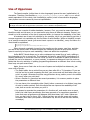
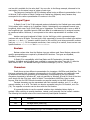
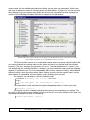
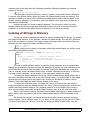
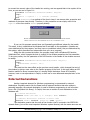
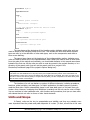
You can easily customize the syntax highlight settings using the Editor Colors page of the
Environment Options dialog box (see Figure 2.1). If you work by yourself, choose the colors you
like. If you work closely with other programmers, you should all agree on a standard color
scheme. I find that working on a computer with a different syntax coloring than the one I am
used to is really difficult.
FIGURE 2.1: THE DIALOG
BOX USED TO SET THE COLOR SYNTAX HIGHLIGHTING.
In this book I've tried to apply a sort of syntax highlighting to the source code listings. I hope this actually
makes them more readable.
Using Code Templates
When writing Pascal language statements you often repeat the same sequence of
keywords. For this reason, Borland has provided a new feature called Code Templates. A code
template is simply a piece of code related with a shorthand. You type the shorthand, then press
Ctrl+J, and the full piece of code appears. For example, if you type arrayd, and then press
Ctrl+J, the Delphi editor will expand your text into:
array [0..] of ;
Since the predefined code templates usually include several versions of the same
construct, the shortcut generally terminates with a letter indicating which of the versions you are
interested in. However, you can also type only the initial part of the shortcut. For example, if you
Essential Pascal [Copyright 1995-2003 Marco Cantù] www.marcocantu.com/epascal
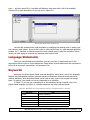
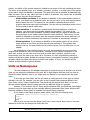
11
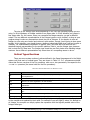
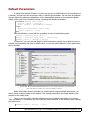
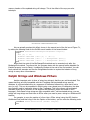
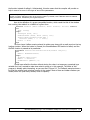
type ar and then press Ctrl+J, the editor will display a local menu with a list of the available
choices with a short description, as you can see in Figure 2.2.
FIGURE 2.2: CODE TEMPLATES SELECTION
You can fully customize the code templates by modifying the existing ones or adding your
own common code pieces. If you do this, keep in mind that the text of a code template generally
includes the '|' character to indicate where the cursor should jump to after the operation, that is,
where you start typing to complete the template with custom code.
Language Statements
Once you have defined some identifiers, you can use them in statements and in the
expressions that are part of some statements. Pascal offers several statements and expressions.
Let's look at keywords, expressions, and operators first.
Keywords
Keywords are all the Object Pascal reserved identifiers, which have a role in the language.
Delphi's help distinguishes between reserved words and directives: Reserved words cannot be
used as identifiers, while directives should not be used as such, even if the compiler will accept
them. In practice, you should not use any keywords as an identifier.
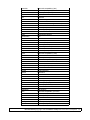
In Table 2.1 you can see a complete list of the identifiers having a specific role in the
Object Pascal language (in Delphi 4), including keywords and other reserved words.
TABLE 2.1: KEYWORDS AND
OTHER RESERVED WORDS IN THE
Keyword
OBJECT PASCAL
LANGUAGE
Role
absolute
abstract
directive (variables)
directive (method)
and
operator (boolean)
array
type
as
operator (RTTI)
asm
statement
Essential Pascal [Copyright 1995-2003 Marco Cantù] www.marcocantu.com/epascal
12
assembler
backward compatibility (asm)
at
statement (exceptions)
automated
access specifier (class)
begin
block marker
case
cdecl
statement
function calling convention
class
type
const
declaration or directive (parameters)
constructor
special method
contains
default
operator (set)
directive (property)
destructor
special method
dispid
dispinterface specifier
dispinterface
type
div
do
operator
statement
downto
statement (for)
dynamic
directive (method)
else
statement (if or case)
end
except
block marker
statement (exceptions)
export
backward compatibility (class)
exports
declaration
external
directive (functions)
far
file
backward compatibility (class)
type
finalization
unit structure
finally
statement (exceptions)
for
statement
forward
function
function directive
declaration
goto
statement
if
statement
implementation
unit structure
implements
in
directive (property)
operator (set) - project structure
index
directive (dipinterface)
inherited
statement
initialization
unit structure
inline
interface
backward compatibility (see asm)
type
is
operator (RTTI)
label
declaration
library
program structure
message
mod
directive (method)
operator (math)
Essential Pascal [Copyright 1995-2003 Marco Cantù] www.marcocantu.com/epascal
13
name
directive (function)
near
backward compatibility (class)
nil
value
nodefault
directive (property)
not
object
operator (boolean)
backward compatibility (class)
of
statement (case)
on
statement (exceptions)
or
operator (boolean)
out
overload
directive (parameters)
function directive
override
function directive
package
program structure (package)
packed
directive (record)
pascal
private
function calling convention
access specifier (class)
procedure
declaration
program
program structure
property
declaration
protected
public
access specifier (class)
access specifier (class)
published
access specifier (class)
raise
statement (exceptions)
read
property specifier
readonly
record
dispatch interface specifier
type
register
function calling convention
reintroduce
function directive
repeat
statement
requires
resident
program structure (package)
directive (functions)
resourcestring
type
safecall
function calling convention
set
type
shl
shr
operator (math)
operator (math)
stdcall
function calling convention
stored
directive (property)
string
type
then
threadvar
statement (if)
declaration
to
statement (for)
try
statement (exceptions)
type
declaration
unit
until
unit structure
statement
Essential Pascal [Copyright 1995-2003 Marco Cantù] www.marcocantu.com/epascal
14
uses
unit structure
var
declaration
virtual
directive (method)
while
statement
with
write
statement
property specifier
writeonly
dispatch interface specifier
xor
operator (boolean)
Expressions and Operators
There isn't a general rule for building expressions, since they mainly depend on the
operators being used, and Pascal has a number of operators. There are logical, arithmetic,
Boolean, relational, and set operators, plus some others. Expressions can be used to determine
the value to assign to a variable, to compute the parameter of a function or procedure, or to test
for a condition. Expressions can include function calls, too. Every time you are performing an
operation on the value of an identifier, rather than using an identifier by itself, that is an
expression.
Expressions are common to most programming languages. An expression is any valid
combination of constants, variables, literal values, operators, and function results. Expressions can
also be passed to value parameters of procedures and functions, but not always to reference
parameters (which require a value you can assign to).
Operators and Precedence
If you have ever written a program in your life, you already know what an expression is.
Here, I'll highlight specific elements of Pascal operators. You can see a list of the operators of the
language, grouped by precedence, in Table 2.2.
Contrary to most other programming languages, the and and or operators have precedence compared to
the relational one. So if you write a < b and c < d, the compiler will try to do the and operation first,
resulting in a compiler error. For this reason you should enclose each of the < expression in parentheses:
(a < b) and (c < d).
Some of the common operators have different meanings with different data types. For
example, the + operator can be used to add two numbers, concatenate two strings, make the
union of two sets, and even add an offset to a PChar pointer. However, you cannot add two
characters, as is possible in C.
Another strange operator is div. In Pascal, you can divide any two numbers (real or
integers) with the / operator, and you'll invariably get a real-number result. If you need to divide
two integers and want an integer result, use the div operator instead.
TABLE 2.2: PASCAL LANGUAGE OPERATORS, GROUPED
BY
PRECEDENCE
Unary Operators (Highest Precedence)
@
Address of the variable or function (returns a pointer)
not
Boolean or bitwise not
Essential Pascal [Copyright 1995-2003 Marco Cantù] www.marcocantu.com/epascal
15
Multiplicative and Bitwise Operators
*
Arithmetic multiplication or set intersection
/
Floating-point division
div
Integer division
mod
Modulus (the remainder of integer division)
as
Allows a type-checked type conversion among at runtime (part of the RTTI support)
and
Boolean or bitwise and
shl
Bitwise left shift
shr
Bitwise right shift
Additive Operators
+
Arithmetic addition, set union, string concatenation, pointer offset addition
-
Arithmetic subtraction, set difference, pointer offset subtraction
or
Boolean or bitwise or
xor
Boolean or bitwise exclusive or
Relational and Comparison Operators (Lowest Precedence)
=
Test whether equal
<>
Test whether not equal
<
Test whether less than
>
Test whether greater than
<=
Test whether less than or equal to, or a subset of a set
>=
Test whether greater than or equal to, or a superset of a set
in
Test whether the item is a member of the set
is
Test whether object is type-compatible (another RTTI operator)
Set Operators
The set operators include union (+), difference (-), intersection (*),membership test (in),
plus some relational operators. To add an element to a set, you can make the union of the set
with another one that has only the element you need. Here's a Delphi example related to font
styles:
Style := Style + [fsBold];
Style := Style + [fsBold, fsItalic] - [fsUnderline];
As an alternative, you can use the standard Include and Exclude procedures, which are
much more efficient (but cannot be used with component properties of the set type, because
they require an l-value parameter):
Include (Style, fsBold);
Conclusion
Now that we know the basic layout of a Pascal program we are ready to start
understanding its meaning in detail. We'll start by exploring the definition of predefined and user
defined data types, then we'll move along to the use of the keywords to form programming
statements.
Essential Pascal [Copyright 1995-2003 Marco Cantù] www.marcocantu.com/epascal
16
Chapter 3
Types, Variables, and Constants
T
he original Pascal language was based on some simple notions, which have now
become quite common in programming languages. The first is the notion of data
type. The type determines the values a variable can have, and the operations that
can be performed on it. The concept of type is stronger in Pascal than in C, where the arithmetic
data types are almost interchangeable, and much stronger than in the original versions of BASIC,
which had no similar concept.
Variables
Pascal requires all variables to be declared before they are used. Every time you declare a
variable, you must specify a data type. Here are some sample variable declarations:
var
Value: Integer;
IsCorrect: Boolean;
A, B: Char;
The var keyword can be used in several places in the code, such as at the beginning of
the code of a function or procedure, to declare variables local to the routine, or inside a unit to
declare global variables. After the var keyword comes a list of variable names, followed by a colon
and the name of the data type. You can write more than one variable name on a single line, as in
the last statement above.
Once you have defined a variable of a given type, you can perform on it only the
operations supported by its data type. For example, you can use the Boolean value in a test and
the integer value in a numerical expression. You cannot mix Booleans and integers (as you can
with the C language).
Using simple assignments, we can write the following code:
Value := 10;
IsCorrect := True;
But the next statement is not correct, as the two variables have different data types:
Value := IsCorrect; // error
If you try to compile this code, Delphi issues a compiler error with this description:
Incompatible types: 'Integer' and 'Boolean'. Usually, errors like this are programming errors,
because it does not make sense to assign a True or False value to a variable of the Integer data
type. You should not blame Delphi for these errors. It only warns you that there is something
wrong in the code.
Of course, it is often possible to convert the value of a variable from one type into a
different type. In some cases, this conversion is automatic, but usually you need to call a specific
system function that changes the internal representation of the data.
In Delphi you can assign an initial value to a global variable while you declare it. For
example, you can write:
var
Value: Integer = 10;
Correct: Boolean = True;
This initialization technique works only for global variables, not for variables declared inside
the scope of a procedure or method.
Essential Pascal [Copyright 1995-2003 Marco Cantù] www.marcocantu.com/epascal
17
Constants
Pascal also allows the declaration of constants to name values that do not change during
program execution. To declare a constant you don't need to specify a data type, but only assign
an initial value. The compiler will look at the value and automatically use its proper data type. Here
are some sample declarations:
const
Thousand = 1000;
Pi = 3.14;
AuthorName = 'Marco Cantù';
Delphi determines the constant data type based on its value. In the example above, the
Thousand constant is assumed to be of type SmallInt, the smallest integral type which can
hold it. If you want to tell Delphi to use a specific type you can simply add the type name in the
declaration, as in:
const
Thousand: Integer = 1000;
When you declare a constant, the compiler can choose whether to assign a memory
location to the constant, and save its value there, or to duplicate the actual value each time the
constant is used. This second approach makes sense particularly for simple constants.
The 16-bit version of Delphi allows you to change the value of a typed constant at run-time, as if it was a
variable. The 32-bit version still permits this behavior for backward compatibility when you enable the $J
compiler directive, or use the corresponding Assignable typed constants check box of the Compiler page of
the Project Options dialog box. This was the default until Delphi 6, but in any case you are strongly
advised not to use this trick as a general programming technique. Assigning a new value to a constant
disables all the compiler optimizations on constants. In such a case, simply declare a variable, instead.
Resource String Constants
When you define a string constant, instead of writing:
const
AuthorName = 'Marco Cantù';
starting with Delphi 3 you can write the following:
resourcestring
AuthorName = 'Marco Cantù';
In both cases you are defining a constant; that is, a value you don't change during
program execution. The difference is only in the implementation. A string constant defined with
the resourcestring directive is stored in the resources of the program, in a string table.
To see this capability in action, you can look at the ResStr example, which has a button
with the following code:
resourcestring
AuthorName = 'Marco Cantù';
BookName = 'Essential Pascal';
procedure TForm1.Button1Click(Sender: TObject);
begin
ShowMessage (BookName + #13 + AuthorName);
end;
The output of the two strings appears on separate lines because the strings are separated
by the newline character (indicated by its numerical value in the #13 character-type constant).
Essential Pascal [Copyright 1995-2003 Marco Cantù] www.marcocantu.com/epascal
18
Starting with Delphi 6, you can use the sLineBreak predefined string for Windows/Linux
compatibility.
The interesting aspect of this program is that if you examine it with a resource explorer
(there is one available among the examples that ship with Delphi) you'll see the new strings in the
resources. This means that the strings are not part of the compiled code but stored in a separate
area of the executable file (the EXE file). Finally notice that although this might sound odd,
resource strings are available also on Kylix.
In short, the advantage of resources is in an efficient memory handling performed by Windows and in the
possibility of localizing a program (translating the strings to a different language) without having to modify
its source code.
Data Types
In Pascal there are several predefined data types, which can be divided into three groups:
ordinal types, real types, and strings. We'll discuss ordinal and real types in the following sections,
while strings are covered later in this chapter. In this section I'll also introduce some types defined
by the Delphi libraries (not predefined by the compiler), which can be considered predefined types.
Delphi also includes a non-typed data type, called variant, and discussed in Chapter 10 of
this book. Strangely enough a variant is a type without proper type-checking. It was introduced in
Delphi 2 to handle OLE Automation.
Ordinal Types
Ordinal types are based on the concept of order or sequence. Not only can you compare
two values to see which is higher, but you can also ask for the value following or preceding a given
value or compute the lowest or highest possible value.
The three most important predefined ordinal types are Integer, Boolean, and Char
(character). However, there are a number of other related types that have the same meaning
but a different internal representation and range of values. The following Table 3.1 lists the ordinal
data types used for representing numbers.
TABLE 3.1: ORDINAL
DATA TYPES FOR NUMBERS
Size
Signed: Range
Unsigned: Range
8 bits
ShortInt: -128 to 127
Byte: 0 to 255
16 bits
SmallInt: -32768 to 32767
Word: 0 to 65,535
32 bits
LongInt: -2,147,483,648 to 2,147,483,647
LongWord (since Delphi 4): 0 to 4,294,967,295
64 bits
Int64
16/32 bits
Integer
Cardinal
As you can see, these types correspond to different representations of numbers,
depending on the number of bits used to express the value, and the presence or absence of a
sign bit. Signed values can be positive or negative, but have a smaller range of values, because
Essential Pascal [Copyright 1995-2003 Marco Cantù] www.marcocantu.com/epascal
19
one less bit is available for the value itself. You can refer to the Range example, discussed in the
next section, for the actual range of values of each type.
The last group (marked as 16/32) indicates values having a different representation in the
16-bit and 32-bit versions of Delphi. Integer and Cardinal are frequently used, because they
correspond to the native representation of numbers in the CPU.
Integral Types
In Delphi 2 and 3, the 32-bit unsigned numbers indicated by the Cardinal type were actually
31-bit values, with a range up to 2 gigabytes. Delphi 4 introduced a new unsigned numeric type,
LongWord, which uses a truly 32-bit value up to 4 gigabytes. The Cardinal type is now an alias of
the LongWord type. LongWord permits 2GB more data to be addressed by an unsigned number,
as mentioned above. Moreover, it corresponds to the native representation of numbers in the
CPU.
Another new type introduced in Delphi 4 is the Int64 type, which represents integer
numbers with up to 18 digits. This new type is fully supported by some of the ordinal type routines
(such as High and Low), numeric routines (such as Inc and Dec), and string-conversion routines
(such as IntToStr). For the opposite conversion, from a string to a number, there are two new
specific functions: StrToInt64 and StrToInt64Def.
Boolean
Boolean values other than the Boolean type are seldom used. Some Boolean values with
specific representations are required by Windows API functions. The types are ByteBool,
WordBool, and LongBool.
In Delphi 3 for compatibility with Visual Basic and OLE automation, the data types
ByteBool, WordBool, and LongBool were modified to represent the value True with -1, while the
value False is still 0. The Boolean data type remains unchanged (True is 1, False is 0).
Characters
Finally there are two different representation for characters: ANSIChar and WideChar. The
first type represents 8-bit characters, corresponding to the ANSI character set traditionally used
by Windows; the second represents 16-bit characters, corresponding to the new Unicode
characters supported by Windows NT, and only partially by Windows 95 and 98. Most of the time
you'll simply use the Char type, which in Delphi 3 corresponds to ANSIChar. Keep in mind,
anyway, that the first 256 Unicode characters correspond exactly to the ANSI characters.
Constant characters can be represented with their symbolic notation, as in 'k', or with a
numeric notation, as in #78. The latter can also be expressed using the Chr function, as in Chr
(78). The opposite conversion can be done with the Ord function.
It is generally better to use the symbolic notation when indicating letters, digits, or
symbols. When referring to special characters, instead, you'll generally use the numeric notation.
The following list includes some of the most commonly used special characters:
#9
tabulator
#10
newline
#13
carriage return (enter key)
Essential Pascal [Copyright 1995-2003 Marco Cantù] www.marcocantu.com/epascal
20
The Range Example
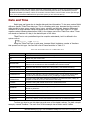
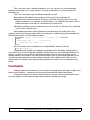
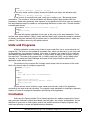
To give you an idea of the different ranges of some of the ordinal types, I've written a
simple Delphi program named Range. The Range program is based on a simple form, which has
six buttons (each named after an ordinal data type) and some labels for categories of
information, as you can see in Figure 3.1. Some of the labels are used to hold static text, others
to show the information about the type each time one of the buttons is pressed.
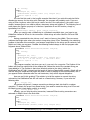
FIGURE 3.1: THE RANGE
EXAMPLE DISPLAYS SOME INFORMATION
ABOUT ORDINAL DATA TYPES
(INTEGERS IN
THIS CASE).
Every time you press one of the buttons on the right, the program updates the labels with
the output. Different labels show the data type, number of bytes used, and the maximum and
minimum values the data type can store. Each button has its own OnClick event-response
method because the code used to compute the three values is slightly different from button to
button. For example, here is the source code of the OnClick event for the Integer button
(BtnInteger):
procedure TFormRange.BtnIntegerClick(Sender: TObject);
begin
LabelType.Caption := 'Integer';
LabelSize.Caption := IntToStr (SizeOf (Integer));
LabelMax.Caption := IntToStr (High (Integer));
LabelMin.Caption := IntToStr (Low (Integer));
end;
If you have some experience with Delphi programming, you can examine the source code
of the program to understand how it works. For beginners, it's enough to note the use of three
functions: SizeOf, High, and Low. The results of the last two functions are ordinals of the same
type (in this case, integers), and the result of the SizeOf function is always an integer. The return
value of each of these functions is first translated into strings using the IntToStr function, then
copied to the captions of the three labels. The methods associated with the other buttons are
very similar to the one above. The only real difference is in the data type passed as a parameter
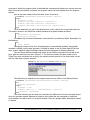
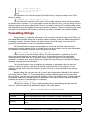
to the various functions. Figure 3.2 shows the result of executing this same program under
Windows 95 after it has been recompiled with the 16-bit version of Delphi. Comparing Figure 3.1
with Figure 3.2, you can see the difference between the 16-bit and 32-bit Integer data types.
FIGURE 3.2: THE OUTPUT OF
THE
16-BIT VERSION
OF THE
RANGE
EXAMPLE,
AGAIN SHOWING INFORMATION ABOUT INTEGERS.
Essential Pascal [Copyright 1995-2003 Marco Cantù] www.marcocantu.com/epascal
21
The size of the Integer type varies depending on the CPU and operating system you are
using. In 16-bit Windows, an Integer variable is two bytes wide. In 32-bit Windows, an Integer is
four bytes wide. For this reason, when you recompile the Range example, you get a different
output. The two different representations of the Integer type are not a problem, as long as your
program doesn't make any assumptions about the size of integers. If you happen to save an
Integer to a file using one version and retrieve it with another, though, you're going to have some
trouble. In this situation, you should choose a platform-independent data type (such as LongInt or
SmallInt). For mathematical computation or generic code, your best bet is to stick with the
standard integral representation for the specific platform--that is, use the Integer type--because
this is what the CPU likes best. The Integer type should be your first choice when handling integer
numbers. Use a different representation only when there is a compelling reason to do so.
Ordinal Types Routines
There are some system routines (routines defined in the Pascal language and in the Delphi
system unit) that work on ordinal types. They are shown in Table 3.2. C++ programmers should
notice that the two versions of the Inc procedure, with one or two parameters, correspond to the
++ and += operators (the same holds for the Dec procedure).
TABLE 3.2: SYSTEM ROUTINES
FOR
ORDINAL TYPES
Routine
Purpose
Dec
Decrements the variable passed as parameter, by one or by the value of the optional
second parameter.
Inc
Increments the variable passed as parameter, by one or by the specified value.
Odd
Returns True if the argument is an odd number.
Pred
Returns the value before the argument in the order determined by the data type, the
predecessor.
Succ
Returns the value after the argument, the successor.
Ord
Returns a number indicating the order of the argument within the set of values of the data
type.
Low
Returns the lowest value in the range of the ordinal type passed as its parameter.
High
Returns the highest value in the range of the ordinal data type.
Notice that some of these routines, when applied to constants, are automatically evaluated
by the compiler and replaced by their value. For example if you call High(X) where X is defined as
an Integer, the compiler can simply replace the expression with the highest possible value of the
Integer data type.
Essential Pascal [Copyright 1995-2003 Marco Cantù] www.marcocantu.com/epascal
22
Real Types
Real types represent floating-point numbers in various formats. The smallest storage size
is given by Single numbers, which are implemented with a 4-byte value. Then there are Double
floating-point numbers, implemented with 8 bytes, and Extended numbers, implemented with 10
bytes. These are all floating-point data types with different precision, which correspond to the IEEE
standard floating-point representations, and are directly supported by the CPU numeric
coprocessor, for maximum speed.
In Delphi 2 and Delphi 3 the Real type had the same definition as in the 16-bit version; it
was a 48-bit type. But its usage was deprecated by Borland, which suggested that you use the
Single, Double, and Extended types instead. The reason for their suggestion is that the old 6-byte
format is neither supported by the Intel CPU nor listed among the official IEEE real types. To
completely overcome the problem, Delphi 4 modifies the definition of the Real type to represent a
standard 8-byte (64-bit) floating-point number.
In addition to the advantage of using a standard definition, this change allows components
to publish properties based on the Real type, something Delphi 3 did not allow. Among the
disadvantages there might be compatibility problems. If necessary, you can overcome the
possibility of incompatibility by sticking to the Delphi 2 and 3 definition of the type; do this by using
the following compiler option:
{$REALCOMPATIBILITY ON}
There are also two strange data types: Comp describes very big integers using 8 bytes
(which can hold numbers with 18 decimal digits); and Currency (not available in 16-bit Delphi)
indicates a fixed-point decimal value with four decimal digits, and the same 64-bit representation
as the Comp type. As the name implies, the Currency data type has been added to handle very
precise monetary values, with four decimal places.
We cannot build a program similar to the Range example with real data types, because we
cannot use the High and Low functions or the Ord function on real-type variables. Real types
represent (in theory) an infinite set of numbers; ordinal types represent a fixed set of values.
Let me explain this better. when you have the integer 23 you can determine which is the following value.
Integers are finite (they have a determined range and they have an order). Floating point numbers are
infinite even within a small range, and have no order: in fact, how many values are there between 23 and
24? And which number follows 23.46? It is 23.47, 23.461, or 23.4601? That's really hard to know!
For this reason, it makes sense to ask for the ordinal position of the character w in the
range of the Char data type, but it makes no sense at all to ask the same question about
7143.1562 in the range of a floating-point data type. Although you can indeed know whether one
real number has a higher value than another, it makes no sense to ask how many real numbers
exist before a given number (this is the meaning of the Ord function).
Real types have a limited role in the user interface portion of the code (the Windows side),
but they are fully supported by Delphi, including the database side. The support of IEEE standard
floating-point types makes the Object Pascal language completely appropriate for the wide range
of programs that require numerical computations. If you are interested in this aspect, you can
look at the arithmetic functions provided by Delphi in the system unit (see the Delphi Help for
more details).
Essential Pascal [Copyright 1995-2003 Marco Cantù] www.marcocantu.com/epascal
23
Delphi also has a Math unit that defines advanced mathematical routines, covering trigonometric functions
(such as the ArcCosh function), finance (such as the InterestPayment function), and statistics (such as
the MeanAndStdDev procedure). There are a number of these routines, some of which sound quite strange
to me, such as the MomentSkewKurtosis procedure (I'll let you find out what this is).
Date and Time
Delphi uses real types also to handle date and time information. To be more precise Delphi
defines a specific TDateTime data type. This is a floating-point type, because the type must be
wide enough to store years, months, days, hours, minutes, and seconds, down to millisecond
resolution in a single variable. Dates are stored as the number of days since 1899-12-30 (with
negative values indicating dates before 1899) in the integer part of the TDateTime value. Times
are stored as fractions of a day in the decimal part of the value.
TDateTime is not a predefined type the compiler understands, but it is defined in the
system unit as:
type
TDateTime = type Double;
Using the TDateTime type is quite easy, because Delphi includes a number of functions
that operate on this type. You can find a list of these functions in Table 3.3.
TABLE 3.3: SYSTEM ROUTINES
FOR THE
TDATETIME TYPE
Routine
Description
Now
Returns the current date and time into a single TDateTime value.
Date
Returns only the current date.
Time
Returns only the current time.
DateTimeToStr
Converts a date and time value into a string, using default formatting; to have more
control on the conversion use the FormatDateTime function instead.
DateTimeToString
Copies the date and time values into a string buffer, with default formatting.
DateToStr
Converts the date portion of a TDateTime value into a string.
TimeToStr
Converts the time portion of a TDateTime value into a string.
FormatDateTime
Formats a date and time using the specified format; you can specify which values
you want to see and which format to use, providing a complex format string.
StrToDateTime
Converts a string with date and time information to a TDateTime value, raising an
exception in case of an error in the format of the string.
StrToDate
Converts a string with a date value into the TDateTime format.
StrToTime
Converts a string with a time value into the TDateTime format.
DayOfWeek
Returns the number corresponding to the day of the week of the TDateTime value
passed as parameter.
DecodeDate
Retrieves the year, month, and day values from a date value.
DecodeTime
Retrieves out of a time value.
EncodeDate
Turns year, month, and day values into a TDateTime value.
EncodeTime
Turns hour, minute, second, and millisecond values into a TDateTime value.
To show you how to use this data type and some of its related routines, I've built a simple
example, named TimeNow. The main form of this example has a Button and a ListBox
Essential Pascal [Copyright 1995-2003 Marco Cantù] www.marcocantu.com/epascal
24
component. When the program starts it automatically computes and displays the current time and
date. Every time the button is pressed, the program shows the time elapsed since the program
started.
Here is the code related to the OnCreate event of the form:
procedure TFormTimeNow.FormCreate(Sender: TObject);
begin
StartTime := Now;
ListBox1.Items.Add (TimeToStr (StartTime));
ListBox1.Items.Add (DateToStr (StartTime));
ListBox1.Items.Add ('Press button for elapsed time');
end;
The first statement is a call to the Now function, which returns the current date and time.
This value is stored in the StartTime variable, declared as a global variable as follows:
var
FormTimeNow: TFormTimeNow;
StartTime: TDateTime;
I've added only the second declaration, since the first is provided by Delphi. By default, it is
the following:
var
Form1: TForm1;
Changing the name of the form, this declaration is automatically updated. Using global
variables is actually not the best approach: It should be better to use a private field of the form
class, a topic related to object-oriented programming and discussed in Mastering Delphi 4.
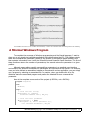
The next three statements add three items to the ListBox component on the left of the
form, with the result you can see in Figure 3.3. The first line contains the time portion of the
TDateTime value converted into a string, the second the date portion of the same value. At the
end the code adds a simple reminder.
FIGURE 3.3: THE OUTPUT OF
THE
TIMENOW
EXAMPLE AT STARTUP.
This third string is replaced by the program when the user clicks on the Elapsed button:
procedure TFormTimeNow.ButtonElapsedClick(Sender: TObject);
var
StopTime: TDateTime;
begin
StopTime := Now;
ListBox1.Items [2] := FormatDateTime ('hh:nn:ss',
StopTime - StartTime);
end;
This code retrieves the new time and computes the difference from the time value stored
when the program started. Because we need to use a value that we computed in a different
event handler, we had to store it in a global variable. There are actually better alternatives, based
on classes.
Essential Pascal [Copyright 1995-2003 Marco Cantù] www.marcocantu.com/epascal
25
The code that replaces the current value of the third string uses the index 2. The reason is that the items of
a list box are zero-based: the first item is number 0, the second number 1, and the third number 2. More
on this as we cover arrays.
Besides calling TimeToStr and DateToStr you can use the more powerful FormatDateTime
function, as I've done in the last method above (see the Delphi Help file for details on the
formatting parameters). Notice also that time and date values are transformed into strings
depending on Windows international settings. Delphi reads these values from the system, and
copies them to a number of global constants declared in the SysUtils unit. Some of them are:
DateSeparator: Char;
ShortDateFormat: string;
LongDateFormat: string;
TimeSeparator: Char;
TimeAMString: string;
TimePMString: string;
ShortTimeFormat: string;
LongTimeFormat: string;
ShortMonthNames: array [1..12] of string;
LongMonthNames: array [1..12] of string;
ShortDayNames: array [1..7] of string;
LongDayNames: array [1..7] of string;
More global constants relate to currency and floating-point number formatting. You can
find the complete list in the Delphi Help file under the topic Currency and date/time formatting
variables.
Delphi includes a DateTimePicker component, which provides a sophisticated way to input a date,
selecting it from a calendar.
Specific Windows Types
The predefined data types we have seen so far are part of the Pascal language. Delphi
also includes other data types defined by Windows. These data types are not an integral part of
the language, but they are part of the Windows libraries. Windows types include new default types
(such as DWORD or UINT), many records (or structures), several pointer types, and so on.
Among Windows data types, the most important type is represented by handles,
discussed in Chapter 9.
Typecasting and Type Conversions
As we have seen, you cannot assign a variable to another one of a different type. In case
you need to do this, there are two choices. The first choice is typecasting, which uses a simple
functional notation, with the name of the destination data type:
var
N: Integer;
C: Char;
B: Boolean;
begin
N := Integer ('X');
C := Char (N);
B := Boolean (0);
Essential Pascal [Copyright 1995-2003 Marco Cantù] www.marcocantu.com/epascal
26
You can typecast between data types having the same size. It is usually safe to typecast
between ordinal types, or between real types, but you can also typecast between pointer types
(and also objects) as long as you know what you are doing. Casting, however, is generally a
dangerous programming practice, because it allows you to access a value as if it represented
something else. Since the internal representations of data types generally do not match, you risk
hard-to-track errors. For this reason, you should generally avoid typecasting.
The second choice is to use a type-conversion routine. The routines for the various types
of conversions are summarized in Table 3.4. Some of these routines work on the data types that
we'll discuss in the following sections. Notice that the table doesn't include routines for special types
(such as TDateTime or variant) or routines specifically intended for formatting, like the powerful
Format and FormatFloat routines.
TABLE 3.4: SYSTEM ROUTINES
FOR
TYPE CONVERSION
Routine
Description
Chr
Converts an ordinal number into an ANSI character.
Ord
Converts an ordinal-type value into the number indicating its order.
Round
Converts a real-type value into an Integer-type value, rounding its value.
Trunc
Converts a real-type value into an Integer-type value, truncating its value.
Int
Returns the Integer part of the floating-point value argument.
IntToStr
Converts a number into a string.
IntToHex
Converts a number into a string with its hexadecimal representation.
StrToInt
Converts a string into a number, raising an exception if the string does not
represent a valid integer.
StrToIntDef
Converts a string into a number, using a default value if the string is not correct.
Val
Converts a string into a number (traditional Turbo Pascal routine, available for
compatibility).
Str
Converts a number into a string, using formatting parameters (traditional Turbo
Pascal routine, available for compatibility).
StrPas
Converts a null-terminated string into a Pascal-style string. This conversion is
automatically done for AnsiStrings in 32-bit Delphi. (See the section on strings
later in this chapter.)
StrPCopy
Copies a Pascal-style string into a null-terminated string. This conversion is done
with a simple PChar cast in 32-bit Delphi. (See the section on strings later in this
chapter.)
StrPLCopy
Copies a portion of a Pascal-style string into a null-terminated string.
FloatToDecimal
Converts a floating-point value to record including its decimal representation
(exponent, digits, sign).
FloatToStr
Converts the floating-point value to its string representation using default
formatting.
FloatToStrF
Converts the floating-point value to its string representation using the specified
formatting.
FloatToText
Copies the floating-point value to a string buffer, using the specified formatting.
FloatToTextFmt
As the previous routine, copies the floating-point value to a string buffer, using the
specified formatting.
StrToFloat
Converts the given Pascal string to a floating-point value.
TextToFloat
Converts the given null-terminated string to a floating-point value.
Essential Pascal [Copyright 1995-2003 Marco Cantù] www.marcocantu.com/epascal
27
In recent versions of Delphi's Pascal compiler, the Round function is based on the FPU processor of the
CPU. This processor adopts the so-called "Banker's Rounding", which rounds middle values (as 5.5 or 6.5)
up and down depending whether they follow an odd or an even number.
Conclusion
In this chapter we've explored the basic notion of type in Pascal. But the language has
another very important feature: It allows programmers to define new custom data types, called
user-defined data types. This is the topic of the next chapter.
Essential Pascal [Copyright 1995-2003 Marco Cantù] www.marcocantu.com/epascal
28
Chapter 4
User-Defined Data Types
A
long with the notion of type, one of the great ideas introduced by the Pascal
language is the ability to define new data types in a program. Programmers can
define their own data types by means of type constructors, such as subrange
types, array types, record types, enumerated types, pointer types, and set types. The most
important user-defined data type is the class, which is part of the object-oriented extensions of
Object Pascal, not covered in this book.
If you think that type constructors are common in many programming languages, you are
right, but Pascal was the first language to introduce the idea in a formal and very precise way.
There are still few languages with so many mechanisms to define new types.
Named and Unnamed Types
These types can be given a name for later use or applied to a variable directly. When you
give a name to a type, you must provide a specific section in the code, such as the following:
type
// subrange definition
Uppercase = 'A'..'Z';
// array definition
Temperatures = array [1..24] of Integer;
// record definition
Date = record
Month: Byte;
Day: Byte;
Year: Integer;
end;
// enumerated type definition
Colors = (Red, Yellow, Green, Cyan, Blue, Violet);
// set definition
Letters = set of Char;
Similar type-definition constructs can be used directly to define a variable without an explicit
type name, as in the following code:
var
DecemberTemperature: array [1..31] of Byte;
ColorCode: array [Red..Violet] of Word;
Palette: set of Colors;
In general, you should avoid using unnamed types as in the code above, because you cannot pass them
as parameters to routines or declare other variables of the same type. The type compatibility rules of
Pascal, in fact, are based on type names, not on the actual definition of the types. Two variables of two
identical types are still not compatible, unless their types have exactly the same name, and unnamed
types are given internal names by the compiler. Get used to defining a data type each time you need a
variable with a complicated structure, and you won’t regret the time you’ve spent in it.
Essential Pascal [Copyright 1995-2003 Marco Cantù] www.marcocantu.com/epascal
29
But what do these type definitions mean? I’ll provide some descriptions for those who are
not familiar with Pascal type constructs. I’ll also try to underline the differences from the same
constructs in other programming languages, so you might be interested in reading the following
sections even if you are familiar with kind of type definitions exemplified above. Finally, I’ll show
some Delphi examples and introduce some tools that will allow you to access type information
dynamically.
Subrange Types
A subrange type defines a range of values within the range of another type (hence the
name subrange). You can define a subrange of the Integer type, from 1 to 10 or from 100 to
1000, or you can define a subrange of the Char type, as in:
type
Ten = 1..10;
OverHundred = 100..1000;
Uppercase = 'A'..'Z';
In the definition of a subrange, you don’t need to specify the name of the base type. You
just need to supply two constants of that type. The original type must be an ordinal type, and the
resulting type will be another ordinal type. When you have defined a subrange, you can legally
assign it a value within that range. This code is valid:
var
UppLetter: UpperCase;
begin
UppLetter := 'F';
But this one is not:
var
UppLetter: UpperCase;
begin
UppLetter := 'e'; // compile-time error
Writing the code above results in a compile-time error, "Constant expression violates
subrange bounds." If you write the following code instead:
var
UppLetter: Uppercase;
Letter: Char;
begin
Letter :='e';
UppLetter := Letter;
Delphi will compile it. At run-time, if you have enabled the Range Checking compiler option
(in the Compiler page of the Project Options dialog box), you’ll get a Range check error message.
I suggest that you turn on this compiler option while you are developing a program, so it'll be more robust
and easier to debug, as in case of errors you'll get an explicit message and not an undetermined behavior.
You can eventually disable the option for the final build of the program, to make it a little faster. However,
the difference is really small, and for this reason I suggest you to leave all these run-time checks turned
on, even in a shipping program. The same holds true for other run-time checking options, such as overflow
and stack checking.
Essential Pascal [Copyright 1995-2003 Marco Cantù] www.marcocantu.com/epascal
30
Enumerated Types
Enumerated types constitute another user-defined ordinal type. Instead of indicating a
range of an existing type, in an enumeration you list all of the possible values for the type. In
other words, an enumeration is a list of values. Here are some examples:
type
Colors = (Red, Yellow, Green, Cyan, Blue, Violet);
Suit = (Club, Diamond, Heart, Spade);
Each value in the list has an associated ordinality, starting with zero. When you apply the
Ord function to a value of an enumerated type, you get this zero-based value. For example, Ord
(Diamond) returns 1.
Enumerated types can have different internal representations. By default, Delphi uses an 8-bit
representation, unless there are more than 256 different values, in which case it uses the 16-bit
representation. There is also a 32-bit representation, which might be useful for compatibility with C or C++
libraries. You can actually change the default behavior, asking for a larger representation, by using the $Z
compiler directive.
The Delphi VCL (Visual Component Library) uses enumerated types in many places. For
example, the style of the border of a form is defined as follows:
type
TFormBorderStyle = (bsNone, bsSingle, bsSizeable,
bsDialog, bsSizeToolWin, bsToolWindow);
When the value of a property is an enumeration, you usually can choose from the list of
values displayed in the Object Inspector, as shown in Figure 4.1.
FIGURE 4.1: AN
ENUMERATED TYPE PROPERTY IN THE
OBJECT INSPECTOR
The Delphi Help file generally lists the possible values of an enumeration. As an alternative
you can use the OrdType program, available on www.marcocantu.com, to see the list of the
values of each Delphi enumeration, set, subrange, and any other ordinal type. You can see an
example of the output of this program in Figure 4.2.
FIGURE 4.2: DETAILED INFORMATION ABOUT AN ENUMERATED TYPE,
ORD TYPE PROGRAM (AVAILABLE ON MY WEB SITE).
AS DISPLAYED BY THE
Essential Pascal [Copyright 1995-2003 Marco Cantù] www.marcocantu.com/epascal
31
Set Types
Set types indicate a group of values, where the list of available values is indicated by the
ordinal type the set is based onto. These ordinal types are usually limited, and quite often
represented by an enumeration or a subrange. If we take the subrange 1..3, the possible values
of the set based on it include only 1, only 2, only 3, both 1 and 2, both 1 and 3, both 2 and 3, all
the three values, or none of them.
A variable usually holds one of the possible values of the range of its type. A set-type
variable, instead, can contain none, one, two, three, or more values of the range. It can even
include all of the values. Here is an example of a set:
type
Letters = set of Uppercase;
Now I can define a variable of this type and assign to it some values of the original type.
To indicate some values in a set, you write a comma-separated list, enclosed within square
brackets. The following code shows the assignment to a variable of several values, a single value,
and an empty value:
var
Letters1, Letters2, Letters3: Letters;
begin
Letters1 := ['A', 'B', 'C'];
Letters2 := ['K'];
Letters3 := [];
In Delphi, a set is generally used to indicate nonexclusive flags. For example, the following
two lines of code (which are part of the Delphi library) declare an enumeration of possible icons for
the border of a window and the corresponding set type:
type
TBorderIcon = (biSystemMenu, biMinimize, biMaximize, biHelp);
TBorderIcons = set of TBorderIcon;
In fact, a given window might have none of these icons, one of them, or more than one.
When working with the Object Inspector (see Figure 4.3), you can provide the values of a set by
expanding the selection (double-click on the property name or click on the plus sign on its left) and
toggling on and off the presence of each value.
FIGURE 4.3: A
SET-TYPE PROPERTY IN THE
OBJECT INSPECTOR
Essential Pascal [Copyright 1995-2003 Marco Cantù] www.marcocantu.com/epascal
32
Another property based on a set type is the style of a font. Possible values indicate a bold,
italic, underline, and strikethrough font. Of course the same font can be both italic and bold, have
no attributes, or have them all. For this reason it is declared as a set. You can assign values to
this set in the code of a program as follows:
Font.Style := []; // no style
Font.Style := [fsBold]; // bold style only
Font.Style := [fsBold, fsItalic]; // two styles
You can also operate on a set in many different ways, including adding two variables of
the same set type (or, to be more precise, computing the union of the two set variables):
Font.Style := OldStyle + [fsUnderline]; // two sets
Again, you can use the OrdType examples included in the TOOLS directory of the book
source code to see the list of possible values of many sets defined by the Delphi component
library.
Array Types
Array types define lists of a fixed number of elements of a specific type. You generally use
an index within square brackets to access to one of the elements of the array. The square
brackets are used also to specify the possible values of the index when the array is defined. For
example, you can define a group of 24 integers with this code:
type
DayTemperatures = array [1..24] of Integer;
In the array definition, you need to pass a subrange type within square brackets, or define
a new specific subrange type using two constants of an ordinal type. This subrange specifies the
valid indexes of the array. Since you specify both the upper and the lower index of the array, the
indexes don’t need to be zero-based, as is necessary in C, C++, Java, and other programming
languages.
Since the array indexes are based on subranges, Delphi can check for their range as we’ve
already seen. An invalid constant subrange results in a compile-time error; and an out-of-range
index used at run-time results in a run-time error if the corresponding compiler option is enabled.
Using the array definition above, you can set the value of a DayTemp1 variable of the
DayTemperatures type as follows:
type
DayTemperatures = array [1..24] of Integer;
var
DayTemp1: DayTemperatures;
procedure AssignTemp;
Essential Pascal [Copyright 1995-2003 Marco Cantù] www.marcocantu.com/epascal
33
begin
DayTemp1
DayTemp1
...
DayTemp1
DayTemp1
[1] := 54;
[2] := 52;
[24] := 66;
[25] := 67; // compile-time error
An array can have more than one dimension, as in the following examples:
type
MonthTemps = array [1..24, 1..31] of Integer;
YearTemps = array [1..24, 1..31, Jan..Dec] of Integer;
These two array types are built on the same core types. So you can declare them using
the preceding data types, as in the following code:
type
MonthTemps = array [1..31] of DayTemperatures;
YearTemps = array [Jan..Dec] of MonthTemps;
This declaration inverts the order of the indexes as presented above, but it also allows
assignment of whole blocks between variables. For example, the following statement copies
January’s temperatures to February:
var
ThisYear: YearTemps;
begin
ThisYear[Feb] := ThisYear[Jan];
You can also define a zero-based array, an array type with the lower bound set to zero.
Generally, the use of more logical bounds is an advantage, since you don’t need to use the index
2 to access the third item, and so on. Windows, however, uses invariably zero-based arrays
(because it is based on the C language), and the Delphi component library tends to do the same.
If you need to work on an array, you can always test its bounds by using the standard
Low and High functions, which return the lower and upper bounds. Using Low and High when
operating on an array is highly recommended, especially in loops, since it makes the code
independent of the range of the array. Later, you can change the declared range of the array
indices, and the code that uses Low and High will still work. If you write a loop hard-coding the
range of an array you’ll have to update the code of the loop when the array size changes. Low
and High make your code easier to maintain and more reliable.
Incidentally, there is no run-time overhead for using Low and High with arrays. They are resolved at
compile-time into constant expressions, not actual function calls. This compile-time resolution of
expressions and function calls happens also for many other simple system functions.
Delphi uses arrays mainly in the form of array properties. We have already seen an
example of such a property in the TimeNow example, to access the Items property of a ListBox
component. I’ll show you some more examples of array properties in the next chapter, when
discussing Delphi loops.
Delphi 4 introduced dynamic arrays into Object Pascal , that is arrays that can be resized at runtime
allocating the proper amount of memory. Using dynamic arrays is easy, but in this discussion of Pascal I
felt they were not an proper topic to cover. You can find a description of Delphi's dynamic arrays in Chapter
8.
Essential Pascal [Copyright 1995-2003 Marco Cantù] www.marcocantu.com/epascal
34
Record Types
Record types define fixed collections of items of different types. Each element, or field,
has its own type. The definition of a record type lists all these fields, giving each a name you’ll use
later to access it.
Here is a small listing with the definition of a record type, the declaration of a variable of
that type, and few statements using this variable:
type
Date = record
Year: Integer;
Month: Byte;
Day: Byte;
end;
var
BirthDay: Date;
begin
BirthDay.Year := 1997;
BirthDay.Month := 2;
BirthDay.Day := 14;
Classes and objects can be considered an extension of the record type. Delphi libraries
tend to use class types instead of record types, but there are many record types defined by the
Windows API.
Record types can also have a variant part; that is, multiple fields can be mapped to the
same memory area, even if they have a different data type. (This corresponds to a union in the
C language.) Alternatively, you can use these variant fields or groups of fields to access the same
memory location within a record, but considering those values from different perspectives. The
main uses of this type were to store similar but different data and to obtain an effect similar to
that of typecasting (something less useful now that typecasting has been introduced also in
Pascal). The use of variant record types has been largely replaced by object-oriented and other
modern techniques, although Delphi uses them in some peculiar cases.
The use of a variant record type is not type-safe and is not a recommended programming
practice, particularly for beginners. Expert programmers can indeed use variant record types, and
the core of the Delphi libraries makes use of them. You won’t need to tackle them until you are
really a Delphi expert, anyway.
Pointers
A pointer type defines a variable that holds the memory address of another variable of a
given data type (or an undefined type). So a pointer variable indirectly refers to a value. The
definition of a pointer type is not based on a specific keyword, but uses a special character
instead. This special symbol is the caret (^):
type
PointerToInt = ^Integer;
Once you have defined a pointer variable, you can assign to it the address of another
variable of the same type, using the @ operator:
var
P: ^Integer;
X: Integer;
Essential Pascal [Copyright 1995-2003 Marco Cantù] www.marcocantu.com/epascal
35
begin
P := @X;
// change the value in two different ways
X := 10;
P^ := 20;
When you have a pointer P, with the expression P you refer to the address of the
memory location the pointer is referring to, and with the expression P^ you refer to the actual
content of that memory location. For this reason in the code fragment above ^P corresponds to
X.
Instead of referring to an existing memory location, a pointer can refer to a new memory
block dynamically allocated (on the heap memory area) with the New procedure. In this case,
when you don't need the pointer any more, you’ll also have to to get rid of the memory you’ve
dynamically allocated, by calling the Dispose procedure.
var
P: ^Integer;
begin
// initialization
New (P);
// operations
P^ := 20;
ShowMessage (IntToStr (P^));
// termination
Dispose (P);
end;
If a pointer has no value, you can assign the nil value to it. Then you can test whether a
pointer is nil to see if it currently refers to a value. This is often used, because dereferencing an
invalid pointer causes an access violation (also known as a general protection fault, GPF):
procedure TFormGPF.BtnGpfClick(Sender: TObject);
var
P: ^Integer;
begin
P := nil;
ShowMessage (IntToStr (P^));
end;
You can see an example of the effect of this code by running the GPF example (or looking
at the corresponding Figure 4.4). The example contains also the code fragments shown above.
FIGURE 4.4: THE SYSTEM
ERROR RESULTING FROM THE ACCESS TO A NIL POINTER , FROM THE
GPF
EXAMPLE.
Essential Pascal [Copyright 1995-2003 Marco Cantù] www.marcocantu.com/epascal
36
In the same program you can find an example of safe data access. In this second case
the pointer is assigned to an existing local variable, and can be safely used, but I’ve added a safecheck anyway:
procedure TFormGPF.BtnSafeClick(Sender: TObject);
var
P: ^Integer;
X: Integer;
begin
P := @X;
X := 100;
if P <> nil then
ShowMessage (IntToStr (P^));
end;
Delphi also defines a Pointer data type, which indicates untyped pointers (such as void* in
the C language). If you use an untyped pointer you should use GetMem instead of New. The
GetMem procedure is required each time the size of the memory variable to allocate is not
defined.
The fact that pointers are seldom necessary in Delphi is an interesting advantage of this
environment. Nonetheless, understanding pointers is important for advanced programming and for
a full understanding of the Delphi object model, which uses pointers "behind the scenes."
Although you don’t use pointers often in Delphi, you do frequently use a very similar construct—namely,
references. Every object instance is really an implicit pointer or reference to its actual data. However, this
is completely transparent to the programmer, who uses object variables just like any other data type.
Notice also that pointers support will be severely limited (if not abolished) in the .NET version of the Delphi
compiler, due to the restrictions imposed by the platform to the so-called “safe” code.
File Types
Another Pascal-specific type constructor is the file type. File types represent physical disk
files, certainly a peculiarity of the Pascal language. You can define a new file data type as follows:
type
IntFile = file of Integer;
Then you can open a physical file associated with this structure and write integer values to
it or read the current values from the file.
Essential Pascal [Copyright 1995-2003 Marco Cantù] www.marcocantu.com/epascal
37
Files-based examples are covered in a specific chapter.
The use of files in Pascal is quite straightforward, but in Delphi there are also some
components that are capable of storing or loading their contents to or from a file. There is some
serialization support, in the form of streams, and there is also database support.
Conclusion
This chapter discussing user-defined data types complete our coverage of Pascal type
system. Now we are ready to look into the statements the language provides to operate on the
variables we've defined.
Essential Pascal [Copyright 1995-2003 Marco Cantù] www.marcocantu.com/epascal
38
Chapter 5
Statements
I
f the data types are one of the foundations of Pascal programming the other are
statements. Statements of the programming language are based on keywords and
other elements which allow you to indicate to a program a sequence of operations to
perform. Statements are often enclosed in procedures or functions, as we'll see in the next
chapter. Now we'll just focus on the basic types of commands you can use to create a program.
Simple and Compound Statements
A Pascal statement is simple when it doesn't contain any other statements. Examples of
simple statements are assignment statements and procedure calls. Simple statements are
separated by a semicolon:
X := Y + Z;
Randomize;
// assignment
// procedure call
Usually, statements are part of a compound statement, marked by begin and end
brackets. A compound statement can appear in place of a generic Pascal statement. Here is an
example:
begin
A := B;
C := A * 2;
end;
The semicolon after the last statement before the end isn't required, as in the following:
begin
A := B;
C := A * 2
end;
Both versions are correct. The first version has a useless (but harmless) semicolon. This
semicolon is, in fact, a null statement; that is, a statement with no code. Notice that, at times,
null statements can be used inside loops or in other particular cases.
Although these final semicolons serve no purpose, I tend to use them and suggest you do the same.
Sometimes after you've written a couple of lines you might want to add one more statement. If the last
semicolon is missing you should remember to add it, so it might be better to add it in the first place.
Assignment Statements
Assignments in Pascal use the colon-equal operator, an odd notation for programmers who
are used to other languages. The = operator, which is used for assignments in some other
languages, in Pascal is used to test for equality.
By using different symbols for an assignment and an equality test, the Pascal compiler (like the C
compiler) can translate source code faster, because it doesn't need to examine the context in which the
operator is used to determine its meaning. The use of different operators also makes the code easier for
people to read.
Essential Pascal [Copyright 1995-2003 Marco Cantù] www.marcocantu.com/epascal
39
Conditional Statements
A conditional statement is used to execute either one of the statements it contains or
none of them, depending on some test. There are two basic flavors of conditional statements: if
statements and case statements.
If Statements
The if statement can be used to execute a statement only if a certain condition is met (ifthen), or to choose between two different alternatives (if-then-else). The condition is described
with a Boolean expression. A simple Delphi example will demonstrate how to write conditional
statements. First create a new application, and put two check boxes and four buttons in the form.
Do not change the names of buttons or check boxes, but double-click on each button to add a
handler for its OnClick event. Here is a simple if statement for the first button:
procedure TForm1.Button1Click(Sender: TObject);
begin
if CheckBox1.Checked then
ShowMessage ('CheckBox1 is checked')
end;
When you click on the button, if the first check box has a check mark in it, the program will
show a simple message (see Figure 5.1). I've used the ShowMessage function because it is the
simplest Delphi function you can use to display a short message to the user.
FIGURE 5.1: THE MESSAGE
DISPLAYED BY THE IF TEST EXAMPLE WHEN YOU
PRESS THE FIRST BUTTON AND THE FIRST CHECK BOX IS CHECKED .
If you click the button and nothing happens, it means the check box was not checked. In
a case like this, it would probably be better to make this more explicit, as with the code for the
second button, which uses an if-then-else statement:
procedure TForm1.Button2Click(Sender: TObject);
begin
// if-then-else statement
if CheckBox2.Checked then
Essential Pascal [Copyright 1995-2003 Marco Cantù] www.marcocantu.com/epascal
40
ShowMessage ('CheckBox2 is checked')
else
ShowMessage ('CheckBox2 is NOT checked');
end;
Notice that you cannot have a semicolon after the first statement and before the else
keyword, or the compiler will issue a syntax error. The if-then-else statement, in fact, is a single
statement, so you cannot place a semicolon in the middle of it.
An if statement can be quite complex. The condition can be turned into a series of
conditions (using the and, or and not Boolean operators), or the if statement can nest a second if
statement. The last two buttons of the IfTest example demonstrate these cases:
procedure TForm1.Button3Click(Sender: TObject);
begin
// statement with a double condition
if CheckBox1.Checked and CheckBox2.Checked then
ShowMessage ('Both check boxes are checked')
end;
procedure TForm1.Button4Click(Sender: TObject);
begin
// compound if statement
if CheckBox1.Checked then
if CheckBox2.Checked then
ShowMessage ('CheckBox1 and 2 are checked')
else
ShowMessage ('Only CheckBox1 is checked')
else
ShowMessage ('Checkbox1 is not checked, who cares for Checkbox2?')
end;
Look at the code carefully and run the program to see if you understand everything.
When you have doubts about a programming construct, writing a very simple program such as
this can help you learn a lot. You can add more check boxes and increase the complexity of this
small example, making any test you like.
Case Statements
If your if statements become very complex, at times you can replace them with case
statements. A case statement consists in an expression used to select a value, a list of possible
values, or a range of values. These values are constants, and they must be unique and of an
ordinal type. Eventually, there can be an else statement that is executed if none of the labels
correspond to the value of the selector. Here are two simple examples:
case
1:
2:
3:
end;
Number of
Text := 'One';
Text := 'Two';
Text := 'Three';
case MyChar of
'+' : Text := 'Plus sign';
'-' : Text := 'Minus sign';
'*', '/': Text := 'Multiplication or division';
'0'..'9': Text := 'Number';
'a'..'z': Text := 'Lowercase character';
'A'..'Z': Text := 'Uppercase character';
Essential Pascal [Copyright 1995-2003 Marco Cantù] www.marcocantu.com/epascal
41
else
Text := 'Unknown character';
end;
Loops in Pascal
The Pascal language has the typical repetitive statements of most programming
languages, including for, while, and repeat statements. Most of what these loops do will be familiar
if you've used other programming languages, so I'll cover them only briefly.
The For Loop
The for loop in Pascal is strictly based on a counter, which can be either increased or
decreased each time the loop is executed. Here is a simple example of a for loop used to add the
first ten numbers.
var
K, I: Integer;
begin
K := 0;
for I := 1 to 10 do
K := K + I;
This same for statement could have been written using a reverse counter:
var
K, I: Integer;
begin
K := 0;
for I := 10 downto 1 do
K := K + I;
The for loop in Pascal is less flexible than in other languages (it is not possible to specify an
increment different than one), but it is simple and easy to understand. If you want to test for a
more complex condition, or to provide a customized counter, you need to use a while or repeat
statement, instead of a for loop.
The counter of a for loop doesn't need to be a number. It can be a value of any ordinal type, such as a
character or an enumerated type.
While and Repeat Statements
The difference between the while-do loop and the repeat-until loop is that the code of the
repeat statement is always executed at least once. You can easily understand why by looking at
a simple example:
while (I
begin
// use
I := I
J := J
end;
<= 100) and (J <= 100) do
I and J to compute something...
+ 1;
+ 1;
repeat
// use I and J to compute something...
I := I + 1;
Essential Pascal [Copyright 1995-2003 Marco Cantù] www.marcocantu.com/epascal
42
J := J + 1;
until (I > 100) or (J > 100);
If the initial value of I or J is greater than 100, the statements inside the repeat-until loop
are executed once anyway.
The other key difference between these two loops is that the repeat-until loop has a reversed condition. The
loop is executed as long as the condition is not met. When the condition is met, the loop terminates. This
is the opposite from a while-do loop, which is executed while the condition is true. For this reason I had to
reverse the condition in the code above to obtain a similar statement.
An Example of Loops
To explore the details of loops, let's look at a small Delphi example. The Loops program
highlights the difference between a loop with a fixed counter and a loop with an almost random
counter. Start with a new blank project, place a list box and two buttons on the main form, and
give the buttons a proper name (BtnFor and BtnWhile) by setting their Name property in the
Object Inspector. You can also remove the word Btn from the Caption property (and eventually
even add the & character to it to activate the following letter as a shortcut key). Here is a
summary of the textual description of this form:
object Form1: TForm1
Caption = 'Loops'
object ListBox1: TListBox ...
object BtnFor: TButton
Caption = '&For'
OnClick = BtnForClick
end
object BtnWhile: TButton
Caption = '&While'
OnClick = BtnWhileClick
end
end
FIGURE 5.2: EACH
TIME YOU PRESS THE
FOR
BUTTON OF THE
LOOPS
EXAMPLE,
THE LIST BOX IS FILLED WITH CONSECUTIVE NUMBERS.
Essential Pascal [Copyright 1995-2003 Marco Cantù] www.marcocantu.com/epascal
43
Now we can add some code to the OnClick events of the two buttons. The first button
has a simple for loop to display a list of numbers, as you can see in Figure 5.2. Before executing
this loop, which adds a number of strings to the Items property of the list box, you need to clear
the contents of the list box itself:
procedure TForm1.BtnForClick(Sender: TObject);
var
I: Integer;
begin
ListBox1.Items.Clear;
for I := 1 to 20 do
Listbox1.Items.Add ('String ' + IntToStr (I));
end;
The code associated with the second button is slightly more complex. In this case, there is
a while loop based on a counter, which is increased randomly. To accomplish this, I've called the
Randomize procedure, which resets the random number generator, and the Random function with
a range value of 100. The result of this function is a number between 0 and 99, chosen
randomly. The series of random numbers control how many times the while loop is executed.
procedure TForm1.BtnWhileClick(Sender: TObject);
var
I: Integer;
begin
ListBox1.Items.Clear;
Randomize;
I := 0;
while I < 1000 do
begin
I := I + Random (100);
Listbox1.Items.Add ('Random Number: ' + IntToStr (I));
end;
end;
Each time you click the While button, the numbers are different, because they depend on
the random-number generator. Figure 5.3 shows the results from two separate button-clicks.
Notice that not only are the generated numbers different each time, but so is the number of
items. That is, this while loop is executed a random numbers of times. If you press the While
button several times in a row, you'll see that the list box has a different number of lines.
Essential Pascal [Copyright 1995-2003 Marco Cantù] www.marcocantu.com/epascal
44
FIGURE 5.3: THE CONTENTS
OF THE LIST BOX OF THE
CHANGE EACH TIME YOU PRESS THE
W HILE
LOOPS
EXAMPLE
BUTTON .
You can alter the standard flow of a loop's execution using the Break and Continue system procedures.
The first interrupts the loop; the second is used to jump directly to the loop test or counter increment,
continuing with the next iteration of the loop (unless the condition is zero or the counter has reached its
highest value). Two more system procedures, Exit and Halt, let you immediately return from the current
function or procedure or terminate the program.
The With Statement
The last kind of Pascal statement I'll focus on is the with statement, which used to be
peculiar to this programming language (although it has been recently introduced also in JavaScript
and Visual Basic) and can be very useful in Delphi programming.
The with statement is nothing but shorthand. When you need to refer to a record type
variable (or an object), instead of repeating its name every time, you can use a with statement.
For example, while presenting the record type, I wrote this code:
type
Date = record
Year: Integer;
Month: Byte;
Day: Byte;
end;
var
BirthDay: Date;
begin
BirthDay.Year := 1997;
BirthDay.Month := 2;
BirthDay.Day := 14;
Using a with statement, I can improve the final part of this code, as follows:
with BirthDay do
Essential Pascal [Copyright 1995-2003 Marco Cantù] www.marcocantu.com/epascal
45
begin
Year := 1995;
Month := 2;
Day := 14;
end;
This approach can be used in Delphi programs to refer to components and other class
types. For example, we can rewrite the final part of the last example, Loops, using a with
statement to access the items of the list box:
procedure TForm1.WhileButtonClick(Sender: TObject);
var
I: Integer;
begin
with ListBox1.Items do
begin
Clear; // shortcut
Randomize;
I := 0;
while I < 1000 do
begin
I := I + Random (100);
// shortcut:
Add ('Random Number: ' + IntToStr (I));
end;
end;
end;
When you work with components or classes in general, the with statement allows you to
skip writing some code, particularly for nested fields. For example, suppose that you need to
change the Width and the Color of the drawing pen for a form. You can write the following code:
Form1.Canvas.Pen.Width := 2;
Form1.Canvas.Pen.Color := clRed;
But it is certainly easier to write this code:
with Form1.Canvas.Pen do
begin
Width := 2;
Color := clRed;
end;
When you are writing complex code, the with statement can be effective and spares you
the declaration of some temporary variables, but it has a drawback. It can make the code less
readable, particularly when you are working with different objects that have similar or
corresponding properties. A further drawback is that using the with statement can allow subtle
logical errors in the code that the compiler will not detect. For example:
with Button1 do
begin
Width := 200;
Caption := 'New Caption';
Color := clRed;
end;
This code changes the Caption and the Width of the button, but it affects the Color
property of the form, not that of the button! The reason is that the TButton components don't
have the Color property, and since the code is executed for a form object (we are writing a
method of the form) this object is accessed by default. If we had instead written:
Button1.Width := 200;
Button1.Caption := 'New Caption';
Essential Pascal [Copyright 1995-2003 Marco Cantù] www.marcocantu.com/epascal
46
Button1.Color := clRed; // error!
the compiler would have issued an error. In general, we can say that since the with
statement introduces new identifiers in the current scope, we might hide existing identifiers, or
wrongfully access another identifier in the same scope (as in the first version of this code
fragment). Even considering this kind of drawback, I suggest you get used to with statements,
because they can be really very handy, and at times even make the code more readable. You
should, however, avoid using multiple with statements, such as:
with ListBox1, Button1 do...
The code following this would probably be highly unreadable, because for each property
defined in this block you would need to think about which component it refers to, depending on the
respective properties and the order of the components in the with statement.
Speaking of readability, Pascal has no endif or endcase statement. If an if statement has
a begin-end block, then the end of the block marks the end of the statement. The case
statement, instead, is always terminated by an end. All these end statements, often found one
after the other, can make the code difficult to follow. Only by tracing the indentations can you see
which statement a particular end refers to. A common way to solve this problem and make the
code more readable is to add a comment after the end statement indicating its role, as in:
end; // if
Conclusion
This chapter has described how to code conditional statements and loops. Instead of
writing long lists of such statements, programs are usually split in routines, procedures or
functions. This is the topic of the next chapter, which introduces also some advanced elements.
Essential Pascal [Copyright 1995-2003 Marco Cantù] www.marcocantu.com/epascal
47
Chapter 6
Procedures and Functions
A
nother important idea emphasized by Pascal is the concept of the routine, basically
a series of statements with a unique name, which can be activated many times by
using their name. This way you avoid repeating the same statements over and
over, and having a single version of the code you can easily modify it all over the program. From
this point of view, you can think of routines as the basic code encapsulation mechanism. I'll get
back to this topic with an example after I introduce the Pascal routines syntax.
Pascal Procedures and Functions
In Pascal, a routine can assume two forms: a procedure and a function. In theory, a
procedure is an operation you ask the computer to perform, a function is a computation returning
a value. This difference is emphasized by the fact that a function has a result, a return value,
while a procedure doesn't. Both types of routines can have multiple parameters, of given data
types.
In practice, however, the difference between functions and procedures is very limited: you
can call a function to perform some work and then skip the result (which might be an optional
error code or something like that) or you can call a procedure which passes a result within its
parameters (more on reference parameters later in this chapter).
Here are the definitions of a procedure and two versions of the same function, using a
slightly different syntax:
procedure Hello;
begin
ShowMessage ('Hello world!');
end;
function Double (Value: Integer) : Integer;
begin
Double := Value * 2;
end;
// or, as an alternative
function Double2 (Value: Integer) : Integer;
begin
Result := Value * 2;
end;
The use of Result instead of the function name to assign the return value of a function is
becoming quite popular, and tends to make the code more readable, in my opinion. Once these
routines have been defined, you can call them one or more times. You call the procedure to
make it perform its task, and call a function to compute the value:
procedure TForm1.Button1Click (Sender: TObject);
begin
Hello;
end;
procedure TForm1.Button2Click (Sender: TObject);
var
Essential Pascal [Copyright 1995-2003 Marco Cantù] www.marcocantu.com/epascal
48
X, Y: Integer;
begin
X := Double (StrToInt (Edit1.Text));
Y := Double (X);
ShowMessage (IntToStr (Y));
end;
For the moment don't care about the syntax of the two procedures above, which are actually methods.
Simply place two buttons on a Delphi form, click on them at design time, and the Delphi IDE will generate
the proper support code: Now you simply have to fill in the lines between begin and end. To compile the
code above you need to add also an Edit control to the form.
Now we can get back to the encapsulation code concept I've introduced before. When you
call the Double function, you don't need to know the algorithm used to implement it. If you later
find out a better way to double numbers, you can easily change the code of the function, but the
calling code will remain unchanged (although executing it will be faster!). The same principle can be
applied to the Hello procedure: We can modify the program output by changing the code of this
procedure, and the Button2Click method will automatically change its effect. Here is how we can
change the code:
procedure Hello;
begin
MessageDlg ('Hello world!', mtInformation, [mbOK]);
end;
When you call an existing Delphi function or procedure, or any VCL method, you should remember the
number and type of the parameters. Delphi editor helps you by suggesting the parameters list of a function
or procedure with a fly-by hint as soon as you type its name and the open parenthesis. This feature is
called Code Parameters and is part of the Code Insight technology.
Reference Parameters
Pascal routines allow parameter passing by value and by reference. Passing parameters by
value is the default: the value is copied on the stack and the routine uses and manipulates the
copy, not the original value.
Passing a parameter by reference means that its value is not copied onto the stack in the
formal parameter of the routine (avoiding a copy often means that the program executes faster).
Instead, the program refers to the original value, also in the code of the routine. This allows the
procedure or function to change the value of the parameter. Parameter passing by reference is
expressed by the var keyword.
This technique is available in most programming languages. It isn't present in C, but has been introduced in
C++, where you use the & (pass by reference) symbol. In Visual Basic every parameter not specified as
ByVal is passed by reference.
Here is an example of passing a parameter by reference using the var keyword:
procedure DoubleTheValue (var Value: Integer);
begin
Value := Value * 2;
end;
Essential Pascal [Copyright 1995-2003 Marco Cantù] www.marcocantu.com/epascal
49
In this case, the parameter is used both to pass a value to the procedure and to return a
new value to the calling code. When you write:
var
X: Integer;
begin
X := 10;
DoubleTheValue (X);
the value of the X variable becomes 20, because the function uses a reference to the
original memory location of X, affecting its initial value.
Passing parameters by reference makes sense for ordinal types, for old-fashioned strings,
and for large records. Delphi objects, in fact, are invariably passed by value, because they are
references themselves. For this reason passing an object by reference makes little sense (apart
from very special cases), because it corresponds to passing a "reference to a reference."
Delphi long strings have a slightly different behavior: they behave as references, but if you
change one of the string variables referring to the same string in memory, this is copied before
updating it. A long string passed as a value parameter behaves as a reference only in terms of
memory usage and speed of the operation. But if you modify the value of the string, the original
value is not affected. On the contrary, if you pass the long string by reference, you can alter the
original value.
Delphi 3 introduced a new kind of parameter, out. An out parameter has no initial value and is used only to
return a value. These parameters should be used only for COM procedures and functions; in general, it is
better to stick with the more efficient var parameters. Except for not having an initial value, out parameters
behave like var parameters.
Constant Parameters
As an alternative to reference parameters, you can use a const parameter. Since you
cannot assign a new value to a constant parameter inside the routine, the compiler can optimize
parameter passing. The compiler can choose an approach similar to reference parameters (or a
const reference in C++ terms), but the behavior will remain similar to value parameters, because
the original value won't be affected by the routine.
In fact, if you try to compile the following (silly) code, Delphi will issue an error:
function DoubleTheValue (const Value: Integer): Integer;
begin
Value := Value * 2;
// compiler error
Result := Value;
end;
Open Array Parameters
Unlike C, a Pascal function or procedure always has a fixed number of parameters.
However, there is a way to pass a varying number of parameters to a routine using an open
array. The basic definition of an open array parameter is that of a typed open array. This means
you indicate the type of the parameter but do not know how many elements of that type the
array is going to have. Here is an example of such a definition:
function Sum (const A: array of Integer): Integer;
var
I: Integer;
Essential Pascal [Copyright 1995-2003 Marco Cantù] www.marcocantu.com/epascal
50
begin
Result := 0;
for I := Low(A) to High(A) do
Result := Result + A[I];
end;
Using High(A) we can get the size of the array. Notice also the use of the return value of
the function, Result, to store temporary values. You can call this function by passing to it an array
of Integer expressions:
X := Sum ([10, Y, 27*I]);
Given an array of Integers, of any size, you can pass it directly to a routine requiring an
open array parameter or, instead, you can call the Slice function to pass only a portion of the
array (as indicated by its second parameter). Here is an example, where the complete array is
passed as parameter:
var
List: array [1..10] of Integer;
X, I: Integer;
begin
// initialize the array
for I := Low (List) to High (List) do
List [I] := I * 2;
// call
X := Sum (List);
If you want to pass only a portion of the array to the Slice function, simply call it this way:
X := Sum (Slice (List, 5));
You can find all the code fragments presented in this section in the OpenArr example (see
Figure 6.1, later on, for the form).
FIGURE 6.1: THE OPEN ARR
EXAMPLE WHEN THE
PARTIAL SLICE BUTTON
IS PRESSED
Typed open arrays are fully compatible with dynamic arrays (introduced in Delphi 4 and covered in Chapter
8). Dynamic arrays use the same syntax as open arrays, with the difference that you can use a notation
such as array of Integer to declare a variable, not just to pass a parameter.
Essential Pascal [Copyright 1995-2003 Marco Cantù] www.marcocantu.com/epascal
51
Type-Variant Open Array Parameters
Besides these typed open arrays, Delphi allows you to define type-variant or untyped open
arrays. This special kind of array has an undefined number of values, which can be handy for
passing parameters.
Technically, the construct array of const allows you to pass an array with an undefined
number of elements of different types to a routine at once. For example, here is the definition of
the Format function (we'll see how to use this function in Chapter 7, covering strings):
function Format (const Format: string;
const Args: array of const): string;
The second parameter is an open array, which gets an undefined number of values. In
fact, you can call this function in the following ways:
N := 20;
S := 'Total:';
Label1.Caption := Format ('Total: %d', [N]);
Label2.Caption := Format ('Int: %d, Float: %f', [N, 12.4]);
Label3.Caption := Format ('%s %d', [S, N * 2]);
Notice that you can pass a parameter as either a constant value, the value of a variable,
or an expression. Declaring a function of this kind is simple, but how do you code it? How do you
know the types of the parameters? The values of a type-variant open array parameter are
compatible with the TVarRec type elements.
Do not confuse the TVarRec record with the TVarData record used by the Variant type itself. These two
structures have a different aim and are not compatible. Even the list of possible types is different, because
TVarRec can hold Delphi data types, while TVarData can hold OLE data types.
The TVarRec record has the following structure:
type
TVarRec = record
case Byte of
vtInteger:
vtBoolean:
vtChar:
vtExtended:
vtString:
vtPointer:
vtPChar:
vtObject:
vtClass:
vtWideChar:
vtPWideChar:
vtAnsiString:
vtCurrency:
vtVariant:
vtInterface:
end;
(VInteger: Integer; VType: Byte);
(VBoolean: Boolean);
(VChar: Char);
(VExtended: PExtended);
(VString: PShortString);
(VPointer: Pointer);
(VPChar: PChar);
(VObject: TObject);
(VClass: TClass);
(VWideChar: WideChar);
(VPWideChar: PWideChar);
(VAnsiString: Pointer);
(VCurrency: PCurrency);
(VVariant: PVariant);
(VInterface: Pointer);
Each possible record has the VType field, although this is not easy to see at first because
it is declared only once, along with the actual Integer-size data (generally a reference or a
pointer). Using this information we can actually write a function capable of operating on different
data types. In the SumAll function example, I want to be able to sum values of different types,
transforming strings to integers, characters to the corresponding order value, and adding 1 for
Essential Pascal [Copyright 1995-2003 Marco Cantù] www.marcocantu.com/epascal
52
True Boolean values. The code is based on a case statement, and is quite simple, although we
have to dereference pointers quite often:
function SumAll (const Args: array of const): Extended;
var
I: Integer;
begin
Result := 0;
for I := Low(Args) to High (Args) do
case Args [I].VType of
vtInteger: Result :=
Result + Args [I].VInteger;
vtBoolean:
if Args [I].VBoolean then
Result := Result + 1;
vtChar:
Result := Result + Ord (Args [I].VChar);
vtExtended:
Result := Result + Args [I].VExtended^;
vtString, vtAnsiString:
Result := Result + StrToIntDef ((Args [I].VString^), 0);
vtWideChar:
Result := Result + Ord (Args [I].VWideChar);
vtCurrency:
Result := Result + Args [I].VCurrency^;
end; // case
end;
I've added this code to the OpenArr example, which calls the SumAll function when a given
button is pressed:
procedure TForm1.Button4Click(Sender: TObject);
var
X: Extended;
Y: Integer;
begin
Y := 10;
X := SumAll ([Y * Y, 'k', True, 10.34, '99999']);
ShowMessage (Format (
'SumAll ([Y*Y, ''k'', True, 10.34, ''99999'']) => %n', [X]));
end;
You can see the output of this call, and the form of the OpenArr example, in Figure 6.2.
Essential Pascal [Copyright 1995-2003 Marco Cantù] www.marcocantu.com/epascal
53
FIGURE 6.2: THE FORM OF
OPEN ARR EXAMPLE, WITH THE MESSAGE
UNTYPED BUTTON IS PRESSED .
THE
DISPLAYED WHEN THE
BOX
Delphi Calling Conventions
The 32-bit version of Delphi has introduced a new approach to passing parameters, known
as fastcall: Whenever possible, up to three parameters can be passed in CPU registers, making
the function call much faster. The fast calling convention (used by default in Delphi 3) is indicated
by the register keyword.
The problem is that this is the default convention, and functions using it are not compatible
with Windows: the functions of the Win32 API must be declared using the stdcall calling
convention, a mixture of the original Pascal calling convention of the Win16 API and the cdecl
calling convention of the C language.
There is generally no reason not to use the new fast calling convention, unless you are
making external Windows calls or defining Windows callback functions. We'll see an example using
the stdcall convention before the end of this chapter. You can find a summary of Delphi calling
conventions in the Calling conventions topic under Delphi help.
What Is a Method?
If you have already worked with Delphi or read the manuals, you have probably heard
about the term "method". A method is a special kind of function or procedure that is related to a
data type, a class. In Delphi, every time we handle an event, we need to define a method,
generally a procedure. In general, however, the term method is used to indicate both functions
and procedures related to a class.
We have already seen a number of methods in the examples in this and the previous
chapters. Here is an empty method automatically added by Delphi to the source code of a form:
procedure TForm1.Button1Click(Sender: TObject);
begin
{here goes your code}
end;
Essential Pascal [Copyright 1995-2003 Marco Cantù] www.marcocantu.com/epascal
54
Forward Declarations
When you need to use an identifier (of any kind), the compiler must have already seen
some sort of declaration to know what the identifier refers to. For this reason, you usually provide
a full declaration before using any routine. However, there are cases in which this is not possible.
If procedure A calls procedure B, and procedure B calls procedure A, when you start writing the
code, you will need to call a routine for which the compiler still hasn't seen a declaration.
If you want to declare the existence of a procedure or function with a certain name and
given parameters, without providing its actual code, you can write the procedure or function
followed by the forward keyword:
procedure Hello; forward;
Later on, the code should provide a full definition of the procedure, but this can be called
even before it is fully defined. Here is a silly example, just to give you the idea:
procedure DoubleHello; forward;
procedure Hello;
begin
if MessageDlg ('Do you want a double message?',
mtConfirmation, [mbYes, mbNo], 0) = mrYes then
DoubleHello
else
ShowMessage ('Hello');
end;
procedure DoubleHello;
begin
Hello;
Hello;
end;
This approach allows you to write mutual recursion: DoubleHello calls Hello, but Hello might
call DoubleHello, too. Of course there must be a condition to terminate the recursion, to avoid a
stack overflow. You can find this code, with some slight changes, in the DoubleH example.
Although a forward procedure declaration is not very common in Delphi, there is a similar
case that is much more frequent. When you declare a procedure or function in the interface
portion of a unit (more on units in the next chapter), it is considered a forward declaration, even if
the forward keyword is not present. Actually you cannot write the body of a routine in the
interface portion of a unit. At the same time, you must provide in the same unit the actual
implementation of each routine you have declared.
The same holds for the declaration of a method inside a class type that was automatically
generated by Delphi (as you added an event to a form or its components). The event handlers
declared inside a TForm class are forward declarations: the code will be provided in the
implementation portion of the unit. Here is an excerpt of the source code of an earlier example,
with the declaration of the Button1Click method:
type
TForm1 = class(TForm)
ListBox1: TListBox;
Button1: TButton;
procedure Button1Click(Sender: TObject);
end;
Essential Pascal [Copyright 1995-2003 Marco Cantù] www.marcocantu.com/epascal
55
Procedural Types
Another unique feature of Object Pascal is the presence of procedural types. These are
really an advanced language topic, which only a few Delphi programmers will use regularly.
However, since we will discuss related topics in later chapters (specifically, method pointers, a
technique heavily used by Delphi), it's worth a quick look at them here. If you are a novice
programmer, you can skip this section for now, and come back to it when you feel ready.
In Pascal, there is the concept of procedural type (which is similar to the C language
concept of function pointer). The declaration of a procedural type indicates the list of parameters
and, in the case of a function, the return type. For example, you can declare a new procedural
type, with an Integer parameter passed by reference, with this code:
type
IntProc = procedure (var Num: Integer);
This procedural type is compatible with any routine having exactly the same parameters
(or the same function signature, to use C jargon). Here is an example of a compatible routine:
procedure DoubleTheValue (var Value: Integer);
begin
Value := Value * 2;
end;
In the 16-bit version of Delphi, routines must be declared using the far directive in order to be used as
actual values of a procedural type.
Procedural types can be used for two different purposes: you can declare variables of a
procedural type or pass a procedural type (that is, a function pointer) as parameter to another
routine. Given the preceding type and procedure declarations, you can write this code:
var
IP: IntProc;
X: Integer;
begin
IP := DoubleTheValue;
X := 5;
IP (X);
end;
This code has the same effect as the following shorter version:
var
X: Integer;
begin
X := 5;
DoubleTheValue (X);
end;
The first version is clearly more complex, so why should we use it? In some cases, being
able to decide which function to call and actually calling it later on can be useful. It is possible to
build a complex example showing this approach. However, I prefer to let you explore a fairly
simple one, named ProcType. This example is more complex than those we have seen so far, to
make the situation a little more realistic.
Simply create a blank project and place two radio buttons and a push button, as shown in
Figure 6.3. This example is based on two procedures. One procedure is used to double the value
of the parameter. This procedure is similar to the version I've already shown in this section. A
Essential Pascal [Copyright 1995-2003 Marco Cantù] www.marcocantu.com/epascal
56
second procedure is used to triple the value of the parameter, and therefore is named
TripleTheValue:
FIGURE 6.3: THE FORM OF
THE
PROC TYPE
EXAMPLE.
procedure TripleTheValue (var Value: Integer);
begin
Value := Value * 3;
ShowMessage ('Value tripled: ' + IntToStr (Value));
end;
Both procedures display what is going on, to let us know that they have been called. This
is a simple debugging feature you can use to test whether or when a certain portion of code is
executed, instead of adding a breakpoint in it.
Each time a user presses the Apply button, one of the two procedures is executed,
depending on the status of the radio buttons. In fact, when you have two radio buttons in a
form, only one of them can be selected at a time. This code could have been implemented by
testing the value of the radio buttons inside the code for the OnClick event of the Apply button.
To demonstrate the use of procedural types, I've instead used a longer but interesting approach.
Each time a user clicks on one of the two radio buttons, one of the procedures is stored in a
variable:
procedure TForm1.DoubleRadioButtonClick(Sender: TObject);
begin
IP := DoubleTheValue;
end;
When the user clicks on the push button, the procedure we have stored is executed:
procedure TForm1.ApplyButtonClick(Sender: TObject);
begin
IP (X);
end;
To allow three different functions to access the IP and X variables, we need to make them
visible to the whole form; they cannot be declared locally (inside one of the methods). A solution
to this problem is to place these variables inside the form declaration:
type
TForm1 = class(TForm)
...
private
{ Private declarations }
IP: IntProc;
X: Integer;
end;
We will see exactly what this means in the next chapter, but for the moment, you need to
modify the code generated by Delphi for the class type as indicated above, and add the definition
Essential Pascal [Copyright 1995-2003 Marco Cantù] www.marcocantu.com/epascal
57
of the procedural type I've shown before. To initialize these two variables with suitable values, we
can handle the OnCreate event of the form (select this event in the Object Inspector after you
have activated the form, or simply double-click on the form). I suggest you refer to the listing to
study the details of the source code of this example.
You can see a practical example of the use of procedural types in Chapter 9, in the section A Windows
Callback Function.
Function Overloading
The idea of overloading is simple: The compiler allows you to define two functions or
procedures using the same name, provided that the parameters are different. By checking the
parameters, in fact, the compiler can determine which of the versions of the routine you want to
call. Consider this series of functions extracted from the Math unit of the VCL:
function
function
function
function
function
Min
Min
Min
Min
Min
(A,B:
(A,B:
(A,B:
(A,B:
(A,B:
Integer): Integer; overload;
Int64): Int64; overload;
Single): Single; overload;
Double): Double; overload;
Extended): Extended; overload;
When you call Min (10, 20), the compiler easily determines that you're calling the first
function of the group, so the return value will be an Integer.
The basic rules are two:
• Each version of the routine must be followed by the overload keyword.
• The differences must be in the number or type of the parameters, or both. The return
type, instead, cannot be used to distinguish among two routines.
Here are three overloaded versions of a ShowMsg procedure I've added to the OverDef
example (an application demonstrating overloading and default parameters):
procedure ShowMsg (str: string); overload;
begin
MessageDlg (str, mtInformation, [mbOK], 0);
end;
procedure ShowMsg (FormatStr: string;
Params: array of const); overload;
begin
MessageDlg (Format (FormatStr, Params),
mtInformation, [mbOK], 0);
end;
procedure ShowMsg (I: Integer; Str: string); overload;
begin
ShowMsg (IntToStr (I) + ' ' + Str);
end;
The three functions show a message box with a string, after optionally formatting the
string in different ways. Here are the three calls of the program:
ShowMsg ('Hello');
ShowMsg ('Total = %d.', [100]);
ShowMsg (10, 'MBytes');
What surprised me in a positive way is that Delphi's Code Parameters technology works
very nicely with overloaded procedures and functions. As you type the open parenthesis after the
Essential Pascal [Copyright 1995-2003 Marco Cantù] www.marcocantu.com/epascal
58
routine name, all the available alternatives are listed. As you enter the parameters, Delphi uses
their type to determine which of the alternatives are still available. In Figure 6.4 you can see that
after starting to type a constant string Delphi shows only the compatible versions (omitting the
version of the ShowMsg procedure that has an integer as first parameter).
FIGURE 6.4: THE MULTIPLE
ALTERNATIVES OFFERED BY
CODE PARAMETERS FOR
OVERLOADED ROUTINES
ARE FILTERED ACCORDING TO THE PARAMETERS ALREADY AVAILABLE.
The fact that each version of an overloaded routine must be properly marked implies that
you cannot overload an existing routine of the same unit that is not marked with the overload
keyword. (The error message you get when you try is: "Previous declaration of '<name>' was
not marked with the 'overload' directive.") However, you can overload a routine that was originally
declared in a different unit. This is for compatibility with previous versions of Delphi, which allowed
different units to reuse the same routine name. Notice, anyway, that this special case is not an
extra feature of overloading, but an indication of the problems you can face.
For example, you can add to a unit the following code:
procedure MessageDlg (str: string); overload;
begin
Dialogs.MessageDlg (str, mtInformation, [mbOK], 0);
end;
This code doesn't really overload the original MessageDlg routine. In fact if you write:
MessageDlg ('Hello');
you'll get a nice error message indicating that some of the parameters are missing. The
only way to call the local version instead of the one of the VCL is to refer explicitly to the local unit,
something that defeats the idea of overloading:
OverDefF.MessageDlg ('Hello');
Essential Pascal [Copyright 1995-2003 Marco Cantù] www.marcocantu.com/epascal
59
Default Parameters
A related new feature of Delphi 4 is that you can give a default value for the parameter of
a function, and you can call the function with or without the parameter. Let me show an example.
We can define the following encapsulation of the MessageBox method of the Application global
object, which uses PChar instead of strings, providing two default parameters:
procedure MessBox (Msg: string;
Caption: string = 'Warning';
Flags: LongInt = mb_OK or mb_IconHand);
begin
Application.MessageBox (PChar (Msg),
PChar (Caption), Flags);
end;
With this definition, we can call the procedure in each of the following ways:
MessBox ('Something wrong here!');
MessBox ('Something wrong here!', 'Attention');
MessBox ('Hello', 'Message', mb_OK);
In Figure 6.5 you can see that Delphi's Code Parameters properly use a different style to
indicate the parameters that have a default value, so you can easily determine which parameters
can be omitted.
FIGURE 6.5: DELPHI'S CODE PARAMETERS MARK OUT WITH SQUARE BRACKETS
THAT HAVE DEFAULT VALUES; YOU CAN OMIT THESE IN THE CALL.
THE PARAMETERS
Notice that Delphi doesn't generate any special code to support default parameters; nor
does it create multiple copies of the routines. The missing parameters are simply added by the
compiler to the calling code.
There is one important restriction affecting the use of default parameters: You cannot
"skip" parameters. For example, you can't pass the third parameter to the function after omitting
the second one:
MessBox ('Hello', mb_OK); // error
Essential Pascal [Copyright 1995-2003 Marco Cantù] www.marcocantu.com/epascal
60
This is the main rule for default parameters: In a call, you can only omit parameters
starting from the last one. In other words, if you omit a parameter you must omit also the
following ones.
There are a few other rules for default parameters as well:
• Parameters with default values must be at the end of the parameters list.
• Default values must be constants. Obviously, this limits the types you can use with
default parameters. For example, a dynamic array or an interface type cannot have a
default parameter other than nil; records cannot be used at all.
• Default parameters must be passed by value or as const. A reference (var) parameter
cannot have a default value.
Using default parameters and overloading at the same time can cause quite a few
problems, as the two features might conflict. For example, if I add to the previous example the
following new version of the ShowMsg procedure:
procedure ShowMsg (Str: string; I: Integer = 0); overload;
begin
MessageDlg (Str + ': ' + IntToStr (I),
mtInformation, [mbOK], 0);
end;
then the compiler won't complain-this is a legal definition. However, the call:
ShowMsg ('Hello');
is flagged by the compiler as Ambiguous overloaded call to 'ShowMsg'. Notice that this
error shows up in a line of code that compiled correctly before the new overloaded definition. In
practice, we have no way to call the ShowMsg procedure with one string parameter, as the
compiler doesn't know whether we want to call the version with only the string parameter or the
one with the string parameter and the integer parameter with a default value. When it has a
similar doubt, the compiler stops and asks the programmer to state his or her intentions more
clearly.
Conclusion
Writing procedure and functions is a key element of programming, although in Delphi you'll
tend to write methods -- procedures and functions connected with classes and objects.
Instead of moving on to object-oriented features, however, the next few chapters give
you some details on other Pascal programming elements, starting with strings.
Essential Pascal [Copyright 1995-2003 Marco Cantù] www.marcocantu.com/epascal
61
Chapter 7
Handling Strings
S
tring handling in Delphi is quite simple, but behind the scenes the situation is quite
complex. Pascal has a traditional way of handling strings, Windows has its own way,
borrowed from the C language, and 32-bit versions of Delphi include a powerful long
string data type, which is the default string type in Delphi.
Types of Strings
In Borland's Turbo Pascal and in 16-bit Delphi, the typical string type is a sequence of
characters with a length byte at the beginning, indicating the current size of the string. Because
the length is expressed by a single byte, it cannot exceed 255 characters, a very low value that
creates many problems for string manipulation. Each string is defined with a fixed size (which by
default is the maximum, 255), although you can declare shorter strings to save memory space.
A string type is similar to an array type. In fact, a string is almost an array of characters.
This is demonstrated by the fact that you can access a specific string character using the []
notation.
To overcome the limits of traditional Pascal strings, the 32-bit versions of Delphi support
long strings. There are actually three string types:
• The ShortString type corresponds to the typical Pascal strings, as described before.
These strings have a limit of 255 characters and correspond to the strings in the 16-bit
version of Delphi. Each element of a short string is of type ANSIChar (the standard
character type).
• The ANSIString type corresponds to the new variable-length long strings. These strings
are allocated dynamically, are reference counted, and use a copy-on-write technique.
The size of these strings is almost unlimited (they can store up to two billion
characters!). They are also based on the ANSIChar type.
• The WideString type is similar to the ANSIString type but is based on the WideChar
type-it stores Unicode characters.
Using Long Strings
If you simply use the string data type, you get either short strings or ANSI strings,
depending on the value of the $H compiler directive. $H+ (the default) stands for long strings (the
ANSIString type), which is what is used by the components of the Delphi library.
Delphi long strings are based on a reference-counting mechanism, which keeps track of
how many string variables are referring to the same string in memory. This reference-counting is
used also to free the memory when a string isn't used anymore-that is, when the reference count
reaches zero.
If you want to increase the size of a string in memory but there is something else in the
adjacent memory, then the string cannot grow in the same memory location, and a full copy of
the string must therefore be made in another location. When this situation occurs, Delphi's runtime support reallocates the string for you in a completely transparent way. You simply set the
Essential Pascal [Copyright 1995-2003 Marco Cantù] www.marcocantu.com/epascal
62
maximum size of the string with the SetLength procedure, effectively allocating the required
amount of memory:
SetLength (String1, 200);
The SetLength procedure performs a memory request, not an actual memory allocation.
It reserves the required memory space for future use, without actually using the memory. This
technique is based on a feature of the Windows operating systems and is used by Delphi for all
dynamic memory allocations. For example, when you request a very large array, its memory is
reserved but not allocated.
Setting the length of a string is seldom necessary. The only case in which you must
allocate memory for the long string using SetLength is when you have to pass the string as a
parameter to an API function (after the proper typecast), as I'll show you shortly.
Looking at Strings in Memory
To help you better understand the details of memory management for strings, I've written
the simple StrRef example. In this program I declare two global strings: Str1 and Str2. When the
first of the two buttons is pressed, the program assigns a constant string to the first of the two
variables and then assigns the second variable to the first:
Str1 := 'Hello';
Str2 := Str1;
Besides working on the strings, the program shows their internal status in a list box, using
the following StringStatus function:
function StringStatus (const Str: string): string;
begin
Result := 'Address: ' + IntToStr (Integer (Str)) +
', Length: ' + IntToStr (Length (Str)) +
', References: ' + IntToStr (PInteger (Integer (Str) - 8)^) +
', Value: ' + Str;
end;
It is vital in the StringStatus function to pass the string parameter as a const parameter.
Passing this parameter by copying will cause the side effect of having one extra reference to the
string while the function is being executed. By contrast, passing the parameter via a reference
(var) or constant (const) parameter doesn't imply a further reference to the string. In this case
I've used a const parameter, as the function is not supposed to modify the string.
To obtain the memory address of the string (useful to determine its actual identity and to
see when two different strings refer to the same memory area), I've simply made a hard-coded
typecast from the string type to the Integer type. Strings are references-in practice, they're
pointers: Their value holds the actual memory location of the string.
To extract the reference count, I've based the code on the little-known fact that the
length and reference count are actually stored in the string, before the actual text and before the
position the string variable points to. The (negative) offset is -4 for the length of the string (a
value you can extract more easily using the Length function) and -8 for the reference count.
Keep in mind that this internal information about offsets might change in future versions of
Delphi; there is also no guarantee that similar undocumented features will be maintained in the
future.
By running this example, you should get two strings with the same content, the same
memory location, and a reference count of 2, as shown in the upper part of the list box of Figure
2.1. Now if you change the value of one of the two strings (it doesn't matter which one), the
Essential Pascal [Copyright 1995-2003 Marco Cantù] www.marcocantu.com/epascal
63
memory location of the updated string will change. This is the effect of the copy-on-write
technique.
FIGURE 7.1: THE STR REF
EXAMPLE SHOWS THE INTERNAL STATUS OF TWO STRINGS,
INCLUDING THE CURRENT REFERENCE COUNT.
We can actually produce this effect, shown in the second part of the list box of Figure 7.1,
by writing the following code for the OnClick event handler of the second button:
procedure TFormStrRef.BtnChangeClick(Sender: TObject);
begin
Str1 [2] := 'a';
ListBox1.Items.Add ('Str1 [2] := ''a''');
ListBox1.Items.Add ('Str1 - ' + StringStatus (Str1));
ListBox1.Items.Add ('Str2 - ' + StringStatus (Str2));
end;
Notice that the code of the BtnChangeClick method can be executed only after the
BtnAssignClick method. To enforce this, the program starts with the second button disabled (its
Enabled property is set to False); it enables the button at the end of the first method. You can
freely extend this example and use the StringStatus function to explore the behavior of long
strings in many other circumstances.
Delphi Strings and Windows PChars
Another important point in favor of using long strings is that they are null-terminated. This
means that they are fully compatible with the C language null-terminated strings used by
Windows. A null-terminated string is a sequence of characters followed by a byte that is set to
zero (or null). This can be expressed in Delphi using a zero-based array of characters, the data
type typically used to implement strings in the C language. This is the reason null-terminated
character arrays are so common in the Windows API functions (which are based on the C
language). Since Pascal's long strings are fully compatible with C null-terminated strings, you can
simply use long strings and cast them to PChar when you need to pass a string to a Windows API
function.
For example, to copy the caption of a form into a PChar string (using the API function
GetWindowText) and then copy it into the Caption of the button, you can write the following code:
procedure TForm1.Button1Click (Sender: TObject);
var
Essential Pascal [Copyright 1995-2003 Marco Cantù] www.marcocantu.com/epascal
64
S1: String;
begin
SetLength (S1, 100);
GetWindowText (Handle, PChar (S1), Length (S1));
Button1.Caption := S1;
end;
You can find this code in the LongStr example. Note that if you write this code but fail to
allocate the memory for the string with SetLength, the program will probably crash. If you are
using a PChar to pass a value (and not to receive one as in the code above), the code is even
simpler, because there is no need to define a temporary string and initialize it. The following line of
code passes the Caption property of a label as a parameter to an API function, simply by
typecasting it to PChar:
SetWindowText (Handle, PChar (Label1.Caption));
When you need to cast a WideString to a Windows-compatible type, you have to use
PWideChar instead of PChar for the conversion. Wide strings are often used for OLE and COM
programs.
Having presented the nice picture, now I want to focus on the pitfalls. There are some
problems that might arise when you convert a long string into a PChar. Essentially, the underlying
problem is that after this conversion, you become responsible for the string and its contents, and
Delphi won't help you anymore. Consider the following limited change to the first program code
fragment above, Button1Click:
procedure TForm1.Button2Click(Sender: TObject);
var
S1: String;
begin
SetLength (S1, 100);
GetWindowText (Handle, PChar (S1), Length (S1));
S1 := S1 + ' is the title'; // this won't work
Button1.Caption := S1;
end;
This program compiles, but when you run it, you are in for a surprise: The Caption of the
button will have the original text of the window title, without the text of the constant string you
have added to it. The problem is that when Windows writes to the string (within the
GetWindowText API call), it doesn't set the length of the long Pascal string properly. Delphi still can
use this string for output and can figure out when it ends by looking for the null terminator, but if
you append further characters after the null terminator, they will be skipped altogether.
How can we fix this problem? The solution is to tell the system to convert the string
returned by the GetWindowText API call back to a Pascal string. However, if you write the
following code:
S1 := String (S1);
the system will ignore it, because converting a data type back into itself is a useless
operation. To obtain the proper long Pascal string, you need to recast the string to a PChar and
let Delphi convert it back again properly to a string:
S1 := String (PChar (S1));
Actually, you can skip the string conversion, because PChar-to-string conversions are
automatic in Delphi. Here is the final code:
procedure TForm1.Button3Click(Sender: TObject);
var
S1: String;
begin
SetLength (S1, 100);
GetWindowText (Handle, PChar (S1), Length (S1));
Essential Pascal [Copyright 1995-2003 Marco Cantù] www.marcocantu.com/epascal
65
S1 := String (PChar (S1));
S1 := S1 + ' is the title';
Button3.Caption := S1;
end;
An alternative is to reset the length of the Delphi string, using the length of the PChar
string, by writing:
SetLength (S1, StrLen (PChar (S1)));
You can find three versions of this code in the LongStr example, which has three buttons
to execute them. However, if you just need to access the title of a form, you can simply use the
Caption property of the form object itself. There is no need to write all this confusing code, which
was intended only to demonstrate the string conversion problems. There are practical cases when
you need to call Windows API functions, and then you have to consider this complex situation.
Formatting Strings
Using the plus (+) operator and some of the conversion functions (such as IntToStr) you
can indeed build complex strings out of existing values. However, there is a different approach to
formatting numbers, currency values, and other strings into a final string. You can use the
powerful Format function or one of its companion functions.
The Format function requires as parameters a string with the basic text and some
placeholders (usually marked by the % symbol) and an array of values, one for each placeholder.
For example, to format two numbers into a string you can write:
Format ('First %d, Second %d', [n1, n2]);
where n1 and n2 are two Integer values. The first placeholder is replaced by the first
value, the second matches the second, and so on. If the output type of the placeholder
(indicated by the letter after the % symbol) doesn't match the type of the corresponding
parameter, a runtime error occurs. Having no compile-time type checking is actually the biggest
drawback of using the Format function.
The Format function uses an open-array parameter (a parameter that can have an
arbitrary number of values), something I'll discuss toward the end of this chapter. For the
moment, though, notice only the array-like syntax of the list of values passed as the second
parameter.
Besides using %d, you can use one of many other placeholders defined by this function
and briefly listed in Table 7.1. These placeholders provide a default output for the given data
type. However, you can use further format specifiers to alter the default output. A width specifier,
for example, determines a fixed number of characters in the output, while a precision specifier
indicates the number of decimal digits. For example,
Format ('%8d', [n1]);
converts the number n1 into an eight-character string, right-aligning the text (use the
minus (-) symbol to specify left-justification) filling it with white spaces.
TABLE 7.1: TYPE SPECIFIERS FOR
THE
FORMAT FUNCTION
TYPE SPECIFIER
DESCRIPTION
d (decimal)
The corresponding integer value is converted to a string of decimal digits.
x (hexadecimal)
The corresponding integer value is converted to a string of hexadecimal digits.
p (pointer)
The corresponding pointer value is converted to a string expressed with hexadecimal
digits.
Essential Pascal [Copyright 1995-2003 Marco Cantù] www.marcocantu.com/epascal
66
s (string)
The corresponding string, character, or PChar value is copied to the output string.
e (exponential)
The corresponding floating-point value is converted to a string based on exponential
notation.
f (floating point)
The corresponding floating-point value is converted to a string based on floating point
notation.
g (general)
The corresponding floating-point value is converted to the shortest possible decimal
string using either floating-point or exponential notation.
n (number)
The corresponding floating-point value is converted to a floating-point string but also
uses thousands separators.
m (money)
The corresponding floating-point value is converted to a string representing a currency
amount. The conversion is based on regional settings-see the Delphi Help file under
Currency and date/time formatting variables.
The best way to see examples of these conversions is to experiment with format strings
yourself. To make this easier I've written the FmtTest program, which allows a user to provide
formatting strings for integer and floating-point numbers. As you can see in Figure 7.2, this
program displays a form divided into two parts. The left part is for Integer numbers, the right part
for floating-point numbers.
Each part has a first edit box with the numeric value you want to format to a string. Below
the first edit box there is a button to perform the formatting operation and show the result in a
message box. Then comes another edit box, where you can type a format string. As an
alternative you can simply click on one of the lines of the ListBox component, below, to select a
predefined formatting string. Every time you type a new formatting string, it is added to the
corresponding list box (note that by closing the program you lose these new items).
FIGURE 7.2: THE OUTPUT OF
A FLOATING-POINT VALUE FROM THE
FMTTEST PROGRAM
The code of this example simply uses the text of the various controls to produce its
output. This is one of the three methods connected with the Show buttons:
Essential Pascal [Copyright 1995-2003 Marco Cantù] www.marcocantu.com/epascal
67
procedure TFormFmtTest.BtnIntClick(Sender: TObject);
begin
ShowMessage (Format (EditFmtInt.Text,
[StrToInt (EditInt.Text)]));
// if the item is not there, add it
if ListBoxInt.Items.IndexOf (EditFmtInt.Text) < 0 then
ListBoxInt.Items.Add (EditFmtInt.Text);
end;
The code basically does the formatting operation using the text of the EditFmtInt edit box
and the value of the EditInt control. If the format string is not already in the list box, it is then
added to it. If the user instead clicks on an item in the list box, the code moves that value to the
edit box:
procedure TFormFmtTest.ListBoxIntClick(Sender: TObject);
begin
EditFmtInt.Text := ListBoxInt.Items [
ListBoxInt.ItemIndex];
end;
Conclusion
Strings a certainly a very common data type. Although you can safely use them in most
cases without understanding how they work, this chapter should have made clear the exact
behavior of strings, making it possible for you to use all the power of this data type.
Strings are handled in memory in a special dynamic way, as happens with dynamic arrays.
This is the topic of the next chapter.
Essential Pascal [Copyright 1995-2003 Marco Cantù] www.marcocantu.com/epascal
68
Chapter 8
Memory
Author's Note: This chapter will cover memory handling, discuss the various memory areas, and introduce
dynamic arrays. Temporarily only this last part is available.
Dynamic Arrays
T
raditionally, the Pascal language has always had fixed-size arrays. When you
declare a data type using the array construct, you have to specify the number of
elements of the array. As expert programmers probably know, there were a few
techniques you could use to implement dynamic arrays, typically using pointers and manually
allocating and freeing the required memory.
Delphi 4 introduced a very simple implementation of dynamic arrays, modeling them after
the dynamic long string type I've just covered. As long strings, dynamic arrays are dynamically
allocated and reference counted, but they do not offer a copy-on-write technique. That's not a big
problem, as you can deallocate an array by setting its variable to nil.
You can simply declare an array without specifying the number of elements and then
allocate it with a given size using the SetLength procedure. The same procedure can also be used
to resize an array without losing its content. There are also other string-oriented procedures, such
as the Copy function, that you can use on arrays. Here is a small code excerpt, underscoring the
fact that you must both declare and allocate memory for the array before you can start using it:
procedure TForm1.Button1Click(Sender: TObject);
var
Array1: array of Integer;
begin
Array1 [1] := 100; // error
SetLength (Array1, 100);
Array1 [99] := 100; // OK
end;
As you indicate only the number of elements of the array, the index invariably starts from
0. Generic arrays in Pascal account for a non-zero low bound and for non-integer indexes, two
features that dynamic arrays don't support. To learn the status of a dynamic array, you can use
the Length, High, and Low functions, as with any other array. For dynamic arrays, however, Low
always returns 0, and High always returns the length minus one. This implies that for an empty
array High returns -1 (which, when you think about it, is a strange value, as it is lower than that
returned by Low).
FIGURE 8.1: THE FORM OF
THE
DYN ARR
EXAMPLE
Essential Pascal [Copyright 1995-2003 Marco Cantù] www.marcocantu.com/epascal
69
After this short introduction I can show you a simple example, called DynArr and shown in
Figure 8.1. It is indeed simple because there is nothing very complex about dynamic arrays. I'll
also use it to show a few possible errors programmers might make. The program declares two
global arrays and initializes the first in the OnCreate handler:
var
Array1, Array2: array of Integer;
procedure TForm1.FormCreate(Sender: TObject);
begin
// allocate
SetLength (Array1, 100);
end;
This sets all the values to zero. This initialization code makes it possible to start reading
and writing values of the array right away, without any fear of memory errors. (Assuming, of
course, that you don't try to access items beyond the upper bound of the array.) For an even
better initialization, the program has a button that writes into each cell of the array:
procedure TForm1.btnFillClick(Sender: TObject);
var
I: Integer;
begin
for I := Low (Array1) to High (Array1) do
Array1 [I] := I;
end;
The Grow button allows you to modify the size of the array without losing its contents. You
can test this by using the Get value button after pressing the Grow button:
procedure TForm1.btnGrowClick(Sender: TObject);
begin
// grow keeping existing values
SetLength (Array1, 200);
end;
procedure TForm1.btnGetClick(Sender: TObject);
begin
// extract
Caption := IntToStr (Array1 [99]);
end;
The only slightly complex code is in the OnClick event of the Alias button. The program
copies one array to the other one with the := operator, effectively creating an alias (a new
variable referring to the same array in memory). At this point, however, if you modify one of the
arrays, the other is affected as well, as they both refer to the same memory area:
procedure TForm1.btnAliasClick(Sender: TObject);
begin
// alias
Array2 := Array1;
// change one (both change)
Array2 [99] := 1000;
// show the other
Caption := IntToStr (Array1 [99]);
The btnAliasClick method does two more operations. The first is an equality test on the
arrays. This tests not the actual elements of the structures but rather the memory areas the
arrays refer to, checking whether the variables are two aliases of the same array in memory:
procedure TForm1.btnAliasClick(Sender: TObject);
begin
...
Essential Pascal [Copyright 1995-2003 Marco Cantù] www.marcocantu.com/epascal
70
if Array1 = Array2 then
Beep;
// truncate first array
Array1 := Copy (Array2, 0, 10);
end;
The second is a call to the Copy function, which not only moves data from one array to
the other, but also replaces the first array with a new one created by the function. The effect is
that the Array1 variable now refers to an array of 11 elements, so that pressing the Get value or
Set value buttons produces a memory error and raises an exception (unless you have rangechecking turned off, in which case the error remains but the exception is not displayed). The code
of the Fill button continues to work fine even after this change, as the items of the array to
modify are determined using its current bounds.
Conclusion
This chapter temporarily covers only dynamic arrays, certainly an important element for
memory management, but only a portion of the entire picture. More material will follow.
The memory structure described in this chapter is typical of Windows programming, a topic
I'll introduce in the next chapter (without going to the full extent of using the VCL, though).
Essential Pascal [Copyright 1995-2003 Marco Cantù] www.marcocantu.com/epascal
71
Chapter 9
Windows Programming
Delphi provides a complete encapsulation of the low-level Windows API using Object Pascal
and the Visual Component Library (VCL), so it is rarely necessary to build Windows applications
using plain Pascal and calling Windows API functions directly. Nonetheless, programmers who want
to use some special techniques not supported by the VCL still have that option in Delphi. You
would only want to take this approach for very special cases, such as the development of new
Delphi components based on unusual API calls, and I don't want to cover the details. Instead,
we'll look at a few elements of Delphi's interaction with the operating system and a couple of
techniques that Delphi programmers can benefit from.
Windows Handles
Among the data types introduced by Windows in Delphi, handles represent the most
important group. The name of this data type is THandle , and the type is defined in the Windows
unit as:
type
THandle = LongWord;
Handle data types are implemented as numbers, but they are not used as such. In
Windows, a handle is a reference to an internal data structure of the system. For example, when
you work with a window (or a Delphi form), the system gives you a handle to the window. The
system informs you that the window you are working with is window number 142, for example.
From that point on, your application can ask the system to operate on window number
142—moving it, resizing it, reducing it to an icon, and so on. Many Windows API functions, in fact,
have a handle as the first parameter. This doesn't apply only to functions operating on windows;
other Windows API functions have as their first parameter a GDI handle, a menu handle, an
instance handle, a bitmap handle, or one of the many other handle types.
In other words, a handle is an internal code you can use to refer to a specific element
handled by the system, including a window, a bitmap, an icon, a memory block, a cursor, a font,
a menu, and so on. In Delphi, you seldom need to use handles directly, since they are hidden
inside forms, bitmaps, and other Delphi objects. They become useful when you want to call a
Windows API function that is not supported by Delphi.
To complete this description, here is a simple example demonstrating Windows handles.
The WHandle program has a simple form, containing just a button. In the code, I respond to the
OnCreate event of the form and the OnClick event of the button, as indicated by the following
textual definition of the main form:
object FormWHandle: TFormWHandle
Caption = 'Window Handle'
OnCreate = FormCreate
object BtnCallAPI: TButton
Caption = 'Call API'
OnClick = BtnCallAPIClick
end
end
As soon as the form is created, the program retrieves the handle of the window
corresponding to the form, by accessing the Handle property of the form itself. We call IntToStr
Essential Pascal [Copyright 1995-2003 Marco Cantù] www.marcocantu.com/epascal
72
to convert the numeric value of the handle into a string, and we append that to the caption of the
form, as you can see in Figure 9.1:
procedure TFormWHandle.FormCreate(Sender: TObject);
begin
Caption := Caption + ' ' + IntToStr (Handle);
end;
Because FormCreate is a method of the form's class, it can access other properties and
methods of the same class directly. Therefore, in this procedure we can simply refer to the
Caption of the form and its Handle property directly.
FIGURE 9.1: THE WHANDLE EXAMPLE SHOWS THE HANDLE OF THE FORM WINDOW .
EVERY TIME YOU RUN THIS PROGRAM YOU 'LL GET A DIFFERENT VALUE.
If you run this program several times you'll generally get different values for the handle.
This value, in fact, is determined by Windows and is sent back to the application. (Handles are
never determined by the program, and they have no predefined values; they are determined by
the system, which generates new values each time you run a program.)
When the user presses the button, the program simply calls a Windows API function,
SetWindowText, which changes the text or caption of the window passed as the first parameter.
To be more precise, the first parameter of this API function is the handle of the window we want
to modify:
procedure TFormWHandle.BtnCallAPIClick(Sender: TObject);
begin
SetWindowText (Handle, 'Hi');
end;
This code has the same effect as the previous event handler, which changed the text of
the window by giving a new value to the Caption property of the form. In this case calling an API
function makes no sense, because there is a simpler Delphi technique. Some API functions,
however, have no correspondence in Delphi, as we'll see in more advanced examples later in the
book.
External Declarations
Another important element for Windows programming is represented by external
declarations. Originally used to link the Pascal code to external functions that were written in
assembly language, the external declaration is used in Windows programming to call a function
from a DLL (a dynamic link library). In Delphi, there are a number of such declarations in the
Windows unit:
// forward declaration
function LineTo (DC: HDC; X, Y: Integer): BOOL; stdcall;
// external declaration (instead of actual code)
function LineTo; external 'gdi32.dll' name 'LineTo';
This declaration means that the code of the function LineTo is stored in the GDI32.DLL
dynamic library (one of the most important Windows system libraries) with the same name we are
Essential Pascal [Copyright 1995-2003 Marco Cantù] www.marcocantu.com/epascal
73
using in our code. Inside an external declaration, in fact, we can specify that our function refer to
a function of a DLL that originally had a different name.
You seldom need to write declarations like the one just illustrated, since they are already
listed in the Windows unit and many other Delphi system units. The only reason you might need
to write this external declaration code is to call functions from a custom DLL, or to call
undocumented Windows functions.
In the 16-bit version of Delphi, the external declaration used the name of the library without the extension,
and was followed by the name directive (as in the code above) or by an alternative index directive, followed
by the ordinal number of the function inside the DLL. The change reflects a system change in the way
libraries are accessed: Although Win32 still allows access to DLL functions by number, Microsoft has
stated this won't be supported in the future. Notice also that the Windows unit replaces the WinProcs and
WinTypes units of the 16-bit version of Delphi.
A Windows Callback Function
We've seen in Chapter 6 that Objet Pascal supports procedural types. A common use of
procedural types is to provide callback functions to a Windows API function.
First of all, what is a callback function? The idea is that some API function performs a
given action over a number of internal elements of the system, such as all of the windows of a
certain kind. Such a function, also called an enumerated function, requires as a parameter the
action to be performed on each of the elements, which is passed as a function or procedure
compatible with a given procedural type. Windows uses callback functions in other circumstances,
but we'll limit our study to this simple case.
Now consider the EnumWindows API function, which has the following prototype (copied
from the Win32 Help file):
BOOL EnumWindows(
WNDENUMPROC lpEnumFunc, // address of callback function
LPARAM lParam // application-defined value
);
Of course, this is the C language definition. We can look inside the Windows unit to retrieve
the corresponding Pascal language definition:
function EnumWindows (
lpEnumFunc: TFNWndEnumProc;
lParam: LPARAM): BOOL; stdcall;
Consulting the help file, we find that the function passed as a parameter should be of the
following type (again in C):
BOOL CALLBACK EnumWindowsProc (
HWND hwnd, // handle of parent window
LPARAM lParam // application-defined value
);
This corresponds to the following Delphi procedural type definition:
type
EnumWindowsProc = function (Hwnd: THandle;
Param: Pointer): Boolean; stdcall;
The first parameter is the handle of each main window in turn, while the second is the
value we've passed when calling the EnumWindows function. Actually in Pascal the
TFNWndEnumProc type is not properly defined; it is simply a pointer. This means we need to
provide a function with the proper parameters and then use it as a pointer, taking the address of
Essential Pascal [Copyright 1995-2003 Marco Cantù] www.marcocantu.com/epascal
74
the function instead of calling it. Unfortunately, this also means that the compiler will provide no
help in case of an error in the type of one of the parameters.
Windows requires programmers to follow the stdcall calling convention every time we call a Windows API
function or pass a callback function to the system. Delphi, by default, uses a different and more efficient
calling convention, indicated by the register keyword.
Here is the definition of a proper compatible function, which reads the title of the window
into a string, then adds it to a ListBox of a given form:
function GetTitle (Hwnd: THandle; Param: Pointer): Boolean; stdcall;
var
Text: string;
begin
SetLength (Text, 100);
GetWindowText (Hwnd, PChar (Text), 100);
FormCallBack.ListBox1.Items.Add (
IntToStr (Hwnd) + ': ' + Text);
Result := True;
end;
The form has a ListBox covering almost its whole area, along with a small panel on the top
hosting a button. When the button is pressed, the EnumWindows API function is called, and the
GetTitle function is passed as its parameter:
procedure TFormCallback.BtnTitlesClick(Sender: TObject);
var
EWProc: EnumWindowsProc;
begin
ListBox1.Items.Clear;
EWProc := GetTitle;
EnumWindows (@EWProc, 0);
end;
I could have called the function without storing the value in a temporary procedural type
variable first, but I wanted to make clear what is going on in this example. The effect of this
program is actually quite interesting, as you can see in Figure 9.2. The Callback example shows a
list of all the existing main windows running in the system. Most of them are hidden windows you
usually never see (and many actually have no caption).
Essential Pascal [Copyright 1995-2003 Marco Cantù] www.marcocantu.com/epascal
75
FIGURE 9.2: THE OUTPUT OF
THE
CALLBACK EXAMPLE,
LISTING THE CURRENT MAIN WINDOWS (VISIBLE AND HIDDEN ).
A Minimal Windows Program
To complete the coverage of Windows programming and the Pascal language, I want to
show you a very simple but complete application built without using the VCL. The program simply
takes the command-line parameter (stored by the system in the cmdLine global variable) and
then extracts information from it with the ParamCount and ParamStr Pascal functions. The first of
these functions returns the number of parameters; the second returns the parameter in a given
position.
Although users seldom specify command-line parameters in a graphical user interface
environment, the Windows command-line parameters are important to the system. For example,
once you have defined an association between a file extension and an application, you can simply
run a program by selecting an associated file. In practice, when you double-click on a file,
Windows starts the associated program and passes the selected file as a command-line
parameter.
Here is the complete source code of the project (a DPR file, not a PAS file):
program Strparam;
uses
Windows;
begin
// show the full string
MessageBox (0, cmdLine,
'StrParam Command Line', MB_OK);
// show the first parameter
if ParamCount > 0 then
MessageBox (0, PChar (ParamStr (1)),
'1st StrParam Parameter', MB_OK)
Essential Pascal [Copyright 1995-2003 Marco Cantù] www.marcocantu.com/epascal
76
else
MessageBox (0, PChar ('No parameters'),
'1st StrParam Parameter', MB_OK);
end.
The output code uses the MessageBox API function, simply to avoid getting the entire
VCL into the project. A pure Windows program as the one above, in fact, has the advantage of a
very small memory footprint: The executable file of the program is about 16 Kbytes.
To provide a command-line parameter to this program, you can use Delphi's Run >
Parameters menu command. Another technique is to open the Windows Explorer, locate the
directory that contains the executable file of the program, and drag the file you want to run onto
the executable file. The Windows Explorer will start the program using the name of the dropped
file as a command-line parameter. Figure 9.3 shows both the Explorer and the corresponding
output.
FIGURE 9.3: YOU
CAN PROVIDE A COMMAND-LINE PARAMETER TO THE
BY DROPPING A FILE OVER THE EXECUTABLE FILE IN THE
STR PARAM
W INDOWS EXPLORER .
EXAMPLE
Conclusion
In this chapter we've seen a low-level introduction to Windows programming, discussing
handles and a very simple Windows program. For normal Windows programming tasks, you'll
generally use the visual development support provided by Delphi and based on the VCL. But this is
beyond the scope of this book, which is the Pascal language.
Next chapter covers variants, a very strange addition to Pascal type system, introduced to
provide full OLE support.
Essential Pascal [Copyright 1995-2003 Marco Cantù] www.marcocantu.com/epascal
77
Chapter 10
Variants
To provide full OLE support, the 32-bit version of Delphi includes the Variant data type.
Here I want to discuss this data type from a general perspective. The Variant type, in fact, has a
pervasive effect on the whole language, and the Delphi components library also uses them in
ways not related to OLE programming.
Variants Have No Type
In general, you can use variants to store any data type and perform numerous operations
and type conversions. Notice that this goes against the general approach of the Pascal language
and against good programming practices. A variant is type-checked and computed at run time.
The compiler won't warn you of possible errors in the code, which can be caught only with
extensive testing. On the whole, you can consider the code portions that use variants to be
interpreted code, because, as with interpreted code, many operations cannot be resolved until run
time. This affects in particular the speed of the code.
Now that I've warned you against the use of the Variant type, it is time to look at what it
can do. Basically, once you've declared a variant variable such as the following:
var
V: Variant;
you can assign to it values of several different types:
V := 10;
V := 'Hello, World';
V := 45.55;
Once you have the variant value, you can copy it to any compatible-or incompatible-data
type. If you assign a value to an incompatible data type, Delphi performs a conversion, if it can.
Otherwise it issues a run-time error. In fact, a variant stores type information along with the data,
allowing a number of run-time operations; these operations can be handy but are both slow and
unsafe.
Consider the following example (called VariTest), which is an extension of the code above.
I placed three edit boxes on a new form, added a couple of buttons, and then wrote the following
code for the OnClick event of the first button:
procedure TForm1.Button1Click(Sender: TObject);
var
V: Variant;
begin
V := 10;
Edit1.Text := V;
V := 'Hello, World';
Edit2.Text := V;
V := 45.55;
Edit3.Text := V;
end;
Funny, isn't it? Besides assigning a variant holding a string to the Text property of an edit
component, you can assign to the Text a variant holding an integer or a floating-point number. As
you can see in Figure 10.1, everything works.
Essential Pascal [Copyright 1995-2003 Marco Cantù] www.marcocantu.com/epascal
78
FIGURE 10.1: THE OUTPUT OF
THE
VARITEST EXAMPLE AFTER
THE
ASSIGN
BUTTON HAS BEEN PRESSED .
Even worse, you can use the variants to compute values, as you can see in the code
related to the second button:
procedure TForm1.Button2Click(Sender: TObject);
var
V: Variant;
N: Integer;
begin
V := Edit1.Text;
N := Integer(V) * 2;
V := N;
Edit1.Text := V;
end;
Writing this kind of code is risky, to say the least. If the first edit box contains a number,
everything works. If not, an exception is raised. Again, you can write similar code, but without a
compelling reason to do so, you shouldn't use the Variant type; stick with the traditional Pascal
data types and type-checking approach. In Delphi and in the VCL (Visual Component Library),
variants are basically used for OLE support and for accessing database fields.
Variants in Depth
Delphi includes a variant record type, TVarData, which has the same memory layout as
the Variant type. You can use this to access the actual type of a variant. The TVarData structure
includes the type of the Variant, indicated as VType, some reserved fields, and the actual value.
The possible values of the VType field correspond to the data types you can use in OLE
automation, which are often called OLE types or variant types. Here is a complete alphabetical list
of the available variant types:
varArray
varCurrency
varDouble
varInteger
varSingle
varTypeMask
varBoolean
varDate
varEmpty
varNull
varSmallint
varUnknown
varByRef
varDispatch
varError
varOleStr
varString
varVariant
You can find descriptions of these types in the Values in variants topic in the Delphi Help
system. There are also many functions for operating on variants that you can use to make
specific type conversions or to ask for information about the type of a variant (see, for example,
the VarType function). Most of these type conversion and assignment functions are actually
called automatically when you write expressions using variants. Other variant support routines
(look for the topic Variant support routines in the Help file) actually operate on variant arrays.
Essential Pascal [Copyright 1995-2003 Marco Cantù] www.marcocantu.com/epascal
79
Variants Are Slow!
Code that uses the Variant type is slow, not only when you convert data types, but also
when you add two variant values holding an integer each. They are almost as slow as the
interpreted code of Visual Basic! To compare the speed of an algorithm based on variants with
that of the same code based on integers, you can look at the VSpeed example.
This program runs a loop, timing its speed and showing the status in a progress bar. Here
is the first of the two very similar loops, based on integers and variants:
procedure TForm1.Button1Click(Sender: TObject);
var
time1, time2: TDateTime;
n1, n2: Variant;
begin
time1 := Now;
n1 := 0;
n2 := 0;
ProgressBar1.Position := 0;
while n1 < 5000000 do
begin
n2 := n2 + n1;
Inc (n1);
if (n1 mod 50000) = 0 then
begin
ProgressBar1.Position := n1 div 50000;
Application.ProcessMessages;
end;
end;
// we must use the result
Total := n2;
time2 := Now;
Label1.Caption := FormatDateTime ('n:ss', Time2-Time1) + ' seconds';
end;
The timing code is worth looking at, because it's something you can easily adapt to any
kind of performance test. As you can see, the program uses the Now function to get the current
time and the FormatDateTime function to output the time difference, asking only for the minutes
("n") and the seconds ("ss") in the format string. As an alternative, you can use the Windows
API's GetTickCount function, which returns a very precise indication of the milliseconds elapsed
since the operating system was started.
In this example the speed difference is actually so great that you'll notice it even without a
precise timing. Anyway, you can see the results for my own computer in Figure 10.2. The actual
values depend on the computer you use to run this program, but the proportion won't change
much.
Essential Pascal [Copyright 1995-2003 Marco Cantù] www.marcocantu.com/epascal
80
FIGURE 10.2: THE DIFFERENT SPEEDS OF
THE SAME ALGORITHM, BASED ON INTEGERS AND VARIANTS (THE ACTUAL
TIMING VARIES DEPENDING ON THE COMPUTER ), AS SHOWN BY THE
VSPEED
EXAMPLE.
Conclusion
Variants are so different from traditional Pascal data types that I've decided to cover them
in this short separate chapter. Although their role is in OLE programming, they can be handy to
write quick and dirty programs without having even to think about data types. As we have seen,
this affects performance by far.
Now that we have covered most of the language features, let me discuss the overall
structure of a program and the modularization offered by units.
Essential Pascal [Copyright 1995-2003 Marco Cantù] www.marcocantu.com/epascal
81
Chapter 11
Program and Units
Delphi applications make intensive use of units, or program modules. Units, in fact, were
the basis of the modularity in the language before classes were introduced. In a Delphi application,
every form has a corresponding unit behind it. When you add a new form to a project (with the
corresponding toolbar button or the File > New Form menu command), Delphi actually adds a new
unit, which defines the class for the new form.
Units
Although every form is defined in a unit, the reverse is not true. Units do not need to
define forms; they can simply define and make available a collection of routines. By selecting the
File > New menu command and then the Unit icon in the New page of the Object Repository, you
add a new blank unit to the current project. This blank unit contains the following code, delimiting
the sections a unit is divided into:
unit Unit1;
interface
implementation
end.
The concept of a unit is simple. A unit has a unique name corresponding to its filename, an
interface section declaring what is visible to other units, and an implementation section with the
real code and other hidden declarations. Finally, the unit can have an optional initialization section
with some startup code, to be executed when the program is loaded into memory; it can also
have an optional finalization section, to be executed on program termination.
The general structure of a unit, with all its possible sections, is the following:
unit unitName;
interface
// other units we need to refer to
uses
A, B, C;
// exported type definition
type
newType = TypeDefinition;
// exported constants
const
Zero = 0;
// global variables
var
Total: Integer;
// list of exported functions and procedures
Essential Pascal [Copyright 1995-2003 Marco Cantù] www.marcocantu.com/epascal
82
procedure MyProc;
implementation
uses
D, E;
// hidden global variable
var
PartialTotal: Integer;
// all the exported functions must be coded
procedure MyProc;
begin
// ... code of procedure MyProc
end;
initialization
// optional initialization part
finalization
// optional clean-up code
end.
The uses clause at the beginning of the interface section indicates which other units we
need to access in the interface portion of the unit. This includes the units that define the data
types we refer to in the definition of other data types, such as the components used within a
form we are defining.
The second uses clause, at the beginning of the implementation section, indicates more
units we need to access only in the implementation code. When you need to refer to other units
from the code of the routines and methods, you should add elements in this second uses clause
instead of the first one. All the units you refer to must be present in the project directory or in a
directory of the search path (you can set the search path for a project in the
Directories/Conditionals page of the project’s Options dialog box).
C++ programmers should be aware that the uses statement does not correspond to an include directive.
The effect of a uses statement is to import just the pre-compiled interface portion of the units listed. The
implementation portion of the unit is considered only when that unit is compiled. The units you refer to can
be both in source code format (PAS) or compiled format (DCU), but the compilation must have taken place
with the same version of the Delphi.
The interface of a unit can declare a number of different elements, including procedures,
functions, global variables, and data types. In Delphi applications, the data types are probably
used the most often. Delphi automatically places a new class data type in a unit each time you
create a form. However, containing form definitions is certainly not the only use for units in Delphi.
You can continue to have traditional units, with functions and procedures, and you can have units
with classes that do not refer to forms or other visual elements.
Units and Scope
In Pascal, units are the key to encapsulation and visibility, and they are probably even
more important than the private and public keywords of a class. (In fact, as we’ll see in the next
Essential Pascal [Copyright 1995-2003 Marco Cantù] www.marcocantu.com/epascal
83
chapter, the effect of the private keyword is related to the scope of the unit containing the class.)
The scope of an identifier (such as a variable, procedure, function, or a data type) is the portion
of the code in which the identifier is accessible. The basic rule is that an identifier is meaningful only
within its scope—that is, only within the block in which it is declared. You cannot use an identifier
outside its scope. Here are some examples.
? Global hidden variables: If you declare an identifier in the implementation portion of
a unit, you cannot use it outside the unit, but you can use it in any block and procedure
defined within the unit. The memory for this variable is allocated as soon as the
program starts and exists until it terminates. You can use the initialization section of the
unit to provide a specific initial value.
?
Local variables: If you declare a variable within the block defining a routine or a
method, you cannot use this variable outside that procedure. The scope of the
identifier spans the whole procedure, including nested routines (unless an identifier with
the same name in the nested routine hides the outer definition). The memory for this
variable is allocated on the stack when the program executes the routine defining it. As
soon as the routine terminates, the memory on the stack is automatically released.
?
Global variables: If you declare an identifier in the interface portion of the unit, its
scope extends to any other unit that uses the one declaring it. This variable uses
memory and has the same lifetime as the previous group; the only difference is in its
visibility.
Any declarations in the interface portion of a unit are accessible from any part of the
program that includes the unit in its uses clause. Variables of form classes are declared in the
same way, so that you can refer to a form (and its public fields, methods, properties, and
components) from the code of any other form. Of course, it’s poor programming practice to
declare everything as global. Besides the obvious memory consumption problems, using global
variables makes a program less easy to maintain and update. In short, you should use the
smallest possible number of global variables.
Units as Namespaces
The uses statement is the standard technique to access the scope of another unit. At that
point you can access the definitions of the unit. But it might happen that two units you refer to
declare the same identifier; that is, you might have two classes or two routines with the same
name.
In this case you can simply use the unit name to prefix the name of the type or routine
defined in the unit. For example, you can refer to the ComputeTotal procedure defined in the
given Totals unit as Totals.ComputeTotal. This should not be required very often, as you are
strongly advised against using the same name for two different things in a program.
However, if you look into the VCL library and the Windows files, you’ll find that some Delphi
functions have the same name as (but generally different parameters than) some Windows API
functions available in Delphi itself. An example is the simple Beep procedure.
If you create a new Delphi program, add a button, and write the following code:
procedure TForm1.Button1Click(Sender: TObject);
begin
Beep;
end;
then as soon as you press the button you’ll hear a short sound. Now, move to the uses
statement of the unit and change the code from this:
Essential Pascal [Copyright 1995-2003 Marco Cantù] www.marcocantu.com/epascal
84
uses
Windows, Messages, SysUtils, Classes, ...
to this very similar version (simply moving the SysUtils unit before the Windows unit):
uses
SysUtils, Windows, Messages, Classes, ...
If you now try to recompile this code, you’ll get a compiler error: "Not enough actual
parameters." The problem is that the Windows unit defines another Beep function with two
parameters. Stated more generally, what happens in the definitions of the first units you include in
the uses statement might be hidden by corresponding definitions of later units. The safe solution
is actually quite simple:
procedure TForm1.Button1Click(Sender: TObject);
begin
SysUtils.Beep;
end;
This code will compile regardless of the order of the units in the uses statements. There
are few other name clashes in Delphi, simply because Delphi code is generally hosted by methods
of classes. Having two methods with the same name in two different classes doesn’t create any
problem. The problems arise only with global routines.
Units and Programs
A Delphi application consists of two kinds of source code files: one or more units and one
program file. The units can be considered secondary files, which are referred to by the main part
of the application, the program. In theory, this is true. In practice, the program file is usually an
automatically generated file with a limited role. It simply needs to start up the program, running
the main form. The code of the program file, or Delphi project file (DPR), can be edited either
manually or by using the Project Manager and some of the Project Options related to the
application object and the forms.
The structure of the program file is usually much simpler than the structure of the units.
Here is the source code of a sample program file:
program Project1;
uses
Forms,
Unit1 in ‘Unit1.PAS’ {Form1DateForm};
begin
Application.Initialize;
Application.CreateForm (TForm1, Form1);
Application.Run;
end.
As you can see, there is simply a uses section and the main code of the application,
enclosed by the begin and end keywords. The program’s uses statement is particularly important,
because it is used to manage the compilation and linking of the application.
Conclusion
Units were the Pascal (actually Turbo Pascal) technique for module programming. Even if
they were later followed b objects and classes, they still play a key role for encapsulation, for the
definition of some sort of name spaces, and for the overall structure of Delphi programs. Also,
units have influence on scope and global memory allocations.
Essential Pascal [Copyright 1995-2003 Marco Cantù] www.marcocantu.com/epascal
85
Chapter 12
Files in the Pascal Language
O
ne of the peculiarities of Pascal compared with other programming languages is its
built-in support for files. As you might recall from Chapter 2, the language has a
file keyword, which is a type specifier, like array or record. You use file to
define a new type, and then you can use the new data type to declare new variables:
type
IntFile: file of Integers;
var
IntFile1: IntFile;
It is also possible to use the file keyword without indicating a data type, to specify an
untyped file. Alternatively, you can use the TextFile type, defined in the System units to declare
files of ASCII characters. Each kind of file has its own predefined routines, as we will see later in
this chapter.
Routines for Working with Files
Once you have declared a file variable, you can assign it to a real file in the file system
using the AssignFile method. The next step is usually to call Reset to open the file for reading
at the beginning, Rewrite to open (or create) it for writing, and Append to add new items to the
end of the file without removing the older items. Once the input or output operations are done,
you should call CloseFile.
As an example look at the following code, which simply saves some numbers to a file:
type
IntFile: file of Integers;
var
IntFile1: IntFile;
begin
AssignFile (IntFile1, 'c:/tmp/test.my')
Rewrite (IntFile1);
Write (IntFile1, 1);
Write (IntFile1, 2);
CloseFile (IntFile1);
end;
The CloseFile operation should typically be done inside a finally block, to avoid leaving the file open
in case the file handling code generates an exception. Actually file based operations generate exceptions
or not depending on the $I compiler settings. In case the system doesn't raise exceptions, you can check
the IOResult global variable to see if anything went wrong.
below:
Delphi includes many other file management routines, some of which are includes in the list
Append
FileClose
Flush
AssignFile
BlockRead
FileCreate
FileDateToDateTime
GetDir
IOResult
BlockWrite
FileExists
MkDir
Essential Pascal [Copyright 1995-2003 Marco Cantù] www.marcocantu.com/epascal
86
ChangeFileExt
FileGetAttr
Read
CloseFile
FileGetDate
Readln
DateTimeToFileDate
FileOpen
Rename
DeleteFile
DiskFree
FilePos
FileRead
RenameFile
Reset
DiskSize
FileSearch
Rewrite
Eof
FileSeek
RmDir
Eoln
Erase
FileSetAttr
FileSetDate
Seek
SeekEof
ExpandFileName
FileSize
SeekEoln
ExtractFileExt
FileWrite
SetTextBuf
ExtractFileName
ExtractFilePath
FindClose
FindFirst
Truncate
Write
FileAge
FindNext
Writeln
Not all of these routines are defined in standard Pascal, but many of them have been part
of Borland Pascal for a long time. You can find detailed information about these routines in Delphi's
Help files. Here, I'll show you three simple examples to demonstrate how these features can be
used.
Handling Text Files
One of the most commonly used file formats is that of text files. As I mentioned before,
Delphi has some specific support for text files, most notably the TextFile data type defined by
the System unit. Ignoring the fact that Delphi's string lists can automatically save themselves to a
file (with the SaveToFile method, based on the use of streams), you could easily save the
content of a string list to a TextFile by writing the following code (in which the file name is
requested to the user, using Delphi's SaveDialog component):
var
OutputFile: TextFile;
I: Integer;
begin
// choose a file
if SaveDialog1.Execute then
begin
// output the text to a file
AssignFile (OutputFile, SaveDialog1.FileName);
Rewrite (OutputFile);
try
// save listbox data to file
for I := 0 to ListBox1.Items.Count - 1 do
Writeln (OutputFile, ListBox1.Items[I]);
finally
CloseFile (OutputFile);
end;
end;
end;
Essential Pascal [Copyright 1995-2003 Marco Cantù] www.marcocantu.com/epascal
87
Instead of being connected to a physical file, a Pascal file type variable can be hooked directly to the
printer, so that the output will be printed instead of being saved to a file. To accomplish this, simple use the
AssignPrn procedure. For example, in the code above you could replace the line AssignFile
(OutputFile, SaveDialog1.FileName); with the line AssignPrn (OutputFile);
A Text File Converter
Up to now we've seen simple examples of creating new files. In our next example, we'll
process an existing file, creating a new one with a modified version of the contents. The program,
named Filter, can convert all the characters in a text file to uppercase, capitalize only the initial
word of each sentence, or ignore the characters from the upper portion of the ASCII character
set.
The form of the program has two read-only edit boxes for the names of the input and
output files, and two buttons to select input and output files using the standard dialog boxes. The
form's lower portion contains a RadioGroup component and a bitmap button (named
ConvertBitBtn) to apply the current conversion to the selected files. The radio group has three
items, as you can see from the following portion of the form's textual description:
object RadioGroup1: TRadioGroup
Caption = 'Conversion'
Items.Strings = (
'&Uppercase'
'Capitalize &sentences'
'Remove s&ymbols')
The user can click on the two buttons to choose the names of the input and output files,
displayed in the two edit boxes:
procedure TForm1.Button1Click(Sender: TObject);
begin
if OpenDialog1.Execute then
Edit1.Text := OpenDialog1.Filename;
end;
The second button activates the SaveDialog1 dialog box. The real code of the example is
in the three conversion routines that are called by the bitmap button's OnClick event-handler.
These calls take place inside a case statement in the middle of the ConvertBitBtn button's
OnClick handler:
case
0:
1:
2:
end;
RadioGroup1.ItemIndex of
ConvUpper;
ConvCapitalize;
ConvSymbols;
Once again, you can see the entire source code among the download files. Before calling
one of the conversion procedures, the ConvertBitBtnClick method displays a dialog box
(ConvertForm) with a ProgressBar component, to show the user that the conversion is taking
place. This method does most of the work related to handling the files-it opens the input file as a
file of bytes (a file storing data as plain bytes) the first time, so that it can use the FileSize
procedure, which is not available for text files. Then this file is closed and reopened as a text file.
Since the program opens two files, and each of these operations can fail, it uses two
nested try blocks to ensure a high level of protection, although using the standard dialog boxes to
select file names already provides a good confirmation of file selection. Now, let's take a look at
one of the conversion routines in detail. The simplest of the three conversion routines is
ConvUpper, which converts every character in the text file to uppercase. Here is its code:
Essential Pascal [Copyright 1995-2003 Marco Cantù] www.marcocantu.com/epascal
88
procedure TForm1.ConvUpper;
var
Ch: Char;
Position: LongInt;
begin
Position := 0;
while not Eof (FileIn) do
begin
Read (FileIn, Ch);
Ch := UpCase (Ch);
Write (FileOut, Ch);
Inc (Position);
ConvertForm.ProgressBar1.Position :=
Position * 100 div FileLength;
Application.ProcessMessages;
end;
end;
This method reads each character from the source file until the program reaches the end
of the file (Eof). Each single character is converted and copied to the output file. As an alternative,
it is possible to read and convert one line at a time (that is, a string at a time) using string
handling routines. This will make the program significantly faster. The approach I've used here is
reasonable only for an introductory example.
The conversion procedure's actual code, however, is complicated by the fact that it has to
update the dialog box's progress bar. At each step of the conversion, a long integer variable with
the current position in the file is incremented. This variable's value is used to compute the
percentage of work completed, as you can see in the code above.
The conversion procedure for removing symbols is very simple:
while not Eof (FileIn) do
begin
Read (FileIn, Ch);
if Ch < Chr (127) then
Write (FileOut, Choose);
...
The procedure used to capitalize the text, in contrast, is really a complex piece of code,
which you can find in the code of the example. The conversion is based on a case statement with
four branches:
?If the letter is uppercase, and it is the first letter after an ending punctuation mark (as
indicated by the Period Boolean variable), it is left as is; otherwise, it is converted to
lowercase. This conversion is not done by a standard procedure, simply because there
isn't one for single characters. It's done with a low-level function I've written, called
LowCase.
?If
the letter is lowercase, it is converted to uppercase only if it was at the beginning of a
new sentence.
?If
the character is an ending punctuation mark (period, question mark, or exclamation
mark), Period is set to True.
?If
the character is anything else, it is simply copied to the destination file, and Period is
set to False.
Figure 12.1 shows an example of this code's effect; it shows a text file before and after
the conversion. This program is far from adequate for professional use, but it is a first step
toward building a full-scale case conversion program. Its biggest drawbacks are that it frequently
Essential Pascal [Copyright 1995-2003 Marco Cantù] www.marcocantu.com/epascal
89
converts proper nouns to lowercase, and capitalizes any letter after a period (even if it's the first
letter of a filename extension).
FIGURE 12.1: THE RESULT
OF RUNNING THE
FILTER
EXAMPLE'S
CAPITALIZE CONVERSION .
Saving Generic Data
In addition to using text files, you can save other data types to a file, including integers,
real numbers, arrays, and records. Using a custom file type instead of a text file may be an
advantage because it might take less space (the textual representation of a number usually takes
much more space than its binary value), but this approach won't let the user browse through the
files using a text editor (which might be an advantage, too).
How do you save a series of integers to a file? First you have to define a file as shown:
SaveFile: file of Integer;
Then you need to assign the real file to the file variable, open the file, operate on it , and
close it. For example the following code saves all the numeric data collected in a 5x4 string grid:
{save to the current file}
AssignFile (SaveFile, CurrentFile);
Rewrite (SaveFile);
try
{write the value of each grid element}
for I := 1 to 5 do
for J := 1 to 4 do
begin
Value := StrToIntDef (Trim (
StringGrid1.Cells [I, J]), 0);
Write (SaveFile, Value);
end;
finally
CloseFile (SaveFile);
Essential Pascal [Copyright 1995-2003 Marco Cantù] www.marcocantu.com/epascal
90
end;
To save the data to a file, the program saves each value of the string grid (after
converting it into a number). To accomplish this, the program uses two nested for loops to scan
the grid. Notice the use of the temporary Value variable: the Write and Read procedures require
a parameter passed by reference (var), so you cannot pass the property of a Delphi component,
since it doesn't correspond directly to a memory location.
Of course, the data should be read in the same order it is written, as you can see in the
Open1Click method:
{load from the current file}
AssignFile (LoadFile, CurrentFile);
Reset (LoadFile);
try
{read the value of each grid element}
for I := 1 to 5 do
for J := 1 to 4 do
begin
Read (LoadFile, Value);
StringGrid1.Cells [I, J] := IntToStr(Value);
end;
finally
CloseFile (LoadFile);
end;
From Files to Streams
Although direct handling of files, using the traditional Pascal-language approach is certainly
still an interesting technique, a strongly urge you to use streams (the TStream and derived
classes) to handle any complex files. Streams represent virtual files, which can be mapped to
physical files, to a memory block, to a socket, or any other continuous series of bytes. You can
find more on streams in the Delphi help file and in my Mastering Delphi book.
Conclusion
At least for the moment, this chapter on files is the last of the book. Feel free to send me
feedback as suggested in the introduction (newsgroup or email), sending me your comment and
requests. If after this introduction on the Pascal language you want to delve into the objectoriented elements of Object Pascal in Delphi, you can refer to my printed book of the series
Mastering Delphi (Sybex).
As I mentioned earlier, buying one of my printed books (possibly through the Amazon link
on my web site) and donating me some cash for this book, is the best way to support its future
development, so that other programmers can benefit from this effort. Helping me with the update
(providing corrections and suggestions) is another very good way to contribute.
For more information on the latest edition of Mastering Delphi and more advanced books
of mine (and of other authors as well) you can refer to my web site, www.marcocantu.com.
The same site hosts updated versions of this book, and its examples. Keep also an eye for the
companion book Essential Delphi.
Happy coding!
Essential Pascal [Copyright 1995-2003 Marco Cantù] www.marcocantu.com/epascal
91
Appendix A
Glossary
T
his is a short glossary of technical terms used throughout the book. They might
also be defined elsewhere in the text, but I've decided to collect them here
anyway, to make it easier to find them.
Heap (Memory)
The term Heap indicates a portion of the memory available to a program, also called
dynamic memory area. The heap is the area in which the allocation and deallocation of memory
happens in random order. This means that if you allocate three blocks of memory in sequence,
they can be destroyed later on in any order. The heap manager takes care of all the details for
you, so you simply ask for new memory with GetMem or by calling a constructor to create an
object, and Delphi will return you a new memory block (optionally reusing memory blocks already
discarded).
The heap is one of the three memory areas available to an application. The other two are
the global area (this is where global variables live) and the stack. Contrary to the heap, global
variables are allocated when the program starts and remain there until it terminates. For the stack
see the specific entry in this glossary.
Delphi uses the heap for allocating the memory of each and every object, the text of the
strings, for dynamic arrays, and for specific requests of dynamic memory (GetMem).
Windows allows an application to have up to 2 GigaBytes of address space, most of which
can be used by the heap.
Stack (Memory)
The term Stack indicates a portion of the memory available to a program, which is
dynamic but is allocated and deallocated following specific order. The stack allocation is LIFO, Last
In First Out. This means that the last memory object you've allocated will be the first to be
deleted. Stack memory is typically used by routines (procedure, function, and method calls).
When you call a routine, its parameters and return type are placed on the stack (unless you
optimize the call, as Delphi does by default). Also the variables you declare within a routine (using
a var block before the begin statement) are stored on the stack, so that when the routine
terminates they'll be automatically removed (before getting back to the calling routine, in LIFO
order).
The stack is one of the three memory areas available to an application. The other two are
called global memory and heap. See the heap entry in this glossary..
Delphi uses the stack for routine parameters and return values (unless you use the default
register calling convention), for local routine variables, for Windows API function calls, and so on.
Windows applications can reserve a large amount of memory for the stack. In Delphi you
set this in the linker page of the project options, however, the default generally does it. If you
receive a stack full error message this is probably because you have a function recursively calling
itself forever, not because the stack space is too limited.
Essential Pascal [Copyright 1995-2003 Marco Cantù] www.marcocantu.com/epascal
92
More Terms for the Glossary
[ *** TODO: Finish glossary. It is really incomplete!]
?Dynamic
?Static
?Virtual
?memory leak
?painting
?literal
?array
?API
?class reference
?class method
?parent
?owner
?self
Essential Pascal [Copyright 1995-2003 Marco Cantù] www.marcocantu.com/epascal
93
Appendix B:
Examples
This is a list of the examples which are part of Essential Pascal and available for download:
Chapter 3
ResStr: resource strings
Range: ordinal types ranges
TimeNow: time manipulation
Chapter 4
GPF: general protection faults with null pointers
Chapter 5
IfTest: if statements
Loops: for and while statements
Chapter 6
OpenArr: open array parameters
DoubleH: simple procedures
ProcType: procedural types
OverDef: overloading and default parameters
Chapter 7
StrRef: strings reference counting
LongStr: using long strings
FmtTest: formatting examples
Chapter 8
DynArr: dynamic arrays
WHandle: Windows handles
Callback: Windows callback functions
StrParam: command line parameters
Chapter 10
VariTest: simple variant operations
VariSpeed: the speed of variants
Essential Pascal [Copyright 1995-2003 Marco Cantù] www.marcocantu.com/epascal
94