1
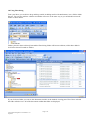
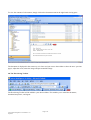
To view the contents of a document, simply click on the document name in the right hand viewing pane.
The document is displayed in the same way as in iiArc and you can use the toolbar to select the next / previous
pages, adjust the zoom, rotate the image and pan around the image.
4.0 The IIArchiving Toolbar
The IIArchiving Toolbar will be added to your other toolbars. This enables you to email the document,
download and print it, and logout.
Page 6 of 6
iiArc Outlook Integration User Manual V1.43
Sep 2009