1
3.0 Using IIArchiving
From your inbox you are able to drag and drop emails, including emails with attachments, in to a folder within
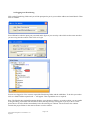
the tree. You can also add new cabinets and folders to the tree in the same way as you would add a new mail
folder as shown below.
Folders placed in the tree directly beneath the IIArchiving folder will become cabinets, while those added a
level below that will remain as folders.
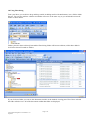
If you click on a folder you can see the documents inside it in the Outlook viewing pane. Here I have selected
the folder called a3 test. All of the documents within that folder are displayed.
Page 5 of 6
iiArc Outlook Integration User Manual V1.43
Sep 2009