1
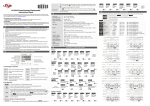
Setting up the parameters in the counter for 1-Stage Counting:
To enter the page for parameter setting of the counter, press Ä for the main menu for more than 3 seconds. After
the setup is completed, press Ä for more than 3 seconds under any of the parameter page you are in and return
to the main menu.
Select functions: There are 4 modes in CTT, (left to right) timer, counter, tachometer and timer + counter.
–FunC
Ä
CntFun
Ä
C–inPt
Ä
C–otmd
Ä
or
time
Cont
or
taCh
or
or
–mix
Select counter functions: 1-stage counting, 2-stage counting, batch counting, total counting, dual counting.
or
sta6e1
or
sta6e2
batCh
or
or
total
or
dual
Select input modes: counting up, counting down, counting up/command down, counting up/counting down,
quadrature input.
or
––UP
down
or
ud–a
or
or
ud–b
or
ud–C
Select output modes: CTT offer 11 output modes, among which mode S, T and D are only valid with input modes
Ud_A, Ud_b and Ud_C.
or
F
or
n
or
C
or
r
or
k
or
q
or
a
or
s
or
t
or
d
or
p
Select counting speed: Maximum 10Kcps; others 5K, 1K, 200, 30 and 1cps.
C–Sped
Ä
t–out1
Ä
t–out2
Ä
–point
Ä
psCale
Ä
–pwers
Ä
–rtsr
Ä
inptlC
or
–10k
––5k
or
or
––1k
or
–200
or
––30
or
–––1
Pulse width of output 1: The default output time is 0.02 second. When the parameter is set to 0.00 second, the
output status will be maintained ON.
or
–002
or
–000
Pulse width of output 2: This paramter is adjustable according to different output modes selected. If the output mode is C,
the default output time will be 0.02 second, When the parameter is set to 0.00 second, the output status will be
maintained ON.
or
–002
–000
or
Set up the position of decimal point: 0 (no decimal point), 1 (one digit after decimal point), 2 (two digits after decimal
point), 3 (three digits after decimal point).
or
0
or
1
or
2
or
3
Set up pre-scale value: 1.000 (default 1:1) Range: 0.001 to 99.999
or
1000
Save the data while switching off the power: When SAVE is selected, the PV will be saved; when CLEAR is selected,
the PV will not be saved.
or
Clear
or
save
Set up minimum width of reset signal: Default = 20ms; 1ms is also selectable
or
––20
or
–––1
Select input signal types: NPN and PNP
or
–npn
or
–pnp
Ä
Back to Top
w w w. a u to m at i o n d i re c t . c o m
Digital Counter / Timer / Tach User Manual, 1st Ed.
6-3