1
5)
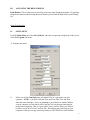
Dial Number. The Dial Number input field allows the user to enter the
phone number (up to 11 digits) that the master station will dial to reach the
remote site. NOTE: Leave this field blank if this site is not accessed via
a PSTN.
6)
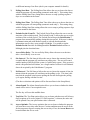
Access. The Access field allows the user to enter the access codes
required to reach this site. In autodial applications, the program will
attempt to dial the phone number first, then set the access relays. Here is
an example of how to use the access relays:
To set the first 4 relays on a Model 2452 (8x1 Relay Module) for a fourwire circuit the following access would be required:
ABC1*1.ABC1*2.ABC1*3.ABC1*4.
To set the second 4 relays for a second four-wire circuit the following
access would be required:
ABC1*5.ABC1*6.ABC1*7.ABC1*8.
Note: At the end of each relay access number you must type a period at
the end of each relay code (ABC1*1.).
7)
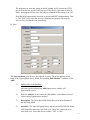
Sub-Master. The Sub-Master choice box allows you to choose whether
this site has a Sub-Master between it and the computer. Note: The Sub
Master wake up command must be issued in the Access field.
If Sub-Master address is 2590: 2590*D.
8)
Access Reset. The Access Reset allows the user to choose whether the
program will reset the access relays after the test. Certain conditions must
be met in order for the program to bypass resetting the access relays. First,
the Access Optimize must be turned on in the Program Menu. Second, the
following site must have the same Access code.
The program also uses this setting to decide whether it will un-seize the
PSTN line or keep the line seized for the next test. If the Dial # is the same
as the next Dial # then the program will not issue the hang-up command
when this setting is on “No”.
Note that the program makes decisions on Access and PSTN
independently. That is if the Dial # is the same but Access is different then
program will reset the Access relays but not the Line Seize Relay.
9)
5
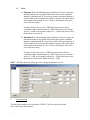
Freq. Tol. The Frequency Tolerance Input field allows you to set the
frequency tolerance of this site. If a test occurs outside of this specification
then the test will be added to the exceptions file and the computer will
sound an alarm when the Program Sound setting is “On”.