1
"
nonscientific staff to key data. The three types of data
checking include (i) 93 validation checks which ensure that
the correct values are keyed, (ii) 12 consistency checks which
ensure that logical entries are made among associated fields,
and (iii) 20 range checks which ensure that outliers are not
accidentally created by incorrect keying. SCL was developed
to perform the first two of these data entry quality control
checks. Validation and consistency checks used the ARRAV
and IF statements. SCl was used to sound an alarm when a
check failed, locate the cursor at the source of the error, and
display a warning message using the ALARM, CURSOR, and
MSG statements (Figure 8). Range checks, including
;;'axim~ and minima constraints, did not require SCl syntax,
but were set up in the MAXIMUM and MINIMUM frames of
the FSEDIT Attribute window. Another aspect of data entry
quality control was the allowance of error override in certain
cases. By design, this was contingent on supervisory
approval since an error or warning message was always
issued upon accessing a record which failed at least one SCl
syntax check. Error override was implemented via the FSEDIT
Parms or parameter definitions window.
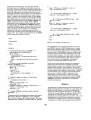
if sex = 'M' & ga ne . & bwtgm ne . then do;
if ga = 24 & bwtgm It 610 I
ga = 42 & bwtgm It 2780 1hen iugr
else if ga = 24 & bwtgm gt 1230 I
'SGA';
ga = 42 & bwtgm gt 3995 then jugr = 'LGA';
else iugr = 'AGA';
end;
if sex = 'F' & ga ne . & bwtgm ne . then do:
if ga = 24 & bwtgm It 490 I
ga = 42 & bwtgm It 2690 then iugr = 'SGA';
else if ga = 24 & bwtgm gt 1250 I
ga = 42 & bwtgm gt 3840 then iugr = 'LGA';
else iugr = 'AGA';
end:
main:
return;
link compute;
Figure 8. SCL--medical chart data entry
return:
Other applications of SCl syntax during data entry were to
open DISPLAV windows of HELP catalog entries at various
points in the data entry facility. SCl was used to evaluate
the entry of certain fields, and if incorrect or illogical entries
had been keyed, a CALL DISPLAV statement would execute
and these "pop up" help windows would open so as not to
obscure the field in question. For other invalid entries, SCl
was used to issue warnings and to draw the user's attention
to an onscreen window displaying valid data entry values.
SCl was also used for the computation and display of
summary or sequential data fields mentioned above.
compute:
'*
*
-Validate previous mentions of FAS/FAE·- J
array pmdxnum {10} pmdx1-pmdx10;
do i = 1 to 10;
if pmdxnum{i} ne • &
pmdxnum{i} It 1 I pmdxnum{i} gt 9 then do;
alarm;
_ms9_ = 'Improper entry! Use codes on screen';
end:
end;
--Produce on-screen distribution of previous
mentions of FAS/FAE-- */
array cntarr {9} cnt1-cnt9;
diffdx = 0;
doj=1t09;
cntarr{j} = .;
dok=1t010;
if pmdxnum{k} = j then cntarr{j} + 1;
end;
'*
'*
--Produce 1 response on Screen 17 from Screen
13-
'*
Finally, an informative and fully illustrated documentation'
coding manual was prepared to be primarily a technical
reference guide and also a user's manual insofar as onscreen
information and instruction was incomplete. This manual.
therefore, documented procedural requirements and anomalies
and discussed the unique features of each screen. Prefacing
the documentation was a one-page, quick-reference user's
guide on how to implement FASAF. Appended to the
documentation were the specifics on data entry quality
control, illustrations of the "pop up" help windows, lists of
variables and attributes of the database produced by PROC
CONTENTS, and the SCl associated with confirmation
windows and data entry.
*'
if cntarr{j} gt 0 then diffdx + 1;
end;
if diffdx gt 1 then multdx = 'V':
else multdx = 'N';
--Produce 1 response on Screen 17 from Screen 5if etohO = 'V' then alcdx = 'V':
else alcdx = 'N';
*'
RESULTS
The advantages of applying SAS'AF and SAS'FSP software to
database management lies in the ability to custom design the
facility to suit the end-user. In this case, considering the
environment under which FAS surveillance is to take place
and the data storage facilities, an application facility, FASAF.
was able to be constructed with a security "front-end"
immediately upon invoking SAS on the user's PC. The current
disadvantage of this artful feature is that authorized data
managers cannot readily access the database. Considering
the expertise of the data entry personnel, SAS]AF and SCL
'*
-Compute IUGR given sex and gestational age and
birthweight- */
""Intrauterine growth as estimated from liveborn birth-weight
data at 24 to 42 weeks of gestation", Lula O. Lubchenco,
M.D., Charlotte Hansman, M.D., Marion Dressler, M.D., and
Edith Boyd, M.D. Pediatrics, November 1963. Pp.793-800.
226