1
Step 3
•
•
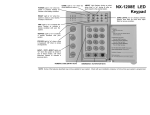
[STAY].
Press
stay key will illuminate indicating that all interior zones are bypassed. (All interior
The
devices will bypass automatically, giving the user freedom of movement within the interior
away and
night keys will flash during the exit delay.
area.) The
• The bypass key will illuminate if any zone(s) are bypassed. If any zone(s) have been
bypassed previously by the user, the light(s) corresponding to the bypassed zone(s) will
illuminate, alerting the user that a zone(s) may be unprotected and can be faulted without
an alarm.
Step 4
To toggle between the STAY and NIGHT mode, double press the key corresponding to
the mode you desire.
Step 5
[AWAY].
To upgrade from the STAY or NIGHT mode to the AWAY mode, double press
Note: Once the AWAY mode is activated, the system must be disarmed to revert to the
STAY or NIGHT mode.
Using the Quick Arm (optional)
The Quick Arm feature may be used if it is enabled. Quick Arm will allow the user to arm the security system in the
AWAY, STAY, or NIGHT mode by pressing the corresponding key twice. This feature is used for ARMING ONLY, and
will not disarm the security system. This is ideal for a maid or baby sitter, etc.
Changing modes while system armed
[AWAY],
[STAY], or
[NIGHT] key will change to the corresponding mode. Once the
Double pressing the
AWAY mode is entered, the system must be disarmed to change modes.
Disarming the system
When you enter the protected area through one of the designated Entry/Exit doors, the keypad control will sound a
away,
stay and
continuous tone for the duration of the entry delay time, or until you enter a valid code. The
night keys will go off and the tone will stop. The security system is now DISARMED. If a valid code is not entered
before the end of the entry delay, an alarm will occur. (NOTE: If the
away,
stay or
night keys are
flashing during the entry delay, the alarm system has been activated in your absence. Leave the building
immediately and call your alarm company and/or the police from a safe location.)
NX-1208E User manual
Page 9
16/04/05