1
Obtaining the Controller’s Software Revision Number
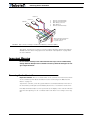
FIGURE 6. Roborun Utility screen layout
To connect the controller to your PC, use the provided cable. Connect the 15-pin connector
to the controller. Connect the 9-pin connector to your PC’s available port (typically COM1).
Apply power to the controller to turn it on.
Load your CD or download the latest revision of Roborun software from
www.Roboteq.com, install it on your PC and launch the program. The software will automatically establish communication with the controller, retrieve the software revision number and present a series of buttons and tabs to enable its various possibilities.
The intuitive Graphical User Interface will let you view and change any of the controller’s
parameters. The “Run” tab will present a number of buttons, dials and charts that are used
for operating and monitoring the motors.
Obtaining the Controller’s Software Revision Number
One of the unique features of the AX3500 is the ability to easily update the controller’s
operating software with new revisions downloaded from Roboteq’s web site at
www.roboteq.com. This is useful for adding features and/or improving existing ones.
AX3500 Motor Controller User’s Manual
10