1
AX3500 Quick Start
Locating Switches and Connectors
Take a moment to familiarize yourself with the controller’s switches and connector.
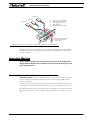
The front side (shown in Figure 1) contains the buttons and display needed to operate and
monitor the controller. The 15-pin connector provides the connection to the R/C or microcomputer, as well as connections to optional switches and sensors.
Connector to Receiver/Controls
and sensors
RC Outputs
connectors
Controller Configuration
buttons
Connector to
Optical Encoders
Operating Status
and Program LED Display
FIGURE 1. Controller Front View
At the back of the controller (shown in the figure below) are located all the Fast-on tabs
that must be connected to the batteries and the motors.
Note:
Both VMot tabs are connected to each other in
the board and must be
wired to the same voltage.
VMot
M2+
M2-
Motor 2
3 x Gnd
Pwr
Ctrl
M1+
M1-
VMot
Motor 1
FIGURE 2. Controller Rear View
3
AX3500 Motor Controller User’s Manual
Version 1.7. February 1, 2005