1
Version 1.0a
Profiling Software User Manual
Process Window Setup
The Process Window is a set of limits applied to the profile data. You have the option of either not using a defined
Process Window in which case no PWI will be calculated, or define a Process Window and have the software
calculate and display a PWI for that profile.
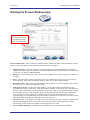
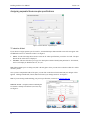
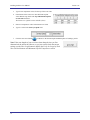
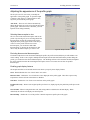
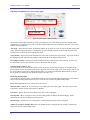
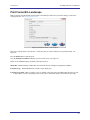
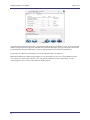
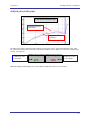
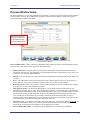
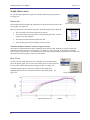
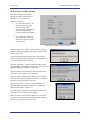
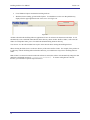
Deselect this check box
to assign separate specs
for each thermocouple
used. See details below.
Figure 89: Process Window
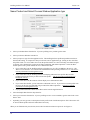
Process Window Name – Name of the Process Window file that includes the statistics chosen and limits for those
statistics, along with whatever text is typed in the Description field.
•
Solder paste menu - A read only library list of numerous solder pastes along with the statistics and limits
suggested by the paste mfg., also included is a User-Defined option in the list which allows you to create a spec.
of your own. See below for additional details.
•
Edit specs – Screen allowing you to edit or choose statistics and limits for a chosen solder paste or define your
own specs
•
Wave – This radio button switches between the process specs and the Wave process specs for the selected
Process Window. Set up a Process Window specific to Wave TCs for Wave Solder profiling.
•
Read only text box – Shows the paste name, statistics name, and limits for a Process Window chosen, edited,
or saved by you. To edit select the Edit Specs button.
•
Same specs for all TCs – By deselecting this checkbox, you can assign separate specifications for each
individual thermocouple you are using. After deselecting the checkbox, you’ll need to click on the Edit Specs
button to choose which statistics will be used and what spec limits will be set for each thermocouple used. This
option would be used if you had component specific specifications that differ from the general solder paste
specs. Another use for this would be if you wanted to monitor the actual board temperature as well as
component temps. You would then only select the statistics for that TC that are relevant. If you wish to use the
same specifications for all thermocouples, put a check mark in the box.
•
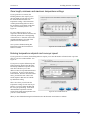
Select TC to view – This dialog box will appear only if the Same Specs for all TCs checkbox is deselected. By
clicking on the dropdown menu, you can view the specifications that have been defined for that number
thermocouple. If a description was included, it will be displayed next to Label.
•
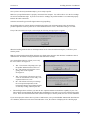
Process Window Description – Field allowing for freehand notes for a particular Process Window
65