1
MTC-20/2S User Manual
_______________________________________________________________________________________________________________
3.2.
Description of the Front Panel
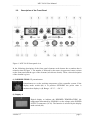
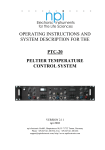
Figure 1: MTC-20/2S front panel view
In the following description of the front panel elements each element has a number that is
related to that in Figure 1. The number is followed by the name (in uppercase letters) written
on the front panel and the type of the element (in lowercase letters). Then, a short description
of the element is given.
(1) DESIRED TEMP./°C potentiometer
Potentiometer to set the working temperature of the controller system. If the
display mode switch (11) is in position SETPOINT the preset value is
monitored on display A (2). Range: +25 °C….+50 °C.
(2) Display A
Digital display to indicate the DESIRED TEMPERATURE, the
temperature determined by SENSOR A or the voltage at the POWER
OUTPUT connectors (18/19). The function is selected by the display
mode switch (11).
___________________________________________________________________________
version 2.7
page 5