1
ENGLISH
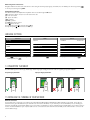
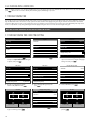
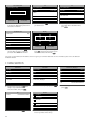
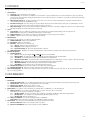
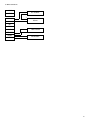
1.3 TERMINAL - DESCRIPTION OF THE KEYS
Main
MainMenu
Menu
01. Programmable function keys
User
UserMgt.
Mgt.
02. Programmable
function keys
03. Confirmation
key
User
UserRole
Role
04. Clocking-in state
COMM.
COMM.
05. Clocking-out activation state
06. System
Keys
Systemfor entering alphanumeric values
Comm.
Comm.
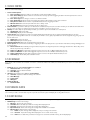
Ethernet
Ethernet
PC
PCConnection
Connection
Wireless
WirelessNetwork
Network
ADMS
ADMS
07. Left/Right navigation / Power
IP
IPAddress
Address
08. Back to previous
menu
step
09. Up/Down navigation
Subnet
SubnetMask
Mask
10. Enter device menu
Gateway
Gateway
11. USB port
12. Reset button DNS
DNS
Personalize
Personalize
TCP
TCPCOMM.
COMM.Port
Port
Data
DataMgt.
Mgt.
DHCP
DHCP
Main
MainMenu
Menu
Comm.
Comm.
WIFI
WIFI
USB
USBManager
Manager
PC
PCConnection
Connection
Network
Network11
Wireless
WirelessNetwork
Network
Network
Network22
ADMS
ADMS
Network
Network33
Short
ShortMessage
Message
Please
Pleaseinput
inpu
255.255.255.0
255.255.255.0
0.0.0.0
0.0.0.0
0.0.0.0
0.0.0.0
4370
4370
Wireless
WirelessNetwork
Network
Ethernet
Ethernet
01
192.168.1.201
192.168.1.201
Confirm
Confirm
Access
AccessControl
Control
Attendace
AttendaceSearch
Search
Ethernet
Ethernet
02
Work
WorkCode
Code
Autotest
Autotest
11
Confirm
Confirm
03
04
12
05
08
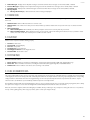
New
Newuser
user
Enroll
EnrollFingerprint
Fingerprint
User
UserID
ID
06
11
00
Name
Name
User
UserRole
Role
07
11 22
Normal
NormalUser
User
Fingerprint
Fingerprint
33
09
User
UserID
ID
66
77 88
99
44 10 55
00
User
UserRole
Role
Fingerprint
Fingerprint
Badge
BadgeNum
Num
Badge
BadgeNumber
Number
Password
Password
Set
SetTime
Time
Name
Name
Please
Pleaseselect
selectthe
thefinger
fingertotobe
beenrolled
enrolled
Set
SetDate
Date
Password
Password
Date
DateFormat
Format
YY-MM-DD
YY-MM-DD
YY/MM/DD
YY/MM/DD
08
08
30
30
00
00
2014
2014
10
10
15
15
HH
HH
MM
MM
SS
SS
YYYY
YYYY
MM
MM
DD
DD
LANGUAGE
SETTINGSCancel
Confirm
Confirm(OK)
(OK)
Cancel(ESC)
(ESC)
Confirm
Confirm(OK)
(OK)
YY.MM.DD
YY.MM.DD
MM-DD-YY
MM-DD-YY
MM/DD/YY
MM/DD/YY
MM.DD.YY
MM.DD.YY
Cancel
Cancel(ESC)
(ESC)
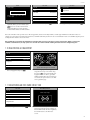
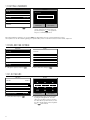
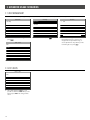
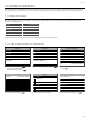
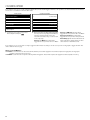
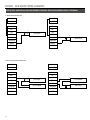
The default language of the terminal is English. To change the terminal language:
Main
MainMenu
Menu
Personalize
Personalize
User
UserInterface
Interface
User
UserMgt.
Mgt.
User
UserInterface
Interface
Language
Language
User
UserRole
Role
Voice
Voice
Lock
LockPower
PowerKey
Key
COMM.
COMM.
Bell
BellSchedules
Schedules
Menu
MenuScreen
ScreenTimeout
Timeout(s)
(s)
System
System
Punch
PunchState
StateOptions
Options
Idle
IdleTime
Timeto
toSleep
Sleep(m)
(m)
Personalize
Personalize
Shortcut
ShortcutKey
KeyMappings
Mappings
Main
MainScreen
ScreenStyle
Style
Data
DataMgt.
Mgt.
1. Press
, use the arrow keys
to Navigate to Personalize and
press
.
2. Select User Interface and press
.
3. Select Language and press
.
Navigate to the desired language and
press
.
5