1
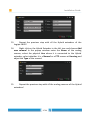
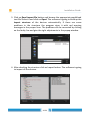
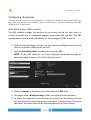
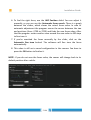
LOGIPIX IP VIDEO SURVEILLANCE SYSTEMS
INSTALLATION GUIDE
Logipix Stadium Surveillance System
Devices:
LPIX15-01-AB, LOBJ-05P, LOBJ-14, LPIX- PTZ-04, LPIX2-B, LPIX2-D, LNVR-H-16-R,
LNVR-16-8-E, LNVR-16/32
Document version: 4.0
Contact
E-mail: [email protected]
Technical support: [email protected]
Web: www.logipix.com
Installation Guide
Table of Contents
Hardware installation...................................................................................5
Installation of the Multi-megapixel Fix cameras.......................................................6
Installation steps..........................................................................................................................6
Mount the camera on the position fine-tuning panel .................................................................6
Remove the protective cap and mount the lens...........................................................................6
Mount the camera on the position fine-tuning panel..................................................................7
Install the camera into a camera enclosure.................................................................................7
Connect the CAT5 cable..............................................................................................................8
Connect the power cable.............................................................................................................8
Setting the fix cameras' final position.........................................................................................9
Setup the focus and the Iris.......................................................................................................12
Setup the Iris.............................................................................................................................13
Installation of the Logipix Full HD Box camera........................................................15
Camera Rear Panel....................................................................................................................15
Lens Mounting..........................................................................................................................16
Mount the camera......................................................................................................................16
Power up the Camera................................................................................................................16
Ethernet Cable Connection.......................................................................................................17
Setup the position and the viewing angle..................................................................................17
Installation of the Logipix Full HD Dome camera....................................................18
Connectors of the camera..........................................................................................................18
Dismount the camera from the mounting bracket.....................................................................19
Mount the bracket of the camera...............................................................................................19
Power up the Camera................................................................................................................19
Ethernet Cable Connection.......................................................................................................19
Setup the position and the viewing angle..................................................................................20
Installation of the Full HD Logipix PTZ cameras......................................................20
Installation steps........................................................................................................................20
Drill the holes............................................................................................................................21
Fix the camera on the Mounting bracket...................................................................................22
Connecting the LAN.................................................................................................................23
Connecting the Power...............................................................................................................23
Check the operation of the PTZ cameras..................................................................................23
Installation of the Logipix Hybrid Extenders............................................................24
Rear view..................................................................................................................................24
Mounting the Hybrid Extender into the rack cabinet................................................................25
Connecting the analog cameras.................................................................................................26
Connecting the analog PTZ cameras.........................................................................................26
Connecting the CAT5 cables.....................................................................................................26
Power on...................................................................................................................................26
Checking LED information.......................................................................................................27
2/80
Installation Guide
Installation of the LNVRs (rack-mount)...................................................................28
Installation steps........................................................................................................................28
The front view...........................................................................................................................29
Install the HDDs........................................................................................................................30
Mounting the LNVR into the rack cabinet................................................................................31
Connecting to the network........................................................................................................31
Connecting the Logipix cameras and the Hybrid extenders to the LNVRs..............32
Connecting the power and power on......................................................................32
Checking LED information.......................................................................................34
Checking LED information of the cameras..............................................................35
LEDs of the Logipix multi-megapixel cameras........................................................................35
LEDs of the Logipix PTZ cameras...........................................................................................36
Appendix A...............................................................................................................36
Appendix B...............................................................................................................37
Installing the software................................................................................38
Installing the server.................................................................................................38
Hardware configuration............................................................................................................38
Before the installation...............................................................................................................38
Installation steps........................................................................................................................39
Installing the workstations......................................................................................40
Hardware configuration............................................................................................................40
Before the installation...............................................................................................................40
Installation steps........................................................................................................................41
Software configuration...............................................................................43
Activating special Stadium functions.......................................................................43
Registering the devices............................................................................................43
Traditional registration..............................................................................................................43
Automatic registration...............................................................................................................48
Configuring the devices...........................................................................................50
Auto Back Focus (ABF) setting................................................................................................50
Configuring the Logipix multi-megapixel cameras..................................................................52
Configuring the Logipix Full HD cameras...............................................................................53
Configuring the Logipix PTZ cameras.....................................................................................54
Configuring the analog cameras................................................................................................55
Configuring the analog PTZ cameras.......................................................................................56
Set the rest of the cameras as camera groups........................................................57
Download settings...................................................................................................59
Creating camera setup groups.................................................................................60
Creating Panorama cameras....................................................................................60
Defining the panorama cameras................................................................................................60
Creating Monitor Profiles........................................................................................61
3/80
Installation Guide
Stitching the images of the panorama cameras......................................................62
PTZ Area configuration............................................................................................66
Creating the map.......................................................................................................................66
Creating a configuration monitor profile..................................................................................67
Configuring PTZ Area..............................................................................................................68
System usage..............................................................................................71
The Event.................................................................................................................71
Controlling the Monitor Profile...............................................................................73
Watching live pictures...............................................................................................................73
Watching the archive.................................................................................................................73
Controlling the Logipix Full HD PTZ......................................................................................76
Saving pictures..........................................................................................................................76
Printing pictures........................................................................................................................77
Saving the archive.....................................................................................................................77
Using the LPlayer to watch .scv files........................................................................78
Installation of the LPlayer.........................................................................................................78
Associate .SCV files..................................................................................................................78
Open a file from the software....................................................................................................79
Saving pictures..........................................................................................................................79
Printing pictures........................................................................................................................79
Panorama images......................................................................................................................79
4/80
Installation Guide
Hardware installation
According to the designed plan determine the places of each device in the
stadium and install the Ethernet cables between them. Determine the places of
the cameras, the network switches, the LNVRs and Hybrid extenders,
furthermore the Server and the Client workstations! Connect the LNVRs to the
company network (VMS VLAN) by CAT6 cables and connect the cameras to the
Local Network Switches (CAMERA VLAN) by CAT5 cables. Connect the switches
to the LNVRs by CAT6/optical cables (requires additional SFP modules). Ensure
the proper power supplies for the Logipix multi-megapixel fix cameras, Logipix
FullHD fix cameras, the Logipix PTZ cameras, the Logipix Hybrid extenders and
the LNVRs. See the Appendix A at the end of the Hardware installation chapter
of this document!
Take into account some important environmental conditions while determining
the devices' final places!
• Determine places for the cameras, both for the fix multi-megapixel
Logipix cameras and for the Logipix PTZ cameras where they can be
installed safely and properly, where their operation cannot be disturbed
by any meteorological effect (heavy rain, wind or other natural
calamities) or spectator vandalism.
•
The LNVRs and the Hybrid Extenders must be installed indoor or in a
heated outdoor box to ensure the proper temperature for operation in
any season which has been specified in the data sheets.
5/80
Installation Guide
Installation of the Multi-megapixel Fix cameras
Installation steps
• Unpack the camera
• Remove the sensor's protective cap
• Mount the lens
• Mount the camera on the position fine-tuning panel
• Install the camera in a camera enclosure
• Connect the CAT5 cable
• Connect the power cable
• Connect audio Output (optional)
• Setup the focus
• Setup the IRIS
Remove the protective cap and mount the lens
After unpacking a camera, remove the sensor's protective cap and mount the
lens as soon as possible to prevent sensor soiling. Rotate the lens clockwise to
fix it on the camera. Leave the front lens protective cap until you have installed
the camera in the outdoor camera enclosure! Protect the camera and the lens
from physical impact and moisture!
6/80
Installation Guide
Mount the camera on the position fine-tuning panel
Remove the protective stick from the bottom of the camera. Suit the Logipix
camera to a mounting hole of the upper part of the position fine-tuning panel,
depending on whether you want to install the camera in a vertical or in a
horizontal position (9 or 10)! Use a M5×6 size screw to fix the camera on the
panel! Use a pipe wrench to tighten the screw!
Install the camera into a camera enclosure
Important requirements for the camera enclosure:
• The material of the enclosure must be aluminum
• The material of the enclosure's front must be glass
• The enclosure must be a top opening one
• The outdoor camera enclosure must have heating and cooling system
• The ventilation system of the enclosure must be set to continuous
circulation
7/80
Installation Guide
• It must have sun shield
Mount the lower part of the positioning panel into the camera house. To install
the Lower part of the panel in an enclosure, follow the steps of the enclosure's
user manual! It is important to install the camera in the enclosure at the best
position. It cannot be neither too close or nor too far from the front glass of
the camera enclosure. The proper position of the camera in the enclosure is
where the distance between the front lens of the camera and the front glass of
the housing is 15mm.
• After the lower part has been installed inside the housing, assembly the
two parts of the positioning panel.
• Put the included three springs on the three setting screws on the lower
part.
• Fit the two parts together by the three setting screws
• Put the included nuts to the setting screws and tighten them to fix the
platform vertically.
• Close the enclosure and fix it at the previously designated point!
• Set the sun shield to a position what can prevent the sunlight to reach
directly the front glass of the enclosure
Connect the CAT5 cable
The connected cable must be the final one which will be used in the network
infrastructure. If you are not using the final CAT5 cable, you may ruin the
camera's final position when rewiring after position and focus setup. Lead the
CAT5 Ethernet cable through the cable gland of the camera enclosure and
connect it with the RJ45 plug to the LAN connector of the camera. The
connector can be found at the back of the camera.
Connect the power cable
The connected cable must be the final one which will be used in the system
infrastructure. Install ferrules for the copper wires of the power supply. Use a
crimping tool to perform this process. Lead the 2×0.5 mm2 copper wire
8/80
Installation Guide
through the cable gland of the camera enclosure and connect it to the two-pin
power connector of the camera (GND and +12V phase). The spring connectors
can be found at the back of the camera. Use a screwdriver to push in the
orange colored plastic spring lifter, connect the wires then release the spring
lifter!
Setting the fix cameras' final position
• Connect the cameras' CAT5 cables to the installed Local Network
Switches!
• Practically use a laptop with a Windows operating system at every point,
where a group of fix cameras are installed, to perform their settings!
• Install the free SCPlayer software on the laptop! You can find the
software on the installation CD. Open the SCPlayer folder and start the
scplayer_install.exe installation wizard! Click on Next after you've read
the welcome message! Browse the destination folder of the program!
Continue with the next window! You can create a Start Menu folder if
9/80
Installation Guide
you want. On the next window sign the Create shortcut on desktop
checkbox, then click on Next! After you've read the installation summery,
click on Install! After the installation has finished, restart your computer!
• Connect the Local Network Switch to your computer and run the
SCPlayer by clicking on the desktop icon! Adjust the IP address of the
camera in the pop up window! The camera picture is going to be shown
immediately on the video monitor surface of the software. If the picture
is upside down, it can be rotated by pressing R.
• Several SCPlayer software can be run simultaneously. Open two more
SCPlayer software! Visualize neighboring camera pictures in each video
matrix window! Arrange the windows on the desktop in one common
line according to the physical camera order! The essence of this method
is to see the camera pictures relative to each other.
• Set the direction and the angle of each camera. You can find the virtual
view of each camera in the previously designed digital plan. These
pictures help you to find the right and final position of each camera. Use
clearly visible objects at the seats at image overlapping areas to find
easily the right position! First move the camera with the camera
enclosure and find the approximately right position, than fine-tune the
position by setting the position fine-tuning panel in the camera
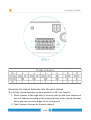
enclosure! To set the panel, follow the steps below:
10/80
Installation Guide
• Loosen the fixing screws (2), (4), (5), (6)
• Set the rotation (horizon) with screws (1) and (3)
• Set the pan position (height of the horizon) with screw (7)
• Set the tilt (horizontal) position of the camera with screw (8)
• Tighten the fixing screws (2), (4), (5), (6)
• Repeat these steps for all the cameras in the camera group!
NOTE: If you don't have the opportunity to connect more cameras at the same
time to the laptop, connect the cameras directly to the computer! After you
11/80
Installation Guide
have positioned one camera, create a screenshot of the camera picture and
use this for a reference when you are positioning the next camera!
Setup the focus and the Iris
On the Lobj-14 the ring closer to the front lens is the iris ring, and the other is
the focus ring.
On the Lobj-05 the ring closer to the front lens is the zoom, and the other is
the focus. The iris is controlled electronically by the camera. It is necessary, to
set the field of view of this lens.
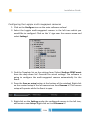
1. Loosen the zoom ring fixing screw! Rotate it counter-clockwise.
2. Rotate the zoom ring left or right until you reach the desired field
of view. You can find the virtual view of each camera in the
previously designed digital plan. These pictures help you to find the
right and final field of view of each camera. Place clearly visible
objects on the seats / corridors, what help you to set the correct
field of view. If needed, set the focus ring as well to get a cleaner
image.
3. Rotate the zoom ring fixing screw clockwise to tighten it and fix the
zoom position.
NOTE: The focus setup must be performed with a fully opened Iris!
In case of a Lens with manual iris:
1. Loosen the Iris fixing screw of the lens! Rotate it counter-clockwise!
2. Rotate the Iris ring of the lens counter-clockwise to fully open it!
3. Rotate the Iris fixing screw clockwise to tighten it and to fix the Iris
position!
In case of a P-iris lens
1.
Enter the camera configuration menu in the SCPlayer software
by pressing C
2.
Locate the camera in the list on the left side of the window
3.
Find the “Logipix settings” node
12/80
Installation Guide
4.
Select the “III” tab
5.
Select P-iris, and save settings
The focus of the Logipix camera can be set easily with a special configuration
function which you can find in the free SCPlayer software. The function utilizes
the traits of the JPEG2000 compression standard, that more details - with the
same compression -, results a larger image size. Thus the largest image size
means the best quality.
The focus setup must be performed for a zoomed area on the picture!
It is important to choose an area for the focus setup where there are no
moving objects during the setup, moreover there are no significant changes in
light condition.
1. Press F12 button, or choose Camera focus setup at Device settings!
2. Zoom in to the desired part of the picture by the mouse scroll (or
PageUp, PageDown keys), which should be the sharpest area.
3. After the enlarging click on the image or press the Space key! Thus the
current image size will be the maximum (the image size marker on the
left will be at its highest value).
4. Turn the focus ring on one direction cautiously! If there is a decreasing
effect on the image size, turn the focus ring on the other direction.
5. When the image starts to be sharper, the image size starts to increase.
First, the indicator on the left side reaches its maximum, then stays
there. The image size increase can be seen on the lower right corner.
After the sharpest point has been found, the indicator starts to fall. In
this case turn the focus ring on the other direction until the indicator
reaches its maximum again.
Setup the Iris
Rotate the Iris ring of the lens to find the right position!
1. Loosen the Iris fixing screw of the lens! Rotate it counter-clockwise!
2. Rotate the Iris ring of the lens to adjust its position!
13/80
Installation Guide
3. To close the Iris rotate the ring clockwise! To open it, counterclockwise is the right direction.
4. Rotate the Iris fixing screw clockwise to tighten it and to fix the Iris
position!
NOTE: The Iris controls the amount of the light passing through the lens. The
smaller the aperture opening, the less light can reach the camera sensor.
Moreover the Iris affects the depth of field as well. The larger the aperture
opening, the shallower the depth of field.
14/80
Installation Guide
Installation of the Logipix Full HD Box camera
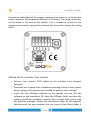
Camera Rear Panel
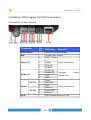
DC 12V / PoE
No.
1
2
Connector
DC 12V/ AC 24V/ PoE
Definition
LINE OUT & LINE IN
Power LED
Two-way audio transmission
Power connection indication (green light)
Reset to factory default; press the button with
3 Default button
a proper tool
4 AUTO IRIS Connector Connecting to Auto Iris Lens
5 PoE NETWORK
For Ethernet Cable and SPE connection
6 Network LEDs
Network connection and activity indication
1 Output +
5 GND
2 Output −
6 D−
7 Alarm I/O
3 Input +
7 D+
4 Input −
VIDEO
(BNC For video output
8
DC 12V
connector)
AC 24V
9 Micro SD Card slot
For videos and snapshots
storage
DC VIDEO
+ AC 24V: Power-1 DC 12V: Power
AC
24V/DC
12V
AC 24V: Earth I/ODC 12V: Reserved
1 2 3 4
10 Connector
GND
(AC 24V Model)
LINE
LINE IN
NETWORK
− AC 24V: Power-2
12V:
OUT DCMIC
IN GND
PoE
15/80
AUTO
IRIS
Installation Guide
Lens Mounting
If C-Mount lens is used, after removing the camera’s plastic cover, you need to
mount the supplied C/CS mount adapter to the camera. Then attach the lens
onto the C/CS mount adapter. Rotate it clockwise. Connect the iris cable to the
rear part of the camera.
Mount the camera
•
The camera supports both standing and ceiling consoles.
•
Use the appropriate IP level housing for outdoor operation.
•
To install the camera in a camera house refer to the user's manual of the housing.
Power up the Camera
•
To
power up the IP Camera, please plug the camera’s DC 12V / AC 24V
Cable into the power adaptor.
• Alternatively, connect the Ethernet Cable to the camera’s PoE port and
plug the other end of the cable into a PoE switch.
NOTE: If PoE is used, make sure the Power Sourcing Equipment (PSE) is in use
in the network.
16/80
Installation Guide
Ethernet Cable Connection
• Connect one end of the CAT5 Ethernet Cable to the PoE Network
Connector of the IP Camera, and the other end of the cable to the
network switch or PC.
NOTE: In some cases, Ethernet Crossover Cable might be needed when
connecting the IP Camera directly to the PC.
VIDEO
DC12V
RESET
NETWORK
DC
NOTE: Check the status of the link indicator and activity indicator LEDs. If the
LEDs are unlit, please check the LAN connection.
LINE
OUT
I/O
1 2 3 4
LINE IN
MIC IN
Green Link Light indicates good network connection.
Orange Activity Light flashes for network activity indication.
AUTO
IRIS
Setup the position and the viewing angle
• The camera picture can be checked by its analog output.
• Connect the analog output of the camera to the BNC connector of an
analog video setting monitor!
• Set the position of the camera with the console or the housing
positioning options!
• Set the viewing angle and focus using the ring with the “N” and “F”
labels!
17/80
Installation Guide
Installation of the Logipix Full HD Dome camera
Connectors of the camera
Connector
Reset Button
BNC
Alarm I/O
Audio I/O
DC 12V
Power
AC 24V
RJ-45
Pin
No.
1
2
3
4
1
2
3
4
1
2
3
1
2
3
-
Definition
Remarks
Restore to factory default
Analog Video Output
GND (Input
- )
Input+
Alarm connection
Output-
Output+
Output (L)
Output (R)
Two-way
audio
transmission
GND
Input
Power
Reserved
GND
Power connection
Power-1
Earth GND
Power-2
10/100 Mbps Ethernet/ PoE
18/80
Installation Guide
Dismount the camera from the mounting bracket
• Dismount the enclosure of the camera with the included tool!
• Loosen the fixing bolt with a Phillips screw driver!
• Push the locking tabs at the sides!
• Pull out the camera module from the mounting bracket!
Mount the bracket of the camera
• Drill the proper size four holes for the bracket into the surface!
• Use the included wall-plugs and screws to fix the bracket on the surface!
• Fix the camera module on the bracket!
Power up the Camera
•
To power up the IP Camera, please plug the camera’s DC 12V / AC 24V cable into the
power terminal block.
•
Alternatively, connect the Ethernet cable to the camera’s PoE port and plug the other end of
the cable into a PoE switch.
NOTE: If using PoE, make sure Power Sourcing Equipment (PSE) is in use in the
network.
Ethernet Cable Connection
• Connect one end of the CAT5 Ethernet cable to the RJ-45 connector of
the IP Camera, and the other end of the cable to the network switch or
PC.
NOTE: In some cases, you may need to use an Ethernet crossover cable when
connecting the IP Camera directly to the PC.
19/80
Installation Guide
VIDEO
DC12V
RESET
NETWORK
DC
NOTE: Check the status of the link indicator and activity indicator LEDs; if the
LEDs are unlit, please check LAN connection.
LINE
OUT
I/O
1 2 3 4
LINE IN
MIC IN
Green Link Light indicates good network connection.
OrangeAUTO
Activity Light flashes for network activity indication.
IRIS
Setup the position and the viewing angle
• The camera picture can be checked by its analog output.
• Connect the analog output of the camera to the BNC connector of an
analog video setting monitor!
• Set the position of the camera with the console or the housing
positioning options.
• Set the viewing angle and focus using the rings of the lenses!
Installation of the Full HD Logipix PTZ cameras
Installation steps
• Unpack the camera
• Drill the holes
• Fix the camera on the Mounting bracket
• Connect the Ethernet cable
• Connect the Power cable
• Check the operation of the PTZ camera
20/80
Installation Guide
Drill the holes
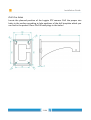
Locate the planned position of the Logipix PTZ camera. Drill the proper size
holes in the surface according to hole positions of the drill template which you
can find in the packet! Place 12×100 wall-plugs in the holes!
21/80
Installation Guide
Fix the camera on the Mounting bracket
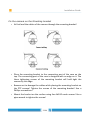
• At first lead the cables of the camera through the mounting bracket!
• Place the mounting bracket to the connecting part of the case on the
top. The connecting part of the case is designed with an edge on it. The
three tightening screws of the mounting bracket will hold tight the
camera by this edge.
• Beware not to damage the cables while placing the mounting bracket on
the PTZ camera! Tighten the screws of the mounting bracket! Use a
Phillips screwdriver!
• Mount the bracket on the surface using four 8x100 coach screws! Use a
pipe wrench to tighten the screws!
22/80
Installation Guide
Connecting the LAN
Connect the CAT5 Ethernet cable with the RJ45 plug to the RJ45 socket of the
camera!
Connecting the Power
Connect the external power supply to the power cable of the camera!
Check the operation of the PTZ cameras
• Connect the Logipix PTZ camera to your computer and run the previously
installed SCPlayer by clicking on its desktop icon! Adjust the IP address of
the PTZ camera in the pop up window! The camera picture is going to be
shown immediately on the video monitor surface of the software.
• A unique solution has been developed for managing the Logipix PTZ
cameras, whereby the camera is movable remotely by the mouse. If
you click on the image of the camera, then it turns, so as the given
point will be the center of the picture. You can zoom by scrolling.
23/80
Installation Guide
Installation of the Logipix Hybrid Extenders
• Mounting the Hybrid Extender into the rack cabinet
• Connecting the analog cameras
• Connecting the CAT5 cables
• Power on
• Checking LED information
Rear view
Connector
Name
J1
Power connector
J2
Serial line and I/O pins
J3
RJ45 socket for the first group of cameras
J4
Serial line and I/O pins
J5
RJ45 socket for the second group of cameras
Video In 1-16
BNC connectors
24/80
Installation Guide
Mounting the Hybrid Extender into the rack cabinet
The 1U high Hybrid extender can be mounted in a 19” rack cabinet.
1. Place 4 pieces of M6 cage nuts (2 on each side) on the front columns of
the rack cabinet according to the mounting holes of the Hybrid Extender,
which you can see at the edges of the front panel!
2. Take 2 pieces of screws for the rack cabinet!
25/80
Installation Guide
3. Suit the Hybrid Extender to the cage nuts and fix it by tightening both
screws!
Connecting the analog cameras
• Connect the BNC cables of the analog cameras to the BNC connectors of
the Hybrid Extender. The connectors can be found at the back of the
Hybrid extender.
Connecting the analog PTZ cameras
• Connect the BNC cables of the analog PTZ cameras to the BNC
connectors of the Hybrid Extender! The connectors can be found at the
back of the Hybrid extender.
• Connect the PTZ cameras serial lines to the RS-485 line of the Hybrid
Extender! The connectors can be found at the back of the Hybrid
extender.
Connecting the CAT5 cables
Connect the CAT5 Ethernet cables' to the RJ-45 sockets of the Hybrid Extender!
The sockets can be found at the back of the Hybrid extender.
Power on
You need to power the Logipix Hybrid Extender using the bundled 12V DC
power supply. The extender will boot immediately upon powering.
26/80
Installation Guide
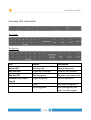
Checking LED information
The left side
The right side
LED
Status
Description
Ready LED
Blinking red
Normal operation
Net Link LED
Lights up in orange
Network link present
Net Act LED
Blinking green
Network communication
Camera LEDs (Video
Signal)
Lights up green
Normal operation
Dark
Input not configured
Blinking green
Input configured, but
bad / no video signal
27/80
Installation Guide
Installation of the LNVRs (rack-mount)
Installation steps
1. Install the HDDs
2. Mounting the LNVR into the rack cabinet
3. Connecting to the network
4. Connecting the Logipix cameras
5. Connecting the Hybrid Extenders
6. Connecting the power
7. Power on
8. Checking LED information
28/80
Installation Guide
The front view
Port / Button
Function
1
100 MBps Ports 1-16
LPoE ports for direct Hybrid Extender
connection
2
GIGABIT Port G17
Camera VLAN – Gigabit port for the Logipix
cameras (Local Network Switch must be
connected here)
3
GIGABIT Port G18
Camera VLAN – Gigabit port for the Logipix
cameras (Local Network Switch must be
connected here)
4
GIGABIT Port G19
VMS VLAN – Gigabit port for company
network connection
29/80
Installation Guide
5
GIGABIT Port G20
VMS VLAN – Gigabit port for company
network connection
6
Optical Port 1
Camera VLAN – Optical port for the Logipix
multi-megapixel fix cameras (connected to
the Local Network Switch)
7
Optical Port 2
Camera VLAN – Optical port for the Logipix
multi-megapixel fix cameras (connected to
the Local Network Switch)
8
Power
Power on and Power off
9
Reset
Reset the LNVR (about 3 min)
10
USB1 / USB2
-
11
Arrows
-
12
LCD Display
13
HDD racks 1-8
LOGIPIX
Hot swap mobile racks for 3,5” SATA HDDs
Install the HDDs
1. The hot swap HDD mobile racks can be found at the front panel of the
LNVR. Smoothly pull the spring lock of a mobile rack to loosen it, then
pull it out!
2. Carefully place the HDD into the mobile rack and be sure that the printed
label on the HDD is side up!
3. Fix the HDD in the mobile rack by tightening the HDD screws through the
mounting holes! Use at least four screws. The mounting holes can be
found on the side and on the bottom of the mobile rack.
4. Once the HDD is in the mobile rack put it back to its place and gently
push the spring lock to fix it in the LNVR!
5. Repeat the previous steps with all the HDDs!
NOTE: There are four HDD racks in each row at the front panel. Each row forms
a RAID group. Place the HDDs into the LNVR according to the groups. For
example if you are using only 4 HDDs in a LNVR-16-8 fill the first row!
30/80
Installation Guide
Only those rows get power which have at least one configured HDD.
Mounting the LNVR into the rack cabinet
The 6U high LNVR can be mounted in a 19” rack cabinet.
4. Place 6 pieces of M6 cage nuts (3 on each side) on the front columns of
the rack cabinet according to the mounting holes of the LNVR, which you
can see at the edges of the front panel!
5. Take 6 pieces of screws for the rack cabinet!
6. Suit the LNVR to the cage nuts and fix it by tightening all the six screws!
Connecting to the network
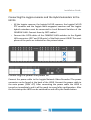
Connect the LNVR to the Company Network Switches (VMS VLAN) by two CAT6
cables. Connect the cable's RJ45 plugs to the LNVR's Company Gigabit ports!
The exact ports are indicated on the picture below (G19 and G20).
31/80
Installation Guide
Connecting the Logipix cameras and the Hybrid extenders to the
LNVRs
•
All the Logipix cameras, the Logipix Full HD cameras, the Logipix Full HD
PTZ cameras and the Logipix multi-megapixel cameras and the Logipix
hybrid extenders must be connected to Local Network Switches of the
CAMERA VLAN. Connect them by CAT5 cables!
•
Connect the CAT6 cables of the CAMERA VLAN switches to the Gigabit
LAN connectors (G17 and G18 ports) of the Rack mount LNVR! The exact
places of the ports are indicated on the picture below.
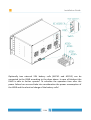
Connecting the power and power on
Connect the power cable to the Logipix Network Video Recorder! The power
connector can be found at the back of the LNVR. Connect the power cable to
the main power (230V AC)! After connecting the power cable the LNVR is
turned on immediately and it will be ready to record after configuration. After
the first startup the LNVR can be switched on and off by the Power button.
32/80
Installation Guide
Optionally two external 24V battery cells (ACCU1 and ACCU2) can be
connected to the LNVR according to the draw above. In case of blackout the
LNVR is able to further operate. To calculate the operation time after the
power failure has occurred take into consideration the power consumption of
the LNVR and the electrical charge of the battery cells!
33/80
Installation Guide
Checking LED information
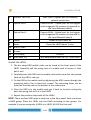
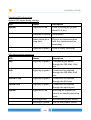
System LED states during startup:
LED
States
Description
System
Lights up in red
LNVR is starting up (it lasts
about 11.5 sec)
Lights up in yellow Initialization
Stays yellow for a
long time
There is no communication
with the motherboard (no
watchdog)
Lights up in green
LNVR is ready, recording
LED states during operation
LED
States
Description
Pwr
Lights up in green
The camera gets power
through the 100 Mbit LPoE
port
Link
Lights up in green
Connection has realized
through the 100 Mbit LPoE
port
GIGABIT Link
Lights up in green
Connection has realized
through the Gbit port
Optical Link
Lights up in green
Connection has realized
through the optical port
System
Lights up in red
Switching off process has
started, or standby operating
mode
Blinking in RED
Motherboard power failure
Blinking in yellow
LPoE or HDD power failure
34/80
Installation Guide
Battery
Lights up in green
Operation from external
battery
Blinking in green
ACCU is charging
Lights up in yellow ACCU voltage under 22V
Lights up in red
ACCU Low
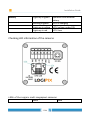
Checking LED information of the cameras
LEDs of the Logipix multi-megapixel cameras
LED1
LED2
35/80
Installation Guide
Indicating
Network Link – Activity
Power – Ready
State1
Blinking in green
according to Ethernet
communication
Lights up in green if the
camera gets power
State2
Blinking in green and red
if the camera is ready to
use
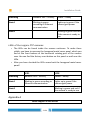
LEDs of the Logipix PTZ cameras
• The LEDs can be found inside the camera enclosure. To make them
visible, you have to unscrew the hexagonal metal cover panel, which you
find at the front bottom of the horizontal rotating part of the camera
case. You can find the factory reset button on this panel as well near the
LEDs.
• After you have checked the LEDs screw back the hexagonal metal cover
panel!
LED1
LED2
Indicating
Network Link – Activity
Power – Ready
State1
Blinking in green according to
Ethernet communication
Lights up in green if the
camera gets power
State2
Blinking in green and red if
the camera is ready to use
Appendix A
Power supplies of the devices
36/80
Installation Guide
Device
Power supply
Logipix multi-megapixel fix camera
10-24V DC; 12VDC: 0,7A, 24VDC: 0,35A
Logipix Full HD fix camera
PoE
Logipix PTZ camera
20-28V DC, 2.5A
LNVR
100-240VAC, 47-63 Hz single phase; 120VAC:
4.2A; 230VAC: 2.1A
Hybrid extender
12V DC
Appendix B
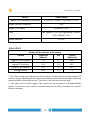
Bitrates of the cameras in the system
Camera
Frame size
[Mbyte]
FPS
Bitrate
[Mbit/sec]
Logipix 15 MP camera
2.3
5
100 *
Logipix PTZ camera
0.6
12
60 *
Logipix 2 MP camera
0.1
5
4-8 **
Analog camera
0.06
12
6
* The LNVR records the video stream of the Logipix 15 MP cameras and the Logipix PTZ
cameras using a VRM fail-safe file system which means the frames of the video stream are
stored divided on four HDDs at once. Thus there is no need to mirror the data.
** The video stream of the Logipix 2 MP camera can be recorded in a redundant RAID1
system. In that case every frame is recorded twice to the HDDs, therefore the stream's
bitrate is doubled.
37/80
Installation Guide
Installing the software
Installing the server
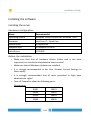
Hardware configuration
Name
Recommended
Operating system
Windows Server 2008 x64 or Windows 7 x64
Processor
Intel Core i7 – Quad Core
System RAM
8 Gbyte RAM
Graphics card
ATI Radeon HD 5450
Hard Drives
1 TB HDD
Before the installation
• Make sure that that all hardware drivers (Video card is the most
important) are installed and updated to latest version!
• Make sure that all Windows Updates are installed!
• It is strongly recommended to Set User Account Control Settings to
Never notify.
• It is strongly recommended that all users permitted to login have
administrator rights!
• Turn off Firewall or allow the following ports:
Device ports:
8080
10601
10000
10602
10220
10603
10600
10606
38/80
Installation Guide
Software ports:
3050
10272
10704
10240
10700
10705
10262
10701
10710
10263
10702
10800
10271
10703
10806
Installation steps
• Put the installation CD in the server computer and run STPInstall.exe!
• Choose Installation!
• After reading the welcome message, click Next!
• Browse the folder in which you would like to install the programs!
• On the next popup window browse the folder of the software keys, then
select all components to be installed on the computer!
• On the next window select the program language and adjust the folder
of Application logs, Download manager and Video proxy (it is
recommended to set these to different drive from the system and
database)
• You can decide where should the system create the daily backup of the
database
• You can decide to create a Start menu folder.
• On the following window select a Firebird server to be installed
according to your operation system! You can select additional modules as
well on this window.
• After you have checked the install summary, click on Install!
• After installation restart the server computer!
39/80
Installation Guide
Installing the workstations
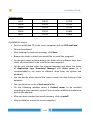
Hardware configuration
Name
Recommended
Operating system
Windows 7 x64
Processor
Intel Core i7 – Quad Core
System RAM
8 Gbyte RAM
Graphics card
ATI Radeon HD 7750
Hard Drives
1×3 TB HDD
Before the installation
• Make sure that that all hardware drivers (Video card is the most
important) are installed and updated to latest version!
• Make sure that all Windows Updates are installed!
• It is strongly recommended to Set User Account Control Settings to
Never notify.
•
The user account must allow the software to modify the necessary files
on the hard disk (in the C:\STP directory).
• Turn off Firewall or allow the next ports:
Device ports:
8080
10601
10000
10602
10220
10603
10600
10606
40/80
Installation Guide
Software ports:
3050
10272
10704
10240
10700
10705
10262
10701
10710
10263
10702
10800
10271
10703
10806
Installation steps
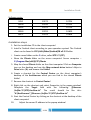
1. Put the installation CD in the client computer!
2. Install a Firebird client according to your operation system! The Firebird
client can be found in CD:\Utils\Other\firebird\FB v2.5.2 folder.
3.
Create a new folder on the C: drive, called STP! C:\STP\
4.
Share the Clients folder on the server computer! Server computer –
C:\Program files (x86)\STP\Clients
5. Map the shared Clients folder on the client computer! Click on Computer
icon on the desktop and use the Map network drive button! Adjust a
Drive letter (X:) and browse the Folder!
6. Create a shortcut for the Control Center on the client computer's
desktop of the AccAlrm.exe which you can find in the shared Clients
folder!
7. Rename the shortcut to Control Center!
8. Right click on the shortcut and select Properties in the popup window!
Complete the Target field with the following: /fileserver
/inifile=”C:\STP\AccAlrm.ini” The result should be like this:
“X:\AccAlrm.exe” /fileserver /inifile=”C:\STP\AccAlrm.ini”
9. Start the Control Center by clicking on the shortcut at the desktop of the
client computer!
10.
Adjust the server IP address in the popup window!
41/80
Installation Guide
11.
Allow to open the new file (Yes), then browse the proper software
key for the given client computer from the Keys folder of the Installation
CD!
12.
Adjust a User name and a Password!
13.
The AccAlarm.ini file is going to be created in C:\STP folder.
42/80
Installation Guide
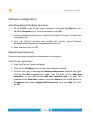
Software configuration
Activating special Stadium functions
1. Go to C:\STP folder on the client computer and open AccAlrm.ini in an
editable Notepad (eg. in Total Commander press F4)!
2. Find the [Stadion] section and enable the function! Rewrite Enabled=No
to Enabled=Yes
3. Find the [Client] section and enable the Events Form! Rewrite
EnabledEventsForm=No to EnabledEventsForm=Yes
4. Save and close the .ini file!
Registering the devices
There are two ways to register new devices in the system.
Traditional registration
1. Start the Control Center software!
2. Click on the Configure icon on the main software surface!
3. Find the left tree in the popup Camera configuration window and right
click on the Not in group tree node, than left click on the Add new
controller... or you can use the Add new controller icon... as well! The
window of the New item appears. Enter the Name of the LNVR, adjust its
IP address and choose Logipix NVR Enterprise from the Type list! Click
on OK!
43/80
Installation Guide
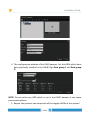
4. The configuration window of the LNVR appears. Set the HDDs which have
been physically installed in the LNVR! Sign Raid group 1 and Raid group
2!
NOTE: Do not select any HDD which is not in the LNVR, because it can cause
permanent reboots.
5. Repeat the previous two steps with all the Logipix LNVRs of the system!
44/80
Installation Guide
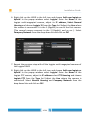
6. Right click on the LNVR in the left tree and choose Add new logipix or
hybrid! In the popup window select Logipix! Enter the Name of the
Logipix multi-megapixel camera, adjust its IP address, Select Normal
Housing and choose Logipix 15 from the Type list! Adjust the Line where
the camera is connected! It is the 1 (Gigabit) in case of the first camera.
(The second camera connects to the 2 (Gigabit), and so on...). Select
Company Network from the drop down list and click on OK!
7. Repeat the previous step with all the Logipix multi-megapixel cameras of
the Logipix LNVR!
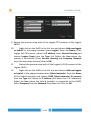
8. Right click on the LNVR in the left tree and choose Add new logipix or
hybrid! In the popup window select Logipix! Enter the Name of the
Logipix PTZ camera, adjust its IP address select PTZ Housing and choose
Logipix PTZ from the Type list! Adjust the Line where the camera is
connected! Select Normal Housing and Company Network from the
drop down lists and click on OK!
45/80
Installation Guide
9. Repeat the previous step with all the Logipix PTZ cameras of the Logipix
LNVR!
10.
Right click on the LNVR in the left tree and choose Add new logipix
or hybrid! In the popup window select Logipix! Enter the Name of the
Logipix Full HD camera, adjust its IP address select Normal Housing and
choose Logipix 2mpx from the Type list! Adjust the Line where the
camera is connected! Select Normal Housing and Company Network
from the drop down lists and click on OK!
11.
Repeat the previous step with all the Logipix Full HD cameras of the
Logipix LNVR!
12.
Right click on the LNVR in the left tree and choose Add new logipix
or hybrid! In the popup window select Hybrid extender! Enter the Name
of the Hybrid extender and choose LNVR Hybrid extender 16 cameras
from the Type list! Adjust its IP address (the device has 2 IP addresses)
Adjust the Line where the Hybrid extender is connected to the LNVR!
Select Company from the Network drop down list! Click on OK!
46/80
Installation Guide
13.
Repeat the previous step with all the Hybrid extenders of the
Logipix LNVR!
14.
Right click on the Hybrid Extender in the left tree and choose Add
new camera! In the popup window enter the Name of the analog
camera, select the physical Line where it is connected to the Hybrid
extender, select whether it is a Normal or a PTZ camera at Housing and
adjust the Type of the camera!
15.
Repeat the previous step with all the analog cameras of the Hybrid
extenders!
47/80
Installation Guide
Automatic registration
There is possibility to import the devices of the system automatically. To
perform this process you have to use a predefined .csv file, wherein the
devices have been listed previously in a given form. The form of the .csv file is
the following:
Name Type assign Network/ Serial IP1 IP2 IP3 IP4 HaveDN HaveABF HaveSATA HaveSound template
channel
The required fields are the Name; Type; and assign. IP1, IP2 (IP2: only in case
of Hybrid Encoders) are strongly recommended fields. The Name is the
device's own name. It should be a unique one in case of LNVR and Hybrid
Encoder. In case of cameras, the names should be unique on every individual
LNVR and Hybrid. Device Types are the following: Camera15MP, Camera2MP,
CameraAnalog, PTZ2MP, PTZAnalog, NVREnterprise, Encoder. To assign the
cameras to an NVR or a Hybrid Encoder an existing device name should be
given. Network/channel is recommended to be given. In case of analog
cameras the fields can be let empty (thus the channel assignment will be
automatic on the free channels of the Hybrid Encoder), but in case of all other
devices, Company Gigabit is the proper adjustment. Serial number is an
optional field, it should be unique if it's given. HaveDN; HaveABF; HaveSATA;
HaveSound fields are optional too and concern only for Logipix cameras. In
case of Logipix 15MP cameras it is recommended to set YES value to the
HaveABF fields. These parameters can be adjusted later during camera
configuration, but this is a faster way to set all Logipix 15MP as cameras with
Auto Back Focus module. Template is optional as well. It can be later adjusted
during camera configuration.
Create a .CSV file (e.g.: in Excel) with the data of the devices based on the .CSV
template above!
1. Open the Control Center software!
2. Select Camera/NVR import and assignment in the Video/Setup menu!
48/80
Installation Guide
3. Click on Read import file button and browse the appropriate predefined
text file! Select it and click on Open! The software is going to build up the
Import structure of the devices automatically. If there are some
problems in the structure the program signs it with red warning
messages in the proper lines. The problems can be corrected by clicking
on the faulty line and give the right adjustments in the popup window.
4. After checking the structure click on Import button. The software is going
to import all the devices.
49/80
Installation Guide
Configuring the devices
The main concept of the device configuration is to configure an individual device from each device
type, then copy and paste the settings to the rest of the devices. The only exception is the ABF
setting for the 15 MP cameras.
Auto Back Focus (ABF) setting
The ABF module changes the position of the sensor to find the right focus. It
can be used with the 15 megapixel Logipix camera with ABF module. The ABF
setting must be performed individually for all the Logipix 15MP cameras.
1. Find the desired Logipix camera on the Camera configuration form and
click on its name in the tree on the left.
2. Sign the Auto Back Focus checkbox then click on OK!
NOTE: If the ABF function has been adjusted previously during the
automatic device import, this field is already active.
3. Click on Settings in the device tree then open the ABF tab!
4. The upper slider (Backfocus day) shows the default sensor position.
5. To adjust the right focus first you have to zoom in on the camera picture
and find the most important area in the aspect of observation. The areas
outside of the zoom area will be obscured during the focus setting.
50/80
Installation Guide
6. To find the right focus, use the ABF Position slider! You can adjust it
manually, or you can use the Automatic focus search. There is a graph
between the sliders, which shows the actual focus value. In case of
automatic adjustment the program moves the sensor between the two
end positions (from -2700 to 2700) and finds the max focus value. After
that the program makes another scan around the max value in 400 steps
to fine tune it.
7. If you've searched the focus manually by the slider, click on the
Automatic fine tune button! The software will fine tune the focus
automatically
8. This value is still not a saved configuration in the camera. You have to
press the OK button to finalize it.
NOTE: If you do not save the focus value, the sensor will change back to its
default position after a while.
51/80
Installation Guide
Configuring the Logipix multi-megapixel cameras
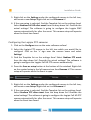
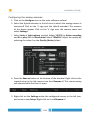
1. Click on the Configure icon on the main software surface!
2. Select the Logipix multi-megapixel camera in the left tree which you
would like to configure! Click on the '+' sign near the camera name and
select Settings!
3. Find the Template list on the settings form! Select Stadium 15MP event
from the drop down list! Override the actual settings! The software is
going to configure the multi-megapixel camera automatically for the
event.
4. Press the Save as setup button at the bottom of the window! Right click
on the created setup in the left camera tree then Rename it! This camera
setup will operate while the Event is open.
5. Right click on the Settings under the configured camera in the left tree,
and create a new Setup! Right click on it and Rename it!
52/80
Installation Guide
6. If the new setup is selected, find the Template list on the settings form!
Select Stadium 15MP after event from the drop down list! Override the
actual settings! The software is going to configure the multi-megapixel
camera automatically for after the event. This camera setup will operate
when the Event has closed.
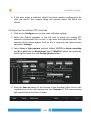
Configuring the Logipix Full HD cameras
1. Click on the Configure icon on the main software surface!
2. Select the Logipix Full HD camera in the left tree which you would like to
configure! Click on the '+' sign near the camera name and select
Settings!
3. Find the Template list on the settings form! Select Stadium Full HD event
from the drop down list! Override the actual settings! The software is
going to configure the Logipix Full HD camera automatically.
4. Press the Save as setup button at the bottom of the window! Right click
on the created setup in the left camera tree then Rename it! This camera
setup will operate while the Event is open.
53/80
Installation Guide
5. Right click on the Settings under the configured camera in the left tree,
and create a new Setup! Right click on it and Rename it!
6. If the new setup is selected, find the Template list on the settings form!
Select Stadium Full HD after event from the drop down list! Override the
actual settings! The software is going to configure the Logipix 2MP
camera automatically for after the event. This camera setup will operate
when the Event has closed.
Configuring the Logipix PTZ cameras
1. Click on the Configure icon on the main software surface!
2. Select the Logipix PTZ camera in the left tree which you would like to
configure! Click on the '+' sign near the camera name and select
Settings!
3. Find the Template list on the settings form! Select Stadium PTZ event
from the drop down list! Override the actual settings! The software is
going to configure the Logipix Full HD PTZ camera automatically.
4. Press the Save as setup button at the bottom of the window! Right click
on the created setup in the left camera tree then Rename it! This camera
setup will operate while the Event is open.
5. Right click on the Settings under the configured camera in the left tree,
and create a new Setup! Right click on it and Rename it!
6. If the new setup is selected, find the Template list on the settings form!
Select Stadium PTZ after event from the drop down list! Override the
actual settings! The software is going to configure the Logipix Full HD PTZ
camera automatically for after the event. This camera setup will operate
when the Event has closed.
54/80
Installation Guide
Configuring the analog cameras
1. Click on the Configure icon on the main software surface!
2. Select the Hybrid extender in the left tree to which the analog camera is
connected! Click on the '+' sign near the Hybrid extender! The cameras
of the device appear. Click on the '+' sign near the camera name and
select Settings!
3.
Select Auto at Light options section! Adjust 12 FPS for Active recording
and 0 for play! Set the Resolution! Select 720x512i! Adjust the quality by
selecting the value 4 on the Quality (Active) slider!
4. Press the Save as button at the bottom of the window! Right click on the
created setup in the left camera tree then Rename it! This camera setup
will operate while the Event is open.
5. Right click on the Settings under the configured camera in the left tree,
and create a new Setup! Right click on it and Rename it!
55/80
Installation Guide
6. If the new setup is selected, adjust the lower quality configuration for
after the event! This camera setup will operate when the Event has
closed.
Configuring the analog PTZ cameras
1. Click on the Configure icon on the main software surface!
2. Select the Hybrid extender in the left tree to which the analog PTZ
camera is connected! Click on the '+' sign near the Hybrid extender! The
cameras of the device appear. Click on the '+' sign near the camera name
and select Settings!
3. Select Auto at Light options section! Adjust 12 FPS for Active recording
and 0 for play! Set the Resolution! Select 720x512i! Adjust the quality by
selecting the value 4 on the Quality (Active) slider!
4. Press the Save as button at the bottom of the window! Right click on the
created setup in the left camera tree then Rename it! This camera setup
will operate while the Event is open.
56/80
Installation Guide
5. Right click on the Settings under the configured camera in the left tree,
and create a new Setup! Right click on it and Rename it!
6. If the new setup is selected, adjust the lower quality configuration for
after the event! This camera setup will operate when the Event has
closed.
Set the rest of the cameras as camera groups
1. Change the view of the device groups! Change to device type grouping
by signing the Device type radio button! Chose the camera type which
cameras you would like to configure at once! (Logipix 15MP camera /
Logipix Full HD PTZ camera / Logipix 2MP camera / analog camera /
analog PTZ camera)
2. Select the previously set individual camera in the device group in the left
tree and click on Settings with the right mouse button!
3. In the popup window, select Copy camera settings! The camera settings
and also the camera setups are going to be copied to the clipboard.
4. Select those cameras which for you would like to copy the given camera
settings and setups! The following individual camera parameters will not
be copied: Name; IP address; LNVR; Motion-masks and related settings,
Privacy and Exposition mask. Camera selection can be performed by the
very same method as file managing in Windows OS. To select
nonconsecutive cameras, hold down CTRL, and then click each item you
want to select. To select a consecutive group of cameras, click the first
item, hold down the SHIFT key, and then click the last item.
57/80
Installation Guide
5. In case of selecting several cameras, a table is going to be displayed at
the place of the camera pictures. The rows of the table contain the
selected cameras and the columns of the table contain the parameters
and the setups of the cameras. Identical rows (identically set cameras)
and columns (identically set parameters for every cameras) of the
parameters may be hidden in the table. In that case the number of the
hidden rows and columns are signed. There are checkboxes before every
rows and columns wherewith we can sign which parameters and setups
we would like to override on which cameras. All the signed checkboxes
can be deselected and reselected at once, separated for the rows and for
the columns.
6. After the parameter selection has checked click on the chosen cameras
by the right mouse button in the right tree, then select Paste camera
settings!
58/80
Installation Guide
Download settings
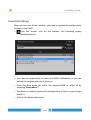
After you have set all the cameras, you need to upload the configuration
settings to the LNVR.
•
Click the “arrow” icon on the toolbar! The following popup
window appears:
• You have the opportunity, to select the LNVRs individually, or you can
upload the configuration to all at once.
• From the drop down list select the desired LNVR or select all by
selecting “Everywhere”!
• The device is ready to receive the configuration if there is a green pipe
beside it.
• Click on the download button!
59/80
Installation Guide
Creating camera setup groups
1.
Select Camera setup groups in the Video / Stadium menu!
2. Create a new setup group! Click on the New button, Name the group and
sign it as Default open event group!
3. The previously created camera setups can be seen on the right side in
the Selectable list. Assign those camera setups to the open group, which
have been created for the event! Select them from the list and use the
Add button!
4. Click on OK!
5. Create another new setup group! Click on the New button, Name the
group and sign it as Default closed event group!
6. Assign those camera setups to the closed group, which have been
created for after the event! Select them from the list and use the Add
button!
7. Click on OK!
Creating Panorama cameras
A panoramic camera is a virtual camera in the system, which is built from
several normal multi-megapixel cameras by configuring their position in
the panoramic picture, and stitching them together.
Defining the panorama cameras
1. Open the Panorama camera menu at Video / Setup menu! In this menu
you can virtually assemble the cameras of the panorama camera.
2. Define a new Panorama camera by the New button!
3. Enter a Name and an Export code for the Panorama camera! (The export
code can be any name that contains only letters (A-Z) and numbers (0-9)
Click OK.
4. Assign the appropriate Logipix multi-megapixel cameras to the Panorama
camera! The list of the Selectable cameras can be seen on the right.
60/80
Installation Guide
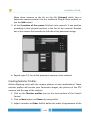
Move those cameras to the list on the left (Selected) which form a
Panorama camera picture! Use the traditional Drag & Drop method, or
use the Add button!
5. At the X position of the camera field set each camera's X axis position
according to their physical position in the line of the cameras! Number
one is the camera that records the left side of the panoramic image.
6. Repeat steps 2-5. for all the panoramic cameras in the stadium!
Creating Monitor Profiles
Define displaying units with the camera pictures at each workstations! These
monitor profiles will contain your Panoramic images, the pictures of the PTZ
cameras and the map of the stadium.
1. Click on the Monitor profiles icon on the main surface of the Control
Center!
2. Click on New button and Name the new profile!
3. Adjust a number at Order field to define the order of appearance of the
61/80
Installation Guide
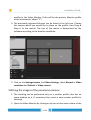
profiles in the Video Monitor. If this will be the primary Monitor profile
at the workstation, adjust “1”!
4. The previously registered devices can be found in the left tree. Choose
the camera which you would like to place on the profile, then Drag &
Drop it to the matrix! The size of the matrix is determined by the
software according to the monitor resolution.
5. Click on the Settings button, find Video Settings, check Normal at Video
resolution and Default at Video stream!
Stitching the images of the panorama cameras
1. The stitching can be performed only on a monitor profile, that has no
zoom window on it. If necessary then create a new monitor profile for
stitching.
2. Open the Video Monitor by clicking on its icon on the main surface of the
62/80
Installation Guide
Control Center software!
3. The previously created Monitor Profile with the Panorama camera
appears on the left as a button with its name. Click on it! Now the
camera pictures are shown in the Video monitor.
4. Once the connection is established, the pictures of the IP cameras which
are in the common camera group can be seen side by side. To see an
appropriate panorama picture you have to stitch the camera pictures so
as overlapping the pictures by designating common points.
5. Press F2 button!
6. Zoom in the camera pictures at the image borders!
7. If you move your mouse over the border of two cameras, a blue
rectangle will be shown. This indicates the cameras which you are going
to stitch. As you move your mouse to the following camera, the next
rectangle will be highlighted. You can lock the selection by pressing and
holding the Shift key.
8. Find common points and select them on both images by Shift+left
mouse button! Common points are signed by the same color markers.
Repeat this step a few times at the border of the images! The markers
should be approximately in a straight vertical line in the image. There
should be one marker close to the top image border if possible, and one
close to the bottom image border.
63/80
Installation Guide
9. Place the markers at every image border!
10.
The placed markers can be relocated. Move the mouse pointer
over the marker, press Shift then the middle mouse button at the desired
position! The undesired markers can be deleted by Shift+right mouse
button.
11.
After you have finished the placing of the markers, press F2, and
the program is going to stitch the camera pictures!
12.
If the gradient between the images is not smooth enough, you
have to set an area on both images, covered by some special points. In
these areas, the difference in white balance between the cameras can be
corrected.
13.
Press F2 then the key V to enter the white balance editor mode of
the panorama picture!
14.
Three different areas can be designated close to the image border.
One area is at the top of the image, another is in the middle and the last
can designate the bottom. As you move your mouse over therse areas, a
green rectangle will be highlighted. You can lock your selection if you
64/80
Installation Guide
hold the Shift button and designate the areas at the border of an image
by placing at least 3 points by the left mouse button. Place the points on
the neighboring image as well to appoint approximately the same area.
You can go back to edit stitching points if you press the N key. If you've
finished with editing, press F2 again!
65/80
Installation Guide
PTZ Area configuration
Logipix Full HD PTZ cameras can be controlled on the Logipix panoramic
camera images in the Video Monitor by selecting a desired area. To perform
this action we have to configure special PTZ guidance points on the Logipix
camera image and on the uploaded map. Based on these guidance points the
Logipix Full HD PTZ cameras can find the appointed area.
Creating the map
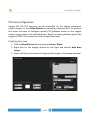
1. Click on Map & Event menu and open Setup / Maps!
2. Right click on the Images section on the right and choose New base
image!
3. Name the Map and browse the appropriate image in the popup window!
66/80
Installation Guide
Creating a configuration monitor profile
1. To configure PTZ Area function, create a new Monitor Profile, marked as
Configuration Window, with two zoom windows! This profile will be
visible only in the PTZ Area Configuration window.
2. Click on the Monitor profiles icon on the main surface of the Control
Center!
3. Click on New button and Name the new profile!
4. Click on the Settings button, find Video Settings and check the field
beside Configuration window!
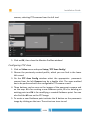
4. Place two Zoom windows on the monitor matrix and place the map as
well! Designate the panoramic camera! Select Panoramic cameras from
the left tree then Drag & Drop it to the Zoom window of the panorama
camera. Perform the same method for the Zoom window of the PTZ
67/80
Installation Guide
camera, selecting PTZ cameras from the left tree!
5. Click on OK, then close the Monitor Profiles window!
Configuring PTZ Area
1. Click on Video menu and open Setup / PTZ Area Config!
2. Choose the previously created profile, which you can find in the lower
left corner!
3. On the PTZ Area Config window select the appropriate panoramic
camera from the left Camera tree by a double click. The same method
has to be performed with the configurable PTZ camera as well.
4. Three buttons can be seen on the images of the panoramic camera and
on the map. N is for creating a new Guidance point, D is for deleting an
existing point and M is for modifying a created Guidance point. You can
also find the M icon on the PTZ image.
5. To create a new Guidance point activate the N button on the panoramic
image by clicking on the icon. The active icon turns to red.
68/80
Installation Guide
6. Place a point on the image at a well recognizable object on the picture by
a single left click! You can move the point by another single click.
7. Find the same point on the map as well and designate it by a single left
click!
8. Now move the crosshair of the PTZ exactly to the same point which
you've designated before on the panoramic image! Use the left mouse
button to move the crosshair!
9. If you find the same points on the panoramic image, on the PTZ image
and on the map as well, click on the Save button or use the Ctrl+S
hotkey! After that the point turns to yellow. If you do not want to save
the points, click on Cancel!
10.
To delete a Guidance point, activate the D icon on the panoramic
image, select the point you want to delete by clicking on it (the point
turns to pink). If you click between the points the program will choose
the closest point to the place of the clicking. You can change between
the points, using the arrow icons in the lower right corner of the image.
Left click again on the point to delete it! After deleting, click on the Save
button!
11.
To modify a point, activate the M icon on the panoramic image
and select the point you want to modify by clicking on it! If you click
between the points the program will choose the closest point to the
place of the clicking. After you have selected the point you can replace it
by single left clicks. You can change between the points, using the arrow
icons in the lower right corner of the image. After modifying, click on the
Save button!
12.
If you have created, modified or deleted a point accidentally, you
can use the ESC key to undo your last action.
13.
Create at least six point-pairs with this method for each Logipix PTZ
camera. Try to create the points forming triangle shapes (place them as
they would be the apexes of triangles), and avoid to place all of them on
one common line. More Reference points mean more accuracy.
69/80
Installation Guide
14.
Activating the M icon on the PTZ image, you can modify the
position of the crosshair on the PTZ, namely you can choose to assign the
actual deignated point of the panoramic image/map to the center or any
corner of the PTZ image.
15.
On the left side of the window you can see the already assigned
PTZ cameras to the actual panoramic camera.
How not to create reference points:
How to create reference points properly:
70/80
Installation Guide
System usage
This part of the document gives information about the usage of the Control Center software,
which performs complex supervision tasks of the Logipix Stadium Video Surveillance System.
Start the Control Center software clicking on its icon on the desktop!
The Event
An event must be created and start (open) for every football game (or any
other event) in the stadium. The LNVR records the video stream with different
camera parameters during the event and after the event. If the event is open,
recordings can not be downloaded, unless they are marked as urgent
downloads. Otherwise downloading is performed after the event has closed.
71/80
Installation Guide
• Open the Event management form! You can find it in the Video /
Stadium menu.
• Create a new Event by the New button!
• Name it in the Event name field!
• Enter the Date of the event! (This is only administrative information)
• Select the camera setups for the event (Open) and for after the event
(Close)! The previously set default groups appears automatically in the
fields. If you want to change them, click on Setting and perform the
change in the popup window!
• Click Event open button to open the event!
• To close the event use the Event close button!
•
Note: The events won't open and close automatically at the time written
in the corresponding fields, you need to open and close them manually
before and after every event!
72/80
Installation Guide
Controlling the Monitor Profile
Watching live pictures
1. Open the Video Monitor! Click on its icon on the main surface of the
Control Center software!
At every Video Monitor launch or profile change the connecting information
are shown at the place of the camera pictures. Steps of the connection
procedure can be seen textually, and the camera name appears in between
round brackets. The green stripe below shows the course of the connection. If
the connection fails, then the stripe turns to red.
2. The previously created Monitor Profile is going to appear on the Video
Monitor which has been marked as the first in the order of the Monitor
profiles.
3. To change between the Monitor Profiles click on their buttons, which
can be found on the left section of the Video Monitor window.
Watching the archive
Archive video streams of all the cameras can be played back during the event
and also after the event has closed.
There are two ways to get the archive on the Video Monitor.
The first:
• Select those cameras on the Video Monitor which from you would like to
get the archives!
• Pause the video stream, then click on the Play backwards icon to play
reverse the archive from the actual time!
• Use the controller icons to navigate the archive playback.
73/80
Installation Guide
Jump to the beginning
Play backward with higher speed: Pushing it once the playback starts
backward at double speed. For other presses it increases the speed to
4x and after 8x, till 16x. After reaching the maximum speed for
another press the record is going to be played at double speed.
One frame back
Play backward (normal speed)
Pause
Play forward (normal speed)
One frame forward
Play forward with higher speed: Pushing it once the
playback starts forward at double speed. For other
presses it increases the speed to 4x and after 8x, till
16x. After reaching the maximum speed for another
press the record is going to be played at double speed.
Jump to the end
To change back to live mode, click on Live video button!
74/80
Installation Guide
The second:
• Set the time interval of the desired archive period by the date and time
fields at the bottom of the window!
•
Move the mouse pointer over the desired camera picture(s) and select them by clicking the
little icon in the upper left corner of the picture! The border becomes blue and the little icon
can be seen if a picture is selected.
• Click on the Archive video button on the left of the Video Monitor!
Now you can see the archive recordings of the adjusted period.
• You can change the playback speed and direction, you can jump frame by
frame or you can pause the picture during the playback by the video
control buttons in the lower middle of the window. You can see a table of
the icons on the previous page.
You can find a button at the bottom of the window for selecting
and deselecting all the cameras.
If you would like to play back only the last ten minutes of the
recordings, then click on Auto select archive interval button and
start the archive playback!
If you select Backwards playback button then the recordings are
going to be played back reverse from the actual time when you are
querying archive recordings.
To change back to live mode, click on Live video button!
75/80
Installation Guide
Controlling the Logipix Full HD PTZ
Controlling on the PTZ camera image
A unique solution has been developed for managing the PTZ cameras, whereby
the camera is movable remotely by the mouse. If we click on the image of the
camera, then it turns, so as the given point will be the center of the picture.
You can zoom by scrolling or using the scrollbar at the side of the image. The
image can be dragged and swiped by holding the left mouse button and
moving the mouse.
Controlling on the panoramic image
You can select a Logipix PTZ camera that you want to control by moving your
mouse pointer on the Logipix panoramic image. Click the pin icon in the lower
right corner of the PTZ camera picture.
Move your mouse pointer over the panoramic camera picture and hold the left
mouse button at least half a second (500ms) and after that draw around the
desired area. The selected PTZ is going to turn and zoom in according to the
marked image section. The image can be dragged and swiped by holding the
left mouse button and moving the mouse.
Controlling on the map
Move your mouse pointer over the map and click on an area! The selected PTZ
is going to turn exactly to the marked image section.
Saving pictures
1. Select the camera(s) which from you would like to save a still image or
images on the Video Monitor!
2. Pause the video stream!
3. Find the desired image! Use the video control icons!
4. If several images are selected at once, they are going to be saved
individually.
5.
Click on the Save as picture icon!
76/80
Installation Guide
6. Choose the destination path of the files in the pop-up window!
7. Name the file!
8. Click on Save button!
Printing pictures
1. Select the camera(s) which from you would like to print a still image or
images on the Video Monitor!
2. Pause the video stream!
3. Find the desired image! Use the video control icons!
4. If several images are selected at once, they are going to be printed
individually.
5.
Click on the Print icon!
6. Choose the destination path of the files in the pop-up window!
7. The image(s) are going to be printed by the default printer.
Saving the archive
1. The adjusted archive period can be downloaded from the selected
cameras.
2. Set the time interval of the desired archive period by the date and time
fields at the bottom of the window!
3. Move the mouse pointer over the desired camera picture(s) and select
them!
4.
Click on the Archive video button on the left of the Video Monitor!
Now you can see the archive recordings of the adjusted period.
5. If several cameras have been selected at once, the downloaded videos
are going to be merged into a video matrix. (That means one file will
contain the videos of all cameras)
6.
Click on the Save selected period icon!
7. Name the downloaded file in the popup window!
77/80
Installation Guide
8. Click on OK button! The download is going to be added to the download
list. The ongoing download file statuses can be checked in the Download
manager. Click on the Download manager icon on the main surface of
the Control Center software to check the status!
9. The files are going to be downloaded to the default download container.
Using the LPlayer to watch .scv files
LPlayer has been developed to play the downloaded video streams, saved in
Logipix Video Surveillance System.
LPlayer is a simple, easy to use software to play the saved video files of the
surveillance system. The video streams can be played forward or backward at
different speeds and they can be stepped frame by frame. The software is able
to display sixteen camera pictures at once. Additional video content
information can be shown as well. The images of the panoramic picture can be
restitched and the white balance correction can be readjusted if necessary.
Installation of the LPlayer
1. Put the installation CD in the client computer!
2. Open Utils/STP/LPlayer folder and start LPlayerRar.exe!
3. Browse the installation folder then click on Install!
4. You can find LPlayer.exe in the folder where you have installed the
software.
Associate .SCV files
1. Start the software by LPlayer.exe!
2.
Click on Settings icon!
3.
Find the following icon:
4.
5.
Press this button to associate all the .SCV files with the LPlayer.
After this LPlayer will open this kind of files.
To open an .scv file, browse it on your computer then double click on the
file name! The software is going to open the file.
78/80
Installation Guide
Open a file from the software
To open an .SCV file to be played, click on the Browse icon.
• In the popup window you can find the right folder of the desired .SCV
file. If you have found the folder, double click on the file or use the Open
button, and the player is going to display the video stream immediately.
Saving pictures
1.
2.
Click on Settings icon!
The camera screen can be saved by the
Save as image button.
Printing pictures
1.
2.
Click on Settings icon!
The camera screen can be printed by the
Print button.
Panorama images
Also panoramic images can be played back by the LPlayer. The images can be
restitched and the white balance differences can be corrected as well if
necessary. Only those images can be restitched which have been downloaded
originally as panoramic images. Standard multi-cam .scv files cannot be
stitched to panoramic images.
Restitching the panoramic picture
1. Press F2 button!
2. Zoom in the camera pictures at the image borders!
3. Find common points and select them on both images by Shift+left
mouse button! Common points are signed by the same color markers.
Repeat this step a few times at the border of the images! The markers
should be approximately in a straight vertical line in the image.
79/80
Installation Guide
4. Place the markers at every image border!
5. The placed markers can be relocated. Move the mouse pointer over the
marker, press Shift then the middle mouse button at the desired
position! The undesired markers can be deleted by Shift+right mouse
button.
6. After you have finished the placing of the markers, press F2, and the
program is going to stitch the camera pictures!
White balance
1. If the gradient between the images is not smooth enough, you have to
set an area on both images, covered by some special points. In these
areas, the difference in white balance between the cameras can be
corrected.
2. Press F2 then the key V to enter the white balance editor mode of the
panorama picture!
3.
Three different areas can be designated close to the image border. One
area is at the top of the image, another is in the middle and the last can
designate the bottom. Hold the Shift button and designate the areas at
the border of an image by placing at least 3 points by the left mouse
button. Place the points on the neighboring image as well to appoint
approximately the same area. You can go back to edit stitching points if
you press the N key. If you've finished with editing, press F2 again!
80/80