1
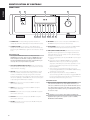
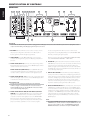
IDENTIFICATION OF CONTROLS
REAR PANEL
ENGLISH
1
2
3
4
5
6
7
8
9
10
11
12
13
14
15
FRANÇAIS
ESPAÑOL
16
17
18
ATTENTION!
Please make sure that the M2 is powered OFF or unplugged before making any connections. It is also advisable to power-down or unplug all associated
components while making or breaking any signal or AC power connections.
ITALIANO
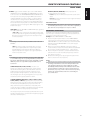
1BALANCED: Connect XLR audio source to these connectors. Ensure
that proper pin configurations are followed – Pin 1: Ground, Pin 2:
Positive (signal live) and Pin 3: Negative (signal return).
The processed signal from the Mac or processor is then sent out
through their corresponding Optical Out port into M2’s OPTICAL LOOP
IN thereby completing the signal loop path.
2SINGLE-ENDED: Use a twin RCA-to-RCA lead to connect to these
sockets the left and right analog output of a CD player, preamplifier or
processor.
Refer also to the item above about “LOOP (DIGITAL PROCESSOR LOOP)”
under IDENTIFICATION OF CONTROLS – FRONT PANEL.
DEUTSCH
3 DIGITAL AUDIO (COAX 1-2): Connect to the corresponding coaxial S/
PDIF-format digital output of sources such as SACD/CD players, HDTV or
satellite tuners and other components.
DIGITAL AUDIO OUT (COAXIAL OUT): Connect COAXIAL OUT to the
corresponding S/PDIF digital input of compatible devices such as CD
recorders, receivers, computer soundcard or other digital processors.
NEDERLANDS
4 DIGITAL AUDIO (OPTICAL 1-2): Connect to the corresponding optical
S/PDIF-format digital output of sources such as SACD/CD players, HDTV
or satellite tuners and other components.
SVENSKA
IMPORTANT NOTICE
For high-end sources with higher sampling rates like 176kHz and
192kHz, it is highly recommended that such sources be interfaced
with the AES/EBU IN connector. The AES/EBU IN is well suited to handle
sources with ultra-high sampling rates.
5 DIGITAL AUDIO OPTICAL LOOP (OPTICAL LOOP OUT, OPTICAL
LOOP IN): Connect OPTICAL LOOP OUT to the corresponding S/PDIF
digital input of compatible devices such as CD recorders, receivers,
computer soundcard or other digital processors. This OPTICAL LOOP
OUT terminal is the same digital output that can be fed to a Mac or
processor where the signal can be subjected to a wide library of third
party crossover filters, equalization or room correction programs.
РУССКИЙ
8
6 AES/EBU IN: Digital audio stream from professional audio sources like
SACD/CD Players or processors can be connected to this XLR connector.
For high-end sources with higher sampling rates like 176kHz and
192kHz, it is highly recommended that such sources be interfaced with
the AES/EBU IN connector. The AES/EBU IN is well suited to handle such
sources with high sampling rate.
7 DIGITAL SOFT CLIPPING™: Enables NAD’s proprietary Soft Clipping
circuitry on all channels. At ON position, Soft Clipping gently limits the
output of the M2 to minimize audible distortion should the amplifier be
over-driven. Soft Clipping may simply be left ON at all times to reduce
the likelihood of audible distortion from excessive volume settings.
However, for critical listening and to preserve optimum dynamics, you
may wish to defeat it by setting this switch to “OFF” position.
8 OFF/AUTO TRIGGER SWITCH: When at AUTO position, the front panel
STANDBY button is disabled and M2 remote control’s [ON/OFF] button
non-functional. At this condition, the M2 can only be switched ON from
standby mode or back to standby mode when +12V DC is applied or
cut off at the +12V TRIGGER IN jack. Slide the OFF/AUTO switch to OFF
setting for the M2 to be normally switched ON (or back to standby
mode) using the front panel STANDBY button or M2 remote control’s
[ON/OFF] button.
NOTE
The rear panel POWER switch must be set to ON position for the
STANDBY button to activate. Switch the rear panel POWER switch to ON
position in order to make use of the +12V TRIGGER IN and OFF/AUTO
TRIGGER SWITCH features as well as the front panel STANDBY button.