1
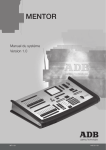
MENTOR
1. Introduction
1.1 Delivery and Unpacking
As soon as you receive your equipment, open the boxes and inspect the items received. If you
discover any damage, contact the carrier immediately and make any necessary claim for the
problems discovered. You can be sure that when the equipment left our factory it was in perfect
condition. Check that the equipment supplied to you corresponds to the consignment note and
that this corresponds to your order. You will find the references of your desk on an identification
label affixed to the rear panel. If there is any discrepancy in the order and delivery, contact your
supplier immediately who will clarify the situation to your full satisfaction.
Permissible storage conditions:
Temperature
Relative humidity
: -10 to +50° C
: variation rate: 20 °C/hour
: 20 to 80 % without condensation.
1.2 Preparing the Desk Location
The surface on which desk is to be located, should be smooth, level and sturdy.
Make sure that there is enough clearance around the desk to :
• open the desk
• access the rear connections
• allow air circulation around vents to prevent the desk from over-heating.
1.3 Desk Installation
The MENTOR desks is a professional lighting console with memory, it is Class I equipment
designed and manufactured to the EN 60950 standard.
THIS EQUIPMENT MUST BE EARTHED.
No special provisions need to be made for the installation of the equipment. The room in which
the equipment is to be installed must be clean, dust-free and have a temperature between
5 °C and 35 °C and a relative humidity from 20 to 80 % without condensation.
Consumption of food and drink over the desk is inadvisable to avoid waste being accidentally
dropped into the equipment and impairing certain functions.
The lighting desk and the monitor should be installed on a table or a console. Like all equipment
which includes microprocessors and uses similar technology, the desk is sensitive to the
influences of static electricity and it is possible that these influences will affect functioning in
certain circumstances. If this is the case, it will be necessary to place anti-static carpets on
the floor and perhaps to make the atmosphere more humid. Whenever a carpet is to be used,
it must be an antistatic carpet.
In order to avoid wasting time and possibly damaging the equipment, the installer is invited to
scrupulously follow the instructions in the diagrams shown, and on the rear panel of the ISIS®
based desk.
Before powering up the desk or any of its peripherals, check that the voltages are within the
limits defined in the TECHNICAL SPECIFICATIONS paragraph.
Note: all connections should be made with the power turned Off, otherwise functioning may
be affected and can even damage the equipment under certain conditions.
Lighting Technologies
Page
5
Issue : 001