1
2. System Setup:
The Wiegand output on the TouchStar unit will need to be configured before the
interface will work. To configure the Wiegand output, log on to the TouchStar with a
Master.
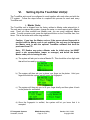
a) At the main screen, press the ‘SEL button to highlight the “CONFIG” option
and press the ‘Enter’ Button. In the System Config screen, press the Page
button to turn to the next page.
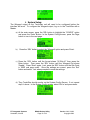
b)
Press the ‘SEL’ button to select the ‘Wiegand’ option and press ‘Enter’.
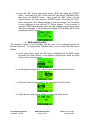
c) Press the ‘SEL’ button until the format shows ’26 Bits-V1’ then press the
Enter button. Then press the ‘SEL’ button until the Wiegand Out shows
‘Enable’. Press ‘Enter’ again. Last, press the ‘SEL’ button until the Site Code
is ‘0000’ and press enter. Once the settings are correct, press the ‘Exit’
button and select ‘Yes’ when prompted to save the settings.
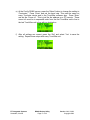
d) They TouchStar should now be on the System Config Screen. If not, repeat
step ‘a’ above. In the System Config screen, select ‘Ext.In’ and press enter.
PTI Integrated Systems
Scottsdale, Arizona
RX900 Backup Utility
Page 15 of 23
Version 1.10 1/10/02
Copyright 2003