1
IX.
Troubleshooting:
Occasionally, you may run into situations where the RX900 Utility is not functioning
correctly. Try these troubleshooting steps. If you are still having problems after trying
these steps, contact PTI technical support at (480) 941-1513 or by email at
[email protected].
A. TouchStar doesn’t communicate with PTI:
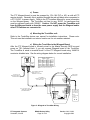
1. Verify all wiring connections.
2. Verify all settings in each TouchStar and in the TouchStar
software (Wiegand input, set it to 26 Bits-V1, set the site code to
0000, set the Wiegand ACK, Timeout 2.0, Baud Rate, and Comm
ID).
3. Have a knowledgeable technician troubleshoot the system.
B. TouchStar units don’t communicate:
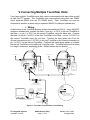
1. Verify all wiring connections.
2. Verify all settings in each TouchStar and in the TouchStar
software (Wiegand input, set it to 26 Bits-V1, set the site code to
0000, set the Wiegand ACK, Timeout 2.0, Baud Rate, and Comm
ID).
3. Have a knowledgeable technician troubleshoot the system.
C. TouchStar acknowledges client but gate or door
doesn’t open:
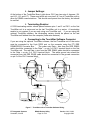
1. Verify all wiring connections.
2. Verify that the client’s code is not 0001 – 0010.
3. Verify that client is setup in both databases.
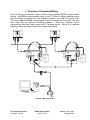
4. Verify that PTI system and TouchStar system are communicating.
PTI Integrated Systems
Scottsdale, Arizona
RX900 Backup Utility
Page 21 of 23
Version 1.10 1/10/02
Copyright 2003