1
Medfusion 3500
MEDEX
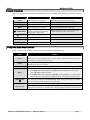
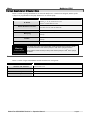
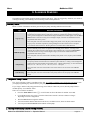
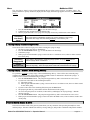
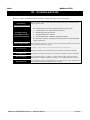
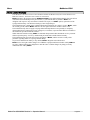
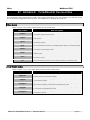
Alarm Message
Priority
Battery Communication
Timeout
Low
The internal battery is not working. The pump may be used on AC power
on a conditional basis. As soon as possible, remove pump from service for
repair by a trained biomedical service technician.
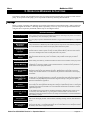
Battery Not Charging
Low
The internal battery is not charging. The pump may be used on AC power
on a conditional basis. As soon as possible, remove pump from service for
repair by a trained biomedical service technician.
Battery Not Working
Medium
The internal battery is not working. The pump may be used on AC power
on a conditional basis. As soon as possible, remove pump from service for
repair by a trained biomedical service technician.
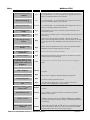
Calculated Rate Out of
Range
High
The calculated rate is not valid. Verify that all infusion parameters have
been entered correctly.
Check Clutch / Plunger
Lever
High
The syringe is not loaded correctly. Check the plunger lever and ensure it is
all the way up.
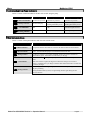
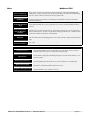
Check Syringe Flange
Sensor
High
Sensor is active when syringe is not loaded. Check the syringe flange
holder. Ensure the flange holder pulls back to the side of the case. If holder
does not operate correctly, immediately remove the pump from service for
repair.
Check Syringe Plunger
Sensor
High
Sensor is active when syringe is not loaded. Check the syringe plunger
holders. Ensure the holders move freely. If they do not operate correctly,
immediately remove the pump from service for repair.
Completing System
Initialization
Limit
Allow pump startup to complete self-testing.
Infusion Complete
High
Either begin a new infusion, return to the SELECT THE MODE screen, where
no alarms sound or turn off the pump.
Low Battery (Each 1% drop
in capacity following initial
signal if power cord is not
plugged in)
Limit
Plug in the power cord and run pump on AC mains while recharging the
battery.
Low Battery (Initial Signal)
Medium
Plug in power cord and run pump on AC mains while recharging the battery
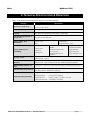
KVO in Progress
Medium
Advisory message that volume limit has been reached and KVO infusion is
in progress.
Invalid Rate for Syringe Size
High
Advisory message in custom dilution program. Consult syringe flow
delivery tables in appendix to determine appropriate syringe size.
Invalid Syringe Size
High
Syringe size not recognized for the manufacturer selected. Review syringe
sizes in the technical specifications section.
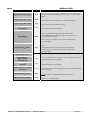
Occlusion − Check Infusion
Line
High
Check infusion line for blockage. Clear or remedy any discovered
occlusion. Press the Start button to begin infusion.
Pressure Increasing − Check
Infusion Line
Medium
Check infusion line for blockage. Clear or remedy any discovered
occlusion.
Outside Range Limit
Medium
The entered rate is outside of the library limits. Press Alarm Silence button
“” to continue. You may then chose to override the range limit or
change the value entered.
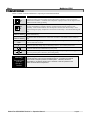
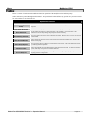
Limit
Keypad has been locked to prevent changes during infusion. The alarm
initiated by pressing any button except Power or Unlock. Press Unlock if
you need to make changes to delivery settings. Or press Power button twice
to end delivery.
Pump is Locked
Restricted Flow – Bolus Rate
Reduced
Medium
Remedy
If the bolus rate is high enough to trigger an occlusion alarm, the 3500
software will reduce the bolus rate until the bolus is successfully delivered.
With each rate reduction, this process repeats. Once silenced, the audible
alarm tone will not reactivate, even if the process repeats.
Medex Part # G6000608 Revision 3 – Operation Manual
Page 15