1
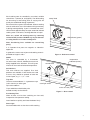
Each cooking zone is controlled by a marked, variable
control from 1 (lowest) to 10 (highest). The ideal setting
for simmering or fast boiling pans of varying size will
quickly be established through experience.
control knob
Each control has a green LED indicator. When a cooking
zone is switched on, the LED indicator will light and stay
lit during heating/cooking. If pan is removed from zone,
LED will flash approximately once per second to indicate
cooking zone is still active, awaiting detection of a pan.
After use, switch off cooking zones by returning
control to OFF position. DO NOT rely on pan detector
or safety features to isolate cooking zone.
LED indicator (green)
Note: Positioning lines available for centralising
pot(s).
It is important that pots are magnetic or inductionapproved.
A guide to the correct use of pans and cooking zones is
provided on Pages 4 and 5.
Figure 2 - Hob zone control
OVEN
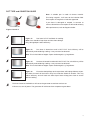
temperature
indicator (amber)
The oven is controlled by a thermostat.
An amber neon, when lit, indicates that current is
being supplied to the elements. This will go out
when oven has reached selected temperature.
control knob
Grid Shelves
Two oven shelves are supplied. Five shelf
positions are available. If two shelves are used
at once, they should be spaced at least two
runners apart, e.g. 1 – 3, 3 – 5 etc.
Tray Size
The oven accommodates 1 x 1 gastronorm trays
(530 x 325mm) or other types
up to 530 x 500mm.
oven light switch
Trays and dishes should always be
located centrally on the shelves.
mains on neon (red)
Figure 3 - Oven control
Pre-Heating Time
Allow at least 45 mins from switching on from cold,
irrespective of temperature setting.
Insert food items quickly and close the doors firmly.
Oven Light
Push and hold switch to view items while cooking.
3