1
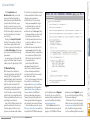
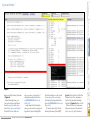
JavaFX-on-Android Features The JavaFX runtime on Android is based on the code in the OpenJFX source repository, and it supports most of the features of the corresponding JavaFX release for desktop platforms. For example, dalviksdk-8u40 releases are based on the same codebase as JavaFX 8u40 for desktop platforms. At this moment, the media framework is not supported. More features of JavaFX have been added to the Android port. For example: ■■ JavaFX on Android now supports JavaFX 3D. ■■ New components that are introduced in JavaFX 8 have been added, including the convenient DatePicker control. ■■ You can use FXML to build your Scene. Although using only standardized Java code is best, sometimes you can benefit from using Android-specific code. Apart from the standard Java classes, Android APIs provide a rich framework that allows developers to integrate device-specific functionality such as the location providers (including GPS), a near field communication (NFC) reader, and so on. Including Android APIs breaks portability, so use a modular approach in your FXActivity activity = FXActivity.getInstance(); As an example, you can get the Android NFC adapter by using the code shown in Listing 5. We’ve seen how you can use Android code in a JavaFX application. In some cases, you want to do the opposite: You have an Android application, and you want to use JavaFX components inside your Android application. While this adds more requirements for the integration of user interfaces, it is technically possible. The samples repository, available here, contains the Kokos project, which is an example of doing this. This example was created with the Android Studio IDE, and it starts ORACLE.COM/JAVAMAGAZINE /////////////////////////////////////////// MARCH/APRIL 2015 android.content.Context ctx = FXActivity.getInstance(); android.nfc.NfcAdapter nfcAdapter = NfcAdapter.getDefaultAdapter(ctx); Download all listings in this issue as text with a regular Android application. By using the Android Studio interface, you created a new <code>fragment<code> as a subclass of javafxports.android .FXFragment. The FXFragment class is a subclass of the Android Fragment class, and it allows you to run a JavaFX application inside its view. In the Kokos example, the javafxports.org .kokos.MyFxApp class is a JavaFX application that is assigned to the created fragment, as shown in Listing 6. Note that the possibility of using JavaFX application code inside Android fragments is still under early development. Start with a JavaFX application whenever possible, rather than starting with an Android application and adding a JavaFX application to it. Conclusion JavaFX became mature right on time for being part of the mobile revolution. Native applications on mobile devices are becoming an interesting area of development. The porting efforts for providing JavaFX on mobile devices are a Java community initiative, and they still require lots of work. To get involved in the porting efforts, send an e-mail to [email protected]. The port of JavaFX to Android is a continuous effort. The build process has been simplified since this article was written, and you can now build iOS applications leveraging the same code and tools. Read more about this effort here. We wrote a Gradle plugin that runs your existing JavaFX code on desktop, Android, and iOS devices. Using the new javafxmobile plugin is very simple; it’s described here. </article> COMMUNITY application, where the Androidspecific parts are implemented in the android subproject. To access the Android APIs, a hook into the Android system (which is offered in the JavaFXPorts libraries) is required. Your application is started automatically by an instance of javafxports.android.FXActivity, a regular Android Activity that extends the Android Context class. You can access this Activity, and consequently all functionality that can be reached through an Activity, by calling the following: JAVA IN ACTION to the Play Store, you have to enter gradle android:assembleRelease. LISTING 6 JAVA TECH LISTING 5 ABOUT US //rich client / blog LEARN MORE •JavaFXPorts website •JavaFXPorts sample applications 68