1
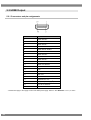
Portable Video Signal Generator
VG-882-A
Instruction Manual
Ver.1.00
Portable Video Signal Generator
VG-882-A
Instruction Manual
2011.5
Ver.1.00
ASTRODESIGN,Inc
Contents
Introduction............................................................................................................................................................... vii
Safety precautions.................................................................................................................................................... vii
Contents of package.................................................................................................................................................. x
Chapter 1 Introducing the VG-882-A........................................................................................................................ 1
1.1 Overview.............................................................................................................................................................. 1
1.2 Features .............................................................................................................................................................. 1
1.3 Specifications....................................................................................................................................................... 2
1.3.1 General specifications................................................................................................................................ 2
1.3.2 Common specifications.............................................................................................................................. 2
1.3.3 HDMI output............................................................................................................................................... 2
1.3.4 Analog output ............................................................................................................................................. 3
1.3.5 External control .......................................................................................................................................... 3
1.4 Names of keys and connectors and their functions ............................................................................................. 4
1.4.1 Front panel of the VG-882-A ...................................................................................................................... 4
1.4.2 RB-1870, RB-1871 (optional accessories)................................................................................................. 4
1.4.3 Names of operation keys and their applications ........................................................................................ 5
1.4.4 Rear panel of the VG-882-A (connectors and communication port)........................................................... 7
1.4.5 Names of connectors and their outputs and applications........................................................................... 7
Chapter 2 Basic Operations (Executing and Saving Programs)............................................................................... 9
2.1 Operating the main unit ....................................................................................................................................... 9
2.2 Executing sample programs ................................................................................................................................ 9
2.2.1 Settings required for displays..................................................................................................................... 9
2.2.2 Program data structure ............................................................................................................................ 10
2.2.3 Selecting the timing data...........................................................................................................................11
2.2.4 Selecting the pattern data .........................................................................................................................11
2.2.5 Selecting the actions................................................................................................................................ 15
2.3 Saving the program data ................................................................................................................................... 18
2.4 Changing program names ................................................................................................................................. 19
2.5 Group function ................................................................................................................................................... 20
2.5.1 Executing groups ..................................................................................................................................... 20
2.5.2 Creating and Saving Groups.................................................................................................................... 21
2.6 Automatic program execution ............................................................................................................................ 23
2.7 Displays appearing on the front fluorescent display tube .................................................................................. 25
2.8 Display of interface output status....................................................................................................................... 26
Chapter 3 Selecting and Editing Timing Data......................................................................................................... 27
3.1 Horizontal timing data editing ............................................................................................................................ 27
3.1.1 Horizontal timing data .............................................................................................................................. 27
i
3.1.2 Restrictions on the horizontal timing parameters ..................................................................................... 27
3.1.3 Horizontal timing data setting procedure ................................................................................................. 28
3.2 Vertical timing data editing................................................................................................................................. 30
3.2.1 Vertical timing data .................................................................................................................................. 30
3.2.2 Restrictions on the vertical timing parameters ......................................................................................... 30
3.2.3 Vertical timing data setting procedure...................................................................................................... 32
3.2.4 Scanning modes ...................................................................................................................................... 33
3.2.5 TV modes ................................................................................................................................................ 33
3.2.6 Serration and EQP................................................................................................................................... 34
3.2.7 EQP-Fp and EQP-Bp............................................................................................................................... 35
Chapter 4 Selecting and Editing Pattern Data ....................................................................................................... 39
4.1 Color bar patterns.............................................................................................................................................. 39
4.1.1 Types of color bar patterns ...................................................................................................................... 39
4.1.2 Customizing color bar patterns ................................................................................................................ 40
4.2 Gray scale patterns ........................................................................................................................................... 42
4.2.1 Types of gray scale patterns .................................................................................................................... 42
4.2.2 Customizing gray scale patterns.............................................................................................................. 43
4.3 Ramp patterns ................................................................................................................................................... 45
4.3.1 Types of ramp patterns ............................................................................................................................ 45
4.3.2 Ramp pattern type settings and customizing ........................................................................................... 46
4.4 Sweep patterns ................................................................................................................................................. 48
4.4.1 Types of sweep patterns .......................................................................................................................... 48
4.4.2 Sweep pattern selection .......................................................................................................................... 49
4.5 Monoscope patterns .......................................................................................................................................... 50
4.5.1 Types of monoscope patterns.................................................................................................................. 50
4.5.2 Selecting the monoscope pattern ............................................................................................................ 50
4.6 Raster patterns .................................................................................................................................................. 52
4.6.1 Types of raster patterns ........................................................................................................................... 52
4.6.2 Raster pattern type settings and customizing .......................................................................................... 52
4.7 Aspect ratio patterns.......................................................................................................................................... 54
4.7.1 Types of aspect ratio patterns.................................................................................................................. 54
4.7.2 Aspect ratio pattern type settings and customizing .................................................................................. 55
4.8 Checkerboard patterns ...................................................................................................................................... 57
4.8.1 Types of checkerboard patterns............................................................................................................... 57
4.8.2 Checkerboard pattern customizing .......................................................................................................... 58
4.9 Image/OPT ........................................................................................................................................................ 61
4.9.1 Types of image/OPT patterns .................................................................................................................. 61
4.9.2 Optional and image pattern setting .......................................................................................................... 62
4.9.3 9-marker (OPT No. 76) pattern setting..................................................................................................... 63
ii
Contents
4.9.4 3D pattern (OPT No. 101) setting ............................................................................................................ 65
4.10 □× ABC Pattern ............................................................................................................................................ 72
4.10.1 Color settings ......................................................................................................................................... 73
4.10.2 Character patterns ................................................................................................................................. 74
4.10.3 Crosshatch patterns............................................................................................................................... 75
4.10.4 Dot patterns ........................................................................................................................................... 77
4.10.5 Circle patterns........................................................................................................................................ 78
4.10.6 Burst patterns......................................................................................................................................... 81
4.11 Window patterns .............................................................................................................................................. 83
4.11.1 Types of window patterns....................................................................................................................... 83
4.11.2 Window pattern settings ......................................................................................................................... 84
4.12 Cursor patterns ................................................................................................................................................ 87
4.12.1 Cursor settings....................................................................................................................................... 87
4.12.2 Cursor operations .................................................................................................................................. 90
4.13 Name/List patterns .......................................................................................................................................... 92
4.13.1 Name/List display................................................................................................................................... 92
4.13.2 Name list................................................................................................................................................ 94
4.13.3 HDCP list ............................................................................................................................................... 96
4.13.4 HDMI list ................................................................................................................................................ 99
4.13.5 EDID list............................................................................................................................................... 100
4.13.6 DDC/CI list ........................................................................................................................................... 103
4.13.7 CEC list................................................................................................................................................ 104
4.13.8 Timing data list ..................................................................................................................................... 105
4.13.9 Image pattern list ................................................................................................................................. 106
4.13.10 OPT-USER pattern list ....................................................................................................................... 106
4.13.11 ARC pattern list .................................................................................................................................. 106
4.14 Video inversion .............................................................................................................................................. 107
Chapter 5 Output Settings ................................................................................................................................... 108
5.1 Common settings............................................................................................................................................. 108
5.1.1 Setting the output interfaces to ON or OFF............................................................................................ 108
5.1.2 Setting the sync signals ON/OFF and setting the sync signal polarities ................................................ 109
5.1.3 Setting the aspect ratio ...........................................................................................................................111
5.1.4 Setting the output gradation (bit length) ..................................................................................................113
5.1.6 Setting the color difference coefficient ....................................................................................................115
5.1.7 Setting the analog video level .................................................................................................................116
5.1.8 Setting the digital video level...................................................................................................................117
5.1.9 Setting the audio level.............................................................................................................................119
5.2 HDMI Output.................................................................................................................................................... 120
5.2.1 Connectors and pin assignments........................................................................................................... 120
iii
5.2.2 HDMI setting procedure..........................................................................................................................121
5.2.3 Info Frame / Packet ................................................................................................................................124
5.2.4 CEC ........................................................................................................................................................142
5.2.5 HDCP (High-bandwidth Digital Content Protection)...............................................................................145
5.2.6 Multi-port HDCP/EDID/CEC Test ............................................................................................................150
5.2.7 EDID .......................................................................................................................................................151
5.2.8 DDC/CI ...................................................................................................................................................151
5.2.9 ARC (Audio Return Channel) ................................................................................................................152
5.3 Component output............................................................................................................................................155
5.3.1 Common component signal settings.......................................................................................................155
5.3.1 VGA (D-Sub) output................................................................................................................................157
5.3.2 YPbPr output ..........................................................................................................................................158
5.3.3 D5 output ................................................................................................................................................158
5.4 Composite output .............................................................................................................................................161
5.4.1 CVBS output ...........................................................................................................................................161
5.4.2 Y/C (S-terminal) output ...........................................................................................................................161
5.4.3 Filter settings ..........................................................................................................................................163
5.4.4 Functions superimposed over composite signals ...................................................................................163
5.5 SCART output ..................................................................................................................................................164
5.5.1 Connectors and pin assignments............................................................................................................164
5.5.2 SCART setting procedure .......................................................................................................................165
5.5.3 Filter settings ..........................................................................................................................................167
5.5.4 Functions superimposed over SCART output.........................................................................................167
5.5.5 Fast blanking signal ................................................................................................................................167
5.5.6 Audio settings .........................................................................................................................................167
5.6 Analog audio.....................................................................................................................................................168
5.6.1 Connectors and output signals ...............................................................................................................168
5.6.2 Analog audio ...........................................................................................................................................168
5.7 Digital audio......................................................................................................................................................170
5.7.1 Digital audio ............................................................................................................................................170
Chapter 6 Functions Superimposed Over TV Signals ..........................................................................................174
6.1 Macrovision ......................................................................................................................................................175
6.1.1 Description and specifications ................................................................................................................175
6.1.2 Setting procedure ...................................................................................................................................176
6.2 Closed caption/V-Chip ......................................................................................................................................177
6.2.1 Description and specifications ................................................................................................................177
6.2.2 Closed caption settings...........................................................................................................................179
6.2.3 V-Chip settings........................................................................................................................................184
6.3 Teletext .............................................................................................................................................................189
iv
Contents
6.3.1 Description and specifications ............................................................................................................... 189
6.3.2 Setting procedure................................................................................................................................... 190
6.4 WSS ................................................................................................................................................................ 194
6.4.1 Description and specifications ............................................................................................................... 194
6.4.2 Setting procedure................................................................................................................................... 195
6.5 CGMS-A/ID-1 .................................................................................................................................................. 197
6.5.1 Description and specifications ............................................................................................................... 197
6.5.2 Setting procedure................................................................................................................................... 198
Chapter 7 Action Settings .................................................................................................................................... 200
7.1 Planes ............................................................................................................................................................. 200
7.2 Window actions ............................................................................................................................................... 201
7.2.1 Scrolling ................................................................................................................................................. 201
7.2.2 Flickering ............................................................................................................................................... 203
7.2.3 Level up/down actions ........................................................................................................................... 204
7.2.4 Level sequence action ........................................................................................................................... 205
7.3 Graphic plane scrolling actions........................................................................................................................ 207
7.4 Character plane scrolling actions..................................................................................................................... 209
7.5 Scroll sequence ................................................................................................................................................211
Chapter 8 VG-882-A System Settings.................................................................................................................. 214
8.1 CONFIG Settings............................................................................................................................................. 214
8.1.1 Beep setting ........................................................................................................................................... 214
8.1.2 Key lock setting...................................................................................................................................... 215
8.1.3 INC/DEC Continuity setting.................................................................................................................... 216
8.1.4 INC/DEC interval setting ........................................................................................................................ 216
8.1.5 Color depth setting................................................................................................................................. 217
8.1.6 SAMPLE RGB/YPbPr setting................................................................................................................. 217
8.1.7 DDC clock setting .................................................................................................................................. 217
8.1.8 Image - priority setting ........................................................................................................................... 218
8.1.9 Image position setting ............................................................................................................................ 219
8.1.10 Cursor coordinate setting..................................................................................................................... 220
8.1.11 Digital video level step setting .............................................................................................................. 221
8.1.12 RB-1870 CUSTOM Key 1/2 and RB-1871 CUSTOM Key 1/2.............................................................. 221
8.1.13 Operation mode at power-on ............................................................................................................... 222
8.1.14
AVMUTE operation mode settings................................................................................................. 223
Chapter 9 Other Functions................................................................................................................................... 224
9.1 Copying and erasing data................................................................................................................................ 224
9.1.1 Copying programs.................................................................................................................................. 224
9.1.2 Copying user characters ........................................................................................................................ 225
v
9.1.3 Copying user optional patterns ...............................................................................................................226
9.1.4 Copying images ......................................................................................................................................227
9.1.5 Copying groups.......................................................................................................................................227
9.1.6 Copying auto executions ........................................................................................................................228
9.1.7 Copying all data ......................................................................................................................................229
9.1.8 Erasing programs ...................................................................................................................................229
9.1.9 Erasing user characters..........................................................................................................................230
9.1.10 Erasing user optional patterns ..............................................................................................................231
9.1.11 Erasing images .....................................................................................................................................231
9.1.12 Erasing groups......................................................................................................................................232
9.1.13 Erasing auto executions .......................................................................................................................232
9.1.14 Erasing all data .....................................................................................................................................233
9.2 Short-cut keys ..................................................................................................................................................234
9.3 Information .......................................................................................................................................................236
9.4 Data initialization ..............................................................................................................................................237
9.4.1 Initializing the system settings ................................................................................................................237
9.4.2 Initializing the short-cut data ...................................................................................................................238
9.5 Internal memory formatting and data installation ..............................................................................................239
9.6 Adjustments......................................................................................................................................................242
9.6.1 Adjusting the video levels of the component output ................................................................................242
9.6.2 Adjusting the video levels of the composite output .................................................................................243
Chapter 10 Internal data........................................................................................................................................244
10.1 Program data ....................................................................................................................................................244
10.2 Optional pattern data ......................................................................................................................................288
10.3 User character pattern data............................................................................................................................291
10.4 Character pattern data....................................................................................................................................296
10.5 Tables of standard signals ..............................................................................................................................304
Chapter 11 Restrictions........................................................................................................................................310
11.1 Maximum Currency for DDC Power....................................................................................................................310
Chapter 12 LIST OF ERROR MESSAGES ..........................................................................................................312
12.1 Media-related error..........................................................................................................................................312
12.2 General error...................................................................................................................................................312
12.3 HDCP-related error .........................................................................................................................................315
12.4 User-generated optional pattern-related error .................................................................................................315
vi
Before Use
Introduction
Thank you for purchasing the VG-882-A Portable Video Signal Generator.
This manual contains operating instructions, as well as precautions and other information. Note that incorrect
handling may lead to accidents, so be sure to read this manual.
After reading the manual, keep it handy for future reference.
Safety precautions
WARNING
General precautions
■ Do not subject the unit to strong impact. Never throw or drop the unit. This poses
a risk of malfunction, rupture of the unit, overheating, or fire.
■ Do not use the unit where it may be exposed to explosions or fire.
■ If you are using the unit outdoors and hear thunder or see lightning, immediately
turn off the unit, disconnect the power cord, and bring it to a safe place.
Power cord
■ Hold the cord by the plug when disconnecting it.
■ To avoid a risk of fire, do not bend the power cord by force or bundle it together.
■ To avoid damaging the power cord and risking fire or electric shock, do not put
heavy objects on the cord.
Foreign substances
■ Avoid spilling liquid in the unit, and do not let combustible substances or metal
objects drop inside. Using the unit in this condition may cause fire, electric shock,
or malfunction.
vii
CAUTION
General precautions
■ When connecting the unit to a display, use the supplied FG cable to ensure that
the display and frame ground are shared. Using the unit without a shared frame
ground may cause the unit to malfunction. Be especially careful when connecting
the unit to a display under development.
FG
AC IN (100-240V) T5A
U.S Patent Nos.4,631,603;4,577,216;
4,819,098;4,907,093;and 6,516,132.
SCART
CVBS
Y/C
ANALOG AUDIO OUT
R
L
FG
D5
Y
PB
PR
HDMI 1
HDMI 2
HDMI 3
HDMI 4
VGA
REMOTE
USB 2
USB 1
MODEL
SER.NO.
ASTRODESIGN,Inc.
MADE IN JAPAN
■ When disconnecting the VG-882-A from a display, first remove the connection
cables and then remove the FG cable.
■ Be sure to use the Power switch on the front panel to turn the power on and off.
Powering the unit by connecting and disconnecting the power cable (with the
Power switch in the ON position) may damage the internal circuitry.
■ Wait 10 to 15 minutes after powering the unit to ensure that the unit operates
stably before operating.
■ Opening of the top panel of the unit is prohibited.
■ Never remove a USB memory device during memory access. This may cause the
device to malfunction.
■ Note that using a USB memory device other than that included with the unit may
prevent the unit from operating properly.
■ When using the USB memory device while connected to the USB2 port, be careful
not to have the device stolen or damaged.
■ Avoid using excessive force when inserting or removing HDMI cables, as this may
damage the cable or connector core wire.
Impact
■ This is a precision instrument and, as such, subjecting it to impact may cause it to
malfunction. Take special care when moving the unit.
■ Do not drop the unit.
viii
Before Use
Installation
■ Install in a safe location with the unit oriented horizontally. Installing the unit with
a vertical orientation may cause overheating and a rise in internal temperature that
may result in malfunction.
In case of abnormality or problems
■ If the unit does not operate properly, disconnect the power cable and contact your
sales representative or the Astrodesign Sales Department.
ix
Contents of package
This unit comes with the following items.
Be sure to use the appropriate accessories, as use of other items may result in malfunction.
■ Standard package
● VG-882-A main unit
● VG-882-A user’s manual CD (this PDF): 1
● SP-8870 software installation CD (for Windows): 1
● SP-8870 user’s manual: PDF version (included in SP-8870 installation CD)
● USB memory device (operations confirmed)
● Power cable: 1*1
● FG cable (1.5 m): 1*1
*1: Exclusively for use with the unit.
■ Optional accessories
● RB-1870*2:
Remote control box for program editing
● RB-1871*2:
Simplified remote control box. Enables program execution but not editing.
*2: This is the same item as the remote control box used for VG-870/871/870A/871A/870B/871B.
These accessories cannot be used with models other than those listed above, including the VG-882-A.
x
1
Introducing the VG-882-A
1.1 Overview
The VG-882-A is a portable video signal generator that can handle various types of output signals.
It can be used to perform all types of testing of interfaces built into digital TVs.
1.2 Features
■ Four HDMI outputs
The HDMI connector supports four channels. Testing can be performed for four outputs at the same time.
■ Various analog output types
Supports various analog interfaces (VGA, D-terminal, YPbPr, CVBS, Y/C, SCART).
■ Supports HDMI Version 1.4a additional functions (Option)
Testing of the Audio Return Channel (ARC) function added in HDMI Version 1.4a can be performed and 3D
patterns (Frame Packing) can be output.
* Audio cannot be output, so audio received by ARC line cannot be output.
* HDMI Ethernet Channel (HEC) is not supported.
■ Windows-compatible editing and registration software (SP-8870) is included as a
standard feature.
Program data in a USB-connected computer can be edited and registered, and signal output can be controlled.
* The USB driver supports Windows 2000, XP, and Vista.
■ Built-in sample data for each standard
One thousand types of timing and patterns are registered as built-in sample data.
These can be categorized by standard and usage, and the necessary data can be easily selected.
■ Create and register user programs
User-created program data can be registered to the internal memory of the VG main unit.
In addition, optional patterns combined with sample patterns and 256-color natural images can be registered.
1
1.3 Specifications
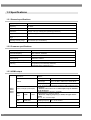
1.3.1 General specifications
Supply voltage
AC 100 to 240V
Frequency
50 / 60Hz
Power consumption
52 VA MAX
Dimensions
370 (W) × 66 (H) × 300 (D) mm (excluding protrusions)
Weight
Approx. 3.5 kg
Operating temperature
range
5 to 40°C
Operating humidity range
30 to 80%RH (no condensation)
1.3.2 Common specifications
Dot clock frequency
0.100 to 165.000 MHz
Horizontal frequency
Max. 300 kHz, 8192 dots
Vertical scan lines
Max. 4096
Video memory
4096 dots × 2560 H
Cutting pulse (Serration)
OFF/0.5H/1H/EXOR
Scanning
Progressive (non-interlaced), interlaced,
segmented frame, interlaced (sync)
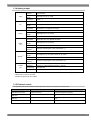
1.3.3 HDMI output
Connectors
HDMI×4
DotCLK
HDMI1
HDMI2
HDMI3
HDMI4
2
Colors, bit length (Color Depth)
Audio
output
HDMI
Audio
input
HDMI ARC
L-PCM
8-bit output
25 to 165 MHz (TMDS CLK: 165 MHz)
10-bit output
25 to 165 MHz (TMDS CLK: 206.25 MHz)
12-bit output
25 to 150 MHz (TMDS CLK: 225 MHz)
8-, 10-, or 12-bit output (supports formats for RGB, YCbCr444, and
YCbCr422)
* However, when set to 10- or 12-bit output, only the indicator
can be displayed.
Sampling frequency: 32, 44.1, or 48 kHz
Output frequency: 100 Hz to 20 kHz
* When the sampling frequency is 32 kHz, the upper limit is
14 kHz.
Bits: 16-, 20-, or 24-bit output
Sampling frequency
Fs = 32 to 192 kHz
Copy protection
HDCP Ver1.2
Additional features
Version 1.4a (DDC2B), xvYCC, CEC
Chapter 1 Introducing the VG-882-A
1.3.4 Analog output
VGA
D5
YPbPr
DotCLK
5 to 165 MHz
Colors, bit
length
8-bit output for R, G, and B
Connector
Dsub × 1
Resolution
HDTV, SDTV
Colors, bit
length
8-bit output for Y, Pb, and Pr
Connector
D-Terminal × 1 (supports D5 output)
Resolution
HDTV, SDTV
Colors, bit
length
8-bit output for Y, Pb, and Pr
Connector
RCA × 3
*1
CVBS
Y/C
SCART
*3
AUDIO
L/R
Resolution
NTSC-M/J/443, PAL (B/D/G/H/I) /M/Nc
Colors, bit
length
8-bit output for Y, Pb, and Pr
Connector
CVBS (RCA) ×1, Y/C (S-VIDEO) ×1
Additional
features*1
Teletext, ClosedCaption, Vchip, Macrovision (*2)
Resolution*1
NTSC-M/J/443, PAL (B/D/G/H/I) /M/Nc
Colors, bit
length
8-bit output for Y, Pb, and Pr and for R, G, and B
Connector
SCART × 1
Additional
features*1
Output
frequency
Teletext, ClosedCaption, Vchip, Macrovision (*2)
Output level
0 to 2000 mV
Connector
RCA × 2
100 Hz to 20 kHz (sampling frequency: 44.1 or 48 kHz)
100 Hz to 14 kHz (sampling frequency: 32 kHz)
*1 Some features may not be supported in the future due to optional TV features and TV timing signals.
*2 Macrovision is sold as a license.
*3 SCART output is sold as an option.
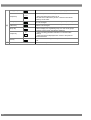
1.3.5 External control
The operation tools of the VG-882-And their operation restrictions are listed in the table below.
Control and editing
Operation restrictions
Notes
VG-882-A front panel
Program read-only
Executes registered programs.
RB-1870
All functions can be operated.
RB-1871
Program read-only
SP-8870
All functions can be operated.
Remote control for VG-870 Series and VG-882A
Simplified remote control for use with production
line
For operation and editing with a computer
3
1.4 Names of keys and connectors and their functions
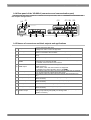
1.4.1 Front panel of the VG-882-A
This is the view of the front panel. For descriptions of the keys, refer to “1.4.3 Names of operation keys and their
applications”.
(B)
(D) (E) (G)
ASTRO
INC
DEC
DIGITAL VIDEO GENERATOR VG-882
SET
POWER
1.4.2 RB-1870, RB-1871 (optional accessories)
These remote boxes are used to edit and execute programs. For descriptions of the keys, refer to “1.4.3 Names of
operation keys and their applications”.
(B)
(E)
REMOTE BOX RB -1870
COL OR
RASTE R
WI NDOW
R/P
R
GRAY
ASPE CT
CURSOR
G /Y
RAMP
SWE E P
CHECKE R
IMAGE/ OPT
NAME / L IST
ACTION
L E VE L
INV
SYNC
B/ P
B
MONOSCOPE
□X
ABC
MENU
7 /D
8 /E
9 /F
CATE GORY
SAMPL E
TI M
SHORT CUT
4/ A
5 /B
6/ C
GROUP
E SC
SE T
SAVE
1
2
3
DE TAI L
SHIF T
0 / STATUS
(A)
INC
PAT
DE C
(D)
(C)
RB-1870
(E)
(A)
SAM PL E
LEVEL
GRP
7
8
9
TIM
4
5
6
PAT
1
2
3
SET
0
Ⅰ
Ⅱ
R
G
B
INV
INC
(D)
DEC
RB-1871
* The RB-1871 has operation limitations. The following operations can be performed.
4
Chapter 1 Introducing the VG-882-A
● Program selection and execution
● Grouped program execution. (Group editing cannot be performed.)
● ON/OFF of R/G/B/INV keys
● ON/OFF of CUSTOM (I/II) keys (by default, I: HDCP, II: MUTE)
● Level adjustment (digital video level only)
* For detailed descriptions of the keys, refer to “1.4.3 Names of operation keys and their applications”.
1.4.3 Names of operation keys and their applications
Pattern keys
Action key
Level key
RGB channel on/off
INV key
(A) SYNC key
Detail key
ABC
COLOR
etc.
ACTION
Used to set the scroll, flicker, and other functions.
Used to set the digital video levels, analog video levels,
and audio levels.
LEVEL
G/Y
Used to set RGB on or off.
etc.
INV
Used to invert the black and white of the video levels.
SYNC
Used to set the sync on or off.
Used to perform the detailed settings of the pattern data,
timing data, and other data.
Used to set HDCP on or off.
(HDCP is a system for protecting content used by HDMI
and DVI.)
Used to set the audio on or off (muted).
DETAIL
HDCP key (custom
key)
Ⅰ.HDCP
MUTE key (custom
key)
Ⅱ.MUTE
* When setting HDMI AV-MUTE
This key operates as the HDMI AV-MUTE On/Off
setting.
(Refer to “8.1.12 RB-1870 CUSTOM Key 1/2 and RB-1871
CUSTOM Key ”.)
The menu screens are used to set and check the items
displayed on the fluorescent display tube.
This is turned clockwise or counterclockwise to select the
setting items or parameters, change the level settings, etc.
(It provides the same control as the INC/DEC keys.)
Menu operation
(B) screens
(C) Jog dial
Number keys
INC/DEC
(D)
Menu
Shortcut key
Save key
Shift key
0/STATUS
9/F
to
INC
MENU
SHORT CUT
SAVE
SHIFT
Used to display and edit the patterns.
DEC
Used to input numerical values, select the menus, etc.
Used to select the setting items or parameters, change
the level settings, change the program numbers, etc.
(It provides the same control as the jog dial.)
Used to display the menu screens.
When it is pressed while a menu screen is already
displayed, the initial screen is restored.
* When the menu key indicator is lighted (selected)
It is no longer possible to use any of the other keys.
Used to move to a user-registered menu screen using
minimal key operations.
Used to save the data which has been set.
Used to input letters of the alphabet with the number
keys.
5
Category key
CATEGORY
Used to select the internal sample data by category.
Used to output the internal sample data.
Sample key
Timing key
(E) Pattern key
Group key
Escape key
Set key
(G) Power switch
6
SAMPLE
TIM
PAT
GROUP
ESC
SET
* When the sample key indicator is off
The data in the USB memory device or stored in the internal
memory can be used.
Used to display changeable lists when only the output timing data
is to be changed.
Used to display changeable lists when only the output pattern
data is to be changed.
Used to display user-registered groups, etc. and create groups.
This key can be used in the following situations.
• When canceling parameter selections or numerical value
settings
• When returning the displayed menu screen to the previous
hierarchical level
Used to enter the setting items and parameters which have been
set.
Used to turn the power of the VG-882-A on and off.
Chapter 1 Introducing the VG-882-A
1.4.4 Rear panel of the VG-882-A (connectors and communication port)
This is the back view of the VG-882-A. For details of the output terminals, refer to “1.4.5 Names of connectors and
their outputs and applications”.
(H)
(P) (Q) (R)
(S)
(I)
AC IN (100-240V) T5A
U.S Patent Nos.4,631,603;4,577,216;
4,819,098;4,907,093;and 6,516,132.
D5
Y
PB
SCART
PR
HDMI 1
HDMI 2
HDMI 3
CVBS
Y/C
ANALOG AUDIO OUT
R
L
HDMI 4
VGA
REMOTE
USB 2
USB 1
MODEL
SER.NO.
ASTRODESIGN,Inc.
MADE IN JAPAN
(N)
(O)
(M)
(L)
(J)
(K)
1.4.5 Names of connectors and their outputs and applications
(H) AC power socket
(I)
Frame ground
(J)
Remote connector
USB 1
(K)
Connect the power cable here.
Voltage from 100 V to 240 V is supported.
Connect this frame ground terminal to the frame ground terminal of the unit
which is connected to the VG-882-A.
This is used to connect the dedicated remote control box (RB-1870 or RB1871).
This is used to update the version of the USB memory device.
(P) CVBS output
This is used to control the VG-882-A by SP-8870 or other software by
connecting to a computer via USB.
For details, see the SP-8870 user’s manual.
This enables output of the same image on four systems at the same time.
(HDMI connector)
EDID, HDCP, CEC, and ARC functions are supported.
For details of the output terminals, refer to “5.2 HDMI”.
This enables output of analog component signals (RGB) and H/V separate
sync. (D-sub connector, shrink type D-sub 15-pin)
This enables output of analog component signals. (Can be output up to
D5.)
This enables output of YPbPr analog component signals.
(RCA connector)
This enables output of NTSC/PAL composite (VBS) signals.
(RCA connector)
(Q) Y/C output
This enables output of Y/C signals. (S-Terminal)
(R) Analog audio output
This enables output of analog audio (L/R).
(RCA connector)
This enables output of NTSC/PAL composite (VBS) signals, Y/C signals,
analog component signals (RGB), and analog audio.
(SCART connector)
(L)
USB 2
HDMI output
(M) VGA output
(N) D-Terminal output
(O) Component output
(S) SCART output
7
8
2
Basic Operations (Executing and
Saving Programs)
The VG-882-A edits and saves program data and config data using the RB-1870/SP-8870.
The key operations of the main unit can be used only to select and execute programs.
Therefore, the descriptions in “2.2 Executing sample programs” and thereafter are described using the operations
with the RB-1870.
For details on operating the SP-8870, refer to the accompanying SP-8870 user’s manual.
2.1 Operating the main unit
For the location of the front keys, refer to “1.4.1 Front panel of the VG-882-A”.
INC/DEC keys: Increment or decrement the program number.
SET key: Executes the selected program.
2.2 Executing sample programs
2.2.1 Settings required for displays
The timing data and pattern data must be set for the test patterns to be displayed from the generator.
The following items are set for these data.
In the case of this generator, the timing data and pattern data are collectively referred to as the “program data”.
Program data
Timing data
Pattern data
Video timing data setting
- Horizontal timing
- Vertical timing
V-SYNC
Pattern data setting
- Type, size, level, and other settings
Video
H-SYNC
Action settings
Output setting
- On or off for each interface
- Settings inherent to interface
-Scroll
-Flicker
-Level sweep
Audio output settings
- Sound source, level
- Frequency
- On or off of channels
9
2.2.2 Program data structure
The data output from the generator is managed using program data.
Program data is made up of pattern data, which is used to set data related to output images, and timing data, which
is used to set data related to other output timing and output conditions. The details of the pattern data and timing
data are as follows.
Block
Timing data
Pattern data
Overview
Program Name
Program name
Timing (TIM)
Timing
Output (TIM)
Output conditions
Audio (TIM)
Audio output
Pattern (PAT)
Pattern
Action (PAT)
Pattern action
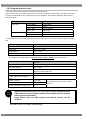
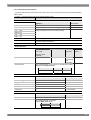
The generator comes with several types of program data, option patterns, and user character patterns as sample
data.
Data units
Timing data
1000 (1001 to 1999)
Pattern data
1000 (1001 to 1999)
Option patterns
200 (1 to 200)
User character patterns
16 (F0H to FFH)
The generator can register data to the internal memory (approx. 90 MB) and the USB memory.
Data units
Program data
1000 (1 to 1000)
User option patterns
200 (1 to 200)
Images (image data)
200 (1 to 200)
(Depends on image data size.)
User character patterns
Number of characters of program
name
16 (E0H to EFH)
20
Number of groups
99 (1 to 99)
Number of group data units
98 (1 to 98)
Number of characters of group name
20
CAU
TION
function”.)
When the USB memory device is connected, the data registered in the
USB memory becomes enabled and the data registered in the internal
memory becomes disabled.
Image data in both the USB memory and internal memory can be
enabled.*
* For details, refer to “8.1.8 Image - priority setting”.
10
(For details of groups, refer to “2.5 Group
Chapter 2 Basic Operations (Executing and Saving Programs)
2.2.3 Selecting the timing data
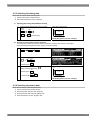
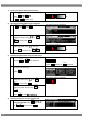
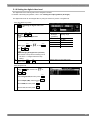
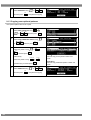
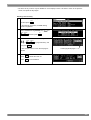
There are two ways to select the timing data.
1) Input the timing data numbers directly.
2) Select the timing data from the categories.
1) Inputting the timing data numbers directly
①
Input the timing data number (1001 to 1999)
using
SAMPLE
Video timing data output
V-SYNC
TIM
Video
0/STATUS
9/F
to
(number keys).
H-SYNC
The display patterns are not changed.
2) Selecting the timing data from the categories
The timing data of the internal sample data is classified by category such as EIA or VESA (PC).
Select the desired timing data from the category to which it belongs.
①
CATEGORY
②
Select the category using
SAMPLE
INC
TIM
DEC
or
SET
.
and then press
③
Video timing data output
V-SYNC
Select the timing data using
SET
Video
and then press
INC
or execute with
DEC
.
H-SYNC
The display patterns are not changed.
2.2.4 Selecting the pattern data
There are four ways to select the pattern data.
1) Input the pattern data numbers directly.
2) Select the pattern data from the categories.
3) Select the pattern data using the pattern keys.
4) Select the patterns for each program data.
11
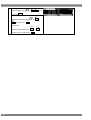
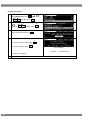
1)
Inputting the pattern data numbers directly
① Input the pattern data number (1001 to 1999)
SAMPLE
The pattern is displayed.
PAT
using
0/STATUS
to
2)
etc.
9/F
(number keys).
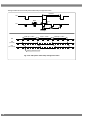
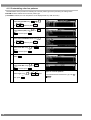
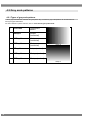
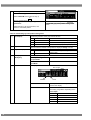
Selecting the pattern data from the categories
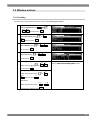
SAMPLE
PAT
① CATEGORY
②
INC
or
Select the category using
SET
DEC
.
and then press
③
The pattern is displayed.
Select the pattern using
and then
SET
DEC
INC
press
3)
The pattern category is displayed.
or execute with
Selecting the pattern data using the pattern keys
① Select the key corresponding to the pattern,
The pattern of the selected type is displayed.
ABC
COLOR
or
such as
etc.
.
, to be displayed.
COLOR
Lighted:
②
When setting details for the pattern or
changing the pattern type.
COLOR
selected; off:
DETAIL
.
Press
The selected pattern is displayed.
INC
③
Select the pattern using
or
SET
DEC
and then press
.
0/STATUS
Select the pattern directly using
to
9/F
.
4/A
Press
4)
to select
.
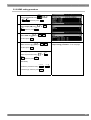
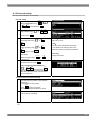
Selecting the patterns for each program data
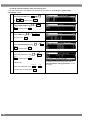
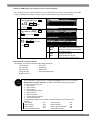
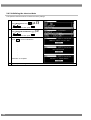
MENU
①
Select Program Edit using
INC
or
12
SET
DEC
, and then press
deselected
The pattern selection screen is displayed.
.
Chapter 2 Basic Operations (Executing and Saving Programs)
②
INC
Select Pattern (PAT) using
or
SET
DEC
, and then press
.
③
Select Pattern/RGB/INV Select using
INC
SET
DEC
or
.
, and then press
④
INC
DEC
or
Select the item using
SET
and then press
.
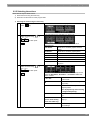
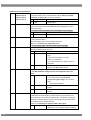
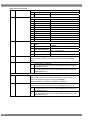
Selected or deselected is displayed.
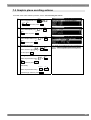
The selected pattern is indicated by a check mark.
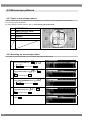
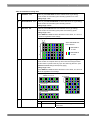
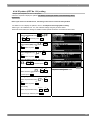
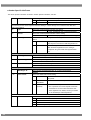
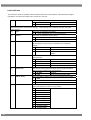
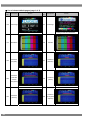
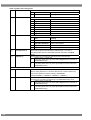
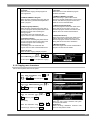
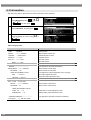
Color Bar
Check this to select the color bar
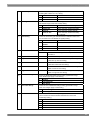
pattern.
Gray Scale
Check this to select the gray scale
pattern.
Ramp
Check this to select the ramp
pattern.
Sweep
Check this to select the sweep
(sine wave) pattern.
Monoscope
Check this to select the monoscope
pattern.
Raster
Check this to select the raster
pattern.
Aspect
Check this to select the pattern for
checking the aspect ratio.
Checker
Check this to select the
checkerboard pattern.
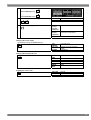
Image/OPT
Check this to select the bitmap
image, an optional pattern, or a
moving image.
Character
Check this to select the character
pattern.
Cross
Check this to select the crosshatch
Hatch
pattern.
Dot
□
Check this to select the dot pattern.
Check this to select the frame
pattern.
×
Check this to select the cross
pattern.
+
Check this to select the center
mark pattern.
Circle
Check this to select the circle
pattern.
Burst
Check this to select the burst
(continuous black and white)
pattern.
Window
Check this to select the window
pattern.
Cursor
Check this to select the cursor
pattern.
13
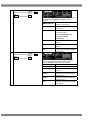
Name/List
Check this to select the name/list
function.
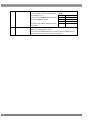
R/Pr
Check this to set the pattern R (red)
or Pr output on or off.
Normally this is checked.
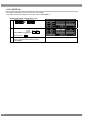
G/Y
Check this to set the pattern G
(green) or Y (luminance) output on
or off. Normally this is checked.
B/Pb
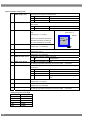
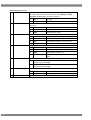
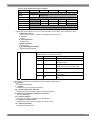
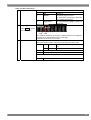
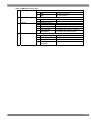
Check this to set the pattern B
(blue) or Pb output on or off.
Normally this is checked.
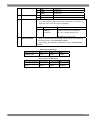
INV
Check this invert the black and
white of the video level.
(Cursor and Name/List are not
inverted.)
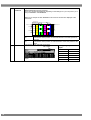
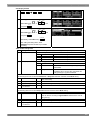
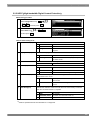
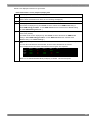
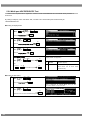
14
Chapter 2 Basic Operations (Executing and Saving Programs)
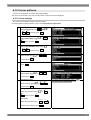
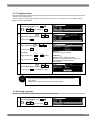
2.2.5 Selecting the actions
There are two ways to select actions.
1) Select the action using the action key.
2) Select and set the action for each program data.
1) Selecting the action using the action key
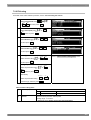
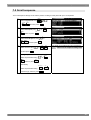
ACTION
①
Press
key.
②
The action selection screen is displayed.
The selected action is indicated by a check mark.
Select the action using
or
DEC
INC
and then press
SET
.
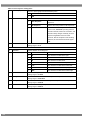
To select the window action, the window pattern must be
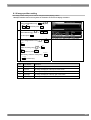
displayed first.
GC-SCROL
Check this to scroll the graphic character
pattern.
G-SCROLL
Check this to scroll the graphic pattern.
C-SCROLL
Check this to scroll the character pattern.
W-SCROLL
Check this to scroll the window.
W-FLICKR
Check this to flicker the window.
W-LEVEL
Check this to change the window level.
W-L.SEQ
Check this to execute the window level
sequence.
③
Select the action using
or
DEC
INC
and then press
SET
.
On this screen, the scroll direction and number of steps are set
when the GC-SCROL, G-SCROLL or C-SCROLL action has
been checked.
←,→,↑,↓
Select these to scroll in the directions
of the arrows.
||
Select this to stop the scrolling
temporarily.
RESET
Select this to return the pattern to its
original position.
(It is displayed only while scrolling
is stopped temporarily.)
STEP+1
Select this to increment the scroll step
by 1.
STEP-1
Select this to decrement the scroll
(Press while holding
step by 1.
down the SHIFT key.)
EDIT
Select this to perform the detailed
scroll settings.
15
INC
④
Select the action using
or
SET
DEC
.
and then press
On this screen, the scroll direction and number of steps
are set when the W-SCROLL action has been
checked.
←,→,↑,↓,
,
Select these to scroll in the
directions of the arrows.
||
Select this to stop the scrolling
temporarily.
RESET
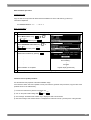
Select this to return the pattern to
its original position.
(It is displayed only while
scrolling is stopped
temporarily.)
STEP+1
Select this to increment the scroll
step by 1.
STEP-1
Select this to decrement the scroll
step by 1.
EDIT
Select this to perform the detailed
scroll settings
INC
⑤
or
Select the action using
SET
DEC
and then press
.
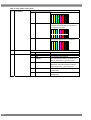
On this screen, the level increment/decrement and
direction as well as the number of steps are set
when the W-LEVEL action has been checked.
UP
Select this to increment the level.
DOWN
Select this to decrement the level.
STOP
Select this to stop the level
change.
STEP+1
Select this to increment the level
change step by 1.
STEP-1
Select this to decrement the level
change step by 1.
EDIT
Select this to perform the detailed
level settings.
16
Chapter 2 Basic Operations (Executing and Saving Programs)
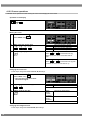
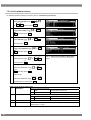
2) Selecting and setting the action for each program data
MENU
①
Select Program Edit using
INC
SET
DEC
or
.
, and then press
②
INC
or
Select Action (PAT) using
SET
DEC
, and then press
.
③
INC
or
Select the item using
DEC
One of the following actions is selected, and
the detailed settings are performed.
SET
and then press
.
・
・
・
・
Graphic Plane
Character Plane
Window
Scroll Sequence
For details on the setting procedure, refer to
“Action Settings”.
17
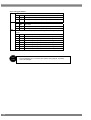
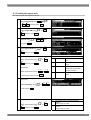
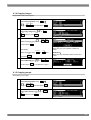
2.3 Saving the program data
Upon completion of program editing, save the data.
If the power is turned off without saving the data, the status before the changes were made will be restored.
* For details on editing the program names and pattern names of data to be saved, refer to “2.4 Changing
program names”.
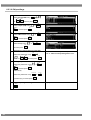
①
SAVE
②
INC
DEC
or
Select the item using
Media
SET
and then press
No.
.
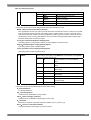
Program
Name
Pattern
Name
③
INC
Select
using
SET
DEC
, and then press
18
or
.
The program number is set here.
(0001-1000)
The internal memory or USB
memory (USB) is selected here.
Any name (consisting of up to 20
characters) can be allocated as the
program name.
Any name (consisting of up to 20
characters) can be allocated as the
pattern name.
The program data is saved.
Chapter 2 Basic Operations (Executing and Saving Programs)
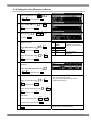
2.4 Changing program names
The name of a program or pattern can be changed and saved after the program is edited.
①
INC
DEC
or
Select Name using
,
SET
②
and then press
.
To move the cursor to the location of the
characters to be changed:
The cursor where the character of the
name is to be input moves.
INC
(when moving to the left)
DEC
(when moving to the right)
All characters are deleted.
To delete all characters:
R/Pr
The character at the cursor position is
deleted.
To delete one character:
G /Y
To switch between insert and overwrite:
B/Pb
This switches between inserting and
overwriting the characters.
This switches between inserting and
overwriting the characters.
The characters are input.
To input characters:
Select the characters using
, and enter
SET
them using
③
.
The name is changed.
To set the name:
Select OK using
, and then press
SET
.
19
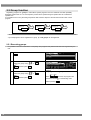
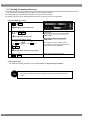
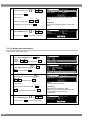
2.5 Group function
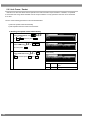
Registering programs as “groups” is useful when specific programs are to be combined and used repeatedly.
Examples include times on a TV set inspection process when specific timing and pattern data are combined for
repeated use.
It is possible to set not only the timing and pattern data execution sequence but also the execution time of each
program.
Group
Program-6
Program-15
Time
Program-10
Time
Time
* Up to 98 programs can be registered in a group. Up to 99 groups can be registered.
2.5.1 Executing groups
It is possible to execute combinations of frequently used programs and patterns that have been registered by the
user.
①
GROUP
②
INC
or
Select the groups using
SET
DEC
, and then press
.
③
INC
or
Select the groups using
SET
DEC
, and then press
.
Only the programs registered as groups can be
selected.
The programs in the group are executed.
INC
DEC
When
are used, the programs are
executed in ascending or descending order
SET
without pressing
20
.
Chapter 2 Basic Operations (Executing and Saving Programs)
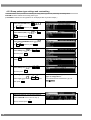
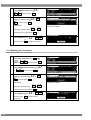
2.5.2 Creating and Saving Groups
Create frequently used programs and save the desired amount of program data as a group.
①
MENU
②
INC
Select Group Edit using
or
SET
DEC
.
and then press
③
INC
or
Select the items using
SET
DEC
.
and then press
④
Select the numbers (01 to 98) of the TIM
or PAT programs and AutoInterval using
SET
INC
No.
The number of the desired group is set
here. (01-99)
Name
Any name (consisting of up to 20
characters) can be allocated as the
group name.
Edit Mode
TIM/PAT:
The timing data and pattern data are
set separately.
Program:
The program number is designated
here.
Program
Depending on the Edit Mode setting,
the display screen in ④ below will
differ.
When TIM/PAT is selected as the Edit Mode
setting
DEC
or
, and
SET
then press
.
When Program is selected as the Edit Mode
setting
The programs set in the group are
executed in sequence from 01 up to 98.
・If 0 is set for both TIM and PAT
・If 0 is set for Program
In both of the above cases, 0 is
recognized as the end of the group.
TIM/PAT
The program number is set here.
TIM
The timing data number is set here.
PAT
The pattern data number is set here.
Auto
The execution times during Auto
-Interval
Display are set here (0 to 999
seconds).
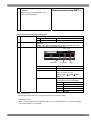
⑤
This completes the setting operations.
The group data is now saved.
SAVE
⑥
INC
or
Select the items using
SET
DEC
and then press
.
No.
Media
The group number is set here (01 to
99).
Internal: The group data is saved in the
internal memory.
USB: The group data is saved in the
memory connected to the USB1 port.
21
Name
Any name (consisting of up to 20
characters) can be allocated as the
name.
⑦
using
Select
INC
DEC
or
SET
, and then press
.
If previous data exists, the user is
prompted to confirm whether to
overwrite the existing data.
22
This completes the saving of the group data.
Chapter 2 Basic Operations (Executing and Saving Programs)
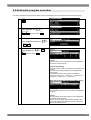
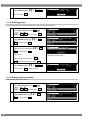
2.6 Automatic program execution
The data in the selected groups and programs can be automatically output in accordance with the set time interval.
①
MENU
②
Select Auto Edit using
or
SET
DEC
INC
.
, and then press
③
Selecting the Mode setting
Select Program or Group using
0/STATUS
or
1
.
④
INC
or
Select Setting using
When Program has been selected as the Mode
setting
SET
DEC
, and then press
.
Interval:
The time during which each pattern is to be displayed is
set here (0 to 999 seconds).
Program (Start-Stop):
The start and end points of programs to be repeated are
set here.
The start and end point settings can be designated in
three stages.
Automatic execution is performed in the following
sequence: Start point 1 → end point 1 → start point 2 →
end point 2 → start point 3 → end point 3.
When Group has been selected as the Mode setting
Group No.:
The number of the group to be executed automatically is
set here.
Interval:
The time during which each pattern is to be displayed is
set here (0 to 999 seconds).
When 0 is set, the group is executed according to the
group data setting. If the interval is not set in the group
data, 0 seconds will be set.
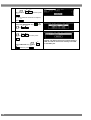
23
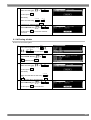
⑤
For automatic execution, select EXECUTE
DEC
INC
or
using
, and then press
SET
.
To cancel automatic execution at anytime,
ESC
press
.
⑥
SAVE
Select Auto Data SAVE using
INC
DEC
.
or
⑦
*
Select the save destination at Media using
INC
or
DEC
, and then press
SET
.
INC
or
Select EXECUTE using
SET
DEC
, and then press
24
.
* Internal: The data is saved in the internal memory.
USB: The data is saved in the memory connected
to the USB1 port.
Chapter 2 Basic Operations (Executing and Saving Programs)
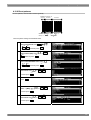
2.7 Displays appearing on the front fluorescent display tube
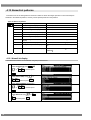
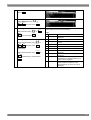
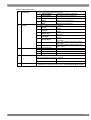
The following describes the information displayed on the fluorescent display tube during operation of the
generator.
Program selection and
execution
Standard display
SAMPLE/TIM/PAT key statuses
ON: S T P OFF: + .
Name of program or pattern (max. 16 characters)
(TIM“OFF”)
Program number
Pattern drawing bit length/
HDCP ON/OFF ON :
Horizontal sync frequency/
⇔ z flashing
OFF : z not flashing
Vertical sync frequency
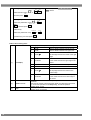
Group execution
Number of program in group
Group number
Name of program (max. 16 characters)
Group selection
Group number
Group name
Digital video level
adjustment
Digital video level
25
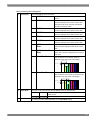
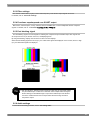
2.8 Display of interface output status
The output status for each interface is displayed.
0/STATUS
Press
SHIFT
and
at the same time.
Program number
Interface status
Background,
white: ON
black: OFF
26
Gradation
Chapter 3 Selecting and Editing Timing Data
3
Selecting and Editing Timing Data
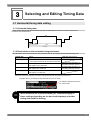
3.1 Horizontal timing data editing
3.1.1 Horizontal timing data
When making changes with the horizontal timing data, the parameters that can be set and the names of the
parameters are indicated below.
Sync Backp
Disp
Period
3.1.2 Restrictions on the horizontal timing parameters
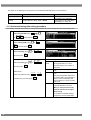
The table below shows the restrictions on the parameters that can be changed with the horizontal timing data.
Setting item
Range
Dot Clock
0.100 to 165.000 MHz
Parameter fixing function
* The number of bits that can be output is restricted.
Period
µs setting fixed with SHIFT+2
dot setting fixed with SHIFT+3
Time display: 0.00 to 999.999 µs
Dot display: 128 to 8192 dots
Disp
µs setting fixed with SHIFT+0
dot setting fixed with SHIFT+1
Time display: 0.00 to 999.999 µs
Dot display: 48 to 4096 dots
Backp , Sync
Time display: 0.00 to 999.999 µs
Dot display: 0 to 4096 dots
* When a parameter is fixed, it is accompanied by an asterisk (*). Even when parameters other than ones with
fixed items have been changed, the values of the parameters with the asterisks remain fixed.
Example: When a µs setting has been fixed with SHIFT+2 for Period
An asterisk is displayed here when
the value is fixed.
CAU
TION
When items are set in microseconds (µs), restrictions apply to
these settings depending on the dot clock frequency and other
timing data used for drawing.
27
The values for the blanking and frontp items are calculated automatically based on the data above.
Item
Calculation formula
Range
Blanking
Blanking = Period – Disp
Time display: 0.00 to 999.999 µs
Dot display: 40 to 4092 dots
Frontp
Frontp = Period – Disp – Sync – Backp
Time display: 0.00 to 999.999 µs
Dot display: 0 to 4092 dots
3.1.3 Horizontal timing data setting procedure
The following describes the procedure for setting the parameters that can be changed with the horizontal timing data.
①
MENU
Select Program Edit using
INC
SET
DEC
or
.
, and then press
②
INC
or
Select Timing (TIM) using
SET
DEC
, and then press
.
③
Select H-Timing using
INC
DEC
INC
DEC
or
SET
.
and then press
Setting the parameters
Select the items using
or
SET
and then press
Set the H-Timing parameters.
Input
Select the input setting for the H-
Mode
Timing parameters to µs: time
[microseconds] or dot: number of
.
Dot Clock
Alternatively:
9/F
0/STATUS
Repetition
to
Select the parameter using
SET
(number keys), and then press
.
Period
dots [dots].
The dot clock frequency [MHz] is set
here.
The number of repetitions is set
here.
The pixel configuration depends on
the number that is set in Repetition.
When 2 is set for Repetition and
1440 for Disp, the number of pixels
will be 720.
The total number of pixels in the
horizontal direction is set here.
When µs: time [microseconds]
has been selected as the Input
Mode setting
It is possible to establish settings
using both µs and dot parameters.
28
Chapter 3 Selecting and Editing Timing Data
Disp
The Disp width in the horizontal
direction is set here.
When µs: time [microseconds]
has been selected as the Input
Mode setting
It is possible to establish settings
using both µs and dot parameters.
Sync
The Sync width in the horizontal
direction is set here.
BackP
The BackP width in the horizontal
direction is set here.
29
3.2 Vertical timing data editing
The vertical timing setting locations and names of the settings are indicated below.
3.2.1 Vertical timing data
For progressive scanning
Serration
EQP-Fp
EQP-Bp
Sync
Backp
Disp
Total
For interlaced scanning
Field-1
Field-2
Total+0.5H
EQP-Fp1
Serration
EQP-Bp1
Bp1
Sync1
Total+0.5H
EQP-Fp2
EQP-Fp1
EQP- Bp2
Disp1
Fp1+0.5H
Fp2+0.5H
Disp2
Fp2
Sync2
3.2.2 Restrictions on the vertical timing parameters
The table below shows the restrictions on the parameters that can be changed with the vertical timing data.
For progressive scanning
Setting item
Range
Total
Time display: 0.00 to 999.999 ms
Dot display: 4 to 4096 H
Disp
Time display: 0.00 to 999.999 ms
Dot display: 1 to 2560 H
Sync
Time display: 0.00 to 999.999 ms
Dot display: 1 to 99 H
Backp
Time display: 0.00 to 999.999 ms
Dot display: 0 to 4096 H
30
Parameter fixing function
ms setting fixed with SHIFT+2
H setting fixed with SHIFT+3
ms setting fixed with SHIFT+0
H setting fixed with SHIFT+1
Chapter 3 Selecting and Editing Timing Data
For interlaced scanning
Setting item
Range
Field-1 Total1
Parameter fixing function
Time display: 0.00 to 999.999 ms
Dot display: 2.0 to 2048.0 H
ms setting fixed with SHIFT+2
H setting fixed with SHIFT+3
(in 0.5 H increments)
Disp1
Time display: 0.00 to 999.999 ms
Dot display: 0 to 1280 H
Sync1
Time display: 0.00 to 999.999 ms
Dot display: 1.0 to 99.0 H
(in 0.5 H increments)
Backp1
Time display: 0.00 to 999.999 ms
ms setting fixed with SHIFT+0
H setting fixed with SHIFT+1
Dot display: 0.0 to 2048.0 H
(in 0.5 H increments)
Field-2 Total2
Disp2
Sync2
Same as Field-1
Same as Field-1
Backp2
* When a parameter is fixed, it is accompanied by an asterisk (*). Even when values other than ones
for parameters with an asterisk have been changed, the values of the parameters with the asterisks
remain fixed.
Example: When a ms setting has been fixed with SHIFT+2 for Total
An asterisk is displayed here when the value is fixed.
CAU
TION
When the time display (ms) is set for the items, restrictions
apply to these settings depending on the H-period and other
timing data used for drawing.
The values for the blanking and frontp items are calculated automatically based on the data above.
For progressive scanning
Item
Calculation formula
Range
Blanking
Blanking = Total – Disp
Time display: 0.00 to 999.999 ms
Dot display: 1 to 4096 H
Frontp
Frontp = Total – Disp – Sync – Backp
Time display: 0.00 to 999.999 ms
Dot display: 0 to 4096 H
For interlaced scanning
Item
Calculation formula
Frontp1
Frontp1 = Total2 – Disp2 – Sync2 – Backp2
(Frontp2)
(Frontp2 = Total1 – Disp1 – Sync1 – Backp1)
Blanking1
Blanking1 = Frontp1 + Sync1 + Backp1
(Blanking2)
(Blanking2 = Frontp2 + Sync2 + Backp2)
Range
Time display: 0.00 to 999.999 ms
Dot display: 0.0 to 2048.0 H
Time display: 0.00 to 999.999 ms
Dot display: 1.0 to 2048.0 H
31
3.2.3 Vertical timing data setting procedure
The following describes the procedure for setting the parameters that can be changed with the vertical timing data.
①
MENU
Select Program Edit using
INC
SET
DEC
or
.
, and then press
②
INC
Select Timing (TIM) using
or
SET
DEC
, and then press
.
③
Select V-Timing using
INC
DEC
INC
DEC
or
SET
.
and then press
Select the items using
SET
and then press
Set the V-Timing parameters.
or
.
Input
Select the input setting for the V-
Mode
Timing parameters to ms: time
[milliseconds] or H: number of lines
Alternatively:
9/F
0/STATUS
Select the parameter using
to
TV Mode
[H].
For further details, refer to “3.2.4
Scanning modes”.
As a general rule, do not change this
setting.
For further details, refer to “3.2.5 TV
modes”.
Total
The Total number in the vertical
Scan
SET
(number keys), and then press
.
* In the case of interlaced scanning outputs,
Total, Disp, Sync and BackP are set for both
Field1 and Field2.
direction is set here.
Disp
The Disp width in the vertical
direction is set here.
Sync
The Sync width in the vertical
BackP
The BackP width in the vertical
Serration
/EQP
direction is set here.
For further details, refer to “3.2.6
Serration and EQP”.
direction is set here.
32
Chapter 3 Selecting and Editing Timing Data
3.2.4 Scanning modes
The table below lists the V-Timing scan settings, the operations for the scanning methods supported by the
settings, the imaging methods, and the action settings.
Scan mode
Progressive
Interlace
System
Pixel imaging
Scroll and other actions
Progressive
Different pixels are drawn on
scanning
each line.
Different pixels are drawn in the
first and second fields.
Operation is performed for
each frame.
Interlaced
scanning
Operation is performed for
each field.
Different pixels are drawn in the
first and second fields.
Operation is performed for
each frame (2 fields).
Interlaced
The same image is repeatedly
scanning
drawn in the first and second
Operation is performed for
each field.
Prog.Segmented
Interlaced
Frame
scanning
Interlace (Sync)
fields.
3.2.5 TV modes
This parameter indicates the output of the standard TV signals (NTSC, NTSC-M, NTSC-443, PAL, PAL-M, PAL-Nc,
HDTV1080 or HDTV 720).
Even when this parameter is changed, the timing data and other data will not be edited. Therefore, when changed, it
is not possible for images to be drawn correctly on the monitor.
* When editing the sample timing data using a TV Mode setting other than “Other”, select “Other” as the TV mode
setting. In this case, however, the tri-level sync signal will not be output.
33
3.2.6 Serration and EQP
Serration and EQP can be selected on the V-Timing [MENU] screen, and the various parameters can be set. The
relationship between the settings and operations are described in the table below.
Serration and EQP setting procedure
Setting item
Key
LCD display
Description
Serration
0
OFF
Serrated pulses are not inserted.
1
0.5H
Serrated pulses are inserted in increments of 0.5 H.
2
1H
Serrated pulses are inserted in increments of 1 H.
3
EXOR
HS and VS EXORs are inserted as serrated pulses.
0
OFF
1
ON
EQP
Equalizing pulses are not inserted into the EQPfp and EQPbp
periods.
Equalizing pulses are inserted into the EQPfp and EQPbp
periods.
The following shows an example of the phase relationship when a setting of 0.5 H has been selected for
Serration.
● When a setting of 0.5H has been selected for Serration
Hperiod
Hsync
HS
VS
Vsync
Hsync
Hperiod
CS
1/2 Hperiod
CAU
TION
34
• The serration and EQP item settings are not reflected in the composite, Y/C
and SCART signals.
• In the case of HDTV timing data, they are set to OFF when EXOR is selected
as the serration setting item.
Chapter 3 Selecting and Editing Timing Data
3.2.7 EQP-Fp and EQP-Bp
Equalizing pulses (EQP-Fp and EQP-Bp) can be selected on the V-Timing [MENU] screen, and the various
parameters can be set.
The relationship between the settings and operations are described in the table below.
EQP-Fp/EQP-Bp setting procedure
For progressive scanning
Setting
item
Details of setting
EQP-Fp
This sets the equalizing pulse inside the front porch.
EQP-Bp
This sets the equalizing pulse inside the back porch.
Range: 0.000 to 999.999 [ms], 0 to 99 [H]
Range: 0.000 to 999.999 [ms], 0 to 99 [H]
For interlaced scanning
Setting
item
Details of setting
EQP-Fp1
This sets the equalizing pulse inside the front porch.
(EQP-Fp2)
Range: 0.000 to 999.999 [ms], 0.0 to 99.0 [H] (in 0.5 H
increments)
EQP-Bp1
This sets the equalizing pulse inside the back porch.
(EQP-Bp2)
Range: 0.000 to 999.999 [ms], 0.0 to 99.0 [H] (in 0.5 H
increments)
CAU
TION
• Set EQP-Fp within the range of [(EQP-Fp +1H) ≦ Hfrontp] for tri-level sync
signal outputs in the interlaced scanning mode
35
The figure below shows the EQP phase relationship and approach taken.
Hperiod
HS
EQP
Hsync
CS
1/2 Hperiod
1/2 Hsync
EQP-Fp(3.0H)
Vsync(3.0H)
EQP-Bp(3.0H)
HS
CS
(First field)
CS
(Second field)
EQP-Fp period from here
Fig. 5-3-9 EQP phase relationship and approach taken
36
Chapter 3 Selecting and Editing Timing Data
Example: Four examples of the EQP-Fp, EQP-Bp, EQP and Serration settings are shown below.
Setting example 1
Setting item
Setting
EQP-Fp
0H
EQP-Bp
0H
EQP
OFF
Serration
OFF
Setting example 2
Setting item
Setting
EQP-Fp
0H
EQP-Bp
0H
EQP
OFF
Serration
0.5H
Setting example 3
Setting item
Setting
EQP-Fp
3H
EQP-Bp
3H
EQP
ON
Serration
1H
Setting example 4
Setting item
Setting
EQP-Fp
3H
EQP-Bp
0H
EQP
OFF
Serration
OFF
37
38
Selecting and Editing Pattern
Data
4
4.1 Color bar patterns
4.1.1 Types of color bar patterns
When color bars have been selected using the pattern key, for instance, color bar patterns can be selected from
among the types listed below.
For further details on pattern selection, refer to “2.2.4 Selecting the pattern data”.
0
CUSTOM
Customized pattern
1
100/100-H
100%/100% color bars
2
100/75-H
100%/75% color bars
3
75/75-H
75%/75% color bars
4
SMPTE
SMPTE color bars
5
RGBW-V
Horizontal color bars
6
xvYCC 4%
xvYCC 4% color bars
7
xvYCC 8%
xvYCC 8% color bars
75%/75% color bars
SMPTE color bars
8
CAU
TION
xvYCC 12%
xvYCC 12% color bars
・ xvYCC color bars are not displayed correctly for output other
than HDMI output.
39
4.1.2 Customizing color bar patterns
Described below is the procedure for selecting the color bar pattern type and for performing the settings when
CUSTOM has been selected as the color bar pattern type.
(If CUSTOM is selected, the color bar patterns can be displayed with any width and color.)
①
MENU
Select Program Edit using
SET
DEC
INC
or
, and then press
.
②
INC
Select Pattern (PAT) using
or
SET
DEC
, and then press
.
③
Select Pattern/RGB/INV select using
SET
DEC
INC
or
, and then press
.
④
INC
Select Color Bar using
or
SET
DEC
, and then press
⑤
.
ESC
Press
.
⑥
INC
Select Color Bar using
SET
DEC
⑦
or
, and then press
.
Selecting the pattern type
INC
Select Type using
SET
then press
40
.
or
For details of the pattern types, refer to “4.1.1
Types of color bar patterns”.
DEC
, and
If CUSTOM has been selected for Type, set item
⑧ below.
Chapter 4 Selecting and Editing Pattern Data
⑧
When Type is set to CUSTOM
Advanced settings of customized patterns
Select CUSTOM on the screen in step ⑥
SET
.
above, and then press
Selecting the items and inputting the
parameters
For details on the settings, refer to “Table of
customized color bar pattern setting items”
below.
Select the items, set the parameters, and
create a customized pattern.
Table of customized color bar pattern setting items
(1)
Format(0-3)
The drawing direction of the color bars is set here.
0
H Direction
Horizontal direction
1
V Direction
Vertical direction
2
H Direction&div.V
Horizontal direction (loopback by Repeat)
(2)
Repeat
(3)
Input Mode(0/1)
(4)
Width[%]
3
V Direction&div.H
Vertical direction (loopback by Repeat)
One or more of the 1 to 16 data set by Color/Level are set here. The value
set here becomes the number of colors that are displayed. Range: 1 to 16
The method of specifying the display size per color is set here.
%
0
The size is set as a percentage of the
entire screen.
dot
1
The size is set in 1-dot increments.
The display size per color is set here.
Width[dot]
When a percentage is used
Set any width from 0.1% to 100.0%.
for Input Mode
When dots are used for
Set the width in 1-dot increments.
Input Mode
(5)
Color/ Level>>
The display color and level are set here.
Number
Number
Color Select
Level
The colors from 1 to the Repeat setting are
used for the display.
Color
Level
The display colors are selected here.
0
___
Black
1
R__
Red
2
_G_
Green
3
RG_
Yellow
4
__B
Blue
5
R_B
Magenta
6
_GB
Cyan
7
RGB
White
The level as a percentage of the peak
brightness is set here. Setting range: 0.0
to 100.0%
41
4.2 Gray scale patterns
4.2.1 Types of gray scale patterns
When gray scale has been selected using the pattern key, for instance, gray scale patterns can be selected from
among the types listed below.
For further details on pattern selection, refer to “2.2.4 Selecting the pattern data”.
0
CUSTOM
Customized
pattern
1
8Step-H
8 steps
(horizontal)
2
16Step-H
16 steps
(horizontal)
3
32Step-H
32 steps
(horizontal)
4
8Step-V
8 steps (vertical)
5
16Step-V
16 steps (vertical)
6
32Step-V
32 steps (vertical)
16Step-H
16Step-V
42
Chapter 4 Selecting and Editing Pattern Data
4.2.2 Customizing gray scale patterns
Described below is the procedure for selecting the gray scale pattern type and for performing the settings when
CUSTOM has been selected as the gray scale pattern type.
(If CUSTOM is selected, the gray scale patterns can be displayed with any width and level.)
①
MENU
Select Program Edit using
SET
DEC
INC
or
, and then press
.
②
INC
Select Pattern (PAT) using
or
SET
DEC
, and then press
.
③
Select Pattern/RGB/INV select using
SET
DEC
INC
or
, and then press
.
④
INC
Select Gray Scale using
or
SET
DEC
, and then press
⑤
.
ESC
Press
.
⑥
INC
Select Gray Scale using
or
SET
DEC
, and then press
⑦
.
For details of the pattern types, refer to “4.2.1
Types of gray scale patterns”.
Selecting the pattern type
INC
Select Type using
SET
then press
.
or
DEC
, and
If CUSTOM has been selected for Type, set
item ⑧ below.
43
⑧
When Type is set to CUSTOM
Advanced settings of customized patterns
Select CUSTOM on the screen in step ⑥
SET
.
above, and then press
Selecting the items and inputting the
parameters
For details on the settings, refer to “Table of
customized gray scale pattern setting items”
below.
Select the items, set the parameters, and
create a customized pattern.
Table of customized gray scale pattern setting items
(1)
Format(0-3)
The drawing direction of the gray scale is set here.
0
H Direction
Horizontal direction
1
V Direction
Vertical direction
2
H Direction&div.V
Horizontal direction (loopback by Repeat)
(2)
Repeat
(3)
Input Mode(0/1)
(4)
Width[%]
3
V Direction&div.H
Vertical direction (loopback by Repeat)
One or more of the 1 to 16 data set by Level are set here. The value set
here becomes the number of steps that are displayed. Range: 1 to 16
The method of specifying the display size per step is set here.
%
0
The size is set as a percentage of the
entire screen.
dot
1
The size is set in 1-dot increments.
The display size per step is set here.
Width[dot]
When a percentage is used
Set any width from 0.1% to 100.0%.
for Input Mode
When dots are used for
Set the width in 1-dot increments.
Input Mode
(5)
Level>>
The display level is set here.
Bit Length
Number
Number
Level
The steps from 1 to the Repeat setting are
used for the display.
Level
The level is set here.
The setting range differs depending on the
color depth.
44
8BIT
0 - 255
9BIT
0 - 511
10BIT
0 - 1023
11BIT
0 - 2047
12BIT
0 - 4095
Chapter 4 Selecting and Editing Pattern Data
4.3 Ramp patterns
4.3.1 Types of ramp patterns
When ramp has been selected using the pattern key, for instance, ramp patterns can be selected from among the
types listed below.
For further details on pattern selection, refer to “2.2.4 Selecting the pattern data”.
0
CUSTOM
1
Linear-H
2
Linear-V
3
Linear-256
4
Turn-H
5
Linear-HV
Linear-H
INC
*1 Limited-V is selectable only by
or
.
*2 The luminance level of Limited-H/V is 16-232 and color-difference level is 16-240.
45
4.3.2 Ramp pattern type settings and customizing
Described below is the procedure for selecting the ramp pattern type and for performing the settings when
CUSTOM has been selected as the ramp pattern type.
(If CUSTOM is selected, the ramp patterns can be displayed with any level and steps.)
①
MENU
Select Program Edit using
SET
DEC
INC
or
, and then press
.
②
INC
Select Pattern (PAT) using
or
SET
DEC
, and then press
.
③
Select Pattern/RGB/INV select using
SET
DEC
INC
or
, and then press
④
.
INC
Select Ramp using
DEC
or
,
SET
and then press
⑤
.
ESC
Press
.
⑥
INC
Select Ramp using
DEC
or
,
SET
and then press
⑦
.
For details of the pattern types, refer to “4.3.1
Types of ramp patterns”.
Selecting the pattern type
INC
Select Type using
or
DEC
, and
SET
then press
⑧
.
When Type is set to CUSTOM
Advanced settings of customized patterns
Select CUSTOM on the screen in step ⑥
SET
above, and then press
46
.
If CUSTOM has been selected for Type, set
item ⑧ below.
Chapter 4 Selecting and Editing Pattern Data
Selecting the items and inputting the
parameters
For details on the settings, refer to “Table of
customized ramp pattern setting items” below.
Select the items, set the parameters, and
create a customized pattern.
Table of customized ramp pattern setting items
(1)
Direction(0/1)
The resolution is set here.
0
(2)
H-Line
(3)
Line1 to Line4
H
Horizontal ramp
1
V
Vertical ramp
Up to four ramp patterns with different levels and steps can be displayed on
one screen.
Range: 1 to 4 types. These types are used in sequence from line 1.
The start level, end level, and step are set here.
Bit Length
Start Level
End Level
Step
(Start)
The start level is set here.
(End)
The end level is set here.
(Step)
The number of display steps from the start
level to end level is set here.
Setting range: 1 ≦ setting ≦ (End) (Start) + 1
The setting range for the above levels
differs depending on the color depth.
8BIT
0 - 255
9BIT
0 - 511
10BIT
0 - 1023
11BIT
0 - 2047
12BIT
0 - 4095
* Concerning H-Line
This item takes effect only when “0” has been selected as the Direction setting.
* Concerning Direction
When “1” has been selected as the Direction setting, only “1” takes effect as the H-Line setting. (Splitting
in the vertical direction is not possible.)
47
4.4 Sweep patterns
4.4.1 Types of sweep patterns
When sweep has been selected using the pattern key, for instance, sweep patterns can be selected from among
the types listed below.
For further details on pattern selection, refer to “2.2.4 Selecting the pattern data”.
0
Multi-Burst 100
Multi-burst
1
Multi-Burst 50
Multi-burst
2
Sweep
Sweep
Multi-burst
48
Chapter 4 Selecting and Editing Pattern Data
4.4.2 Sweep pattern selection
The types of sweep patterns can be set using the procedure below.
①
MENU
Select Program Edit using
SET
DEC
INC
or
, and then press
.
②
INC
Select Pattern (PAT) using
or
SET
DEC
, and then press
.
③
Select Pattern/RGB/INV select using
SET
DEC
INC
or
, and then press
④
.
INC
Select Sweep using
DEC
or
,
SET
and then press
⑤
.
ESC
Press
.
⑥
INC
Select Sweep using
DEC
or
,
SET
and then press
⑦
.
For details of the pattern types, refer to “4.4.1
Types of sweep patterns”.
Selecting the pattern type
INC
Select Type using
or
DEC
, and
SET
then press
.
49
4.5 Monoscope patterns
4.5.1 Types of monoscope patterns
When monoscope has been selected using the pattern key, for instance, monoscope patterns can be selected
from among the types listed below.
For further details on pattern selection, refer to “2.2.4 Selecting the pattern data”.
0
1
2
3
4
SMPTE RP-133
SMPTE PR-133 Color
MONOSCOPE
PHILIPS
CHINA
MONOSCOPE
4.5.2 Selecting the monoscope pattern
The types of monoscope patterns can be selected using the procedure below.
①
MENU
Select Program Edit using
SET
DEC
INC
or
, and then press
.
②
INC
Select Pattern (PAT) using
or
SET
DEC
, and then press
.
③
Select Pattern/RGB/INV select using
SET
DEC
INC
or
, and then press
.
④
INC
Select Monoscope using
, and then press
⑤
ESC
Press
50
or
SET
DEC
.
.
Chapter 4 Selecting and Editing Pattern Data
⑥
INC
Select Monoscope using
or
SET
DEC
, and then press
⑦
.
For details of the pattern types, refer to “4.5.1
Types of monoscope patterns”.
Selecting the pattern type
INC
Select Type using
or
DEC
, and
SET
then press
.
51
4.6 Raster patterns
4.6.1 Types of raster patterns
When raster patterns have been selected using the pattern key, for instance, raster patterns can be selected from
among the types listed below.
For further details on pattern selection, refer to “2.2.4 Selecting the pattern data”.
0
1
2
3
4
5
6
CUSTOM
White
Red
Green
Blue
Black
50%-Gray
Raster pattern
4.6.2 Raster pattern type settings and customizing
Described below is the procedure for selecting the raster pattern type and for performing the settings when
CUSTOM has been selected as the raster pattern type. (The rasters can be displayed with any level.)
①
MENU
Select Program Edit using
SET
DEC
INC
or
, and then press
.
②
INC
Select Pattern (PAT) using
or
SET
DEC
, and then press
.
③
Select Pattern/RGB/INV select using
SET
DEC
INC
or
, and then press
④
.
INC
Select Raster using
DEC
or
,
SET
and then press
⑤
.
ESC
Press
.
⑥
INC
Select Raster using
or
SET
and then press
52
.
DEC
,
Chapter 4 Selecting and Editing Pattern Data
⑦
For details of the pattern types, refer to “4.6.1
Types of raster patterns”.
Selecting the pattern type
INC
Select Type using
DEC
or
, and
SET
then press
⑧
.
If CUSTOM has been selected for Type, set
item ⑧ below.
Bit Length
When Type is set to CUSTOM
Advanced settings of customized patterns
Select CUSTOM on the screen in step ⑥
SET
above, and then press
.
Level
Selecting the items and inputting the
parameters
Select the items, set the parameters, and
create a customized pattern.
R,G,B
The setting range for the above levels
differs depending on the color depth.
8BIT
0 - 255
9BIT
0 - 511
10BIT
0 - 1023
11BIT
0 - 2047
12BIT
0 - 4095
53
4.7 Aspect ratio patterns
4.7.1 Types of aspect ratio patterns
When aspect ratio has been selected using the pattern key, for instance, aspect ratio patterns can be selected
from among the types listed below.
For further details on pattern selection, refer to “2.2.4 Selecting the pattern data”.
0
Over Scan
AFD
1
54
0
As the coded frame
1
4:3 (center)
2
16:9 (center)
3
14:9 (center)
4
box 16:9 (top)
5
box 14:9 (top)
6
box 13:7 (center)
7
box 2:1 (center)
8
box 11:5 (center)
9
box 12:5 (center)
A
4:3 (14:9 center)
B
16:9 (14:9 center)
C
16:9 (4:3 center)
Over Scan
AFD pattern
Chapter 4 Selecting and Editing Pattern Data
4.7.2 Aspect ratio pattern type settings and customizing
Described below is the procedure for selecting the aspect ratio pattern type and for performing the settings when
CUSTOM has been selected as the aspect ratio pattern type.
(If CUSTOM is selected, the aspect ratio patterns can be displayed with any level.)
①
MENU
Select Program Edit using
SET
DEC
INC
or
, and then press
.
②
INC
Select Pattern (PAT) using
or
SET
DEC
, and then press
.
③
Select Pattern/RGB/INV select using
SET
DEC
INC
or
, and then press
④
.
DEC
INC
Select Aspect using
or
,
SET
and then press
⑤
.
ESC
Press
.
⑥
DEC
INC
Select Aspect using
or
,
SET
and then press
⑦
.
For details of the pattern types, refer to “4.7.1
Types of aspect ratio patterns”.
Selecting the pattern type
INC
Select Type using
DEC
or
, and
SET
then press
⑧
.
If AFD has been selected for Type, set item
⑧ below.
When Type is set to AFD
Advanced settings of AFD patterns
Select AFD on the screen in step ⑥ above,
SET
and then press
.
Selecting the items and inputting the
parameters
For details on the settings, refer to “Table of AFD
pattern setting items” below.
Select the items, set the parameters, and
create a customized pattern.
55
Table of AFD pattern setting items
(1)
Aspect(0/1)
The aspect ratio of the screen is set here.
0
The images are displayed on the screen with a
4:3
4:3 aspect ratio.
1
(2)
Type
(3)
Color
The images are displayed on the screen with a
16:9
16:9 aspect ratio.
For details of the pattern types, refer to “4.7.1 Types of aspect ratio patterns”.
Bit Length
Part
Circle
Level
Displays the circle level.
The R, G and B levels are displayed in sequence
from the left.
The setting range for the above levels differs
depending on the color depth.
Back
8BIT
0 - 255
9BIT
0 - 511
10BIT
0 - 1023
11BIT
0 - 2047
12BIT
0 - 4095
The background level is set here.
(Details are the same as for Color Circle.)
Bar
The bar level is set here.
(Details are the same as for Color Circle.)
56
Chapter 4 Selecting and Editing Pattern Data
4.8 Checkerboard patterns
4.8.1 Types of checkerboard patterns
When checkerboard has been selected using the pattern key, for instance, checkerboard patterns can be selected
from among the types listed below.
For further details on pattern selection, refer to “2.2.4 Selecting the pattern data”.
0
DOTxDOT
Dot
1
BLOCKxBLOCK
Block
2
SubPixel
Sub-pixel
57
4.8.2 Checkerboard pattern customizing
Described below is the procedure for selecting the checkerboard pattern type and setting the spacing.
①
MENU
Select Program Edit using
SET
DEC
INC
or
, and then press
.
②
INC
Select Pattern (PAT) using
or
SET
DEC
, and then press
.
③
Select Pattern/RGB/INV select using
SET
DEC
INC
or
, and then press
.
④
DEC
INC
Select Checker using
or
,
SET
and then press
⑤
.
ESC
Press
.
⑥
DEC
INC
Select Checker using
or
,
SET
and then press
⑦
.
For details of the pattern types, refer to “4.8.1
Types of checkerboard patterns”.
Selecting the pattern type
DEC
INC
Select Type using
or
, and
SET
then press
.
Setting the parameters
INC
Select the parameters using
or
SET
DEC
, and then press
.
Alternatively:
0/STATUS
Select the parameters using
9/F
to
SET
(number keys), and then press
58
.
Depending on the Type setting, the setting items
differ. Refer to “Table of checkerboard setting
items” below.
Chapter 4 Selecting and Editing Pattern Data
Table of checkerboard setting items
(1)
DOTxDOT H/V
(Valid only when DOT×DOT has been selected as the Type setting)
Set the number of horizontal (H) and vertical (V) pixels for one color.
Setting range: 1 to 8
(2)
BLOCKxBLOCK H/V
(Valid only when BLOCKxBLOCK has been selected as the Type setting)
Set the number of horizontal (H) and vertical (V) blocks.
Setting range: 2 to 32
(3)
Sub Pixel H/V
(Valid only when Sub Pixel has been selected as the Type setting)
Set the number of horizontal (H) sub pixels and vertical (V) pixels.
Setting range: 0 to 3
* When RGB 0% / 100% has been selected for Color Select, H=1 and V=1
will be set regardless of the settings.
Setting example: H=2, V=3
2 2
When User Color has
been selected
3
: User Color 1
is used.
: User Color 2
3
(4)
SubPixel Offset H/V
is used.
(Valid only when Sub Pixel has been selected as the Type setting)
Set the number of sub pixels at the top left in the horizontal (H) direction
and the number of pixels at the very top in the vertical (V) direction. (The
Sub Pixel H and V settings subsequently apply.)
Setting range: 0 to 2
* When RGB 0% / 100% has been selected for Color Select, H=0 and V=0
will be set regardless of the settings.
Setting example: Sub Pixel H=3, V=1, Sub Pixel Offset H/V = refer to figures.
Offset H =0 / V=0
V=2 (/H=0)
H=1 (/V=0)
H=2 (/V=0)
(5)
Color Select (0/1)
Set the color and level.
0
RGB 0% / 100%
0% / 100%
1
User Color
The colors selected using User Color 1 and
2 are used.
59
(6)
User Color 1 R,G,B
When RGB 0% / 100% has been selected
Setting ranges by color
for Color Select, set any color and level to
depth
be indicated by “0%”.
8BIT
0 - 255
In the case of the Sub Pixel item, the same
9BIT
0 - 511
level as the RGB level is set.
10BIT
0 - 1023
11BIT
0 - 2047
The setting range differs depending on the
12BIT
0 - 4095
color depth.
(7)
User Color 2 R,G,B
When RGB 0% / 100% has been selected for Color Select, set any color
and level to be indicated by “100%”.
In the case of the Sub Pixel item, the same level as the RGB level is set.
The setting range is the same as that for User Color 1.
60
Chapter 4 Selecting and Editing Pattern Data
4.9 Image/OPT
4.9.1 Types of image/OPT patterns
When Image/OPT has been selected using the pattern key, for instance, optional and image patterns can be
selected from among the types listed below.
For further details on pattern selection, refer to “2.2.4 Selecting the pattern data”.
0
IMAGE
Image pattern
IMAGE
A still image registered as the default can be used or
any still image can be registered by the user and
used.
1
OPT-SAMPLE
Sample optional pattern
OPT-USER
User option patterns
OPT-SAMPLE
2
Option pattern registered by the user
Any test pattern can be described using a
programming language.
61
4.9.2 Optional and image pattern setting
The procedure for setting optional and image patterns is described below.
①
MENU
Select Program Edit using
SET
DEC
INC
or
, and then press
.
②
INC
Select Pattern (PAT) using
or
SET
DEC
, and then press
.
③
Select Pattern/RGB/INV select using
SET
DEC
INC
or
, and then press
.
④
INC
Select Image/OPT using
or
SET
DEC
, and then press
⑤
.
ESC
Press
.
⑥
INC
Select Image/OPT using
or
SET
DEC
, and then press
⑦
.
Selecting the items
INC
Select the items using
DEC
or
,
* 3D pattern can only be displayed or executed
when the pattern has a registered license.
・For details of the settings when 9 Marker is
selected, refer to “4.9.3 9-marker (OPT No.
76) pattern setting”.
SET
and then press
.
・For details of the settings when 3D Pattern is
selected, refer to “4.9.4 3D pattern (OPT No.
101) setting”.
⑧
Setting the pattern number
No.
Select the pattern number using
INC
optional and image patterns. The
or
number of the pattern to be displayed
SET
DEC
, and then press
Specific numbers are allocated to the
is set in No.
.
Setting range: 1 to 200
Selecting the pattern type
Type
Select the pattern number using
INC
, and then press
62
or
SET
DEC
.
* For further details, refer to “4.9.1
Types of image/OPT patterns”.
Chapter 4 Selecting and Editing Pattern Data
4.9.3 9-marker (OPT No. 76) pattern setting
Sample optional pattern No. 76 is a pattern that displays up to nine markers and lines at the desired positions.
For details on how to display the patterns, refer to “4.9.2 Optional and image pattern setting”.
Select Type = OPT-SAMPLE, No. 76, and edit the marker and line positions using the procedure below.
Marker
マーカー
ライン
Line
①
MENU
Select Program Edit using
INC
SET
DEC
or
, and then press
.
②
INC
Select Pattern (PAT) using
or
SET
DEC
, and then press
.
③
INC
Select Image/OPT using
or
SET
DEC
, and then press
.
④
Select 9 Marker (OPT No. 76) using
INC
, and then press
⑤
or
SET
DEC
.
For details on the parameters, refer to “Table of
9-marker setting items” below.
Selecting the items
INC
Select the items using
DEC
or
,
SET
and then press
.
Setting the parameters
INC
Select the parameters using
or
SET
DEC
, and then press
.
Alternatively:
0/STATUS
Select the parameters using
9/F
to
SET
(number keys), and then press
.
63
Table of 9-marker setting items
(1)
(2)
Mark Shape (0-2)
Mark Fill (0/1)
The shape of the markers is specified here.
Circle
0
Circle
1
Square
Square
2
Line
Line
Whether to fill the markers is specified here. (disabled when Line is selected for
Mark Shape)
(3)
Mark Line Width
0
OFF(Line)
Markers not filled
○□
1
ON
Markers fill
●■
The width of the marker frame is set
Setting example: Mark Line Width = 1
here.
Mark Size = 5
Setting range: 1 to 15 [dot]
Center
中心
* When “ON” has been selected for
5 dot
the Mark Fill setting, the width will
be 1 dot regardless of the setting.
(4)
Mark Size
The size of the markers is set here.
Setting range: 1 to 9999 [dot]
(5)
Mark Number
(6)
Mark Position H,V
(7)
Mark Direction [H,V]
1 dot
The number of the markers is set here.
Setting range: 0 to 9
The center coordinate of the marker position is set here.
Setting range: 0 to 4095 [dot]
The direction of the line marker is set here.
0
H
Horizontal line
(8)
Mark Color R,G,B
1
V
Vertical line
The color of the markers is set here.
The setting range differs depending on the color depth. * See below.
(9)
Line Mode (0-3)
Whether to display the lines and the shape of the lines when they are displayed
are set here.
0
None
No lines
1
V-Line
Vertical line
2
H-Line
Horizontal line
3
HV-Line
Cross consisting of horizontal line and vertical
line
(10)
Line Width
The width of the lines is set here.
Setting range: 1 to 15 [dot]
(11)
Line Position H,V
The positions of the lines are set here.
(12)
Line Color R,G,B
Setting range: 0 to 4095 [dot]
The color of the lines is set here.
The setting range differs depending on the color depth. * See below.
* Setting ranges by color depth
64
Color Depth
Setting range
8BIT
0 - 255
9BIT
0 - 511
10BIT
0 - 1023
11BIT
0 - 2047
12BIT
0 - 4095
Chapter 4 Selecting and Editing Pattern Data
4.9.4 3D pattern (OPT No. 101) setting
Sample optional pattern No.101 is a 3D pattern.
A license is required to display this pattern. For details, contact your dealer or the Astrodesign Sales
Department.
Note: If your license is limited version, the setting in this section is fixed at factory default.
For details on how to display the patterns, refer to “4.9.2 Optional and image pattern setting”.
Select Type = OPT-SAMPLE, No. 101, and make the settings using the procedure below.
Other than shown below, the settings of “HDMI ■ Vendor Specific InfoFrame” are referenced at this time.
①
MENU
Select Program Edit using
INC
SET
DEC
or
, and then press
.
②
INC
Select Pattern (PAT) using
or
SET
DEC
, and then press
.
③
INC
Select Image/OPT using
or
SET
DEC
, and then press
④
Select 3D Pattern (OPT No. 101) using
INC
SET
DEC
or
⑤
.
, and then press
.
For details on the parameters, refer to “Table of
3D pattern setting items” below.
Selecting the items
INC
Select the items using
DEC
or
,
SET
and then press
.
Setting the parameters
INC
Select the parameters using
or
SET
DEC
, and then press
.
Alternatively:
0/STATUS
Select the parameters using
9/F
to
SET
(number keys), and then press
.
65
<List of 3D pattern setting items>
(1)
Type (0-7)
(2)
L,R ON/OFF (0-2)
(3)
L, R Field ON/OFF
The type of pattern is selected here.
0 Color Bar V-1
1 Color Bar V-2
2 Vertical Bar
3 Checker DOT
The checker pattern settings are referenced.
4 Checker BLOCK
5 Slant Color Bar
6 Slant Gray Bar
7 Raster
8
9 Window / Circle
A Cross Hatch (it will be referred to Cross Hatch setting).
On or Off is selected for the left (L) and right (R) pattern outputs.
At the Off setting, the color set using Back Color is output.
0 L=ON, R=ON
1 L=ON, R=OFF
2 L=OFF, R=ON
On/Off setting of Left and Right patterns by field.
The setting color in the Back Color is displayed if it is set off.
Note) In case of Interlace signal, or except using Frame Packing mode, it will
switch to L, R ON/OFF mode.
ON/OFF
0
ON
Pattern is output
66
(4)
Level L,R
(5)
Off Color R,G,B
(6)
L, R Color (0/1)
(7)
L, R Text (0-2)
(8)
BkBackLRText (0/1)
1
OFF
Pattern is not output
The left (L) and right (R) pattern output levels are set here.
Setting range: 0 - 100 [%]
The output color when Off has been selected as the L,R ON/OFF or L, R
Field ON/OFF is set here.
Setting range: 0 - 255
0
Not use
Pattern is drawn by the original value or designated
color set by pattern parameter.
1
Use
Patterb and background is drawn by the value set by
Left/ Right color in each right and left picture.
Set display type of « LEFT » and « RIGHT » character.
0
OFF
Not displayed.
1
TOP
Display on the top.
2
CENTER
Display in center.
Set black background around « LEFT » and « RIGHT » character.
0
OFF
Does not set black around « LEFT » and « RIGHT »
character.
Set black around « LEFT » and « RIGHT » character.
1
ON
Chapter 4 Selecting and Editing Pattern Data
(9)
(10)
Sub Sampling (0/1)
Left/Right Color
(11)
V.Bar Width (1-16)
(12)
Slant Angle (0-B)
(13)
Checker
(14)
Window / Circle
(15)
Cross Hatch
In case of « Side by Side » and « Top & Bottom », set it either normal
drawing or thin-out drawing.
0
OFF
Normal drawing
1
ON
Thin-out drawing
If you set « Use » in L, R Color, set pattern color and back color in each left
and right picture.
Coor(L) (R )
R,G,B
Set pattern color of each Left and Right picture.
Setting range : 0-65535 (max value will change by
BitMode.)
Back color L) (R )
R,G,B
Set back color.
Setting range : 0-65535 (max value will change by
BitMode.)
If you set « Vertical Bar » in Type, the width of vertical bar can be set.
Setting range : 1-16 LANE
If you set « Slant Color Bar » or « Slant Gray Bar » in Type, set drawing
angle here.
0
0 degree
1
15 degrees
2
30 degrees
3
45 degrees
A
150 degrees
B
165 degrees
A checkerboard pattern is set when Checker DOT or Checker BLOCK has
been specified as the Type setting.
This is the same setting as the regular checkerboard pattern. (Refer to
section “4.8 Checkerboard patterns.”)
Set a parameter of Window / Circle that is selected in Type.
Type (0-3)
Select kinds of pattern
0
Window
Draw one Window.
1
Circle
Draw one Circle.
2
9 Window Draw 9 Windows.
3
9 Circle
Draw 9 Circles.
Real Circle (0/1) In Type, if you select Circle or 9 Circle, select if the circle
shoul be true-circle or not.
0
OFF
Draw circle based on H and V size.
1
ON
Draw true-circle.
Size
Set the drawing size of the pattern.
H, V
Setting range : 0-100 [%]
LPosition
Set the drawing position of Window / Circle in each Left
and Right picture.The setting value becomes the center
RPosition
of the pattern.
Setting range : 0-100 [%]
Position
Set the drawing position of 9 Windows / 9 Circles.
The setting value is regarded as the blank area from the
edge of screen.
Setting range : 0-100 [%]
If you selet Cross Hatch in Type, set the details of Cross Hatch.
This is the same setting as the regular Cross Hatch pattern. (Refer to section
“4.10.3 Cross Hatch.”)
67
<Details of 3D patterns>
[0] Color Bar V-1
This outputs color bars in the same vertical direction on the left and right. “LEFT” and “RIGHT” are displayed in
the left and right patterns.
Left
Right
[1] Color Bar V-2
This outputs color bars in a vertical direction on the left and right, as shown below.
Left
Right
}Left
}Right
}Left
}Right
}Left
}Right
[2] Vertical Bar
This outputs a vertical bar for every dot. The patterns on the left and right are the same.
Left (and right)
1dot
[3] Checker DOT
This outputs a checkerboard DOTxDOT pattern. The colors in the left and right patterns are inverted.
Left
68
Right
Chapter 4 Selecting and Editing Pattern Data
[4] Checker BLOCK
This outputs a checkerboard BLOCKxBLOCK pattern. The colors in the left and right patterns are inverted.
The patterns shown below are when the number of blocks are set to H = 4 and V = 4.
Left
Right
[5] Slant Color Bar, [6] Slant Gray Bar
The different width color bar / gray bar in the slant direction. The right and the left output the same picture.
The drawing angle can be changed from 0 – 165 degrees.
[7] Raster
This outputs a raster pattern. The patterns on the left and right are the same.
[8]
□×+○
This outputs the center mark, circle, diagonal lines and edge pattern displaying overlapping The patterns on the
left and right are the same.
Left and right
69
[9-1] Window [9-2] Circle
Window / circle pattern is displayed in the designated position. The left and right frame shows the same picture, but
color can be set separately.
[9-3] 9 Window [9-4] 9 Corcle
9 Window patterns are displayed in the designated position. The left and right frame shows the same picture, but color
can be set separately.
[10] Cross Hatch
Cross hatch is output. The left and right frame shows the same picture, but color can be set separately.
70
Chapter 4 Selecting and Editing Pattern Data
* About Sub Sampling display
In case of Side-by-Side and Top & Bottom, by setting Sub-sampling = OFF, ODD and EVEN line is not taken
out and line seems more clear.
Example : Side-by-Side
If Sub Sampling is ON, the pattern is displayed according to the setting in the « 3D Extention Data » in the
Vender Specific Infoframe. (e.g. : Type = □×+○)
Example : Top & Bottom
If Sub Samplingn is ON, only Odd lines are drawn in each left and right picture.
(e.g. : Type = □×+○)
If Sub Sampling is OFF, all lines are drawn by the size of « Sub Sampling = ON »,
(e.g. Type = □×+○)
71
4.10 □× ABC Pattern
ABC
The following patterns are available as □× ABC patterns. Select them using the
key.
All the patterns can be superimposed onto one another, and displayed.
For further details on pattern selection, refer to “2.2.4 Selecting the pattern data”.
Character
Character
(text)
Cross
Crosshatch
Dot
Dot
Circle
Circle
Character
Cross Hatch
Dot
Circle
Burst
Burst
Burst
□
□
×
×
+
+
* There are no items to be set in □, × and + patterns.
72
Chapter 4 Selecting and Editing Pattern Data
4.10.1 Color settings
The colors of the □× ABC patterns themselves and their background colors can be set.
①
MENU
Select Program Edit using
INC
SET
DEC
or
, and then press
.
②
INC
Select Pattern (PAT) using
or
SET
DEC
, and then press
.
③
DEC
INC
Select □×[ABC] using
or
,
SET
and then press
.
④
DEC
INC
Select Color using
or
Bit Length
,
SET
and then press
.
Part
⑤
Setting the items
INC
Select the items using
Foreground
DEC
or
The colors of the □× ABC pattern
are set here (in the order of RGB
,
from the left).
SET
and then press
Level
The setting range differs
.
depending on the color depth.
* Refer to below list
Background
Setting the parameters
INC
Select the parameters using
left).
or
The setting range differs
SET
DEC
, and then press
The background color is set here
(in the order of RGB from the
depending on the color depth.
.
* Refer to below list
Alternatively:
0/STATUS
Select the parameters using
9/F
to
SET
(number keys), and then press
.
* Setting ranges by color depth
8BIT
0 - 255
9BIT
0 - 511
10BIT
0 - 1023
11BIT
0 - 2047
12BIT
0 - 4095
73
4.10.2 Character patterns
①
MENU
Select Program Edit using
SET
DEC
INC
or
, and then press
.
②
INC
Select Pattern (PAT) using
or
SET
DEC
, and then press
.
③
Select Pattern/RGB/INV select using
SET
DEC
INC
or
, and then press
.
④
INC
Select Character using
or
SET
DEC
, and then press
⑤
.
ESC
Press
.
⑥
INC
Select □×[ABC] using
DEC
or
,
SET
and then press
.
⑦
INC
Select Character using
or
SET
DEC
, and then press
⑧
.
Setting the items
INC
Select the items using
or
,
SET
and then press
.
Setting the parameters
INC
Select the parameters using
or
SET
DEC
, and then press
.
Alternatively:
0/STATUS
Select the parameters using
(number keys).
74
For details, refer to “Table of character setting
DEC
9/F
to
items” below.
Chapter 4 Selecting and Editing Pattern Data
Table of character setting items
(1)
(2)
(3)
The format is selected here.
Format(0-2)
0
Character List
1
All 1-Character
2
Corner&Center
The font size is set here.
Font(0-2)
0
5x7
1
7x9
2
16x16
The character code is selected here.
Character Code
Setting range: 20h to FFh
When selecting characters directly, select ABC.
For details on the operation procedure, refer to “2.4 Changing program
(4)
names”.
The size of each character is set here.
Cell Size [dot]
Set the size of the character in the
H
horizontal direction.
Set the size of the character in the vertical
V
direction.
4.10.3 Crosshatch patterns
The crosshatch pattern settings are described below.
①
MENU
Select Program Edit using
SET
DEC
INC
or
, and then press
.
②
INC
Select Pattern (PAT) using
or
SET
DEC
, and then press
.
③
Select Pattern/RGB/INV select using
SET
DEC
INC
or
, and then press
.
④
INC
Select Cross Hatch using
, and then press
⑤
or
SET
DEC
.
ESC
Press
.
75
⑥
INC
Select □×[ABC] using
DEC
or
,
SET
and then press
.
⑦
INC
Select Cross Hatch using
or
SET
DEC
, and then press
⑧
.
Setting the items
INC
Select the items using
For details, refer to “Table of crosshatch setting
DEC
or
,
items” below.
SET
and then press
.
Setting the parameters
INC
Select the parameters using
or
SET
DEC
, and then press
.
Alternatively:
0/STATUS
Select the parameters using
9/F
to
SET
(number keys), and then press
.
Table of crosshatch setting items
(1)
Format(0-2)
The origin point of the pattern drawing is set here.
0
From Center
The pattern is drawn using the screen
center as the origin point.
1
From Top-Left
The pattern is drawn using the top left as
the origin point.
(2)
InputMode(0/1)
The input mode is selected here.
0
Number Of Line
This sets the number of lines to be
displayed on the screen.
1
(3)-a
Interval(dot)
This sets the interval between the blocks.
When Input Mode
This sets the number of lines to be displayed on the screen.
=Number Of Lines
Number Of Lines : H=
Set the number of lines in the horizontal
direction.
Number Of Lines : V=
Set the number of lines in the vertical
direction.
(3)-b
When Input Mode
This sets the interval between the blocks.
= Interval(dot)
Interval [dot] : H=
Set the interval between the blocks in the
horizontal direction.
Interval [dot] : V=
(4)
Line Width [dot]
Set the interval between the blocks in the
vertical direction.
The width of the lines is set here.
Line Width [dot]: H=
Set the width of the lines in the horizontal
direction.
Line Width [dot]: V=
Set the width of the lines in the vertical
direction.
76
Chapter 4 Selecting and Editing Pattern Data
4.10.4 Dot patterns
The dot pattern settings are described below.
①
MENU
Select Program Edit using
SET
DEC
INC
or
, and then press
.
②
INC
Select Pattern (PAT) using
or
SET
DEC
, and then press
.
③
Select Pattern/RGB/INV select using
SET
DEC
INC
or
, and then press
④
INC
Select Dot using
.
DEC
or
, and
SET
then press
⑤
.
ESC
Press
.
⑥
INC
Select □×[ABC] using
DEC
or
,
SET
and then press
.
⑦
INC
Select Dot using
DEC
or
, and
SET
then press
⑧
.
Setting the items
INC
Select the items using
For details, refer to “Table of dot setting items”
DEC
or
,
below.
SET
and then press
.
Setting the parameters
INC
Select the parameters using
or
SET
DEC
, and then press
.
Alternatively:
0/STATUS
Select the parameters using
9/F
to
SET
(number keys), and then press
.
77
Table of dot setting items
(1)
The origin point of the pattern drawing is set here.
Format(0-2)
0
From Center
The pattern is drawn using the screen
center as the origin point.
1
From Top-Left
The pattern is drawn using the top left as
the origin point.
(2)
The input mode is selected here.
InputMode(0/1)
0
Number Of Line
This sets the number of lines to be
displayed on the screen.
1
(3)-a
Interval(dot)
This sets the interval between the dots.
When Input Mode
This sets the number of lines to be displayed on the screen.
=Number Of Lines
Number Of Lines : H=
Set the number of lines in the horizontal
direction.
Number Of Lines : V=
Set the number of lines in the vertical
direction.
(4)-b
When Input Mode
This sets the interval between the blocks.
= Interval(dot)
Interval [dot] : H=
Set the interval between the blocks in the
horizontal direction.
Interval [dot] : V=
(5)
Size [dot]
(6)
Shape
vertical direction.
The size is set here. Setting range: 1 to 15 [Dot]
The shape is set here.
0
Circle
The dots are drawn in the form of circles.
1
Square
The dots are drawn in the form of squares.
4.10.5 Circle patterns
The circle pattern settings are described below.
①
MENU
Select Program Edit using
INC
SET
DEC
or
, and then press
.
②
INC
Select Pattern (PAT) using
or
SET
DEC
, and then press
.
③
Select Pattern/RGB/INV select using
INC
SET
DEC
or
, and then press
④
.
INC
Select Circle using
or
SET
and then press
78
Set the interval between the blocks in the
.
DEC
,
Chapter 4 Selecting and Editing Pattern Data
⑤
ESC
Press
.
⑥
DEC
INC
Select □×[ABC] using
or
,
SET
and then press
.
⑦
DEC
INC
Select Circle using
or
,
SET
and then press
⑧
.
Setting the items
Select the shapes of the circles from the
INC
Select Format using
options below.
or
Format 0
・ Single circle
SET
DEC
, and then press
.
・ Center: 1/2H, 1/2V
・ Radius: 1/3V
Setting the parameters
INC
Select the parameters using
・ Center: 1/2H, 1/2V
or
・ Radius (from the center): 1/6V, 1/3V, 1/2V,
SET
DEC
, and then press
Format 1
・ Concentric circles 1
.
1/2H
0/STATUS
Format 2
・ Format 1 + (circles with radius 1/6V × 4)
Alternatively:
Select the parameters using
9/F
to
Format 3
・ Concentric circles 2
.
・ Center: 1/2H, 1/2V
SET
(number keys), and then press
・ Radius (from the center): One circle added
inside the 1/6V, 1/3V and 1/2V circles, 1/2
radius added
Format 4
・ Consecutive circles with radius 1/6V
・ Top/bottom and left/right symmetry with
center (1/2H, 1/2V) as the reference
Format 5
・ Single filled-in circle
・ Center: 1/2H, 1/2V
・ Radius: 1/3V
Format 6
・ Filled-in circles with radius 1/6V × 5
79
0
1
2
3
4
5
6
80
Chapter 4 Selecting and Editing Pattern Data
4.10.6 Burst patterns
In burst patterns, the line width increases gradually.
Number Of Lines =5
5 Lines 5 Lines
Width = 1
Width = 2
Step = 1
+1
5 Lines
Width = 3
+1
The burst pattern settings are described below.
①
MENU
Select Program Edit using
SET
DEC
INC
or
, and then press
.
②
INC
Select Pattern (PAT) using
or
SET
DEC
, and then press
.
③
Select Pattern/RGB/INV select using
SET
DEC
INC
or
, and then press
④
.
DEC
INC
Select Burst using
or
,
SET
and then press
⑤
.
ESC
Press
.
⑥
DEC
INC
Select □×[ABC] using
or
,
SET
and then press
.
⑦
INC
Select Burst using
or
DEC
,
SET
and then press
.
81
⑧
Setting the items
INC
Select the items using
For details, refer to “Table of burst setting
DEC
or
,
items” below.
SET
and then press
.
Setting the parameters
INC
Select the parameters using
or
SET
DEC
, and then press
.
Alternatively:
0/STATUS
Select the parameters using
9/F
to
SET
(number keys), and then press
.
Table of burst setting items
The origin point of the pattern drawing is set here.
0
L->R
The line width increases from left to right.
1
L<-R
The line width increases from right to left.
2
L<-C->R
The line width increases from the center to
the left edge and from the center to the right
edge.
The line width increases from the left edge
3
(1)
L->C<-R
Format(0-2)
to the center and from the right edge to the
center.
4
T->B
The line width increases from top to bottom.
5
T<-B
The line width increases from bottom to top.
The line width increases from the center to
6
T<-C->B
the top edge and from the center to the
bottom edge.
The line width increases from the top edge
7
82
(2)
Number of Line
(3)
Step
T->C<-B
to the center and from the bottom edge to
the center.
The number of lines set here are repeatedly drawn with the same
thickness.
After the set number of lines have been drawn, the thickness is increased
by an amount equivalent to the Step setting, and this is repeated.
Setting range: 1 to 99
The step is set here.
Setting range: 0 to 99 [dot]
Chapter 4 Selecting and Editing Pattern Data
4.11 Window patterns
Mono-color rectangles can be displayed as window patterns. The window patterns can also be used to check
moving images (refer to “Action Settings”).
4.11.1 Types of window patterns
When window has been selected using the pattern key, for instance, window patterns can be selected from among
the types listed below.
For further details on pattern selection, refer to “2.2.4 Selecting the pattern data”.
0
1 Window
1 window displayed
1
4 Window
4 windows displayed
2
9 Window
9 windows displayed
3
16 Window
16 windows displayed
4
25 Window
25 windows displayed
5
64 Window
64 windows displayed
6
3 Window In V
Row
3 windows in a vertical row
displayed
7
3 Window In H
Row
3 windows in a horizontal
row displayed
8
User Pos Center
Window displayed at the desired
position
Position-1:H
Position-1:V
Size:V
Size:H
* The coordinates of the window
center are specified as the origin point
of the display.
9
User Pos Corner
Window displayed at the desired
position
Position-1:H Size:H
Position-1:V
Size:V
* The coordinates of the top left of the
window are specified as the origin
point of the display.
83
4.11.2 Window pattern settings
The types of window patterns can be selected using the procedure below.
①
MENU
Select Program Edit using
SET
DEC
INC
or
, and then press
.
②
INC
Select Pattern (PAT) using
or
SET
DEC
, and then press
.
③
Select Pattern/RGB/INV select using
SET
DEC
INC
or
, and then press
④
.
DEC
INC
Select Window using
or
,
SET
and then press
⑤
.
ESC
Press
.
⑥
DEC
INC
Select Window using
or
,
SET
and then press
⑦
.
INC
Select the items using
DEC
or
,
SET
.
and then press
Setting the parameters
INC
Select the parameters using
or
SET
DEC
, and then press
.
Alternatively:
0/STATUS
Select the parameters using
9/F
to
SET
(number keys), and then press
84
For details on the parameters, refer to “Table
of window pattern setting items” below.
Selecting the items
.
Chapter 4 Selecting and Editing Pattern Data
Table of window pattern setting items
(1)
Format(0-9)
The window display format is set here.
0
1 Window
One window is displayed at the center of the
screen.
1
4 Window
The screen is divided into four areas, and a
window is displayed in the center of each area.
The window size is set using the area divided
into the four areas as 100%.
2
9 Window
The screen is divided into nine areas, and a
window is displayed in the center of each area.
3
16 Window
4
25 Window
5
64 Window
6
3 Window In V
Row
The screen is divided into 16 areas, and a
window is displayed in the center of each area.
The screen is divided into 32 areas, and a
window is displayed in the center of each area.
The screen is divided into 64 areas, and a
window is displayed in the center of each area.
The screen is divided vertically into three areas,
and a window is displayed in the center of each
area.
7
8
3 Window In H
Row
User Pos Center
The screen is divided horizontally into three
areas, and a window is displayed in the center of
each area.
The window can be displayed at any position.
The coordinates of the window center are
specified as the origin point of the display.
Position-1:H
Position-1:V
Size:V
Size:H
9
User Pos Corner
The window can be displayed at any position.
The coordinates of the top left of the window are
specified as the origin point of the display.
Position-1:H Size:H
Position-1:V
Size:V
(2)
Input Mode
The input mode for the window size and display position is specified here.
0
%
The size and position are set as a percentage of the
entire screen.
(3)
Size
1
dot
The size and position are set in 1-dot increments.
The window size is set here.
The setting procedure differs depending on the Input Mode setting.
85
(4)
Position-1
Position-2
Specify the coordinates of the window when Format 8: User Pos Center or Format 9:
User Pos Corner has been selected.
Up to four windows are displayed depending on the settings of H (% or dot) and V (% or
dot) for Position-1 and Position-2.
Below is an example of when Format: 9 is set and four windows are displayed at the
same time.
Position-2:H
Position-1:H Size:H
Size:H
Position-2:V
Position-1:V
Size:V
Size:V
H=
The window center position or horizontal direction of the start position is
V=
The window center position or vertical direction of the start position is set
set here.
(5)
Color R G B
here.
The window colors and level are set here.
Bit Length
The setting range differs depending on the color
depth.
86
Setting ranges by color
depth
8BIT
0 - 255
9BIT
0 - 511
10BIT
0 - 1023
11BIT
0 - 2047
12BIT
0 - 4095
Chapter 4 Selecting and Editing Pattern Data
4.12 Cursor patterns
A cursor can be displayed on screens with pattern displays.
The cursor can be moved to any point, and its position on the screen can be displayed.
4.12.1 Cursor settings
The cursor can be selected using the procedure below.
For further details on pattern selection, refer to “2.2.4 Selecting the pattern data”.
①
MENU
Select Program Edit using
SET
DEC
INC
or
, and then press
.
②
INC
Select Pattern (PAT) using
or
SET
DEC
, and then press
.
③
Select Pattern/RGB/INV select using
SET
DEC
INC
or
, and then press
④
.
DEC
INC
Select Cursor using
or
,
SET
and then press
⑤
.
ESC
Press
.
⑥
DEC
INC
Select Cursor using
or
,
SET
and then press
⑦
.
For details on the parameters, refer to “Table
of cursor pattern setting items” below.
Selecting the items
INC
Select the items using
DEC
or
,
SET
.
and then press
Setting the parameters
INC
Select the parameters using
or
SET
DEC
, and then press
.
Alternatively:
0/STATUS
Select the parameters using
9/F
to
SET
(number keys), and then press
.
87
Table of cursor pattern setting items
(1)
Format(0-2)
The shape of the cursor is set here.
5x5 Cross
The cursor is displayed as a 5×5-pixel cross.
0
1
HV-Line
The cursor is displayed as a cross whose
horizontal and vertical dimensions extend to
the edges of the screen.
2
(2)
(3)
V-Line
The cursor is displayed as a vertical line.
Step
The amount of cursor movement when the cursor is to be moved is set here.
Coordinate
0-2
1dot /10dot /100dot
The coordinate display method is set here.
0
OFF
No coordinates are displayed.
1
Normal-1
The horizontal and vertical coordinates and
2
Normal-2
step are displayed in 1-pixel increments.
The horizontal and vertical coordinates are
displayed in sub-pixel increments, and the
step is displayed in 1-pixel increments.
3
Reverse-1
Normal-1 is inverted at the top and bottom,
and displayed.
4
Reverse-2
Normal-2 is inverted at the top and bottom,
and displayed.
88
Chapter 4 Selecting and Editing Pattern Data
(4)
(5)
Blink
Sub Pixel
Whether the cursor is to blink and the blink interval are set here.
0
None
The cursor does not blink.
1-7
1V /2V /4V /8V /16V
The cursor blinks for each 1 V (vertical sync
/32V /64V
period) to 64 V and then goes off, and this is
repeated.
Set whether the cursor is to be moved in 1-pixel increments or sub-pixel
increments.
Operation in sub-pixel increments:
Right
(6)
Overlay
⇀ ⇀ ⇀ ⇀ ⇀ ⇀
↽ ↽ ↽ ↽ ↽ ↽
R
G
B
R
G
B
Left
0
OFF
The cursor is moved in 1-pixel increments.
1
ON
The cursor is moved in sub-pixel increments.
Set whether the cursor is to be displayed on top of the test pattern or on top of
the background color set using the Color Back R G B item.
0
OFF
The cursor is displayed on top of the
background color set by the Color Back R G
B item.
1
(7)
Intersection
(8)
Color Cursor R,G,B
ON
The cursor is displayed on top of the test
pattern.
The shape of the intersection is set here.
0
Normal
The intersection is filled in as a cross.
1
Space
The intersection is displayed in black.
The cursor color and level are set here.
Setting ranges by color
depth
The setting range differs depending on the color
depth.
(9)
Color Back R,G,B
8BIT
0 - 255
9BIT
0 - 511
10BIT
0 - 1023
11BIT
0 - 2047
12BIT
0 - 4095
The background color and level are set here. However, when On has been
selected as the Overlay item setting, the test pattern becomes the
background, so this setting is canceled.
The setting procedure is the same as that for Color Cursor R, G, B.
89
4.12.2 Cursor operations
Available cursor operations include moving the cursor and changing the cursor level.
Operation screen display
CURSOR
DETAIL
Moving the cursor
①
1
Select MOVE using
②
When using the number keys
4/A
6/C
,
③
.
2
,
8/E
,
4
6
2
8
When using the jog dial
The cursor moves to the left.
The cursor moves to the right.
The cursor moves downward.
The cursor moves upward.
4/A
6/C
When
or
is pressed and the jog
dial is turned, the cursor moves to the left or
right.
2
8/E
When
or
is pressed and the jog dial
is turned, the cursor moves down or up.
Changing the cursor level
* These steps change the Color Cursor R, G, B settings.
①
1
Select LEVEL using
.
* The level of the sub-pixel cursor
cannot be changed.
②
(When using the number keys)
2
8/E
2
8
The level is decremented.
The level is incremented.
When
turned
counterclockwise
When
turned
clockwise
The level is decremented.
,
③
(When using the jog dial)
Changing the background level
* These steps change the Color Back R, G, B settings.
90
The level is incremented.
Chapter 4 Selecting and Editing Pattern Data
①
1
Select LEVEL-BK using
.
7/D
Select BACK-DEF using
②
.
(When using the number keys)
2
8/E
2
8
The level is decremented.
The level is incremented.
When
turned
counterclockwise
When
turned
clockwise
The level is decremented.
5x5
CROSS
HV-LINE
5×5-pixel cross
,
③
(When using the jog dial)
The level is incremented.
Changing the cursor shape
* These steps change the Format settings.
3
V-LINE
Cross that covers the entire
screen
Vertical line
Changing the background color
7/D
BACKDEF
BACK-W
BACK-R
BACK-G
BACK-B
BACKBLK
Color Back R, G, B settings
COL-DEF
COL-INV
Normal
Inverted
White
Red
Green
Blue
Black
Inverting the cursor color
9/F
91
4.13 Name/List patterns
Information such as the setting data and execution results as well as the images (number of colors restricted) are
contained in the Name/List patterns, and they can be superimposed onto other patterns.
Types of Name/List patterns
NAME/LIST
NAME
EDID
Program name display
EDID setting data display
For details, refer to “4.13.2 Name”.
For details, refer to “4.13.5 EDID”.
EDID(HEX)
EDID setting data HEX display
For details, refer to “4.13.5 EDID”.
DDC/CI
DDC-CI setting data display
For details, refer to “4.13.6 DDC/CI”.
HDCP
HDCP authentication screen display
For details, refer to “4.13.3 HDCP”.
CEC
CEC setting data display
For details, refer to “5.2.4 CEC”.
HDMI
HDMI setting data display
For details, refer to “4.13.4 HDMI list”.
TIMING
For details, refer to “4.13.8 Timing data list”.
IMAGE
OPT-USER
Timing data (parameters, etc.)
display
Image pattern list display
User optional pattern list display
ARC
Audio Return Channel data display
For details, refer to “4.13.9 Image pattern list”.
For details, refer to “4.13.10 OPT-USER pattern
list”.
For details, refer to “5.2.9 ARC (Audio Return
Channel)”.
4.13.1 Name/List display
The Name/List functions can be selected using the procedure below.
①
MENU
Select Program Edit using
INC
DEC
or
, and then press
SET
.
②
Select Pattern (PAT) using
or
SET
DEC
INC
, and then press
③
.
Select Pattern/RGB/INV select using
INC
or
DEC
, and then press
SET
.
④
INC
Select Name/List using
, and then press
92
or
SET
DEC
.
Chapter 4 Selecting and Editing Pattern Data
⑤
ESC
Press
.
⑥
Select Name/List using
or
SET
DEC
INC
, and then press
⑦
.
Selecting the items
INC
Select the items using
or
Type
0 NAME
SET
DEC
, and then press
.
Setting the parameters
Select the parameters using
or
SET
DEC
INC
, and then press
.
Alternatively:
0/STATUS
Select the parameters using
to
9/F
(number keys), and then press
SET
Specify the pattern to be displayed by Type.
Some patterns have advanced settings.
The names of programs are displayed.
1
HDCP
2
EDID
3
EDID(HEX)
4
DDC/CI
The EDID is displayed in hexadecimal
format.
DDC/CI is used.
5
CEC
The CEC execution list is displayed.
6
ARC
The ARC execution list is displayed.
7
HDMI
8
Timing
9
Image
A
OPT-USER
A list of the HDMI-related data is
displayed.
A list of timing that is being output is
displayed.
The information of the image patterns
registered in the internal memory or on
the CF card is displayed.
The names and sizes of the user
optional patterns registered in the
internal memory or on the CF card is
displayed.
.
The HDCP authentication screen is
displayed.
The EDID is displayed as text.
93
4.13.2 Name list
The display method can be set when Name has been selected as the Type setting.
①
MENU
Select Program Edit using
SET
DEC
INC
or
, and then press
.
②
INC
Select Pattern (PAT) using
or
SET
DEC
, and then press
.
③
Select Pattern/RGB/INV select using
SET
DEC
INC
or
, and then press
.
④
INC
Select Name/List using
or
SET
DEC
, and then press
⑤
.
ESC
Press
.
⑥
INC
Select Name/List using
or
SET
DEC
, and then press
.
⑦
DEC
INC
Select Name using
or
,
SET
.
and then press
⑧
INC
Select the items using
DEC
or
,
SET
and then press
.
Setting the parameters
INC
Select the parameters using
or
SET
DEC
, and then press
.
Alternatively:
0/STATUS
Select the parameters using
9/F
to
SET
(number keys), and then press
94
For details, refer to “Table of name setting
items” below.
Selecting the items
.
Chapter 4 Selecting and Editing Pattern Data
Table of name setting items
(1)
Format(0-3)
The display contents of Name are set here.
Program Name
The program names are displayed.
0
1
Pattern Name
The pattern names are displayed.
2
Program & Pattern
Name
Program Name,
Freq
The program and pattern names are
displayed at the same time.
The program names and video timing
frequencies are displayed.
3
(2)
Position
(3)
Font
(4)
(5)
Overscan [%]
Pattern Name
The display position of the name is set here.
The name is displayed at the center of the
0
Center
screen.
The name is displayed at the top left of the
1
Top-Left
screen.
The name is displayed at the bottom left of
2
Bottom-Left
the screen.
The name is displayed at the top right of the
3
Top-Right
screen.
The name is displayed at the bottom right of
4
Bottom-Right
the screen.
The name is displayed at the top center of
5
Top-Center
the screen.
The name is displayed at the bottom center
6
Bottom Center
of the screen.
The font size is set here.
0
5x7
1
7x9
5 × 7 is set as the font size.
7 × 9 is set as the font size.
16 × 16 is set as the font size.
2
16x16
The display position can be adjusted in such a way that the display is not
hidden to simulate an overscanning monitor.
The horizontal overscanning ratio is set here.
H=
The vertical overscanning ratio is set here.
V=
The pattern names are edited here.
For details on the editing procedure, refer to “2.4 Changing program names”.
95
4.13.3 HDCP list
The HDCP authentication results can be shown on the display.
(For details of the HDCP settings and execution, refer to “5.2.5 HDCP”.)
Displaying the HDCP authentication screen
NAME/LIST DETAIL
NAME/LIST DETAIL
①
②
Selecting HDCP
INC
Select HDCP using
DEC
or
SET
③
96
and then press
.
Advanced settings
For the advanced HDCP settings, refer to
“5.2.5 HDCP”.
,
Chapter 4 Selecting and Editing Pattern Data
* The underlined area in (5) 3.
is displayed as “Repeater” or
“Receiver” depending on the
device connected to the VG882-A.
Details of the displayed information are given below.
HDCP authentication screen display data
(1)
This displays the port selected in c) Display Select of “8.1 Execution procedure”.
(When the HDCP authentication is successful, the HDCP version is displayed next to the port;
when it has failed, an error message is displayed next to the port.)
(2)
This displays the EDID reading results.
(The results are displayed only when AUTO has been selected as the HDMI or DVI setting in
“5.2.2 HDMI setting procedure” or when EDID Check has been selected as the Version setting in
“5.2.5 HDCP setting list”.)
(3)
The Key Selection Vectors are displayed here among the HDCP keys. “TxKSV” is the key selection
vector of the transmitter; “RxKSV” is the key selection vector of the receiver.
(4)
The Synchronization Verification Values calculated by the initial authentication are displayed here.
“TxR0” is the value calculated for the transmitter; “RxR0” is the value calculated for the receiver.
(5)
(6)*
The authentication status of the initial
An item with “PASS” denotes an item that
authentication is displayed here.
has been successfully authenticated.
The authentication status of the second
authentication for a repeater is displayed here.
(7)
(8)*
If all authentication attempts are successful, “PASS (green)” appears; otherwise, “NG (red)” appears.
This displays the DEPTH (number of stages) and COUNT (total number of connections) of the devices
connected to the receiver that is connected to the VG-882-A.
(9)*
This displays the value (V’), which is used to verify the adequacy of the KSV list of devices connected to
the receiver that is connected to the VG-882-A.
97
(10)
This displays the Synchronization Verification Values (Ri, Ri’), which are used for checking the
adequacy of links.
Ri is the value calculated for the transmitter; Ri’ is the value calculated for the receiver. “OK” is
displayed when the transmitter and receiver values match. (If OK resulted from a retry, “OK2” is
displayed instead.)
* This information is displayed only when the device connected to the VG-882-A is a repeater.
98
Chapter 4 Selecting and Editing Pattern Data
4.13.4 HDMI list
The HDMI list display can be selected by pressing the NAME/LIST pattern key while the output from the HDMI
connector is connected to the display. Information of the signals that are input to the display from the HDMI
connector is shown on the display.
Example: HDMI list when EIA 1280 × 720 and 59.94 Hz output signals are input to the display
Program No.
Program Name
HDMI output
99
4.13.5 EDID list
The EDID of the connected display can be displayed on the screen.
a)
EDID display method
NAME/LIST DETAIL
①
②
NAME/LIST DETAIL
Displaying the EDID
DEC
INC
Select EDID using
or
, and
SET
then press
.
The EDID is displayed as shown below.
Alternatively:
4/A
Select
for the GUI display format or
5/B
for the HEX display format.
③
Selecting the pages
Select
(previous page) or
(next page) using
INC
or
SET
DEC
, and then press
.
Alternatively:
2
Select the page using
3
or
100
(next page).
(previous page)
When the display extends over several
pages, it is divided up on the fluorescent
display tube, and shown. (Switch from one
page to another to display all the information.)
Chapter 4 Selecting and Editing Pattern Data
When the GUI display format is
selected
1)
2)
3)
4)
5)
EDID block number
If an error occurs, the error is
displayed.
DDC type
Displayed EDID blocks
EDID content
When the HEX display format is
selected
1) EDID block number
2) If an error occurs, the error is
displayed.
3) EDID content
CAU
TION
The maximum number of read EDID blocks is eight (1 base block + 7 extension blocks)
(when HDMI is selected).
101
b)
Port selection method
The EDID is displayed by only one video interface at a time, and it is necessary to set the video interface
that is to display the EDID.
①
NAME/LIST DETAIL
NAME/LIST DETAIL
Establish the state in which EDID or EDID
(HEX) is selected.
②
DEC
INC
Select EDIT using
or
, and
SET
then press
.
0/STATUS
Alternatively, select EDIT using
③
.
Selecting the port
Select the video interface for displaying the EDID.
INC
Select the port using
or
SET
and then press
102
.
DEC
,
0
HDMI1
HDMI 1 output is selected.
1
HDMI2
HDMI 2 output is selected.
2
HDMI3
HDMI 3 output is selected.
3
HDMI4
HDMI 4 output is selected.
4
VGA
VGA output is selected.
Chapter 4 Selecting and Editing Pattern Data
4.13.6 DDC/CI list
Using the VGA and HDMI connectors, the DDC/CI commands can be sent and received, and shown on the display.
Two modes are available for DDC/CI: the Get (Get VCP Feature) mode, in which the function data of the connected
display is read, and the Set (Set VCP Feature) mode, in which user-defined data is set to the connected display.
Setting DDC/CI
NAME/LIST DETAIL
①
②
NAME/LIST DETAIL
Selecting DDC/CI
DEC
INC
Select DDC/CI using
or
,
SET
③
.
and then press
Advanced setting: EDIT
DEC
INC
Select EDIT using
or
, and then
SET
press
.
0/STATUS
Alternatively, select EDIT using
Re-executing DDC/CI
NAME/LIST DETAIL
①
.
NAME/LIST DETAIL
②
INC
Select RE-EXECUTE using
or
SET
DEC
, and then press
.
Alternatively, select RE-EXECUTE using
3
.
Table of DDC/CI setting items
(1)
(2)
Port(0-C)
Mode(0/1)
The port using DDC/CI is set here.
0
HDMI1
HDMI 1 output is selected.
1
HDMI2
HDMI 2 output is selected.
2
HDMI3
HDMI 3 output is selected.
3
HDMI4
HDMI 4 output is selected.
4
VGA
VGA output is selected.
The operating mode is set here.
0
Get VCP
The status of the connection destination is
Feature
checked.
1
Set VCP Feature
The control commands are sent to the
The VCP code is set.
connection destination.
(3)
VCP Code
00H-FFH
(4)
Value
0-65535
A value is set only when Set VCP Feature has been selected
as the Mode setting.
103
Display example of sent and received data using the DDC-CI setting
①
Port
Output port from which DDC/CI is transferred
②
Mode
DDC/CI transfer mode
Items to be set by the
generator
Get VCP Feature: The status of the connection
destination is received.
Set VCP Feature: The control commands are sent
to the connection destination.
③
VCP Code
④
Value
Transfer command (set using the hexadecimal format)
(Displayed only when Set VCP Feature has been
selected as the Mode setting.)
Parameter value to be transferred from the generator to
the connection destination
⑤
Write
Data sent from the generator
Items that display the
receiving or sending
⑥
Read
Data received by the generator
⑦
Result
Transfer result
results
PASS: Data was transferred successfully.
NG: Transfer failed.
⑧
Value
(Displayed only when Get VCP Feature has been
selected as the Mode setting.)
Parameter value received by the VG-882-A from the
connection destination
4.13.7 CEC list
The CEC list display can be selected by pressing the NAME/LIST key while the generator is connected to the
display.
For details of the executed and displayed list, refer to “5.2.4 CEC”.
104
Chapter 4 Selecting and Editing Pattern Data
4.13.8 Timing data list
The timing data list display can be selected by pressing the NAME/LIST pattern key while the generator is
connected to the display. The timing data, such as the parameters, of the signals that are input to the display from
the output terminal is shown on the display.
Example: Timing list when EIA 1280 × 720 and 59.94 Hz output signals are input to the display
Program Name
Horizontal sync
frequency
Vertical sync
frequency
Program No.
Horizontal
timing data
Output
conditions
Vertical
timing data
Audio
output
105
4.13.9 Image pattern list
When the image list display is selected by pressing the NAME/LIST key while the generator is connected to the
display, the information on the image patterns registered in the internal memory or the USB memory is shown on the
display.
* When the USB memory device is connected, the information of the image patterns registered in the USB memory is
displayed in a list; otherwise, the information of the image patterns in the internal memory is displayed in a list.
Internal or USB memory
Page number/number of pages
Free space [KB]
Image Data List ( Internal:12345KB free ) ... 1/1
NO.
H,V-SIZE
COLOR NAME
────────────────────────────────────
1 ( 1024, 768) 24bit owl
101 ( 712, 484) 24bit china Monoscope
102 ( 1920, 1080) 24bit carnation girl
LICENSE
available
missing
:
:
:
NO.:
Image number
H,V-SIZE:
Image size (width [dots], height [dots])
COLOR:
Number of bits per dot
NAME:
Image name
LICENSE:
-
No license required. (standard)
available The license has been registered, so the image can be used. (option)
missing
The license has not been registered, so the image cannot be used by this generator. (option)
If the total number of pages exceeds two, the pages can be selected using
/
.
4.13.10 OPT-USER pattern list
When the OPT-USER pattern list display is selected by pressing the NAME/LIST key while the generator is
connected to the display, the names and sizes of the user optional patterns registered in the internal memory or the
USB memory are shown on the display.
* When the USB memory device is connected, the information registered in the USB memory is displayed in a list;
otherwise, the information in the internal memory is displayed in a list.
Internal or USB memory
Page number/number of pages
Free space [KB]
USER OPT Data List ( Internal:12345KB free ) ... 1/1
NO.
SIZE NAME
───────────────────
1
578 RGBW Color Bar
100
676 10Step & 1/10MHz
200
2549 DisplayPositionAdj
:
:
:
NO.:
SIZE:
NAME:
Pattern number
Pattern size [bytes]
Pattern name
If the total number of pages exceeds two, the pages can be selected using
/
.
4.13.11 ARC pattern list
The ARC list display can be selected by pressing the NAME/LIST key while the generator is connected to the
display.
For details of the executed and displayed list, refer to “5.2.9 ARC (Audio Return Channel)”.
106
Chapter 4 Selecting and Editing Pattern Data
4.14 Video inversion
The video levels can be inverted.
①
Not inverted
INV
Inverted
: Not inverted
INV
: Inverted
* Cursor and Name/List are not inverted.
107
5
Output Settings
5.1 Common settings
The following items are set as settings common to multiple video and audio output interfaces.
・ Output interface on/off setting
・ Sync signal on/off and polarity setting
・ Aspect ratio setting
・ Output gradation (bit length) setting
・ Color difference coefficient setting
・ Analog video level setting
・ Digital video level setting
・ Audio level setting
5.1.1 Setting the output interfaces to ON or OFF
“Output” (ON) or “no output” (OFF) can be selected for each video and audio output interface.
This is set to ON for the internal sample timing data unless this interferes with the ratings or specifications of the
generator.
Example: In the case of EIA 1920 × [email protected], the CVBS, SCART and Y/C signals are set to OFF, but other
output signals are set to ON.
①
MENU
Select Program Edit using
INC
SET
DEC
or
, and then press
.
②
INC
Select Output (TIM) using
or
SET
DEC
, and then press
.
③
INC
Select All using
DEC
or
, and
SET
then press
.
④
INC
Select Output OFF/ON using
or
SET
DEC
, and then press
.
PC, TV, etc. are types of interfaces.
⑤
Select the interface whose settings are to be
INC
changed using
or
DEC
, and
SET
then press
.
108
Chapter 5 Output Settings
⑥
DEC
INC
Select ON/OFF using
or
,
SET
and then press
.
How to check the interfaces whose signals are output
①
0/STATUS
while holding
On the initial screen, select
SHIFT
.
down
0/STATUS
Select
again while holding down
SHIFT
to exit from the OUTPUT STATUS
screen.
5.1.2 Setting the sync signals ON/OFF and setting the sync signal polarities
In this section, the sync signals are set to ON or OFF and the sync signal polarities are set for each output terminal.
①
MENU
Select Program Edit using
INC
SET
DEC
or
, and then press
.
②
INC
Select Output (TIM) using
or
SET
DEC
, and then press
.
③
DEC
INC
Select All using
or
, and
SET
then press
.
④
INC
Select Sync using
DEC
or
, and
SET
then press
.
⑤
INC
Select the items using
,
SET
and then press
.
INC
or
Select the parameters using
* CV is a sync signal superimposed by analog
video signals output from the RGB/YPbPr
terminals, and it denotes “Video-on-Sync” in
this manual.
For details, refer to “SYNC setting parameters”.
SET
DEC
, and then press
MENU
HS/VS and CV are set here.
DEC
or
.
Display returns to the initial screen.
109
Sync setting parameters
HS
VS
CV
Used to set the HS terminal output.
0
Off
No output
1
Nega
The signal is output with a negative polarity.
2
Posi
The signal is output with a positive polarity.
Used to set the VS terminal output.
0
Off
No output
1
Nega
The signal is output with a negative polarity.
2
Posi
The signal is output with a positive polarity.
Used to set whether to superimpose Video-on-Sync onto analog component
signals.
CAU
TION
110
0
Off
Video-on-Sync is not superimposed.
1
R
Video-on-Sync is superimposed onto the R signal.
2
G
Video-on-Sync is superimposed onto the G signal.
3
RG
Video-on-Sync is superimposed onto the RG signal.
4
B
Video-on-Sync is superimposed onto the B signal.
5
RB
Video-on-Sync is superimposed onto the RB signal.
6
GB
Video-on-Sync is superimposed onto the GB signal.
7
RGB
Video-on-Sync is superimposed onto the RGB signal.
• If the overlapping sync is a tri-level sync (HDTV timing) signals, its polarity
cannot be changed.
Chapter 5 Output Settings
5.1.3 Setting the aspect ratio
The aspect ratio of video signals is set here.
①
MENU
Select Program Edit using
INC
SET
DEC
or
, and then press
.
②
INC
Select Output (TIM) using
or
SET
DEC
, and then press
.
③
INC
Select All using
DEC
or
, and
SET
then press
.
④
INC
Select Aspect Mode using
, and then press
⑤
or
SET
DEC
.
Inputting the parameters
Set the aspect ratio.
INC
Select the parameters using
0
or
, and then press
The aspect ratio is set to
4:3.
SET
DEC
.
1
16:9
The aspect ratio is set to
2
Resolution
The aspect ratio is set to
16:9.
Alternatively:
0/STATUS
Select the parameters using
same ratio as that of the
9/F
screen resolution.
to
3
SET
(number keys), and then press
⑥
4:3
User
The user sets the aspect
ratio.
.
If User was set in step ⑤, the user can set the
aspect ratio.
DEC
INC
Select UserAspect using
or
,
SET
and then press
⑦
.
Inputting the parameters
INC
or
Select the parameters using
SET
DEC
, and then press
.
Set the aspect ratio.
H
The aspect ratio is set in the horizontal
direction.
Setting range: 0 to 255
The aspect ratio is set in the vertical
V
direction.
Setting range: 0 to 255
111
INC
or
Select the numerical value using
SET
DEC
, and then press
.
Alternatively:
0/STATUS
Select the parameters using
9/F
to
SET
(number keys), and then press
.
* Although images are normally output with the 4:3 aspect ratio, the images that are output when 4:3
Letter Box has been selected have a 16:9 aspect ratio. Therefore, the top and bottom portions of the
images are filled in black and output.
When 4:3 Letter Box has been selected as the aspect ratio, the images output will appear as shown
below.
Normal
Letter Box
Nornal
Letter Box
112
Chapter 5 Output Settings
5.1.4 Setting the output gradation (bit length)
The output gradation (bit length) of the program for execution can be set.
This can either be set either separately for each program or it can be fixed irrespective of the programs.
a) Specify a fixed bit length
b) Set the bit length for each program
a) Specifying a fixed bit length
①
Select Configuration using
INC
MENU
SET
DEC
or
, and then press
②
.
DEC
INC
Select General using
or
,
SET
and then press
.
③
INC
Select Color Depth using
SET
DEC
, and then press
④
or
.
Inputting the parameters
Select the bit length.
INC
Select the parameters using
or
0
, and then press
.
The setting matches the program
Program
setting.
1
8Bit
The patterns are drawn with 8
2
9Bit
3
10Bit
SET
DEC
Refer to
bits.
Alternatively:
0/STATUS
Select the parameters using
bits.
9/F
to
.
The patterns are drawn with 10
bits.
SET
(number keys), and then press
The patterns are drawn with 9
4
11Bit
The patterns are drawn with 11
bits.
5
12Bit
The patterns are drawn with 12
bits.
113
b) Setting the bit length for each program
This setting takes effect when Refer to Program has been selected for the setting in ③ of “a) Specifying a
fixed bit length” above.
①
Select Program Edit using
INC
or
MENU
SET
DEC
, and then press
.
②
INC
Select Output (TIM) using
or
SET
DEC
, and then press
.
③
INC
Select All using
DEC
or
, and
SET
then press
.
④
INC
Select Color Depth using
or
SET
DEC
, and then press
.
⑤
INC
or
Select the bit length using
SET
DEC
, and then press
114
.
Chapter 5 Output Settings
5.1.6 Setting the color difference coefficient
①
MENU
Select Program Edit using
INC
SET
DEC
or
, and then press
.
②
INC
Select Output (TIM) using
or
SET
DEC
, and then press
.
③
INC
Select All using
DEC
or
, and
SET
then press
④
.
Select the color difference coefficient.
SMPTE274M
0
The color difference
/296M
coefficient for one of the
/RP-177
standards on the left is set.
SMPTE-240M
1
SMPTE-293M
2
SMPTE-125M
3
User
4
The user sets the
coefficient.
Select the color difference coefficient when
YPbPr is selected.
INC
Select YPbPr Select using
or
SET
DEC
, and then press
.
INC
or
Select the parameters using
SET
DEC
, and then press
⑤
.
If User was set in step ④, the user can set the
coefficient.
Select UserYPbPr Coefficient using
INC
⑥
SET
DEC
or
, and then press
.
Set the color matrix coefficients.
◎ Caution for setting the coefficients
• The Y line must total 1.0000.
• The sum of the coefficient for Pb and Pr
respectively must be 0.
INC
or
Select the parameters using
SET
DEC
, and then press
.
INC
or
Select the numerical value using
SET
DEC
, and then press
.
Alternatively:
0/STATUS
Select the parameters using
9/F
to
SET
(number keys), and then press
MENU
.
Display returns to the initial screen.
115
5.1.7 Setting the analog video level
The video level of the analog component signals can be changed in real-time.
The video signal gray scale remains unchanged, and only the level is changed.
The analog video level can be changed either by using the LEVEL key screen or Program Edit.
Using the LEVEL key screen
3
LEVEL
①
Setting the analog video level
②
INC
DEC
Setting range:
When Video-on-Sync is not superimposed
0.05V – 1.2V
or
Changing the analog level
When Video-on-Sync is superimposed
0.30V – 1.2V
To increase the setting speed
SHIFT
Use
SHIFT
and
, or use
and
DEC
INC
.
For the Video-On-Sync settings, refer to
“5.1.2 Setting the sync signals ON/OFF and
setting the sync signal polarities”.
Changing the analog level (increase)
③
Display returns to the initial screen.
ESC
LEVEL
or
Using Program Edit
For details of the setting procedure, refer to “5.3.1 Common component signal settings”.
CAU
TION
116
This setting only takes effect when outputting analog component signals (VGA,
YPbPr).
Chapter 5 Output Settings
5.1.8 Setting the digital video level
The digital level of the video signals can be changed in real-time.
For details of the setting the gradation, refer to “5.1.4 Setting the output gradation (bit length)”.
The digital video level can be changed either by using the LEVEL key screen or Program Edit.
Using the LEVEL key screen
LEVEL
①
Setting the digital video level
②
DEC
INC
Bit length
or
Changing the digital level
(gradation)
8BIT
To increase the setting speed
SHIFT
Select using
INC
SHIFT
and
Setting range
, or use
DEC
9BIT
10BIT
11BIT
12BIT
0 - 255
0 - 511
0 - 1023
0 - 2047
0 - 4095
.
and
Changing the digital level (increase)
The number of steps when increasing can be
set with “8.1.11 Digital video level step
setting”.
③
or
Select using
Using Program Edit
MENU
①
Select
INC
Display returns to the initial screen.
ESC
LEVEL
.
, and then use
or
DEC
to:
SET
select Program Edit, and then press
.
SET
select Output (TIM), and then press
.
SET
select HDMI, and then press
.
SET
select Level, and then press
.
117
②
INC
Select the items using
DEC
or
, and
SET
.
then press
Inputting the parameters
INC
Select the parameters using
or
SET
DEC
, and then press
.
Alternatively:
0/STATUS
Select the parameters using
9/F
to
SET
(number keys), and then press
118
.
Chapter 5 Output Settings
5.1.9 Setting the audio level
The audio output level for common items can be changed in real-time. The levels set separately for analog audio
and HDMI audio are applied with the levels added here.
* For details on analog audio and HDMI, refer to “5.6.2 Analog audio” and “5.7.1 Digital audio” respectively.
①
3
LEVEL
3
(PAGE: 3/3)
②
INC
Change the audio level using
or
DEC
.
To increase the setting speed
SHIFT
Select using
INC
SHIFT
and
or
and
DEC
.
③
Select using
CAU
TION
Display returns to the initial screen.
ESC
LEVEL
or
.
● The value set here is not saved to the program data.
119
5.2 HDMI Output
5.2.1 Connectors and pin assignments
Pin No.
Signal
1
TMDS DATA2+
2
TMDS DATA2 SHIELD
3
TMDS DATA2-
4
TMDS DATA1+
5
TMDS DATA1 SHIELD
6
TMDS DATA1-
7
TMDS DATA0+
8
TMDS DATA0 SHIELD
9
TMDS DATA0-
10
TMDS CLK+
11
TMDS CLK SHIELD
12
TMDS CLK-
13
CEC
14
UTILITY
15
DDC CLK
16
DDC DATA
17
GROUND(for +5V)
18
+5V (DDC power supply*1)
19
HOT PLUG DETECT
Shell
FG
*1 Restrictions apply to the supply current of the DDC power supply. Refer to “11.1 Maximum Currency for DDC ”.
120
Chapter 5 Output Settings
5.2.2 HDMI setting procedure
①
MENU
Select Program Edit using
INC
SET
DEC
or
, and then press
.
②
INC
Select Output (TIM) using
or
SET
DEC
, and then press
.
③
DEC
INC
Select HDMI using
or
,
SET
.
and then press
④
Select the items using
or
,
SET
and then press
For details on the parameters, refer to “HDMI
DEC
INC
output setting parameters” on the next page.
.
.
Inputting the parameters
INC
Select the parameters using
or
SET
DEC
, and then press
.
Alternatively:
0/STATUS
Select the parameters using
9/F
to
SET
(number keys), and then press
.
121
HDMI output setting parameters
(1)
(2)
Output 1ch (0/1)
Set on or off for each channel here.
Output 2ch (0/1)
The same settings as the ones described in “5.1.1 Setting the output
Output 3ch (0/1)
interfaces to ON or OFF” can also be used here.
Output 4ch (0/1)
0
OFF
No output
1
ON
Signal output
Level Mode(0/1)
Set the range of the video level output from HDMI. It is possible to
output video, switching between HDMI standard Limited Range and the
normal Full Range.
* For details of the level mode, refer to the table on the next page.
(3)
Level
0
Full
This outputs video with Full Range.
1
Limited
This outputs video with Limited Range.
The output level is set here. The setting range varies depending on the
output gradation setting.
This level is linked to the common digital video level.
(Refer to “5.1.8 Setting the digital video level”.)
* For the setting range, refer to the table on the next page.
(4)
HDMI or DVI(0-2)
An HDMI connection can be made to DVI by cable conversion.
Set the operations at this time here.
0
HDMI
The full functions of HDMI can be used.
1
DVI
This setting differs from HDMI in the following
ways.
InfoFrame and Packet are not sent.
Audio is not supported.
Up to 8 bits are supported. Deep Color is not
supported.
2
Auto
EDID of the connected monitor is checked, and
the DVI and HDMI modes are set.
(5)
Video Format (0-2)
The color space of the images output from HDMI is set here.
* The AVI InfoFrame setting must also be configured at the same
time.
0
RGB
The images are output using RGB signals.
* The color format of “5.3.1 Common
component signal settings” must be set to
RGB.
(Product specifications)
1
YCbCr4:4:4
The images are output using YCbCr4:4:4
signals.
2
YCbCr4:2:2
The images are output using YCbCr4:2:2
signals.
(6)
Width(0-3)
The bit length of the images output from HDMI is set here. A setting
independent of the bit length for pattern drawing can be selected or the
same bit length can be selected automatically. * The portion by which the
bit length for pattern drawing exceeds the bit length set here is discarded.
The deficient portion is filled with zeros.
Refer to “5.1.4 Setting the output gradation (bit length)”.
0
Auto
8, 10 or 12 bits are selected here automatically
depending on the bit length for pattern drawing.
122
Chapter 5 Output Settings
(7)
(8)
Audio Output(0/1)
Audio N (0/1)
1
8bit
8-bit output
2
10bit
10-bit output
3
12bit
12-bit output
0
OFF
Audio is not output.
1
ON
Audio (sine wave via L-PCM) is output.
The audio N parameter is set here.
* This setting is optional. This setting is only valid when the CTS license is
registered. This is set to Auto when not registered.
0
Auto
The appropriate value is set here.
1
Manual
Set the N value that is calculated by
128xfs/ A
N = 128 × sampling frequency / A.
A setting range: 300 to 1500
(9)
InfoFrame/Packet
・ When sending this setting automatically together with the color space and
other settings, refer to “5.2.3 Info Frame / Packet”.
・ When sending this setting with specified data, refer to “5.2.3 Info Frame /
Packet”.
Video range of Full Range
R/G/B/Y/Cb/Cr
8BIT
10BIT
12BIT
0-255
0-1023
0-4095
Video range of Limited Range
8BIT
10BIT
12BIT
R/G/B/Y
16-235
64-940
256-3760
Cb/Cr
16-240
64-960
256-3840
123
5.2.3 Info Frame / Packet
InfoFrame can send the values that are optimal for the video and audio output conditions. In addition, it is possible
to send InfoFrame using values that differ from the output conditions to verify operations when the correct InfoFrame
is not sent.
Use one of the following operations to send InfoFrame/Packet:
a) Send the optimal values automatically
b) Set separate InfoFrame values and send them.
a) Sending the optimal values automatically
①
MENU
Select Configuration using
INC
SET
DEC
or
, and then press
②
.
DEC
INC
Select HDMI using
or
,
SET
and then press
.
③
INC
Select Auto Select using
or
1
SET
DEC
, and then press
The values are selected and sent
automatically.
and
.
0
OFF
1
ON
The optimal value is not
sent.
124
The optimal value is sent.
Chapter 5 Output Settings
List of automatically selected items
・ If program data has been saved when Auto Select is set to ON, the values that were set by automatic selection
will be saved.
・ A dash (“-”) denotes that the value of the original setting is used.
Item
Setting/reference section
AVI InfoFrame
AFD pattern is displayed. (* Refer to “4.7 Aspect ratio
patterns”.)
Other setting
Active Format Information
Valid
-
Active Format Aspect
The setting depends on the AFD>Type setting.
-
Top
Value calculated from AFD and Timing settings
-
Bar
Bottom Bar
Left
Bar
Right
Bar
RGB or YCbCr
The setting depends on the HDMI>Video Format setting.
Picture Aspect
The setting depends on the HDMI>AVI InfoFrame>Video Code setting.
(Conforms with EIA/CEA-861.)
Repetition
The setting depends on the H-Timing>Repetition setting.
Audio InfoFrame
The setting depends on the Digital Audio>Source setting.
Ext.ANALOG to L-PCM
Int.L-PCM
Ext.ANALOG to DSD
Int.DSD
(optional)
Other
setting
44.1kHz
Ext.I2S L-PCM
(optional)
Sampling Frequency
-
Depends
on the DSD
File
information.
-
Channel Count
The setting depends on the number of channels set to ON by
Digital Audio>Output Channel.
-
0
1
2~8
Refer StreamHeader
2ch
2~8ch
ACP Packet
The setting depends on the ACP Packet>ACP_Type setting.
DVD-Audio
Other setting
DVD-Audio_Type
1
0
Copy_Permission
-
0 (Copy Freely)
Copy_Number
-
0 (1 copies)
Quality
-
0
Transaction
-
0 (Not Present)
ISRC Packet
The setting depends on the ACP Packet>ACP_Type setting.
OFF/ON ISRC1
ISRC2
DVD-Audio
Other setting
-
OFF
The setting depends on the ISRC
Packet>ISRC_Cont setting.
0
1
OFF
OFF
-
125
b) Setting separate InfoFrame values and sending them
* This setting takes effect when Off has been selected for Auto Select in “a) Sending the optimal values
automatically” above.
①
Select Program Edit using
INC
MENU
SET
DEC
or
, and then press
.
②
INC
Select Output (TIM) using
or
SET
DEC
, and then press
.
③
DEC
INC
Select HDMI using
or
,
SET
and then press
④
.
Select the InfoFrame and Packet to be set.
INC
Select InfoFrame/Packet using
, and then press
⑤
or
SET
DEC
.
Inputting the parameters
Example: When AVI-InfoFrame is selected
INC
Select the parameters using
or
SET
DEC
, and then press
.
Alternatively:
0/STATUS
9/F
to
Select the parameters using
SET
(number keys), and then press
126
.
For details on InfoFrame and Packet, refer to
“InfoFrame/Packet setting parameters” on the
next page.
Chapter 5 Output Settings
Setting the HDMI output when making changes to InfoFrame/Packet
When making changes to InfoFrame/Packet, users can select either to turn off the synchronization of the HDMI
output and configure the settings or change only the packets without turning off the synchronization.
①
MENU
Select Configuration using
DEC
INC
or
, and
SET
.
then press
②
INC
Select HDMI using
or
SET
DEC
, and then press
③
.
Select Packet Changing using
INC
or
DEC
, and then
SET
press
.
0
Normal
The HDMI output synchronization is
Mode
turned off, and the InfoFrame/Packet
changes are made.
1
Game
Changes are made to
Mode
InfoFrame/Packet only (the
synchronization is not turned off).
InfoFrame/Packet setting parameters
The following are the nine InfoFrame/Packet setting parameters.
・ Vendor Specific
・ NTSC VBI
・ AVI InfoFrame
・ ACP Packet
・ SPD InfoFrame
・ ISRC Packet
・ Audio InfoFrame
・ Gamut Metadata Packet
・ MPEG InfoFrame
CAU
TION
Due to restrictions of built-in devices, only up to four packets may be sent, not including
AVI InfoFrame or Audio InfoFrame. In addition, the ON/OFF settings of packets are
checked in the following order.
1. ACP Packet
2. ISRC1 Packet
3. ISRC2 Packet
4. Gamut Meta Data Packet
5. SPD InfoFrame
6. MPEG InfoFrame
7. Vendor Specific InfoFrame
8. NTSC VBI InfoFrame
In the following example, Vendor Specific InfoFrame and NTSC VBI InfoFrame are
disabled.
: ON
: ON
SPD InfoFrame
ACP Packet
:
OFF
: ON
MPEG InfoFrame
ISRC1 Packet
:
OFF
: ON
Vendro Specific InfoFrame
ISRC2 Packet
:
ON
: ON
Gamut Metadata Packet
NTSC VBI InfoFrame
127
■ Vendor Specific InfoFrame
The vendor specific information is stored in Vendor Specific InfoFrame, and sent.
(1)
OFF/ON
This setting determines whether Vendor Specific InfoFrame is to be sent.
0
OFF
The Vendor Specific InfoFrame is not sent.
1
ON
The Vendor Specific InfoFrame is sent.
The following are the Vendor Specific InfoFrame settings. * These settings are not related to the video and
audio output settings.
(2)
Type
This is the Vendor Specific InfoFrame type setting.
1
(3)
Version
* “Type” is displayed only. It cannot be changed.
This is the Vendor Specific InfoFrame version setting.
1
(4)
IEEE RegID Sel
* “Version” is displayed only. It cannot be changed.
This selects the format setting for the IEEE Registration ID and the items
after it.
0
Other
Any IEEE Registration ID can be selected.
The Payload is set after the IEEE Registration ID.
1
HDMI
The IEEE Registration ID is set to 000C03.
After the IEEE Registration ID, the setting is
configured using the format that supports HDMI
1.4.
1. IEEE RegID Sel: Other
1-(1)
IEEE Regist. ID
This is the IEEE Registration ID setting.
000000 - FFFFFF
1-(2)
Payload Length
This is the Payload length setting.
1-(3)
Payload 1-24
This is the Payload data setting.
0 – 24
00 – FF
2. IEEE RegID Sel: HDMI
2-(1)
IEEE Regist. ID
2-(2)
Video Format
This indicates the IEEE Registration ID. (It cannot be changed.)
000C03
This is the HDMI Video Format setting.
0
None
1
Ext.
No additional HDMI video format is presented in
this packet.
Extended resolution format present.
Resolution
2
3D
3D format indication present.
(optional)
* “3D” is optional. The Vendor Specific InfoFrame
information is not sent unless the license has
been registered. For details, contact your dealer
or the Astrodesign Sales Department.
2-1. Video Format: Ext. Resolution
2-1-(1)
128
HDMI VIC
This is the HDMI VIC setting.
0
4Kx2K 29.97/30Hz
1
4Kx2K 25Hz
2
4Kx2K 23.98/24Hz
3
4Kx2K 24Hz(SMPTE)
Chapter 5 Output Settings
2-2. Video Format: 3D (optional)
2-2-(1)
2-2-(2)
2-2-(3)
3D Structure
3D Ext Data
3DMeta Present
This is the 3D Structure setting.
0
Frame Packing
1
Field Alternative *1
2
Line Alternative
3
Side-by-Side(Full)
4
L + depth
5
L + d + G + G-d
6
Side-by-Side(Half)
7
Top & Bottom
( L + depth + graphics + graphics - depth )
This is the 3D Ext Data setting.
0
*2
Horizontal O/L,O/R
Horizontal sub-sampling
Odd/Left picture,Odd/Right picture
1
*2
Horizontal O/L,E/R
Horizontal sub-sampling
Odd/Left picture,Even/Right picture
2
*2
Horizontal E/L,O/R
Horizontal sub-sampling
Even/Left picture,Odd/Right picture
3
*2
Horizontal E/L,E/R
Horizontal sub-sampling
Even/Left picture,Even/Right picture
4
Quincunx O/L,O/R
Quincunx matrix
Odd/Left picture,Odd/Right picture
5
Quincunx O/L,E/R
Quincunx matrix
Odd/Left picture,Even/Right picture
6
Quincunx E/L,O/R
Quincunx matrix
Even/Left picture,Odd/Right picture
7
Quincunx E/L,E/R
Quincunx matrix
Even/Left picture,Even/Right picture
This is the 3D Meta present (whether or not the following 3D metadata is
present) setting.
0
0 (Not Present)
3D metadata not present
1
1
3D metadata present
2-2-(4)
Metadata Type
2-2-(5)
Metadata Length
This is the 3D Metadata Length setting.
2-2-(6)
Metadata 1-19
This is the 3D Metadata data setting.
This indicates the 3D Metadata type. (It cannot be changed.)
0
0 - 19
00 – FF
CAU
TION
CAU
TION
*1
The output signals differ from the written standards. Currently, during the Vblank3 period of Field
Alternative the DE signal becomes HIGH.
*2
The values 0 to 3 of 3D Ext Data are all set to “Horizontal sub-sampling” for HDMI version
1.4a.
The previous notation is used for the VG to differentiate the drawing methods and ensure
compatibility.
129
■ AVI InfoFrame
“AVI InfoFrame” stands for Auxiliary Video Information InfoFrame. The information of the transmission images,
including the color space and aspect ratio, is stored in it, and sent.
(1)
OFF/ON
This setting determines whether the AVI InfoFrame is to be sent.
0
OFF
The AVI InfoFrame is not sent.
1
ON
The AVI InfoFrame is sent.
The following are the AVI InfoFrame settings. * These settings are not related to the video and audio
output settings.
(2)
Type
This is the AVI InfoFrame type setting.
2
(3)
(4)
Version
Scan Info
* “Type” is displayed only. It cannot be changed.
This is the AVI InfoFrame version setting.
1
Version 1
2
Version 2
This sets the Scan Information.
(It sets whether scan processing is required for the transmitted
images.)
0
No Data
No Data
1
Overscanned
Composed for an overscanned display.
2
Underscanned
Composed for an underscanned
display.
(5)
Bar Info
This sets the Bar Info (valid or invalid for the Bar Information
described later).
(6)
ActiveF Info
0
Data Not Valid
Bar Data not valid
1
Vertical Valid
Vert.Bar info valid
2
Horizontal Valid
Horiz.Bar info Valid
3
Vert. & Horiz. Valid
Vert. And Horiz. Bar Info valid
This sets the Active Format Information Present (valid or invalid for
the Active Format Aspect Ratio described later).
(7)
(8)
RGB or YCbCr
AvtiveF Aspect
0
No Data
No Data
1
Valid
Active Format Information Valid
This is the RGB or YCbCr (color space of transmitted images) setting.
0
RGB
1
YCbCr 4:2:2
2
YCbCr 4:4:4
This is the Active Format Aspect Ratio (aspect ratio of the video
parts (excluding Bar of letter box, etc.)) setting.
130
0
Same Picture
1
4:3(center)
2
16:9(center)
3
14:9(center)
4
Box 16:9(top)
5
Box 14:9(top)
6
Box > 16:9(center)
7
4:3(14:9 center)
8
16:9(14:9 center)
9
16:9(4:3 center)
Chapter 5 Output Settings
(9)
Picture Aspect
This is the Picture Aspect Ratio (aspect ratio of the video parts
including Bar of letter box, etc.) setting.
(10)
Scaling
0
No Data
No Data
1
4:3
4:3
2
16:9
16:9
This is the Non-Uniform Picture Scaling (direction in which
transmitted images have been scaled) setting.
0
No Known
No Known non-uniform Scaling
1
Horizontal
Picture has been scaled horizontally
2
Vertical
Picture has been scaled vertically
3
Horiz. & Vert.
Picture has been scaled horizontally
and vertically
(11)
Colorimetry
This is the Colorimetry (the standard whose coefficients were used
for conversion into color difference signals) setting.
0
No Data
No Data
1
SMPTE170M
SMPTE170M/ITU601
ITU601
(12)
Video Code
2
ITU709
ITU709
3
Extended Valid
Extended Colorimetry Information Valid
This is the Video Format Identification Code setting.
0 – 64
For details on the timings indicated by Code, refer to
CEA-861-E.
(13)
Repetition
1 - 10
This is the Pixel Repetition Factor setting.
(14)
Top Bar
0 - 65535
This is the Line Number of End of Top Bar setting.
(15)
Bottom Bar
0 - 65535
(Letter box top bar size setting)
This is the Line Number of Start of Bottom Bar setting.
(Letter box bottom bar size setting)
(16)
Left Bar
0 - 65535
This is the Pixel Number of End of Left Bar setting.
(Pillar box left bar size setting)
(17)
Right Bar
0 - 65535
This is the Pixel Number of Start of Right Bar setting.
(Pillar box right bar size setting)
(18)
RGB Quan.Range
This is the RGB Quantization Range setting (quantization range
when RGB images apply to Colorimetry).
(19)
YCC Quan.Range
0
Default
1
Limited Range
2
Full Range
This is the YCC Quantization Range setting (quantization range
when YCC images apply to Colorimetry).
(20)
Extended Colo.
0
Limited Range
1
Full Range
This is the Extended Colorimetry setting.
(This is referenced when Extended Valid has been set as the
Colorimetry setting.)
0
XvYCC601
1
XvYCC709
2
sYCC601
3
AdobeYCC601
4
AdobeRGB
131
(21)
IT content
This is the IT Content (whether the transmitted images are IT
content) setting.
(22)
(23)
IT Content Type
Checksum
0
No Data
1
IT content
This is the IT Content Type setting.
0
Graphics
1
Photo
2
Cinema
3
Game
This is the checksum setting.
0
Auto
The value is calculated automatically.
1
Manual
The user sets the value.
00h - 0FFh
(24)
Length
0 - 15 [byte]
This is the AVI InfoFrame length
setting.
(It does not include Packet Header or
Checksum.)
The default value is 13 (bytes).
(25)
Data Byte 14, 15
00h - 0FFh
This sets the values of Data Byte 14
and 15.
*1 Checksum, Length, and Data Byte 14,15 are optional. This setting is only valid when the license is
registered.
When it is not registered, Checksum is fixed to Auto and Length is fixed to 13 bytes.
132
*1
Chapter 5 Output Settings
■ SPD InfoFrame
“SPD InfoFrame” stands for Source Product Description InfoFrame. The information of the transmission device is
stored in it, and sent.
(1)
OFF/ON
This setting determines whether the SPD InfoFrame is to be sent.
0
OFF
The SPD InfoFrame is not sent.
1
ON
The SPD InfoFrame is sent.
The following are the SPD InfoFrame settings. * These settings are not related to the video and audio
output settings.
(2)
Type
This is the SPD InfoFrame type setting.
3
(3)
Version
* “Type” is displayed only. It cannot be changed.
This is the SPD InfoFrame version setting.
1
Version1
* “Version” is displayed only. It cannot be
changed.
(4)
Vendor Name
This is the Vendor Name (name of the transmission device vendor)
setting.
Maximum 8
characters
For details on the input method, refer to steps
② and beyond in “2.4 Changing program
names”.
(5)
Product Description
This the Product Description (name of the transmission device
(model name, etc.)) setting.
Maximum 16
characters
For details on the input method, refer to steps
② and beyond in “2.4 Changing program
names”.
(6)
Source Device
This is the Source Device Information (the type of transmission
device) setting.
0
Unknown
1
Digital STB
2
DVD Player
3
D-VHS
4
HDD Video recorder
5
DVC
6
DSC
7
Video CD
8
Game
9
PC general
A
Blue-Ray Disc
B
Super Audio CD
C
HD DVD
D
PMP
133
■ Audio InfoFrame
The transmission audio information is stored in the Audio InfoFrame, and sent.
(1)
OFF/ON
This setting determines whether the Audio InfoFrame is to be sent.
0
OFF
The Audio InfoFrame is not sent.
1
ON
The Audio InfoFrame is sent.
The following are the Audio InfoFrame settings. * These settings are not related to the video and audio
output settings.
(2)
Type
This is the Audio InfoFrame type setting.
4
(3)
Version
This is the Audio InfoFrame version setting.
1
(4)
(5)
(6)
(7)
134
Coding Type
Coding Ext Type
Channel Count
Sampling Freq
* “Type” is displayed only. It cannot be changed.
* “Version” is displayed only. It cannot be changed.
This is the Audio Coding Type setting.
0
Refer StremHeader
1
IEC60958 PCM
2
AC-3
3
MPEG1(Layers 1&2)
4
MP3(MPEG1 Layer 3)
5
MPEG2(multi ch.)
6
AAC
7
DTS
8
ATRAC
9
One Bit Audio
A
Dolby Digital +
B
DTS-HD
C
MLP
D
DST
E
WMA Pro
F
Refer Extension
Refer to Stream Header
This is the Audio Coding Ext Type setting.
0
HE-AAC
1
HE-AACv2
2
MPEG Surround
This is the Audio Channel Count setting.
0
Refer StreamHeader
1
2ch
↓
↓
7
8ch
Refer to Stream Header
This is the Sampling Frequency setting.
0
Refer StreamHeader
1
32kHz
2
44.1kHz
3
48kHz
4
882-AkHz
5
96kHz
6
176.4kHz
7
192kHz
Refer to Stream Header
Chapter 5 Output Settings
(8)
(9)
Sample Size
Speaker Placement
This is the Sample Size setting.
0
Refer StreamHeader
1
16bit
2
20bit
3
24bit
Refer to Stream Header
This is the Channel/Speaker Allocation setting.
8ch
7ch
6ch
5ch
4ch
3ch
2ch
1ch
0
-
-
-
-
-
FR
FL
1
-
-
-
-
LFE
FR
FL
2
-
-
-
FC
-
FR
FL
3
-
-
-
FC
LFE
FR
FL
4
-
-
RC
-
-
FR
FL
5
-
-
RC
-
LFE
FR
FL
6
-
-
RC
FC
-
FR
FL
7
-
-
RC
FC
LFE
FR
FL
8
-
RR
RL
-
-
FR
FL
9
-
RR
RL
-
LFE
FR
FL
10
-
RR
RL
FC
-
FR
FL
11
-
RR
RL
FC
LFE
FR
FL
12
RC
RR
RL
-
-
FR
FL
13
RC
RR
RL
-
LFE
FR
FL
14
RC
RR
RL
FC
-
FR
FL
15
RC
RR
RL
FC
LFE
FR
FL
16
RRC
RLC
RR
RL
-
-
FR
FL
17
RRC
RLC
RR
RL
-
LFE
FR
FL
18
RRC
RLC
RR
RL
FC
-
FR
FL
19
RRC
RLC
RR
RL
FC
LFE
FR
FL
20
FRC
FLC
-
-
-
-
FR
FL
21
FRC
FLC
-
-
-
LFE
FR
FL
22
FRC
FLC
-
-
FC
-
FR
FL
23
FRC
FLC
-
-
FC
LFE
FR
FL
24
FRC
FLC
-
RC
-
-
FR
FL
25
FRC
FLC
-
RC
-
LFE
FR
FL
26
FRC
FLC
-
RC
FC
-
FR
FL
27
FRC
FLC
-
RC
FC
LFE
FR
FL
28
FRC
FLC
RR
RL
-
-
FR
FL
29
FRC
FLC
RR
RL
-
LFE
FR
FL
30
FRC
FLC
RR
RL
FC
-
FR
FL
31
FRC
FLC
RR
RL
FC
LFE
FR
FL
(10)
Level Shift Value
This is the Level Shift Value setting.
(11)
Down-mix
This is the Down–mix Inhibit Flag setting.
0 -15
0
The decibel (dB) level is set here.
Permitted / No Info
Permitted or no information about
any assertion of this
1
Prohibited
Prohibited
135
(12)
LFE PB Level
This is the LFE Playback Level setting.
0
Undnown
1
0dB Playback
2
+10dB Playback
■ MPEG InfoFrame
If the original source of the data prior to its conversion to HDMI is MPEG data, its information is stored in MPEG
InfoFrame, and sent.
(1)
OFF/ON
This setting determines whether the MPEG InfoFrame is to be sent.
0
OFF
The MPEG InfoFrame is not sent.
1
ON
The MPEG InfoFrame is sent.
The following are the MPEG InfoFrame settings. * These settings are not related to the video and audio
output settings.
(2)
Type
This is the MPEG InfoFrame type setting.
(3)
Version
This is the MPEG InfoFrame version setting.
(4)
Bit Rate
0 – 4294M 967k 295Hz
(5)
Field Repeat
This is the Field Repeat setting.
5
1
(6)
Frame
* “Type” is displayed only. It cannot be changed.
* “Version” is displayed only. It cannot be changed.
0
New Field(picture)
1
Repeated Field
This is the MPEG bit rate setting.
This is the MPEG Frame setting.
0
Unknown(No Data)
1
I Picture
2
B Picture
3
P Picture
■ NTSC VBI InfoFrame
The vertical blanking interval (VBI) information is stored in NTSC VBI InfoFrame, and sent.
(1)
OFF/ON
This setting determines whether the NTSC VBI InfoFrame is to be sent.
0
OFF
The NTSC VBI InfoFrame is not sent.
1
ON
The NTSC VBI InfoFrame is sent.
The following are the NTSC VBI InfoFrame settings. * These settings are not related to the video and audio
output settings.
(2)
Type
This is the NTSC VBI InfoFrame type setting.
6
(3)
Version
This is the NTSC VBI InfoFrame version setting.
1
* “Version” is displayed only. It cannot be changed.
(4)
PES Length
0 – 27
This sets the PES length.
(5)
PES 1-5/6-10/11-15/16-
00 – FF
This sets the PES data.
20/21-25/26-27
136
* “Type” is displayed only. It cannot be changed.
Chapter 5 Output Settings
■ ACP Packet
“ACP Packet” stands for Audio Content Protection Packet. The copyright protection information added to DVDAudio and Super Audio CD contents is stored in it, and sent.
(1)
OFF/ON
This setting determines whether the ACP Packet is to be sent.
0
OFF
The ACP Packet is not sent.
1
ON
The ACP Packet is sent.
The following are the ACP Packet settings. * These settings are not related to the video and audio output
settings.
(2)
(3)
(4)
ACP_Type
DVD-Audio Type
CopyPermission
This is the ACP Type setting.
0
Generic Audio
1
IEC60958 Audio
2
DVD-Audio
3
Super Audio CD
This is the DVD-Audio_Type_Dependent_Generation setting.
0
* This must be set to 1 when “DVD-Audio” has been selected as
1
the ACP_Type setting.
Audio_Copy_permission (the information concerning the permission to
copy DVD-Audio content) is set here.
(5)
Copy_Number
0
Copy Freely
1
(reserved)
2
Specify CopyNumber
3
No More Copies
Audio_copy_number (the number of times DVD-Audio content may be
copied) is set here.
(6)
Quality
0
1 copies
1
2 copies
2
4 copies
3
6 copies
4
8 copies
5
10 copies
6
3 copies
7
Copy OneGeneration
Audio_Quality (the quality in which DVD-Audio content is to be copied)
is set here.
(7)
Transaction
Channels
Sampling frequency
Bit width
0
2 channels or less
48kHz or less
16 bits or less
1
2 channels or less
No restrictions
No restrictions
2
No restrictions
No restrictions
No restrictions
3
No restrictions
48kHz or less
16 bits or less
Audio_Transaction (whether the status of optional access control is
contained in the DVD-Audio data) is set here.
0
Not Present
not present
1
(reserved)
Reserved for copyright management system
use
137
(8)
Count_A
Count_A (the number of times the Super Audio CD contents can be
copied by an approved secure recorder) is set here.
(9)
Count_S
0
Prohibited
1 - 254
Allowed from 1 to 254 times
255
No restrictions
Count_S (the number of times the Super Audio CD contents can be
copied by a secure recorder) is set here.
(10)
Count_U
0
Prohibited
1 - 254
Allowed from 1 to 254 times
255
No restrictions
Count_U (the number of times the Super Audio CD contents can be
copied by an unlisted recorder) is set here.
(11)
CCI_Flags_Q_A
0
Prohibited
1 - 254
Allowed from 1 to 254 times
255
No restrictions
CCI_Flags_Q_A (the quality in which Super Audio CD contents are to
be copied by an approved secure recorder) is set here.
(12)
CCI_Flags_Q_S
0
CD Quality
1
Unlimited DSD Quality
CCI_Flags_Q_S (the quality in which Super Audio CD contents are to
be copied by a secure recorder) is set here.
(13)
CCI_Flags_Q_U
0
CD Quality
1
Unlimited DSD Quality
CCI_Flags_Q_U (the quality in which Super Audio CD contents are to
be copied by an unlisted recorder) is set here.
(14)
CCI_Flags_Move_A
0
CD Quality
1
Unlimited DSD Quality
CCI_Flags_Move_A (whether copying of Super Audio CD contents by
individual track onto an approved secure recorder is allowed) is set
here.
(15)
CCI_Flags_Move_S
0
Not Allowed
1
Allowed
CCI_Flags_Move_S (whether copying of Super Audio CD contents by
individual track onto a secure recorder is allowed) is set here.
(16)
CCI_Flags_Move_U
0
Not Allowed
1
Allowed
CCI_Flags_Move_U (whether copying of Super Audio CD contents
by individual track onto an unlisted recorder is allowed) is set here.
138
0
Not Allowed
1
Allowed
Chapter 5 Output Settings
■ ISRC Packet
“ISRC Packet” stands for International Standard Recording Code Packet. The sound source identification codes
and other information are stored in it, and sent.
(1)
(2)
OFF/ON ISRC1
OFF/ON ISRC2
This setting determines whether the ISRC1 Packet is to be sent.
0
OFF
The ISRC1 Packet is not sent.
1
ON
The ISRC1 Packet is sent.
This setting determines whether the ISRC2 Packet is to be sent.
0
OFF
The ISRC2 Packet is not sent.
1
ON
The ISRC2 Packet is sent.
The following are the ISRC Packet settings. * These settings are not related to the video and audio
output settings.
(3)
(4)
ISRC_Cont
ISRC_Valid
This is the ISRC Continued setting.
0
ISRC2 is not sent.
1
ISRC2 is sent.
This is the ISRC Valid setting.
(ISRC Valid indicates whether data has been set to the ISRC_Status
in the ISRC Packet and whether the UPC_EAN_ISRC_XX field is
valid.)
(5)
ISRC_Status
0
Invalid
1
Valid
This is the ISRC_Status setting.
(ISRC_Status indicates the position on the current track.)
(6)
Validity Info
0
Starting
1
Intermediate
2
Ending
This is the Validity information setting.
(This indicates whether the ISRC and UPC/EAN data is valid or
invalid.)
0
Vo Validity
1
ISRC
2
UPC/EAN
3
UPC/EAN and ISRC
(7)
Catalogue Code
This is the Catalogue Code (UPC/EAN #1 - 13) setting.
(8)
Country Code
This is the Country Code (ISRC #1 - 2) setting.
Number consisting of 13 digits
Character string consisting of 2 letters
(9)
First Owner Code
This is the First Owner Code (ISRC #3 - 5) setting.
Character string consisting of 3 alphanumerics
(10)
Year of Rec. Code
This is the Year-of-recording code (ISRC #6 - 7) setting.
Number consisting of 2 digits
(11)
Recording-item Code
This is the Recording code/Recording-item code (ISRC #8 -12)
setting.
Number consisting of 5 digits
139
■ Gamut Metadata Packet
If the transmission images have been sent by xvYCC, their color space information (range, etc.) is stored in the
Gamut Metadata Packet, and sent.
(1)
OFF/ON
This setting determines whether the Gamut Metadata Packet is to be
sent.
OFF
0
The Gamut Metadata Packet is not
sent.
ON
1
The Gamut Metadata Packet is sent.
The following are the Gamut Metadata Packet settings. * These settings are not related to the video and
audio output settings.
(2)
Next-Field
This is the Next_Field setting.
(This indicates whether GBD (Gamut Boundary Description) sent in
this Gamut Metadata Packet is applicable to the next video field.)
(3)
No_Current_GBD
0
Not applicable
1
Applicable
This is the No_Current_GBD setting.
(This indicates whether GBD sent in this Gamut Metadata Packet is
valid or invalid.)
(4)
(5)
GBD_Profile
AffectedGamutSeqNum
0
Invalid
1
Valid
This is the GBD_Profile setting.
0
P0
1
P1
2
P2
3
P3
0 - 15
This is the Affected_Gamut_Seq_Num setting.
(This indicates the number of GBD (Gamut boundary
description) sent in this Gamut Metadata Packet.)
(6)
Current_GamutSeqNum
0 - 15
This is the Current_Gamut_Seq_Num setting.
(This indicates the number of the GBD that applies to the
current video field.)
(7)
Packet_Seq
This is the Packet_Seq setting.
(This identifies what this Gamut Metadata Packet is in the Gamut
Metadata Packet Sequence.)
(8)
Format_Flag
0
Intermediate
Intermediate packet in sequence
1
First
First packet in sequence
2
Last
Last packet in sequence
3
Only
Only packet in sequence
This is the Format_Flag setting.
(This indicates the format of the GBD sent.)
(9)
Colorprecision
0
Vertices/Facets
Vertices/Facets description
1
Range
Range description
This is the GBD_Color_Precision setting.
(This indicates the precision (bit width) of the vertex and range data in GBD.)
140
0
8bit
1
10bit
2
12bit
Chapter 5 Output Settings
(10)
Color_Space
This is the GBD_Color_Space setting.
■ When Vertices/facets (0) has been selected as the Format_Flag
setting
0
ITU-R BT.709
ITU-R BT.709 (using RGB)
1
xvYCC601
xvYCC601 (IEC61966-2-4-SD) (using YCbCr)
2
xvYCC709
xvYCC709 (IEC61966-2-4-HD) (using YCbCr)
3
XYZ
XYZ
■ When Range (1) has been selected as the Format_Flag setting
(11)
Number_Vertices
0
Reserved
Reserved
1
xvYCC601
RGB expression of xvYCC601 coordinates
2
xvYCC709
RGB expression of xvYCC709 coordinates
3
Reserved
Reserved
This is the Number_Vertices setting.
* This is displayed only when Vertices/Facets (0) has been selected as
the Format_Flag setting.
Colorprecision =
8bit : 4 - 8
10bit : 4 - 6
12bit : 4 - 5
(12)
Packed_GBD_
This is the Packed_GBD_Vertices_Data setting.
Vertices_Data
* This is displayed only when Vertices/Facets (0) has been selected as
the Format_Flag setting.
(13)
Data1
Colorprecision =
Data2
8bit : 0 - 255
Data3
10bit: 0 - 1023
Data4
12bit: 0 - 4095
The Y, Cb and Cr values of the colors (Data)
are set here.
Packed_Range_
This is the Packed_Range_Data setting.
Data
* This is displayed only when Range (1) has been selected as the
Format_Flag setting.
Min_Red
Colorprecision =
The Range Data of the
Max_Red
8bit : -3.96875 - +3.96875
colors (Red, Green and
Min_Green
10bit: -3.9921875 - +3.9921875
Blue) are set here.
Max_Green
12bit: -3.998046875 - +3.998046875
Min_Blue
Max_Blue
141
5.2.4 CEC
HDMI can send and receive the CEC commands, and display them on the screen.
The CEC function has three operation modes.
a)
Monitor mode (Monitor)
In this mode, the sending and receiving of the commands generated between the equipment connected to
CEC are displayed on the screen.
Logical Address =Y
Logical Address =X
DG
I TI AL VIDEO G ENERATO R VG
C O L OR
GR A Y
S WE E P
R AMP
HDCP
MO N OS C O P E
ME N U
7 /
D
8 /
E
/ F
9
5 B
/
/ C
6
2
3
- 870B
Display
CEC
Pattern
AUX
RAS T ER
ASP E CT
CHE CK ER
M
I AGE
OP T
/
ABC
S HOR TCU
4 T
A
/
MU T E
POWE R
P OWE R
WN
I D OW
/ P
R
C U R S O R N A ME
L S
/
I T
G/
Y
B/
P
B
ACTO
I N
N
I V
L E VE L
S Y NC
SAVE
DE T A L
I
CF CAR D
C A T E G OR Y
S A MP L E
T M
I
P AT
GR OU P
E SC
S ET
S HF
I T
1
0 / S TAT US
N
I C
DEC
R
Logical Address = Z
VG
DVD
Monitering
TV
CEC
Monitor Mode
b)
Transmission mode (Transmission)
In this mode, the commands are sent from the generator to the designated logical address.
Logical Address =Y
Logical Address = X
DG
I TI AL VD
I EO G ENERATO R VG
COL OR
RAST E R
WN
I DOW
/ P
R
R
GRAY
A SPE CT
RAMP
G/
Y
S WE E P
CHE CKE R
M
I AGE
OP T
/
C U R S OR N A ME
L S
/
I T
B/
P
B
ACT O
I N
N
I V
H DCP
MON OS C OP E
ABC
ME N U
MUT E
L E VE L
SY NC
7 /
D
8 /
E
S HORT CU
4 T
A
/
5 /
B
SAVE
DE T AL
I
CF CARD
CAT E GOR Y
S A MP L E
T M
I
PAT
GROUP
E SC
SE T
SHF
I T
1
- 870B
/ F
9
Logical Address =Z
CEC
Pattern
P OWE R
P OWE R
3
N
I C
Display
AUX
/ C
6
2
0 / ST AT US
DE C
VG
DVD
TV
Transmission
CEC Tx
Transmission Mode
c)
Response mode (Response)
In this mode, the commands are sent as responses when the designated commands have been transmitted.
Logical Address =Y
Logical Address =X
DG
I TI AL VD
I EO G ENERATO R VG
COL OR
RAST E R
WN
I DOW
RPR
/
GRAY
A SPE CT
RAMP
L S
/
I T
C U R S OR N A ME
G /Y
S WE E P
CHE CKE R
M
I AGE
OP T
/
B /P
B
ACT O
I N
N
I V
H DCP
MON OS C OP E
ABC
ME N U
L E VE L
SY NC
SAVE
DE T AL
I
7 /
D
S HORT CU
4 T
A
/
MUT E
CF CARD
CAT E GOR Y
S A MP L E
T M
I
PAT
GROUP
E SC
SE T
SHF
I T
1
0 / ST AT US
8 /
E
/ F
9
5 /
B
/ C
6
2
3
N
I C
- 870B
Display
AUX
P OWE R
P OWE R
DE C
VG
Monitering
Transmission
2 ) CEC Tx
CEC
Pattern
Logical Address =Z
DVD
TV
1) CEC Rx
Response Mode
142
Chapter 5 Output Settings
CEC display method
NAME/LIST DETAIL
①
②
NAME/LIST DETAIL
Selecting CEC
DEC
INC
Select CEC using
or
, and
SET
③
then press
.
Advanced setting: Selecting EDIT
INC
Select EDIT using
DEC
or
, and
SET
then press
.
0/STATUS
Alternatively, select EDIT using
.
After editing the setting items, select
EXECUTE and press the SET key to enable
the setting.
Table of CEC setting items
VG Logical Address
(1)
(2)
Port(0-1)
(3)
Mode(0-2)
This sets the logical address of the VG generator. (0 to F)
This sets the port used for CEC execution.
HDMI1
0
CEC is executed using HDMI1.
HDMI2
1
CEC is executed using HDMI2.
HDMI3
2
CEC is executed using HDMI3.
HDMI4
3
CEC is executed using HDMI4.
The operating mode is set here.
0
Monitor
The CEC commands are monitored.
1
Transmission
2
Response
The CEC commands set using items (4) to (7) are
transmitted.
When commands have been received under
conditions (8) to (12), the CEC commands set
using items (4) to (7) are transmitted.
Set here the CEC commands to be sent from the VG-882-A.
The following items are set when Transmission or Response has been selected as the Mode setting.
Tx | Destination
This sets the address of the destination (transmission destination of
(4)
CEC commands).
Tx | Opcode
(5)
This sets the OPCode.
Tx | Data Length
(6)
0-14 This sets the length of the Tx | data.
Tx | Data [H] 1-6
(7)
This sets the CEC command data.
/7-12/13-14
Set here the CEC commands to be received from the VG-882-A.
The following items are set when Response has been selected as the Mode setting.
Rx | Initiator
(8)
0-E
This sets the address of the initiator.
Rx | Destination
This sets the address of the destination.
(9)
0-F
This can also be set using a logical address other than the one set
using item (1).
(10) Rx | Opcode
This sets the OPCode.
(11) Rx | Data Length
0-14 This sets the length of the Rx | data.
(12) Rx | Data [H] 1-6
This sets the CEC command data.
/7-12/13-14
143
:CEC mode
:Logical Address
:CEC command
:Command display
“HDMI CEC Monitor Pattern”: Monitor mode
1
CEC mode
“HDMI CEC Transmission Pattern”: Command transmission mode
“HDMI CEC Response Pattern”: Command response mode
2
Logical Address
VG logical address that has been set
3
Display of CEC
“CEC Command send to Device Xh”
command
: The command has been transmitted to the unit (Destination Logical
transmission/reception
status
Address Xh) that has been set.
“CEC Command sent to VG”
: The generator has received a command. (Command destined to the
VG logical address that has been set.)
“CEC Command sent to Other Devices”
: A command has been transferred to a unit other than the generator.
(A command to a VG logical address other than the one that has
been set)
“Waiting Command ・・・・”
: Command wait status (when a command is not transmitted or
received for at least 5 seconds)
4
Command display
When the corresponding command has been transmitted or received, it is
displayed.
XXh[FA] XXh[FA] XXh[FA] XXh[EA]
Acknowledge
A: Provided
N: Not provided
End of Message
E: Yes
F: No
Data portion
TX is a command that is transmitted by the generator; RX is a command that is
received by the generator.
* Commands sent to the destination address of Fh are judged to be broadcast
messages and are displayed using the polarity that is the reverse of regular
ACK polarity.
144
Chapter 5 Output Settings
5.2.5 HDCP (High-bandwidth Digital Content Protection)
HDCP setting procedure
①
Select Configuration using
INC
MENU
SET
DEC
or
, and then press
②
.
INC
Select HDCP using
DEC
or
,
SET
and then press
.
Table of HDCP setting items
(1)
Execute Mode (0-2)
This sets the HDCP execution mode.
0
Disable
HDCP is not executed.
1
Enable
HDCP is executed.
2
Program
This sets whether to execute HDCP for each
program.
(2)
Display Mode(0-1)
This sets the display mode of the HDCP authentication screen.
0
All
All authentication values are displayed.
1
NG Only
The authentication value is displayed only when
the status is NG.
(3)
Interval
(4)
Version(0-2)
This sets the interval for performing authentication.
1s-10s
(5)
RiErrorReset(0/1)
Set from 1 to 10 seconds.
This sets the HDCP version.
0
1.0
Operates as HDCP 1.0.
1
1.1 / 1.2
Operates as HDCP 1.1/1.2.*1
2
EDID Check
The version is determined by checking the EDID.
This sets whether to perform authentication again when an HDCP
authentication error occurs.
0
OFF
Do not perform authentication again when an
error occurs.
1
ON
Perform authentication again when an error
occurs.
(6)
FIFO Ready(0-8)
This sets the restriction value of the wait time until “FIFO Ready” is returned
when the connection device is a repeater.
0
OFF
30 seconds
1-7
600ms~4,200ms
Increases in increments of 600 ms.
8
5,000ms
5 seconds
*1 Advance Cipher/Enhanced Link Verification is not supported.
145
Executing HDCP
HDCP can be executed with any of the following three operations.
a) Enable or disable HDCP setting the custom key to ON or OFF
b) Enable or disable HDCP using the configuration
c) Enable or disable HDCP for each program
a) Enabling or disabling HDCP setting the custom key to ON or OFF
When the program is changed, this setting is canceled and either b) or c) below takes effect.
HDCP is executed and the authentication results
① Ⅰ.HDCP
screen is displayed on the test pattern.
b) Enabling or disabling HDCP using the configuration
MENU
①
Select Configuration using
INC
SET
DEC
, and then press
or
②
.
DEC
INC
Select HDCP using
or
,
SET
and then press
.
③
INC
Select Execute Mode using
or
SET
DEC
, and then press
.
This sets the HDCP execution mode.
0
Disable
HDCP is not executed.
1
Enable
HDCP is executed.
2
Program
This sets whether to execute
HDCP for each program.
c) Enabling or disabling HDCP for each program
* This setting takes effect when Program has been selected for the HDCP execution mode of “b) Enabling
or disabling HDCP using the configuration” above.
MENU
①
Select Program Edit using
INC
SET
DEC
, and then press
or
.
②
INC
Select Output (TIM) using
or
SET
DEC
, and then press
.
③
INC
Select HDMI using
DEC
or
,
SET
and then press
.
④
INC
Select HDCP using
or
SET
and then press
146
.
DEC
,
Chapter 5 Output Settings
⑤
INC
Select the items using
DEC
or
,
SET
and then press
.
Inputting the parameters
Execute Enable(0/1)
This sets whether to execute HDCP.
All video interfaces for which HDCP can be
executed are affected by this setting. HDCP is
also executed at the same time.
Disable
0
HDCP is not executed.
Enable
1
HDCP is executed.
Display Select(0-7)
The HDCP authentication status can be
displayed by only one video interface.
INC
Select the parameters using
or
SET
DEC
, and then press
.
Alternatively:
0/STATUS
Select the parameters using
Disable
HDMI1
2
HDMI2
3
HDMI3
4
HDMI4
9/F
to
SET
(number keys), and then press
0
1
.
Do not display the status.
Display the status of channel 1
of the HDMI unit.
Display the status of channel 2
of the HDMI unit.
Display the status of channel 3
of the HDMI unit.
Display the status of channel 4
of the HDMI unit.
147
HDCP execution results display
During execution of HDCP, the authentication results and other information is displayed on the screen.
(If another pattern is being displayed, the information is displayed on top of that pattern.)
① When HDCP has been selected for the NAME/LIST pattern
For details of the screen and display content, refer to “4.13.3 HDCP”.
② Otherwise
The following screen is displayed.
148
Chapter 5 Output Settings
Details of the displayed information are given below.
HDCP authentication screen (simplified) display data
(1)
This displays the port selected in c) Display Select of “5.2.5 HDCP Execution”.
(2)
This displays the HDCP version.
(When HDCP authentication has failed, an error message is displayed.)
(3)
The HDCP authentication result (success: PASS, fail: NG) is displayed.
(4)
This displays the EDID header and checksum check result.
(The results are displayed only when AUTO has been selected as the HDMI or DVI setting in
“5.2.2 HDMI setting procedure” or when EDID Check has been selected as the Version setting
in “5.2.5 <HDCP Setting item list>”.)
(5)
This displays the HDCP authentication status (OK/NG) and the EDID header and checksum
check result (OK/NG).
(The EDID check result is displayed only when AUTO has been selected as the HDMI or DVI
setting in “5.2.2 HDMI setting procedure” or when EDID Check has been selected as the
(6)
Version setting in “8.1 HDCP settings”.)
This displays the Synchronization Verification Values, which are used for checking the validity of
links.
Tx is the value calculated for the transmitter; Rx is the value calculated for the receiver.
This is displayed each time HDCP authentication and encryption are completed.
HDCP
EDID
CEC
HDMI-1
PASS
PASS
PASS
HDMI-2
NG
NG
NG
HDMI-3
NG
PASS
PASS
HDMI-4
PASS
NG
NG
VGA-1
PASS
Refer to “5.2.6 HDCP/CEC/EDID Multi-port display” for details. This is license option.
149
5.2.6 Multi-port HDCP/EDID/CEC Test
* This function requires licence registration. Please contact ASTRODESIGN for more details about purchase of
the licence.
By setting List display “OFF” and HDCP “ON,” VG-882-A can check all the ports simultaneously for
HDCP/EDID/CEC test.
■ Setting of Display Mode
①
MENU
INC
With
DEC
or
SET
choose Configuration
②
INC
With
DEC
or
SET
choose HDCP/EDID/CEC Check
③
INC
With
DEC
or
SET
choose Display Mode
<Parameter Input>
INC
With
Display Mode Configuration
SET
DEC
or
, choose
Or
0/STATUS
SET
9/F
-
INC
Standard
Standard dysplay
1
Collective
Simultaneous disyplay;
Show items set at Item Selct
use Number keys
■ Setting of Item Select
①
With
or
0
simultaneously.
DEC
SET
choose Item Select
Select “Collective at” Display Mode, then you will
see “Item Select” in the next line
②
INC
With
DEC
or
SET
choose items to show simultaneously
150
Chapter 5 Output Settings
<Judgement of PASS/NG>
(1) HDCP
Regarding HDCP to be “ON,” the test will check whether or not HDCP authentication works properly.
(2) EDID
Reading EDID in a certain cycle, the test will show “PASS” when it meets the following two conditions.
- Reading EDID works normally
- EDID headers and checksums are normal
(3) CEC
Transmitting CEC commands to each HDMI port one by one during program execution, the test will show “PASS”
when ACK response properly occurs. The CEC transmission data/parameters will refer to data of CEC List of
program data.
CEC check will be made in the following situations:
- Mode is “Transmission”
- Tx Destination has any value except “Fn”
CEC check will not be carried out (nor displayed) without these conditions.
<Displayable Items>
Multi-port HDCP/EDID/CEC test covers the following items in the table below.
Output
VGA
HDMI
HDCP
HDMI-1
HDMI-2
HDMI-3
HDMI-4
EDID
VGA-1
HDMI-1
HDMI-2
HDMI-3
HDMI-4
CEC
HDMI-1
HDMI-2
HDMI-3
HDMI-4
5.2.7 EDID
For the advanced setting procedure, refer to “4.13.5 EDID”.
5.2.8 DDC/CI
For the advanced setting procedure, refer to “4.13.6 DDC/CI”.
151
5.2.9 ARC (Audio Return Channel)
This executes the Audio Return Channel function and displays patterns for related data.
Audio Return Channel display method
NAME/LIST DETAIL
NAME/LIST DETAIL
①
②
Selecting HDMI ARC
INC
Select HDMI ARC using
or
SET
DEC
, and then press
③
.
Advanced setting: Selecting EDIT
INC
Select EDIT using
DEC
or
, and
SET
then press
.
0/STATUS
Alternatively, select EDIT using
.
After editing the setting items, select
EXECUTE and press the SET key to enable
the setting.
Table of Audio Return Channel setting items
VG Logical Address
(1)
This sets the logical address of the VG generator. (0 to F)
(2)
Port(0/1)
(3)
Mode (0/1)
This sets the port used for Audio Return Channel execution.
HDMI1
0
Audio Return Channel is executed using HDMI1.
HDMI2
1
Audio Return Channel is executed using HDMI2.
HDMI3
2
Audio Return Channel is executed using HDMI3.
HDMI4
3
Audio Return Channel is executed using HDMI4.
The operating mode is set here.
0
152
(4)
CEC Command (0-2)
(5)
Follower : Mode (0/1)
(6)
Follower :
LogicalAddr
Use CEC
This controls the start and end of ARC using CEC
commands.
Audio
1
This starts acquisition of audio without using CEC
Monitor
commands.
The operation is set when Use CEC(0) has been selected as the Mode
setting.
Wait
0
Operations are in response to ARC start and end
Request
requests from ARC TX.
Initiate
1
ARC starts from ARC RX(VG).
(The Initiate ARC command is sent.)
Terminate
2
ARC ends from ARC RX(VG).
(The Terminate ARC command is sent.)
This sets the transmission destination of CEC commands.
Auto
0
Commands are sent to a neighboring VG
device.*
Manual
1
Commands are sent by specifying the logical
address.
This sets the logical address to which commands are sent when Manual(1)
has been set for Follower: Mode.
(0-F)
Chapter 5 Output Settings
CAU
TION
When Auto(0) has been selected for Follower: Mode
・ To set the neighboring VG device, confirm the VG connection location by reading
the physical address of the EDID connected to VG. If it is determined that the
physical address cannot be acquired (because the EDID of the connection
destination cannot be read or the EDID is not an HDMI EDID), an error occurs. In
this case, EXECUTE must be performed again.
・
CEC commands are sent from VG to set the neighboring VG device. When a
response to a command is invalid and VG cannot set the neighboring device, an
error occurs. In this case, EXECUTE must be performed again.
・
When it is determined from the response to that command that there are two or
more devices in the vicinity of VG (because the physical address is the same, etc.),
the neighboring device is determined with priority given to the device with the
smallest logical address.
A response is sent to the following received commands when the ARC pattern is selected.
When Auto(0) has been selected for Follower: Mode
Received command
Response command
Command
Sent from
Command
Give Physical
All
Report Physical Address
Address
* Only when a physical address can be
acquired from EDID
* The device type of the address set with
VG Logical Address is used for the
device type from among the
parameters. However, a separate
device type is used for the following
addresses.
Ch : Reserved
Dh : Reserved
Eh : Video Processor
Fh: No response
Request ARC Neighboring
Initiate ARC
Initiation
device
Request ARC Neighboring
Terminate ARC
Termination
device
Neighboring
device
Neighboring
device
When Manual(1) has been selected for Follower: Mode
Received command
Response command
Command
Sent from
Command
Request ARC Follower:
Initiate ARC
LogicalAddr
Initiation
setting
Request ARC Follower:
Terminate ARC
LogicalAddr
Termination
setting
Sent to
Follower:
LogicalAddr
setting
Follower:
LogicalAddr
setting
Sent to
Broadcast
153
--- HDMI ARC (HDMI-1) ---
1
ARC RX is Inactive.
2
AudioType : Linear PCM
SampleFreq : 96kHz
3
CH
ChannelStatusBit
1
04h 05h 00h 0Ah 0Bh
2
04h 05h 00h 0Ah 0Bh
Volume
4
01:a
TX:
10
C0
RX:
01:a
C1:a
A
B
C3:a
[EOM]
5
7FFFFFh
--- HDMI CEC Monitor --RX:
7FFFFFh
VG Logical Address = 1h
6
7
[EOM]
C
Audio data is displayed at the top and CEC sent and received data is displayed at the bottom of the Audio Return
Channel screen.
Audio data only is displayed when Audio Monitor(1) has been selected for Mode.
Table of displayed audio data items
Status display
(1)
This displays the execution status of the ARC function of VG.
ARC RX is Inactive.
The ARC receiving function is not being executed.
ARC RX is Active.
The ARC receiving function is being executed.
(2)
AudioType
This displays the audio type.
(3)
SampleFreq
This displays the sampling frequency.
(4)
ChannelStatusBit
This displays the channel status.
(5)
Volume
This displays the volume (peak) value. (Only Linear PCM)
* Audio data is not displayed when Use CEC(0) has been selected for Mode unless CEC commands are
communicated properly.
Table of displayed CEC data items
(6)
VG Logical Address
This displays the logical address of VG.
CEC sent/received data
This displays the CEC command data sent from VG or other devices.
RX is a command that is received by VG; TX is a command that is
(A)RX/TX
(7)
transmitted by VG.
(B) Data portion
(C) ACK portion
This displays the block data (00-FF).
This displays the block ACK data (a: ACK present, n: ACK not present).
* Only received commands are displayed.
Regarding the display items (7) above, the following information is displayed.
[E_BUS]
[E_ACK]
[E_ARB]
[EOM]
154
When an attempt was made to send a command from VG, the bus was not released;
therefore, the command was not sent.
There was no ACK in the command sent from VG.
When an attempt was made to send a command from VG, there was interference from
another command and sending of the command could not be completed.
The block EOM is set. * This is only displayed for received commands.
Chapter 5 Output Settings
5.3 Component output
5.3.1 Common component signal settings
The video, sync, and other levels can be set for analog component signals. These settings are applied to all
component outputs.
In level mode, it is possible to output video, switching between HDMI standard Limited Range and the normal Full
Range.
(For details of the level mode, refer to the table on the next page.)
* The level of the video parts of analog output can be changed, but there is no change for either pedestal
level and peak level when set to Full Range.
Setting procedure
①
Select Program Edit using
MENU
SET
DEC
INC
or
, and then press
.
②
INC
Select Output (TIM) using
or
SET
DEC
, and then press
.
③
INC
Select Analog using
or
DEC
,
SET
and then press
.
④
INC
Select the items using
DEC
or
,
SET
and then press
.
Select the numerical value using
or
SET
DEC
INC
, and then press
.
Set each parameter.
RGB/YPbPr
Set the color format here.
0 RGB
The signal is output in RGB.
1 YPbPr The signal is output in
YPbPr.
Level Mode
The video level range is set here.
0 Full
This outputs video with Full
Range.
1 Limited This outputs video with
Limited Range.
Level
Alternatively:
0/STATUS
Select using
Video
to
(number keys),
.
When Video-on-Sync is
OFF
SET
and then press
The video level is set here.
0.05-1.20V
9/F
0.30-1.20V
When Video-on-Sync is ON
Setup
0.00-0.25V
The setup level is set here.
Sync
0.00-0.60V
The sync signal (Video-OnSync) level is set here.
MENU
CAU
TION
Display returns to the initial screen.
Configure the setting so that the Video setting is equal to or greater than the
Setup, Sync, or Setup+Sync settings.
155
Video range of Full Range
R/G/B/Y/Cb/Cr
8BIT
10BIT
12BIT
0-255
0-1023
0-4095
Video range of Limited Range
156
8BIT
10BIT
12BIT
R/G/B/Y
16-235
64-940
256-3760
Cb/Cr
16-240
64-960
256-3840
Chapter 5 Output Settings
5.3.1 VGA (D-Sub) output
5.3.1.1 Connectors and pin assignments
5
1
15
11
10
6
Pin No.
Signal
Pin No.
Signal
1
R
9
+5V (DDC power supply*1)
2
G
10
GND
3
B
11
GND
4
NC
12
DDC DATA
5
NC
13
HS
6
GND(R)
14
VS
7
GND(G)
15
DDC CLK
8
GND(B)
*1 Restrictions apply to the supply current of the DDC power supply. Refer to “11.1 Maximum Currency for DDC ”.
5.3.1.2 Setting the video level
For the control method, refer to “5.1.7 Setting the analog video level”.
5.3.1.3 Setting the sync signal
For the control method, refer to “5.1.2 Setting the sync signals ON/OFF and setting the sync signal
polarities”.
5.3.1.4 EDID function
For the control method, refer to “4.13.5 EDID list”.
5.3.1.5 DDC/CI function
For the control method, refer to “4.13.6 DDC/CI list”.
157
5.3.2 YPbPr output
5.3.2.1 Connectors and pin assignments
Connector
Y
PB
PR
Signal
Y
Pb
Pr
5.3.2.2 Setting the video level
For the control method, refer to “5.1.7 Setting the analog video level”.
5.3.2.3 Setting the sync signal
For the control method, refer to “5.1.2 Setting the sync signals ON/OFF and setting the sync signal
polarities”.
5.3.3 D5 output
5.3.3.1 Connectors and pin assignments
158
7
1
14
8
Pin No.
Signal
Pin No.
Signal
1
Y
8
Line 1
2
GND(Y)
9
Line 2
3
Pb
10
NC
4
GND(Pb)
11
Line 3
5
Pr
12
NC
6
GND(Pr)
13
NC
7
NC
14
NC
Chapter 5 Output Settings
5.3.3.2 Setting the video level
For the control method, refer to “5.1.7 Setting the analog video level”.
5.3.3.3 Setting the sync signal
For the control method, refer to “5.1.2 Setting the sync signals ON/OFF and setting the sync signal
polarities”.
5.3.3.4 Setting the ID signals
ID signals indicating the resolution, scanning system and aspect ratio can be output from the D-terminal. The ID
signals are DC signals, and they identify the formats using three lines. These lines are referred to as line 1, line 2
and line 3.
Setting procedure
①
Select Program Edit using
INC
MENU
SET
DEC
or
, and then press
.
②
INC
Select Output (TIM) using
or
SET
DEC
, and then press
.
③
INC
Select Analog using
or
DEC
,
SET
and then press
.
④
INC
Select D5 using
DEC
or
, and
SET
then press
⑤
.
Selecting the items
INC
Select the items using
For details on the setting items and parameters,
refer to “Table of D5 setting items” below.
DEC
or
,
SET
.
and then press
Setting the parameters
INC
Select the parameters using
or
SET
DEC
, and then press
.
Alternatively:
0/STATUS
Select using
9/F
to
(number keys), and
SET
then press
.
After completing the settings:
MENU
Display returns to the initial screen.
159
Table of D5 setting items
(1)
(2)
(3)
160
Line1(0-2)
Line2(0/1)
Line3(0-2)
Line1: This sets the resolution.
0
480
720×480
1
720
1280×720
2
1080
1920×1080
3
Auto
The setting matches the program setting.
Line2: This sets the scanning system.
0
Interlace
Interlace
1
Progressive
Progressive
2
Auto
The setting matches the program setting.
Line3: This sets the aspect ratio.
0
4:3
4:3
1
4:3 Letter Box
4:3 letter box
2
16:9
16:9
3
Auto
The setting matches the program setting.
Chapter 5 Output Settings
5.4 Composite output
The following video signals can be output as composite signals.
・ NTSC-M、NTSC-J、NTSC-443
・ PAL、PAL-M、PAL-Nc
CAU
TION
● If the timing of the composite and Y/C signals (such as the period and sync
width data) has been changed from that in the internal program, it may no
longer be possible to draw the patterns on the monitor correctly.
5.4.1 CVBS output
5.4.1.1 Connectors and pin assignments
Connector
Signal
CVBS
Composite video
5.4.2 Y/C (S-terminal) output
5.4.2.1 Connectors and pin assignments
Pin No.
Signal
1
GND
2
GND
3
Y
4
C
161
5.4.2.2 Setting the ID signals
The Y/C signals can be used to identify the aspect ratio by the DC level superimposed onto the C signal.
Setting procedure
①
Select Program Edit using
INC
MENU
SET
DEC
or
, and then press
.
②
INC
Select Output (TIM) using
or
SET
DEC
, and then press
.
③
DEC
INC
Select Analog using
or
,
SET
and then press
.
④
DEC
INC
Select Y/C using
or
, and
SET
then press
.
⑤
INC
Select the Aspect using
or
SET
DEC
, and then press
.
INC
⑥
Select the parameters using
SET
DEC
, and then press
Set the DC voltage of the C signal.
or
.
0
4:3 Normal
4.3 (0 V)
1
4:3 Letter
4:3 letter box (2.2 V)
Alternatively:
Box
0/STATUS
Select the parameters using
9/F
to
2
.
16:9 squeeze (5.0 V)
Squeeze
SET
(number keys), and then press
16:9
3
Auto
The setting matches the
aspect ratio setting of the
program.
After completing the settings:
MENU
162
Display returns to the initial screen.
Chapter 5 Output Settings
5.4.3 Filter settings
The filter for composite output can be set.
This setting is processed before the chrominance is added to the video signals so that the color burst is not affected.
3.6MHz
Attenuator
Amplifier
Video
VBS
C
Y
C
Y/C
Color Burst
Setting procedure
①
Select Configuration using
INC
MENU
SET
DEC
or
, and then press
.
②
DEC
INC
Select General using
or
,
SET
and then press
.
③
Select TV-COMPOSITE Filter using
INC
, and then press
④
or
SET
DEC
.
Inputting the parameters
INC
Select the parameters using
or
SET
DEC
, and then press
.
Alternatively:
0/STATUS
Select the parameters using
9/F
to
The TV-COMPOSITE Filter setting is used
to enhance or smooth the edges.
0
3.5dB gain
The edges are enhanced.
1
1.0dB gain
Same as above
2
-1.0dB
The edges are smoothed.
3
-3.0dB
Same as above
4
SET
(number keys), and then press
.
5
-7.0dB
-7.0dB *1
Same as above
(factory setting)
Three pixels are smoothed
in addition to the setting of 4.
* The filter settings are shared by the CVBS, Y/C (S-terminal) and SCART outputs.
5.4.4 Functions superimposed over composite signals
Macrovision, Closed Caption, V-Chip, Teletext, WSS, and CGMS-A/ID-1 can be multiplexed with the composite
signals. For details, refer to “6. Functions Superimposed Over TV Signals”.
163
5.5 SCART output
5.5.1 Connectors and pin assignments
1
21
2
164
20
Pin No.
Signal
Pin No.
Signal
1
Audio R output
11
Component G output
2
N.C.
12
N.C.
3
Audio L output
13
GND
4
GND
14
GND
5
GND
15
Component R output/C output
6
GND
16
RGB status
7
Component B output
17
GND
8
Video Status
18
GND
9
GND
19
Composite/Y output/CS
10
N.C.
20
N.C
21
GND
Chapter 5 Output Settings
5.5.2 SCART setting procedure
SCART setting procedure
①
Select Program Edit using
INC
MENU
SET
DEC
or
, and then press
.
②
INC
Select Output (TIM) using
or
SET
DEC
, and then press
.
③
DEC
INC
Select Analog using
or
,
SET
and then press
.
④
DEC
INC
Select SCART using
or
,
SET
and then press
.
⑤
INC
Select the items using
DEC
or
SET
and then press
For details on the parameters, refer to “SCART
,
setting parameters” below.
.
Inputting the parameters
INC
Select the parameters using
or
SET
DEC
, and then press
.
Alternatively:
0/STATUS
Select the parameters using
9/F
to
SET
(number keys), and then press
.
165
SCART setting parameters
(1)
Output(0/1)
Set on or off for each channel here.
The same settings as the ones described in “5.1.1 Setting the output
interfaces to ON or OFF” can also be used here.
(2)
Output Select(0-2)
0
Off
No output
1
On
Signal output
This sets the format of the video signals that are output from the SCART
connector.
(3)
(4)
Video Status(0-3)
RGB Status(0-3)
0
COMPOSITE
Composite signals are output.
1
Y/C
Y/C signals are output.
2
RGB
RGB signals are output.
This sets the video status signal that is output from the SCART connector.
0
Auto
The setting matches the program setting.
1
4:3
4:3 (identified voltage: 12 V (9.5 to 12.0 V))
2
16:9
16:9 (identified voltage: 5 V (4.5 to 7.0 V))
3
No Signal
No output (identified voltage: 0V (0.0 to 2.0 V))
This sets the RGB status signal that is output from the SCART connector.
0
Auto
The signal is set automatically by Output Select.
1
VBS
Composite or Y/C (identified voltage: 0 V)
2
RGB
RGB (identified voltage: 5 V)
3
Fast Blanking
This sets the output range of the fast blanking
signal.
(5)
Fast Blanking Area
This sets the output range of the fast blanking signal.
H
The horizontal output range is set as a percentage of H-Disp.
Setting range: 0 to 100 [%]
V
The vertical output range is set as a percentage of V-Disp.
Setting range: 0 to 100 [%]
(6)
(7)
166
Audio Out1ch(0/1)
Audio Out2ch(0/1)
Set on or off for each channel here.
0
OFF
No output
1
ON
Signal output
This setting is the same as for the Audio Out1ch setting.
Chapter 5 Output Settings
5.5.3 Filter settings
The amount of attenuation (or gain) in the 3.6 MHz frequency of the SCART output signals can be set.
For details, refer to “5.4.3 Filter settings”.
5.5.4 Functions superimposed over SCART output
Macrovision, Closed Caption, V-Chip, Teletext, WSS, and CGMS-A/ID-1 can be multiplexed with the composite
signals. For details, refer to “6. Functions Superimposed Over TV Signals”.
5.5.5 Fast blanking signal
The fast blanking signal is a control signal for selecting the composite output and RGB output video signals that
are output from the 16-pin SCART connector, and displaying them.
By using fast blanking, displays can be shown as with on-screen displays.
When the fast blanking signal level is low (0 V), the CVBS video signals are displayed on the monitor; when it is high
(5 V), the RGB video signals are displayed.
CAU
TION
● With the VG-882-A, different images cannot be output from the composite (CVBS,
Y/C) and RGB output. If CVBS or Y/C has been set for Output Select among the
SCART settings, a black-filled image is output to the RGB output of the SCART
connector. If RGB has been set for Output Select the same image as that for
composite is output.
5.5.6 Audio settings
For the advanced setting procedure, refer to “5.6 Analog audio”.
167
5.6 Analog audio
5.6.1 Connectors and output signals
Connector
R
L
Signal
Audio R output
Audio L output
5.6.2 Analog audio
Analog audio can be output.
The operation procedure is described below.
a) Enable the analog audio.
b) Set the audio source, frequency, and level.
a) Enabling the analog audio
①
MENU
Select Program Edit using
INC
SET
DEC
or
, and then press
.
②
INC
Select Output (TIM) using
or
SET
DEC
, and then press
.
③
INC
Select Analog using
DEC
or
,
SET
and then press
.
④
INC
Select AUDIO using
DEC
or
,
SET
and then press
.
⑤
INC
Select Output (TIM) using
, and then press
168
or
SET
DEC
.
The analog audio output is enabled or disabled.
0
OFF
Disabled
1
ON
Enabled
Chapter 5 Output Settings
b) Setting the audio source, frequency, and level
①
MENU
Select Program Edit using
INC
SET
DEC
or
, and then press
.
②
INC
Select Audio (TIM) using
or
SET
DEC
, and then press
.
③
INC
Select Analog Audio using
or
SET
DEC
, and then press
.
④
INC
Select the items using
,
SET
and then press
The frequency and level are set here.
DEC
or
Frequency L
The left channel frequency is
set.
.
Setting range:
Sampling frequency
44.1 or 48 KHz: 20 Hz to
20,000 KHz
32 KHz: 20 Hz to 14,000 KHz
(100 Hz Step)
Frequency R
Inputting the parameters
set.
INC
Select the parameters using
Setting range:
or
Sampling frequency
SET
DEC
, and then press
The right channel frequency is
44.1 or 48 KHz: 20 Hz to
.
20,000 KHz
Alternatively:
0/STATUS
Select the parameters using
9/F
to
SET
(number keys), and then press
32 KHz: 20 Hz to 14,000 KHz
(100 Hz Step)
Level L
The left channel level is set.
Setting range: 0 to 4000 [mV]
.
(50 mV Step)
Level R
The right channel level is set.
Setting range: 0 to 4000 [mV]
(50 mV Step)
CAU
TION
● The sampling frequency of analog audio is shared with that of digital audio.
Therefore, the sampling frequency is switched at the same time the sampling
frequency of HDMI output is changed.
The analog audio may experience a temporary drop in sound at that time.
169
5.7 Digital audio
5.7.1 Digital audio
This is audio that is superimposed over HDMI output. The only supported audio source is L-PCM that is generated
internally by the generator.
Set the audio source, frequency, and output level.
Operation procedure
①
MENU
Select Program Edit using
INC
SET
DEC
or
, and then press
.
②
INC
Select Audio (TIM) using
or
SET
DEC
, and then press
.
③
INC
Select Digital Audio using
or
SET
DEC
, and then press
.
④
INC
Select Source using
DEC
or
Sine waves are output via the internal L-PCM as
,
the “Source” sound source.
SET
and then press
.
For details on the settings, refer to “Int L-PCM
setting parameters” below.
Inputting the parameters
INC
Select the parameters using
or
SET
DEC
, and then press
.
Alternatively:
0/STATUS
Select the parameters using
to
SET
9/F
(number keys), and then press
.
Int. L-PCM setting parameters
Setting menu display
170
(1)
Sampling Frequency
(0-2)
(2)
Width (0-2)
This sets the sampling frequency.
32KHz
0
This outputs the signals at a 32-kHz sampling
frequency.
44.1KHz
1
This outputs the signals at a 44.1-kHz sampling
frequency.
48KHz
2
This outputs the signals at a 48-kHz sampling
frequency.
This sets the bit length of the audio data.
16BIT
0
The audio data is output with 16 bits.
20BIT
1
The audio data is output with 20 bits.
24BIT
2
The audio data is output with 24 bits.
Chapter 5 Output Settings
(3)
Output Channel
This sets whether to set ON or OFF for channels 1 to 8 of the embedded
audio.
0
(4)
Frequency
OFF
No output
1
ON
Signal output
This sets the frequency (sine wave) of the audio signals to be output.
100-20000 (10014000)
・ When the sampling frequency is 32 kHz:
The output frequency can be set from 100 Hz to
14 kHz.
・ When the sampling frequency is 44.1 or 48 kHz:
The output frequency can be set from 100 Hz to
20 kHz.
(5)
Level InpMode
This sets the level input method.
This sets all the channels 1 to 8 as a dB display.
0
dB(1-8ch All)
Setting range: -138.48 to 0.00 [dB]
1
BIT(1-8ch All)
This sets all the channels 1 to 8 as a bit display.
Setting range: 0 to 7FFFFFh
2
db(1-8ch
This sets channels 1 to 8 separately as a dB
display.
Setting range: -138.48 to 0.00 [dB]
Separate)
Select the level here.
171
3
bit(1-8ch
Separate)
This sets channels 1 to 8 separately as a bit
display.
Setting range: 0 to 7FFFFFh
Select the level here.
172
Chapter 5 Output Settings
173
Functions Superimposed Over TV
Signals
6
Teletext broadcasts, data multiplexed broadcasts, copy prevention information, and other data are
superimposed in the vertical blanking interval (VBI) of the NTSC, PAL and SECAM standard TV signals, and
transmitted.
The VG-882-A supports the following functions.
(1) Macrovision (optional)
(2) Closed caption/V-Chip
(3) Teletext
(4) WSS
(5) CGMS-A/ID-1
The standard TV signals and supported functions are summarized in the table below.
Macrovision
Closed caption
Teletext
WSS
CGMS-A/
V-Chip
ID-1
NTSC-J
○
○
-
-
○
NTSC-M
○
○
-
-
○
NTSC-443
○
○
-
-
○
PAL-M
○
○
-
-
○
PAL(-BDGHIK)
○
○
○
○
-
PAL-Nc
○
○
-
○
-
CAU
TION
・ The Macrovision, closed caption (V-Chip), teletext, WSS, and CGMS-A/ID-1
functions cannot be executed at the same time. Macrovision has priority.
174
Chapter 6 Functions Superimposed Over TV Signals
6.1 Macrovision
6.1.1 Description and specifications
■ What is “Macrovision”?
Macrovision is a copy prevention system developed by Macrovision Corporation.
Widely used by video sources such as VHS and DVD-Video on the market and by satellite broadcasts, the system
ensures that, by causing the automatic gain control (AGC) of the video decks to malfunction, users will not be able
to record properly the video output sources protected by the system.
The AGC circuit is designed to adjust the gain of the input signals automatically and maintain the appropriate
sensitivity, and almost all consumer-use VCRs now feature it. It serves to make dark images a little brighter and
excessively light images darker and keep them this way.
While keeping the luminance and chrominance signal components of the video signals unchanged,
Macrovision’s copy prevention signals cause the AGC to malfunction by mixing signals with non-standard levels in
the vertical blanking interval. This is why the brightness of the images will fluctuate even when the images are
recorded. These signals also have the effect of causing trouble for the sync signals and disturbances in the
images.
The disturbances caused ensure that content is unwatchable even when it has been copied.
■ What does the “color stripe” function do?
This function is part of the Macrovision standard, and it provides color stripes to overlap with the regular
Macrovision signals.
It constitutes a method of superimposing the modulated color burst signal onto the video signals, and it is also
referred to as a means of color burst copy prevention.
The color stripe function inserts thin horizontal lines into the copied images and, like the Macrovision system, it
makes the images unwatchable.
* The color stripes are provided only in the Type 2 and 3 modes of the NTSC-M and J systems.
■ Macrovision specifications
Macrovision supports the TV signals of the following systems.
Its signals are superimposed onto the composite signals and Y/C signals.
・ NTSC-M、NTSC-J、NTSC-443
・ PAL、PAL-M、PAL-Nc
CAU
TION
・ Macrovision is optional. Contact your dealer or the Astrodesign Sales
Department.
・ Macrovision signals have different effects depending on the type of VHS or
DVD player used. When using the system, be sure to check the terms and
conditions of the agreement with Macrovision Corporation.
175
6.1.2 Setting procedure
①
MENU
Select Program Edit using
INC
SET
DEC
or
, and then press
.
②
INC
Select Output (TIM) using
or
SET
DEC
, and then press
.
③
INC
Select Analog using
DEC
or
,
SET
and then press
.
④
INC
Select VBI Function using
or
SET
DEC
, and then press
.
⑤
INC
Select Macrovision using
or
SET
DEC
, and then press
.
⑥
INC
Select Mode using
or
The selection options for Mode differ depending
DEC
,
SET
and then press
Alternatively:
Select using
9/F
to
SET
and then press
.
(OFF is set for any timing format not listed below.)
NTSC-M
.
0/STATUS
on the TV signals.
(number keys),
0
OFF
1
Type1 ( AGC only )
2
Type2 ( AGC + 2Line Colorstripe )
3
Type3 ( AGC + 4Line Colorstripe )
4
VHS USA
5
VHS US obs.
NTSC-J
0
OFF
1
Type1 ( AGC only )
2
Type2 ( AGC + 2Line Colorstripe )
3
Type3 ( AGC + 4Line Colorstripe )
4
VHS Japan1
5
VHS Japan2
NTSC-443, PAL-M
0
OFF
1
Type1,2,3 ( AGC only )
PAL, PAL-Nc
0
176
OFF
1
Type1,2,3 ( AGC only )
2
VHS
Chapter 6 Functions Superimposed Over TV Signals
MENU
Display returns to the initial screen.
6.2 Closed caption/V-Chip
6.2.1 Description and specifications
■ What is “closed caption (CC)”?
Closed captioning was developed in the United States, and it provides broadcasts with subtitles for the hearing
impaired so that people who are deaf or hard of hearing can enjoy movies and news programs.
The captions are “closed” in the sense that they are not displayed on the screen during normal playback. Conversely,
the Japanese-language subtitles and other such characters used with video content that is “burned into” the images
from the start are referred to as “open captions.”
Although closed captioning was originally developed as a technology for the hearing impaired, it is currently
attracting the attention of educators and language learners as a tool which helps develop “listening.”
The CC subtitle data is superimposed onto line 21 (first field) and line 284 (second field) of the NTSC output
signals, and output. The subtitle data has two modes, captions and text. Another available service is the Extended
Data Service (EDS), which transmits titles, ratings and other program information using line 284 (second field). The
V-Chip described below uses the EDS function.
A total of 32 characters can be displayed per line by CC. There are 15 lines, but the maximum number of lines is
limited to 4 in the caption mode (CC1 to 4). All 15 lines can be displayed in the text mode (T1 to 4).
■ What is the “V-Chip”?
The V-Chip refers to a semiconductor chip that blocks out TV programs containing violence and sexual situations.
“V” refers to violence, and the viewing of programs is blocked out according to the ratings that are categorized by the
extremity of the program content. Once the ratings are set in a receiver (TV set) that incorporates the V-Chip
function, the rating information of EDS is decoded, and whether the programs are to be output to the screen is
automatically determined.
■ Specifications of closed caption/V-Chip
Closed caption/V-Chip supports the TV signals of the following systems.
Closed caption/V-Chip is superimposed onto the composite signals and Y/C signals.
・ NTSC-M, NTSC-J, NTSC-443
・ PAL-60, PAL, PAL-M, PAL-Nc
* However, in a 625-line system (PAL, PAL-N, PAL-Nc), the caption data is superimposed onto 23 lines (335 lines).
The closed caption/V-Chip waveform is shown below. After the color burst comes a sine wave known as Clock
Run-In and then the start bit. The start bit is always “001.” Two bytes of data (Char1, Char2) are sent for each line.
Char1 and Char2 are decoded from LSB, and an odd parity is usually added to MSB (bit 8).
177
Clock Run-In
Start Bit
s1
s2
s3
Character One
b0
b1
b2
b3
b4
b5
Character Two
b6
p1
b0
50IRE
0IRE
LSB
LSB
Closed Caption / V-Chip (21Line System)
178
b1
b2
b3
b4
b5
b6
p2
Chapter 6 Functions Superimposed Over TV Signals
6.2.2 Closed caption settings
①
MENU
Select Program Edit using
INC
SET
DEC
or
, and then press
.
②
INC
Select Output (TIM) using
or
SET
DEC
, and then press
.
③
DEC
INC
Select Analog using
or
,
SET
and then press
.
④
INC
Select VBI Function using
or
SET
DEC
, and then press
.
⑤
INC
Select Closed Caption using
, and then press
⑥
or
SET
DEC
.
Selecting the setting items from the table
For details on the setting items and parameters,
SET
refer to “Table of closed caption setting items”
Select the parameters using
INC
or
⑦
below.
SET
DEC
, and then press
.
Setting the parameters
INC
Select the parameters using
or
SET
DEC
, and then press
.
Alternatively:
0/STATUS
Select the parameters using
9/F
to
SET
(number keys), and then press
After completing the settings:
MENU
.
Display returns to the initial screen.
179
Table of closed caption setting items
(1)
Mode(0-9)
The mode is set here.
0
OFF
The captions are set to OFF.
1
CC1
Closed caption mode 1 is selected here.
2
CC2
Closed caption mode 2 is selected here.
3
CC3
Closed caption mode 3 is selected here.
4
CC4
Closed caption mode 4 is selected here.
5
T1
Text data mode 1 is selected here.
6
T2
Text data mode 2 is selected here.
7
T3
Text data mode 3 is selected here.
8
T4
Text data mode 4 is selected here.
9
USER Data
The user data is selected here.
Up to 20 user data can be registered using
SP-8870.
(2)
Interval
0-60
Interval
The interval at which the closed caption data
is transmitted is set. (in 1-second increments)
(3)
USER Data No.
1-20
The user data number is set here.
This is valid when USER Data has been
selected as the Mode setting in (1) above.
Listed below are the types of closed caption services available.
CC1 - Primary Synchronous Caption Service (caption service for primary language)
CC2 - Special Non-Synchronous Use Caption (service that does not need to be synchronized with the sound,
etc.)
CC3 - Secondary Synchronous Caption Service (caption service for secondary language)
CC4 - Special Non-Synchronous Use Caption (service that does not need to be synchronized with the sound,
etc.)
T1 - First Text service (text service)
T2 - Second Text service (text service)
T3 - Third Text service (text service)
T4 - Fourth Text service (text service)
180
Chapter 6 Functions Superimposed Over TV Signals
■ The content of closed caption internal data (1/3)
Service
CC1~
CC4
Caption style, line, color,
optional settings, etc.
Roll-up2
ROW2
Background: Black, not
transparent
Text: White
Displayable characters
Primary Synchronous
Caption Service -- CC1 (CC1)
Secondary Synchronous
Caption Service -- CC2 (CC2)
Special Non-Synchronous
Use Captions -- CC3 (CC3)
Special Non-Synchronous
Use Captions -- CC4 (CC4)
Roll-up3
ROW10
Background: Blue, not
transparent
Text: Yellow
Roll-up4
ROW15, indent
Background: Cyan, not
transparent
Text: Red
Pop-on
ROW1
ROW2
ROW3
Background: Red, semitransparent
Text: Cyan
Pop-on
ROW4
ROW5
ROW6
Background: Green, semitransparent
Text: Blue, flashing
Pop-on
ROW7, indent
ROW8, indent
ROW9, indent
Background: Magenta, not
transparent
Text: Green, italic
Roll-up Style
characters are always
displayed immediately.
Each time a Carriage Return is
received,
the text is scrolled up
one row.
Standerd characters
0123456789
ABCDEFGHIJ
áàâçéèêíîÑñóôúû
!,.;:7”#% &@/()
[]+-÷<=>?
Music note, solid block, Transparent space,solid block, Music
note, solid block, Transparent space
Pop-on Style
Caption data are loaded
into a non-displayed memory.
End of Caption command (EOC)
“flips” displayed and
non displayed memory.
ABCDEFGHIJ
0123456789
Å å Ø ø┌┐└┘
181
■ The content of closed caption internal data (2/3)
Service
T1
Caption style, line, color,
optional settings, etc.
Pop-on
ROW12, indent
ROW13, indent
ROW14, indent
ROW15, indent
Background: White, not
transparent
Text: Red, underlined
Paint-on
ROW1
ROW3
ROW4
ROW6
ROW7
ROW9
Background: Yellow, semitransparent
Text: Blue
Paint-on
ROW5
ROW6
ROW7
ROW8
ROW9
ROW10
ROW12, indent
ROW14, indent
Background: Yellow, semitransparent
Text: Blue
--
T2
--
CC1~
CC4
182
Displayable characters
ÁÉÓÚÜü, opening single quote, inverted exclamation mark
ÀÂÇÈÊËëÎÏïÔÙùÛ«»
ÃãÍÌìÒòÕõ{}\^_|~
ÄäÖöß\¤|
Paint-on Style
Characters are always
displayed immediately.
Characters on next row
will be erased by Backspase.
ABCDEFGH
(A~H is deleted by Backspase)
Once the cursor reaches
the 32nd column position on
any row, all subsequent
characters will be displayed
In thet column replaceing
any previous character.
ABCDEFGHIJKLMNOPQRSTUVWXYZ (S~Y are replaced by Z)
Abcdefghijklmnopqrstuvwxyz (n~y are replaced by z)
First Text Service -- T1
Text Mode is a data service,
generally not program related,
which may be transmitted using
either field of line21.
Text Mode data are always
displayed as soon as they are
received and are intended to be
displayed in a manner which
isolates them from the video
program used to transmit
the data. Once the display
window is filled these data are
always scrolled upward through
the display window provided by
the decoder.
Second Text Service -- T2
ABCDEFGHIJKLMNOPQRSTUVWXYZ
abcdefghijklmnopqrstuvwxyz
012345678901234567890
!"#$%&'()á+,-./
:;<=>?@[é]íóú
*.–©SM• ”\
Chapter 6 Functions Superimposed Over TV Signals
■ The content of closed caption internal data (3/3)
Service
Caption style, line, color,
optional settings, etc.
T3
--
T4
--
Displayable characters
Third Text Service -- T3
A Text Mode may be used that
consists of data formatted to
fill a box which in height is
not less than 7 rows and not
more than 15 rows (all of which
should be contiguous), and in
width is not less than
32 columns. Text should be
displayed over a solid
background to isolate it from
the unrelated program video.
Each row of text contains
maximum of 32 characters.
Fourth Text Service -- T4
ABCDEFGHIJKLMNOPQRSTUVWXYZ
abcdefghijklmnopqrstuvwxyz
012345678901234567890
!"#$%&'()á+,-./
:;<=>?@[é]íóú
*.–©SM• ”\
183
6.2.3 V-Chip settings
①
MENU
Select Program Edit using
INC
SET
DEC
or
, and then press
.
②
INC
Select Output (TIM) using
or
SET
DEC
, and then press
.
③
INC
Select VBI Function using
or
SET
DEC
, and then press
.
④
DEC
INC
Select V-Chip using
or
,
SET
and then press
⑤
.
Selecting the setting items from the table
For details on the setting items and parameters,
SET
refer to “Table of V-Chip setting items” below.
Select the parameters using
INC
or
⑥
SET
DEC
, and then press
.
Setting the parameters
INC
Select the parameters using
or
SET
DEC
, and then press
.
Alternatively:
0/STATUS
9/F
to
Select the parameters using
SET
(number keys), and then press
After completing the settings:
MENU
184
.
Display returns to the initial screen.
Chapter 6 Functions Superimposed Over TV Signals
Table of V-Chip setting items
(1)
System(0-4)
The rating system is selected here.
0
OFF
The V-Chip is set to OFF here.
1
MPAA
MPAA is set here.
2
U.S.TV
U.S. TV is set here.
3
English
Canadian English is set here.
4
French
Canadian French is set here.
Listed below are the names of the rating systems and a brief description of each.
MPAA:Motion Picture Association of America
This organization was set up in order to promote the spread of American movies. It is active in many fields
such as promoting exports overseas and cracking down on pirated movies. On the U.S. domestic front, it
helps viewers exercise voluntary controls by establishing a rating system for violence, sexual content and
discriminatory content. Its rating standards are strict, and it has screening targets images and language
that would hardly raise an eyebrow in Japan.
U.S.TV:U.S. TV Parental Guideline Rating System
This rating system is incorporated in ordinary TV sets installed in American homes.
English:Canadian English Language Rating System
This rating system targets Canadian English.
French:Canadian French Language Rating System
This rating system targets Canadian French.
(2)
MPAA
These ratings, which apply when MPAA has been selected as the System
setting in (1) above, are set here.
0
G
1
PG
2
PG-13
3
R
4
NC-17
5
X
“Restricted” is set as the MPAA rating.
“No One 17 and Under Admitted” is set as the
MPAA rating.
“Adult Movie” is set as the MPAA rating.
6
Not Rated
“Not Submitted For MPAA Review” is set as
7
N/A
“N/A” is set as the MPAA rating.
“General Audience” is set as the MPAA
rating.
“Parental Guidance” is set as the MPAA
rating.
“Parents Strongly Cautioned” is set as the
MPAA rating.
the MPAA rating.
Listed below are the names and descriptions of the MPAA ratings.
G:General Audience
For general audiences.
PG:Parental Guidance
Contains scenes unsuitable for young children.
PG-13:Parents Strongly Cautioned
Contains scenes unsuitable for children aged 13 and under.
R:Restricted
Permission of a parent or guardian required for children up to 17 years of age.
NC-17:No One 17 and Under Admitted
Cannot be viewed by anyone aged 17 years and under.
185
X:Adult Movie
For adults only.
Not Rated
Not Submitted For MPAA Review
N/A
No applicable restrictions
(3)
U.S.TV
These ratings, which apply when U.S.TV has been selected as the System
setting in (1) above, are set here.
0
TV-Y
“All children” is set as the U.S. TV rating.
1
TV-Y7
“Directed to older children” is set as the
U.S. TV rating.
2
TV-G
“General Audience” is set as the U.S. TV
rating.
3
TV-PG
“Parental Guidance Suggested” is set as
the U.S. TV rating.
4
TV-14
5
TV-MA
6
Not Rated 1
7
Not Rated 2
“Parents Strongly Cautioned” is set as the
U.S. TV rating.
“Mature Audience Only” is set as the U.S.
TV rating.
“Not Rated” is set as the U.S. TV rating.
(Code = 000)
(4)
USTV Extension
“Not Rated” is set as the U.S. TV rating.
(Code = 111)
The extension bits for U.S. TV are set.
The bits which can be set differ depending on the U.S. TV ratings.
For details of the pattern types, refer to “U.S. TV rating system extension
bit settings”.
Listed below are the names and descriptions of the U.S. TV ratings.
TV-Y:All children
Suitable for all children.
TV-Y7:Directed to older children
Suitable for children aged 7 and above.
TV-G:General Audience
Suitable for audiences of all ages (must not contain violent scenes, objectionable language or sexual
content).
TV-PG:Parental Guidance Suggested
Contains scenes involving some violence and sexual content unsuitable for young children or situations
that may induce foul language or incite delinquency.
TV-14:Parents Strongly Cautioned
Contains scenes involving violence and sexual content unsuitable for children aged 14 or below or
situations that may induce foul language or incite delinquency.
TV-MA:Mature Audience Only
For adults only; programs with this rating are hardly ever broadcast.
Not Rated1/2
No applicable restrictions
186
Chapter 6 Functions Superimposed Over TV Signals
[U.S. TV rating system extension bit settings]
FV
V
S
L
D
TV-Y
Cannot be set
TV-Y7
0:- / 1:*
TV-G
Cannot be set
TV-PG
Cannot be set
0:- / 1:*
0:- / 1:*
0:- / 1:*
TV-14
Cannot be set
0:- / 1:*
0:- / 1:*
0:- / 1:*
0:- / 1:*
TV-MA
Cannot be set
0:- / 1:*
0:- / 1:*
0:- / 1:*
Cannot be set
Not Rated 1
Cannot be set
Not Rated 2
Cannot be set
Cannot be set
0:- / 1:*
* “-” denotes OFF, and “*” ON.
Listed below are the names of the U.S. TV rating extension service ratings and a description of each.
FV:Fantasy Violence
Acts of fantasy violence = violence in animated features and comics.
V:Violence
Violence
S:Sexual Situations
Sexual content
L:Adult Language
Foul language
D:Sexually Suggestive Dialog
Sexually suggestive dialog
(5)
English
These ratings, which apply when English has been selected as the
System setting in (1) above, are set here.
0
E
“Exempt” is set as the English rating.
1
C
“Children” is set as the English rating.
2
C8+
“Children eight years and older” is set as
the English rating.
3
G
“General Programming, suitable for all
audiences” is set as the English rating.
4
PG
5
14+
6
18+
“Parental Guidance” is set as the English
rating.
“Viewers 14 years and older” is set as the
English rating.
“Adult Programming” is set as the English
rating.
Listed below are the names and descriptions of the Canadian English ratings.
E:Exempt
No age restrictions apply.
C:Children
Programming may be viewed by all children.
C8+:Children eight years and older
Programming may be viewed by children aged eight and above.
G:General Programming, suitable for all audiences
General programming
PG:Parental Guidance
Permission of a parent is required to view programming.
14+:Viewers 14 years and older
Programming may be viewed by children 14 years and older.
18+:Adult Programming
Programming for adults only.
187
(6)
French
These ratings, which apply when French has been selected as the System
setting in (1) above, are set here.
0
E
“Exempt” is set as the French rating.
1
G
“General” is set as the French rating.
2
8ans+
“Not recommended for young children” is
3
13ans+
set as the French rating.
“Programming may not be suitable for
children under 13” is set as the French
rating.
4
16ans+
“Programming is not be suitable for
children under 16” is set as the French
rating.
5
18ans+
“Programming restricted to adults” is set
as the French rating.
Listed below are the names and descriptions of the Canadian French ratings.
E:Exempt
No age restrictions apply.
G:General
General programming
8ans+:Not recommended for young children
Programming unsuitable for young children
13ans+:Programming may not be suitable for children under 13
Programming unsuitable for children aged 13 and under
16ans+:Programming is not suitable for children under 16
Programming unsuitable for children aged 16 and under
18ans+:Programming restricted to adults
Programming for adults only.
(7)
Interval
0-60
Interval
The interval at which the V-Chip data is
transmitted is set. (in 1-second increments)
188
Chapter 6 Functions Superimposed Over TV Signals
6.3 Teletext
6.3.1 Description and specifications
■ What is “Teletext”?
Teletext is the name of a system used to send still picture program data of text and graphics after multiplexing it in
the vertical sync blanking interval of the TV signals. Programs broadcast in Teletext include subtitled broadcasts, news
broadcasts, weather forecasts and stock market information. Teletext has achieved a high penetration rate in various
countries in Europe and Southeast Asia where the 625/50i system is used.
With Teletext, a total of 40 characters × 25 lines can be contained on a page (per screen), and between 100 and
899 pages of information can be displayed.
■ Teletext specifications
Teletext supports the following TV signals.
Teletext is superimposed onto the composite signals and Y/C signals.
・ PAL (but not PAL-Nc)
The vertical sync blanking interval (VBI) and Teletext waveforms are shown below.
The Teletext data can be output in lines 8 to 22 (first field) and lines 321 to 335 (second filed) in the vertical sync
blanking interval of the PAL signals.
A total of 45 bytes consisting of the Clock Run-In, Framing Code and data bytes (42 bytes) are superimposed in one
line.
VBI waveforms
45byte
66IRE
0I
RE
101010101010101011100100
Clock Run-In
2byte
Framing
Code
1byte
Teletext
Teletext waveforms
189
6.3.2 Setting procedure
①
MENU
Select Program Edit using
INC
SET
DEC
or
, and then press
.
②
INC
Select Output (TIM) using
or
SET
DEC
, and then press
.
③
DEC
INC
Select Analog using
or
,
SET
and then press
.
④
INC
Select VBI Function using
or
SET
DEC
, and then press
.
⑤
INC
Select the Teletext using
SET
DEC
, and then press
⑥
or
.
Selecting the setting items from the table
For details on the setting items and parameters,
SET
refer to “Table of teletext setting items” below.
Select the parameters using
INC
or
⑦
SET
DEC
, and then press
.
Setting the parameters
INC
Select the parameters using
or
SET
DEC
, and then press
.
Alternatively:
0/STATUS
Select the parameters using
9/F
to
SET
(number keys), and then press
After completing the settings:
MENU
190
.
Display returns to the initial screen.
Chapter 6 Functions Superimposed Over TV Signals
Table of teletext setting items
(1)
Mode(0-2)
The Teletext operation mode is selected here.
0
Off
Teletext off
1
Default
The default pages are output.
For details of the default pages, refer to the
list of teletext default pages.
2
Page Select
The pages selected by page in (2) below is
output here.
(2)
Page
SET
Press
to display
the setting menu.
Page
Data
This generator enables up to 20 pages of teletext screens to be registered.
Numbers for the internal data are set on each page.
Page data can be set from 100 to 899.
(3)
Line
The lines in which the Teletext data is to be output are set here.
The figure indicates the line numbers in the first field and second field.
8,321
0
Disable
1
Enable
The data is not output in line 8 and line
321.
The data is output in line 8 and line 321.
9,322
Same setting as above.
10,323
Same setting as above.
・
・
22,335
Same setting as above.
191
■ List of teletext default pages (page 1 of 2)
Page
No.
100
Description
Index Page
Screen
Page
No.
101
Description
Screen
Test Page
Including FLASH and CONCEAL.
102
200
Newsflash
Character
(English)
103
201
Subtitle
Character
(German)
Character
202
(Swedish
/Finnish
203
Character
(Italian)
/Hungarian)
204
192
Character
(French)
Character
205
(Portuguese
/Spanish)
Chapter 6 Functions Superimposed Over TV Signals
■ List of teletext default pages (page 2 of 2)
Page
No.
Description
Screen
Page
No.
Description
Screen
Character
206
301
(Czech
Colours
/Slovak)
302
White Flat
505
515
Multi Page
555
Clock
Cracker
Test
Pattern1
4 sub-pages
560
Test
Pattern2
-
Other
pages
Screen for page 700
193
6.4 WSS
6.4.1 Description and specifications
■ What is WSS (Wide Screen Signaling)?
“WSS (Wide Screen Signaling)” is a system for multiplexing the aspect ratio information of the images in the
vertical sync blanking interval, and sending it.
■ WSS specifications
WSS supports the following TV signals.
WSS is superimposed onto the composite signals and Y/C signals.
・ PAL, PAL-Nc
The aspect ratio information of WSS is superimposed on line 23 of the first field. The WSS waveform consists
of Run-In, Start Code and the 14-bit data. This waveform and the bit allocation are shown below.
Line 23
Bit
0
1
13
0.5V±5%
0IRE
Run-In
11.0us±0.25us
Start Code
14 Data Bits
27.4us
Video
WSS(Widscreen Signaling)
・Bit0-3 : Aspect
Bit
012
3
000
1
100
0
010
0
110
1
001
0
101
1
011
1
111
0
Bit3 is the parity bit.
Aspect
Ratio
4:3
14:9
14:9
16:9
16:9
>16:9
14:9
16:9
Full format or
Letterbox
Full format
Letterbox
Letterbox
Letterbox
Letterbox
Letterbox
Full format
Full format
• Bit4-13: Other service information (not supported by the VG-882-A)
194
Position
Not applicable
Center
Top
Center
Top
Center
Center
Not applicable
Chapter 6 Functions Superimposed Over TV Signals
6.4.2 Setting procedure
①
MENU
Select Program Edit using
INC
SET
DEC
or
, and then press
.
②
INC
Select Output (TIM) using
or
SET
DEC
, and then press
.
③
DEC
INC
Select Analog using
or
,
SET
and then press
.
④
INC
Select VBI Function using
or
SET
DEC
, and then press
.
⑤
DEC
INC
Select WSS using
or
, and
SET
then press
⑥
.
Selecting the setting items from the table
For details on the setting items and parameters,
SET
refer to “Table of WSS setting items” below.
Select the parameters using
INC
or
⑦
SET
DEC
, and then press
.
Setting the parameters
INC
Select the parameters using
or
SET
DEC
, and then press
.
Alternatively:
0/STATUS
9/F
to
Select the parameters using
SET
(number keys), and then press
After completing the settings:
MENU
.
Display returns to the initial screen.
195
Table of WSS setting items
(1)
(2)
196
OFF/ON (0/1)
Aspect Ratio(0-7)
Set whether the WSS information is to be output.
0
OFF
WSS information is not output.
1
ON
WSS information is output.
Set the aspect ratio here.
0
The aspect ratio is set to Full Format 4:3.
1
The aspect ratio is set to LB 14:9 center.
2
The aspect ratio is set to LB 14:9 top.
3
The aspect ratio is set to LB 16:9 center.
4
The aspect ratio is set to LB 16:9 top.
5
The aspect ratio is set to LB >16:9 center.
6
The aspect ratio is set to Full Format 14:9.
7
The aspect ratio is set to Full Format 16:9.
Chapter 6 Functions Superimposed Over TV Signals
6.5 CGMS-A/ID-1
6.5.1 Description and specifications
■ What is CGMS-A (Copy Generation Management System)?
CGMS-A is a system of multiplexing the copy control information in the vertical sync blanking intervals, and
sending it.
■ What is ID-1?
ID-1 is a system of multiplexing the aspect ratio information in the vertical sync blanking intervals, and sending it.
■ CGMS-A/ID-1 specifications
CGMS-A/ID-1 supports the following TV signals.
CGMS-A/ID-1 is superimposed onto the composite signals and Y/C signals.
・ NTSC, NTSC-M, NTSC-443
・ PAL-M
CGMS-A and ID-1 are superimposed onto line 20 (first field) and line 283 (second field). The CGMS-A and ID-1
waveform consists of the reference bit and 20-bit data. This waveform and the bit allocation are shown below.
Line 20/283
70IRE±10IRE
Reference
Bit no
1
2
3
4
… 20
0IRE
2.235us±50ns
11.2us±0.3us
49.1us±0.44us
CGMS-A / ID-1
・ Bit1-0 : Aspect (ID-1)
Bit
1
2
0
0
1
0
0
1
1
1
Aspect ratio
4:3
16:9
4:3
Applications
Picture display format
Normal
Normal
Letter Box
Not Defined
• Bit6-2: Fixed at “0000”
197
・ Bit8-7 : CGMS-A
Bit
7
8
0
0
1
0
0
1
1
1
Application
Copy is permitted without restriction
Condition not to be used
One generation of copies may be made
No copying is permitted
• Bit14-9: Other service information (not supported by the VG-882-A)
• Bit20-15 : CRC
6.5.2 Setting procedure
①
MENU
Select Program Edit using
INC
SET
DEC
or
, and then press
.
②
INC
Select Output (TIM) using
or
SET
DEC
, and then press
.
③
DEC
INC
Select Analog using
or
,
SET
and then press
.
④
INC
Select VBI Function using
or
SET
DEC
, and then press
.
⑤
INC
Select CGMS-A/ID-1 using
, and then press
⑥
or
SET
DEC
.
Selecting the setting items from the table
For details on the setting items and parameters,
SET
refer to “Table of CGMS-A/ID-1 setting items”
Select the parameters using
INC
or
⑦
below.
SET
DEC
, and then press
.
Setting the parameters
INC
Select the parameters using
or
SET
DEC
, and then press
.
Alternatively:
0/STATUS
Select the parameters using
9/F
to
SET
(number keys), and then press
After completing the settings:
MENU
198
.
Display returns to the initial screen.
Chapter 6 Functions Superimposed Over TV Signals
Table of CGMS-A/ID-1 setting items
(1)
(2)
OFF/ON Field1(0/1)
OFF/ON Field2(0/1)
Set whether to output the data to line 20 of the first field.
0
OFF
The data is not output.
1
ON
The data is output.
Set whether to output the data to line 283 of the second field.
0
(3)
(4)
Aspect
CGMS-A
OFF
The data is not output.
1
ON
Set the aspect ratio here.
The data is output.
0
4:3 Normal
The aspect ratio is set to 4:3.
1
16:9 Normal
The aspect ratio is set to 16:9.
2
4:3 Letter Box
The aspect ratio is set to 4:3 letter box.
3
Not Defined
The aspect ratio is left undefined.
Set copy protection here.
0
Copying Permitted
Copying is permitted.
1
Not Used Condition
Copy protection is left undefined.
2
Copy Once
Copy-once is set.
3
No Copying
Copying is not permitted.
Permitted
* The same data is superimposed onto line 20 and line 283.
199
7
Action Settings
7.1 Planes
Lower
Priority
Graphic plane
●Color bar
●Gray scale
patterns
Character plane
patterns
Higher
Window
patterns
planepatterns
●Window
Cursor plane patterns
●Cursor patterns
ウィンドウプレー
●Character
●Cross hatch
●Dot patterns
●Circle patterns
●Burst patterns
●Program names
--------------------●+
●□
●×
★
★
Use pattern select to select
the pattern which is to be
output.
★
Patterns accompanied by ★
are superimposed.
[WINDOW]
[CHARA][CIRCLE]
[□]
[GRAY]
HHHHHHHHHHHHHHHHHH
HHHHHHHHHHHHHHHHHH
HHHHHHHHHHHHHHHHHH
HHHHHHHHHHHHHHHHHH
HHHHHHHHHHHHHHHHHH
HHHHHHHHHHHHHHHHHH
HHHHHHHHHHHHHHHHHH
HHHHHHHHHHHHHHHHHH
★
The data for each
pattern is set here.
・・・・・・・・・・
・・・・・・・・・・
・・・・・・・・・・
・・・・・・・・・・
・・・・・・・・・・
・・・・・・・・・・
・・・・・・・・・・
・・・・・・・・・・
VESA600-72
VESA600-72
★
There are no items to be set in [ ], [ ] and [ ].
Display
HHHHHHHHHHHHHHH
HHHHHHHHHHHHHHH
HHHHHHHHHHHHHHH
HHHHHHHHHHHHHHH
HHHHHHHHHHHHHHH
HHHHHHHHHHHHHHH
HHHHHHHHHHHHHHH
HHHHHHHHHHHHHHH
200
Chapter 7 Action Settings
7.2 Window actions
7.2.1 Scrolling
For details of the action selection procedure, refer to “2.2.5 Selecting the actions”.
①
MENU
Select Program Edit using
INC
SET
DEC
or
.
, and then press
②
INC
Select Action (PAT) using
or
SET
DEC
.
, and then press
③
INC
Select Window using
DEC
or
,
SET
.
and then press
④
INC
Select Scroll using
DEC
or
,
SET
.
and then press
⑤
Selecting the items
INC
Select the items using
DEC
For details on the setting items and parameters,
refer to “Table of scroll setting items” below.
or
SET
.
and then press
Setting the parameters
INC
Select the parameters using
or
SET
DEC
, and then press
.
Alternatively:
9/F
0/STATUS
Select the parameters using
to
SET
(number keys), and then press
.
201
Table of scroll setting items
(1)
OFF/ON (0/1)
Set On or Off for window scrolling.
OFF
Window scrolling is set to Off.
0
1
(2)
(3)
Direction(0-A)
Mode(0-4)
Interval(Interval 1)
Window scrolling is set to On.
Set the direction of scrolling here.
Left
The window is scrolled to the left.
0
1
Right
The window is scrolled to the right.
2
Up
The window is scrolled up.
3
Down
The window is scrolled down.
4
Left Up
The window is scrolled to the top left.
5
Left Down
The window is scrolled to the bottom left.
6
Right Up
The window is scrolled to the top right.
7
Right Down
The window is scrolled to the bottom right.
8
Left<->Right
The window is scrolled to the left and right.
9
Up<->Down
The window is scrolled up and down.
A
Random
The window is scrolled randomly.
Set the interval (execution interval) mode for window scrolling here.
The window is scrolled as per the Interval 1User
0
4 setting.
60i->60i
The interval (execution interval) is set to 1 V.
1
The interval (execution interval) is set to 2 V
24p->60i 2-3PullDown
2
and 3 V and repeated.
25p->50i
The interval (execution interval) is set to 2 V.
3
4
(4)
ON
30p->60i
The interval (execution interval) is set to 2 V.
Set the interval (execution interval) here. Setting range: 1 V to 255 V
This setting takes effect only when User has been selected as the Mode
setting.
(5)
Step(Step 1)
Set the amount of movement per interval (execution interval) here.
Setting range: 1 to 255 dots
H
This setting takes effect only when Left or Right has been selected as
the Direction setting.
Setting range: 1H to 255H
V
This setting takes effect only when Up or Down has been selected as
the Direction setting.
The following settings take effect only when User has been selected as the Mode setting.
(6)
Interval 2 - 4
Set the interval (execution interval) here. Setting range: 0 V to 255 V
When a setting other than “0” has been selected, the conditions which have
been set are repeated in sequence starting with Interval 1.
Example: Interval 1 → Interval 2 → Interval 3 → Interval 1 → ・・・
(7)
Step 2 - 4
Set the amount of movement per interval (execution interval) here.
The amount of movement corresponding to the Interval 2-4 setting is set.
Setting range: 0 to 255 dots
H
This setting takes effect only when Left or Right has been selected as
the Direction setting.
Setting range: 0H to 255H
This setting takes effect only when Up or Down has been selected as
V
the Direction setting.
202
Chapter 7 Action Settings
7.2.2 Flickering
For details of the action selection procedure, refer to “2.2.5 Selecting the actions”.
①
MENU
Select Program Edit using
INC
SET
DEC
or
.
, and then press
②
INC
Select Action (PAT) using
or
SET
DEC
.
, and then press
③
INC
Select Window using
DEC
or
,
SET
.
and then press
④
INC
Select Flicker using
DEC
or
,
SET
.
and then press
⑤
Selecting the items
INC
Select the items using
DEC
For details on the setting items and parameters,
refer to “Table of flicker setting items” below.
or
SET
.
and then press
Setting the parameters
INC
Select the parameters using
or
SET
DEC
.
, and then press
Alternatively:
9/F
0/STATUS
Select the parameters using
to
SET
(number keys), and then press
.
Table of flicker setting items
(1)
OFF/ON (0/1)
Set On or Off for window flicker.
OFF
Window flicker is set to Off.
0
1
(2)
Interval
ON
Window flicker is set to On.
Set the interval (execution interval) here.
Setting range: 1 V to 255 V
* Set this to 2 V or higher when using interlaced output.
203
7.2.3 Level up/down actions
For details of the action selection procedure, refer to “2.2.5 Selecting the actions”.
①
MENU
Select Program Edit using
INC
SET
DEC
.
, and then press
or
②
INC
Select Action (PAT) using
or
SET
DEC
.
, and then press
③
INC
Select Window using
DEC
or
,
SET
.
and then press
④
INC
Select Level Up/Down using
.
, and then press
⑤
or
SET
DEC
Selecting the items
INC
Select the items using
DEC
or
For details on the setting items and parameters,
refer to “Table of level up/down setting items”
below.
SET
.
and then press
Setting the parameters
INC
Select the parameters using
or
SET
DEC
.
, and then press
Alternatively:
9/F
0/STATUS
Select the parameters using
to
SET
(number keys), and then press
.
Table of level up/down setting items
(1)
OFF/ON(0/1)
Set On or Off for level up/down.
OFF
Level up/down is set to Off.
0
1
(2)
Direction(0/1)
ON
Set the direction in which the level is changed.
Up
Select this to increment the level.
0
1
Down
Select this to decrement the level.
(3)
Interval
Set the interval (execution interval) here. Setting range: 1 V to 255 V
(4)
Step
Set the amount of increase/decrease per interval (execution interval) here.
Setting range: 1 to 255
204
Level up/down is set to On.
Chapter 7 Action Settings
7.2.4 Level sequence action
For details of the action selection procedure, refer to “2.2.5 Selecting the actions”.
①
MENU
Select Program Edit using
INC
SET
DEC
.
, and then press
or
②
INC
Select Action (PAT) using
or
SET
DEC
.
, and then press
③
INC
Select Window using
DEC
or
,
SET
.
and then press
④
Select Level Sequence using
INC
or
SET
DEC
.
, and then press
⑤
Selecting the items
INC
Select the items using
DEC
or
For details on the setting items and parameters,
refer to “Table of level sequence setting items”
below.
SET
and then press
.
Setting the parameters
INC
Select the parameters using
or
SET
DEC
, and then press
.
Alternatively:
9/F
0/STATUS
Select the parameters using
to
SET
(number keys), and then press
.
205
Table of level sequence setting items
(1)
OFF/ON(0/1)
Set On or Off for level sequence.
OFF
Level sequence is set to Off.
0
1
(2)
ON
Level sequence is set to On.
Set the number of level sequences. Setting range: 1 to 16
Number
The sequences are repeated in order for the number of times set here.
(3)
1 - 16
The RGB levels and interval (execution interval) in each sequence are set
here.
(R)
(B)
Set the R, G, and B levels.
8-bit setting range: 0 to 255
9-bit setting range: 0 to 511
10-bit setting range: 0 to 1023
11-bit setting range: 0 to 2047
12-bit setting range: 0 to 4095
(Time)
Set the interval (execution interval) here. Setting range: 1 V
to 9999 V
(G)
206
Chapter 7 Action Settings
7.3 Graphic plane scrolling actions
For details of the action selection procedure, refer to “2.2.5 Selecting the actions”.
①
MENU
Select Program Edit using
INC
SET
DEC
or
.
, and then press
②
INC
Select Action (PAT) using
or
SET
DEC
.
, and then press
③
INC
Select Graphic Plane using
SET
DEC
.
and then press
④
or
Selecting the items
INC
Select the items using
DEC
or
For details on the setting items and parameters,
refer to “Table of graphic plane setting items”
below.
SET
and then press
.
Setting the parameters
INC
Select the parameters using
or
SET
DEC
, and then press
.
Alternatively:
9/F
0/STATUS
Select the parameters using
to
SET
(number keys), and then press
.
207
Table of graphic plane setting items
(1)
Scroll(0/1)
Set On or Off for scrolling.
OFF
0
1
(2)
(3)
Direction(0-7)
Mode(0-4)
Interval(Interval 1)
Scrolling is set to Off.
Scrolling is set to On.
Set the direction of scrolling here.
Left
The window is scrolled to the left.
0
1
Right
The window is scrolled to the right.
2
Up
The window is scrolled up.
3
Down
The window is scrolled down.
4
Left Up
The window is scrolled to the top left.
5
Left Down
The window is scrolled to the bottom left.
6
Right Up
The window is scrolled to the top right.
7
Right Down
The window is scrolled to the bottom right.
Set the interval (execution interval) mode for scrolling here.
The window is scrolled as per the Interval 1User
0
4 setting.
60i->60i
The interval (execution interval) is set to 1 V.
1
The interval (execution interval) is set to 2 V
24p->60i 2-3PullDown
2
and 3 V and repeated.
25p->50i
The interval (execution interval) is set to 2 V.
3
4
(4)
ON
30p->60i
The interval (execution interval) is set to 2 V.
Set the interval (execution interval) here. Setting range: 1 V to 255 V
This setting takes effect only when User has been selected as the Mode
setting.
(5)
Step(Step 1)
Set the amount of movement per interval (execution interval) here.
Setting range: 1 to 4095 dots
H
This setting takes effect only when Left or Right has been selected as
the Direction setting.
Setting range: 1H to 4095H
V
This setting takes effect only when Up or Down has been selected as
the Direction setting.
The following settings take effect only when User has been selected as the Mode setting.
(6)
Interval 2 - 4
Set the interval (execution interval) here. Setting range: 0 V to 255 V
When a setting other than “0” has been selected, the conditions which have
been set are repeated in sequence starting with Interval 1.
Example: Interval 1 → Interval 2 → Interval 3 → Interval 1 → ・・・
(7)
Step 2 - 4
Set the amount of movement per interval (execution interval) here.
The amount of movement corresponding to the Interval 2-4 setting is set.
Setting range: 0 to 255 dots
H
This setting takes effect only when Left or Right has been selected as
the Direction setting.
Setting range: 0H to 255H
This setting takes effect only when Up or Down has been selected as
V
the Direction setting.
208
Chapter 7 Action Settings
7.4 Character plane scrolling actions
For details of the action selection procedure, refer to “2.2.5 Selecting the actions”.
①
MENU
Select Program Edit using
INC
SET
DEC
or
.
, and then press
②
INC
Select Action (PAT) using
or
SET
DEC
.
, and then press
③
Select Character Plane using
INC
or
SET
DEC
.
and then press
④
Selecting the items
INC
Select the items using
DEC
or
For details on the setting items and parameters,
refer to “Table of character plane setting items”
below.
SET
and then press
.
Setting the parameters
INC
Select the parameters using
or
SET
DEC
, and then press
.
Alternatively:
9/F
0/STATUS
Select the parameters using
to
SET
(number keys), and then press
.
209
Table of character plane setting items
(1)
Scroll(0/1)
Set On or Off for scrolling.
OFF
0
1
(2)
(3)
Direction(0-7)
Mode(0-4)
Interval(Interval 1)
Scrolling is set to Off.
Scrolling is set to On.
Set the direction of scrolling here.
Left
The window is scrolled to the left.
0
1
Right
The window is scrolled to the right.
2
Up
The window is scrolled up.
3
Down
The window is scrolled down.
4
Left Up
The window is scrolled to the top left.
5
Left Down
The window is scrolled to the bottom left.
6
Right Up
The window is scrolled to the top right.
7
Right Down
The window is scrolled to the bottom right.
Set the interval (execution interval) mode for scrolling here.
The window is scrolled as per the Interval 1User
0
4 setting.
60i->60i
The interval (execution interval) is set to 1 V.
1
The interval (execution interval) is set to 2 V
24p->60i 2-3PullDown
2
and 3 V and repeated.
25p->50i
The interval (execution interval) is set to 2 V.
3
4
(4)
ON
30p->60i
The interval (execution interval) is set to 2 V.
Set the interval (execution interval) here. Setting range: 1 V to 255 V
This setting takes effect only when User has been selected as the Mode
setting.
(5)
Step(Step 1)
Set the amount of movement per interval (execution interval) here.
Setting range: 1 to 4095 dots
H
This setting takes effect only when Left or Right has been selected as
the Direction setting.
Setting range: 1H to 4095H
V
This setting takes effect only when Up or Down has been selected as
the Direction setting.
The following settings take effect only when User has been selected as the Mode setting.
(6)
Interval 2 - 4
Set the interval (execution interval) here. Setting range: 0 V to 255 V
When a setting other than “0” has been selected, the conditions which have
been set are repeated in sequence starting with Interval 1.
Example: Interval 1 → Interval 2 → Interval 3 → Interval 1 → ・・・
(7)
Step 2 - 4
Set the amount of movement per interval (execution interval) here.
The amount of movement corresponding to the Interval 2-4 setting is set.
Setting range: 0 to 255 dots
H
This setting takes effect only when Left or Right has been selected as
the Direction setting.
Setting range: 0H to 255H
This setting takes effect only when Up or Down has been selected as
V
the Direction setting.
210
Chapter 7 Action Settings
7.5 Scroll sequence
The scroll sequence settings can be used to perform scrolling for each plane with up to 16 sequences.
①
MENU
Select Program Edit using
INC
SET
DEC
or
.
, and then press
②
INC
Select Action (PAT) using
or
SET
DEC
.
, and then press
③
Select Scroll Sequence using
INC
or
SET
DEC
.
, and then press
④
INC
Select the items using
DEC
or
SET
and then press
For details on the setting items and parameters,
refer to “Table of scroll sequence setting items”
below.
.
Setting the parameters
INC
Select the parameters using
or
SET
DEC
, and then press
.
Alternatively:
9/F
0/STATUS
Select the parameters using
to
SET
(number keys), and then press
.
211
Table of scroll sequence setting items
(1)
(2)
OFF/ON (0/1)
Return Mode (0-2)
Set On or Off for graphic/character/window plane.
0
OFF
1
ON
Set the mode to restore the scroll position.
Restore the scroll position for each
0
One Sequence
1
All Sequence
Restore the scroll position for all sequences.
2
Random
Do not restore the scroll position.
sequence.
In this mode, Parameter (scrolling direction,
execution interval, amount of movement, and
execution time) changes randomly for each
sequence regardless of the set value.
However, with the exception of the scrolling
direction, the set value becomes the upper
limit.
(3)
Number
Set the number of sequences.
Setting range: 1 to 16
Parameter
(1)
(2)
Direction
Interval
Set the direction of scrolling here.
0
L
The window is scrolled to the left.
1
R
The window is scrolled to the right.
2
U
The window is scrolled up.
3
D
The window is scrolled down.
4
L-U
The window is scrolled to the top left.
5
L-D
The window is scrolled to the bottom left.
6
R-U
The window is scrolled to the top right.
7
R-D
The window is scrolled to the bottom right.
Set the interval (execution interval) here.
Setting range: 1 to 255 V
(3)
H Step
Set the amount of horizontal movement per interval (execution interval) here.
Setting range: 1 to 255 dots
(4)
V Step
Set the amount of vertical movement per interval (execution interval) here.
Setting range: 1 to 255 H
(5)
Time
Set the execution time per sequence.
Setting range: 1 to 999 V
212
Chapter 7 Action Settings
213
8
VG-882-A System Settings
8.1 CONFIG Settings
8.1.1 Beep setting
The buzzer, which sounds when any of the keys on the front panel of the VG-882-A (or on the RB-1870 or RB1871) are pressed, can be turned on or off.
①
MENU
Select Configuration using
INC
SET
DEC
or
, and then press
.
②
INC
Select General using
DEC
or
,
SET
and then press
.
③
INC
Select Beep using
DEC
or
, and
SET
then press
.
Inputting the parameters
INC
Select the parameters using
SET
DEC
, and then press
This sets the beep.
or
.
0
OFF
The beep is turned off.
1
ON
The beep is turned on.
Alternatively:
0/STATUS
Select the parameters using
9/F
to
SET
(number keys), and then press
.
214
Chapter 9. Other Functions
8.1.2 Key lock setting
The keys on the VG-882-A can be locked.
Key lock setting
①
MENU
Select Configuration using
INC
SET
DEC
or
, and then press
.
②
INC
Select General using
DEC
or
,
SET
and then press
.
③
UnLock:
Key lock is not set.
INC
Select Key Lock using
or
DEC
Lock:
The keys set by the SP-8870 are locked.
* For details on the settings, refer to the
.
INC
or
Select the setting using
SET
DEC
, and then press
instruction manual of the SP-8870 software.
.
ALL Lock:
Alternatively:
0/STATUS
Select the setting using
(number keys).
④
All keys are locked.
9/F
to
SAVE
Call the SAVE menu using
.
Select Configuration Data SAVE using
INC
DEC
SET
or
, and then press
.
After the setting is saved, the key lock setting
takes effect when the power is turned off and
then turned back on.
Key lock release and unlock settings
①
After the key lock setting is saved, the setting
takes effect when the power of the generator
is turned on.
To release the key lock setting:
MENU
Press
for about 5 seconds.
Key lock is released and MENU is opened.
②
Save the Unlock setting by following steps ①
to ④ for the key lock setting.
* Unless the Unlock setting is saved, the key lock setting will take effect when the generator is turned
on.
215
8.1.3 INC/DEC Continuity setting
The INC/DEC key continuity function enables the holding down of the INC and DEC keys to be enabled or disabled.
This function works only when programs are selected and executed.
①
MENU
Select Configuration using
INC
SET
DEC
or
, and then press
.
②
DEC
INC
Select General using
or
,
SET
and then press
.
ON:
Programs continue to be switched while the
INC or DEC key is held down.
③
Select INC/DEC Continuity using
or
DEC
INC
.
Select ON/OFF using
OFF:
DEC
INC
or
,
corresponds to the number of times the INC
SET
and then press
The number of programs switched
or DEC key is pressed. Whether the keys are
.
0/STATUS
Alternatively, select ON/OFF using
tapped or held down makes no difference.
to
9/F
For the switching intervals, refer to “8.1.4
(number keys).
INC/DEC interval setting”.
8.1.4 INC/DEC interval setting
This function enables the minimum interval for switching programs to be set using the INC and DEC key.
This function works only when programs are selected and executed.
①
MENU
Select Configuration using
INC
SET
DEC
or
, and then press
②
.
INC
Select General using
DEC
or
,
SET
and then press
.
Set using a value from 0 s to 10 s
The lower the value, the faster the switching
speed.
③
Select INC/DEC Interval using
INC
or
DEC
.
INC
Select the value using
DEC
or
,
SET
and then press
.
0/STATUS
Alternatively, select the value using
9/F
(number keys).
216
to
Chapter 9. Other Functions
8.1.5 Color depth setting
This setting makes it possible to specify whether the number of color gray scale bits for the output images is to
match the program data or whether it is to be fixed.
For details, refer to “5.1.4 Setting the output gradation (bit length)”.
8.1.6 SAMPLE RGB/YPbPr setting
This setting makes it possible to specify whether the color space of the output images is to match the sample
program data or whether it is to be fixed to RGB.
①
MENU
Select Configuration using
INC
SET
DEC
or
, and then press
.
②
DEC
INC
Select General using
or
,
SET
and then press
.
③
Select SAMPLE RGB/YPbPr using
or
DEC
INC
.
DEC
INC
Select the value using
or
,
SET
.
and then press
0/STATUS
Alternatively, select the value using
to
9/F
(number keys).
Default:
RGB/YPbPr is changed in accordance with
the color space registered in the sample
program data.
RGB:
The color space is fixed to RGB.
Due to the stipulations of the DVI and other
standards, the color difference signals are
output at the “Default” setting when the EIA
timing or other such data of the sample
program has been selected for outputs with
no color difference signals. However, fixing
the color space to RGB enables RGB output
without having to edit the program.
8.1.7 DDC clock setting
The DDC clock can be set.
①
MENU
Select Configuration using
INC
SET
DEC
or
, and then press
.
②
DEC
INC
Select General using
or
,
SET
and then press
.
③
Select 20, 40, 60, 80 or 100 kHz.
The factory setting is 100 kHz.
INC
Select DDC Clock using
or
DEC
.
INC
Select the value using
DEC
or
,
SET
and then press
.
0/STATUS
Alternatively, select the value using
to
9/F
(number keys).
217
8.1.8 Image - priority setting
Image priority settings can be performed.
Data can be saved both in the internal memory of the VG-882-A or in the USB memory.
This setting is used to set the priority when both sets of image data are valid.
This setting provides some advantages such as increasing the drawing speed, distributing the data to the internal
memory and USB memory, and calling the saved data.
①
MENU
Select Configuration using
INC
SET
DEC
or
, and then press
②
.
DEC
INC
Select General using
or
,
SET
and then press
.
③
INC
Select Image Priority using
or
DEC
.
OFF:
When the USB memory device is connected,
the image data in the USB memory is valid
and the image data in the internal memory is
invalid.
INC
or
Select the setting using
SET
DEC
, and then press
.
0/STATUS
Alternatively, select the setting using
Internal > USB:
The image data both in the internal memory
and the USB memory are valid. In this mode,
reading of the image data in the internal
memory takes priority. An increase in the
drawing speed can be expected.
9/F
to
218
(number keys).
USB > Internal:
The image data both in the internal memory
and the USB memory are valid. In this mode,
reading of the image data in the USB memory
takes priority.
Chapter 9. Other Functions
8.1.9 Image position setting
The image position setting can be used to change the bitmap display position.
* Bitmap resolution can be set only when its resolution is lower than display resolution.
①
MENU
Select Configuration using
INC
SET
DEC
or
, and then press
②
.
DEC
INC
Select General using
or
,
SET
and then press
.
③
INC
Select Image Position using
For details of the setting, refer to table below.
or
DEC
.
INC
or
Select the setting using
SET
DEC
, and then press
.
0/STATUS
Alternatively, select the setting using
9/F
to
Key
(number keys).
LCD display
Description
0
Center
The image is displayed at the center of the screen.
1
Top-Left
The image is displayed at the top left of the screen.
2
Bottom-Left
The image is displayed at the bottom left of the screen.
3
Top-Right
The image is displayed at the top right of the screen.
4
Bottom-Right
The image is displayed at the bottom right of the screen.
219
8.1.10 Cursor coordinate setting
The position for displaying the cursor coordinates can be set. For details on the On/Off setting for the coordinate
display, refer to “4.12 Cursor patterns”.
①
MENU
Select Configuration using
INC
SET
DEC
or
, and then press
②
.
DEC
INC
Select General using
or
,
SET
and then press
.
For details of the setting, refer to table below.
③
Select Cursor Coordinate using
or
DEC
INC
.
INC
Select the setting using
or
SET
DEC
, and then press
.
0/STATUS
Alternatively, select the setting using
9/F
to
Key
220
(number keys).
LCD display
Description
0
Normal
The coordinates are displayed at the top left or right of the display.
1
Move with Curs
The display appears near the actual cursor coordinates and moves as
the cursor moves.
Chapter 9. Other Functions
8.1.11 Digital video level step setting
This function can be used to increase the digital video level adjustment speed by pressing the SHIFT key while
adjusting the digital video level.
Set the number of steps at this time here. (For details of the adjusting the level, refer to “5.1.8 Setting the digital
video level”.)
①
MENU
Select Configuration using
INC
SET
DEC
or
, and then press
.
②
DEC
INC
Select General using
or
,
SET
and then press
③
.
Select the DV Level Step (SHIFT) using
INC
Setting range: 0 (factory setting), 1 to 32767
DEC
or
.
INC
or
Select the setting using
SET
DEC
, and then press
.
0/STATUS
When this is set to “0”, the default number of
steps that depends on the bit length (level) is
used.
When this is set to “1 to 32767”, the number
of set steps is used regardless of the bit
length (level).
Alternatively, select the setting using
9/F
to
(number keys).
8.1.12 RB-1870 CUSTOM Key 1/2 and RB-1871 CUSTOM Key 1/2
RB-1870 Custom Key 2 and RB-1871 Custom Key 2 can be set.
Either MUTE or HDMI AV-MUTE can be selected.
①
MENU
Select Configuration using
INC
SET
DEC
or
, and then press
②
.
DEC
INC
Select General using
or
,
SET
and then press
③
.
Select CUSTOM Key 2 or RB-1871 CUSTOM
DEC
INC
Key 2 using
or
.
INC
Select the setting using
or
SET
DEC
, and then press
MUTE:
Operates as audio mute.
.
0/STATUS
Alternatively, select the setting using
HDMI AV-MUTE:
Operates as HDMI AV-mute.
This is set to Off when the program is switched.
* When the setting is changed, MUTE or HDMI
AV-MUTE is set to Off.
9/F
to
(number keys).
221
8.1.13 Operation mode at power-on
The program to be executed immediately after turning on the power of the VG-882-A can be set.
①
MENU
Select Configuration using
INC
SET
DEC
or
, and then press
.
②
DEC
INC
Select General using
or
,
SET
and then press
.
③
Select Power-On-Program using
INC
or
SET
DEC
, and then press
.
④
INC
or
Select the setting using
SET
DEC
, and then press
.
Alternatively:
0/STATUS
Select the setting using
9/F
to
SET
.
(number keys), and then press
⑤
Reference
None(not execute):
The program is not executed when the
generator’s power is turned on.
Configuration:
The program which was set in step ⑤ is
executed.
Last Memory:
The Last Memory operation (the program which
was executed immediately before the generator’s
power was turned off) is executed.
However, some restrictions apply. Refer to notes
below.
When Configuration has been selected
INC
Select the setting using
or
SET
DEC
, and then press
Select the type of data for Type.
.
Alternatively:
0/STATUS
Select the setting using
9/F
to
SET
(number keys), and then press
.
Type
SAMPLE TIM/PAT:
Internal sample data (timing or pattern data)
USER Program:
Program data created and registered by the
user.
Group:
Group data created and registered by the
user.
* Last Memory restrictions
1. The user program will be executed in cases where the data types differ, such as when internal sample
data is selected as the timing data and a user program is selected as the pattern data.
(Example: When TIM=1001 and PAT=1, then TIM=PAT=1 is executed.)
2. The timing data number will be executed in cases where user programs are selected as both the timing
data and pattern data but their numbers differs.
(Example: When TIM=5 and PAT=1, then TIM=PAT=5 is executed.)
3. When Last Memory is executed using a group, the data at the head of the group will be executed.
222
Chapter 9. Other Functions
8.1.14 AVMUTE operation mode settings
It is possible to select the method used to set the Set_AVMUTE and Clear_AVMUTE flags in the General Control
Packet when executing AVMUTE (set/clear) operations.
(1)
MENU
Select Configuration using
INC
SET
DEC
or
, and then press
(2)
.
INC
Select HDMI using
DEC
or
, and
SET
then press
.
(3)
For details on the settings, refer to the table below.
INC
Select AVMUTE Mode using
or
DEC
.
INC
Select the setting using
or
DEC
,
SET
.
and then press
Alternatively, select the setting using the
0/STATUS
number keys (
Key
0
LCD display
Keeping Status
9/F
to
).
Description
The status is always sent with ON set for the Set_AVMUTE flag when executing
AVMUTE operations.
When AVMUTE is released (when images are output), the status is always sent with ON
set for the Clear_AVMUTE flag.
AVMUTE
1
Pulse
AVMUTE released
The pulses are normally sent with OFF set for both the Set_AVMUTE and
Clear_AVMUTE flags.
When AVMUTE is executed, OFF is sent after several frames have been sent with ON
set for the Set_AVMUTE flag.
When AVMUTE is released, OFF is sent after several frames have been sent with ON
set for the Clear_AVMUTE flag.
* Select these modes when executing HDMI CTS Test-ID 8-16 using the SP-8870
HDMI CTS Tool.
AVMUTE
AVMUTE released
223
9
Other Functions
9.1 Copying and erasing data
The data stored on the media (internal memory or USB memory) can be copied or erased.
CAU
TION
Avoid removing the USB memory device or turning off the power while data is
being copied or erased.
9.1.1 Copying programs
Various methods can be used to copy the program data.
①
MENU
Select Data Copy/Erase using
INC
or
SET
DEC
, and then press
.
②
INC
Select Copy: Program using
or
SET
DEC
, and then press
.
③
INC
Select the program using
or
SET
DEC
, and then press
.
Alternatively:
0/STATUS
Select the program using
9/F
to
SET
(number keys), and then press
224
.
Type: Select the type of data copying.
Source: Select the copy source number and
media.
Destination: Select the copy destination number
and media.
Chapter 9. Other Functions
Program categories for Type
1-Program
Select this when copying stored programs in
their original form.
Differences in the settings
1-Program
Select the source and destination program
numbers and media.
1-SAMPLE TIM&PAT->Program
Select this when combining the timing data and
pattern data among the internal sample data to
create a program.
1-SAMPLE TIM&PAT->Program
Select the timing or pattern data number
among the internal sample data to serve as the
source, and select the program number and
media to serve as the destination.
1-TIM(Timing/Output/Audio)
Select this when combining the timing data of
the source program with the pattern data of the
destination program and overwriting the
existing program.
* This setting cannot be used when the
program does not exist at the destination end.
1-PAT(Pattern/Action)
Select this when combining the pattern data of
the source program with the timing data of the
destination program and overwriting the
existing program.
* This setting cannot be used when the
program does not exist at the destination end.
1-TIM(Timing/Output/Audio)
Select the program number and media for the
timing data to be used as the source, and
select the program number and media for the
pattern data to be used as the destination.
1-PAT(Pattern/Action)
Select the program number and media for the
pattern data to be used as the source, and
select the program number and media for the
timing data to be used as the destination.
1-Multiple-Program
Select the range of the source and destination
program numbers and the media.
Multiple-Program
Select this when copying multiple programs.
④
DEC
INC
Select EXECUTE using
or
,
SET
and then press
to complete the copying.
9.1.2 Copying user characters
User character pattern data can be copied.
①
MENU
Select Data Copy/Erase using
INC
or
SET
DEC
, and then press
.
②
Select Copy: USER Character using
INC
or
SET
DEC
, and then press
.
③
INC
Select the characters using
or
SET
DEC
, and then press
.
Alternatively:
0/STATUS
Select the characters using
to
SET
(number keys), and then press
9/F
.
Source:
Select the copy source character code (such
as e0H) and the media.
Destination:
Select the copy destination character code
(such as e0H) and the media.
225
④
INC
Select EXECUTE using
DEC
or
,
SET
and then press
to complete the copying.
9.1.3 Copying user optional patterns
User optional pattern data can be copied.
①
MENU
Select Data Copy/Erase using
INC
SET
DEC
or
, and then press
.
②
Select Copy: USER OPT Pattern using
INC
SET
DEC
or
, and then press
.
③
INC
Select the patterns using
or
SET
DEC
, and then press
.
Source:
Select the copy source pattern number and
media.
Alternatively:
0/STATUS
9/F
Select the patterns using
to
Destination:
Select the copy destination pattern number and
media.
SET
.
(number keys), and then press
④
INC
Select EXECUTE using
or
DEC
,
SET
and then press
226
to complete the copying.
Chapter 9. Other Functions
9.1.4 Copying images
Image pattern data can be copied.
①
MENU
Select Data Copy/Erase using
SET
DEC
INC
or
, and then press
②
.
INC
Select Copy: Image using
or
SET
DEC
, and then press
.
③
DEC
INC
Select the images using
or
,
SET
.
and then press
Source:
Select the copy source pattern number and
media.
Alternatively:
0/STATUS
Select the images using
9/F
to
, and
SET
then press
.
④
INC
Select EXECUTE using
Destination:
Select the copy destination pattern number and
media.
DEC
or
,
SET
and then press
to complete the copying.
9.1.5 Copying groups
Group data can be copied.
①
MENU
Select Data Copy/Erase using
INC
or
SET
DEC
, and then press
②
.
INC
Select COPY: Group using
or
SET
DEC
, and then press
.
227
③
DEC
INC
Select the groups using
or
,
SET
.
and then press
Source:
Select the copy source group number and
media.
Alternatively:
0/STATUS
Select the groups using
9/F
to
Destination:
Select the copy destination group number and
media.
SET
.
(number keys), and then press
④
DEC
INC
Select EXECUTE using
or
,
SET
and then press
to complete the copying.
9.1.6 Copying auto executions
Auto execution data can be copied.
①
MENU
Select Data Copy/Erase using
INC
SET
DEC
or
, and then press
②
.
INC
Select COPY: Auto using
or
SET
DEC
, and then press
.
③
Select the auto executions using
INC
or
SET
DEC
, and then press
.
Source:
Select the copy source media.
Alternatively:
0/STATUS
Select the auto executions using
to
Destination:
Displays the copy destination media.
(When the copy source media is selected, the
copy destination media is selected
automatically.)
SET
9/F
(number keys), and then press
④
INC
Select EXECUTE using
or
.
DEC
,
SET
and then press
228
to complete the copying.
Chapter 9. Other Functions
9.1.7 Copying all data
All data can be copied together.
The time taken to copy the data differs according to how much data is to be copied. It is not possible to cancel
copying once it has been initiated.
①
MENU
Select Data Copy/Erase using
INC
SET
DEC
or
, and then press
②
.
DEC
INC
Select COPY: All using
or
,
SET
and then press
.
③
DEC
INC
Select all data using
or
,
SET
.
and then press
Source:
Select the copy source media.
Alternatively:
0/STATUS
9/F
Select all data using
to
(number
SET
.
keys), and then press
④
INC
Select EXECUTE using
Destination:
Displays the copy destination media.
(When the copy source media is selected, the
copy destination media is selected
automatically.)
DEC
or
,
SET
and then press
CAU
TION
to complete the copying.
Avoid removing the USB memory device or turning off the power while data is
being copied.
Otherwise the USB memory and its data may be damaged.
9.1.8 Erasing programs
Program data can be erased. Multiple data can be erased at the same time.
①
MENU
Select Data Copy/Erase using
INC
or
SET
DEC
, and then press
.
229
②
Select ERASE: Program using
or
SET
DEC
INC
, and then press
.
③
INC
Select the programs using
or
SET
DEC
, and then press
.
Select the range of the program numbers to be
erased and the media.
Alternatively:
0/STATUS
Select the programs using
9/F
to
SET
(number keys), and then press
.
④
DEC
INC
Select EXECUTE using
or
,
SET
and then press
to erase the programs.
9.1.9 Erasing user characters
User character pattern data can be erased.
①
MENU
Select Data Copy/Erase using
INC
SET
DEC
or
, and then press
.
②
Select ERASE: USER Character using
INC
SET
DEC
or
, and then press
.
③
INC
Select the characters using
or
SET
DEC
, and then press
.
Select the character code (such as e0H) to be
erased and the media.
Alternatively:
0/STATUS
Select the characters using
9/F
to
SET
.
(number keys), and then press
④
INC
Select EXECUTE using
or
SET
and then press
characters.
230
to erase the user
DEC
,
Chapter 9. Other Functions
9.1.10 Erasing user optional patterns
User optional pattern data can be erased.
①
MENU
Select Data Copy/Erase using
INC
or
②
, and then press
.
Select ERASE: USER OPT Pattern using
INC
SET
DEC
or
③
SET
DEC
, and then press
.
Select the user optional pattern number using
INC
SET
DEC
or
, and then press
.
Alternatively:
Select the user optional pattern number using
0/STATUS
Select the number of the pattern to be erased
and the media.
9/F
to
(number keys), and then
SET
press
.
④
DEC
INC
Select EXECUTE using
or
,
SET
and then press
optional pattern.
to erase the user
9.1.11 Erasing images
Image pattern data can be erased.
①
MENU
Select Data Copy/Erase using
INC
or
SET
DEC
, and then press
.
②
INC
Select ERASE: Image using
or
SET
DEC
, and then press
.
③
Select the image number using
INC
or
SET
DEC
, and then press
.
Select the number of the image to be erased
and the media.
Alternatively:
0/STATUS
Select the image number using
to
SET
9/F
(number keys), and then press
.
231
④
DEC
INC
Select EXECUTE using
or
,
SET
and then press
.
9.1.12 Erasing groups
Group pattern data can be erased. Multiple data can be erased at the same time.
①
MENU
Select Data Copy/Erase using
INC
SET
DEC
or
, and then press
.
②
INC
Select ERASE: Group using
or
SET
DEC
, and then press
.
③
INC
Select the group number using
or
SET
DEC
, and then press
.
Select the range of the numbers of the groups
to be erased and the media.
Alternatively:
0/STATUS
Select the group number using
to
SET
9/F
(number keys), and then press
④
.
DEC
INC
Select EXECUTE using
or
,
SET
and then press
to erase the group.
9.1.13 Erasing auto executions
Auto execution data can be erased.
①
MENU
Select Data Copy/Erase using
INC
or
SET
DEC
, and then press
②
INC
Select ERASE: Auto using
or
SET
DEC
, and then press
232
.
.
Chapter 9. Other Functions
③
DEC
INC
Select the media using
or
,
SET
.
and then press
Select the media whose data is to be erased.
Alternatively:
0/STATUS
Select the media using
9/F
to
SET
.
(number keys), and then press
④
DEC
INC
Select EXECUTE using
or
,
SET
and then press
executions.
to erase the automatic
9.1.14 Erasing all data
All data can be erased together.
①
MENU
Select Data Copy/Erase using
INC
SET
DEC
or
, and then press
②
.
INC
Select ERASE: All using
or
SET
DEC
, and then press
.
③
INC
Select the media using
DEC
or
,
SET
.
and then press
Select the media whose data is to be erased.
Alternatively:
0/STATUS
to
Select the media with the data using
SET
9/F
(number keys), and then press
④
INC
Select EXECUTE using
or
.
DEC
,
SET
and then press
to erase all data.
233
9.2 Short-cut keys
It is possible to set up to any of 90 frequently used menu screens so that they can be called by pressing the
short-cut keys.
Registering a short-cut key
①
Display the menu screen to be registered as a
SAVE
.
short-cut, and then press
In the example given here, the HDMI setting
screen is registered.
②
Select SHORTCUT Key ENTRY using
, and then press
③
or
SET
DEC
INC
.
Select the position where the screen is to be
registered using
DEC
INC
or
(for page selection), and
SET
.
then press
Current page/total pages
In this example, the screen is saved to 7 on the
first page.
* The selected positions 1 to 9 correspond to
1
9/F
to
④
.
Set the name of the registered screen.
To use the name already displayed, select OK, and
SET
then press
.
To change the name:
SHIFT
DEC
INC
,
Change the name using
SET
select OK, and then press
.
The new name in this example is HDMI-1.
When the setting is saved, “Save Completed” is
displayed and the display returns to the screen in
① above.
⑤
Calling a menu screen with SHORTCUT
SHORT CUT
Press
to display the SHORTCUT screen.
HDMI-1, which is the registered screen, is now
registered to shortcut 7 on the first page.
Current page/last registered page
7/D
Use
INC
, or alternatively use
DEC
(for page selection) and then press
display the HDMI setting screen.
234
or
SET
to
Chapter 9. Other Functions
* The short-cut key function may be disabled on some display screens. Use ESC to return to the previous
screen, and press the keys again.
Deleting a short-cut key
①
To delete a short-cut, display the menu screen,
SAVE
.
and then press
In the example given here, the HDMI setting
screen is registered.
②
Select SHORTCUT Key ERASE using
INC
, and then press
③
or
SET
DEC
.
Select the short-cut to be deleted using
DEC
INC
or
(for page selection), and
SET
then press
.
In this example, short-cut 6 on the first page is
deleted.
④
Current page/total pages
SET
Press
to delete the short-cut.
ESC
Press
to cancel deletion.
235
9.3 Information
The main unit’s version, serial number and other information can be displayed.
①
MENU
Select Maintenance using
INC
SET
DEC
or
, and then press
②
.
SET
Select Information, and then press
.
③
Scroll the display up or down using
or
DEC
INC
.
Table of display items
Example of display
Description
TYPE
: VG-882-A
Product name
SERIAL
: ******* (3505001)
Serial number of main unit
LICENSE
: -(Macrovision)
Usable optional functions
FPGA Ver. : *.** (1.00)
Hardware version
F/W Ver.
: *.*** (1.000)
Firmware version
BOOT *.*** (1.001)
Boot data version
- BOARD -------------------------------
(The following is the board information.)
MAIN) SERIAL : ******* (3505001)
Serial number of main board
REVISION : * (C)
Board revision of main board
USER ADJUSTMENT VALUE:
User adjustment values (dependent on the unit type)
VGA
= +0/+0/+0
YPbPr/D5 = +0/+0/+0
EXT) TYPE
SERIAL
VGA output adjustment value
YPbPr/D5 output adjustment value
: TV Encorder
: ******* (3505001)
Serial number of EXT board
Board revision of EXT board
REVISION : * (0)
USER ADJUSTMENT VALUE:
CVBS, Y/C
RGB(SCART)
= +0
= +0
- INTERNAL MEMORY --------------------Free Space
236
: ***** KB (87110 KB)
CVBS and Y/C output adjustment value
RGB (SCART) output adjustment value
(The following is the internal memory information.)
Chapter 9. Other Functions
9.4 Data initialization
Initialization restores the system settings and short-cut data to the factory settings.
CAU
TION
・ Performing this operation initializes all data stored in the internal memory.
・ The generator must be re-started after initialization.
9.4.1 Initializing the system settings
This operation restores the system settings data to the factory settings.
①
MENU
Select Maintenance using
or
②
SET
DEC
INC
, and then press
.
Select INITIALIZE: Configuration using
INC
, and then press
or
③
SET
DEC
.
SET
Press
to execute initialization.
:
:
:
:
:
:
:
:
:
↓
↓
Initialization is completed.
④
Cycle the power of the generator.
237
9.4.2 Initializing the short-cut data
This operation restores the short-cut data to the factory settings.
①
MENU
Select Maintenance using
SET
DEC
INC
or
, and then press
.
②
Select INITIALIZE: SHORTCUT using
or
③
SET
DEC
INC
, and then press
SET
to execute initialization.
Press
:
:
:
:
:
:
:
:
:
Initialization is completed.
④
238
.
Cycle the power of the generator.
↓
↓
Chapter 9. Other Functions
9.5 Internal memory formatting and data installation
The following describes the procedure for formatting the internal memory.
CAU
TION
Formatting the internal memory will delete the data required for the generator’s operation, so the steps for data
installation and firmware version updating must be taken after the memory has been formatted.
Procedure
1. Have the required data ready.
2. Format the internal memory.
Refer to “Formatting procedure”.
3. Turn on the power.
4. Install the data.
Refer to “Data installation procedure”.
5. Turn off the power.
6. Update the firmware version (partial update).
Refer to “Firmware version update procedure”.
7. Turn on the power.
Required data
・ Copy the data in the InitialData folder on the provided SP-8870 software installation CD to the USB memory
and use this data.
・ If the firmware version has been updated at some point after the generator was purchased, the data of the
updated version will be required.
Further action must be taken in the following cases.
For details, contact your dealer or the Astrodesign Sales Department.
● When using APCD patterns (optional)
APDC patterns are not included in the data provided with the SP-8870 software.
● When the VG generator is not a standard model
The data provided with the SP-8870 software is for a standard model.
239
Formatting procedure
①
MENU
Select Maintenance using
or
②
SET
DEC
INC
, and then press
.
Select FORMAT: Internal Memory using
INC
or
SET
DEC
, and then press
③
SET
Initiate formatting by pressing
④
.
.
A confirmation message is displayed.
SET
To continue with formatting, select
.
ESC
To cancel formatting, select
.
:
:
Formatting is completed.
⑤
240
Cycle the power, and then install the data.
↓
Now Formatting ...
↓
Complete >>> Please Reboot!
Chapter 9. Other Functions
Data installation procedure
Preparing the data
Copy the data on the provided SP-8870 software installation CD to the USB memory (in drive B:).
There are multiple files.
A:\InitialData\VG882-A\ *.* → B:\ *.*
Main unit operations
①
Connect the USB memory device containing the copied data.
②
MENU
Select Maintenance using
SET
DEC
INC
or
, and then press
.
③
Select INITIALIZE: Initial Data using
INC
or
SET
DEC
, and then press
④
.
SET
Initiate data installation by pressing
.
:
:
:
:
:
:
↓
Now Installing ...
↓
Complete
↓
Original display (EXECUTE)
Data installation is completed.
⑤
Cycle the power, and then update the firmware version (partial).
Firmware version update procedure
Use the data that was prepared at the data installation stage.
If the firmware version has been updated at some point after the generator was purchased, copy the data of the
updated version to the USB memory.
① Connect the USB memory device to the main unit.
SET
INC
② Turn on the power while holding down
and
.
③ The message “FPGA/Firmware Version Up” is displayed. Wait a few moments.
④ After the message “End. Please reboot!!” is displayed and a buzzer sounds, cycle the power of the generator.
241
9.6 Adjustments
9.6.1 Adjusting the video levels of the component output
The video levels of the component output can be adjusted. After adjusting the levels, save the data.
* YPbPr output and D5 output share the same adjustment value.
①
・ Display the raster “white” pattern (No.1121) using any timing data.
・ Check that the digital levels are the maximum values. (Refer to “5.1.8 Setting the digital video
level”.)
・ Set the analog levels to the desired values. (Refer to “5.1.7 Setting the analog video level”.)
②
MENU
Select Maintenance using
SET
DEC
INC
or
, and then press
.
③
Select ADJUST: VGA/YPbPR/D5 using
SET
DEC
INC
or
, and then press
.
④
Select the items to be set using
, and
then while monitoring the actual level with an
oscilloscope or other measuring device, adjust
INC
the value set in ① up using
or down
DEC
using
.
* Perform this step for R, G, and B.
* VGA and YPbPr (D5) can be adjusted
independently of each other.
⑤
SAVE
Press
, select Adjustment Data SAVE,
SET
and then press
.
The message “Save Completed” is displayed, and then the display returns to the screen in ⑤ above.
242
Chapter 9. Other Functions
9.6.2 Adjusting the video levels of the composite output
The video levels of the composite output can be adjusted. After adjusting the levels, save the data.
* The adjustment values for CVBS and Y/C are also applied to CVBS and Y/C for SCART output.
* The RGB adjustment value is applied only to SCART output.
①
・ Display the raster “white” pattern (No.1121) using any timing data.
・ Check that the digital levels are the maximum values. (Refer to “5.1.8 Setting the digital video
level”.)
・ Set the analog levels to the desired values. (Refer to “5.1.7 Setting the analog video level”.)
②
MENU
Select Maintenance using
INC
SET
DEC
or
③
, and then press
.
Select ADJUST: CVBS/Y/C/SCART using
SET
DEC
INC
or
, and then press
.
④
Select the items to be set using
,
and then while monitoring the actual level with
an oscilloscope or other measuring device,
INC
adjust the value set in ① up using
or
DEC
down using
.
* CVBS and Y/C share the same adjustment
value.
* R, G, and B share the same adjustment
value.
⑤
SAVE
Press
, select Adjustment Data SAVE,
SET
and then press
.
The message “Save Completed” is displayed, and then the display returns to the screen in ⑤ above.
243
10
Internal data
10.1 Program data
Dot clock
frequency
[MHz]
Sync
No. of display
Int /
polarity
dots
Prog
(HxV)
H V
SyncType
Color
difference
Timing data name
1001
31.47
59.94
25.175
640x480
Prog
N
N
ANALOG
RGB
[email protected]
1002
31.50
60.00
25.200
640x480
Prog
N
N
ANALOG
RGB
EIA640x480p@60
1003
31.47
59.94
27.000
720x480
Prog
N
N
ANALOG
YPbPr
[email protected]
1004
31.50
60.00
27.027
720x480
Prog
N
N
ANALOG
YPbPr
EIA720x480p@60
1005
31.47
59.94
27.000
720x480
Prog
N
N
1006
31.50
60.00
1007
44.96
59.94
27.027
720x480
Prog
N
74.176
1280x720
Prog
P
1008
45.00
60.00
74.250
1280x720
Prog
P
[email protected]
Pattern data
Pattern data name
100%/100% color bars,
Color Bar 100/100-H
horizontal direction
100%/75% color bars, horizontal
Color Bar 100/75-H
direction
75%/75% color bars, horizontal
Color Bar 75/75-H
direction
SMPTE color bars
Color Bar SMPTE
RGBW color bars, vertical
direction
Color Bar RGBW-V
ANALOG
YPbPr
N
ANALOG
YPbPr
EIA720x480pW@60
xvYCC 4% color bars
Color Bar xvYCC 4%
P
HDTV720
YPbPr
[email protected]
xvYCC 8% color bars
Color Bar xvYCC 8%
P
HDTV720
YPbPr
EIA1280x720p@60
xvYCC 12% color bars
Color Bar xvYCC 12%
100%/100% color bars,
horizontal direction 2
Color Bar 100/100-H2
1009
33.72
59.94
74.176
1920x1080
Int
P
P
HDTV1080
YPbPr
[email protected]
1010
33.75
60.00
74.250
1920x1080
Int
P
P
HDTV1080
YPbPr
EIA1920x1080i@60
1011
15.73
59.94
27.000
1440x480
Int
N
N
ANALOG
YPbPr
[email protected]
1012
15.75
60.00
27.028
1440x480
Int
N
N
ANALOG
YPbPr
EIA1440x480i@60
1013
15.73
59.94
27.000
1440x480
Int
N
N
ANALOG
YPbPr
[email protected]
1014
15.75
60.00
27.028
1440x480
Int
N
N
ANALOG
YPbPr
EIA1440x480iW@60
1015
15.73
60.05
27.000
1440x240
Prog
N
N
ANALOG
YPbPr
[email protected]
1016
15.75
60.12
27.028
1440x240
Prog
N
N
ANALOG
YPbPr
EIA1440x240p@60
1017
15.73
59.83
27.000
1440x240
Prog
N
N
ANALOG
YPbPr
[email protected]
1018
15.75
59.89
27.028
1440x240
Prog
N
N
ANALOG
YPbPr
EIA1440x240p@60
1019
15.73
60.05
27.000
1440x240
Prog
N
N
ANALOG
YPbPr
[email protected]
1020
15.75
60.12
27.028
1440x240
Prog
N
N
ANALOG
YPbPr
EIA1440x240pW@60
244
内蔵プログラムデータ:No.1001~1020
Horizontal Vertical
Program
frequency frequency
No.
[KHz]
[Hz]
Carter10. Internal data
Horizontal Vertical
Program
frequency frequency
No.
[KHz]
[Hz]
Dot clock
frequency
[MHz]
No. of display
dots
(HxV)
Sync
Int / polarity
Prog
H V
SyncType
Color
difference
Timing data name
15.73
59.83
27.000
1440x240
Prog
N
N
ANALOG
YPbPr
[email protected]
1022
15.75
59.89
27.028
1440x240
Prog
N
N
ANALOG
YPbPr
EIA1440x240pW@60
1023
15.73
59.94
54.000
2880x480
Int
N
N
ANALOG
YPbPr
[email protected]
1024
15.75
60.00
54.054
2880x480
Int
N
N
ANALOG
YPbPr
EIA2880x480i@60
1025
15.73
59.94
54.000
2880x480
Int
N
N
ANALOG
YPbPr
[email protected]
1026
15.75
60.00
54.054
2880x480
Int
N
N
ANALOG
YPbPr
EIA2880x480iW@60
1027
15.73
60.05
54.000
2880x240
Prog
N
N
ANALOG
YPbPr
[email protected]
1028
15.75
60.11
54.054
2880x240
Prog
N
N
ANALOG
YPbPr
EIA2880x240p@60
1029
15.73
59.83
54.000
2880x240
Prog
N
N
ANALOG
YPbPr
[email protected]
1030
15.75
59.89
54.054
2880x240
Prog
N
N
ANALOG
YPbPr
[email protected]
1031
15.73
60.05
54.000
2880x240
Prog
N
N
ANALOG
YPbPr
[email protected]
1032
15.75
60.11
54.054
2880x240
Prog
N
N
ANALOG
YPbPr
EIA2880x240pW@60
1033
15.73
59.83
54.000
2880x240
Prog
N
N
ANALOG
YPbPr
[email protected]
1034
15.75
59.89
54.054
2880x240
Prog
N
N
ANALOG
YPbPr
EIA2880x240pW@60
1035
31.47
59.94
54.000
1440x480
Prog
N
N
ANALOG
YPbPr
[email protected]
1036
31.50
60.00
54.054
1440x480
Prog
N
N
ANALOG
YPbPr
EIA1440x480p@60
1037
31.47
59.94
54.000
1440x480
Prog
N
N
ANALOG
YPbPr
[email protected]
1038
31.50
60.00
54.054
1440x480
Prog
N
N
ANALOG
YPbPr
EIA1440x480pW@60
1039
67.43
59.94
148.352
1920x1080
Prog
P
P
HDTV1080
YPbPr
[email protected]
1040
67.50
60.00
148.500
1920x1080
Prog
P
P
HDTV1080
YPbPr
EIA1920x1080p@60
Gray scale, horizontal direction
(4 steps)
Gray scale, horizontal direction
(8 steps)
Gray scale, horizontal direction
(16 steps)
Gray scale, horizontal direction
(32 steps)
Gray scale, horizontal direction
(64 steps)
Gray scale, horizontal direction
(128 steps)
Gray scale, horizontal direction
(256 steps)
Gray scale, vertical direction (4
steps)
Gray scale, vertical direction (8
steps)
Gray scale, vertical direction
(16 steps)
Pattern data name
Gray Scale H-4step
Gray Scale H-8step
Gray Scale H-16step
Gray Scale H-32step
Gray Scale H-64step
Gray Scale H-128step
Gray Scale H-256step
Gray Scale V-4step
Gray Scale V-8step
Gray Scale V-16step
245
内蔵プログラムデータ:No.1021~1040
1021
Pattern data
Horizontal Vertical
Program
frequency frequency
No.
[KHz]
[Hz]
Dot clock
frequency
[MHz]
No. of display
dots
(HxV)
Sync
Int / polarity
Prog
H V
SyncType
Color
difference
Timing data name
Pattern data
Pattern data name
1041
31.25
50.00
27.000
720x576
Prog
N
N
ANALOG
YPbPr
EIA720x576p@5
0
1042
31.25
50.00
27.000
720x576
Prog
N
N
ANALOG
YPbPr
EIA720x576pW@50
1043
37.50
50.00
74.250
1280x720
Prog
P
P
HDTV720
YPbPr
EIA1280x720p@50
1044
28.13
50.00
74.250
1920x1080
Int
P
P
HDTV1080
YPbPr
EIA1920x1080i@50
1045
15.63
50.00
27.000
1440x576
Int
N
N
ANALOG
YPbPr
EIA1440x576i@50
1046
15.63
50.00
27.000
1440x576
Int
N
N
ANALOG
YPbPr
EIA1440x576iW@50
Linear ramp, vertical direction
Ramp Linear-V
Linear ramp, horizontal and
vertical directions
Ramp Linear-HV
Gray scale, vertical direction
(32 steps)
Gray Scale V-64step
Gray Scale V-128step
Gray Scale V-256step
Ramp Linear-H
1047
15.63
50.08
27.000
1440x288
Prog
N
N
ANALOG
YPbPr
EIA1440x288p@50
1048
15.63
49.92
27.000
1440x288
Prog
N
N
ANALOG
YPbPr
EIA1440x288p@50
Ramp Linear-H RGBW-H
1049
15.63
49.76
27.000
1440x288
Prog
N
N
ANALOG
YPbPr
EIA1440x288p@50
Ramp Linear-V RGBW-V
1050
15.63
50.08
27.000
1440x288
Prog
N
N
ANALOG
YPbPr
EIA1440x288pW@50
Ramp Linear-H RGBW-V
1051
15.63
49.92
27.000
1440x288
Prog
N
N
ANALOG
YPbPr
EIA1440x288pW@50
1052
15.63
49.76
27.000
1440x288
Prog
N
N
ANALOG
YPbPr
EIA1440x288pW@50
1053
15.63
50.00
54.000
2880x576
Int
N
N
ANALOG
YPbPr
EIA2880x576i@50
Ramp Linear H:G V:R
1054
15.63
50.00
54.000
2880x576
Int
N
N
ANALOG
YPbPr
EIA2880x576iW@50
Ramp Linear H:B V:R
1055
15.63
50.08
54.000
2880x288
Prog
N
N
ANALOG
YPbPr
EIA2880x288p@50
Ramp Linear H:B V:G
1056
15.63
49.92
54.000
2880x288
Prog
N
N
ANALOG
YPbPr
EIA2880x288p@50
Ramp Linear H:R V:G
1057
15.63
49.76
54.000
2880x288
Prog
N
N
ANALOG
YPbPr
EIA2880x288p@50
Ramp Linear H:R V:B
1058
15.63
50.08
54.000
2880x288
Prog
N
N
ANALOG
YPbPr
EIA2880x288pW@50
Ramp Linear H:G V:B
1059
15.63
49.92
54.000
2880x288
Prog
N
N
ANALOG
YPbPr
EIA2880x288pW@50
1060
15.63
49.76
54.000
2880x288
Prog
N
N
ANALOG
YPbPr
EIA2880x288pW@50
246
Turn ramp
128-step gray scale ramp (top:
R → L, bottom: R ← L)
256-step gray scale ramp (top:
R → L, bottom: R ← L)
Ramp-H 1Level/dot
Ramp 128 R->L L->R
Ramp 256 R->L L->R
内蔵プログラムデータ:No.1041~1060
Gray scale, vertical direction
(64 steps)
Gray scale, vertical direction
(128 steps)
Gray scale, vertical direction
(256 steps)
Linear ramp, horizontal
direction
Gray Scale V-32step
Carter10. Internal data
Horizontal Vertical
Program
frequency frequency
No.
[KHz]
[Hz]
Dot clock
frequency
[MHz]
No. of display
dots
(HxV)
Sync
Int / polarity
Prog
H V
SyncType
Color
difference
Timing data name
31.25
50.00
54.000
1440x576
Prog
N
N
ANALOG
YPbPr
EIA1440x576p@50
1062
31.25
50.00
54.000
1440x576
Prog
N
N
ANALOG
YPbPr
EIA1440x576pW@50
1063
56.25
50.00
148.500
1920x1080
Prog
P
P
HDTV1080
YPbPr
EIA1920x1080p@50
1064
26.97
23.98
74.176
1920x1080
Prog
P
P
HDTV1080
YPbPr
[email protected]
1065
27.00
24.00
74.250
1920x1080
Prog
P
P
HDTV1080
YPbPr
EIA1920x1080p@24
1066
28.13
25.00
74.250
1920x1080
Prog
P
P
HDTV1080
YPbPr
EIA1920x1080p@25
1067
33.72
29.97
74.176
1920x1080
Prog
P
P
HDTV1080
YPbPr
[email protected]
1068
33.75
30.00
74.250
1920x1080
Prog
P
P
HDTV1080
YPbPr
EIA1920x1080p@30
1069
31.47
59.94
108.000
2880x480
Prog
N
N
ANALOG
YPbPr
[email protected]
1070
31.50
60.00
108.108
2880x480
Prog
N
N
ANALOG
YPbPr
EIA2880x480p@60
1071
31.47
59.94
108.000
2880x480
Prog
N
N
ANALOG
YPbPr
[email protected]
1072
31.50
60.00
108.108
2880x480
Prog
N
N
ANALOG
YPbPr
EIA2880x480pW@60
1073
31.25
50.00
108.000
2880x576
Prog
N
N
ANALOG
YPbPr
EIA2880x576p@50
1074
31.25
50.00
108.000
2880x576
Prog
N
N
ANALOG
YPbPr
EIA2880x576pW@50
1075
31.25
50.00
72.000
1920x1080
Int
P
N
HDTV1250(AUS)
YPbPr
EIA1920x1080i@50
1076
56.25
100.00
148.500
1920x1080
Int
P
P
HDTV1080
YPbPr
EIA1920x1080i@100
1077
75.00
100.00
148.500
1280x720
Prog
P
P
HDTV720
YPbPr
EIA1280x720p@100
1078
62.50
100.00
54.000
720x576
Prog
N
N
ANALOG
YPbPr
EIA720x576p@100
1079
62.50
100.00
54.000
720x576
Prog
N
N
ANALOG
YPbPr
EIA720x576pW@100
1080
31.25
100.00
54.000
1440x576
Int
N
N
ANALOG
YPbPr
EIA1440x576i@100
Pattern data name
Linear ramp, horizontal
Ramp Linear-H Scroll
direction + scroll
Linear ramp, vertical direction +
Ramp Linear-V Scroll
scroll
Linear ramp, horizontal and
Ramp Linear-HV Scroll
vertical directions + scroll
247
内蔵プログラムデータ:No.1061~1080
1061
Pattern data
Horizontal Vertical
Program
frequency frequency
No.
[KHz]
[Hz]
Dot clock
frequency
[MHz]
Sync
No. of display
Int / polarity
dots
Prog
(HxV)
H V
SyncType
Color
difference
Timing data name
31.25
100.00
54.000
1440x576
Int
N
N
ANALOG
YPbPr
EIA1440x576iW@100
1082
67.43
119.88
148.352
1920x1080
Int
P
P
HDTV1080
YPbPr
[email protected]
1083
67.50
120.00
148.500
1920x1080
Int
P
P
HDTV1080
YPbPr
EIA1920x1080i@120
1084
89.91
119.88
148.352
1280x720
Prog
P
P
HDTV720
YPbPr
[email protected]
1085
90.00
120.00
148.500
1280x720
Prog
P
P
HDTV720
YPbPr
EIA1280x720p@120
1086
62.94
119.88
54.000
720x480
Prog
N
N
ANALOG
YPbPr
[email protected]
1087
63.00
120.00
54.054
720x480
Prog
N
N
ANALOG
YPbPr
EIA720x480p@120
1088
62.94
119.88
54.000
720x480
Prog
N
N
ANALOG
YPbPr
[email protected]
1089
63.00
120.00
54.054
720x480
Prog
N
N
ANALOG
YPbPr
EIA720x480pW@120
1090
31.47
119.88
54.000
1440x480
Int
N
N
ANALOG
YPbPr
[email protected]
1091
31.50
120.00
54.054
1440x480
Int
N
N
ANALOG
YPbPr
EIA1440x480i@120
1092
31.47
119.88
54.000
1440x480
Int
N
N
ANALOG
YPbPr
[email protected]
1093
31.50
120.00
54.054
1440x480
Int
N
N
ANALOG
YPbPr
EIA1440x480iW@120
1094
125.00
200.00
108.000
720x576
Prog
N
N
ANALOG
YPbPr
EIA720x576p@200
1095
125.00
200.00
108.000
720x576
Prog
N
N
ANALOG
YPbPr
EIA720x576pW@200
1096
62.50
200.00
108.000
1440x576
Int
N
N
ANALOG
YPbPr
EIA1440x576i@200
1097
62.50
200.00
108.000
1440x576
Int
N
N
ANALOG
YPbPr
EIA1440x576iW@200
1098
125.87
239.76
108.000
720x480
Prog
N
N
ANALOG
YPbPr
[email protected]
1099
126.00
240.00
108.108
720x480
Prog
N
N
ANALOG
YPbPr
EIA720x480p@240
1100
125.87
239.76
108.000
720x480
Prog
N
N
ANALOG
YPbPr
[email protected]
248
Pattern data name
内蔵プログラムデータ:No.1081~1100
1081
Pattern data
Carter10. Internal data
Horizontal Vertical
Program
frequency frequency
No.
[KHz]
[Hz]
Dot clock
frequency
[MHz]
Sync
No. of display
Int / polarity
dots
Prog
(HxV)
H V
SyncType
Color
difference
Timing data name
Pattern data
Pattern data name
126.00
240.00
108.108
720x480
Prog
N
N
ANALOG
YPbPr
EIA720x480pW@
240
Multi burst 100%
Multi Burst 100%
1102
62.94
239.76
108.000
1440x480
Int
N
N
ANALOG
YPbPr
[email protected]
Multi burst 50%
Multi Burst 50%
1103
63.00
240.00
108.108
1440x480
Int
N
N
ANALOG
YPbPr
EIA1440x480i@240
Sweep pattern
Sweep
1104
62.94
239.76
108.000
1440x480
Int
N
N
ANALOG
YPbPr
[email protected]
1105
63.00
240.00
108.108
1440x480
Int
N
N
ANALOG
YPbPr
EIA1440x480iW@240
1106
18.00
24.00
59.400
1280x720
Prog
P
P
HDTV720
YpbPr
EIA1280x720p@24
1107
18.75
25.00
74.250
1280x720
Prog
P
P
HDTV720
YPbPr
EIA1280x720p@25
1111
OPT38 (SMPTE RP-133)
SMPTE RP-133
1112
OPT39 (SMPTE color version)
SMPTE RP-133+Color
1113
Monoscope
Monoscope
1114
Philips pattern
Philips
1115
Chinese monoscope
China Monoscope
1116
APDC1
APDC1
1117
APDC2
APDC2
1118
APDC3
APDC3
1119
APDC4
APDC4
1108
22.50
30.00
74.250
1280x720
Prog
P
P
HDTV720
YpbPr
EIA1280x720p@30
1109
112.50
100.00
297.000
1920x1080
Prog
P
P
HDTV1080
YpbPr
EIA1920x1080p@100
1110
135.00
120.00
297.000
1920x1080
Prog
P
P
HDTV1080
YpbPr
EIA1920x1080p@120
1120
* Program No. 1116-1119 needs licence, without which these programs will show licence error message. Please ask us for purchase of the licence.
* VG-882-A does not support programs in gray. These programs will show error message.
249
内蔵プログラムデータ:No.1101~1120
1101
Horizontal Vertical
Program
frequency frequency
No.
[KHz]
[Hz]
Dot clock
frequency
[MHz]
No. of display
dots
(HxV)
Sync
Int / polarity
Prog
H V
SyncType
Color
difference
Timing data name
Pattern data
Pattern data name
White solid
Raster White
1122
Red solid
Raster Red
1123
Green solid
Raster Green
1124
Blue solid
Raster Blue
1125
Black solid
Raster Black
1126
50% solid gray
Raster 50%Gray
1127
Magenta solid
Raster Magenta
1128
Cyan solid
Raster Cyan
1129
Yellow solid
Raster Yellow
1130
1131
1132
1133
1134
1135
1136
1137
1138
1139
1140
250
内蔵プログラムデータ:No.1121~1140
1121
Carter10. Internal data
Horizontal Vertical
Program
frequency frequency
No.
[KHz]
[Hz]
Dot clock
frequency
[MHz]
No. of display
dots
(HxV)
Sync
Int / polarity
Prog
H V
SyncType
Color
difference
Timing data name
Pattern data
Pattern data name
Overscan pattern
Over Scan
1142
AFD pattern 4:3 Type 0
AFD 4:3 Type0
1143
AFD pattern 4:3 Type 1
AFD 4:3 Type1
1144
AFD pattern 4:3 Type 2
AFD 4:3 Type2
1145
AFD pattern 4:3 Type 3
AFD 4:3 Type3
1146
AFD pattern 4:3 Type 4
AFD 4:3 Type4
1147
AFD pattern 4:3 Type 5
AFD 4:3 Type5
1148
AFD pattern 4:3 Type 6
AFD 4:3 Type6
1149
AFD pattern 4:3 Type 7
AFD 4:3 Type7
AFD pattern 4:3 Type 8
AFD 4:3 Type8
AFD pattern 4:3 Type 9
AFD 4:3 Type9
1150
1151
31.47
59.94
27.000
720x480
Prog
N
N
ANALOG
YPbPr
EIA480p59YCC-12
1152
33.72
59.94
74.176
1920x1080
Int
P
P
HDTV1080
YPbPr
EIA1080i59-YCC-12
AFD pattern 4:3 Type 10
AFD 4:3 Type10
1153
44.96
59.94
74.176
1280x720
Prog
P
P
HDTV720
YPbPr
EIA720p59-YCC-12
AFD pattern 4:3 Type 11
AFD 4:3 Type11
1154
31.47
59.94
25.175
640x480
Prog
N
N
ANALOG
RGB
EIA480p59-YCC-12
AFD pattern 4:3 Type 12
AFD 4:3 Type12
1155
67.43
59.94
148.352
1920x1080
Prog
P
P
HDTV1080
YPbPr
EIA1080p59-YCC-12
AFD pattern 16:9 Type 0
AFD 16:9 Type0
1156
15.73
59.94
27.000
1440x480
Int
N
N
ANALOG
YPbPr
EIA480i59-YCC-12
AFD pattern 16:9 Type 1
AFD 16:9 Type1
1157
27.00
24.00
74.250
1920x1080
Prog
P
P
HDTV1080
YPbPr
EIA1080p24-YCC-12
AFD pattern 16:9 Type 2
AFD 16:9 Type2
1158
31.25
50.00
27.000
720x576
Prog
N
N
ANALOG
YPbPr
EIA576p50-YCC-12
AFD pattern 16:9 Type 3
AFD 16:9 Type3
1159
28.13
50.00
74.250
1920x1080
Int
P
P
HDTV1080
YPbPr
EIA1080i50-YCC-12
AFD pattern 16:9 Type 4
AFD 16:9 Type4
YPbPr
EIA720p50YCC-12
AFD pattern 16:9 Type 5
AFD 16:9 Type5
1160
37.50
50.00
74.250
1280x720
Prog
P
P
HDTV720
251
内蔵プログラムデータ:No.1141~1160
1141
Horizontal Vertical
Program
frequency frequency
No.
[KHz]
[Hz]
Dot clock
frequency
[MHz]
No. of display
dots
(HxV)
Sync
Int / polarity
Prog
H V
SyncType
Color
difference
56.25
50.00
148.500
1920x1080
Prog
P
P
HDTV1080
YPbPr
1162
15.63
50.00
27.000
1440x576
Int
N
N
ANALOG
YPbPr
1163
28.13
25.00
74.250
1920x1080
Prog
P
P
HDTV1080
YPbPr
Pattern data
Pattern data name
EIA1080p50-YCC-12 AFD pattern 16:9 Type 6
AFD 16:9 Type6
AFD pattern 16:9 Type 7
AFD 16:9 Type7
EIA576i50-YCC-12
EIA1080p25-YCC-12 AFD pattern 16:9 Type 8
AFD 16:9 Type8
1164
AFD pattern 16:9 Type 9
AFD 16:9 Type9
1165
AFD pattern 16:9 Type 10
AFD 16:9 Type10
1166
AFD pattern 16:9 Type 11
AFD 16:9 Type11
1167
AFD pattern 16:9 Type 12
AFD 16:9 Type12
1168
1169
1170
1171
31.47
59.94
27.000
720x480
Prog
N
N
ANALOG
YPbPr
EIA480p59-RGB-12
1172
33.72
59.94
74.176
1920x1080
Int
P
P
HDTV1080
YPbPr
EIA1080i59-RGB-12
1173
44.96
59.94
74.176
1280x720
Prog
P
P
HDTV720
YPbPr
EIA720p59-RGB-12
1174
31.47
59.94
25.175
640x480
Prog
N
N
ANALOG
RGB
EIA480p59-RGB-12
1175
67.43
59.94
148.352
1920x1080
Prog
P
P
HDTV1080
YPbPr
EIA1080p59-RGB-12
1176
15.73
59.94
27.000
1440x480
Int
N
N
ANALOG
YPbPr
EIA480i59-RGB-12
1177
27.00
24.00
74.250
1920x1080
Prog
P
P
HDTV1080
YPbPr
EIA1080p24-RGB-12
1178
31.25
50.00
27.000
720x576
Prog
N
N
ANALOG
YPbPr
EIA576p50-RGB-12
1179
28.13
50.00
74.250
1920x1080
Int
P
P
HDTV1080
YPbPr
EIA1080i50-RGB-12
1180
37.50
50.00
74.250
1280x720
Prog
P
P
HDTV720
YPbPr
EIA720p50-RGB-12
252
内蔵プログラムデータ:No.1161~1180
1161
Timing data name
Carter10. Internal data
Horizontal Vertical
Program
frequency frequency
No.
[KHz]
[Hz]
Dot clock
frequency
[MHz]
No. of display
dots
(HxV)
Sync
Int / polarity
Prog
H V
SyncType
Color
difference
Timing data name
56.25
50.00
148.500
1920x1080
Prog
P
P
HDTV1080
YPbPr
EIA1080p50-RGB-12
1182
15.63
50.00
27.000
1440x576
Int
N
N
ANALOG
YPbPr
EIA576i50-RGB-12
1183
28.13
25.00
74.250
1920x1080
Prog
P
P
HDTV1080
YPbPr
EIA1080p25-RGB-12
1191
33.72
59.94
74.176
1920x1080
Int
P
P
HDTV1080
YPbPr
EIA1080i59-YCC-12-xv
1192
44.96
59.94
74.176
1280x720
Prog
P
P
HDTV720
YPbPr
EIA720p59-YCC-12-xv
Pattern data name
内蔵プログラムデータ:No.1181~1200
1181
Pattern data
1184
1185
1186
1187
1188
1189
1190
1193
67.43
59.94
148.352
1920x1080
Prog
P
P
HDTV1080
YPbPr
EIA1080p59-YCC-12-xv
1194
27.00
24.00
74.250
1920x1080
Prog
P
P
HDTV1080
YPbPr
EIA1080p24-YCC-12-xv
1195
28.13
50.00
74.250
1920x1080
Int
P
P
HDTV1080
YPbPr
EIA1080i50-YCC-12-xv
1196
37.50
50.00
74.250
1280x720
Prog
P
P
HDTV720
YPbPr
EIA720p50-YCC-12-xv
1197
56.25
50.00
148.500
1920x1080
Prog
P
P
HDTV1080
YPbPr
EIA1080p50-YCC-12-xv
1198
28.13
25.00
74.250
1920x1080
Prog
P
P
HDTV1080
YPbPr
EIA1080p25-YCC-12-xv
1199
1200
253
Horizontal Vertical
Program
frequency frequency
No.
[KHz]
[Hz]
Dot clock
frequency
[MHz]
No. of display
dots
(HxV)
Sync
Int / polarity
Prog
H V
SyncType
Color
difference
Timing data name
Pattern data
Pattern data name
134.87
59.94
296.704
1920x2205
Prog
P
P
ANALOG
YPbPr
3D 1080p60 FramePack 1-dot × 1-dot checker
Checker 1dot*1dot
1202
112.50
50.00
297.000
1920x2205
Prog
P
P
ANALOG
YPbPr
3D 1080p50 FramePack 2-dot × 1-dot checker
Checker 2dot*1dot
1203
67.43
29.97
148.352
1920x2205
Prog
P
P
ANALOG
YPbPr
3D 1080p30 FramePack 4-dot × 1-dot checker
Checker 4dot*1dot
1204
53.95
23.98
148.352
1920x2205
Prog
P
P
ANALOG
YPbPr
3D 1080p24 FramePack 4 × 4 checker
Checker 4*4
1205
67.43
29.97
148.352
1920x2228
Prog
P
P
ANALOG
YPbPr
3D 1080i60 FramePack 8 × 8 checker
Checker 8*8
1206
56.25
25.00
148.500
1920x2228
Prog
P
P
ANALOG
YPbPr
3D 1080i50 FramePack Sub-pixel checker
SubPixel
1207
89.91
59.94
148.352
1280x1470
Prog
P
P
ANALOG
YPbPr
3D 720p60 FramePack
1208
75.00
50.00
148.500
1280x1470
Prog
P
P
ANALOG
YPbPr
3D 720p50 FramePack
1209
44.96
29.97
148.352
1280x1470
Prog
P
P
ANALOG
YPbPr
3D 720p30 FramePack
1210
35.96
23.98
118.681
1280x1470
Prog
P
P
ANALOG
YPbPr
3D 720p24 FramePack
1211
62.94
59.94
54.000
720x1005
Prog
N
N
ANALOG
YPbPr
3D 480p60 FramePack
1212
31.47
29.97
54.000
1440x1028
Prog
N
N
ANALOG
YPbPr
3D 480i60 FramePack
1213
62.50
50.00
54.000
720x1201
Prog
N
N
ANALOG
YPbPr
3D 576p50 FramePack
1214
31.25
25.00
54.000
1440x1226
Prog
N
N
ANALOG
YPbPr
3D 576i50 FramePack
1215
62.94
59.94
50.350
640x1005
Prog
N
N
ANALOG
RGB
3D VGAp60 FramePack
内蔵プログラムデータ:No.1201~1220
1201
1216
1217
1218
1219
1220
* Program No. 1201-1215 needs licence to output 3D Vender Specific InfoFrame, without which these programs will show licence error message. Please ask us for purchase of the licence.
* VG-882-A does not support programs in gray. These programs will show error message.
254
Carter10. Internal data
Horizontal Vertical
Program
frequency frequency
No.
[KHz]
[Hz]
Dot clock
frequency
[MHz]
No. of display
dots
(HxV)
Sync
Int / polarity
Prog
H V
SyncType
Color
difference
Timing data name
Pattern data
Pattern data name
1221
67.43
59.94
148.352
1920x1080
Prog
P
P
ANALOG
YPbPr
3D 1080p60 Side_half
Character list 7 × 9
Character List 7*9
1222
56.25
50.00
148.500
1920x1080
Prog
P
P
ANALOG
YPbPr
3D 1080p50 Side_half
Character H ( 5 × 7 / 10 × 14 )
Character all H5*7
1223
33.72
29.97
74.176
1920x1080
Prog
P
P
ANALOG
YPbPr
3D 1080p30 Side_half
Character H ( 7 × 9 / 14 × 18 )
Character all H7*9
1224
26.97
23.98
74.176
1920x1080
Prog
P
P
ANALOG
YPbPr
3D 1080p24 Side_half
1225
33.72
59.94
74.176
1920x1080
Int
P
P
ANALOG
YPbPr
3D 1080i60 Side_half
1226
28.13
50.00
74.250
1920x1080
Int
P
P
ANALOG
YPbPr
3D 1080i50 Side_half
1227
44.96
59.94
74.176
1280x720
Prog
P
P
ANALOG
YPbPr
3D 720p60 Side_half
1228
37.50
50.00
74.250
1280x720
Prog
P
P
ANALOG
YPbPr
3D 720p50 Side_half
1229
22.48
29.97
74.176
1280x720
Prog
P
P
ANALOG
YPbPr
3D 720p30 Side_half
Character “me” 18 × 18
Chara all me
1230
17.98
23.98
59.341
1280x720
Prog
P
P
ANALOG
YPbPr
3D 720p24 Side_half
Character “me” 18 × 18 (VESA
specifications)
Chara all me(VESA)
1231
31.47
59.94
27.000
720x480
Prog
N
N
ANALOG
YPbPr
3D 480p60 Side_half
1232
15.73
59.94
27.000
1440x480
Int
N
N
ANALOG
YPbPr
3D 480i60 Side_half
1233
31.25
50.00
27.000
720x576
Prog
N
N
ANALOG
YPbPr
3D 576p50 Side_half
1234
15.63
50.00
27.000
1440x576
Int
N
N
ANALOG
YPbPr
3D 576i50 Side_half
1235
31.47
59.94
25.175
640x480
Prog
N
N
ANALOG
RGB
3D VGAp60 Side_half
Corner & center character H ( 7
Chara Cor&Cen H7*9
× 9 / 14 × 18 )
Corner & center character H
Chara Cor&Cen H16*16
( 16 × 16 / 32 × 32 )
Chinese character “BI” ( 7 × 9 /
Chara all Chinese
64 × 64 )
内蔵プログラムデータ:No.1221~1240
Character H ( 16 × 16 / 32 ×
Character all H16*16
32 )
Corner & center character H ( 5
Chara Cor&Cen H5*7
× 7 / 10 × 14 )
1236
1237
1238
1239
1240
* Program No. 1221-1235 needs licence to output 3D Vender Specific InfoFrame, without which these programs will show licence error message. Please ask us for purchase of the licence.
255
Horizontal Vertical
Program
frequency frequency
No.
[KHz]
[Hz]
Dot clock
frequency
[MHz]
No. of display
dots
(HxV)
Sync
Int / polarity
Prog
H V
SyncType
Color
difference
Timing data name
Pattern data
67.43
59.94
148.352
1920x1080
Prog
P
P
ANALOG
YPbPr
3D 1080p60 Top&Bot Crosshatch pattern
1242
56.25
50.00
148.500
1920x1080
Prog
P
P
ANALOG
YPbPr
3D 1080p50 Top&Bot
1243
33.72
29.97
74.176
1920x1080
Prog
P
P
ANALOG
YPbPr
3D 1080p30 Top&Bot
1244
26.97
23.98
74.176
1920x1080
Prog
P
P
ANALOG
YPbPr
3D 1080p24 Top&Bot
1245
33.72
59.94
74.176
1920x1080
Int
P
P
ANALOG
YPbPr
3D 1080i60 Top&Bot
1246
28.13
50.00
74.250
1920x1080
Int
P
P
ANALOG
YPbPr
3D 1080i50 Top&Bot
1247
44.96
59.94
74.176
1280x720
Prog
P
P
ANALOG
YPbPr
3D 720p60 Top&Bot
1248
37.50
50.00
74.250
1280x720
Prog
P
P
ANALOG
YPbPr
3D 720p50 Top&Bot
1249
22.48
29.97
74.176
1280x720
Prog
P
P
ANALOG
YPbPr
3D 720p30 Top&Bot
Cross Hatch
1250
17.98
23.98
59.341
1280x720
Prog
P
P
ANALOG
YPbPr
3D 720p24 Top&Bot
1251
31.47
59.94
27.000
720x480
Prog
N
N
ANALOG
YPbPr
3D 480p60 Top&Bot
H=20, V=20 dot pattern
Dot H=20,V=20
1252
15.73
59.94
27.000
1440x480
Int
N
N
ANALOG
YPbPr
3D 480i60 Top&Bot
H=60, V=60 dot pattern
Dot H=60,V=60
1253
31.25
50.00
27.000
720x576
Prog
N
N
ANALOG
YPbPr
3D 576p50 Top&Bot
1254
15.63
50.00
27.000
1440x576
Int
N
N
ANALOG
YPbPr
3D 576i50 Top&Bot
1255
31.47
59.94
25.175
640x480
Prog
N
N
ANALOG
RGB
3D VGAp60 Top&Bot
内蔵プログラムデータ:No.1241~1260
1241
Pattern data name
1256
1257
1258
1259
1260
* Program No. 1241-1225 needs licence to output 3D Vender Specific InfoFrame, without which these programs will show licence error message. Please ask us for purchase of the licence.
256
Carter10. Internal data
Horizontal Vertical
Program
frequency frequency
No.
[KHz]
[Hz]
Dot clock
frequency
[MHz]
No. of display
dots
(HxV)
Sync
Int / polarity
Prog
H V
SyncType
Color
difference
Timing data name
Pattern data
Pattern data name
67.43
59.94
296.704
3840x1080
Prog
P
P
ANALOG
YPbPr
3D 1080p60 Side_full
Edge marker pattern
Edge Marker
1262
56.25
50.00
297.000
3840x1080
Prog
P
P
ANALOG
YPbPr
3D 1080p50 Side_full
Diagonal line pattern
Diagonal Line
1263
33.72
29.97
148.352
3840x1080
Prog
P
P
ANALOG
YPbPr
3D 1080p30 Side_full
Center marker pattern
Center Marker
1264
26.97
23.98
148.352
3840x1080
Prog
P
P
ANALOG
YPbPr
3D 1080p24 Side_full
1265
33.72
59.94
148.352
3840x1080
Int
P
P
ANALOG
YPbPr
3D 1080i60 Side_full
1266
28.13
50.00
148.500
3840x1080
Int
P
P
ANALOG
YPbPr
3D 1080i50 Side_full
1267
44.96
59.94
148.352
2560x720
Prog
P
P
ANALOG
YPbPr
3D 720p60 Side_full
1268
37.50
50.00
148.500
2560x720
Prog
P
P
ANALOG
YPbPr
3D 720p50 Side_full
1269
22.48
29.97
148.352
2560x720
Prog
P
P
ANALOG
YPbPr
3D 720p30 Side_full
1270
17.98
23.98
118.681
2560x720
Prog
P
P
ANALOG
YPbPr
3D 720p24 Side_full
1271
31.47
59.94
54.000
1440x480
Prog
N
N
ANALOG
YPbPr
3D 480p60 Side_full
Circle (Format 0)
Circle Format0
1272
15.73
59.94
54.000
2880x480
Int
N
N
ANALOG
YPbPr
3D 480i60 Side_full
Circle (Format 1)
Circle Format1
1273
31.25
50.00
54.000
1440x576
Prog
N
N
ANALOG
YPbPr
3D 576p50 Side_full
Circle (Format 2)
Circle Format2
1274
15.63
50.00
54.000
2880x576
Int
N
N
ANALOG
YPbPr
3D 576i50 Side_full
Circle (Format 3)
Circle Format3
1275
31.47
59.94
50.350
1280x480
Prog
N
N
ANALOG
RGB
3D VGAp60 Side_full
Circle (Format 4)
Circle Format4
1276
Circle (Format 5)
Circle Format5
1277
Circle (Format 6)
Circle Format6
内蔵プログラムデータ:No.1261~1280
1261
1278
1279
1280
* Program No. 1261-1275 needs licence to output 3D Vender Specific InfoFrame, without which these programs will show licence error message. Please ask us for purchase of the licence.
* VG-882-A does not support programs in gray. These programs will show error message.
257
Horizontal Vertical
Program
frequency frequency
No.
[KHz]
[Hz]
Dot clock
frequency
[MHz]
No. of display
dots
(HxV)
Sync
Int / polarity
Prog
H V
SyncType
Color
difference
Timing data name
Pattern data
Pattern data name
Burst L → R
Burst L->R
1282
Burst L ← R
Burst L<-R
1283
Burst L ← C → R
Burst L<-C->R
1284
Burst L → C ← R
Burst L->C<-R
1285
Burst T → B
Burst T->B
1286
Burst T ← B
Burst T<-B
1287
Burst T ← C → B
Burst T<-C->B
1288
Burst T → C ← B
Burst T->C<-B
1289
1290
1291
1292
1293
1294
1295
1296
1297
1298
1299
1300
258
内蔵プログラムデータ:No.1281~1300
1281
Carter10. Internal data
Horizontal Vertical
Program
frequency frequency
No.
[KHz]
[Hz]
Dot clock
frequency
[MHz]
Sync
No. of display
Int / polarity
dots
Prog
(HxV)
H V
SyncType
Color
difference
Timing data name
Pattern data
Pattern data name
15.73
59.94
27.000
1440x487
Int
N
N
ANALOG
YPbPr
SD-SDI [email protected]
1 window
1 Window
1302
15.63
50.00
27.000
1440x576
Int
N
N
ANALOG
YPbPr
SD-SDI 576i@50
4 windows
4 Window
1303
9 windows
9 Window
1304
16 windows
16 Window
1305
25 windows
25 Window
1306
64 windows
64 Window
1307
3 windows, vertical direction
3 Window in V Row
1308
3 windows, horizontal direction
3 Window in H Row
1309
Window user position/center
User pos-Center
1310
Window user position/corner
User pos-Corner
Window scroll: Left
Window Scroll: Left
Window scroll: Right
Window Scroll: Right
HD-SDI 1080@50i
Window scroll: Up
Window Scroll: Up
HD-SDI 1080@30sf
Window scroll: Down
Window Scroll: Down
1311
33.75
60.00
74.250
1920x1080
Int
P
P
HDTV1080
YPbPr
HD-SDI 1080@60i
1312
33.72
59.94
74.176
1920x1080
Int
P
P
HDTV1080
YPbPr
HD-SDI [email protected]
1313
28.13
50.00
74.250
1920x1080
Int
P
P
HDTV1080
YPbPr
1314
33.75
60.00
74.250
1920x1080
Int
P
P
HDTV1080
YPbPr
1315
33.72
59.94
74.176
1920x1080
Int
P
P
HDTV1080
YPbPr
1316
28.13
50.00
74.250
1920x1080
Int
P
P
HDTV1080
YPbPr
HD-SDI 1080@25sf
Window scroll: Bottom left
Window Scroll: L Down
1317
27.00
48.00
74.250
1920x1080
Int
P
P
HDTV1080
YPbPr
HD-SDI 1080@24sf
Window scroll: Top right
Window Scroll: R Up
1318
26.97
47.96
74.176
1920x1080
Int
P
P
HDTV1080
YPbPr
1319
45.00
60.00
74.250
1280x720
Prog
P
P
HDTV720
YPbPr
HD-SDI 720@60p
1320
44.96
59.94
74.176
1280x720
Prog
P
P
HDTV720
YPbPr
HD-SDI [email protected]
HD-SDI [email protected] Window scroll: Top left
HD-SDI [email protected] Window scroll: Bottom right
Window Scroll: L Up
Window Scroll: R Down
Window scroll L ⇔ R
Window Scroll: L<->R
Window scroll: Up ⇔ down
Window Scroll: Up<->D
259
内蔵プログラムデータ:No.1301~1320
1301
Horizontal Vertical
Program
frequency frequency
No.
[KHz]
[Hz]
Dot clock
frequency
[MHz]
Sync
No. of display
Int / polarity
dots
Prog
(HxV)
H V
SyncType
Color
difference
Timing data name
Pattern data
Pattern data name
22.50
30.00
74.250
1280x720
Prog
P
P
HDTV720
YPbPr
HD-SDI 720@30p
Window scroll: Random
Window Scroll: Random
1322
22.48
29.97
74.176
1280x720
Prog
P
P
HDTV720
YPbPr
HD-SDI [email protected]
Window + monoscope
Window & Monoscope
1323
18.75
25.00
74.250
1280x720
Prog
P
P
HDTV720
YPbPr
HD-SDI 720@25p
Window: 2-3 pull-down
Window 2-3pull down
1324
18.00
24.00
74.250
1280x720
Prog
P
P
HDTV720
YPbPr
HD-SDI 720@24p
0% window
Window HV Size 0%
1325
17.98
23.98
74.176
1280x720
Prog
P
P
HDTV720
YPbPr
HD-SDI [email protected]
5% window
Window HV Size 5%
1326
37.50
50.00
74.250
1280x720
Prog
P
P
HDTV720
YPbPr
HD-SDI 720@50p
10% window
Window HV Size 10%
1327
20% window
Window HV Size 20%
1328
30% window
Window HV Size 30%
1329
40% window
Window HV Size 40%
1330
50% window
Window HV Size 50%
1331
67.50
60.00
148.500
1920x1080
Prog
P
P
HDTV1080
YPbPr
3G-A 60p YC422 10b 60% window
Window HV Size 60%
1332
67.43
59.94
148.352
1920x1080
Prog
P
P
HDTV1080
YPbPr
3G-A 59p YC422 10b 70% window
Window HV Size 70%
1333
33.75
60.00
74.250
1920x1080
Int
P
P
HDTV1080
YPbPr
80% window
Window HV Size 80%
1334
33.72
59.94
74.176
1920x1080
Int
P
P
HDTV1080
YPbPr
3G-A 59i RGB 12b
90% window
Window HV Size 90%
1335
33.75
60.00
74.250
1920x1080
Int
P
P
HDTV1080
YPbPr
3G-A 60i YC444 12b
100% window
Window HV Size 100%
1336
33.72
59.94
74.176
1920x1080
Int
P
P
HDTV1080
YPbPr
3G-A 59i YC444 12b
Window: Flicker 1 V
Window Flicker 1V
1337
33.75
60.00
74.250
1920x1080
Int
P
P
HDTV1080
YPbPr
3G-A 60i YC422 12b
Window: Flicker 2 V
Window Flicker 2V
1338
33.72
59.94
74.176
1920x1080
Int
P
P
HDTV1080
YPbPr
3G-A 59i YC422 12b
Window: Flicker 3 V
Window Flicker 3V
1339
27.00
24.00
74.250
2048x1080
Prog
P
P
ANALOG
YPbPr
3G-A DCI RGB 12b
1340
260
3G-A 60i RGB 12b
Window: Flicker 4 V
Window Flicker 4V
Window: Level Up
Window Auto Level
内蔵プログラムデータ:No. 1321~1340
1321
Carter10. Internal data
Horizontal Vertical
Program
frequency frequency
No.
[KHz]
[Hz]
Dot clock
frequency
[MHz]
Sync
No. of display
Int / polarity
dots
Prog
(HxV)
H V
SyncType
Color
difference
Timing data name
Pattern data
67.50
60.00
148.500
1920x1080
Prog
P
P
HDTV1080
YPbPr
3G-B 60p YC422 10b Bar: L → R
1342
67.43
59.94
148.352
1920x1080
Prog
P
P
HDTV1080
YPbPr
3G-B 59p YC422 10b
1343
33.75
60.00
74.250
1920x1080
Int
P
P
HDTV1080
YPbPr
3G-B 60i RGB 12b
1344
33.72
59.94
74.176
1920x1080
Int
P
P
HDTV1080
YPbPr
3G-B 59i RGB 12b
1345
33.75
60.00
74.250
1920x1080
Int
P
P
HDTV1080
YPbPr
3G-B 60i YC444 12b
1346
33.72
59.94
74.176
1920x1080
Int
P
P
HDTV1080
YPbPr
3G-B 59i YC444 12b
1347
33.75
60.00
74.250
1920x1080
Int
P
P
HDTV1080
YPbPr
3G-B 60i YC422 12b
1348
33.72
59.94
74.176
1920x1080
Int
P
P
HDTV1080
YPbPr
3G-B 59i YC422 12b
1349
27.00
24.00
74.250
2048x1080
Prog
P
P
ANALOG
RGB
3G-B DCI RGB 12b
1351
67.50
60.00
148.500
1920x1080
Prog
P
P
HDTV1080
YPbPr
Dual 60p YC422 10b
1352
67.43
59.94
148.352
1920x1080
Prog
P
P
HDTV1080
YPbPr
Dual 59p YC422 10b
1353
33.75
60.00
74.250
1920x1080
Int
P
P
HDTV1080
YPbPr
Dual 60i RGB 12b
1354
33.72
59.94
74.176
1920x1080
Int
P
P
HDTV1080
YPbPr
Dual 59i RGB 12b
1355
33.75
60.00
74.250
1920x1080
Int
P
P
HDTV1080
YPbPr
Dual 60i YC444 12b
1356
33.72
59.94
74.176
1920x1080
Int
P
P
HDTV1080
YPbPr
Dual 59i YC444 12b
1357
33.75
60.00
74.250
1920x1080
Int
P
P
HDTV1080
YPbPr
Dual 60i YC422 12b
1358
33.72
59.94
74.176
1920x1080
Int
P
P
HDTV1080
YPbPr
Dual 59i YC422 12b
1359
27.00
24.00
74.250
2048x1080
Prog
P
P
HDTV720
YPbPr
Dual DCI RGB 12b
Moving Bar
内蔵プログラムデータ:No. 1341~1360
1341
Pattern data name
1350
1360
261
Horizontal Vertical
Program
frequency frequency
No.
[KHz]
[Hz]
Dot clock
frequency
[MHz]
Sync
No. of display
Int / polarity
dots
Prog
(HxV)
H V
SyncType
Color
difference
Timing data name
56.25
50.00
148.500
1920x1080
Prog
P
P
HDTV1080
YPbPr
3G-A 50p YC422 10b
1362
56.25
50.00
148.500
1920x1080
Prog
P
P
HDTV1080
YPbPr
3G-B 50p YC422 10b
1363
56.25
50.00
148.500
1920x1080
Prog
P
P
HDTV1080
YPbPr
Dual 50p YC422 10b
1364
1365
1366
1367
1368
1369
1370
1371
1372
1373
1374
1375
1376
1377
1378
1379
1380
262
Pattern data name
内蔵プログラムデータ:No. 1341~1360
1361
Pattern data
Carter10. Internal data
Horizontal Vertical
Program
frequency frequency
No.
[KHz]
[Hz]
Dot clock
frequency
[MHz]
Sync
No. of display
Int / polarity
dots
Prog
(HxV)
H V
SyncType
Color
difference
Timing data name
135.00
60.00
594.000
3840x2160
Prog
P
P
HDTV1080
RGB
4K2K 3840x2160p60 s0
1382
135.00
60.00
594.000
3840x2160
Prog
P
P
HDTV1080
RGB
4K2K 3840x2160p60 s1
1383
135.00
60.00
594.000
3840x2160
Prog
P
P
HDTV1080
RGB
4K2K 3840x2160p60 s2
1384
135.00
60.00
594.000
3840x2160
Prog
P
P
HDTV1080
RGB
4K2K 3840x2160p60 s3
1385
270.00
120.00
1188.000
3840x2160
Prog
P
P
HDTV1080
RGB
4K2K 3840x2160p120s0
1386
270.00
120.00
1188.000
3840x2160
Prog
P
P
HDTV1080
RGB
4K2K 3840x2160p120s1
1387
270.00
120.00
1188.000
3840x2160
Prog
P
P
HDTV1080
RGB
4K2K 3840x2160p120s2
1388
270.00
120.00
1188.000
3840x2160
Prog
P
P
HDTV1080
RGB
4K2K 3840x2160p120s3
Pattern data name
内蔵プログラムデータ:No. 1381~1400
1381
Pattern data
1389
1390
1391
1392
1393
1394
1395
1396
1397
1398
1399
1400
* VG-882-A does not support programs in gray. These programs will show error message.
263
Horizontal Vertical
Program
frequency frequency
No.
[KHz]
[Hz]
1401
31.47
Dot clock
frequency
[MHz]
59.94
27.000
Sync
No. of display
Int / polarity
dots
Prog
(HxV)
H V
720x483
Prog
N
N
SyncType
Color
difference
Timing data name
ANALOG
YPbPr
NTSC PROG.
31.47
59.94
27.000
720x483
Prog
N
N
ANALOG
YPbPr
NTSC PROG. W
1403
31.47
59.94
27.000
720x483
Prog
N
N
ANALOG
YPbPr
NTSC PROG. LB
1404
33.72
59.94
74.176
1920x1080
Int
P
P
HDTV1080
YPbPr
[email protected]
1405
33.75
60.00
74.250
1920x1080
Int
P
P
HDTV1080
YPbPr
1920x1080@60i
1406
67.43
59.94
148.352
1920x1080
Prog
P
P
HDTV1080
YPbPr
[email protected]
1407
67.50
60.00
148.500
1920x1080
Prog
P
P
HDTV1080
YPbPr
1920x1080@60p
1408
44.96
59.94
74.176
1280x720
Prog
P
P
HDTV720
YPbPr
[email protected]
1409
45.00
60.00
74.250
1280x720
Prog
P
P
HDTV720
YPbPr
1280x720@60p
1410
15.73
59.94
13.500
712x484
Int
N
N
NTSC
YPbPr
NTSC-J 4:3
256-block color
64-gradation block gray (white
→ black)
64-gradation block gray (black
→ white)
Pattern data name
256-Color Block
64Gray Block White->
64Gray Block Black->
8 color bars & 16 gray scale
8-Color &
16-Gray
Gray scale & crosshatch
Gray & Cross Hatch
Color bar & crosshatch
Color & Cross Hatch
Color temperature
Color Temperature
Pairing
Pairing
Crosshatch & circle & gray
Cross&Circle&Gray
Crosshatch & circle & color bar
Cross&Circle&Color&H
& character
1411
Circle & line
Circle & Line
1412
Character edge (H)
H-Character Line
1413
Character edge (O)
O-Character Line
1414
Crosstalk (width 90%)
Cross Talk W=90%
1415
Sine wave scroll
Sign Wave Scroll
10 steps & 1/10 MHz
1/10MHz x 10step
Gamma Ramp wr=2.5
1416
31.25
50.00
27.000
1417
31.25
50.00
27.000
1418
31.25
50.00
1419
28.13
50.00
1420
56.25
50.00
264
720x576
Prog
N
N
ANALOG
YPbPr
PAL PROG.
ANALOG
YPbPr
PAL PROG. W
Gamma correction ramp wγ =
2.5
N
ANALOG
YPbPr
PAL PROG. LB
Gamma correction ramp γ = 2.0 Gamma Ramp r=2.0
P
HDTV1080
YPbPr
1920x1080@50i
Gamma correction ramp γ = 0.5 Gamma Ramp r=0.5
P
HDTV1080
YPbPr
1920x1080@50p
SMPTE RP-27.1
720x576
Prog
N
N
27.000
720x576
Prog
N
74.250
1920x1080
Int
P
148.500
1920x1080
Prog
P
SMPTE RP-27.1
内蔵プログラムデータ:No.1401~1420
1402
Pattern data
Carter10. Internal data
Horizontal Vertical
Program
frequency frequency
No.
[KHz]
[Hz]
Dot clock
frequency
[MHz]
Sync
No. of display
Int / polarity
dots
Prog
(HxV)
H V
SyncType
Color
difference
Timing data name
HDTV720
YPbPr
1280x720@50p
Pattern data
Pattern data name
ITC 9-Window
ITC Cross & Marker
1423
ITC pattern H character
ITC H-Character
1424
64 gray + RGBW color bars
superimposed
64-Gray & RGBW-Color
Gray scale + circle
Gray & Circle
Corner & center point marker
Corner&Center Marker
Crosstalk (width 60%)
Cross Talk W=60%
Song of Youth
SpeakerCheck / Youth
1422
37.50
15.63
50.00
50.00
74.250
13.500
1280x720
702x574
Prog
Int
P
N
P
N
PAL
YPbPr
PAL 4:3
1425
1426
33.72
29.97
74.176
1920x1080
Prog
P
P
HDTV1080
YPbPr
[email protected]
1427
33.75
30.00
74.250
1920x1080
Prog
P
P
HDTV1080
YPbPr
1920x1080@30p
1428
26.97
23.98
74.176
1920x1080
Prog
P
P
HDTV1080
YPbPr
[email protected]
1429
27.00
24.00
74.250
1920x1080
Prog
P
P
HDTV1080
YPbPr
1920x1080@24p
Crosshatch & marker
Cross & Marker 1
256-Color <Color>
256-Color Random
1430
28.13
25.00
74.250
1920x1080
Prog
P
P
HDTV1080
YPbPr
1920x1080@25p
256-color block color “Color”
letters
1431
33.72
59.94
74.176
1920x1080
Int
P
P
HDTV1080
YPbPr
[email protected]
Random 256-color color bar
256-step gray scale & 7 color
bars
Center, corner window & edge
marker
1432
33.75
60.00
74.250
1920x1080
Int
P
P
HDTV1080
YPbPr
1920x1080@30sf
1433
26.97
47.96
74.176
1920x1080
Int
P
P
HDTV1080
YPbPr
[email protected]
1434
27.00
48.00
74.250
1920x1080
Int
P
P
HDTV1080
YPbPr
1920x1080@24sf
3-step gray scale window
3gray-Window
1435
28.13
50.00
74.250
1920x1080
Int
P
P
HDTV1080
YPbPr
1920x1080@25sf
19 × 15 crosshatch & marker
Cross & Marker 2
1436
22.48
29.97
74.176
1280x720
Prog
P
P
HDTV720
YPbPr
[email protected]
Crosshatch & circle
Circle & Cross Hatch
1437
22.50
30.00
74.250
1280x720
Prog
P
P
HDTV720
YPbPr
1280x720@30p
Checkerboard & window
1dotChecker & Window
1438
17.98
23.98
74.176
1280x720
Prog
P
P
HDTV720
YPbPr
[email protected]
ANSI pattern (Setup)
ANSI Setup
1439
18.00
24.00
74.250
1280x720
Prog
P
P
HDTV720
YPbPr
1280x720@24p
ANSI pattern (Contrast)
ANSI Contrast
1440
18.75
25.00
74.250
1280x720
Prog
P
P
HDTV720
YPbPr
1280x720@25p
ANSI pattern (9Point)
ANSI 9-Point
256-Gray & 7-Color
Corner&Center Window
265
内蔵プログラムデータ:No.1421~1440
ITC pattern 9 windows
ITC pattern crosshatch &
marker
1421
Horizontal Vertical
Program
frequency frequency
No.
[KHz]
[Hz]
Dot clock
frequency
[MHz]
Sync
No. of display
Int / polarity
dots
Prog
(HxV)
H V
SyncType
Color
difference
Timing data name
Pattern data name
1441
ANSI pattern (Hor Reso)
ANSI H-Resolution
1442
ANSI pattern (Ver Reso)
ANSI V-Resolution
1443
Gamma correction ramp γ = 2.2 Gamma Ramp r=2.2
Gamma correction ramp γ =
0.45
Limited ramp in horizontal
direction
1444
1445
Ramp Limited-H
Limited ramp in vertical direction Ramp Limited-V
1446
1447
1448
1449
1450
1451
Gamma Ramp r=0.45
33.72
59.94
74.176
1920x1035
Int
P
P
HDTV1080
YPbPr
[email protected]
1452
33.75
60.00
74.250
1920x1035
Int
P
P
HDTV1080
YPbPr
1920x1035@60i
1453
31.25
50.00
74.250
1920x1080
Int
N
N
HDTV1250
YPbPr
SMPTE295Mi
1454
62.50
50.00
148.500
1920x1080
Prog
N
N
HDTV1250
YPbPr
SMPTE295Mp
1455
31.25
50.00
48.000
1280x1152
Int
P
P
HDTV1152(AUS)
YPbPr
AUS 1152i
1456
31.25
50.00
72.000
1920x1080
Int
P
N
HDTV1250(AUS)
YPbPr
AUS 1080i
1457
1458
1459
1460
* Prorams No.1461-1480 are not registered.
266
内蔵プログラムデータ:No.1441~1460
Pattern data
Carter10. Internal data
Horizontal Vertical
Program
frequency frequency
No.
[KHz]
[Hz]
Dot clock
frequency
[MHz]
Sync
No. of display
Int / polarity
dots
Prog
(HxV)
H V
SyncType
Color
difference
Timing data name
Pattern data
Pattern data name
Motion blur 1
Motion Blur1
1482
Motion blur 2
Motion Blur2
1483
Motion blur 3
Motion Blur3
1484
Motion blur 4
Motion Blur4
1485
Motion blur 5
Motion Blur5
1486
Motion blur 6
Motion Blur6
1487
Motion blur 7
Motion Blur7
1488
Motion blur 8
Motion Blur8
1489
Motion blur 9
Motion Blur9
1490
Motion blur 10
Motion Blur10
1491
Motion blur 11
Motion Blur11
1492
Motion blur 12
Motion Blur12
1493
1494
1495
1496
1497
1498
1499
1500
267
内蔵プログラムデータ:No.1481~1500
1481
内
蔵
プ
ロ
グ
ラ
ム
No
.
14
41
~
14
60
Horizontal Vertical
Program
frequency frequency
No.
[KHz]
[Hz]
Dot clock
frequency
[MHz]
Sync
No. of display
Int / polarity
dots
Prog
(HxV)
H V
SyncType
Color
difference
Timing data name
15.73
59.94
13.500
712x484
Int
N
N
NTSC
YPbPr
NTSC-J 4:3
1502
15.73
59.94
13.500
712x484
Int
N
N
NTSC
YPbPr
NTSC-J 16:9
1503
15.73
59.94
13.500
712x484
Int
N
N
NTSC
YPbPr
NTSC-J LB
1504
15.63
50.00
13.500
702x574
Int
N
N
PAL
YPbPr
PAL 4:3
1505
15.63
50.00
13.500
702x574
Int
N
N
PAL
YPbPr
PAL 16:9
1506
15.63
50.00
13.500
702x574
Int
N
N
PAL
YPbPr
PAL LB
1507
15.63
50.00
13.500
702x574
Int
N
N
SECAM
YPbPr
SECAM 4:3
1508
15.63
50.00
13.500
702x574
Int
N
N
SECAM
YPbPr
SECAM 16:9
1509
15.63
50.00
13.500
702x574
Int
N
N
SECAM
YPbPr
SECAM LB
1510
15.73
59.94
13.500
712x484
Int
N
N
NTSC-M
YPbPr
NTSC-M
1511
15.73
59.94
13.500
712x484
Int
N
N
NTSC-443
YPbPr
NTSC-443
1512
15.73
59.94
13.500
712x484
Int
N
N
PAL-M
YPbPr
PAL-M
1513
15.73
59.94
13.500
712x484
Int
N
N
PAL-60
YPbPr
PAL-60
1514
15.63
50.00
13.500
718x572
Int
N
N
PAL-N
YPbPr
PAL-N
1515
15.63
50.00
13.500
702x574
Int
N
N
PAL-Nc
YPbPr
PAL-Nc
1516
1517
1518
1519
1520
Note: If you select Program # 1507-1509, 1513 and 1514, it is not output from CVBS, Y/C and SCART.
268
Timing data
Pattern data name
Timing Data
HDCP On Screen
内蔵プログラムデータ:No.1501~1520
1501
Pattern data
Carter10. Internal data
Horizontal Vertical
Program
frequency frequency
No.
[KHz]
[Hz]
Dot clock
frequency
[MHz]
Sync
No. of display
Int / polarity
dots
Prog
(HxV)
H V
SyncType
Color
difference
Timing data name
Closed Caption CC1
15.73
59.94
13.500
712x484
Int
N
N
NTSC-M
YPbPr
1522
15.73
59.94
13.500
712x484
Int
N
N
NTSC-M
YPbPr
Closed Caption CC2
1523
15.73
59.94
13.500
712x484
Int
N
N
NTSC-M
YPbPr
Closed Caption Text1
1524
15.73
59.94
13.500
712x484
Int
N
N
NTSC-M
YPbPr
Closed Caption Text2
1525
15.73
59.94
13.500
712x484
Int
N
N
NTSC-M
YPbPr
V Chip MPAA G
1526
15.73
59.94
13.500
712x484
Int
N
N
NTSC-M
YPbPr
V Chip MPAA X
1527
15.73
59.94
13.500
712x484
Int
N
N
NTSC-M
YPbPr
V Chip US TV-Y
1528
15.73
59.94
13.500
712x484
Int
N
N
NTSC-M
YPbPr
V Chip US TV-MA-VSL
15.63
50.00
13.500
702x574
Int
N
N
PAL
YPbPr
PAL TELETEXT
Pattern data name
1529
1530
EDID pattern DVI-1
EDID DVI1
1532
EDID pattern DVI-1 (HEX)
EDID DVI1(HEX)
1533
EDID pattern DVI-2
EDID DVI2
1534
EDID pattern DVI-2 (HEX)
EDID DVI2(HEX)
1535
EDID pattern HDMI1
EDID HDMI1
1536
EDID pattern HDMI1 (HEX)
EDID HDMI1(HEX)
1537
EDID pattern HDMI2
EDID HDMI2
1538
EDID pattern HDMI2 (HEX)
EDID HDMI2(HEX)
1539
EDID pattern PC-DVI
EDID PC-DVI
1540
EDID pattern PC-DVI (HEX)
EDID PC-DVI(HEX)
1531
269
内蔵プログラムデータ:No.1521~1540
1521
Pattern data
Horizontal Vertical
Program
frequency frequency
No.
[KHz]
[Hz]
Dot clock
frequency
[MHz]
Sync
No. of display
Int / polarity
dots
Prog
(HxV)
H V
SyncType
Color
difference
Timing data name
Pattern data
Pattern data name
15.73
59.94
13.500
712x484
Int
N
N
NTSC
YPbPr
Mac NTSC-J DVD Type1 EDID pattern PC-VGA
EDID PC-VGA
1542
15.73
59.94
13.500
712x484
Int
N
N
NTSC
YPbPr
Mac NTSC-J DVD Type2 EDID pattern PC-VGA (HEX)
EDID PC-VGA(HEX)
1543
15.73
59.94
13.500
712x484
Int
N
N
NTSC
YPbPr
Mac NTSC-J DVD Type3 EDID pattern TV-VGA
EDID TV-VGA
1544
15.63
50.00
13.500
702x574
Int
N
N
PAL
YPbPr
Mac PAL DVD
1551
15.63
50.00
13.500
702x574
Int
N
N
PAL
YPbPr
SCART PAL VBS 4:3
1552
15.63
50.00
13.500
702x574
Int
N
N
PAL
YPbPr
SCART PAL Y/C 4:3
1553
15.63
50.00
13.500
702x574
Int
N
N
PAL
YPbPr
SCART PAL RGB 4:3
1554
15.63
50.00
13.500
702x574
Int
N
N
PAL
YPbPr
SCART PAL VBS 16:9
1555
15.63
50.00
13.500
702x574
Int
N
N
PAL
YPbPr
SCART PAL TELETEXT
1545
1546
1547
1548
1549
1550
1556
1557
1558
1559
1560
270
EDID pattern TV-VGA (HEX)
EDID TV-VGA(HEX)
内蔵プログラムデータ:No.1541~1560
1541
Carter10. Internal data
Horizontal Vertical
Program
frequency frequency
No.
[KHz]
[Hz]
Dot clock
frequency
[MHz]
Sync
No. of display
Int / polarity
dots
Prog
(HxV)
H V
SyncType
Color
difference
Timing data name
Pattern data
Pattern data name
DDC/CIpattern DVI-1 L-0
DDC/CI DVI1 L-0
1562
DDC/CI pattern DVI-1 L-100
DDC/CI DVI1 L-100
1563
DDC/CI pattern DVI-1 L-200
DDC/CI DVI1 L-200
1564
DDC/CI pattern DVI-2 L-0
DDC/CI DVI2 L-0
1565
DDC/CI pattern DVI-2 L-100
DDC/CI DVI2 L-100
1566
DDC/CI pattern DVI-2 L-200
DDC/CI DVI2 L-200
1567
DDC/CI pattern HDMI1 L-0
DDC/CI HDMI1 L-0
1568
DDC/CI pattern HDMI1 L-100
DDC/CI HDMI1 L-100
1569
DDC/CI pattern HDMI1 L-200
DDC/CI HDMI1 L-200
1570
DDC/CI pattern HDMI2 L-0
DDC/CI HDMI2 L-0
1571
DDC/CI pattern HDMI2 L-100
DDC/CI HDMI2 L-100
1572
DDC/CI pattern HDMI2 L-200
DDC/CI HDMI2 L-200
1573
DDC/CI pattern PC-DVI L-0
DDC/CI pcDVI L-0
1574
DDC/CI pattern PC-DVI L-100
DDC/CI pcDVI L-100
1575
DDC/CI pattern PC-DVI L-200
DDC/CI pcDVI L-200
1576
DDC/CI pattern PC-VGA L-0
DDC/CI pcVGA L-0
1577
DDC/CI pattern PC-VGA L-100 DDC/CI pcVGA L-100
1578
DDC/CI pattern PC-VGA L-200 DDC/CI pcVGA L-200
1579
DDC/CI pattern TV-VGA L-0
1580
DDC/CI pattern TV-VGA L-100 DDC/CI tvVGA L-100
1581
DDC/CI pattern TV-VGA L-200 DDC/CI tvVGA L-200
DDC/CI tvVGA L-0
※Programs No.1582-1600 are not registered.
271
内蔵プログラムデータ:No.1561~1581
1561
Horizontal Vertical
Program
frequency frequency
No.
[KHz]
[Hz]
Dot clock
frequency
[MHz]
Sync
No. of display
Int / polarity
dots
Prog
(HxV)
H V
SyncType
Color
difference
Timing data name
37.86
85.08
31.500
640x350
Prog
P
N
ANALOG
RGB
VESA640x350@85
1602
37.86
85.08
31.500
640x400
Prog
N
P
ANALOG
RGB
VESA640x400@85
1603
37.93
85.04
35.500
720x400
Prog
N
P
ANALOG
RGB
VESA720x400@85
1604
31.47
59.94
25.175
640x480
Prog
N
N
ANALOG
RGB
VESA640x480@60
1605
37.86
72.81
31.500
640x480
Prog
N
N
ANALOG
RGB
VESA640x480@72
1606
37.50
75.00
31.500
640x480
Prog
N
N
ANALOG
RGB
VESA640x480@75
1607
43.27
85.01
36.000
640x480
Prog
N
N
ANALOG
RGB
VESA640x480@85
1608
35.16
56.25
36.000
800x600
Prog
P
P
ANALOG
RGB
VESA800x600@56
1609
37.88
60.32
40.000
800x600
Prog
P
P
ANALOG
RGB
VESA800x600@60
1610
48.08
72.19
50.000
800x600
Prog
P
P
ANALOG
RGB
VESA800x600@72
1611
46.88
75.00
49.500
800x600
Prog
P
P
ANALOG
RGB
VESA800x600@75
1612
53.67
85.06
56.250
800x600
Prog
P
P
ANALOG
RGB
VESA800x600@85
1613
76.30
119.97
73.250
800x600
Prog
P
N
ANALOG
RGB
VESA800x600@120CVT
1614
31.02
60.00
33.750
848x480
Prog
P
P
ANALOG
RGB
VESA848x480@60
1615
35.52
86.96
44.900
1024x768
Int
P
P
ANALOG
RGB
VESA1024x768@43
1616
48.36
60.00
65.000
1024x768
Prog
N
N
ANALOG
RGB
VESA1024x768@60
1617
56.48
70.07
75.000
1024x768
Prog
N
N
ANALOG
RGB
VESA1024x768@70
1618
60.02
75.03
78.750
1024x768
Prog
P
P
ANALOG
RGB
VESA1024x768@75
1619
68.68
85.00
94.500
1024x768
Prog
P
P
ANALOG
RGB
VESA1024x768@85
1620
97.55
119.99
115.500
1024x768
Prog
P
N
ANALOG
RGB
VESA1024x768@120CVT
272
Pattern data name
内蔵プログラムデータ:No.1601~1620
1601
Pattern data
Carter10. Internal data
Horizontal Vertical
Program
frequency frequency
No.
[KHz]
[Hz]
1621
67.50
75.00
Dot clock
frequency
[MHz]
108.000
Sync
No. of display
Int / polarity
dots
Prog
(HxV)
H V
1152x864
Prog
P
P
SyncType
Color
difference
Timing data name
ANALOG
RGB
VESA1152x864@75
47.40
59.99
68.250
1280x768
Prog
P
N
ANALOG
RGB
VESA1280x768@60
1623
47.78
59.87
79.500
1280x768
Prog
N
P
ANALOG
RGB
VESA1280x768@60
1624
60.29
74.89
102.250
1280x768
Prog
N
P
ANALOG
RGB
VESA1280x768@75
1625
68.63
84.84
117.500
1280x768
Prog
N
P
ANALOG
RGB
1626
97.40
119.80
140.250
1280x768
Prog
P
N
ANALOG
RGB
1627
49.31
59.91
71.000
1280x800
Prog
P
N
ANALOG
RGB
1628
49.70
59.81
83.500
1280x800
Prog
N
P
ANALOG
RGB
VESA1280x800@60
1629
62.79
74.93
106.500
1280x800
Prog
N
P
ANALOG
RGB
VESA1280x800@75
1630
71.55
84.88
122.500
1280x800
Prog
N
P
ANALOG
RGB
VESA1280x800@85
1631
101.56
119.91
146.250
1280x800
Prog
P
N
ANALOG
RGB
VESA1280x800@120CVT
1632
60.00
60.00
108.000
1280x960
Prog
P
P
ANALOG
RGB
VESA1280x960@60
1633
85.94
85.00
148.500
1280x960
Prog
P
P
ANALOG
RGB
VESA1280x960@85
1634
121.88
119.84
175.500
1280x960
Prog
P
N
ANALOG
RGB
VESA1280x960@120CVT
1635
63.98
60.02
108.000
1280x1024
Prog
P
P
ANALOG
RGB
VESA1280x1024@60
1636
79.98
75.02
135.000
1280x1024
Prog
P
P
ANALOG
RGB
VESA1280x1024@75
1637
91.15
85.02
157.500
1280x1024
Prog
P
P
ANALOG
RGB
VESA1280x1024@85
1638
130.03
119.96
187.250
1280x1024
Prog
P
N
ANALOG
RGB
VESA1280x1024@120CVT
1639
47.71
60.02
85.500
1360x768
Prog
P
P
ANALOG
RGB
VESA1360x768@60
1640
97.53
119.97
148.250
1360x768
Prog
P
N
ANALOG
RGB
VESA1360x768@120CVT
Pattern data name
CEC pattern HDMI1 Standby CEC HDMI1 Standby
CEC pattern HDMI1 Im View
CEC HDMI1 Im View On
On
CEC pattern HDMI1 Set
CEC HDMI1 Set OSD Nm
OSD Nm
CEC pattern HDMI2 Standby CEC HDMI2 Standby
CEC pattern HDMI2 Im View
CEC HDMI2 Im View On
On
CEC pattern HDMI2 Set
VESA1280x768@120CVT
CEC HDMI2 Set OSD Nm
OSD Nm
VESA1280x768@85
VESA1280x800@60CVT
内蔵プログラムデータ: No.. 1621~1640
1622
Pattern data
内蔵プ
ログラ
ムデー
タ:
No
.
1601
~
1620
* VG-882-A does not support programs in gray. These programs will show error message.
273
Horizontal Vertical
Program
frequency frequency
No.
[KHz]
[Hz]
Dot clock
frequency
[MHz]
Sync
No. of display
Int / polarity
dots
Prog
(HxV)
H V
SyncType
Color
difference
Timing data name
64.74
59.95
101.000
1400x1050
Prog
P
N
ANALOG
RGB
VESA1400x1050@60
1642
65.32
59.98
121.750
1400x1050
Prog
N
P
ANALOG
RGB
VESA1400x1050@60
1643
82.28
74.87
156.000
1400x1050
Prog
N
P
ANALOG
RGB
VESA1400x1050@75
1644
93.88
84.96
179.500
1400x1050
Prog
N
P
ANALOG
RGB
VESA1400x1050@85
1645
133.33
119.90
208.000
1400x1050
Prog
P
N
ANALOG
RGB
VESA1400x1050@120CVT
1646
55.47
59.90
88.750
1440x900
Prog
P
N
ANALOG
RGB
VESA1440x900@60CVT
1647
55.93
59.89
106.500
1440x900
Prog
N
P
ANALOG
RGB
VESA1440x900@60
1648
70.64
74.98
136.750
1440x900
Prog
N
P
ANALOG
RGB
VESA1440x900@75
1649
80.43
84.84
157.000
1440x900
Prog
N
P
ANALOG
RGB
VESA1440x900@85
1650
114.22
119.85
182.750
1440x900
Prog
P
N
ANALOG
RGB
VESA1440x900@120CVT
1651
75.00
60.00
162.000
1600x1200
Prog
P
P
ANALOG
RGB
VESA1600x1200@60
1652
81.25
65.00
175.500
1600x1200
Prog
P
P
ANALOG
RGB
VESA1600x1200@65
1653
87.50
70.00
189.000
1600x1200
Prog
P
P
ANALOG
RGB
VESA1600x1200@70
1654
93.75
75.00
202.500
1600x1200
Prog
P
P
ANALOG
RGB
VESA1600x1200@75
1655
106.25
85.00
229.500
1600x1200
Prog
P
P
ANALOG
RGB
VESA1600x1200@85
1656
152.41
119.92
268.250
1600x1200
Prog
P
N
ANALOG
RGB
VESA1600x1200@120CVT
1657
64.67
59.88
119.000
1680x1050
Prog
P
N
ANALOG
RGB
VESA1680x1050@60CVT
1658
65.29
59.95
146.250
1680x1050
Prog
N
P
ANALOG
RGB
VESA1680x1050@60
1659
82.31
74.89
187.000
1680x1050
Prog
N
P
ANALOG
RGB
VESA1680x1050@75
1660
93.86
84.94
214.750
1680x1050
Prog
N
P
ANALOG
RGB
VESA1680x1050@85
* VG-882-A does not support programs in gray. These programs will show error message.
274
Pattern data name
内蔵プログラムデータ:No.1641~1660
1641
Pattern data
Carter10. Internal data
Horizontal Vertical
Program
frequency frequency
No.
[KHz]
[Hz]
Dot clock
frequency
[MHz]
Sync
No. of display
Int / polarity
dots
Prog
(HxV)
H V
SyncType
Color
difference
Timing data name
133.42
119.99
245.500
1680x1050
Prog
P
N
ANALOG
RGB
VESA1680x1050@120CVT
1662
83.64
60.00
204.750
1792x1344
Prog
N
P
ANALOG
RGB
VESA1792x1344@60
1663
106.27
75.00
261.000
1792x1344
Prog
N
P
ANALOG
RGB
VESA1792x1344@75
1664
170.72
119.97
333.250
1792x1344
Prog
P
N
ANALOG
RGB
VESA1792x1344@120CVT
1665
86.33
60.00
218.250
1856x1392
Prog
N
P
ANALOG
RGB
VESA1856x1392@60
1666
112.50
75.00
288.000
1856x1392
Prog
N
P
ANALOG
RGB
VESA1856x1392@75
1668
74.04
59.95
154.000
1920x1200
Prog
P
N
ANALOG
RGB
VESA1920x1200@60
1669
74.56
59.88
193.250
1920x1200
Prog
N
P
ANALOG
RGB
VESA1920x1200@60
1670
94.04
74.93
245.250
1920x1200
Prog
N
P
ANALOG
RGB
VESA1920x1200@75
1671
107.18
84.93
281.250
1920x1200
Prog
N
P
ANALOG
RGB
VESA1920x1200@85
1672
152.40
119.91
317.000
1920x1200
Prog
P
N
ANALOG
RGB
VESA1920x1200@120CVT
1673
90.00
60.00
234.000
1920x1440
Prog
N
P
ANALOG
RGB
VESA1920x1440@60
1674
112.50
75.00
297.000
1920x1440
Prog
N
P
ANALOG
RGB
VESA1920x1440@75
Pattern data name
内蔵プログラムデータ:No.1661~1680
1661
Pattern data
1667
1675
1676
98.71
59.97
268.500
2560x1600
Prog
P
N
ANALOG
RGB
VESA2560x1600@60CVT
1677
47.71
59.79
85.500
1366x768
Prog
P
P
ANALOG
RGB
VESA1366x768@60
1678
45.00
60.00
74.250
1280x720
Prog
P
P
ANALOG
RGB
VESA1280x720@60
1679
48.00
60.00
72.000
1366x768
Prog
P
P
ANALOG
RGB
VESA1366x768@60
1680
60.00
60.00
108.000
1600x900
Prog
P
P
ANALOG
RGB
VESA1600x900@60
* VG-882-A does not support programs in gray. These programs will show error message.
275
Horizontal Vertical
Program
frequency frequency
No.
[KHz]
[Hz]
Dot clock
frequency
[MHz]
Sync
No. of display
Int / polarity
dots
Prog
(HxV)
H V
SyncType
Color
difference
Timing data name
1681
67.50
60.00
148.50
1920x1080
Prog
P
P
ANALOG
RGB
VESA1920x1080@60
1682
72.00
60.00
162.00
2048x1152
Prog
P
P
ANALOG
RGB
VESA2048x1152@60
1683
Pattern data
Pattern data name
内蔵プログラムデータ:No 1681~1700
内蔵
プログ
ラムデ
ータ:
1684
1685
1686
1687
1688
1689
1690
1691
No
.
1661
1692
1693
1694
~
1680
1695
1696
1697
1698
1699
1700
* Programs No.1701–1800 are not registered.
* 3D Timings have been moved to Prg.no 1201-1275 since HDMI ver 1.4 support, with which Prg.no 1801-1848 have been all deleted.
Data contained in Prg.no can be read and used with the standard software SP-8870.
* VG-882-A does not support programs in gray. These programs will show error message.
276
Carter10. Internal data
Horizontal Vertical
Program
frequency frequency
No.
[KHz]
[Hz]
Dot clock
frequency
[MHz]
Sync
No. of display
Int / polarity
dots
Prog
(HxV)
H V
SyncType
Color
difference
Timing data name
134.87
59.94
296.704
1920x2205
Prog
P
P
ANALOG
YPbPr
3D 1080p60 FramePack
1802
112.50
50.00
297.000
1920x2205
Prog
P
P
ANALOG
YPbPr
3D 1080p50 FramePack
1803
53.95
23.98
148.352
1920x2205
Prog
P
P
ANALOG
YPbPr
3D 1080p24 FramePack
1804
67.43
29.97
148.352
1920x2228
Prog
P
P
ANALOG
YPbPr
3D 1080i60 FramePack
1805
56.25
25.00
148.500
1920x2228
Prog
P
P
ANALOG
YPbPr
3D 1080i50 FramePack
1806
89.91
59.94
148.352
1280x1470
Prog
P
P
ANALOG
YPbPr
3D 720p60 FramePack
1807
75.00
50.00
148.500
1280x1470
Prog
P
P
ANALOG
YPbPr
3D 720p50 FramePack
1808
62.94
59.94
54.000
720x1005
Prog
N
N
ANALOG
YPbPr
3D 480p60 FramePack
1809
62.50
50.00
54.000
720x1201
Prog
N
N
ANALOG
YPbPr
3D 576p50 FramePack
1810
31.47
29.97
54.000
1440x1028
Prog
N
N
ANALOG
YPbPr
3D 480i60 FramePack
1811
31.25
25.00
54.000
1440x1226
Prog
N
N
ANALOG
YPbPr
3D 576i50 FramePack
1812
62.94
59.94
50.350
640x1005
Prog
N
N
ANALOG
RGB
3D VGAp60 FramePack
1813
67.43
59.94
148.352
1920x2206
Int
P
P
ANALOG
YPbPr
3D 1080i60 FieldAlte
1814
56.25
50.00
148.500
1920x2206
Int
P
P
ANALOG
YPbPr
3D 1080i50 FieldAlte
1815
31.47
59.94
54.000
1440x1006
Int
N
N
ANALOG
YPbPr
3D 480i60 FieldAlte
1816
31.25
50.00
54.000
1440x1202
Int
N
N
ANALOG
YPbPr
3D 576i50 FieldAlte
1817
134.87
59.94
296.704
1920x2160
Prog
P
P
ANALOG
YPbPr
3D 1080p60 LineAlter
1818
112.50
50.00
297.000
1920x2160
Prog
P
P
ANALOG
YPbPr
3D 1080p50 LineAlter
1819
53.95
23.98
148.352
1920x2160
Prog
P
P
ANALOG
YPbPr
3D 1080p24 LineAlter
1820
89.91
59.94
148.352
1280x1440
Prog
P
P
ANALOG
YPbPr
3D 720p60 LineAlter
Pattern data name
内蔵プログラムデータ:No. 1801~1820
1801
Pattern data
* 3D Timings have been moved to Prg.no 1201-1275 since HDMI ver 1.4 support, with which Prg.no 1801-1848 have been all deleted.
Data contained in Prg.no can be read and used with the standard software SP-8870.
* VG-882-A does not support programs in gray. These programs will show error message.
277
Horizontal Vertical
Program
frequency frequency
No.
[KHz]
[Hz]
Dot clock
frequency
[MHz]
Sync
No. of display
Int / polarity
dots
Prog
(HxV)
H V
SyncType
Color
difference
Timing data name
75.00
50.00
148.500
1280x1440
Prog
P
P
ANALOG
YPbPr
3D 720p50 LineAlter
1822
62.94
59.94
54.000
720x960
Prog
N
N
ANALOG
YPbPr
3D 480p60 LineAlter
1823
62.50
50.00
54.000
720x1152
Prog
N
N
ANALOG
YPbPr
3D 576p50 LineAlter
1824
62.94
59.94
50.350
640x960
Prog
N
N
ANALOG
RGB
3D VGAp60 LineAlter
1825
67.43
59.94
296.704
3840x1080
Prog
P
P
ANALOG
YPbPr
3D 1080p60 Side_full
1826
56.25
50.00
297.000
3840x1080
Prog
P
P
ANALOG
YPbPr
3D 1080p50 Side_full
1827
26.97
23.98
148.352
3840x1080
Prog
P
P
ANALOG
YPbPr
3D 1080p24 Side_full
1828
33.72
59.94
148.352
3840x1080
Int
P
P
ANALOG
YPbPr
3D 1080i60 Side_full
1829
28.13
50.00
148.500
3840x1080
Int
P
P
ANALOG
YPbPr
3D 1080i50 Side_full
1830
44.96
59.94
148.352
2560x720
Prog
P
P
ANALOG
YPbPr
3D 720p60 Side_full
1831
37.50
50.00
148.500
2560x720
Prog
P
P
ANALOG
YPbPr
3D 720p50 Side_full
1832
31.47
59.94
54.000
1440x480
Prog
N
N
ANALOG
YPbPr
3D 480p60 Side_full
1833
31.25
50.00
54.000
1440x576
Prog
N
N
ANALOG
YPbPr
3D 576p50 Side_full
1834
15.73
59.94
54.000
2880x480
Int
N
N
ANALOG
YPbPr
3D 480i60 Side_full
1835
15.63
50.00
54.000
2880x576
Int
N
N
ANALOG
YPbPr
3D 576i50 Side_full
1836
31.47
59.94
50.350
1280x480
Prog
N
N
ANALOG
RGB
3D VGAp60 Side_full
1837
67.43
59.94
148.352
1920x1080
Prog
P
P
ANALOG
YPbPr
3D 1080p60 Side_half
1838
56.25
50.00
148.500
1920x1080
Prog
P
P
ANALOG
YPbPr
3D 1080p50 Side_half
1839
26.97
23.98
74.176
1920x1080
Prog
P
P
ANALOG
YPbPr
3D 1080p24 Side_half
1840
33.72
59.94
74.176
1920x1080
Int
P
P
ANALOG
YPbPr
3D 1080i60 Side_half
CEC pattern HDMI1 Standby CEC HDMI1 Standby
CEC pattern HDMI1 Im View
CEC HDMI1 Im View On
On
CEC pattern HDMI1 Set OSD
CEC HDMI1 Set OSD Nm
Nm
CEC pattern HDMI2 Standby CEC HDMI2 Standby
CEC pattern HDMI2 Im View
CEC HDMI2 Im View On
On
CEC pattern HDMI2 Set OSD
CEC HDMI2 Set OSD Nm
Nm
* 3D Timings have been moved to Prg.no 1201-1275 since HDMI ver 1.4 support, with which Prg.no 1801-1848 have been all deleted.
Data contained in Prg.no can be read and used with the standard software SP-8870.
* VG-882-A does not support programs in gray. These programs will show error message.
278
Pattern data name
内蔵プログラムデータ:No. 1821~1840
1821
Pattern data
Carter10. Internal data
Horizontal Vertical
Program
frequency frequency
No.
[KHz]
[Hz]
Dot clock
frequency
[MHz]
Sync
No. of display
Int / polarity
dots
Prog
(HxV)
H V
SyncType
Color
difference
Timing data name
28.13
50.00
74.250
1920x1080
Int
P
P
ANALOG
YPbPr
3D 1080i50 Side_half
1842
44.96
59.94
74.176
1280x720
Prog
P
P
ANALOG
YPbPr
3D 720p60 Side_half
1843
37.50
50.00
74.250
1280x720
Prog
P
P
ANALOG
YPbPr
3D 720p50 Side_half
1844
31.47
59.94
27.000
720x480
Prog
N
N
ANALOG
YPbPr
3D 480p60 Side_half
1845
31.25
50.00
27.000
720x576
Prog
N
N
ANALOG
YPbPr
3D 576p50 Side_half
1846
15.73
59.94
27.000
1440x480
Int
N
N
ANALOG
YPbPr
3D 480i60 Side_half
1847
15.63
50.00
27.000
1440x576
Int
N
N
ANALOG
YPbPr
3D 576i50 Side_half
1848
31.47
59.94
25.175
640x480
Prog
N
N
ANALOG
RGB
3D VGAp60 Side_half
Pattern data name
内蔵プログラムデータ:No. 1841~1848
1841
Pattern data
1849
NOTE /
Sample timing Prg.no 1801-1848 includes 3D timings not specified by HDMI specification ver 1.4.
There is possibility to change sample timings in accordance with update of HDMI specification.
As for Vblank3 interval of field-alternative, DE has been currently set to HIGH, which will possibly change in future.
279
Horizontal Vertical
Program
frequency frequency
No.
[KHz]
[Hz]
Dot clock
frequency
[MHz]
Sync
No. of display
Int / polarity
dots
Prog
(HxV)
H V
SyncType
Color
difference
Timing data name
37.86
85.08
31.500
640x400
Prog
N
P
ANALOG
RGB
VESA400-85
1851
37.86
72.81
31.500
640x480
Prog
N
N
ANALOG
RGB
VESA480-72
1852
37.50
75.00
31.500
640x480
Prog
N
N
ANALOG
RGB
VESA480-75
1853
35.16
56.25
36.000
800x600
Prog
P
P
ANALOG
RGB
VESA600-56
1854
37.88
60.32
40.000
800x600
Prog
P
P
ANALOG
RGB
VESA600-60
1855
48.08
72.19
50.000
800x600
Prog
P
P
ANALOG
RGB
VESA600-72
1856
48.36
60.00
65.000
1024x768
Prog
N
N
ANALOG
RGB
VESA768-60
1857
56.48
70.07
75.000
1024x768
Prog
N
N
ANALOG
RGB
VESA768-70
1858
60.02
75.03
78.750
1024x768
Prog
P
P
ANALOG
RGB
VESA768-75
1859
79.98
75.02
135.000
1280x1024
Prog
P
P
ANALOG
RGB
VESA1024-75
1860
91.15
85.02
157.500
1280x1024
Prog
P
P
ANALOG
RGB
VESA1024-85
1861
75.00
60.00
162.000
1600x1200
Prog
P
P
ANALOG
RGB
VESA1200-60
1862
81.25
65.00
175.500
1600x1200
Prog
P
P
ANALOG
RGB
VESA1200-65
1863
87.50
70.00
189.000
1600x1200
Prog
P
P
ANALOG
RGB
VESA1200-70
1864
93.75
75.00
202.500
1600x1200
Prog
P
P
ANALOG
RGB
VESA1200-75
1865
100.00
80.00
216.000
1600x1200
Prog
P
P
ANALOG
RGB
VESA1200-80
1866
106.25
85.00
229.500
1600x1200
Prog
P
P
ANALOG
RGB
VESA1200-85
1867
98.21
70.05
236.500
1800x1350
Prog
N
P
ANALOG
RGB
VESA1350-70
1868
18.44
49.83
16.260
720x350
Prog
N
N
ANALOG
RGB
MDA
1869
15.75
60.10
14.360
640x200
Prog
N
N
ANALOG
RGB
CGA
1870
21.85
59.71
16.260
640x350
Prog
N
N
ANALOG
RGB
EGA
* VG-882-A does not support programs in gray. These programs will show error message.
280
Pattern data name
内蔵プログラムデータ:No.1850~1870
1850
Pattern data
Carter10. Internal data
Horizontal Vertical
Program
frequency frequency
No.
[KHz]
[Hz]
Dot clock
frequency
[MHz]
Sync
No. of display
Int / polarity
dots
Prog
(HxV)
H V
SyncType
Color
difference
Timing data name
30.48
60.00
24.870
640x400
Prog
N
N
ANALOG
RGB
PGA
1872
31.47
50.03
28.320
720x350
Prog
N
N
ANALOG
RGB
VGA-TEXT350-50
1873
31.47
59.94
28.320
720x350
Prog
N
N
ANALOG
RGB
VGA-TEXT350-60
1874
31.47
70.08
28.320
720x350
Prog
N
N
ANALOG
RGB
VGA-TEXT350-70
1875
31.47
50.03
28.320
720x400
Prog
N
N
ANALOG
RGB
VGA-TEXT400-50
1876
31.47
59.94
28.320
720x400
Prog
N
N
ANALOG
RGB
VGA-TEXT400-60
1877
31.47
70.08
28.320
720x400
Prog
N
N
ANALOG
RGB
VGA-TEXT400-70
1878
31.47
50.03
25.175
640x350
Prog
N
N
ANALOG
RGB
VGA350-50
1879
31.47
59.94
25.175
640x350
Prog
N
N
ANALOG
RGB
VGA350-60
1880
31.47
70.09
25.175
640x350
Prog
N
N
ANALOG
RGB
VGA350-70
1881
31.47
50.03
25.175
640x400
Prog
N
N
ANALOG
RGB
VGA400-50
1882-A
31.47
59.94
25.175
640x400
Prog
N
N
ANALOG
RGB
VGA400-60
1883
31.47
70.09
25.175
640x400
Prog
N
N
ANALOG
RGB
VGA400-70
1884
31.47
50.03
25.175
640x480
Prog
N
N
ANALOG
RGB
VGA480-50
1885
31.47
59.94
25.175
640x480
Prog
N
N
ANALOG
RGB
VGA480-60
1886
35.16
56.16
36.000
800x600
Prog
N
N
ANALOG
RGB
S-VGA-56
1887
48.08
72.19
50.000
800x600
Prog
N
N
ANALOG
RGB
S-VGA-72
1888
46.88
75.00
49.500
800x600
Prog
N
N
ANALOG
RGB
S-VGA-75
1889
48.08
59.80
65.000
1024x768
Prog
N
N
ANALOG
RGB
XGA-60
1890
53.95
66.11
71.640
1024x768
Prog
N
N
ANALOG
RGB
XGA-66
Pattern data name
内蔵プログラムデータ:No.1871~1890
1871
Pattern data
281
Horizontal Vertical
Program
frequency frequency
No.
[KHz]
[Hz]
Dot clock
frequency
[MHz]
Sync
No. of display
Int / polarity
dots
Prog
(HxV)
H V
SyncType
Color
difference
Timing data name
56.48
70.07
75.000
1024x768
Prog
N
N
ANALOG
RGB
XGA-70
1892
60.68
57.03
100.000
1280x1024
Prog
N
N
ANALOG
RGB
SXGA-57
1893
63.5
59.68
106.930
1280x1024
Prog
N
N
ANALOG
RGB
SXGA-60A
1894
63.75
59.75
110.160
1280x1024
Prog
N
N
ANALOG
RGB
SXGA-60B
1895
63.72
60.00
109.470
1280x1024
Prog
N
N
ANALOG
RGB
SXGA-60C
1896
78.91
74.16
132.880
1280x1024
Prog
N
N
ANALOG
RGB
SXGA-70
1897
74.63
59.94
160.000
1600x1200
Prog
N
N
ANALOG
RGB
UXGA1200-60
1898
107.42
85.05
220.000
1600x1200
Prog
N
N
ANALOG
RGB
UXGA1200-85A
1899
106.48
85.05
230.000
1600x1200
Prog
N
N
ANALOG
RGB
UXGA1200-85B
1900
107.42
80.05
220.000
1600x1280
Prog
N
N
ANALOG
RGB
UXGA1280-80A
1901
106.48
80.06
230.000
1600x1280
Prog
N
N
ANALOG
RGB
UXGA1280-80B
1902
106.4
80.00
238.340
1600x1280
Prog
N
N
ANALOG
RGB
UXGA1280-80C
1903
109.82
80.40
246.000
1600x1280
Prog
N
N
ANALOG
RGB
UXGA1280-82
1904
35.52
86.96
44.900
1024x768
Int
N
N
ANALOG
RGB
IBM 8514A
1905
63.36
60.00
89.210
1024x1024
Prog
N
N
ANALOG
RGB
IBM 5080
1906
29.58
73.14
24.020
640x754
Int
N
N
ANALOG
RGB
IBM 5550
1907
63.36
60.00
111.520
1280x1024
Prog
N
N
ANALOG
RGB
IBM 6000
1908
15.71
59.98
6.380
323x246
Prog
N
N
ANALOG
RGB
NAVIGATION
1909
35.00
66.67
30.240
640x480
Prog
N
N
ANALOG
RGB
Mac 480-66A
1910
34.97
66.60
31.330
640x480
Prog
N
N
ANALOG
RGB
Mac 480-66B
* VG-882-A does not support programs in gray. These programs will show error message.
282
Pattern data name
内蔵プログラムデータ:No.1891~1910
1891
Pattern data
Carter10. Internal data
Horizontal Vertical
Program
frequency frequency
No.
[KHz]
[Hz]
Dot clock
frequency
[MHz]
Sync
No. of display
Int / polarity
dots
Prog
(HxV)
H V
SyncType
Color
difference
Timing data name
48.83
66.89
50.000
800x600
Prog
N
N
ANALOG
RGB
Mac 600-66
1912
49.72
74.55
57.280
832x624
Prog
N
N
ANALOG
RGB
Mac 624-57
1913
48.78
59.56
64.000
1024x768
Prog
N
N
ANALOG
RGB
Mac 768-60
1914
60.24
74.93
80.000
1024x768
Prog
N
N
ANALOG
RGB
Mac 768-75
1915
68.68
75.06
100.000
1152x870
Prog
N
N
ANALOG
RGB
Mac 870-75
1916
24.82
56.42
21.050
640x400
Prog
N
N
ANALOG
RGB
NEC PC9801
1917
32.86
79.84
47.840
1120x750
Int
N
N
ANALOG
RGB
NEC PC9801XL
1918
50.02
60.05
78.430
1120x750
Prog
N
N
ANALOG
RGB
NEC 768-60A
1919
56.48
70.07
75.000
1024x768
Prog
N
N
ANALOG
RGB
NEC 768-70
1920
64.6
59.93
107.500
1280x1024
Prog
N
N
ANALOG
RGB
NEC 1024-60
1921
74.88
69.85
127.000
1280x1024
Prog
N
N
ANALOG
RGB
NEC 1024-70
1922
78.86
74.11
135.000
1280x1024
Prog
N
N
ANALOG
RGB
NEC 1024-75
1923
48.36
60.08
65.000
1024x768
Prog
N
N
ANALOG
RGB
NEC 768-60B
1924
61.8
65.95
92.940
1152x900
Prog
N
N
ANALOG
RGB
SUN 900-66
1925
71.73
76.07
105.590
1152x900
Prog
N
N
ANALOG
RGB
SUN 900-76
1926
70.84
84.03
92.940
1024x800
Prog
N
N
ANALOG
RGB
SUN 800-84
1927
81.13
76.11
135.000
1280x1024
Prog
N
N
ANALOG
RGB
SUN 1024-76
1928
63.38
60.02
107.500
1280x1024
Prog
N
N
ANALOG
RGB
SONY NEWS
1929
78.86
74.11
135.000
1280x1024
Prog
N
N
ANALOG
RGB
SONY 1024-74
1930
78.86
74.11
135.000
1280x1024
Prog
N
N
ANALOG
RGB
SONY 1024-74
Pattern data name
内蔵プログラムデータ:No.1911~1930
1911
Pattern data
283
Horizontal Vertical
Program
frequency frequency
No.
[KHz]
[Hz]
Dot clock
frequency
[MHz]
Sync
No. of display
Int / polarity
dots
Prog
(HxV)
H V
SyncType
Color
difference
Timing data name
48.48
59.64
64.000
1024x768
Prog
N
N
ANALOG
RGB
SGI Indigo768-60
1932
77.01
72.38
130.000
1280x1024
Prog
N
N
ANALOG
RGB
SGI Indigo1024-72
1933
63.9
60.00
107.350
1280x1024
Prog
N
N
ANALOG
RGB
SGI IRIS4D
1934
63.33
59.97
108.170
1280x1024
Prog
N
N
ANALOG
RGB
HP 9000t1
1935
78.13
72.00
135.000
1280x1024
Prog
N
N
ANALOG
RGB
HP 9000t2
1936
54
60.00
69.120
1024x864
Prog
N
N
ANALOG
RGB
VAX 768-60
1937
70.66
66.47
119.840
1280x1024
Prog
N
N
ANALOG
RGB
VAX 1024-66
1938
60.05
75.06
78.780
1024x768
Prog
N
N
ANALOG
RGB
Fujitsu FMV 1024-75
1939
80.66
100.83
108.410
1024x768
Prog
N
N
ANALOG
RGB
Fujitsu FMV 1024-100
1940
79.7
74.83
134.370
1280x1024
Prog
N
N
ANALOG
RGB
Fujitsu FMV5166
1941
80.38
75.12
135.040
1280x1024
Prog
N
N
ANALOG
RGB
Fujitsu FMV5133
1942
63.74
60.02
108.100
1280x1024
Prog
N
N
ANALOG
RGB
Fujitsu SIGMA
1943
78.16
71.64
135.060
1280x1024
Prog
N
N
ANALOG
RGB
HITACHI SXGA
1944
26.35
59.90
22.770
640x400
Prog
N
N
ANALOG
RGB
Panasonic M550
1945
46.88
75.00
49.500
800x600
Prog
P
P
ANALOG
RGB
VESA600-75
1946
31.47
59.94
25.175
640x480
Prog
N
N
ANALOG
RGB
VGA480-60
1947
31.47
59.95
28.640
746x471
Prog
N
N
ANALOG
RGB
ASTRO SC-2025
1948
64.00
59.98
115.200
1400x1050
Prog
N
N
ANALOG
RGB
SXGA+
1949
94.64
59.60
265.000
2048x1536
Prog
N
N
ANALOG
RGB
QXGA
1950
15.73
59.94
13.500
712x484
Int
N
N
NTSC
YPbPr
NTSC
* VG-882-A does not support programs in gray. These programs will show error message.
284
Pattern data name
内蔵プログラムデータ:No.1931~1950
1931
Pattern data
Carter10. Internal data
Horizontal Vertical
Program
frequency frequency
No.
[KHz]
[Hz]
Dot clock
frequency
[MHz]
Sync
No. of display
Int / polarity
dots
Prog
(HxV)
H V
SyncType
Color
difference
Timing data name
33.75
60.00
74.250
1920x1080
Int
N
N
HDTV1080
YPbPr
1080i
1952
31.47
59.94
25.175
640x480
Prog
N
N
ANALOG
RGB
VGA480-60
1953
31.47
59.94
25.175
640x480
Prog
N
N
ANALOG
RGB
VGA480-60
1954
31.47
59.94
25.175
640x480
Prog
N
N
ANALOG
RGB
VGA480-60
1955
31.47
59.94
25.175
640x480
Prog
N
N
ANALOG
RGB
VGA480-60
1956
31.22
49.98
46.200
1170x1168
Int
N
N
ANALOG
RGB
MEDICAL-1I
1957
31.22
50.03
46.200
1170x584
Prog
N
N
ANALOG
RGB
MEDICAL-1N
1958
30.69
60.00
36.830
947x946
Int
N
N
ANALOG
RGB
MEDICAL-2I
1959
30.69
60.06
36.830
947x473
Prog
N
N
ANALOG
RGB
MEDICAL-2N
1960
37.93
85.04
35.500
720x400
Prog
N
P
ANALOG
RGB
VESA400-88
1961
112.5
90.00
243.000
1600x1200
Prog
N
N
ANALOG
RGB
1200-90
1962
31.47
59.94
25.175
640x480
Prog
N
N
ANALOG
RGB
VGA480-60
1963
63.98
60.02
108.000
1280x1024
Prog
P
P
ANALOG
RGB
VESA1024-60
1964
15.63
50.00
13.500
702x574
Int
N
N
SECAM
YPbPr
SECAM
1965
31.47
59.94
34.240
864x480
Prog
N
N
ANALOG
RGB
W-VGA
1966
37.88
60.32
53.940
1072x600
Prog
N
N
ANALOG
RGB
W-SVGA
1967
48.36
60.00
87.440
1376x768
Prog
N
N
ANALOG
RGB
W-XGA
1968
15.73
59.94
13.500
712x484
Int
N
N
NTSC
YPbPr
NTSC
1969
15.63
50.00
13.500
702x574
Int
N
N
PAL
YPbPr
PAL
1970
67.5
60.00
148.500
1920x1080
Prog
N
N
HDTV1080
YPbPr
1080P
Pattern data name
内蔵プログラムデータ:No.1951~1970
1951
Pattern data
* VG-882-A does not support programs in gray. These programs will show error message.
285
Horizontal Vertical
Program
frequency frequency
No.
[KHz]
[Hz]
Dot clock
frequency
[MHz]
Sync
No. of display
Int / polarity
dots
Prog
(HxV)
H V
SyncType
Color
difference
Timing data name
67.43
59.94
148.352
1920x1080
Prog
N
N
HDTV1080
YPbPr
1080P
1972
33.75
60.00
74.250
1920x1080
Int
N
N
HDTV1080
YPbPr
1080i
1973
33.72
59.94
74.176
1920x1080
Int
N
N
HDTV1080
YPbPr
1080i
1974
33.75
60.00
74.250
1920x1035
Int
N
N
HDTV1080
YPbPr
1035i
1975
33.72
59.94
74.176
1920x1035
Int
N
N
HDTV1080
YPbPr
1035i
1976
45.00
60.00
74.250
1280x720
Prog
N
N
HDTV720
YPbPr
720P
1977
44.96
59.94
74.176
1280x720
Prog
N
N
HDTV720
YPbPr
720P
1978
31.47
59.94
27.000
720x483
Prog
N
N
ANALOG
YPbPr
483P
1979
31.25
50.00
27.000
720x576
Prog
N
N
ANALOG
YPbPr
PAL*2
1980
83.64
60.00
204.750
1792x1344
Prog
N
P
ANALOG
RGB
VESA1344-60
1981
83.64
60.00
204.750
1792x1344
Prog
N
P
ANALOG
RGB
VESA1344-60
1982
86.33
60.00
218.250
1856x1392
Prog
N
P
ANALOG
RGB
VESA1392-60
1983
86.33
60.00
218.250
1856x1392
Prog
N
P
ANALOG
RGB
VESA1392-60
1984
90.00
60.00
234.000
1920x1440
Prog
N
P
ANALOG
RGB
VESA1440-60
1985
90.00
60.00
234.000
1920x1440
Prog
N
P
ANALOG
RGB
VESA1440-60
1986
31.47
59.94
25.175
640x480
Prog
N
N
ANALOG
RGB
VGA480-60
1987
31.47
59.94
25.175
640x480
Prog
N
N
ANALOG
RGB
VGA480-60
1988
31.47
59.94
25.175
640x480
Prog
N
N
ANALOG
RGB
VGA480-60
1989
31.47
59.94
25.175
640x480
Prog
N
N
ANALOG
RGB
VGA480-60
1990
31.47
59.94
25.175
640x480
Prog
N
N
ANALOG
RGB
VGA480-60
* VG-882-A does not support programs in gray. These programs will show error message.
286
Pattern data name
内蔵プログラムデータ:No.1971~1990
1971
Pattern data
Carter10. Internal data
Dot clock
frequency
[MHz]
Sync
No. of display
Int / polarity
dots
Prog
(HxV)
H V
SyncType
Color
difference
Timing data name
1991
31.47
59.94
25.175
640x480
Prog
N
N
ANALOG
RGB
VGA480-60
1992
31.47
59.94
25.175
640x480
Prog
N
N
ANALOG
RGB
VGA480-60
1993
31.47
59.94
25.175
640x480
Prog
N
N
ANALOG
RGB
VGA480-60
1994
15.73
59.94
13.500
712x484
Int
N
N
NTSC-M
YPbPr
NTSC-M
1995
31.47
59.94
25.175
640x480
Prog
N
N
ANALOG
RGB
VGA480-60
1996
31.47
59.94
25.175
640x480
Prog
N
N
ANALOG
RGB
VGA480-60
1997
48.08
72.19
50.000
800x600
Prog
P
P
ANALOG
RGB
VESA600-72
1998
56.48
70.07
75.000
1024x768
Prog
N
N
ANALOG
RGB
VESA768-70
1999
79.98
75.02
135.000
1280x1024
Prog
P
P
ANALOG
RGB
VESA1024-75
Pattern data
Pattern data name
* Internal program data No. 1507-1509, 1513, 1514, 1961 will not output signals from CVBS, Y/C, and SCART connectors.
287
内蔵プログラムデータ:No.1991~1999
Horizontal Vertical
Program
frequency frequency
No.
[KHz]
[Hz]
Capter10. Internal data
10.2 Optional pattern data
The internal optional pattern data (No.1 to No.70) of the VG-882-A is as shown below.
No.
1
Pattern Name
256-Color Block
No.
2
Pattern Name
64Gray Block White->
No.
3
Pattern Name
64Gray Block Black->
No.
4
5
Gray & Cross Hatch
6
Color & Cross Hatch
7
Color Temperature
8
9
Cross & Circle & Gray
10
Cross & Circle & Color
&H
11
Circle & Line
12
Pattern Name
8-Color & 16-Gray
Pairing
H-Character Line
13
O-Character Line
14
Cross Talk W = 90%
15
16
NTSC Color
17
Sign Wave Scroll
18
Multi Burst 100%
19
1/10MHz ×10step
20
Gamma Ramp wγ=2.5
21
Gamma Ramp γ=2.0
22
Gamma Ramp γ=0.5
23
SMPTE Color
24
SMPTE RP-27.1
25
ITC 9-Window
26
ITC Cross & Marker
27
ITC H-Character
28
32-Gray H
288
Carter10. Internal data
29
64-Gray H
30
64-Gray H &
RGBW-Color
31
Gray & Circle
32
AFD
33
Corner & Center
Marker
34
Cross Talk W = 60%
35
Gamma Ramp γ=2.2
36
Gamma Ramp γ=0.45
37
Position Adjuster
38
SMPTE RP-133
39
SMPTE RP-133 Color
40
SpeakerCheck / Youth
42
Cross & Marker 1
43
256-Color <Color>
44
Linear Ramp H
41
45
Linear Ramp V
46
256-Color Random
47
48
49
Corner & Center
Window
50
32-Gray H2
51
3gray-Window
52
Cross & Marker 2
53
Circle & Cross Hatch
54
1dotChecker & Window
55
32-Gray V
56
64-Gray V
57
Linear Ramp H
58
Linear Ramp V
59
Linear Ramp HV
60
ANSI Setup
289
61
ANSI Contrast
62
65
128-Gray H
66
67
68
69
70
71
72
73
74
75
77
78
ANSI 9-point
63
101
ANSI H-Resolution
64
76
ANSI V-Resolution
9 Marker
3D Pattern
※1
*1: Licence registration is required. Ask more us for purchase of licence.
*2: This is a pattern supporting minus levels specially for analog CVBS output. It cannot display the pattern with proper
level in other outputs.
*3: This is a pattern supporting minus levels specially for analog Component output. It cannot display the pattern with
proper level in other outputs.
290
Carter10. Internal data
10.3 User character pattern data
コード(H)
説明
セルサイズ
参照頁
F0
Letters “me” #1
18 x 18
p.292
F1
Letters “me” #2 (VESA specifications)
18 x 18
p.292
F2
Chinese character “AI”
64 x 64
p.293
F3
Chinese character “BI”
64 x 64
p.293
F4
Chinese character “TAKA”
32 x 32
p.294
F5
Chinese character “KIRI”
32 x 32
p.294
F6
Chinese character “KEN”
32 x 32
p.295
64 x 64
p.295
F7
Burst
F8
F9
FA
FB
FC
FD
FE
FF
291
■ F0H [letters “me” #1]/F1H [letters “me” #2 (VESA specifications)]
292
Carter10. Internal data
■ F2H [Chinese character “AI”]/F3H [Chinese character “BI”]
293
■F4H [Chinese character “TAKA”]/F5H [Chinese character “KIRI”]
294
Carter10. Internal data
■ F6H [Chinese character “KEN”]/F7H [Burst]
295
10.4 Character pattern data
■ 5 × 7 character pattern table (1 of 2)
296
Carter10. Internal data
■5 × 7 character pattern table (2 of 2)
297
■ 7 × 9 character pattern table (1 of 2)
298
Carter10. Internal data
■ 7 × 9 character pattern table (2 of 2)
※8×9 dots are used for 80H to 8FH.
299
■ 16 × 16 character pattern table (1 of 4)
300
Carter10. Internal data
■ 16 × 16 character pattern table (2 of 4)
301
■ 16 × 16 character pattern table (3 of 4)
302
Carter10. Internal data
■ 16 × 16 character pattern table (4 of 4)
303
Chapter10. Internal data
10.5 Tables of standard signals
■ Table of TV standard signals (1 of 2)
Signal format
Total no. of
samples
Total no. of
samples
Total no. of
samples
Frame rate
[Hz]
Scanning
system
NTSC-J(Japan)
NTSC
(RS-170A)
NTSC
NTSC
PAL
PAL
(BT.470-6)
PAL
SMPTE293M
712×484
858×525
60/1.001
712×484
712×484
712×484
702×574
858×525
858×525
858×525
864×625
702×574
720×483
720×574
NTSC-M
NTSC-443
PAL-M
PAL
(B/D/G/H/I/K)
PAL-Nc
483p
(NTSC-PROG)
576p
(PAL-PROG)
BT.1358
Aspect
ratio
Video level
[mV]
Sync level
[mV]
SETUP
Interrace
Subcarrier
frequency
[MHz]
3.579545
4:3
714
286
No
60/1.001
60/1.001
60/1.001
50
Interrace
Interrace
Interrace
Interrace
3.579545
4.43361875
3.57561189
4.43361875
4:3
4:3
4:3
4:3
714
714
714
700
286
286
286
300
Yes
Yes
Yes
No
864×625
848×525
50
60/1.001
Interrace
Progressive
3.58205625
-
4:3
4:3
700
700
300
300
No
-
Brazil
U.K,
Germany
Argentina
-
864×625
50
Progressive
-
4:3
700
300
-
-
304
Main
countries
where used
Japan
USA
Chapter10. Internal data
■ Table of TV standard signals (2 of 2)
Signal format
Total no. of
samples
Total no. of
samples
Total no. of
samples
Frame rate
[Hz]
Scanning
system
720p
SMPTE296M
1280×720
BTA S-001A
1920×1035
Interlaced
1080i
SMPTE274M
1920×1080
1080p
SMPTE274M
1920×1080
60
60/1.001
50
30
30/1.001
25
24
24/1.001
60
60/1.001
60
60/1.001
50
60
60/1.001
50
30
30/1.001
25
24
24/1.001
Progressive
1035i
1650×750
1650×750
1980×750
3300×750
3300×750
3960×750
4125×750
4125×750
2200×1125
Subcarrier
frequency
[MHz]
-
2200×1125
2200×1125
2640×1125
2200×1125
2200×1125
2640×1125
2200×1125
2200×1125
2640×1125
2750×1125
2750×1125
Aspect
ratio
Video level
[mV]
Sync level
[mV]
SETUP
16:9
700
300
-
Main
countries
where used
-
-
16:9
700
300
-
-
Interlaced
-
16:9
700
300
Progressive
-
16:9
700
300
305
■ Table of TV standard signal timing waveforms (1 of 3)
306
Chapter10. Internal data
Table of TV standard signal timing waveforms (2 of 3)
307
■ Table of TV standard signal timing waveforms (3 of 3)
308
Chapter10. Internal data
309
11
Restrictions
11.1 Maximum Currency for DDC Power
This product can supply power for DDC lines from each output.
The maximum currency for the DDC line is as follows:
- HDMI output / 0.5A for each channel
- Analog output / 0.5A from VGA output
The DDC supply voltage is output as shown in the figure below.
+5V
+5V
GND
DDC power supply output circuit
The voltage is as follows:
- HDMI, Analog(DSUB) output / 5V (fixed)
CAUTION
•
•
The DDC power supply incorporates an overcurrent protection device, but do
not use a current which exceeds the rating.
Do NOT supply power to the DDC power supply from the device connected to
the VG-882-A. If such the voltage of such a power supply is connected, both
the VG-882-And the connected device may fail.
310
C
311
12
LIST OF ERROR MESSAGES
12.1 Media-related error
Code (HEX) Error message
Description
217
Flash ROM(User) Full
There is not enough free space in the internal memory.
228
No CF-Card
The CF card has not been inserted.
229
CF-Card Unformatted
The CF card has not been formatted.
22A
CF-Card Full
There is not enough free space on the CF card.
22C
OPT Data File Error
Error in the optional pattern data.
22F
Image Data File Error
Error in the image data.
12.2 General error
e (HEX) Error message
Description
‘H-Timing DotClock’ Over Limit
Dot clock in the horizontal timing data is outside the setting range.
‘H-Timing Frontp’ Over Limit
Frontp in the horizontal timing data is outside the setting range.
‘H-Timing HD’ Over Limit
HDstart+HDwidth in the horizontal timing data is outside the setting range.
‘H-Timing Period’ Over Limit
Period in the horizontal timing data is outside the setting range.
‘H-Timing Disp’ Over Limit
Disp in the horizontal timing data is outside the setting range.
‘H-Timing Sync’ Over Limit
Sync in the horizontal timing data is outside the setting range.
‘H-Timing Backp’ Over Limit
Backp in the horizontal timing data is outside the setting range.
‘H-Timing Blanking’ Over Limit
Blanking in the horizontal timing data is outside the setting range.
H-Frequency Over Limit
The horizontal sync frequency in the horizontal timing data is outside the setting range.
‘H-Timing’ Data Error
Error other than those described above in the horizontal timing data.
‘Output’ Data Error”
Error in the output condition data.
‘Character’ Data Error”
Error in the character pattern data.
‘Cross Hatch’ Data Error”
Error in the crosshatch pattern data.
‘Dot’ Data Error”
Error in the dot pattern data.
‘Circle’ Data Error”
Error in the circle pattern data.
312
Chapter12. LIST OF ERROR MESSAGES
Code (HEX) Error message
Description
315
'Burst' Data Error"
Error in the burst pattern data.
316
'Window' Data Error"
Error in the window pattern data.
317
'Color Bar' Data Error"
Error in the color bar pattern data.
318
TERMINAL) Parameter Error
Error in a parameter in the terminal mode.
319
TERMINAL) Data Error
Error in the data in the terminal mode.
The video level (Video), setup level (Setup) and sync signal level
31B
'Video/Setup/Sync Level' Error
(Sync) are outside the setting range. (Setting range: [Video ≥ Setup]
and [Video ≥ Sync] and [Video ≥ (Setup + Sync)])
Time-out has occurred in the data during communication in the
31E
TERMINAL) Communication Timeout
31F
TERMINAL) Undefined Command
An undefined command was received in the terminal mode.
321
'Program No.' Error"
Error in the program number.
322
'Group No.' Error"
Error in the group number.
323
'Character Code' Error"
Error in a user character code.
32B
'OPT No.' Error"
Error in the optional pattern number.
32D
32E
330
OPT Data File Not Found"
'Image No.' Error"
Image Data File Not Found"
terminal mode.
The optional pattern has not been registered.
Error in the image pattern number.
The image pattern has not been registered.
The cursor pattern has not been selected (when SP-8870 CurTool
333
CURSOR Not Selected
338
'Gray Scale' Data Error
Error in the gray scale pattern data.
339
'OPT/Image' Data Error"
Error in the optional pattern or image pattern data.
33B
'Cursor' Data Error
Error in the cursor pattern data.
33C
'Program Name' Data Error
Error in the program name data.
33D
'□×[ABC] Color' Data Error
Error in the
33E
'Action' Data Error"
Error in the action data.
340
'V-Timing Total' Over Limit
Total in the vertical timing data is outside the setting range.
341
'V-Timing Disp' Over Limit"
Disp in the vertical timing data is outside the setting range.
342
'V-Timing Sync' Over Limit
Sync in the vertical timing data is outside the setting range.
343
'V-Timing Backp' Over Limit
Backp in the vertical timing data is outside the setting range.
344
'V-Timing Frontp' Over Limit
Frontp in the vertical timing data is outside the setting range.
345
'V-Timing Blanking' Over Limit
Blanking in the vertical timing data is outside the setting range.
346
V-Frequency Over Limit
is used).
× [ABC] color data.
The vertical sync frequency in the vertical timing data is outside the
setting range.
313
Code (HEX) Error message
Description
348
'V-Timing EQP-Fp' Over Limit
EQP-FP in the vertical timing data is outside the setting range.
349
'V-Timing EQP-Bp' Over Limit
EQP-BP in the vertical timing data is outside the setting range.
34A
'V-Timing' Data Error
Error other than those described above in the vertical timing data.
34E
DDC2 Line Error
ACK was not received in DDC2.
350
Macrovision Not Supported
An IC supporting Macrovision has not been installed in the unit.
352
EDID Header Error
Error in the EDID header.
353
EDID Check Sum Error
EDID checksum error.
354
EDID Header & Check Sum Error
Errors in both the EDID header and checksum.
355
User YPbPr Coefficient Error
Error in the color difference coefficients.
360
Image License Error
The image data license has not been supplied.
361
Data File Not Found
The data (other than the optional pattern and image data) cannot
be found.
・The copy source data and copy destination data are identical.
362
314
Copy Condition Error
・ The number of copy source data and number of copy
destination data are different.
Chapter12. LIST OF ERROR MESSAGES
12.3 HDCP-related error
Code (HEX) Error message
Description
403
HDCP) Transmitter KSV Error
KSV of the transmitter does not contain twenty ‘0’s and ‘1’s.
404
HDCP) Receiver KSV Error
KSV of the receiver does not contain twenty ‘0’s and ‘1’s.
405
HDCP) Link Check Error
During initial validation, the values did not match (R0 ≠ R0’).
406
HDCP) Encryption Error
Encryption was not completed.
407
HDCP) Hot Plug Error
The device to be connected is not connected.
408
HDCP) Ri Ready Error
The ready bit of the receiver was not set high.
412
HDCP) I2C Line Error
The I2C line is not working properly.
414
HDCP) Receiver Not HDMIMode
The connected device (receiver) was not set to the HDMI mode when
the HDCP version was identified as 1.1 as a result of HDCP
version:1.1 or HDCP version: EDID check.
415
HDCP) Ri NG
The values of Ri and Ri’ do not match.
416
HDCP) FIFO Ready Time-out
FIFO Ready fails to occur within restricted time limit.
417
HDCP) DEPTH Error
The depth number has exceeded ‘7’.
418
HDCP) DEVICE_COUNT Error
The count number has exceeded ‘127’.
419
HDCP) List Error (V'!=V)
The values of V and V’ do not match.
12.4 User-generated optional pattern-related error
Code (HEX) Error message
Description
The user-generated optional pattern is not found.
501
OPT Program Not Found
502
Variables Stack Error
Variable stack error.
503
Register Stack Error
Register stack error.
504
Call Stack Error
Function stack error.
505
Illegal Instruction Code
Illegal instruction code.
506
Divide by Zero
An attempt was made to divide a number by zero.
539
OPT-USER License Error
The user-generated optional pattern license has not been supplied.
315
VG-882-A
Instruction Manual
NOTICE
● An incorrectly collated manual or a manual with missing pages will be
replaced.
● All copyrights pertaining to this product are the property of ASTRODESIGN.
● This manual may not be copied in whole or in part without written
permission.
● The contents of this manual are subject to change without prior notice due
to improvements.
● The manufacturer will not be liable for any effects caused by incorrect
operation.
● All inquiries concerning this product should be addressed to your dealer or
to the manufacturer at the contact numbers given below.
● The products and product names mentioned in this manual are the
trademarks and registered trademarks of the companies concerned.
T0213