1
Welcome
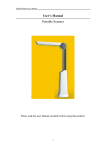
Thank you for purchasing the mbeat® Portable Image
and Document Scanner.
Please take a moment to read through this manual. Its
contents will help you to get the best use of the smart
scanner.
1. Precaution
Before using your Portable Scanner, please ensure that
you read and understand the safety precautions
described below. Always ensure that the Portable
Scanner is operated correctly.
• Never operate Portable Scanner inside of an aircraft
or anywhere else where operation of such devices is
restricted. Improper use creates the risk of serious
accident.
• Do not try to open the case of Portable Scanner or
attempt to modify Portable Scanner in any way.
High-voltage internal components create the risk of
electric shock when exposed. Maintenance and
repairs should be performed only by authorized
service providers.
• Keep Portable Scanner away from water and other
liquids. Do not use Portable Scanner with wet hands.
Never use Portable Scanner in the rain or snow.
Moisture creates the danger of fire and electric
shock.
2