1
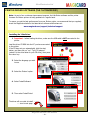
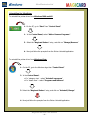
Ultra Electronics Ltd Uninstalling the UltraDriver To uninstall the printer driver from Windows 2000 and XP: 1. On the PC, go to “Start” then “Control Panel” 1. In the Control Panel, select “Add or Remove Programs”. 3. Select the “Magicard Enduro” entry, and click on “Change/Remove” 4. Now just follow the prompts from the Printer Uninstall application. To uninstall the printer driver from Windows Vista: 1. On the PC, go to the Windows logo then “Control Panel” 2. In the Control Panel: if in ‘category view’ - select “Uninstall a program” if in ‘classic view’ – select “Programs and features” 3. Select the “Magicard Enduro” entry, and click on “Uninstall/Change” 4. Now just follow the prompts from the Printer Uninstall application. Magicard Enduro User Manual - 21 -