1
Ultra Electronics Ltd
UPGRADING TO DOUBLE-SIDED:
For users with a single-sided Enduro printer, a double-sided upgrade kit can be purchased from your
Magicard Dealer - Part No. 3633-0052.
With this simple drop-in kit you can change your
single-sided Enduro printer into a double-sided
Enduro Duo and be printing double-sided (duplex)
cards in seconds!
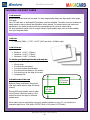
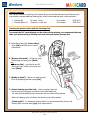
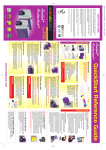
STEP 1 - Power-up your printer, display shows
“Enduro”.
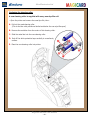
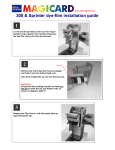
STEP 2 - Open the lid and remove any dye film that
may have been previously installed (this can
be used again after the upgrade has been
completed).
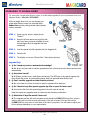
STEP 3 - Load the special dye film supplied with the Upgrade Kit.
STEP 4 - Close the lid.
STEP 5 - The display now shows “Enduro Duo”. Start duplex printing!
Upgrade FAQs
1. Q: Do I need any tools or mechanical knowledge?
A: Not at all. You just need to load the upgrade dye film roll and the printer does everything else
automatically.
2. Q: How does it work?
A: All Enduro printers have a card flipper mechanism. The RFID tag in the special upgrade dye
film roll tells the printer to permanently change itself into a double-sided Enduro Duo.
3. Q: Can I use this upgrade on other Enduro printers?
A: No, once used in a printer it cannot be used to upgrade other machines.
4. Q: Do I have to keep this special upgrade dye film or spool for future use?
A: Just use the film from this special upgrade kit to print cards as normal.
Keep the empty blue upgrade spool for reference and warranty confirmation.
5. Q: What kind of dye film should I use now?
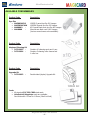
A: The upgrade dye film will work the same as the standard MA250YMCKOK dye film, which is
used to print color on the front and resin black on the rear of a card. You can also use the
MA300YMCKO to print color on both sides of the card if you prefer. You will need to adjust your
Driver settings depending on your requirements.
Magicard Enduro User Manual
- 26 -