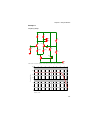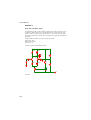
1
SIMETRIX SPICE AND USER ’S MANUAL MIXED MODE SIMULATION Trademarks PSpice is a trademark of Cadence Design Systems Inc. Hspice is a trademark of Synopsis Inc. Contact SIMetrix Technologies Ltd., 78 Chapel Street, Thatcham, RG18 4QN, United Kingdom Tel: Fax: Email: Internet +44 1635 866395 +44 1635 868322 [email protected] http://www.simetrix.co.uk Copyright © SIMetrix Technologies Ltd. 1992-2012 SIMetrix User’s Manual 6 March, 2012 Table of Contents Table of Contents Chapter 1 Introduction Installation and Licensing ................................................ 16 Install CD .................................................................. 16 What Is Simetrix............................................................... 16 What is SIMPLIS.............................................................. 17 Why Simulate?................................................................. 18 System Requirements ..................................................... 19 Operating System..................................................... 19 Hardware .................................................................. 19 Recommended System ............................................ 20 About the 64 bit Version ........................................... 20 Chapter 2 Quick Start Examples and Tutorials - Where are They? ............. 21 Simulation for the Novice.......................................... 21 Tutorial 1 - A Simple Ready to Run Circuit ...................... 22 Tutorial 2 - A Simple SMPS Circuit.................................. 30 Tutorial 3 - Installing Third Party Models ......................... 37 Chapter 3 Getting Started Simulation Modes - SIMetrix or SIMPLIS ........................ 42 Using the Schematic Editor ............................................. 42 Creating a Schematic ............................................... 42 Circuit Rules .................................................................... 45 Circuit Stimulus................................................................ 46 Waveform Generator ................................................ 46 PWL Source ............................................................. 47 Power Supply/Fixed Current Source ........................ 47 AC Source ................................................................ 47 Universal Source ...................................................... 48 Other Sources .......................................................... 49 Analysis Modes................................................................ 50 Overview................................................................... 50 Using the Choose Analysis Dialog ........................... 50 Setting Up a SIMPLIS Simulation............................. 55 Manual Entry of Simulator Commands..................... 57 Running the Simulator ..................................................... 58 SIMetrix .................................................................... 58 3 User’s Manual SIMPLIS ................................................................... 58 Plotting Simulation Results.............................................. 58 Overview .................................................................. 58 Fixed Probes ............................................................ 59 Random Probes ....................................................... 60 Chapter 4 Schematic Editor Schematic Windows and Sheets.............................. 62 Schematic Editor Window ........................................ 62 Editing Operations.................................................... 63 Wiring ....................................................................... 67 Edit Modes ............................................................... 69 Bus Connections ...................................................... 69 Copying to the Clipboard.......................................... 70 Annotating a Schematic ........................................... 70 Assigning Component References........................... 71 Checking the Schematic .......................................... 71 Schematic Preferences ............................................ 71 Adding and Removing Worksheets.......................... 72 Finding and Specifying Net Names.......................... 72 Hierarchical Schematic Entry .......................................... 72 Top-Down Method.................................................... 73 Bottom-up method.................................................... 74 Navigating Hierarchical designs............................... 74 Placing - Full vs Relative Path ................................. 74 Connecting Busses in a Hierarchy ........................... 75 Global Nets .............................................................. 76 Global Pins............................................................... 76 Passing Parameters Through a Hierarchy ............... 78 Missing Hierarchical Blocks ..................................... 79 Highlighting .............................................................. 79 Copying a Hierarchy................................................. 80 Printing ............................................................................ 80 Printing a Single Schematic Sheet........................... 80 Printing a Hierarchical Schematic ............................ 80 File Operations ................................................................ 80 Saving ...................................................................... 80 Exporting Schematic Graphics................................. 81 Exporting to Earlier Versions of SIMetrix ................. 81 ASCII format............................................................. 81 Autosave .................................................................. 82 Creating Schematic Symbols - Overview ........................ 82 Graphical Symbol Editor.................................................. 83 4 Table of Contents Notes ........................................................................ 83 Symbol Editor Window ............................................. 83 The Elements of a Symbol ....................................... 83 Creating a New Symbol............................................ 84 Editing an Existing Symbol ....................................... 84 Drawing Straight Line Segments .............................. 84 Drawing Arcs, Circles and Ellipses........................... 84 Placing and Defining Pins......................................... 85 Defining Properties ................................................... 87 Saving Symbols........................................................ 92 Creating a Symbol from a Script...................................... 93 Properties ........................................................................ 94 Overview................................................................... 94 What is a Property? .................................................. 94 Template Property .................................................... 96 Editing Properties in a Schematic............................. 97 Restoring Properties................................................. 97 Template Property ........................................................... 97 Overview................................................................... 97 Template Property Format........................................ 98 Template Scripts..................................................... 107 Symbol Library Manager................................................ 107 Operations .............................................................. 109 Editing System Symbol Libraries............................ 110 PSpice Schematics Translation ..................................... 110 Configuring the Translator ...................................... 111 If you don't have PSpice ......................................... 111 Reading PSpice Schematics .................................. 111 Installing PSpice Libraries for Use with SIMetrix .... 111 What the Translator will do ..................................... 111 Limitations .............................................................. 112 Using Schematic Editor for CMOS IC Design................ 112 MOSFET Symbols.................................................. 112 Automatic Area and Perimeter Calculation............. 114 Editing the MOS Symbols....................................... 114 Further Information ........................................................ 115 How Symbols are Stored........................................ 115 Summary of Simulator Devices .............................. 115 Chapter 5 Components Numbered Components................................................. 118 Selecting a Model by Specification......................... 120 Viewing and Editing Models ................................... 121 5 User’s Manual Numbered Components in SIMPLIS ............................. 122 SPICE to SIMPLIS Conversion .............................. 122 Generic Components .................................................... 128 Saturable Inductors and Transformers................... 130 Ideal Transformers ................................................. 132 Coupling Factor...................................................... 133 Mutual Inductors..................................................... 133 Resistors, Capacitors and Inductors ...................... 134 Infinite Capacitors and Inductors............................ 135 Potentiometer......................................................... 136 Lossless Transmission Line ................................... 136 Lossy Transmission Line........................................ 137 Fixed Voltage and Current Sources ....................... 137 Controlled Sources................................................. 137 Voltage Controlled Switch ...................................... 138 Switch with Hysteresis ........................................... 138 Delayed Switch ...................................................... 139 Parameterised Opamp ........................................... 140 Parameterised Opto-coupler .................................. 141 Parameterised Comparator.................................... 141 VCO ....................................................................... 142 Verilog-A Library .................................................... 142 Generic ADCs and DACs....................................... 144 Generic Digital Devices.......................................... 145 Functional Blocks - Overview................................. 145 Non-linear Transfer Function ................................. 146 Laplace Transfer Function ..................................... 148 Arbitrary Non-linear Passive Devices..................... 151 Creating Models ............................................................ 151 Overview ................................................................ 151 Creating Soft Recovery Diode Models ................... 151 Subcircuits..................................................................... 153 Overview ................................................................ 153 Creating a Sub-circuit from a Schematic................ 154 Calling a Sub-circuit in a Schematic....................... 155 Special Components ..................................................... 157 Initial Conditions..................................................... 157 Nodesets ................................................................ 158 Keeps ..................................................................... 158 Parameters and Expressions ........................................ 159 Example ................................................................. 159 6 Table of Contents Chapter 6 Device Library and Parts Management Using Parts Browser ...................................................... 162 Parts Management - Installing Models .......................... 163 Overview................................................................. 163 Procedure ............................................................... 163 Full Model Installation Procedure ........................... 163 Removing Model Libraries...................................... 167 Parts Management - Advanced Topics.......................... 167 Associating Multiple Models with Symbols ............. 167 Embedded Association........................................... 169 Catalog Files........................................................... 170 Importing Models to a Schematic ........................... 171 Sundry Topics................................................................ 171 .LIB Control............................................................. 171 Drag and Drop to Schematic .................................. 172 Library Diagnostics ................................................. 172 Local Models .......................................................... 172 Library Indexing Mechanism................................... 172 Duplicate Model Names ......................................... 172 Chapter 7 Analysis Modes Running Simulations...................................................... 175 Overview................................................................. 175 Starting, Pausing and Aborting Analyses ............... 175 Running Analyses in Asynchronous Mode ............. 176 Running an Analysis on a Netlist............................ 176 Transient Analysis ......................................................... 176 Setting up a Transient Analysis .............................. 176 Restarting a Transient Run..................................... 179 Transient Snapshots............................................... 179 Operating Point.............................................................. 181 Sweep Modes ................................................................ 182 Device Sweep......................................................... 182 Temperature ........................................................... 183 Model Parameter .................................................... 183 Parameter............................................................... 183 Frequency............................................................... 185 Monte Carlo ............................................................ 185 Setting up a Swept Analysis ................................... 185 DC Sweep...................................................................... 186 Setting up a DC sweep........................................... 186 Example.................................................................. 187 7 User’s Manual AC Sweep ..................................................................... 188 Setting up an AC sweep......................................... 188 Example ................................................................. 189 Noise Analysis............................................................... 189 Setting up an AC Noise analysis............................ 189 Plotting Results of Noise Analysis.......................... 190 Example 1 .............................................................. 191 Example 2 .............................................................. 192 Real Time Noise............................................................ 193 Setting Up a Real Time Noise Analysis ................. 193 Transfer Function .......................................................... 195 Setting up a Transfer Function Analysis ................ 195 Plotting Transfer Function Analysis Results........... 196 Example ................................................................. 196 Sensitivity ...................................................................... 197 Setting up a Sensitivity Analysis ............................ 197 Simulator Options.......................................................... 198 Setting Simulator Options ...................................... 198 Multi-step Analyses ....................................................... 200 Setting up a Multi-step Analysis ............................. 200 Example 1 .............................................................. 202 Example 2 .............................................................. 203 Safe Operating Area Testing......................................... 204 Overview ................................................................ 204 Defining Simple Limit Tests.................................... 204 Advanced SOA Limit Testing ................................. 205 Chapter 8 SIMPLIS Analysis Modes Transient Analysis ......................................................... 207 Setting up a Transient Analysis.............................. 207 Periodic Operating Point (POP) .................................... 209 Setting up a POP Analysis ..................................... 209 AC Analysis ................................................................... 212 Setting up an AC Analysis...................................... 212 SIMPLIS Options........................................................... 213 Multi-step and Monte Carlo Analyses............................ 213 Overview ................................................................ 213 Comparison Between SIMetrix and SIMPLIS ........ 214 Setting up a SIMPLIS Multi-step Parameter Analysis214 Setting Up a SIMPLIS Monte Carlo Analysis ......... 215 Tolerances and Distribution Functions................... 216 Monte Carlo Seed Values ...................................... 216 Performance Analysis and Histograms .................. 218 8 Table of Contents Initial Condition Back-annotation ................................... 218 Overview................................................................. 218 How to Back-annotate a Schematic ....................... 219 Disable/Enable Initial Conditions ............................ 219 Back-annotation Errors........................................... 219 Editing Back-annotated Initial Conditions ............... 219 How Does it Work?................................................. 219 Hierarchical Blocks and Subcircuits ....................... 220 Chapter 9 Graphs, Probes and Data Analysis Elements of the Graph Window ..................................... 221 Main Window .......................................................... 221 Windows and Tabbed Sheets................................. 221 Graph Toolbar ........................................................ 222 Probes: Fixed vs. Random ............................................ 222 Fixed Probes.................................................................. 223 Fixed Probe Options............................................... 224 Fixed Bus Probe Options........................................ 227 Using Fixed Probes in Hierarchical Designs .......... 228 Adding Fixed Probes After a Run has Started........ 228 Changing Update Period and Start Delay .............. 228 Random Probes............................................................. 228 General Behaviour.................................................. 228 Functions ................................................................ 229 Notes on Probe Functions ...................................... 230 Plotting Noise Analysis Results .............................. 231 Plotting Transfer Function Analysis Results ........... 231 Fourier Analysis...................................................... 232 Probing Busses ...................................................... 236 Bus Probe Options ................................................. 237 Plotting an Arbitrary Expression ............................. 238 Curve Arithmetic ..................................................... 243 Using Random Probes in Hierarchical Designs...... 243 Plot Journals and Updating Curves ............................... 245 Overview................................................................. 245 Update Curves........................................................ 246 Plot Journals........................................................... 246 Graph Layout - Multiple Y-Axis Graphs ......................... 246 AutoAxis Feature .................................................... 248 Manually Creating Axes and Grids ......................... 249 Selecting Axes........................................................ 249 Stacking Curves to Multiple Grids .......................... 249 Moving Curves to Different Axis or Grid ................. 249 9 User’s Manual Deleting Axes ......................................................... 249 Editing Axes ........................................................... 250 Reordering Grids and Digital Axes......................... 251 Plotting the Results from a Previous Simulation ........... 251 Combining Results from Different Runs................. 252 Curve Operations .......................................................... 253 Selecting Curves .................................................... 253 Deleting Curves...................................................... 253 Hiding and Showing Curves................................... 253 Re-titling Curves..................................................... 254 Highlighting Curves ................................................ 254 Graph Cursors............................................................... 254 Overview ................................................................ 254 Cursor Operations.................................................. 255 Additional Cursors.................................................. 257 Cursor Readout...................................................... 257 Cursor Functions.................................................... 259 Curve Measurements .................................................... 260 Overview ................................................................ 260 Available Measurements........................................ 260 Using the Define Measurement GUI ...................... 260 Measurement Definitions Manager ........................ 262 Repeating the Same Measurement ....................... 264 Applying Measurements to Fixed Probes .............. 264 Notes on Curve Measurement Algorithms ............. 266 Plots from curves ................................................... 267 Graph Zooming and Scrolling........................................ 268 Annotating a Graph ....................................................... 269 Curve Markers........................................................ 269 Legend Box ............................................................ 271 Text Box ................................................................. 272 Caption and Free Text ........................................... 272 Graph Symbolic Values.......................................... 273 Copying to the Clipboard............................................... 275 Overview ................................................................ 275 Copy Data to the Clipboard.................................... 276 Copying Graphics to the Clipboard ........................ 276 Paste Data from the Clipboard............................... 276 Using the Internal Clipboard................................... 276 Exporting Graphics........................................................ 277 Saving Graphs............................................................... 277 Saving .................................................................... 278 Restoring................................................................ 278 Viewing DC Operating Point Results............................. 278 10 Table of Contents Schematic Annotation............................................. 278 Displaying Device Operating Point Info .................. 278 List File Data........................................................... 278 Other Methods of Obtaining Bias Data................... 279 Bias Annotation in SIMPLIS ................................... 279 Bias Annotation Display Precision.......................... 279 Bias Annotation and Long Transient Runs ............. 279 Saving Data ................................................................... 279 Saving the Data of a Simulation ............................. 279 Restoring Simulation Data...................................... 280 Performance Analysis and Histograms.......................... 280 Overview................................................................. 280 Example.................................................................. 281 Histograms ............................................................. 283 Goal Functions ....................................................... 286 Data Import and Export.................................................. 296 Importing SPICE3 Raw and CSDF Files ................ 296 Importing Tabulated ASCII Data............................. 297 Exporting SPICE3 Raw Files.................................. 297 Exporting Data........................................................ 297 Launching Other Applications................................. 298 Data Files Text Format ........................................... 298 Chapter 10 The Command Shell Command Line .............................................................. 300 Command History................................................... 300 Message Window ................................................... 300 Multiple commands on one line .............................. 301 Scripts..................................................................... 301 Command Line Editing ........................................... 301 Command Line Switches........................................ 301 Editing the Menu System............................................... 301 Overview................................................................. 301 Procedure ............................................................... 302 User Defined Toolbars and Buttons............................... 303 Message Window .......................................................... 303 Menu Reference ............................................................ 304 Keyboard ....................................................................... 304 Chapter 11 Command and Function Reference Command Summary...................................................... 309 Reference ...................................................................... 309 11 User’s Manual DefKey ................................................................... 309 DefMenu................................................................. 311 OpenGroup ............................................................ 313 ReadLogicCompatibility ......................................... 313 Reset...................................................................... 314 SaveRhs................................................................. 314 Set.......................................................................... 315 Show ...................................................................... 315 Unset...................................................................... 316 Function Summary ........................................................ 317 Function Reference ....................................................... 319 abs(real/complex)................................................... 319 arg(real/complex) ................................................... 319 arg_rad(real/complex) ............................................ 320 atan(real/complex) ................................................. 320 cos(real/complex)................................................... 320 db(real/complex) .................................................... 320 diff(real) .................................................................. 320 exp(real/complex)................................................... 320 fft(real [, string]) ...................................................... 320 FIR(real, real [, real]) .............................................. 321 Floor(real)............................................................... 321 GroupDelay(real/complex) ..................................... 322 Histogram(real, real) .............................................. 322 Iff(real, any, any) .................................................... 322 IIR(real, real [, real]) ............................................... 323 im(real/complex), imag(real/complex) .................... 324 integ(real) ............................................................... 324 Interp(real, real [, real, real])................................... 324 IsComplex(any) ...................................................... 324 length(any) ............................................................. 324 ln(real/complex)...................................................... 324 log10(real/complex), log(real/complex) .................. 325 mag(real/complex), magnitude(real/complex)........ 326 maxidx(real/complex) ............................................. 326 Maxima(real [, real, string]) .................................... 326 Maximum(real/complex [, real, real])...................... 326 mean(real/complex) ............................................... 326 Mean1(real [, real, real])......................................... 327 minidx(real/complex) .............................................. 327 Minima(real [, real, string]) ..................................... 327 Minimum(real/complex [, real, real])....................... 327 norm(real/complex) ................................................ 327 ph(real/complex), phase(real/complex).................. 328 12 Table of Contents phase_rad(real/complex)........................................ 328 Range(real/complex [, real, real]) ........................... 328 re(real/complex), real(real/complex)....................... 328 Ref(real/complex) ................................................... 328 Rms(real)................................................................ 328 RMS1(real [, real, real]) .......................................... 328 rnd(real) .................................................................. 329 RootSumOfSquares(real [, real, real]) .................... 329 sign(real)................................................................. 329 sin(real/complex) .................................................... 329 sqrt(real/complex)................................................... 329 SumNoise(real [, real, real]).................................... 329 tan(real/complex).................................................... 329 Truncate(real [, real, real]) ...................................... 329 unitvec(real)............................................................ 330 vector(real) ............................................................. 330 XFromY(real, real [, real, real]) ............................... 330 XY(real, real) .......................................................... 330 YFromX(real, real [, real]) ....................................... 330 Chapter 12 Monte Carlo Analysis An Example ................................................................... 332 Component Tolerance Specification.............................. 334 Setting Device Tolerances...................................... 334 Model Tolerances ................................................... 335 Matching Devices ................................................... 335 Random Distribution ............................................... 336 Running Monte Carlo..................................................... 336 Overview................................................................. 336 Setting up a Single Step Monte Carlo Sweep ........ 336 Setting up a Multi Step Monte Carlo Run ............... 337 Running a Monte Carlo Analysis ............................ 337 Setting the Seed Value........................................... 337 Analysing Monte-Carlo Results ..................................... 338 Plots........................................................................ 338 Creating Histograms............................................... 339 Chapter 13 Verilog-HDL Simulation Overview........................................................................ 341 Documentation............................................................... 341 Supported Verilog Simulators ........................................ 341 Basic Operation ............................................................. 341 13 User’s Manual Using Verilog-HDL in SIMetrix Schematics ................... 342 Creating Schematic Symbols ................................. 342 Editing Parameters................................................. 342 Module Cache ............................................................... 343 Operation ............................................................... 343 Simulation Options ........................................................ 343 Verilog Simulator.................................................... 343 Timing Resolution .................................................. 343 Open Console for Verilog Process......................... 344 Tutorial .......................................................................... 344 Procedure............................................................... 345 Verilog Simulator Interface ............................................ 349 VPI ......................................................................... 349 Interface Configuration........................................... 350 Launch Script ......................................................... 350 Verilog Simulation Preparation............................... 350 Chapter 14 Sundry Topics Saving and Restoring Sessions .................................... 351 Overview ................................................................ 351 Saving a Session ................................................... 351 Restoring a Session ............................................... 351 Where is Session Data Stored? ............................. 351 Symbolic Path Names ................................................... 351 Overview ................................................................ 351 Definition ................................................................ 352 Configuration File Example .................................... 353 Using Symbolic Names .......................................... 353 SIMetrix Command Line Parameters ............................ 354 Using startup.ini ..................................................... 355 Configuration Settings ................................................... 355 Overview ................................................................ 355 Default Configuration Location............................... 355 Application Data Directory...................................... 355 Specifying Other Locations for Config Settings...... 356 Options .......................................................................... 357 Overview ................................................................ 357 Using the Options Dialog ....................................... 357 Using the Set and Unset commands...................... 363 Startup Auto Configuration ............................................ 383 Overview ................................................................ 383 What is Set Up ....................................................... 383 Auto Configuration Options .................................... 383 14 Table of Contents Installation - Customising ....................................... 385 Colours and Fonts ......................................................... 385 Colours ................................................................... 385 Fonts....................................................................... 385 Using a Black Background ..................................... 387 Startup Script ................................................................. 387 15 User’s Manual Chapter 1 Introduction Installation and Licensing Full installation and licensing instructions may be found at: http://www.simetrix.co.uk/app/users.htm Install CD The install CD contains the installation files but also contains other useful material such as model documentation and script source. A physical CD is only shipped to customers who purchase a portable license, but the full CD content may also be accessed from our web site. There is a web browseable version as well as a downloadable ISO file allowing you to burn your own CD. The CD content may be found at our web site by navigating to: http://www.simetrix.co.uk/app/product-installation.htm From there you should be able to find the download links page for the version of interest. Be aware that a username and password is required to access the download links pages. If you have current maintenance you can obtain these by registering at http://www.simetrix.co.uk/app/register.htm. Otherwise contact [email protected] What Is Simetrix SIMetrix is a mixed-signal circuit simulator designed for ease and speed of use. The core algorithms employed by the SIMetrix analog simulator are based on the SPICE program developed by the CAD/IC group at the department of Electrical Engineering and Computer Sciences, University of California at Berkeley. The digital event driven simulator is derived from XSPICE developed by the Computer Science and Information Technology Laboratory, Georgia Tech. Research Institute, Georgia Institute of Technology. Although originally derived from these programs only about 30% of the overall application code can be traced to them. A large part of the simulator code is either new or has been rewritten in order to provide new analysis features and to resolve convergence problems. In addition SIMetrix includes schematic entry and waveform analysis features that owe nothing to the original SPICE program. Features 16 • Closely coupled direct matrix analog and event driven digital simulator. • Fully integrated hierarchical schematic editor, simulator and graphical postprocessor. Chapter 1 Introduction • Superior convergence for both DC and transient analyses. Pseudo transient analysis algorithm solves difficult operating points while enhanced transient analysis algorithm virtually eliminates transient analysis failures. • Advanced swept analyses for AC, DC, Noise and transfer function. 6 different modes available. • Real time noise analysis allowing noise simulation of oscillators and sampled data systems. • Support for IC design models such as BSIM3/4, VBIC and Hicum. • Cross probing of voltage, current and device power from schematic. Current and power available for sub-circuits. • Monte Carlo analysis including comprehensive tolerance specification features. • Full featured scripting language allowing customised waveform analysis and automated simulation • Verilog-A Analog Hardware Description Language • Mixed signal simulation using Verilog-HDL • Functional modelling with arbitrary non-linear source and arbitrary linear sdomain transfer function. • Arbitrary logic block for definition of any digital device using descriptive language. Supports synchronous, asynchronous and combinational logic as well as ROMS and RAMs. • Models for saturable magnetic components including support for air-gaps. • User definable fixed and popup menus and key definitions. What is SIMPLIS SIMPLIS is a circuit simulator designed for rapid modelling of switching power systems. An acronym for “SIMulation for Piecewise LInear System”, it is supplied with our SIMetrix/SIMPLIS product range. SIMPLIS is a component level simulator like SPICE but is typically 10 to 50 times faster when simulating switching circuits. It achieves its speed by modelling devices using a series of straight-line segments rather than solving non-linear equations as SPICE does. By modelling devices in this way, SIMPLIS can characterise a complete system as a cyclical sequence of linear circuit topologies. This is an accurate representation of a typical switching power system where the semiconductor devices function as switches. However, a linear system can be solved very much more rapidly than the non-linear systems that SPICE handles. The end result is accurate, but extremely fast simulations, allowing the modelling of complex topologies that would not be viable with SPICE. SIMPLIS has three analysis modes: Transient, Periodic Operating Point and AC. Transient analysis is similar to the SPICE equivalent but is typically 10-50 times faster. Periodic Operating Point is a unique analysis mode that finds the steady-state operating waveforms of switching systems. AC analysis finds the frequency response of a switching system without needing to use averaged models. This is especially useful for what-if studies on new circuit topologies or control schemes where the small-signal averaged model has not yet been derived. 17 User’s Manual Because non-linear devices are defined using a sequence of straight line segments, models for such devices are quite different from SPICE models. There are of course many SPICE models available and so in order to retain compatibility with these, SIMetrix/SIMPLIS has the ability to convert models for some types of device into SIMPLIS format. This conversion is performed when the device is placed on the schematic. Devices currently supported are MOSFETs, BJTs and diodes. In the case of MOSFETs and Zener diodes, the conversion is achieved by performing a sequence of simulations using the SIMetrix-SPICE simulator. This method is independent of the method of implementation of the device. Why Simulate? Integrated circuit designers have been using analog simulation software for over three decades. The difficulty of bread-boarding and high production engineering costs have made the use of such software essential. For discrete designers the case has not been so clear cut. For them prototyping is straightforward, inexpensive and generally provides an accurate assessment of how the final production version of a circuit will behave. By contrast computer simulation has been seen as slow and prone to inaccuracies stemming from imperfect models. In recent years, however, the simulation of discrete analog circuits has become more viable. This has come about because of the almost relentless advances in CPU power, the increased availability of device models from their manufacturers and the introduction of easy to use and affordable simulation tools such as SIMetrix. The pressure to reduce product development time-scales has meant that for many projects the traditional bread-boarding phase is skipped altogether - with or without simulation - and circuit development is carried out on the first revisions of PCB. The use of simulation on a circuit or parts of a circuit can help to eliminate errors in a circuit design prior to this stage and reduce the number of PCB revisions required before the final production version is reached. Of course, to be useful, the simulation process must therefore not be too time consuming. Computer simulation, does however, have many more uses. There are some things you can do with a simulator which cannot be achieved with practical approaches. You can remove parasitic elements, you can make non-invasive measurements that are impossible in real-life or you can run components outside of their safe operating area. These abilities make simulation a valuable tool for finding out why a particular design does not behave as expected. If the problem can be reproduced on a simulator then its cause can be much more easily identified. Even if a problem cannot be reproduced then this gives some clues. It means that it is caused by something that is not modelled, a wiring parasitic perhaps. Simulation is extremely useful for testing ideas at the system level. Sometimes it is not easy to test a concept because the hardware to implement it is very costly or time consuming to build. It may even be that you don't know how to implement the idea in hardware at all. The alternative is to design a model and simulate it with a computer. Once it has been established that the concept is viable then attention can be given to its implementation. If it proves not to be viable, then a great deal of time will have been saved. 18 Chapter 1 Introduction System Requirements Operating System Windows 32 bit versions The following are supported Windows 7 Home Premium/Professional/Enterprise/Ultimate Windows Vista Home, Home Premium, Ultimate, Business, Enterprise Windows XP Home and Professional Windows 2000 There are no service pack requirements for any of the above The 32 bit version will also run on any of the systems listed under “Windows 64 bit version” below. Windows 64 bit version The following are supported: Windows 7 Home Premium/Professional/Enterprise/Ultimate, x64 Edition Windows Vista Home/Home Premium/Business/Enterprise/Ultimate, x64 Edition Windows XP Professional, x64 Edition There are no service pack requirements for any of the above Linux There are so many Linux distributions available that it is impossible to fully test and support each and every one. We therefore only fully support the following distributions: Redhat Enterprise Linux, 3, 4 and 5 Currently only 32 bit versions are supported. SIMetrix will run correctly on other distributions. However, if you use an unsupported distribution, and you have difficulties with running SIMetrix on that distribution, we will not be able to offer assistance unless we can reproduce that difficulty with a supported distribution. SIMetrix will usually run on any distribution that uses glibc 2.3.2 or later and gcc version 3.2.3 or later. Hardware SIMetrix will run satisfactorily on any hardware that is sufficient to run the machine’s operating system. 19 User’s Manual Recommended System If you regularly run large circuit simulations or long runs on smaller circuits, we recommend investing in the most powerful CPU available. A large RAM system can be useful as this will allow caching of simulation data. This will speed up plotting results if a large amount of data is generated. The data is stored to disk in an efficient manner and therefore substantial RAM is not essential unless the circuits being simulated are very large indeed. 20,000 MOSFETs requires around 64MBytes. A high performance bus mastering SCSI disk system will improve simulation performance a little. About the 64 bit Version A 64 bit version of SIMetrix is available for Windows. See above for system requirements. The bit length of a processor (e.g. 32, 64 etc) can mean many things but it usually refers to the size of the internal registers and thus the maximum range of addressable memory. Up until recently all personal computers and workstations used 32 bit processors and so the maximum memory range was 2^32 or 4GBytes. This is no longer the unimaginably large amount of memory that it once was. In order to access more memory than this we need more than 32 bits and the usual choice is to increase it to 64. The memory range is the chief benefit of using a 64 bit processor and you should not expect substantial performance improvements. With SIMetrix, the main area where 4GBytes of memory may not be enough is graph plotting. If you run simulations with ten million time points or more, you should seriously consider using the 64 bit version of SIMetrix. Note that all 64 bit applications require a 64 bit operating system as well as a 64 bit processor. You cannot install or run the 64 bit version of SIMetrix on a 32 bit operating system even if the processor is 64bit. Although major performance benefits should not be expected, a 64 bit application will usually run faster with a 64 bit OS compared to a 32 bit version of the same application running with a 64 bit OS. 20 Chapter 2 Quick Start Chapter 2 Quick Start Tutorials - Overview This chapter covers a number of tutorials that will help you get started with SIMetrix. Tutorial 1 is designed for total novices. You may wish to skip to tutorial 2 if you already have experience with SPICE type programs. Tutorial 2 assumes you have grasped the basics of using the schematic editor. You don't have to worry about setting up analyses or the characteristics of any input stimulus such as V2 in tutorial 1; these procedures will be explained. If you are an experienced circuit designer but have never used a circuit simulator before, we recommend you read “Simulation for the Novice” below. This will familiarise you with a few concepts about simulation that may be alien to you if you are used to traditional methods of evaluating circuits. Examples and Tutorials - Where are They? In Linux the examples and tutorials reside in the examples.tar file that forms part of the standard distribution. Note that this file is not automatically installed. On Windows the example files are first installed under the main installation root (e.g. under C:\Program Files\SIMetrix600\support\examples) but it is not intended that they are used from that location. Instead they will be copied to your “My Documents” folder when SIMetrix starts for the first time, but only if you accept the option to do so. If you can’t find the examples files, you may need to manually copy them from the installation root to a suitable location of your choice. In the following tutorial discussions, the examples directory is referred to as ‘EXAMPLES’. Simulation for the Novice When measuring a real circuit, you would probably connect up a power source - bench power supply perhaps - maybe also some signal source, then switch it on and take measurements using - probably - an oscilloscope. You can also make adjustments to the circuit and see the effects straight away. For simulation, you have a choice of analysis modes and not all of them have an exact real life equivalent. The analysis mode that most closely resembles the method of bench testing a circuit described above is transient analysis. This performs an analysis over a specified (by you) time period and saves all the results - i.e. all the voltages and currents in the circuit - to your hard disk. The difference between real life testing and simulation is that the simulation is not running all the time. If you want to see the effects of changing a component value, you have to change it then re-run the simulation. (But note there is a potentiometer device that automates this procedure see “Potentiometer” on page 136). 21 User’s Manual In order to solve the circuit, the simulator has to calculate the voltage at every node at every time point. Disk space is cheap and plentiful so SIMetrix saves all these values as well as the device currents. Not all simulators do this, some require you to state in advance what you want saved. After the run is complete, you can then randomly probe the circuit to look at any voltage, current or device power over the analysis time period. You can also place fixed probes on the circuit before running the analysis which will cause the waveform at that point of the circuit to be automatically be displayed while the simulation is running or optionally after its completion. Some of the other analysis modes are: AC analysis which performs a frequency sweep, DC sweep which ramps a voltage or current source and noise analysis which calculates total noise at a specified point and which components are responsible for that noise. Tutorial 1 - A Simple Ready to Run Circuit This tutorial demonstrates a basic simulation on a ready to run to circuit. All you need to do is load the circuit and press F9 to run it. We will then make a few changes to the circuit and make some extra plots. This tutorial demonstrates the basic features without having to get into the details of setting up a simulation. Proceed as follows: 1. Select the menu File|Open Schematic.... Select the schematic file TUTORIAL1 which you should find in the folder EXAMPLES\TUTORIALS (See “Examples and Tutorials - Where are They?” on page 21). Select Open to open this file. A schematic window will open with the following circuit: 5.6k R2 V1 5 Q3 Q2N2222 50 R5 Q1 Q2N2222 Q2 Q2N2222 V2 AC 1 0 Pulse(0 100m 0 10n 10n 5u) 2.7k R1 2.2k R3 Amplifier Output CLOAD 100p 470 R4 V3 5V This is a simple feedback amplifier designed to amplify a 100mV pulse up to 22 Chapter 2 Quick Start around 500mV. The basic requirement of the design is that the pulse shape should be preserved, DC precision is important but is not critical. The above is our first attempt at a design but has not yet been optimised. This example circuit has been setup to be ‘ready to run’. 2. To start the simulation, select from the schematic window Simulator|Run or press F9. The simulation will not take long, on a modern machine less than half a second. You will see a graph of the output voltage appear: 600 Amplifier Output / mV 500 400 300 200 100 0 2 4 Time/µSecs 6 8 10 2µSecs/div As can be seen, our amplifier doesn't work all that well. There are two problems. 1. There is substantial ringing on the rising edge, probably caused by the capacitative load. 2. The falling edge is somewhat sluggish The sluggish falling edge is caused by the absence of any standing current in the output emitter follower, Q3. To rectify this, we will place a resistor from the emitter to the -5V rail. The resulting schematic is shown below: 23 User’s Manual 5.6k R2 V1 5 Q3 Q2N2222 50 R5 Q1 Q2N2222 Q2 Q2N2222 V2 AC 1 0 Pulse(0 100m 0 10n 10n 5u) 2.7k R1 2.2k R3 Amplifier Output CLOAD 100p 470 R4 1K R6 V3 5V To make this modification, proceed as follows: 1. Press the Resistor button in the component toolbar. Alternatively, select the menu Place|Passives|Resistor (Box shape) or, if you prefer, Place|Passives|Resistor (Z shape). A resistor symbol will appear. Place this in the location shown in the diagram above. Click the left mouse button to fix it to the schematic. You may now see another resistor symbol appear (depending on how the system options are set). Cancel this by clicking the right mouse button. 2. Now wire up the resistor. There are a number of ways of doing this. If you have a three button mouse or wheel mouse, one way is to use the middle button (or wheel). Pressing it once will start a wire. Pressing it again will fix it and start a new one. Pressing the right button will terminate it. If enabled you can also use the ‘smart-wiring’ method. Just take the mouse pointer to the pin of the resistor. You will see a pen symbol appear as the mouse gets close to the pin. Left click then move the mouse cursor to the destination then left click again. This method will automatically locate a route for the wire if one exists. You can also enter wiring mode by selecting the toolbar wire button . This puts schematic into a permanent wiring mode where the left key is always used for wiring. Revert to normal mode by pressing the wire button again. 3. Re run the simulation by pressing F9. The graph will now be updated to: 24 Chapter 2 Quick Start 600 First attempt 500 Amplifier Output / mV 400 300 With R6 added 200 100 0 0 2 4 6 Time/µSecs 8 10 2µSecs/div As you can see, The problem with the trailing edge has been fixed and the ringing is much improved. Now let's have a look at the ringing in more detail. To do this, we need to zoom in the graph by adjusting the limits of the axes. There are two ways of doing this. The quickest is to simply drag the mouse over the region of interest. The other method is to manually enter the limits using the Edit Axis Dialog Box. To zoom with the mouse, proceed as follows: 1. Make sure that the graph window is selected by clicking in its title bar. 2. Place the cursor at the top left of the region of interest i.e to the left of the y-axis and above the top of the red curve. 3. Press the left mouse key and while holding it down, drag the mouse to the bottom right of the area you wish to zoom in. You should see a rectangle appear as you drag the mouse. 4. Release the mouse key. You should see something like: 25 User’s Manual First attempt 600 500 Amplifier Output / mV With R6 added 400 300 200 100 0 0 50 Time/nSecs 100 150 200 250 300 350 400 50nSecs/div If you don't get it quite right, press the Undo Zoom button: to return to the previous view. You can also use the left, right, up and down arrow keys to shift the position of the curves. We can probably improve the ringing by adding a small phase lead in the feed back loop. This can be done by connecting a small capacitor between the emitter of Q3 and the base of Q2. There isn't room to add this tidily at present, so first, we will move a few components to make some space. Proceed as follows: 1. 26 In the schematic window, drag the mouse with the left key pressed over the region shown by the dotted lines below: Chapter 2 Quick Start 5.6k R2 V1 5 Q3 Q2N2222 Amplifier Output 2.2k R3 Q1 50 Q2N2222 Q2 V2 R5 AC 1 0 Pulse(0 100m 0 10n 10n 5u) Q2N2222 CLOAD 100p 470 R4 2.7k R1 V3 5V 1K R6 As you drag the mouse, a rectangle should appear. 2. Release the mouse. The area enclosed will turn blue: 5.6k R2 V1 5 Q3 Q2N2222 50 R5 Q1 Q2N2222 Q2 Q2N2222 V2 AC 1 0 Pulse(0 100m 0 10n 10n 5u) 2.7k R1 2.2k R3 Amplifier Output CLOAD 100p 470 R4 1K R6 V3 5V The blue wires and components are said to be selected. To move them... 3. Place the cursor within one of the selected components - V1 say - then press and hold the left mouse key. 4. Move the mouse to the right by two grid squares then release the left key. 27 User’s Manual 5. Unselect by left clicking in an empty area of the schematic. This is what you should now have: 5.6k R2 V1 5 Q3 Q2N2222 50 R5 2.2k R3 Q1 Q2N2222 Q2 Q2N2222 V2 AC 1 0 Pulse(0 100m 0 10n 10n 5u) CLOAD 100p 470 R4 2.7k R1 6. Amplifier Output 1K R6 V3 5V Wire in the capacitor C1 as shown below using a similar procedure as for the resistor R6. Q3 Q2N2222 1n C1 2.2k R3 Q2 Q2N2222 Amplifier Output CLOAD 100p 470 R4 1nF is obviously far too high a value so we will try 2.2pF. To change the component's value proceed as follows: 1. 28 Double click C1. You should see the following dialog box appear: Chapter 2 Quick Start You can type the new value in directly in the Result box or you can select a value using the mouse alone with the up and down arrow buttons. Leave the Initial Condition setting at its default (Open Circuit) 2. Now re-run the simulation. This is the result you should see: First attempt 600 With R6 added 500 Amplifier Output / mV With R6 and C1 added 400 300 200 100 0 0 50 Time/nSecs 100 150 200 250 300 350 400 50nSecs/div The blue curve is the latest result. This is now a big improvement on our first attempt. You will notice that a new curve is displayed each time you run a new simulation. This is the default behaviour but this can be changed so that, for example, old curves are deleted leaving only the latest on view. To do this, double click the probe - that is the 29 User’s Manual object labelled “Amplifier Output”. Set “Peristence” to 1 and close the box. (For more infromation see “Probe Options Sheet” on page 225) We will now round off tutorial 1 by introducing AC analysis. AC analysis performs a frequency sweep over a specified frequency range. To set one up, follow these instructions: 1. In the schematic window, select the menu Simulator|Choose Analysis... . This is what you will see 2. Click AC check box and uncheck the Transient check box. The details of the AC sweep have already been set up - click the AC tab at the top to see them. 3. Run the simulation - this will open a new graph sheet. Tutorial 2 - A Simple SMPS Circuit In this tutorial we will simulate a simple SMPS switching stage to demonstrate some of the more advanced plotting and waveform analysis facilities available with SIMetrix. 30 Chapter 2 Quick Start ESR_C1 80m D2 murd310 V1 9 R3 3 C1 150u 30u IRF7501 L1 Output 47 Q1 R2 V2 X Pulse(0 5 0 50n 50n 1.95u 5u) You can either load this circuit from EXAMPLES\Tutorials\Tutorial2 (see “Examples and Tutorials - Where are They?” on page 21) or alternatively you can enter it from scratch. The latter approach is a useful exercise in using the schematic editor. To do this follow these instructions: 1. Place the components and wires as shown above. 2. The probe labelled ‘Output’ can be selected from either Place|Probe|Voltage Probe or Probe|Place Fixed Voltage Probe or just by pressing ‘B’ in the schematic editor. 3. After placing the output probe, double click to edit its label. Enter this in the box titled Curve Label. All the other options may be left at their defaults. 4. For the pulse source V2, you can use Place|Voltage Sources|Universal Source or the Universal Source tool bar button. 31 User’s Manual 5. Double click V2. Edit the settings as shown below: This sets up a 200kHz 5V pulse source with 40% duty cycle and 50nS rise time. 6. Set up the simulation by selecting the schematic menu Simulator|Choose Analysis... . In the dialog box, check Transient. Usually we would set the Stop time but on this occasion, the default 1mS is actually what we want. Now select the Advanced Options button. In the Integration method box, select Gear integration. This improves the simulation results for this type of circuit. You will still get sensible results without checking this option, they will just be a little better with it. (For more information, see “Convergence and Accuracy” chapter in the Simulator Reference Manual). If you have any graph windows open, you should now close them. Once you have loaded or entered the circuit, press F9 or use the schematic Simulator|Run menu to start the simulation. This will take somewhat longer than the previous tutorial but still less than 1 second on a modern machine. This is the graph you will see 32 Chapter 2 Quick Start 0 -0.5 -1 Output / V -1.5 -2 -2.5 -3 -3.5 -4 -4.5 0 0.2 0.4 0.6 0.8 Time/mSecs 1 200µSecs/div The circuit is the switching stage of a simple step-down (buck) regulator designed to provide a 3.3 V supply from a 9V battery. The circuit has been stripped of everything except bare essentials in order to investigate power dissipation and current flow. Currently, it is a little over simplified as the inductor is ideal. More of this later. We will now make a few measurements. First, the power dissipation in Q1: 1. Create an empty graph sheet by pressing F10 2. Select schematic menu Probe|Power In Device... . Left click on Q1. This is what you should see: 200 180 160 Power(Q1) / W 140 120 100 80 60 40 20 -0 0 Time/mSecs 0.2 0.4 0.6 0.8 1 200uSecs/div 33 User’s Manual This shows a peak power dissipation of 200W although you are probably more interested in the average power dissipation over a specified time. To display the average power dissipation over the analysis period: 1. Select menu Measure|Mean This should display a value of about 517mW. This is the average power over the whole analysis period of 1mS. You can also make this measurement over any period you select using the cursors as described below: 1. Zoom in the graph at a point around 100uS, i.e. where the power dissipation is at a peak. 2. Switch on graph cursors with menu Cursors|Toggle On/Off. There are two cursors represented by cross-hairs. One uses a long dash and is referred to as the reference cursor, the other a shorter dash and is referred to as the main or measurement cursor. When first switched on the reference cursor is positioned to the left of the graph and the main to the right. 3. Position the cursors to span a complete switching cycle. There are various ways of moving the cursors. To start with the simplest is to drag the vertical hairline left to right. As you bring the mouse cursor close to the vertical line you will notice the cursor shape change. See “Graph Cursors” on page 254 for other ways of moving cursors. 4. Press F3 or select analysis menu Measure|More Functions... . : In the right hand pane labelled Choose Measurement select Mean. In the Pre-process group, select Cursor span. Click Ok to close the dialog box 34 Chapter 2 Quick Start You should see a value of about 2.8W displayed. This is somewhat more than the 517mW average but is still well within the safe operating area of the device. However, as we noted earlier, the inductor is ideal and does not saturate. Lets have a look at the inductor current. 1. Select schematic menu Probe|Current in Device Pin (New Graph Sheet)… 2. Left click on the left pin of the inductor L1. This is what you will see: 0 -1 I(L1-P) / A -2 -3 -4 -5 -6 0 Time/mSecs 0.2 0.4 0.6 0.8 1 200µSecs/div This shows that the operating current is less than 1.5A but peaks at over 6A. In practice you would want to use an inductor with a maximum current of around 2A in this application; an inductor with a 6A rating would not be cost-effective. We will now replace the ideal component, with something closer to a real inductor. 1. Delete L1. 2. Select schematic menu Place|Magnetics|Saturable Transformer/Inductor.... A dialog box will be displayed. (See picture below). Select 0 secondaries then enter 34 in the turns edit box. Next check Select Core Type. Select EFD10-3F3-A25. This is part number for a Ferroxcube ferrite core. This is what you should have: 35 User’s Manual Click Ok to close the dialog box. 3. Place the inductor in the same place as before. 4. Run a new simulation. 5. Select the graph sheet that displayed the inductor current by clicking on its tab at the top of the graph window. Now select schematic menu Probe|Current in Device Pin... and left click on the left hand inductor pin. You will notice the peak current is now in excess of 45A. This is of course because the inductor is saturating. You can also measure the peak power over 1 cycle: 1. 36 Select the graph sheet with the power plot then select Probe|Power In Device… 2. Zoom back to see the full graph using the button: 3. Zoom in on the peak power. 4. Position the cursors to span a full cycle. (The cursors are currently tracking the first power curve. This doesn't actually matter here as we are only interested in the x-axis values. If you want to make the cursors track the green curve, you can simply pick up the cursor at its intersection with the mouse and drag it to the other curve) Chapter 2 Quick Start 5. We now have two curves on the graph so we must select which one with which we wish to make the measurement. To do this check the box as shown: 6. As before, press F3 then select Mean with the cursor span pre-process option. The new peak power cycle will now be in the 11-12W region - much more than before. Tutorial 3 - Installing Third Party Models In this tutorial, we will install a device model library. For this exercise, we have supplied a model library file - TUTORIAL3.MOD - with just two devices. These are: SXN1001 - an NPN bipolar transistor SXOA1000 - an opamp. Both are totally fictitious. You will find this file in the tutorial folder i.e. Examples\Tutorials\Tutorial3.mod. There are two aspects to installing a model. SIMetrix needs to know where within your file system, the model is located. If the model is to be listed in the parts browser system, then SIMetrix also needs to know what symbol to use for it in the schematic and what category it comes under. This is how you do it: 1. Open windows explorer or click on My Computer or open other file manager of your choice. 2. Locate TUTORIAL3.MOD in EXAMPLES\Tutorials (see “Examples and Tutorials - Where are They?” on page 21). Pick the file up and drop into the SIMetrix command shell. That is, drop it in the window where SIMetrix messages are displayed. If you can't see the command shell because it is obscured, select any SIMetrix window then press the space bar. A message box will appear asking you to confirm you wish to install the file. Click Ok. The message “Making device catalog. This may take some time, please wait...” will be displayed. At this stage, SIMetrix knows where to find our fictitious devices. You will find that it also knows about the NPN transistor as the following demonstrates: 1. Open an empty schematic. 2. Press control-G or select menu Place|From Model Library. You should see window displayed with the caption “Select Device” 3. Select the “* Recently Added Models *” category from the top of list shown on the left hand side. 37 User’s Manual 4. Select SXN1001 from the listed items on the right hand side. This is what you should see: 5. Press Place to place the device on the schematic. Without you having to tell it, SIMetrix already knew that the SXN1001 is an NPN transistor. This is because it is a primitive device defined using a .MODEL control. Such devices are built in to the simulator and SIMetrix can determine the part type simply by reading the .MODEL control in TUTORIAL3.MOD. This is not the case with the other device in the model library. This is an opamp and is defined as a subcircuit. This is a module made up of other components, in this case BJTs, diodes, resistors and current sources. SIMetrix can’t tell what type of device this is. It knows that it has five terminals and it knows where the electrical model is located in the file system, but it doesn’t know what schematic symbol to use for this model. SIMetrix will ask you for this information when you try and place it. Follow this procedure: 38 Chapter 2 Quick Start 1. Repeat the steps 1-5 above but instead select the SXOA1000 device instead of the SXN1000. Notice that when you select the device in the right hand side, you see the message ‘SIMetrix does not know what symbol to use for this model. Press “Place” to resolve’. 2. After pressing the Place button, you should see the following box: 3. First specify a suitable category for the device. In this case it is an operational amplifier, so select ‘Op-amps’ from the drop down box labelled Choose Category for SXOA1000. 4. Next define a symbol for this part. Under Define Symbol for SXOA1000 select ‘Operational Amplifier - 5 terminal’. We have not quite finished yet. Our new op-amp has the wrong pin out for the schematic symbol. The pin order for the symbol is shown in the third box down on the right and is as follows: 39 User’s Manual Pin name Function INP Non-inverting input INN Inverting input VSP Positive supply VSN Negative supply OUT Output The text at the bottom of the dialog box shows the actual subcircuit definition. Fortunately, it has been annotated with the function of each of the sub-circuit's terminals. (This is in fact usually the case with third-party models). As you can see, the output terminal is in the wrong place. We can change the pin order using the Pin order up and down buttons: 40 1. Select out in the pin order box. 2. Click twice on the up button so that it is positioned between inn and vsp. This is what you will now have: Chapter 2 Quick Start 3. Press OK You will now find our op-amp listed under the Op-amps category in the parts browser. Notes You will not always need to execute the above procedure to associate models and symbols even for subcircuit devices. SIMetrix is supplied with a data base of over 30000 devices that are already associated. These are devices for which SPICE models are known to be available from some third party source. This database is in the file ALL.CAT which you will find in ‘support’ directory under Windows and in the ‘share’ directory under Linux. The information you enter in the associate models dialog is stored in a file called USER_v2.CAT which you will find in the application data directory - see “Application Data Directory” on page 355. You will also not need to perform the above procedure for many 2 and 3 terminal semiconductor parts even if they are not listed in the ALL.CAT database. SIMetrix runs a series of simulations on these models and attempts to determine what the device type is from their results. If successful, the ‘association’ step demonstrated above will be skipped. Finally, there is a method of embedding association information within the model itself, and such models will not require manual association. The embedding method is described in “Embedded Association” on page 169. 41 User’s Manual Chapter 3 Getting Started Overview This chapter describes the basic operation of SIMetrix and is aimed primarily at novice users. The basic steps to simulate a circuit are as follows: 1. Enter the circuit using the schematic editor. See page 42 below 2. Add signal sources if relevant to your circuit. See page 46 below. 3. Specify analysis. This includes what type of analysis and over what limits it should run. See page 50 below. 4. Run simulator . See “Running the Simulator” on page 58 5. Graph results. (See “Plotting Simulation Results” on page 58 The following paragraphs briefly describe these steps. More details are given in other sections. Simulation Modes - SIMetrix or SIMPLIS If you have SIMetrix/SIMPLIS, you can set the schematic editor to one of two modes to select whether you are using the SIMetrix native (SPICE) simulator or the SIMPLIS simulator. To choose the simulator mode, select the menu File|Select Simulator... then select which simulator you wish to use. If the schematic is not empty and you change modes, the program will check that all parts entered on the sheet are compatible with the newly selected simulation mode as not all parts will work in both modes. Any that are believed not to be compatible will be highlighted and a warning will be issued. To clear the highlighting, select Edit|Unhighlight (This Sheet). You will most likely need to replace those components but in some cases you may simply need to re-enter the same component. If you wish to enter a circuit that will work in both modes, you should enter it in SIMPLIS mode and not use any of the components in the menu Place|SIMPLIS Primitives. Following this advice will not guarantee a circuit with dual mode simulation ability but will minimise the chance of placing a device that is compatible with only one of the simulators. Using the Schematic Editor Creating a Schematic The schematic editor has been designed to be intuitive to use and you may not need to read too much about it. Here we describe the less obvious procedures.If you have SIMetrix/SIMPLIS, make sure you are in the correct mode before entering a schematic. See above section. 42 Chapter 3 Getting Started In the following notes references are made to the schematic tool bar. The diagram above shows the standard toolbar and the function of each button. To Place a Component If it is a simple device which only needs a value such as a resistor or capacitor, select the appropriate symbol from the tool bar or Place menu. For other devices that require a part number, it is easiest to use the parts browser. Select menu Place|From Model Library and select your desired device. To Change Value or Device Type for a Component First select it then double click or select schematic popup Edit Part... or press F7. A dialog box appropriate for the type of component will be displayed. For devices requiring a model name, a list of available types will appear. To Rotate, Mirror or Flip a Component Use the Rotate toolbar button (see diagram above) or key F5 to rotate a component. This operation can be performed while a component is being placed or while a block is being moved or copied (see below). You can also select a component or block then press the rotate button/key to rotate insitu. To mirror a component or block through the y-axis, press the Mirror toolbar button or F6 key. To flip a component or block (mirror about x-axis), press Flip button or press shift-F6. 43 User’s Manual Wiring There are a number of ways of placing a wire: Method 1: Place the mouse cursor close to an unselected symbol pin or wire end. Notice the cursor shape change to depict a pen symbol. Now left click to mark the start point then left click again to mark the final point. SIMetrix will automatically route the wire for you. You can also mark intermediate points if you would prefer to define the precise route rather than accept the auto-routed connection. Method 2: If you have a three button mouse or scroll wheel mouse you can start a wire by clicking the middle button/scroll wheel. Clicking the middle button or scroll wheel a second time will complete the wire and start a new one. Click the right button or press escape to terminate wiring. Method 3: Start a wire by pressing F3 or double clicking the left button. Single clicking the left button will complete the wire and start a new one. Click the right button or press escape to terminate wiring. Method 4: Press the Wiring tool button on the toolbar. You can start a wire by single clicking the left button, otherwise continue as described above. Press the Wire button again to cancel this mode. Disconnecting Wires In most cases just selecting the wire then deleting it with the delete key or button is the easiest way. In some cases, especially if the wire is short, it is difficult to select it. In this instance, hold down the shift key then select area enclosing the wire. Press delete button. To Move Items Disconnected Select items then schematic menu Edit|Detach or the Detach toolbar button. Move items to desired location then press left mouse key. You can rotate/flip/mirror the items (see above) while doing so. To Copy Across Schematics Select block you wish to copy. Choose menu Edit|Copy. In second schematic choose Edit|Paste. Multiple Selection Individual items which do not lie within a single rectangle can be selected by holding down the control key while using the mouse to select the desired items in the usual way. 44 Chapter 3 Getting Started Selecting Wires Only Hold down shift key while performing select operation. Holding Down the ALT Key... ... while selecting will limit component selection to only devices that are wholly enclosed by the selection box. Zoom Area Press the Zoom box button on schematic. Drag mouse to zoom in on selected area. Zoom Full (Fit to Area) Press the HOME key to fit the whole schematic in the current window size. Circuit Rules The following design rules must be observed for the simulation to run correctly. Note that most circuits obey them anyway and they do not impose serious limitations on the capability of the simulator. • There must always be at least one ground symbol on every circuit. • Every node on the circuit must have a dc path to ground. For example, two capacitors in series form a node which does not have DC path to ground. If you do have a floating node, you can provide a DC path to ground by connecting a high value resistor (e.g. 1G) between it and ground. Capacitors without initial conditions do not have have a DC path. But if you set an initial condition on a capacitor a DC path is formed and this method is an alternative to using a resistor to provide a DC path. Also note that inductors with an initial condition do not have a DC path. This is because they are treated as a constant current during the calculation of the DC bias point. If using a high value resistor to make a DC path, we recommend that you also place a low value capacitor in parallel with it. This is not always necessary but can help avoid problems with transient analysis convergence. It is best to choose a realistic value that would represent what the capacitance would really be in the real-world circuit. • There must not be any zero resistance loops constructed from voltage sources, inductors without intial conditions or capacitors with initial conditions. If you do have such loops you can insert a low value resistor. You should choose a value that represents what the resistance would be in the real world, e.g. the actual winding resistance of an inductor, and never use an unrealitically small value. Very small resistances (e.g. 1 fempto-Ohm) can cause convergence problems. For loops containing inductors you can break the loop by adding an initial condition to the inductor instead of adding a resistor. Failure to observe the above usually leads to a Singular Matrix error. 45 User’s Manual Circuit Stimulus Most circuits require some form of input signal such as a pulse or sine wave. Such signals - or stimuli - are specified using a voltage or current source which is placed on the schematic in the usual way. A number of different types of source are available. These are described in the following sections. Waveform Generator This is used to create a time domain signal for transient analysis. This generator will work in both SIMetrix and SIMPLIS1 modes of operation. To place one of these devices, select menu Place|Voltage Sources|Waveform Generator for a voltage source or Place|Current Sources|Waveform Generator for a current source. To specify the signal for the source, select then choose the popup menu Edit Part... or press F7. This will bring up the dialog box shown below. (In SIMPLIS simulation mode it will have an additional check box - see notes below) Select the wave shape on the right hand side then enter the parameters as appropriate. The following notes provide details on some of the controls. • Damping describes an exponential decay factor for sinusoidal wave-shapes. The decay is governed by the expression: e-damping*t 1. 46 SIMPLIS is available with SIMetrix/SIMPLIS products Chapter 3 Getting Started • Off until delay if checked specifies that the signal will be at the Initial value until the delay period has elapsed. • Note that some parameters can be specified in more than one way. For example both frequency and period edit controls are supplied. Changing one will cause the other to be updated appropriately. The same applies to duty and width and the vertical controls in the lower half. • A Cosine wave-shape combined with a positive delay and with Off until delay checked, will only function correctly in SIMPLIS mode. • If in SIMPLIS simulation mode, you will also see a check box titled Source Idle during POP and AC analyses. If checked, the source will be disabled in POP and AC analysis modes. PWL Source This device can be used to describe a piece wise linear source. A PWL source can describe any arbitrary wave shape in terms of time-voltage or time-current pairs. To place a PWL source select menu Place|Voltage Sources|PWL Source or Place|Current Sources|PWL Source. To edit the device, select it and press F7 or Edit Part... popup menu. This will open the Edit PWL Dialog which allows you to enter time and voltage/current values. As well as entering values individually, you can also paste them from the Windows clipboard by pressing the Paste button or control-V. The values can be copied to the clipboard using a text editor. The values may be separated by spaces, tabs, commas or new lines. PWL sources may be used in both SIMetrix and SIMPLIS modes. When defined in this way PWL sources are limited to 256 points. In SIMetrix mode, much larger PWL sources may be defined. See the “Analog Device Reference” in the Simulator Reference Manual for more information. In SIMPLIS mode, a check box titled Source Idle during POP and AC analyses will also be shown. This will be checked by default meaning that the source is inactive in POP and AC analyses. Power Supply/Fixed Current Source Select menu Place|Voltage Sources|Power Supply or Place|Current Sources|DC Source to place a fixed voltage or current source. These devices work in both SIMetrix and SIMPLIS modes. AC Source The small signal analysis modes, AC sweep and Transfer Function, require AC sources for their input stimulus. To place an AC source select menu Place|Voltage Sources|AC Source (for AC analysis) or Place|Current Sources|AC Source. 47 User’s Manual You can also use a Universal Source (see below) for the AC source for SIMetrix (i.e. not SIMPLIS) simulations. Be sure to check the Enable AC check box in the Universal Source. Universal Source All of the sources described above can be used in both SIMetrix and SIMPLIS modes of operation. In SIMetrix mode there is also a Universal source which provides the function of transient, AC and DC sources all in one device. In addition, the Universal source may be used to create a random noise source. To place a universal source, select menu Place|Voltage Sources|Universal Source or Place|Current Sources|Universal Source. To edit a universal source, select the device and press F7 or popup menu Edit Part.... This will display the following dialog box: Pulse, sine, noise and DC waveforms may be specified using the tab sheets of the same name. You can also specify a Piece wise linear source, exponential source or a single frequency FM source. To enter one of these select the Text tab and enter the appropriate syntax for the source. Please refer to Voltage source in the Simulator Reference Manual for more information on these sources. The AC sheet is for AC analysis only. 48 Chapter 3 Getting Started With the universal source, you can specify transient, AC and DC specifications simultaneously. This is not possible with any of the other sources. Other Sources Sine Tone Burst Generates a sequence of sinusoidal bursts with a user defined number of cycles per burst, burst frequency and tone frequency. Use menu Place | Voltage Sources | Sine Tone Burst then place device in the usual way. Editing the device will bring up a dialog with 6 parameters: Parameter Description Burst Freq. Burst frequency Tone Freq. Frequency of the sinusoidal tone Num Tone Cycles Number of sinusoidal cycles in each burst Peak Peak voltage Offset Offset voltage Points Per Cycle Minimum number of time steps in each sinusoidal cycle. Increasing this number will improve the accuracy of the simulation at the expense of simulation speed Swept Sinusoid Generate a sinusoidal signal with linearly increasing frequency. Use menu Place | Voltage Sources | Swept Sine then place in the usual manner. Editing the device will bring up a dialog with 6 parameters: Parameter Description Start Frequency Starting frequency End Frequency Frequency at the end of the ramp 49 User’s Manual Parameter Description Interval Time taken to ramp from start frequency to end frequency Peak Peak voltage Offset Offset voltage Points Per Cycle Minimum number of time steps in each sinusoidal cycle. Increasing this number will improve the accuracy of the simulation at the expense of simulation speed Bidirectional Pulse Generates a symmetrical bidirectional pulse waveform. Use menu Place | Voltage Sources | Bidirectional Pulse then place device in the usual way. Editing the device will bring up a dialog with 3 parameters: Parameter Description P-P Voltage Peak to peak voltage Frequency Pulse frequency Delay Delay after start Analysis Modes Overview In this section we explain how to setup the most commonly used analysis modes in both SIMetrix and SIMPLIS (SIMetrix/SIMPLIS product only) For more comprehensive details on analysis modes, see “Analysis Modes” on page 174 for SIMetrix and “SIMPLIS Analysis Modes” on page 206 for SIMPLIS . Using the Choose Analysis Dialog Analysis mode is setup by selecting the menu Simulator|Choose Analysis.... In SIMetrix mode this displays the following dialog box: 50 Chapter 3 Getting Started To set up the analysis, first check the box on the right according to which analysis you wish to perform. You can select more than one, but usually it is easier to do just one at a time. The following describes the most commonly used modes and how to set one up. Transient The most useful and general mode. First the bias point is found. Then the circuit is simulated over a fixed time interval in steps of varying size according to circuit activity. The circuit may contain any number of time varying voltage and current sources (stimuli see “Circuit Stimulus” on page 46) to simulate external signals, test generators etc. Usually you only need to specify the Stop time specified at the top of the dialog box. For information on the remaining options see “Transient Analysis” on page 176. DC Device Sweep A DC device sweep will sweep a specified device over a defined range and compute the DC operating point of the circuit at each point. This allows, for example, the DC transfer function of the circuit to be plotted. Note that all reactive elements are ignored in DC sweep. 51 User’s Manual To set up a DC Sweep, select the DC Sweep check box at the right and the DC tab at the top. You will need to enter some values in the Sweep Parameters section: The analysis will sweep the device you specify in the Device name box over the range specified by Start value, Stop value and Number of points or Points per decade if you select a decade sweep. The entry in the Device name box is the component reference of the device to be swept and for DC sweep would usually be a voltage source, a current source or a resistor. Device sweep is just 1 of 5 modes available with DC sweep. The Define... button allows you to specify one of the others. See “DC Sweep” on page 186 for details. AC Frequency Sweep An AC Frequency Sweep calculates the small signal response of a circuit to any number of user defined inputs over a specified frequency range. The small signal response is computed by treating the circuit as linear about its DC operating point. There must be at least one input source for AC analysis for the results to be meaningful. Connect a voltage or current source to the circuit, select it then press F7. In the dialog box select the Enable AC check box. On the circuit, an AC input voltage source will look something like this: AC 1 0 V1 To set up an AC Frequency Sweep, select the AC check box at the right and the AC tab at the top. You will need to enter some values in the Sweep Parameters section: 52 Chapter 3 Getting Started The analysis will sweep the frequency over the range specified by Start frequency, Stop frequency and Number of points or Points per decade if you select a decade sweep. Frequency sweep is just 1 of 6 modes available with AC sweep. The Define... button allows you to specify one of the others. See “AC Sweep” on page 188 for details. Noise Frequency Sweep Like AC analysis, Noise analysis is a small signal mode. Over a user defined frequency range, the circuit is treated as linear about its DC operating point and the contribution of all noisy devices to a designated output is computed. The total noise at that output is also calculated and optionally the noise referred back to an input source may also be computed. To set up a Noise Frequency Sweep, select the Noise check box at the right and the Noise tab at the top. You will need to enter some values in the Sweep Parameters section: The analysis will sweep the frequency over the range specified by Start frequency, Stop frequency and Number of points or Points per decade if you select a decade sweep. You will also need to enter some additional parameters: 53 User’s Manual An entry in the Output node box is compulsory. It is the name of the circuit node as it appears in the netlist. Usually the schematic's netlist generator chooses the node names but we recommend that when running a noise analysis that you assign a user defined name to your designated output node. You can do this using a terminal symbol (Place|Connectors|Terminal) To find out more see “Finding and Specifying Net Names” on page 72. An entry in the Ref node box is optional. It is the node to which the output node is referenced. If omitted it is assumed to be ground. An entry in the Source name box is optional. If specified the noise referred back to it will be calculated. Enter the component reference of the voltage or current source that is used as the input to your circuit. Frequency sweep is just 1 of 6 modes available with Noise Analysis. The Define... button allows you to specify one of the others. See “Noise Analysis” on page 189 for details. DC Operating Point To specify a DC operating point analysis, check the DCOP box on the right of the Choose Analysis Dialog. Note that the DC operating point is calculated automatically for all the other analysis modes described above although for noise analysis the results are not stored. After a DC operating point has been completed, you can annotate your schematic with markers to display the voltages at each node. Press control-M on the schematic to place a single marker or select the popup menu Bias Annotation|Auto Place Markers to automatically place markers on all nodes. See “Viewing DC Operating Point Results” on page 278 for full details. Other Analysis Modes Real-time noise An extension of transient analysis which enables noise generators for noisy devices using the same equations used for small signal noise analysis. See “Real Time Noise” on page 193. Transfer function Similar to AC but instead of calculating the response to a (usually) single input, it calculates the response from all signal sources to a single output. See “Transfer Function” on page 195. Sensitivity Calculates the sensitivity of a specified output to device and model parameters. See “Sensitivity” on page 197. Multi-step Analyses Transient, AC, DC, Noise and Transfer Function analyses can 54 Chapter 3 Getting Started be run in an auto-repeat mode while stepping a user-defined parameter. See “Multi-step Analyses” on page 200. Monte Carlo Analysis See “Monte Carlo Analysis” on page 332. Setting Up a SIMPLIS Simulation SIMPLIS analyses are setup using the same menu as SIMetrix but you must first set the schematic to SIMPLIS mode. See “Simulation Modes - SIMetrix or SIMPLIS” on page 42 for details. Select menu Simulator|Choose Analysis... . You will see the following dialog box: SIMPLIS has three analysis modes, namely Transient, Periodic Operating Point (POP) and AC. Transient is similar to SIMetrix transient analysis. POP is a unique analysis mode that finds the steady state of a switching circuit. AC finds the small signal response of a periodic system. Transient Analysis To setup a basic transient analysis: 55 User’s Manual 1. Click on the Transient tab: 2. Check the Transient box in the Select analysis section. 3. Enter an appropriate stop time under Analysis parameters. 4. Enter an appropriate selection under Save Options. Its usually best to select All. This will instruct SIMPLIS to save all data for subsequent plotting. In most cases the above is all you need to do. For information on the remaining transient analysis settings, see “Transient Analysis” on page 176. Periodic Operating Point Analysis (POP) To setup a POP analysis: 1. Select Periodic Operating Point sheet: 56 Chapter 3 Getting Started 2. Check the POP box under Select analysis. 3. Check the Use "POP Trigger" Schematic Device box. You will need to place a POP trigger device on your schematic. See below 4. In the Max. period box, enter a value that is larger than the largest possible value of your circuits switching period. You must place on your schematic a POP trigger device. Select menu Place|Analog Functions|POP Trigger. After placing the device, connect its input to a switching frequency signal. You do not need to connect the output of this device. Select the trigger device then press F7. Enter suitable values for Ref. Voltage and Hysteresis so that it will always reliably trigger on the switching waveform. If you don't use the output, there is no need to change the other parameters. AC Analysis To setup an AC analysis: 1. Select AC sheet. 2. Check the AC box under Select analysis. 3. Enter parameters in Sweep Parameters section. These have the same meaning as the equivalent SIMetrix analysis. Manual Entry of Simulator Commands The analysis mode selected using Simulator|Choose Analysis... is stored in text form in the schematic's simulator command window also known as the F11 window. If you wish, it is possible to edit this directly. Users familiar with the simulator's syntax may prefer this approach. Note that the text entered in the simulator command window and the Choose Analysis dialog box settings remain synchronised so you can freely switch between the two methods. To open the simulator command window, select the schematic then press the F11 key. It has a toggle action, pressing it again will hide it. If you have already selected an analysis mode using the Choose Analysis dialog box, you will see the simulator controls already present. The window has a popup menu selected with the right key. The last item - Edit file at cursor - will open a text editor with the file name pointed to by the cursor or selected text item if there is one. 57 User’s Manual The simulator command window can be resized using the splitter bar between it and the schematic drawing area. If you have SIMetrix/SIMPLIS you should use the .SIMULATOR control to mark SIMetrix and SIMPLIS entries. If .SIMULATOR SIMetrix is encountered, all following lines will only work in SIMetrix mode and will be ignored by SIMPLIS. Conversely, any lines following .SIMULATOR SIMPLIS will only be accepted by SIMPLIS and will be ignored by SIMetrix. All lines before any occurrence of .SIMULATOR or after .SIMULATOR DEFAULT will be accepted by both simulators. Running the Simulator SIMetrix To run simulator, select the Simulator|Run menu item, press F9 or select the run button in the Simulator|Choose Analysis... dialog box. A dialog box will show the status of the simulation. You can pause the simulation by selecting the Pause button on the simulator status dialog box. To restart select the Resume button (the Pause button changes name when simulation pauses) or the Simulator|Resume menu item. There is no obligation to resume a simulation that has been paused. If you start a new run after having paused the previous one, you will be asked whether you wish to abandon the pending simulation run. Notes 1. There is no need to specify in advance of the simulation what voltages, currents and/or powers you wish to look at. By default everything except signals internal to some device models are stored in a disk file. You can decide after the run is complete what you wish to look at. 2. It is recommended that any schematics are saved before a run is commenced especially if the run is expected to take a long time. SIMPLIS If the schematic is in SIMPLIS mode, the procedure described above will start the SIMPLIS simulator. A window showing the progress of the SIMPLIS simulation will be displayed. Please refer to the SIMPLIS Reference Manual for more information about this display. SIMPLIS can be aborted by pressing the Abort button in the progress window. SIMPLIS, cannot however, be paused and resumed. Plotting Simulation Results Overview SIMetrix provides two methods of creating plots of simulated results. 58 Chapter 3 Getting Started The first approach is to fix voltage or current probes to the schematic before or during a run. SIMetrix will then generate graphs of the selected voltages and/or currents automatically. The probes have a wide range of options which allow you to specify for example - how the graphs are organised and when and how often they are updated. The second approach is to randomly probe the circuit after the run is complete. (You can also do this during a run by pausing first). With this approach, the graph will be created as you point the probe but will not be updated on a new run. You do not need to make any decisions on how you wish to probe your circuit before starting the run. You can enter a circuit without any fixed probes, run it, then randomly probe afterwards. Alternatively, you can place - say - a single fixed probe on an obvious point of interest, then randomly probe to investigate the detailed behaviour of your circuit. Fixed schematic probes are limited to single ended voltages and currents and differential voltages. The random probing method allows you to plot anything you like including device power, FFTs, arbitrary expressions of simulation results and X-Y plots such as Nyquist diagrams. It is possible to set up fixed probes to plot arbitrary expressions of signals but this requires manually entering the underlying simulator command, the .GRAPH control. There is no direct schematic support for this. For details of the .GRAPH control see the “Command Reference” chapter of the Simulator Reference Manual. Fixed Probes There are several types of fixed probe. Three of the commonly used probes are: 1. Voltage. Plots the voltage on a net. 2. Current. Plots the current in a device pin. 3. Differential voltage. Plots the voltage difference between two points. They are simply schematic symbols with special properties. When you place a fixed probe on the schematic, the voltage or current at the point where you place the probe will be plotted each time you run the simulation. The probes have a wide range of options which can be set by doubleclicking it. These options are covered in detail in section “Fixed Probes” on page 223. There are more fixed probes available in addition to those described above. See “Fixed Probes” on page 223 for details. Fixed Voltage Probes You can place these on a schematic with the single hot key ‘B’ or with one of the menus Probe|Place Fixed Voltage Probe... Place|Probe|Voltage Probe schematic popup Probe Voltage 59 User’s Manual Hint If you place the probe immediately on an existing schematic wire, SIMetrix will try and deduce a meaningful name related to what it is connected to. If you place the probe at an empty location, its name will be a default (e.g. PROBE1-NODE) which won't be meaningful and you will probably wish to subsequently edit it. Fixed Current Probes You can place these on a schematic with the single hot key ‘U’ or with one of the menus Probe|Place Fixed Current Probe... Place|Probe|Current Probe schematic popup Probe Current Current probes must be placed directly over a component pin. They will have no function if they are not and a warning message will be displayed. Fixed Differential Voltage Probes These can be placed using one of the menus Probe|Place Fixed Diff. Voltage Probe... Place|Probe|Differential Voltage Probe Random Probes Most of the entries in the schematic's Probe menu are for random probing. You can probe, voltage, current, differential voltage, device power, dB, phase, Nyquist diagrams and much more. You can also plot arbitrary expressions of any circuit signal and plot signals from earlier simulation runs. Just a few of the possibilities to get you started are explained below. For a full reference see “Random Probes” on page 228. Random Voltage Probing 1. Select the schematic menu item Probe|Voltage... 2. Using the mouse, place the cursor over the point on the circuit you wish to plot. 3. Press the left mouse button. A graph of the voltage at that point will be created. The new curve will be added to any existing graph if the X-axis has the same units. Otherwise, a new graph sheet will be created. Random Voltage Probing - On New Graph Sheet 1. Select the schematic menu item Probe|Voltage (New Graph Sheet)... 2. Using the mouse, place the cursor over the point on the circuit you wish to plot. 3. Press the left mouse button. A graph of the voltage at that point will be created. A new graph sheet will be created for it unconditionally. Random Current Probing 1. 60 Select the schematic menu item Probe|Current... Chapter 3 Getting Started 2. Using the mouse, place the cursor at the device pin whose current you wish to plot. 3. Press the left mouse button. A graph of the current at that point will be created. The new curve will be added to any existing graph if the X-axis has the same units. Otherwise, a new graph sheet will be created. Random Current Probing - On New Graph Sheet 1. Select the schematic menu item Probe|Current in Device Pin (New Graph Sheet)... 2. Using the mouse, place the cursor at the device pin whose current you wish to plot. 3. Press the left mouse button. A graph of the current at that point will be created. A new graph sheet will be created for it unconditionally. Probing dB and Phase for AC Analysis In AC analysis you will probably want to plot signals in dB and you may also want to plot the phase of a signal. 1. Select the schematic menu item Probe AC/Noise|db - Voltage... for dB or Probe AC/Noise|Phase - Voltage... . 2. Using the mouse, place the cursor over the point on the circuit you wish to plot. 3. Press the left mouse button. The new curve will be added to any existing graph if the X-axis has the same units. Otherwise, a new graph sheet will be created. Probing dB and Phase for AC Analysis - On New Graph Sheet 1. Create an empty graph sheet by pressing F10 or selecting menu Probe|New Graph Sheet 2. Proceed as in above section. Differential Voltage Probing The schematic menu Probe|Voltage Differential... allows you to plot the voltage difference between two points. When you select this menu click on the schematic twice. The first is the signal node and the second the reference node. Advanced Probing The menu Probe|More Probe Functions... provides many more probing functions selectable from a tree structured list. More advanced plotting can be achieved with the menu Probe|Add Curve.... This opens a dialog box allowing you to enter any expression and which also provides a range of options on how you wish the graph to be plotted. 61 User’s Manual Chapter 4 Schematic Editor Schematic Windows and Sheets The schematic editor window is shown below. It can display multiple sheets arranged like a notebook with tabs. It is also possible to have multiple windows allowing schematic to be compared. Creating Schematic Windows and Sheets To Open a new schematic window - select menu File|New Schematic Window To Open a new schematic sheet, select menu File|New Schematic Sheet. This will create a new sheet in the selected window. If no schematic is open, one will be created. Selecting Simulator Mode If you have SIMetrix/SIMPLIS and you wish to enter a schematic for simulation with SIMPLIS, you should select SIMPLIS simulator mode. To do this select menu File|Select Simulator then select SIMPLIS. Schematic Editor Window 62 Chapter 4 Schematic Editor Editing Operations In the following notes references are made to the schematic tool bar. The diagram above shows the standard toolbar and the function of each button. To Place a Component If it is a simple device which only needs a value such as a resistor or capacitor, select the appropriate symbol from the tool bar or Place menu. For other devices that require a part number, it is easiest to use the parts browser. Select menu Place|From Model Library and select your desired device. Once the symbol has been selected, using the mouse, move the image of the component to your desired location then press the left mouse button. This will fix the component to the schematic. Depending on preference settings (command shell menu File|Options|General... schematic tab), you may now be presented with another copy of the symbol for placement. Use left key as before to place, press right key to cancel. Selecting a Single Component Most operations require items to be selected. When an item (component or wire) is selected, it changes colour to blue. To select a single component, just left click it. Selecting an Area To select all items within a rectangular area of the schematic press the left mouse key in an empty area of the sheet and hold down while dragging mouse to opposite corner of rectangle. A rectangular box should be drawn as you move the mouse. (Note that if the initial cursor position is too close to a wire junction or component, a move operation will be carried out instead of selection.) 63 User’s Manual To Change Value or Device Type for a Component First select it then select schematic popup Edit Part... or press F7. Alternatively, you can just double click the device. A dialog box appropriate for the type of component will be displayed. For devices requiring a model name, a list of available types will appear To Rotate, Mirror or Flip a Component Click the Rotate toolbar button or press key F5 to rotate a component. This operation can be performed while a component is being placed or while a block is being moved or copied (see below). You can also select a component or block then click the Rotate button or press the F5 key to rotate in situ. To mirror a component or block through the y-axis, click the Mirror toolbar button or press the F6 key. To flip a component or block (mirror about x-axis), click the Flip toolbar button or press shift-F6. Wiring See “Wiring” on page 67 below Deleting Wires Select the wire by placing cursor over it clicking left button. Click the Cut toolbar button or press delete key. Disconnecting Wires Press the shift key, then select area enclosing the wire or wires to be deleted. Press delete button. To Move a Single Component Place the cursor within it and then drag it using the left mouse key. You can rotate/flip/mirror the component (see above) while doing so. To Move More Than One Item Select items as described above. Place cursor within any of the selected items then drag the items to the desired location. You can rotate/flip/mirror the items (see above) while doing so. To Move Items Disconnected Select items as described above then click the Detach toolbar button. Move items to desired location then press left mouse key. You can rotate/flip/mirror the items (see above) while doing so. 64 Chapter 4 Schematic Editor To Move Property Text (Labels) SIMetrix provides the ability to move property labels simply by dragging them with the mouse but this method is disabled by default. To enable, use menu File | Options | General... then in Schematic sheet select Enable GUI property edits in the Property editing box. Although this is of course a convenient method for moving property labels, our recommendation is that this method is kept switched off. Our philosophy is that it is better to move the symbol so that the label is clearly visible rather than move the label itself. See “Notes on Property Text Position” on page 67 for a discussion. You can also move a component’s value, by pressing control-F7 and its reference using control-F8. To move any other property select device then popup Properties|Move... . To Duplicate Items Select items as described above then click the Duplicate toolbar button. Move the items to your desired location then press left key to fix. You can rotate/flip/mirror the items (see above) while doing so. To Copy Across Schematics Select block you wish to copy. Choose menu Edit|Copy. In second schematic choose Edit|Paste. To Delete Select items as described above then click the Cut toolbar button or press the delete key. Multiple Selection Individual items which do not lie within a single rectangle can be selected by holding down the control key while using the mouse to select the desired items as described above. Selecting Wires Only Hold down shift key while performing select operation. Holding Down the ALT Key... ... while selecting will limit component selection to only devices that are wholly enclosed by the selection box. Unselecting Place the cursor in an empty area and press left mouse key. Unselect Items Within a Rectangle You can unselect an area of schematic enclosed by the selection box. Use menu Edit|Unselect|Rectangle. 65 User’s Manual To Change a Component Reference Select component(s) then press F8 or select schematic menu Edit|Change Reference. Enter new reference. To Correct a Mistake Click the Undo toolbar button. By default you can backtrack up to ten operations (but this can be changed with File|Options|General...). If you want to undo the undo operation, select the menu Edit|Redo menu item. To Add Text To a Schematic Select the popup menu item Edit|Add Free Text.... This opens a dialog box prompting you for the text to be entered. After entering text and closing box you can then position the text where you require using the mouse. To Change Text Already Entered Select the text then press F7 and enter the new text. To Hide A Component Value Select popup menu item Hide/Show Value Zoom Area Click the Zoom box toolbar button then drag mouse to zoom in on selected area. Zoom Full (Fit to Area) Select popup Zoom|Full or press HOME key to fit whole schematic in current window size. Zoom Out Click the Zoom out toolbar button or press F12 to zoom out one level. You may also zoom out by holding down the control key and rolling the mouse scroll wheel backwards Zoom In Click the Zoom in toolbar button or shift-F12 to zoom in one level. You may also zoom out by holding down the control key and rolling the mouse scroll wheel forwards Panning The easiest way to pan the schematic is with the mouse scroll wheel. Just rotate the wheel for vertical pan. For horizontal pan, hold down the shift key and rotate the wheel. 66 Chapter 4 Schematic Editor You may also use the scroll bars, cursor keys and page up and down keys to pan schematic. The left, right, up and down cursor keys pan the schematic one grid square in the relevant direction and the Page up, Page down, control left cursor, control right cursor to pan the schematic 10 grid squares. Notes on Property Text Position The SIMetrix schematic editor has been designed using a basic principle that it is better to move the component to make its property text visible rather than move the property. That way the component's value and other properties will always have a consistent location relative to the symbol body and there will be no confusion as to which component it belongs. If you have a situation where some device label (=property text) clashes with another, your first thought will probably be to move the label. We ask you instead to think about moving the component that owns the label; it’s nearly always a better way. In situations where the label is very long, it might be better to hide it altogether. If you find that moving the label is the only way then you should be aware of how the positions of property text are defined. In SIMetrix, property positions can be defined in one of two ways namely Auto and Absolute. Most of the standard symbols have their properties defined as Auto. This means that SIMetrix chooses the location of the property on a specified edge of the symbol and ensures that it doesn't clash with other properties on the same edge. Auto properties are always horizontal and therefore easily readable. The position of Absolute properties is fixed relative to the symbol body regardless of the orientation of the symbol and location of other properties. When the symbol is rotated through 90 degrees, absolute text will also rotate. Absolute properties are intended for situations where the precise location is important, such as in a title block. When a visible property on a symbol is moved by the method described above, it and all other visible properties on that symbol are converted to Absolute locations. This is the only way that the positions of all properties can be preserved. This means that once you move a single property on a component, it and all other properties will rotate with the symbol. For this reason, it is better not to move property text until the orientation of the symbol has been finalised. Wiring Overview SIMetrix offers both manual and smart wiring methods. In smart mode, you select the start and end points and SIMetrix will find a suitable route. In manual mode, you place each wire segment individually in exactly the locations you require. You don’t need to change global settings to select the mode you desire; the procedures for each mode are different and so you can freely switch between them from one wiring operation to the next. However, in most applications you won’t need to use the manual wiring method. The smart wiring method can still be used to enter wire segments one by one, simply by selecting start and end points that have an obvious straight line route. The fundamental 67 User’s Manual difference between smart and manual is that smart mode will always route around obstacles such as existing wire terminations or whole symbols. In manual mode the wire will always go exactly where you take it even it crosses existing connections or passes through existing symbols. Smart Wiring Procedure 1. Initiate smart wiring by bringing the mouse cursor close to either an unselected symbol pin or an unselected wire end. As you do this you will notice that the cursor changes shape to depict a pen symbol. 2. Click the left button (press and release), to mark the starting point of the wire connection. 3. Move, the cursor to the destination point. This may be anywhere on the schematic, not just at a wire end or symbol pin. If there is a viable route from the start point to the destination point, SIMetrix will locate it and draw the wire route. Smart Wiring Notes The smart wiring algorithm use an heuristic algorithm that finds as many routes as possible then chooses the best one based on a number of criteria. The criteria used in the selection include the number of corners, the number of wires crossed, the number of property labels crossed and its overall length. It attempts to find the most aesthetically pleasing route, but as this is somewhat subjective, it may not necessarily find the route you may have chosen manually. However, in our tests, we have found that it usually finds the best route for situations where there are no more than 2 or 3 corners required. In developing the algorithm we paid particular attention to common scenarios found in analog design such as routing the output of an opamp back to its inverting input and you should find that these common scenarios work well. Smart Wiring Options There is two option to control the smart wiring algorithm. Firstly, you can disable the smart wiring algorithm altogether, in which case the smart wiring procedure will place wires in a similar fashion to the manual wiring methods. Secondly, there is an option that controls whether or not the smart wiring algorithm is allowed to route wires through existing wires that are connected to the start and end points. By default this option is on, i.e. the smart algorithm is allowed to route through connected wires. If the option is off, the algorithm will not allow any wires in the route to connect to any existing wire regardless of what it is connected to. In general, we recommend that the option is left switched. To change the smart wiring options, select menu File | Options | General... . The two wiring options are in the section titled Wiring. Manual Wiring Procedure If you have a three button mouse you can start a wire by clicking the middle button. Clicking the middle button a second time will complete the wire and start a new one. Click the right button to terminate wiring. 68 Chapter 4 Schematic Editor If you have a two button mouse you can start a wire by pressing F3 or double clicking the left button. Single clicking the left button will complete the wire and start a new one. Click the right button to terminate wiring. Alternatively, click the Wire button on the toolbar. You can start a wire by single clicking the left button, otherwise continue as described above. Press the Wire button again to cancel this mode. Edit Modes SIMetrix has three alternative edit modes that affect how wires are treated during move operations and also the behaviour when superimposed connecting pins are separated. These are: 1. Classic. This is a basic rubberbanding mode where wires are fixed at one end and follow the component at the selected end. When superimposed pins are separated, no wire is created between them. This is the method used for all SIMetrix version up to and including release 5.2 hence the name classic. 2. Grow wire. The wire editing is the same as for classic but when superimposed pins are separated, a wire is created to maintain the electrical connection. 3. Orthogonal. As grow wire but wires are edited in a manner so that they are kept at right angles as much as possible. The default setting is Classic. To change to a new setting, proceed as follows: 1. Select command shell menu File | Options | General... 2. In schematic tab in the Edit Mode section select the mode of your choice. Note that this change will not affect currently open schematic sheets Bus Connections SIMetrix provides the Bus Ripper symbol to allow the connection of busses. To Add a Bus Connector 1. Select the menu Place|Connectors|Bus Ripper... This will display dialog: Enter a bus name if you require it. 2. Start index and end index define the wires within the bus that you wish to connect to. Suppose you were connecting to a data bus called DATA and it was 16 bits 69 User’s Manual wide. If you wish to make a connection to the 4 bits from DATA8 to DATA11, you would enter 8 and 11 for the start and end index respectively. The bus ripper doesn't care about the size of the bus to which it is connecting. 3. Choose an appropriate style. This only affects the appearance of the symbol not its functionality. 4. Press OK then place the symbol on your schematic. To Draw Busses There is no special method of drawing busses. Simply wire up bus rippers as you would any other component. As soon as you connect to the bus pin of a bus ripper, the colour and thickness of the wire will automatically change to signify that it is a bus. To Increase/Reduce the Connections to a Bus If you wish to add connections to or delete connections from a bus ripper, select the ripper device and press F7 or popup menu Edit Part.... The same dialog as above will be displayed. Adjust the start and end indexes appropriately then close the box. Connecting Busses in a Hierarchy See “Connecting Busses in a Hierarchy” on page 75 Copying to the Clipboard To copy schematics to the clipboard, select the entire schematic then choose menu Edit|Copy. If you wish the schematic to be copied in black white select Edit|Copy Monochromatic. It is recommended that you zoom the schematic to fill the window prior to copying to the clipboard. After copying to the clipboard, the schematic can be pasted into another application such as a word processor. Annotating a Schematic You can add a caption or free text to a schematic. The only difference between them is the font style and justification. Captions use a heavy font and are centre justified. Free text use a smaller font and are left justified. To place a caption or free text use the popup or fixed menus: Edit|Add Caption... or Edit|Add Free Text... respectively. Note, you can use the enter key to add a new line. The actual fonts used can be changed with File|Options|Font.... Note the fonts are global and not stored with the schematic. 70 Chapter 4 Schematic Editor Assigning Component References Standard Behaviour As you place components on a schematic, they are automatically assigned a component reference (R1, Q42, C11 - etc.). These references are assigned in sequence and breaks in the sequence are reused. So if you place resistors on the schematic R1, R2, R3 and R4 then delete R2, the next resistor placed will use the reference R2 that has become available. Setting Start Value By default, auto assigned references start at 1. You can change this using the AnnoMinSuffix option variable (see page 364). For example, type this at the command line: Set AnnoMinSuffix=100 Auto assigned component references will now begin with 100. Assigning By Position You can reassign component references so that they are allocated by their position on the schematic. To do this select menu Edit | Assign References By Position. Checking the Schematic The schematic menu Simulator|Check performs a number of checks. First, a netlist of the circuit is created. During this process the following potential errors will be reported. • Unconnected pins. • Dangling wires. • Implicit connections (e.g. two terminal symbols with the same name) • Name translations. This is for busses with different names connected together. One name has to win. • Shorted components. Any components with two or more pins which have all their pins connected to each other. Next the netlist is read in by the simulator but the simulation is not started. This will identify any devices for which models have not been found. Schematic Preferences Component Toolbar The default toolbar show a selection of symbols useful for either CMOS IC design (Micron versions) or discrete circuit design (all other versions). There are however many more buttons available and these can be added as desired. To do this select the schematic menu View|Configure Toolbar... . This will display a dialog box allowing full customisation of the component buttons on the schematic toolbar. Note that the 71 User’s Manual toolbar configuration in SIMetrix mode is independent of the configuration in SIMPLIS mode. Further customisation of all toolbars is possible using script commands. You can also define your own toolbars and buttons. Full details may be found in the Script Reference Manual Component Placement Options You can specify whether or not you prefer multiple or single placement of components. By default, placement of components from the schematic tool bar is repetitive while placement of components from the menus is done one at a time. This can be changed. Select the command shell menu File|Options|General.... In the schematic sheet, the options available are presented in the Placement box. Adding and Removing Worksheets A number of standard sizes of worksheet are included. See menu Place|Worksheets. The worksheet menus automatically protect the worksheet after it has been placed. This prevents it from being selected. To delete a worksheet, use the Place|Worksheet|Delete Worksheet menu. You should avoid placing a worksheet from the Place|From Symbol Library menu as it will not be protected if you do this. Finding and Specifying Net Names When a simulation is run, a netlist of the schematic is created and this is delivered to the simulator. The netlist generator automatically assigns names to every net (or node) of the circuit. There are some situations where you need to find the name of a net. For example, in noise analysis (see page 189) you must specify an output node. In these situations you can either find the name of the net that the netlist generator assigned or alternatively you can specify a name of your choice. To Find an Assigned Net Name Place the mouse cursor on the net of interest. You will see the name appear in the fifth entry of the status box at the base of the schematic window in the form “NET= netname”. Note that the schematic must have been netlisted for this to work. Netlisting occurs when you run a simulation for example, but you can force this at anytime by selecting the menu Simulator | Check. To Specify a User Defined Name User defined net names can be specified using either the Terminal symbol or the Small Terminal symbol. Select menu Place|Connectors|Terminal or Place|Connectors|Small Terminal. To specify the net name select the terminal then press F7 and enter your choice of name. Hierarchical Schematic Entry Schematics can be organised into multiple levels in a hierarchy. Typically the top level would contain a number of blocks, each of which represents an underlying child schematic. Each of the child schematics can in turn contain more blocks. 72 Chapter 4 Schematic Editor You can create a hierarchical schematic in one of two ways: Top-down method Blocks are created first to make a functional diagram. The underlying schematic for each block is created afterwards. Bottom-up method Schematics are designed first then blocks are created to use with them. The schematic and its symbol are stored within the same file. The combined element is known as a component and is usually given the file extension .SXCMP. In earlier versions, the symbol (or block) had to be stored in the symbol library while the schematic was stored as a separate file. This method is still supported but we recommend using the component method for all new designs. All the methods for creating hierarchical schematics described in this section use components. Top-Down Method Creating Component Symbol Select schematic menu Hierarchy|Create New Symbol... . This will open the graphical symbol editor. See page 82 for details. Note that the symbol you create must be given a Ref property typically with the initial value ‘U?’ and a Model property which must have the value ‘X’. Placing Symbol If the schematic containing the block has never been saved (‘untitled’ in caption bar) you must save it now. This is so that the schematic has a title. This step is only necessary if the schematic has never been saved before. Select either Hierarchy|Place Component (Full Path)... or Hierarchy|Place Component (Relative Path)... . The first references the component file using a full file system path name while the second uses a path relative to the parent schematic. See“Placing - Full vs Relative Path” on page 74 for more details. Select the .SXCMP file you used to save the symbol in the above paragraph. Note that you will see the warning message “Component module ports in underlying schematic do not match symbol pins” displayed in the command shell. This warning may be ignored at this point. Creating Schematic for Block 1. Select the symbol whose schematic you wish to define then select schematic menu Hierarchy|Descend Into. Note the symbol must have been saved as a component as described above. 2. A new schematic sheet will be opened with a number of module port symbols already placed. These will be named according to the pin names of the block. You must use these to make connections to the outside world. 73 User’s Manual Bottom-up method Creating Schematic 1. 2. Open or draw schematic. It must have at least one Module Port symbol on it. To place a module port, use schematic menu Hierarchy|Place Module Port. Save the schematic as a component. Select menu Save As... then select Components from Save as type: list. Creating Symbol for Schematic 1. Select Hierarchy|Open/Create Symbol for Schematic... 2. A graphical symbol editor window will be opened with a default symbol generated from the number, orientation and names of the module ports on the schematic. 3. The symbol created can be saved straight away or you can edit it to suit your requirements. To save it, in the symbol editor window, select the menu File|Save... . You will not usually need to change any of the settings in the dialog. Just press Ok to close. Navigating Hierarchical designs There are a number of means of navigating hierarchical designs. You can go up or down one level or you can jump straight to the top level (or root). Descending into a Block 1. Select the block then either press Control-E or select Hierarchy|Descend Into. 2. If schematic attached to the block is already open, it will be brought into view. If it isn't it will be opened. Note that the schematic will now be associated with the block that you entered. This is important if you have more than one block attached to the same schematic and you intend to plot curves from it after a simulation. This is explained more fully in the section on simulating hierarchical designs. Ascending to Parent Schematic 1. Select Hierarchy|Ascend 2. If schematic is open, it will be brought into view. if it isn't, it will be opened. Placing - Full vs Relative Path Components can be placed using their full path or a relative path. When placed with a full path, the component file is referenced using its full file system path name (e.g. C:\Projects\Proj123\amplifier.sxcmp). This allows the schematic file that uses the component to be freely moved as long as the component file stays in the same place. However if the component file is moved the schematic will no longer be able to locate it. 74 Chapter 4 Schematic Editor When placed with a relative path, the component file is referenced with a file system path name relative to the schematic that uses it. Most likely the component file will be in the same directory (or folder) as the schematic and will therefore be referenced by its file name alone. (E.g. amplifier.sxcmp). This allows the schematic file and component file to be moved together to any location but they may not be moved individually. In general we recommend using relative paths wherever possible. The exception is when placing a comonent that is held in a general library, for example a standard cell used in an integrated circuit design. To place a component using its full path Select schematic menu Hierarchy|Place Component (Full Path)... . Select a component file then place in the normal way. To place a component using its relative path Select schematic menu Hierarchy|Place Component (Relative Path)... . Select a component file then place in the normal way. Using symbolic constants SIMetrix has a facility to define path names using symbolic constants. This system allows absolute locations for files to be defined using a single value and thus making it easy to change that location. See “Symbolic Path Names” on page 351 for further details. Windows/Linux Interoperability From version 5.5, paths are stored on each schematic instance using the UNIX directory separator, that is the forward slash ‘/’. This allows schematics created using a Windows version to be used with a Linux version which was not possible in earlier versions that used a back slash. In most cases Windows accepts a forward slash as a directry separator whereas Linux does not accept a back slash. Connecting Busses in a Hierarchy Overview Bus connections can be passed through a hierarchy in much the same way as normal single wire connections. Bus connections are defined by the underlying schematic. The symbol representing the schematic does not require any special treatment. Creating Bus Connections Using the Bottom Up Method 1. Enter the schematic in the usual way. 2. To define a bus connection, place the part Hierarchy|Place Module Bus Port instead of the usual Module Port. Select the device and press F7 to define the port name and bus size (i.e. the number of wires in the bus). 3. Save schematic as a 'Component' 75 User’s Manual 4. Select menu Hierarchy|Open/Create Symbol for Schematic... 5. Edit symbol if required then save Changing the Bus Offset in the Parent Schematic The bus connection in the parent schematic has a size that is determined by the module port in the child schematic. However, the offset - that is the first wire it connects to in the bus in the parent - can be changed on a per instance basis. To do this, proceed as follows: 1. Select the label next to the bus pin. This will be of the form [A..B] where A is the start wire (default is 0) and B is the final wire. Note that if you edited an existing symbol to add a bus connection, you may not see this label. If so select the component then menu Hierarchy|Update Bus Connections. 2. Press F7 then enter the new offset and OK. You will see the label change accordingly. For example, suppose the bus has 8 wires as defined in the child schematic. To begin with the label will be [0..7] and will therefore connect to bus wire 0 to 7. If you change the offset to, for example, 4, the label will change to [4..11] meaning that the connection will now be made to wires 4 to 11. Changing a Non-bus Connection to a Bus Connection 1. In the child schematic change the Module Port to a Module Bus Port and edit as appropriate. 2. In the parent schematic, select the block then menu Hierarchy|Update Bus Connections. This will update the schematic to show the bus connection on the hierarchical block. Changing the Size of a Bus Connection 1. In the child schematic, select the appropriate Module Bus Port 2. Press F7 and enter the new size as required. 3. In the parent schematic, select the block then menu Hierarchy|Update Bus Connections Global Nets You can access any net at the top level of a hierarchy using a terminal symbol and prefixing the name with '#'. For example, suppose you have a net at the top level called VCC. You can access this net at any level of the hierarchy without having to pass the connection by connecting a terminal symbol (Place|Connectors|Terminal) and then assigning it the name #VCC. Global Pins Supposing you have two instances of a hierarchical block which you wish to connect to different supply rails. To do this you would need to connect the supplies - say VCC - to pins at the top level with explicit (i.e. non-global) connections at the lower levels. So every child schematic at lower levels would also need VCC pins. 76 Chapter 4 Schematic Editor However, it is sometime convenient to hide these connections. When there is only one supply for an entire design, this can be done using global nets. However, in the scenario we described above, there are two versions of VCC so we would not be able to use a global net in this case. A solution to this is to use a feature of SIMetrix called Global Pins. Global pins are defined during symbol definition. Once a pin is defined as global, a net of the same name will be available in all child schematics at all levels without the need for it to be explicitly passed. Example 12 V5 5 V3 VCC block1.sxsch U1 VCC In Out VEE Sine(0 1 1k 0 0) V1 block1.sxsch U2 In Out VEE 1K R1 1K R2 12 V4 5 V2 Top level schematic 1K In Pin0 Pin1 R1 block2.sxsch U1 Out Block 1 v cc 1u Q1 N1 Pin0 L1 Pin1 VEE Block 2 In the above example, VCC and VEE connections have been made in block2 without them having to be passed via the parent block1. The above trivial example is supplied as an example. See Examples\Hierarchy\Global Pins. 77 User’s Manual Creating Global Pins To define a global pin. select the symbol editor menu Property/Pin|Global Pins... . Double click on the pin you wish to assign as global and select Yes. Passing Parameters Through a Hierarchy To pass parameters through a hierarchy, assign a PARAMS property then give it a value to assign each parameter you wish to pass (e.g. PARAM1=10 PARAM2=57). See supplied example in folder Examples\Hierarchy\Passing Parameters. This feature works in both SIMetrix and SIMPLIS runs. Note, however, that this feature did not work for SIMPLIS in version 5.6 and earlier. Adding Parameters to a Symbol The PARAMS property is most easily added in the symbol editor when the symbol for the hieararchical block is created. This is the procedure: 1. Open the symbol in the symbol editor. If you are editing a hierarchical symbol that has already been created and placed on a schematic, select the symbol then menu Hierarchy|Open/Create Symbol for Schematic. 2. In the symbol editor, select menu Property/Pin Add Property. This will open the Add Property dialog box. 3. In the Name box enter PARAMS. 4. In the Value box enter the parameter names and their default values. For example: PARAM1=10 PARAM2=57 5. You can leave the remaining settings at their default values or edit as desired. 6. Ok Add Property dialog box. 7. Select menu File|Save... , then click Ok to close. Close symbol editor window if desired. The above procedure will add the PARAMS property to all new instances of the symbol. It will not add the property to any existing instances already placed on a schematic. If you have already placed instances of the symbol you can update it so that it acquires the new PARAMS property you have just added to the symbol definition. To do this proceed as follows: 1. Select the instance of the symbol in the schematic editor. 2. Select right click menu Update Properties... . Accept the default action - this will add any properties missing from the existing instance but present in the symbol definition. Editing Parameters To edit parameters after they have been added, proceed as follows: 1. Select hierarchical instance. 78 Chapter 4 Schematic Editor 2. Select right click menu Edit/Add Properties... . 3. Double click the item with name PARAMS 4. Enter new values as required in the Value box. Accessing Parameters in the Child Schematic You can use any parameter defined on the symbol in an expression to define a component value or model value. You should enclose the expression with curly braces: ‘{‘ and ‘}’. Missing Hierarchical Blocks When a hierarchical schematic is opened, SIMetrix needs to locate the component files that contain the symbols used for each hierarchical block. If, however, the file for a particular component is missing or is in the wrong location, then SIMetrix will not be able to display that component’s symbol. Unlike library symbols, component symbols are not stored locally in the schematic file. In order to make it possible to resolve the problem, SIMetrix instead puts a place holder symbol in place of the missing symbol. The place holder symbol is a diagonal cross. Repairing Missing Components If a component is missing you can either edit the schematic to identify the new location of the component, or you can move files around so that the components are once again in the expected locations. To edit the schematic, select the place holder symbol then menu Hierarchy|Replace Component... . To relocate files, use the system’s file handling tools to move the component files, then select menu Hierarchy|Update Symbols. Highlighting The schematic highlighting features will work through a hierarchy. The menus Edit | Highlight by Net and Edit | Highlight Net by Name... will highlight a selected net within the displayed schematic and any connected nets in other schematics in the same hierarchy. But note the following: 1. In very large hierarchies, it is possible that the mechanism that traces through the hierarchy to identify connected nets can noticeably slow down the time taken to descend into a new schematic. Hierarchical highlighting can be disabled if this becomes a problem. See menu File | Options | General... then check Disabled under Hierarchy Highlighting 2. Connectivity information in SIMetrix schematics is normally only generated when a netlist is created. For this reason it is possible for highlighting to be incomplete if a schematic has been edited since a simulation was last run. The highlighting algorithms seeks to minimise this problem by running the netlister at certain times, but for performance reasons does not netlist the whole hierarchy. You can use the menu Edit | Refresh Hierarchical Highlights to resolve this 79 User’s Manual problem. This will netlist the complete hierarchy and rebuild the highlights from scratch. Copying a Hierarchy A complete hierarchy may be copied for archival purposes subject to certain conditions as follows: 1. The hierarchy must use relative paths throughout 2. All child components must be either in the same directory as the root or in a directory that is a direct descendant of the root. If these conditions are met then the hierarchy may be copied using schematic menu File | Copy Hierarchy. Before any file copying is started, checks that the above conditions are met is made first. A check will also be made for any existing target files to ensure that no existing file will be overwritten. If all checks are successful, you will be presented with a list of all the files that will be copied before the copying operation is started. Printing Printing a Single Schematic Sheet 1. Select menu File|Print... 2. If there is a graph window currently open (See “Graphs, Probes and Data Analysis” on page 221) you can choose to plot the schematic alongside the graph on the same sheet. Select your choice in the Layout section. 3. In the Schematic box select an appropriate scale. Fit area will fit the schematic to a particular area relative to the size of paper. If multiple sheets are chosen, a small overlap will be included. Fixed grid means that the schematic’s grid will be mapped to a fixed physical size on the paper. The sizes are in inches (1 inch= 25.4mm). So 0.3 means that 1 grid square on the displayed schematic will be 0.3 inches or 7.5mm on the printed sheet. Printing a Hierarchical Schematic 1. Select menu File|Print Hierarchy... 2. You will be presented with a complete list of schematics used in the current hierarchy. Select the schematics you wish print and Ok. 3. Select options as appropriate then Ok. File Operations Saving For normal save operations use the File|Save or File|Save As... menus. To save all the sheets currently open use File|Save All. 80 Chapter 4 Schematic Editor Exporting Schematic Graphics You may export schematic graphics to other applications such as word processors or drawing programs. You can do this via the clipboard (windows only, see “Copying to the Clipboard” on page 70) or by writing out to a file. To export schematic graphics to a file, select the schematic menu File | Save Picture... then select the format of your choice using the Save as type: drop down box. The choices are: 1. Windows Meta File (.EMF and .WMF). This is only available in Windows versions. Nearly all windows applications that support graphics import will accept this format. Note that this is a scalable format and therefore suitable for high resolution printing. 2. Scalable Vector Graphics (.svg). This is a relatively new format and is not supported by many applications. However, it is the only scalable format available in Linux. 3. Bitmap - default image size (.png, .jpg, .bmp) These are available on all platforms, are widely supported by graphics applications but these are not scalable formats and so do not offer good quality when printed using high resolution printers. PNG is the default format if you do not choose a file extension. PNG tends to be the most efficient format to use for images such as schematics and it is also lossless meaning that it uses a compression technique which does not lose information. To choose JPG (JPEG format) or BMP (windows bitmap format) you must explicitly enter .jpg or .bmp file extensions respectively. With this option the image size will match the image size currently displayed on screen. If you wish to specify a different image size, use next option. 4. Bitmap - specify image size (.png, .jpg, .bmp). As 3 above but you must explicitly define the image resolution in pixels. You will be prompted for this when you close the file selection dialog box. Note that schematics always maintain their aspect ratio so the final image size may differ from what you specify. The actual image will always fit within the X and Y values you give. Exporting to Earlier Versions of SIMetrix The schematic format used from version 4.1 onwards has been designed in a manner that allows us to add new features while retaining backward compatibility. At the time of writing schematics created with the latest SIMetrix version (6.2) remain readable with all versions from and including 4.1. However, although the schematics may be viewed with older versions, they won’t necessarily simulate. ASCII format SIMetrix schematics are usually saved in a binary format. This is fast, compact and can be read by earlier versions. From version 5.0 a new ASCII based format was introduced. The format used is fully documented allowing the development of translators to other formats. Also there are some editing operations that are easier performed on an ASCII file than with the graphical editor. For example, changing a symbol name is very difficult with the 81 User’s Manual schematic editor as you have to delete and replace all instances. But this is a simple task with a text editor operating on the ASCII file. Saving in ASCII Format To save a schematic in the ASCII format use the menu File|Save Special... then select ASCII format. Opening ASCII Schematics No special procedure is needed. Just open the schematic in the usual way. SIMetrix will detect that it is in the ASCII format automatically. File Format Documentation for the format be found on the install CD (see “Install CD” on page 16) may be found at cd-drive-letter:\Docs\File-Formats\schematic-ascii-format-revnnn.pdf (Windows) or /cd-mount-point/Docs/File-Formats/schematic-ascii-format-revnnn.pdf (Linux). (nnn is the format revision number). Important The schematic will be saved in binary format as long as the following are satisfied: 1. The ASCII format check box is not checked if using the Save Special... menu. 2. The file being saved does not already exist OR the file does exist and is not already a SIMetrix ASCII schematic. So, if you have an ASCII schematic and wish to convert it to binary, the only method is to open it normally then save to a new file. Autosave When enabled, SIMetrix will automatically save all open schematics at regular intervals.This system does not write to the schematic's normal file but to a backup location.If SIMetrix closes unexpectedly due perhaps to a power failure, you will be asked whether you would like to recover the auto-saved schematics when you restart SIMetrix. To enable auto saving and to set the auto-save interval, select menu File | Options | General.... See the Auto-save interval section in the Schematic sheet. Creating Schematic Symbols - Overview A large variety of schematic symbols are supplied with SIMetrix which should cover many uses. However, there will be occasions when you wish either to define your own new symbol - perhaps to implement a hierarchical block or subcircuit - or to modify one of the standard symbols. This section describes how this can be done. There are two different methods to create symbols: 82 1. Use the graphical symbol editor (see page 83) 2. Create manually with a script Chapter 4 Schematic Editor For most applications, using the graphical symbol editor is the most appropriate method. Creating a symbol from a script is appropriate for automated symbol creation. Details are provided in the Script Reference Manual. Graphical Symbol Editor Notes The graphical symbol editor shares much in its operation and layout with the schematic editor. For this reason, it is recommended that, before learning how to use the symbol editor, you become competent in the operation of the schematic editor. In some parts of the following sections the explanations assume that you are already familiar with the schematic editor. Symbol Editor Window The following diagram shows the main elements of the symbol editor The Elements of a Symbol Schematic symbols are composed of a combination of the following elements. All symbols that represent an electrical device would comprise all of these elements. 83 User’s Manual Symbols used purely for annotation would not need pins and may not need one or other of the remaining elements either. The schematic caption, for example, is a symbol that consists purely of properties. • Segments. These make up the visible body of the symbol. They include straight line segments and arc segments. • Pins. These define electrical connections to the device. • Properties. Properties have a name and a value and are used to define the behaviour of the device represented by the symbol. They can also be used for annotation, for example, a label or a caption. Creating a New Symbol Select the command shell menu File|Symbol Editor|New Symbol. This will open a symbol editor window as shown above. Now create the elements of the symbol as described above. Details are provided in the following sections. Editing an Existing Symbol Select the command shell menu File|Symbol Editor|Symbol Manager... and select the symbol you wish to edit. See “Symbol Library Manager” on page 107 for details. If you wish to edit a symbol that is placed on an open schematic, select the symbol on the schematic then choose popup menu Edit Symbol.... Drawing Straight Line Segments Drawing straight line segments in the symbol editor is very similar to drawing wires in the schematic editor. You can do one of the following: 1. Select Draw Segment Mode by clicking the Draw segment tool button. You can now draw segments using the left and right mouse buttons. Press the button again to revert to normal mode. 2. If you have a three button mouse, the middle button will start a new segment. The left button will complete a segment and terminate the operation, while the right button will terminate without completing the current segment. 3. Enter Draw Segment Mode temporarily by pressing F3. 4. Double click the left button to start a new segment. Drawing Arcs, Circles and Ellipses The basic method of drawing each of the curved elements is the same for each case. Before drawing starts, you must define the start-finish angle and, for ellipses, the ratio of height to width. The drawing operation itself defines the start and finish points. For full circles and ellipses the start and finish points are on opposite sides. Dedicated menus are supplied for starting a full circle, half circle and quarter circle. For everything else use Arcs|Ellipse/Arc... . 84 Chapter 4 Schematic Editor When you have initiated the operation, the cursor will change to a shape showing a pencil with a small circle. You can now draw the curved segment by dragging the mouse with the left key. When you release the mouse button the operation will be complete and the mouse mode will revert to normal select mode. It is easier to demonstrate than explain. You may wish to experiment with arc/circle/ellipse drawing to gain a feel of how the system operates. You will note that full circles are displayed with a small filled square on opposite sides. These are the select points. You can pick either one and drag it to resize the circle. Placing and Defining Pins Placing a Single Pin To place a single pin, select Property/Pin|Place Pin... . Place this on the sheet by left clicking the mouse at your desired location. Note that pins always snap to major grid points. (See diagram in section “Symbol Editor Window” on page 83). The first pin you place on the sheet will be called ‘*pin’. The * signifies that the pin name will not be visible when the symbol is placed on a schematic. Editing Pin Attributes To edit the attributes of the pin, (e.g. to change its name or visibility) select either the pin or its label with the left mouse key then press F7 or select popup menu Edit Property/Pin/Arc... . This will display the following dialog: Pin name Must be unique within the symbol and may not contain spaces. 85 User’s Manual If the symbol is to be used as a hierarchical block, the pin name must match the names of the module ports on the schematic which it represents. If the symbol is to be used for an existing sub-circuit from, for example, a model library, the pin names are not important and you can choose any suitable name. The pin names do not need to match the node names in the sub-circuit definition. Text Location Justification If the pin name is visible this specifies its alignment Hidden Check this box if you do not wish the pin name to be visible on the schematic Vertical The pin’s label will be displayed vertically if this is checked Attributes Font style Select font style to use for a visible pin name. There is a choice of 8 styles. Schematic fonts are explained on page 385. Placing Multiple Pins To place more than one pin select menu Property/Pin|Place Pin (repeated).... You will be prompted to supply a Base pin name which will be used to compose the actual pin name. SIMetrix will append a number to this name to make the pin name unique. The first number used will be '0' unless you append the Base name with a number in which case your appended number will be used as the starting point. For example, if you supplied a Base name of DATA, the first pin placed will be called DATA0, the second DATA1 etc. assuming there aren't already pins of that name on the sheet. If you supplied a base name of DATA2, the first pin you place will be called DATA2, the second DATA3 etc. Editing Multiple Pins You can only edit the names of pins one at a time, but you can edit the attributes of a group of pins in a single operation. First select all of the pins you wish to edit. Selecting is done in the same manner as for the schematic except note that you can select the pins themselves or the pin names; either will do. Now press F7 or select popup menu Edit Property/Pin/Arc.... You can change any of the pins attributes except its name and the change will be applied to all selected pins. Moving Pins or Pin Names Moving any item in the symbol editor is done the same way as in the schematic. Note, however that pin names are attached to the pins. If you move a pin, its name moves with it. You can move the name on its own by making sure that only the name is selected and not the pin. Defining Pin Order The symbol's pin order is important if you are defining a symbol for use with a subcircuit or primitive simulator device. If it is a sub-circuit, the symbol's pin order must match the order in which the corresponding nodes are defined in the .SUBCKT 86 Chapter 4 Schematic Editor statement. If the symbol is a primitive device, then it must follow the order defined in section “Summary of Simulator Devices” on page 115. If you are creating a symbol for a hierarchical block, you do not need to define the pin order. The connection between the symbol and the underlying child schematic is made by name. To define the symbol's pin order select menu Property/Pin|Edit Pin Order.... Use the up and down buttons to reorder the pins as appropriate. Adding XSpice Pin Attributes Some XSPICE devices support vector connections and/or variable type connections. These are designated in the netlist with the characters '[', ']' and '%' and are explained in the “Digital Simulation” chapter of the Simulator Reference Manual. You can add these to a symbol by prefixing the appropriate pin name with the same characters as required in the netlist. E.g. to start a vector connection at a pin named IN1 enter the pin name [IN1. To close a vector connection at pin IN3 use pin name IN3]. Similarly to change a connection whose default type is ‘v’ (i.e. a single-ended voltage) to a differential current (type%id), prefix the first pin name with%id and a space. E.g. pin name ‘VIN’ would become ‘%id VIN’. Examples of the use of vector connections in symbols can be found with any of the digital gate symbols. Defining Properties Properties define the behaviour of the symbol. For full documentation on the use of properties, see section “Properties” on page 94. In this section, the methods of adding and editing properties in the symbol editor are described. Adding a Single Property To add a property to a symbol, select Property/Pin|Add Property.... You will see the following dialog box: 87 User’s Manual This box allows you to define the name, value and attributes of the property. Note that if the property is not protected, the value and attributes can be changed after the symbol has been placed on a schematic using the schematic popup Edit Properties.... Name Name of property. This would usually be one of the special properties documented in “Properties” on page 94. You can, however, add any property name you wish to display as text or to provide a special function that you define in a custom script. The only restriction is that the name must not contain spaces. Value The property's value. (Don't confuse this with the Value property). You can insert a new line by pressing the ENTER key. But be careful that if you press the ENTER key accidentally intending to close the dialog that you must delete the erroneously entered new line. Text location Define the position of the property's value text on the schematic. Auto/Absolute 88 When auto is selected, the property's value text is positioned automatically outside the symbol's border according to the options specified in Normal and Rotated. When absolute is Chapter 4 Schematic Editor selected, the property is placed at a fixed position relative to the symbol body. You can define the location interactively with the mouse. When auto is selected, the text is always horizontal, when absolute is selected, the text is vertical when the symbol is at a 90 degree rotation. Normal When auto is selected, this specifies which side of the symbol the text is located when the symbol is in normal orientation. Rotated When auto is selected, this specifies which side of the symbol the text is located when the symbol is rotated 90 degrees. Justification Defines the reference point on the text when absolute is specified. See diagram below for meaning of options. The reference point is always at a fixed location with respect to the symbol body. The position of the remainder of the text may vary with zoom level or font size. Centre Top Property Text Base line Hidden The property's value text will not be displayed in the schematic. Vertical If checked, the property will be displayed vertically. This option is only available if absolute location is selected. Property Attributes Font style Select one of eight font styles. The actual font definition is defined by the Font dialog box. See page 385 for details. Selectable If checked, the instance of the symbol owning the property can be selected by clicking in the property text. It is recommended that this option is off unless the symbol has no body e.g. a pure text item. Protected If checked, it will not be possible to edit or delete the property on a schematic instance of the symbol. Linear When this is not checked, the size of the font is adjusted for best readability and does not necessarily scale exactly with the zoom magnification. When the box is checked, the font size follows the magnification in a linear fashion. Show Name If selected the name of the property as well as its value will be displayed Resolve symbolic The value may contain expressions enclosed by ‘{‘ and ‘}’, keywords enclosed by ‘<‘ and ‘>’ and property names enclosed by ‘%’. These items will each be substituted with their resolved value to obtain the property text that is actually displayed. 89 User’s Manual Expressions may contain the usual arithmetic operators and may also use functions as defined in the Script Reference Manual. Property names enclosed with ‘%’ are substituted with that property’s value. Keywords may be <date>, <time>, <version>, <if>, <ifd> and <t>. <date>, <time> resolve to date and time in local format and <version> resolves to an integer value which is incremented each time a schematic is saved. The keywords <if>, <ifd> and <t> behave in the same manner as the TEMPLATE property keywords of the same name. See “Template Property” on page 96 for details. Note that, like template properties, the resolution is performed in two passes with the property values being substituted first. Adding Standard Properties Select menu Property/Pin|Add Standard Properties.... This prompts you for values for the ref, value and model properties. These properties are usually specified for all symbols, with the exception of hierarchical blocks which do not require a Value property. If you are using the SIMetrix/SIMPLIS product, you will also be prompted to supply a value for the SIMULATOR property. The following table describes the four standard properties. 90 Chapter 4 Schematic Editor Property name Function Ref property This is the component reference e.g. U1, R3 etc. This would conventionally be a letter or letters followed by a question mark ('?'). When you place the component on the schematic, the question mark will be replaced automatically by a number that makes the reference unique. If you don't specify a Model property (see below), the first letter of the reference is important as it defines the type of device. This is explained in more detail below. Value property This is the device's value or model name including any additional parameters. For a resistor this might be 12k for an op-amp, LM324, or for a bipolar transistor, Q2N2222. The value property must be present on a symbol at the definition stage but its initial value is not important as it would usually be changed after the symbol is placed on a schematic. Model property This property usually has a value that is a single letter that specifies the type of device. For sub-circuits and hierarchical blocks this letter must be 'X'. For other types of device refer to the table in “Summary of Simulator Devices” on page 115. If this property is not present, the first letter of the ref property will be used to identify the device. For information only: The value of this property and a '$' symbol are prefixed to the ref property to obtain the first word of the device line in the netlist hence complying with SPICE syntax. (This won't be done if the first letter of the Ref property is already the same as the value of the model property as this would be unnecessary.) Simulator property This is only required for the SIMetrix/SIMPLIS product. It declares which simulator the symbol is compatible with. This is only for the purpose of advising the user if a component may not work with a particular simulator. It does not affect the functionality of that component for any simulator. This property can have one of three values: SIMetrix Symbol compatible with SIMetrix simulator only. SIMPLIS Symbol compatible with the SIMPLIS simulator only Dual Symbol compatible with both SIMetrix and SIMPLIS 91 User’s Manual Editing a Property To edit a property, select it then press F7 or select popup menu Edit Property/Pin/Arc.... This will open a dialog box very similar to the one described above but without the option to enter a property name. Make the appropriate changes then press OK. Saving Symbols To save the current symbol, select menu File|Save... . The following dialog will be displayed: Define Symbol - User Name Enter the name as you wish it to be displayed in the dialog box opened with the schematic menu Parts|All Symbols... . Define Symbol - Internal Name For a new symbol, an internal name will automatically be entered when you type the User Name. In most cases you can leave it at that. However, the internal name must be unique across the whole model library so there may be situations where you will need to change it. If you are unsure whether the name used is unique, prefix it with something that is very unlikely to be used anywhere such as your initials. The resulting name does not need to be meaningful to anyone else; it is an identifying code not a descriptive name. Define Symbol - Category Enter a category to determine how the symbol will be listed in the dialog box opened with the schematic menu Place|From Symbol Library.... Sub-categories are separated using a semi-colon. Note that you can easily move symbols to different categories 92 Chapter 4 Schematic Editor using the symbol library manager . So if you are unsure at this stage what category to use, you can place it in a temporary category and move it later. Define Symbol - All references to symbol automatically updated If this is checked, any changes you make to a symbol will automatically be applied to any instance of it in existing schematics whether they are open or not. If it is not checked, instances of the symbol will not be updated until the Update Symbols menu is selected in the schematic. Copies of all symbols used by a schematic are stored locally within the schematic and that local version will only be updated if this box is checked. See “How Symbols are Stored” on page 115 for further details. Save to - Library File Saves the symbol to the library file specified in the File box. This would usually have a .SXSLB extension. Save to - Component File Saves the symbol as a component to the file specified in the File box. This would usually have the extension .SXCMP. Component files are used for hierarchical schematics and contain a schematic and a symbol representing it in the same file. When you save a symbol to a component file, only the symbol portion of it will be overwritten. If it contains an embedded schematic, that schematic will remain unchanged. See Hierarchical Schematic Entry . Save to - Current Schematic Only The symbol will be saved to the currently selected schematic only and will not be available to other schematics. File Library or component file name - see above. Press Browse to select a new file. Creating a Symbol from a Script Creating a symbol from a script is a method of creating symbols programmatically and is useful for creating symbols for devices that have some variable characteristic. An example is a transformer that can have a varying number of windings and indeed this technique is employed to create symbols for the built-in transformer models. For full documentation on how to create a symbol from a script, refer to the Script Reference Manual. This is available as a PDF file on the install CD (see “Install CD” on page 16) and can also be downloaded from our web site. 93 User’s Manual Properties Overview Properties are one of the schematic editor's most important concepts. They are actually used for a number of purposes but the most importantly they are used to determine how a schematic device behaves during simulation. A property tells the simulator what type of device it is (resistor, BJT, sub-circuit etc.), another property specifies a device's value or model name and, for a hierarchical block, a property specifies the file location of the underlying schematic. For many applications, you only need to understand the meaning of ref, value and model properties. These are explained below but also in “Adding Standard Properties” on page 90. It is also useful, but not essential, to understand the schematic_path property used in hierarchical blocks. What is a Property? A Property is an item of text that is attached to a schematic component to specify some circuit parameter such as a component reference (e.g. R23), value (e.g. 2.2K) or model name (e.g. BC547). All properties have a name, a value and a number of attributes. A property's value may be displayed on the schematic. Most attributes determine how the value is displayed; an exception is the protected attribute which determines whether a property is allowed to be modified. A property can have any name (as long as does not have spaces in it) and any value. However, certain property names have a special meaning and impart a particular functionality on the component that owns it. These special properties are described in the following table. Note, however, that this is not an exhaustive list as many properties are used for special components and the behaviour they impart is defined in the script that is used to edit those components. 94 Chapter 4 Schematic Editor Property name Function ref Component reference. (E.g. R23) All circuit devices must have this property and its value must be unique. value Component value or model name. (E.g. BC547). All circuit devices must have this property. (This may be confusing. What is described here is a property of name value not the property's value.) model Single letter to signify type of device. For list of signifying letters for each device supported by simulator see “Summary of Simulator Devices” on page 115. If absent the first letter of the component reference will be used instead (as for SPICE) For example, a device with a model property of value 'Q' will always be a BJT regardless of its component reference. model properties of 'X', 'H' and 'F' have a special significance as follows: X Subcircuit instance. pinnames specifier will be added to inform simulator of the devices pin names. The simulator will then choose names for device current vectors which will allow crossprobing of currents from the schematic. F Current controlled current source. The standard SPICE CCCS is a two terminal device which uses a separate voltage source for the controlling current. SIMetrix provides the facility to use a single four terminal device with pins 3 and 4 for the controlling current and pins 1 and 2 for the output. Any symbol with four terminals and a model property of 'F' will be treated as a such a device. An additional voltage source will be created by the netlist generator and connected to pins 3 and 4 to be used as the controlling current. H Current controlled voltage source. As 'F' above but has a voltage output For a list of valid device types and their signifying letters see “Summary of Simulator Devices” on page 115. (In some respects, the special behaviour of model property values ‘X’, ‘F’ and ‘H’ is legacy from the past. The recommended method of customising netlist output is to use the template property, but this was not supported in very early versions of SIMetrix.) 95 User’s Manual Property name Function netname If this property is present on a symbol, all nets connected to any of its pins will be named according to the value property. The netname property is used by the Terminal component in the Symbols menu. The Terminal component forces the net to which it is attached to have a user specified name. (The value of the netname property will be used in the absence of a value property). scterm Identifies the component as a Module Port. These identify connections in hierarchical blocks. tol, lot, match These are used for Monte Carlo analysis to specify tolerances. See page . schematic_path Path of schematic in hierarchical designs mapping Rearranges pin order. This is a sequence of numbers each representing a symbol pin order. The order of the numbers in the mapping is the order in which the schematic symbol pins placed on the netlist. For example the LMC6762B comparator in the library is assigned a mapping of 1,2,5,3,4. The output on the comparator symbol is pin 5 but the model requires this to be the third node in the netlist entry. params Additional parameters for device appended to value. If model property is X the keyword params: prefixes the params property value. template Specifies a customised netlist entry for the device. See “Template Property” on page 96 below for full details. valuescript Specifies a script to be called when F7 or equivalent menu is selected. incscript Script to be called when the shift-up key is pressed. This is to increment a component's value. Currently used for potentiometers and some passive devices. decscript As incscript but for shift-down to decrement a device. handle This property is automatically allocated to every instance and always has a unique value. Because it is automatically added, it is the only property that every schematic component is guaranteed to possess. This property is protected and therefore cannot be edited simulator Determines simulator compatibility. See “Adding Standard Properties” on page 90 Template Property This is the subject of its own section. See below. 96 Chapter 4 Schematic Editor Editing Properties in a Schematic Unprotected properties of a symbol placed on a schematic may be edited using the popup menu Edit Properties.... This first opens a dialog listing all properties owned by the device. After selecting the property to edit a dialog box similar to the box described in “Defining Properties” on page 87. If the property you select is protected, the dialog box will still open but you will not be able to change any of the settings. Restoring Properties This is a method of restoring an instance's properties to the values and attributes of the original symbol. This is especially useful in situations where a symbol has been edited to, for example, add a new property and you wish that new property to be included on existing instances of that symbol. To restore instances properties follow the instructions below. 1. Select the instances whose properties you wish to restore. 2. Select popup menu Restore Properties... 3. There are two options: New Properties Only will only add new properties to the selected instances. That is any property that is present on the symbol definition but not on the schematic instance of it will be added. All other properties will remain intact. All Properties will restore all properties to that of the symbol definition. This includes deleting any instance properties that are not in the symbol definition. In effect this will restore the symbol as if it had just been placed using the Place|From Symbol Library menu. Note that REF properties will be automatically annotated to make them unique. This option must be used with care. Don't use it unless you are very clear about what it will do. This function will restore properties according to the local symbol definition stored in the schematic. This won't necessarily be the same as the global definition in the symbol library. For more information see “How Symbols are Stored” on page 115 Template Property Overview The template property provides a method of customising the netlist entry for a schematic component. Normally a single line is created in the netlist for each schematic component (except 'F' and 'H' devices which are defined by two lines). The line is created according to the values of various properties most importantly the ref, model, and value properties. If, however, a template property is specified this system is bypassed and the netlist entry is defined by the value of this property. The template property value can contain a number of special keywords and characters that will be substituted during the netlist creation. Values that can be substituted include node names, pin names and the value of any property. 97 User’s Manual There are three template keywords that define multiple lines to implement series or/and parallel combinations, ladder networks or arrays of devices. Template Property Format The netlist entry for a device with a template property will be the literal text of the template property's value with certain special characters and words substituted. Text enclosed by '<' and '>' are keywords and have a special meaning. Text enclosed with '%' is substituted with the value of the property whose name is enclosed by the '%' character. Finally text enclosed by curly braces, '{' and '}' will be treated as an expression and will be evaluated. Each of these is described in more detail in the following sections. Property Substitution Any text enclosed with '%' is substituted with the value of the property whose name is enclosed by the '%' character. So %REF% would be substituted with the value of the ref property. Expressions Text enclosed by curly braces, '{' and '}' will be treated as an expression and will be evaluated. Note that property substitutions are performed before expressions are evaluated, so the result of an expression can depend on any combination of property values. If the attempt to evaluate the expression fails the result will be empty. No error message will be reported. Keywords Any text enclosed by '<' and '>' represents a keyword. The keyword along with the '<' and '>' will be substituted according to the keyword as defined in the following table. There are two types of keyword: simple and compound. Simple keywords are just a single word whereas compound keywords consist of sequence of names and values separated by colons (':'). Compound keywords are used to generate multiple netlist lines for applications such as creating series and parallel combinations. How Template Properties are Evaluated Template properties are processed in two passes. In the first pass the property names enclosed by '%' are substituted, while keywords and expressions pass through untouched. In the second pass, keywords and expressions are processed and the '%' character is treated literally. This makes it possible to use property values in expressions and the control values for the multi line keywords. For example: %MODEL%$%REF% <nodelist> %VALUE% L=%L% W=%W% AD={%W%*0.5u} if L=1u, W=0.5u, MODEL=M, REF=Q23 and VALUE = N1, this would resolve to the following after the first pass: M$Q23 <nodelist> N1 L=1u W=0.5u AD={0.5u*0.5u} 98 Chapter 4 Schematic Editor The second pass would then be able to evaluate the expression and resolve <nodelist> (see below). The value of AD will be calculated according to whatever W is set to. This is an alternative method of setting MOSFET area and perimeter values. (The method used with the standard symbols is different in order to remain compatible with earlier versions). Note that if the property value contains any of the special characters ('<', '>', '{', '}', '%'), these will be treated literally. So if for example a property value was {tailres}, no attempt would be made to evaluate {tailres} in the second pass. Keyword Summary The keywords available are summarised in the following table and explained in detail below. Keyword Description NODELIST, NODELIST_H Substituted with full list of nodes for device. PINLIST Substituted with full list of pin names for symbol NODE[n] Substituted for individual node MAPPEDNODE[n] As ‘node’ but order defined by mapping property if present PINNAMES Equivalent to ‘pinnames: <pinlist>’ except that no substitution takes place if the /nopinnames switch is specified for the Netlist command. MAPPEDPINNAMES As pinnames but order is altered according to mapping property if present NODENAME This is not replaced by any text but signifies that the item following is a node name. The netlist generator must be able to identify any text that is a node so that it can correctly substitute the name when required. REPEAT Start of compound keyword to create a general purpose repeating sequence SERIES Start of compound keyword to create a series combination PARALLEL Start of compound keyword to create a parallel combination. STEP Used by series and parallel to return sequence number. IF Conditional on the result of an expression IFD Conditional on whether a property is defined 99 User’s Manual Keyword Description JOIN, JOIN_PIN, JOIN_NUM Returns information about a connected device. Used for current probes. SEP Returns separator character. (Usually '$') REF SPICE compatible component reference INODE Generates an internal node. T Substitutes a property value treating it as a template VALUE Returns the resolved value PARAMSVALUE Returns passed parameters BUS Returns name of bus connected to the specified pin PROBE Similar to node but resolves mapped nodes in SIMPLIS mode FOREACHPIN Repeats for each pin NUMPINS Returns the number of pins on a symbol In the following descriptions the square bracket character is used to denote an optional item. Square brackets in bold (‘[‘, ‘]’) mean the literal square bracket symbol. NODELIST, NODELIST_H <NODELIST[:map[|nox]]> <NODELIST_H[:map[|nox]]> Replaced by the nodes connected to the device's pins. NODELIST_H includes hidden global pins (see “Global Pins” on page 76) used in hierarchical schematics whereas NODELIST omits these. Has two options: map If present will order the nodes according to the MAPPING property nox If present, will disable XSpice pin attributes. See “Adding XSpice Pin Attributes” on page 87 for details PINLIST <PINLIST> Replaced by the symbol’s pin names. NODE <NODE[n]> Replaced by the individual node identified by n starting at 1. So node[1] is node name connected to the first pin on the symbol. 100 Chapter 4 Schematic Editor MAPPEDNODE <MAPPEDNODE[n]> Same as NODE except that the mapping property is applied. The mapping property is used to rearrange nodes in a different order than defined on the symbol. It is used by the model-symbol association system to allow a single symbol to be associated with multiple models that may not necessarily have the same terminal order. INODE <INODE:name> Resolves to a unique node number that is guaranteed not be used anywhere else. The value name may be used to identify the number for repeated use within the same TEMPLATE. For example <inode:a> will always resolve to the same node number if used more than once within the same TEMPLATE definition. INODE is intended to be used to create devices that need multiple netlist lines with connected nodes. This can also be done using a subcircuit but for simple cases INODE may be more convenient. PINNAMES <PINNAMES> Equivalent to ‘PINNAMES: <PINLIST>’ except that no substitution takes place if the /nopinnames switch is specified for the Netlist command. MAPPEDPINNAMES <MAPPEDPINNAMES> As PINNAMES but with the mapping property applied. See MAPPEDNODE above. NODENAME <NODENAME> This is not replaced by any text but signifies that the item following is a node name. The netlist generator must be able to identify any text that is a node so that it can correctly substitute the name when required. For example, the following is the template definition of the N-channel MOSFET with bulk connected to VSS: %model%$%ref% <nodelist> <nodename>vss %value% If VSS were actually connected to ground, the netlist generator would replace all nodes called VSS with 0 (meaning ground). If the <nodename> keyword were not present in the above the netlist generator would not be able to determine that VSS is a node and the substitution would not take place. SEP <SEP> 101 User’s Manual Returns separator character used to separate the device letter and component reference. This defaults to '$' but can be changed at the Netlist command line. See Netlist command syntax in the Script Reference Manual. REF <REF> Returns the component reference of the device using the same rules that are used when the template property is not present. The rules are: if MODEL property is blank OR MODEL is a single character AND first letter of REF property equals MODEL property <ref> %REF% otherwise <ref> %MODEL%<sep>%REF% Where <sep> is the separator character. This is usually '$' but can be changed at the netlist command line. See Netlist command syntax in the Script Reference Manual. If <REF> is used for a series or parallel repeat sequence, it will be appended with: <SEP><STEP> where <STEP> is the sequence number for the series/parallel function. See below. REPEAT <REPEAT:var_name:num:<line>> Repeats line num times. var_name is incremented on each step. var_name may be used in an expression to define device or node names. The following example creates a subcircuit that define an RC ladder circuit with a variable number of sections defined by the property NUM. The resistance of each section is defined by the property RES and the capacitance by the property CAP. Note that, as explained above, templates are resolved in two passes. In the first pass the property names enclosed by '%' are substituted with their values while expressions and keywords are left untouched. In the second pass the keywords and expressions are processed. .subckt ladder 1 {%NUM%+1} gnd <repeat:idx:%NUM%:<X{idx} {idx} {idx+1} gnd section;>> .subckt section in out gnd R1 in out %RES% C1 out gnd %CAP% 102 Chapter 4 Schematic Editor .ends .ends var_name in the above is set to idx. If NUM were set to ten, the line: X{idx} {idx} {idx+1} gnd section; would be repeated 10 times with idx incrementing by one each time. Note the semicolon at the end of the line. This signifies that a new line must be created and is essential. The end result of the above with NUM=10, RES=1k and CAP=1n is .subckt ladder 1 11 gnd X1 1 2 gnd section X2 2 3 gnd section X3 3 4 gnd section X4 4 5 gnd section X5 5 6 gnd section X6 6 7 gnd section X7 7 8 gnd section X8 8 9 gnd section X9 9 10 gnd section X10 10 11 gnd section .subckt section in out gnd R1 in out 1k C1 out gnd 1n .ends .ends Although it is legal to nest REPEAT keywords, we recommend avoiding doing so as it can lead to unexpected results. You can always use subcircuit definitions to each multidimensional repeats and these are usually easier to understand. The above example has multiple lines. These can be entered using the Edit Properties dialog box. The best way to define multiple line templates is to first enter them in a text editor and then copy and paste to the Edit Properties dialog. SERIES <SERIES:num:<line>> Creates a series combination of the device described in line. For example: <series:%series%:<<ref> <nodelist> %VALUE%>> Creates a series combination of components. The number in series is determined by the property SERIES. Note that the REF keyword returns the component reference appropriately modified by the MODEL property and appended with the sequence number. If SERIES=5, REF=R1, VALUE=1k and MODEL=R and the device is connected to external nodes R1_P and R1_N, this is the end result. R1$1 R1_P 1 1k R1$2 1 2 1k R1$3 2 3 1k 103 User’s Manual R1$4 3 4 1k R1$5 4 R1_N 1k If the num element is empty - e.g. in above example if SERIES property were empty or missing - then no output will be made at all. The example above can be used for any two terminal component. There must however be a SERIES property present on the symbol. PARALLEL <PARALLEL:num:<line>> Creates a parallel combination of the device described in line. For example: <parallel:%parallel%:<<ref> <nodelist> %VALUE%>> creates a parallel combination of components. The number in parallel is determined by the property PARALLEL. Note that the REF keyword returns the component reference appropriately modified by the MODEL property and appended with the sequence number. If PARALLEL=5, REF=R1, VALUE=1k, MODEL=R and the device is connected to external nodes R1_P and R1_N, this is the end result. R1$1 R1$2 R1$3 R1$4 R1$5 R1_P R1_P R1_P R1_P R1_P R1_N R1_N R1_N R1_N R1_N 1k 1k 1k 1k 1k If the num element is empty - e.g. in above example if PARALLEL property were empty or missing - then no output will be made at all. The example above can be used for any two terminal component. There must however be a PARALLEL property present on the symbol. STEP <STEP> Used with SERIES and PARALLEL keywords. Returns sequence number. IF <IF:test:action1[:action2]> If test resolves to a non-zero value action1 will be substituted otherwise action2 will be substituted. Typically test would be an expression enclosed in curly braces. ('{' and '}'). For example, the following implements in a somewhat complex manner a series connection of resistors. (This should actually all be on one line) <REPEAT:line:%SERIES%:<%REF%$R{line} <if:{line== 1}:<<NODE[1]>>:$%REF%${line}> <if:{line== %SERIES%}:<<NODE[2]>>:$%REF%${line+1}> %VALUE%;>> 104 Chapter 4 Schematic Editor Note that usually each action should be enclosed with '<' and '>'. They can be omitted if the action does not contain any keywords. If in doubt, put them in. IFD <IFD:propname:action1[:action2]> If propname is present and not blank, action1 will be substituted otherwise action2 will be substituted. Example <ifd:value:<%value%>:1> In the above, if the property value is present it will be substituted otherwise the value ‘1’ will be substituted. JOIN <JOIN:prop_name[:index]> This can only be used with instances of symbols with one and only one pin. Returns the value of prop_name on an instance attached directly to the single pin of the device. For example in the following: R1-P 1K R1 <JOIN:REF> on the probe (R1-P) would return R1 as this is the value of the REF property of the resistor. In situations where more than one instance is connected to the pin, index may be used to specify which one. index may have a value between 0 and 1 less than the number of devices connected. Use <join_num> to determine how many devices are connected. Note that the pin of the device must be directly connected i.e. with pins superimposed and not by wires. <JOIN> is intended to be used for current probes. JOIN_REF <JOIN_REF> Similar to <JOIN:REF> except that instead of the literal REF property, it returns how the connected instance is identified in the netlist. This takes account of any TEMPLATE property the connected instance posesses or the MODEL property prefix if it does not have a TEMPLATE property. JOIN_NUM <JOIN_NUM> Only valid for single pin instances. Returns number of joined devices. See <JOIN> above for details. 105 User’s Manual JOIN_PIN <JOIN_PIN[:index]> Only valid for single pin instances. Returns connected pin name for another device connected to this device's only pin. This can be used in conjunction with <JOIN> to return the current vector for a component. E.g. <JOIN:REF>#<JOIN_PIN> for the probe device in: R1-P 1K R1 would return R1#p. In situations where more than one instance is connected to the pin, index may be used to specify which one. index may have a value between 0 and 1 less than the number of devices connected. Use <join_num> to determine how many devices are connected. T <T:prop_name> Does the same as %prop_name% except that the properties value is evaluated as if it were a template itself. With %prop_name% the literal value of the property is always used. Note that recursive properties will simply be substituted with nothing. E.g. <T:TEMPLATE> will return empty if used in a template property called TEMPLATE. VALUE <VALUE> Returns the %VALUE% property value unless the instance is a hierarchical block in which case it returns the name of the referenced subcircuit definition. PARAMSVALUE <PARAMSVALUE> Returns the instance’s parameters. This is defined by the PARAMS property and will be prefixed with the parameter separator for subcircuit devices. This is params: for SIMetrix mode and vars: for SIMPLIS mode. This keyword will also include tolerance parameters defined by the properties LOT, TOL and MATCH if present. BUS <BUS[n]> Returns the name of the bus connected to th n’th pin 106 Chapter 4 Schematic Editor PROBE <PROBE[n]> In SIMetrix mode, behaves identically to NODE. In SIMPLIS mode, will return the mapped node name if relevant. This will happen if the node has a name defined by a terminal symbol. Instead of the assigned node number this keyword will return the node name prefixed by a ‘#’. As the name imlies, this is intended for use with probe symbols. FOREACHPIN <FOREACHPIN:var:<body>> Repeats body for each pin on the symbol. var is a variable that will be assigned with the pin number being processed and may be used inside an expression. body may also use keywords <node> and <pin> to access connected nodes and pin names respectively. NUMPINS <NUMPINS> Returns the number of pins on the symbol owning the TEMPLATE property. Further Information To put a new line in the netlist entry you can use a ';'. Literal new lines are also accepted. To put a literal < >; {} or % character in the text, use two of them. So '<<' will become '<'. Template Scripts It is also possible to write a script to compile the line generated by the netlist generator. Such scripts are called ‘Template Scripts’. With this approach, you enjoy the full power of the scripting language and very complex devices can be created in this manner. For full details of this approach, please refer to the Script Reference Manual. Symbol Library Manager The symbol manager is a comprehensive system for managing symbols and the libraries that store them. To open the symbol library manager, select command shell menu File|Symbol Editor|Symbol Manager.... The dialog shown below will be displayed. 107 User’s Manual Note that the box can be resized in the usual way. The symbols available to the schematic editor are stored in library files which conventionally have the extension .SXSLB . Only symbols in installed libraries are available for placing a new part. Note, however, that once a symbol is placed on a schematic a copy is stored locally, so you can still view a schematic that uses symbols that are not installed. The symbols in each file are grouped into categories using a tree structure as shown above in the Symbols box. The manager allows you to install or uninstall library files, to move symbols between files or categories, to delete symbols, to copy symbols and to create new categories. You can also create new empty symbols ready for editing with the symbol editor. 108 Chapter 4 Schematic Editor Operations Installing Libraries Select the Add... button and select a library file to install. Note that if you have the PSpice translator option you can install PSpice symbol libraries (.SLB files) directly. See “PSpice Schematics Translation” on page 110 for more details. Clicking the Add... button will open a file select dialog box but note that it has two additional buttons at the top left called User and System. Clicking these buttons will take you straight to the user symbols directory and the system symbols directory respectively. Uninstalling Libraries Select the library file you wish to uninstall from the Library Files box then click the Remove button. Note that this does not delete the file. Changing Search Order When searching for a particular symbol, the library files are searched in the order in which they are listed in the Library Files box. To change the order, use the Up and Down buttons. Moving Symbols To move an individual symbol to a new category, simply pick it up with the mouse and drop it onto the new category. You can move a symbol to a new library by dropping the symbol onto a library file in the Library Files box. You can move more than one symbol at a time by picking up a complete category. Copying Symbols To copy a symbol within a library, select the symbol in the Symbols box then click the Copy... button or use the right click menu Copy Symbol... . Enter a new user name for the symbol. It isn't usually necessary to change the internal name. To copy symbols to a new library, use the same drag and drop procedure as for moving but hold the control key down while doing so. You can do this for a single symbol or for an entire category. Note that when copying to a new library, the symbol retains its user name and internal name. There will therefore be duplicates installed unless they are renamed. Deleting Symbols To delete a symbol, select it then press Delete or the right click popup menu of the same name. You can also delete an entire category in the same way. Renaming Symbols Select a symbol then press F2 or the right click popup menu Rename. You can also rename a category in the same way. 109 User’s Manual Note that this only renames the user name of the symbol. There is no method of changing the internal name other than making a copy with a new name, then deleting the original. Creating a New Category To create a new category, select the parent category where you wish it to be placed, then click Create... or the popup menu of the same name. In the dialog that opens, select the Category button and enter the new name. Creating a New Symbol Select the category where you wish the symbol to be placed, then click Create... or the popup menu of the same name. Enter the desired user name. An internal name will be automatically entered as you type in the user name. This can usually be left alone. The symbol created will be empty. Use the symbol editor to define it. You can call this directly by clicking the Edit button. Note that this will close the library manager dialog box. Placing Symbol If a schematic sheet is open, you can place a symbol on it directly from the library manager by clicking the Place button. Note that this will close the dialog box. Editing System Symbol Libraries The system symbol libraries are listed in the file SystemLib.sxlst located in the symbol libraries folder. The libraries are treated specially when written to - e.g. when editing any symbol in the library. System symbol libraries are protected from being edited directly. You can still edit the system symbols, but the changes are stored separately in an ASCII file located in a directory in the application data area. This scheme protects such changes from being lost when the system symbol libraries are updated during a service update. The system symbol libraries are stored in a directory defined by the SymbolsDir option variable (see page 378). On Windows this is typically located at C:\Program Files\SIMetrixXX\support\symbollibs and on Linux /usr/local/simetrix_xx/share/symbol-libs. The directory where system library edits are stored is defined by the UserSystemSymbolDir option variable (see page 380). PSpice Schematics Translation SIMetrix can read schematic files created by the PSpice ‘Schematics’ program. ‘Schematics’ is the original MicroSim schematic editor but is no longer supported. Current PSpice releases use Orcad Capture for schematic entry. SIMetrix is not able to read Orcad Capture schematics. 110 Chapter 4 Schematic Editor Configuring the Translator Before using this facility, it must be configured. This is simply a matter of specifying the location of the PSPICE.INI file which PSpice uses to store symbol library locations. Proceed as follows: 1. Select menu File|Options|General... 2. Select File Locations tab 3. Double click the item ‘PSpice inifile’ 4. Locate the file PSPICE.INI. This is usually at the root folder for PSpice e.g. C:\Program Files\Orcad\PSpice\PSPICE.INI. Press Open when you have found the file. The above assumes you are using version 9 of PSpice. Earlier versions stored their settings in a similar manner but the file name was different and in a different location. For example MSIM.INI located in the windows directory. Note we have only tested version 9.2 and the evaluation version 8.0. Some earlier versions used different inifile section names and in these cases the file will need to be manually edited. For more information see the on-line help topic Schematic Editor >> PSpice Schematics Translation. If you don't have PSpice If you do not have PSpice on your system then you will need to create a PSPICE.INI file that contains the location of the PSpice symbol libraries. Note that PSpice schematics do not contain local copies of their symbols (unlike SIMetrix) so the symbol libraries are essential to perform any schematic translation. For information see the on-line help topic Schematic Editor >> PSpice Schematics Translation. Reading PSpice Schematics Once the translator has been configured, simply open the PSpice schematic in the same way as you would one created by SIMetrix. Installing PSpice Libraries for Use with SIMetrix You can install PSpice symbol libraries in the same way as SIMetrix symbol libraries. This will make the symbols available for use with SIMetrix. Note that the schematic translator only uses symbols in the PSpice libraries specified using the procedure described above. What the Translator will do 1. The translator will convert symbols, parts and wires and display them in a manner that is as close as reasonably possible to the original schematic. 2. It will convert any TEMPLATE properties to the SIMetrix format while preserving the original PSpice template under a different name. 3. It will copy where possible any simulator commands to the F11 window. 4. Hierarchical symbols will be appropriately converted but the underlying schematics need to be converted separately and saved in SIMetrix format. 111 User’s Manual 5. Translated symbols will be copied to PSPICE.SXSLB in the SymbolLibraries directory. By default this library is not installed. If you do install it (see Symbol Library Manager) these symbols can then be used in SIMetrix schematics. Limitations The translator has the following limitations: 1. It cannot convert busses. 2. Boxes, text boxes, free text and embedded graphics are not supported. 3. Pin attributes are not supported. 4. Hierarchical blocks are not supported but hierarchical symbols are. To use hierarchical blocks, use PSpice to convert them to symbols. 5. The template properties are converted to the SIMetrix format but with one limitation. References to properties that are themselves templates are not supported. These are used in some of the standard ABM blocks supplied with PSpice. These will need to be manually converted by editing the template property. 6. You will not normally be able to cross probe current into a device converted from PSpice. The current into the device will be available but the schematic crossprobing mechanism won't work without manually editing the symbols and template property. 7. PSpice Schematics allows the placement of symbol pins, parts and wires off-grid. The translator will convert these correctly and SIMetrix will display them correctly but they can cause problems if attempting to edit them subsequently. (SIMetrix itself does not permit the user to place off-grid items). If off grid parts are identified, they will be highlighted and a warning will be displayed. Off-grid symbols will also resulting in a warning. If possible we recommend that these are corrected within the PSpice environment before reading the file into SIMetrix. Using Schematic Editor for CMOS IC Design MOSFET Symbols 4 MOSFET symbols are supplied for use in CMOS IC design. These are: 112 Chapter 4 Schematic Editor Q2 N-channel 3 terminal bulk to VSS nmos_a3_vss_new W=1u L=1u Q1 N-channel 4 terminal nmos_a_new W=1u L=1u Q3 P-channel 3 terminal bulk to VDD pmos_a3_vdd_new W=1u L=1u Q4 P-channel 4 terminal pmos_a_new W=1u L=1u In the Micron versions of SIMetrix, these will by default be available from the component toolbar. These symbols have the model name N1 for the N-channel types and P1 for the P-channel types. These names can of course be changed after being placed on the schematic, but this would be time consuming to have to do each time. To avoid having to do this, you can do one of the following: • Modify your SPICE model files so the devices are always called N1 and P1 • Modify the standard symbol so the model name corresponds to your SPICE models. • Create a new set of symbols for each process you use. The best course of action is probably to create a new symbol for each process. Once you have created the new symbols, you can modify the toolbar buttons so that they call up your new symbols instead of the standard ones. You must do this using the DefButton command which redefines toolbar buttons. To make permanent changes the DefButton command should be put in the startup script. Here is the procedure: 1. Select command shell menu "File | Scripts | Edit Startup...". If you are using Linux, you might first need to define a suitable text editor for this menu to work. (The default is gedit) 2. Enter a DefButton command for each toolbar button you wish to redefine. For the MOS symbols the commands will be one or more combinations of the following: DefButton NMOS4 "inst /ne your_nmos4_symbol" DefButton PMOS4 "inst /ne your_pmos4_symbol" DefButton NMOS3IC "inst /ne your_nmos3_symbol" DefButton PMOS3IC "inst /ne your_pmos3_symbol" 113 User’s Manual Replace your_nmos4_symbol, your_pmos4_symbol etc. with the internal names of your new symbols. Automatic Area and Perimeter Calculation In the Micron versions of SIMetrix, you can edit device length, width and scale factor using the popup menu Edit MOS Length/Width or by pressing alt-F7. These menus alter the symbol properties W, L and M for width, length and multiplier. The symbols described above have been designed in a manner such that additional parameters such as AS, AD, PS, PD, NRS and NRD may be automatically calculated from width and length. To use this facility append the VALUE property with the parameter definitions defined as expressions. E.g.: N1 AD={2*%W%+0.8u} The above device will have an AD parameter calculated from “2*width+0.8u”. Note that the formula is enclosed in curly braces (‘{‘, ‘}’) and width and length expressed as %W% and %L% respectively. You can use similar expressions for any other parameter. As an alternative, you can define AS, AD etc. as a parameter expression in a subcircuit. See “Subcircuits” on page 153 for more details. Editing the MOS Symbols You may wish to create your own MOS symbols for each process you use. We suggest that you always make a copy of the standard symbols and save them with a new name in your own symbol library. Once you have your copied version, you can edit it to suit your IC process. In most applications, you will probably only need to edit the VALUE property. See next paragraph. Editing VALUE property The VALUE property defines the model name and all the device’s parameters except length, width and the multiplier M. The standard VALUE property defines just the model name and this defaults to N1 for NMOS devices and P1 for PMOS devices. You should edit these to match the model name used in your process. In addition (as described in “Automatic Area and Perimeter Calculation” above) you can append the VALUE property with other parameters such as AD, AS etc. and define these as expressions relating width (using %W%) or/and length (using %L%.) To Edit the Default Values of L and W Edit the L and W properties as appropriate. To Edit the Hidden Node for 3 Terminal Devices The hidden bulk node for three terminal devices is defined by the BULKNODE property. This defaults to VSS for NMOS devices and VDD for PMOS devices. 114 Chapter 4 Schematic Editor Further Information How Symbols are Stored When a symbol is placed on a schematic, a copy of that symbol definition is stored locally. This makes it possible to open the schematic even if some of the symbols it uses are not available in the symbol library. However, if you edit a symbol definition for a schematic that is saved, when you open that schematic, it has a choice between its local copy of the symbol or the copy in the library. Which it chooses depends on an option chosen when the symbol is saved. When saving the symbol with the graphical editor, you will see the check box All references to symbols automatically updated. If this is checked then the schematic editor will always use the library symbol if present. If not, it will use its local copy. If a schematic is using a local copy and you wish to update it to the current library version, select the symbol or symbols then select the popup menu Update Symbol. Note that all instances of the symbol will be updated. It is not possible to have two versions of a symbol on the same schematic. Important Note Note, that only the symbol geometry, pin definitions and protected properties of a schematic instance will be changed when its symbol definition is edited. Unprotected properties will remain as they are. For example, the standard NPN bipolar transistor symbol has an initial value property of Q2N2222 so when you place one of these on the schematic from the Place menu or tool bar, this is the value first displayed. This can of course be subsequently changed. The initial value of Q2N2222 is defined in the NPN symbol. However, if you edit the symbol definition and change the initial value to something else - say - BC547, the value of the value property for any instances of that symbol that are already placed will not change. You can use the popup menu Restore Properties... to restore properties to their symbol defined values. For more information, see “Restoring Properties” on page 97 If you wish a property value to always follow the definition in the symbol, then you must protect it. See “Defining Properties” on page 87 for details. Summary of Simulator Devices The following information is needed to define schematic symbols for the various devices supported by the simulator. In order to be able to cross-probe pin currents, the pin names for the schematic symbol must match up with those used by the simulator. So for a BJT (bipolar junction transistor) the simulator refers to the four pins as ‘b’, ‘c’, ‘e’ and ‘s’ for base, collector, emitter and substrate. The same letters must also be used for the pin names for any schematic BJT symbol. The simulator device pin names are listed below. The model property is the schematic symbol property which describes what type of device the symbol refers to. SPICE uses the first letter of the component reference to identify the type of device. The SIMetrix netlist generator prefixes the model property 115 User’s Manual (and a '$' symbol) to the component reference to comply with this. This makes it possible to use any component reference on the schematic. 116 Device Model Pin no. Pin Pin function property names XSPICE device A Arbitrary Sources B 1 2 p n Bipolar junction transistors Q 1 2 3 4 c b e s Capacitor C 1 2 p n Current Controlled Current Source (2 terminal) F 1 2 p n Current Controlled Current Source (4 terminal) F 1 2 3 4 p n any any Current Controlled Voltage Source (2 terminal) H 1 2 p n Current Controlled Voltage Source (4 terminal) H 1 2 3 4 p n any any + output - output + control - control Current Source I 1 2 p n + - Diode D 1 2 p n Anode Cathode GaAs FETs Z 1 2 3 d g s Drain Gate Source Inductor L 1 2 p n Junction FET J 1 2 3 d g s Drain Gate Source MOSFET M 1 2 3 4 d g s b Drain Gate Source Bulk Resistors R 1 p Collector Base Emitter Substrate + output - output + control -control Chapter 4 Schematic Editor Device Model Pin no. Pin Pin function property names Transmission Line T (lossless) O (lossy) 1 2 3 4 p1 n1 p2 n2 Port 1 Term 1 Port 1 Term 2 Port 2 Term 1 Port 2 Term 2 Voltage Controlled Current Source G 1 2 3 4 p n cp cn + output - output + contol -control Voltage Controlled Switch S 1 2 3 4 p n cp cn Switch term 1 Switch term 2 + control - control Voltage Controlled Voltage Source E 1 2 3 4 p n cp cn + output - output + control -control Voltage Source V 1 2 p n + output - output Subcircuits X Pins can be given any name. Numbering must be in the order that pins appear in the .subckt control which defines the subcircuit. SIMetrix uses a special extension of the netlist format to tell the simulator what the pin names are. Verilog-A device U Pin count, names and order must (recomme match ports in Verilog module nded) statement. See Verilog-A User Manual for details. VSXA (Verilog-HDL device) U Pin count, names and order must match ports in Verilog module statement. See VSXA device in the Simulator Reference Manual . AC Table Lookup Pin count = 2 x number of ports. This device does not currently provide current readback. Pin names can thus be assigned arbitrarily. U 117 User’s Manual Chapter 5 Components Overview In this chapter we describe the components available at the schematic level. Broadly speaking components fall into two categories namely numbered and generic. Numbered components are devices that have a manufacturer’s part number and are described by a model either supplied with SIMetrix or by the manufacturer itself. Generic components are devices that are defined by one or more parameters that are entered by the user after the component has been placed on the schematic. A transistor like a 2N2222 or BC547 is an example of a numbered component and a resistor is probably the simplest example of a generic component. There are some components that have characteristics of both types. CMOS IC designers would use MOSFETs defined by a model but will then customise it with length and width parameters. Saturable inductors have an underlying model to describe the core's characteristics but a number of user defined parameters to define the geometry and air gap. Numbered components need a model which is usually stored in the model library. Refer to “Device Library and Parts Management” on page 162 for details. This chapter is concerned only with devices at the schematic level. Many of these devices are implemented directly by the simulator. For example the simulator has a bipolar transistor model built in and such devices can be defined with a set of simulator parameters. However, not all devices are implemented directly by the simulator. It does not, for example have an operational amplifier device built in. These components are constructed from a number of other components into a subcircuit. The devices built in to the simulator are described in the “Simulator Devices” chapter of the Simulator Reference Manual. Numbered Components Numbered components may be accessed via the Parts Browser. Select menu Place|From Model Library to open it. 118 Chapter 5 Components Select the appropriate category on the left then the part number on the right. The picture above shows what you would see if selecting an IRF530 from the NMOS category. If you are not sure what category the component is in, select the ‘* All Devices *’ category which you will find at the bottom of the category list. If you are looking for a part that you installed (as opposed to a part supplied with SIMetrix) then you will find it in the ‘* All User Models *’ category as well as the ‘* All Devices *’ category. If installed within the last 30 days, you will also find it under ‘* Recently Added Models *’. To reduce the number of devices displayed to a manageable level, you can specify a filter. You can use the wild-cards '*' and '?' here. '*' will match 1 or more of any character while '?' will match any single character. So, '*' on its own will match any string and so all devices will be displayed. But 'IRF*' will display any device that starts with the three letters 'IRF'. 'IRF???' will display any device beginning with IRF and followed by three and only three characters. 119 User’s Manual Selecting a Model by Specification For some classes of part, you can select a model based on a desired specification. For example, if you are looking for an n-channel power FET with a 200V max Vds and Rds(on) less than 0.5Ohms, you can enter this specification and obtain a list of parts that meet it. Currently, devices supported for this scheme include power FETs, diodes and Zener diodes. This feature is available in both SIMetrix and SIMPLIS modes. To use this method of selecting a device, proceed as follows: 1. Select one of the menus listed under Place | Select by Specification. The picture below show what you would see if selecting NMOS Power FET 2. Note that this is not the entire list of available parts of the desired type; only parts for which a specification is available will be listed. However, there should be a representative range so that it should be possible to find a model suitable for initial development work. To filter listed parts to include your desired spec, use the drop-down boxes at the bottom of the box in the Filter group. Note that the upper end of each range is exclusive. So for example, ‘100-500’ means everything from and including 100 up to but not including 500. 3. 120 Once you have selected your model, click Ok to place in the usual way. Chapter 5 Components Viewing and Editing Models All parts selected using the parts browser as described above are defined using a model located in the global model library. You can view this model using the right click popup menu View/Edit Model... . This will display something like the following dialog box: The top half of the above box shows the definition of the model in the library. The bottom half shows an editable local copy of the model. To begin with, this will be exactly the same as the library model shown in the top half. But you may edit this as desired (but note you should not edit the top line starting .subckt or bottom line .ends). This model will then be used instead of the global library model if you select the check box at the bottom: Use local model. You may subsequently swap between the global and local models at any time. The local model is stored in the schematic instance as a property and will continue to be 121 User’s Manual available even if you select the global model at some time. This allows you to freely swap between the library model and your own modified version. Note that only models defined in the global library may be viewed and edited in this way. Models defined locally in the F11 window or models defined using .lib or .inc may not currently be viewed or edited. Numbered Components in SIMPLIS This section applies only to the SIMetrix/SIMPLIS product. SIMPLIS works in a quite different way to SIMetrix (SPICE) and as a result its models for semiconductor devices are completely different. For that reason the selection of devices available from Place|From Model Library when in SIMPLIS mode will not be the same as in SIMetrix mode. However, SIMetrix is able to convert some SPICE models for use with SIMPLIS. This conversion operation is performed behind the scenes and you don't necessarily need to know what is happening. However, it is very useful to understand the process that is being performed in order to understand the devices behaviour under SIMPLIS. This conversion process is described in the next section. SPICE to SIMPLIS Conversion SIMetrix is able to convert the following SPICE models types to SIMPLIS models: Type Supported SPICE Implementation Conversion Method Diode Primitive model or subcircuit Simulated parameter extraction Zener Diode Primitive model or subcircuit Simulated parameter extraction BJT Primitive model Parameter translation MOSFET Primitive model or subcircuit Simulated parameter extraction Supported SPICE Implementation refers to the way the SPICE model must be implemented for the conversion operation to be supported. SPICE models can be either primitive models using the .MODEL statement or can be sub-circuits using .SUBCKT. .ENDS. Conversion Method describes the method used to perform the conversion. Parameter translation is a simple process whereby the .MODEL parameters are read from the model and used to compile a SIMPLIS model using a knowledge of the SPICE device equations. Simulated parameter extraction is a more sophisticated and general purpose method that can be applied to any primitive model or subcircuit. In this method the SPICE device is measured using the SIMetrix simulator in a number of test circuits. 122 Chapter 5 Components The results of these tests are then analysed and used to derive the final SIMPLIS model. SPICE to SIMPLIS conversion takes place when you place the device on the schematic and may be repeated if you edit one of the additional parameters - see below. If Simulated parameter extraction is being used, the message “Extracting SIMPLIS model for ???. Please wait.” will be displayed. For MOSFETs this process usually takes less than about 0.5 seconds on a modern machine but can be much longer if the SPICE model is complex. Note that Simulated parameter extraction is not guaranteed to succeed and can fail if the SPICE model is faulty or badly designed. Additional Parameters Semiconductor devices converted for SIMPLIS operation have some additional parameters that may be edited after the device is placed. This is done using the popup menu Edit Additional Parameters.... The parameters displayed depend on the type of device but usually include some parameters to define operating conditions. These are used to work out suitable coordinates for the piece wise linear approximation needed for SIMPLIS devices in order to extract the most efficient and accurate model. Some device have a LEVEL parameter which defines the complexity of the model used to set the trade off between accuracy and speed. In most cases, the SIMPLIS model will be regenerated when one of these parameters is edited. The following table explains the meaning of the parameters for each device 123 User’s Manual : Device Parameters Diodes Maximum current This should be set to the maximum current rating of the device. The conversion process needed to create the SIMPLIS model is often able to look up this value in a database. If not you will be prompted to enter a suitable value Reverse Voltage Set this to the largest steady voltage that the diode will be subjected to during normal operation. This is not the breakdown voltage of the diode, but the voltage that is used to define reverse leakage current. Temperature This parameter will set the simulation temperature used when extracting the SIMPLIS model. It will only be meaningful if the temperature is properly supported in the SPICE model. Number of Segments Set this to 2 or 3. 3 segments will be more precise but run slower. Initial condition Set this according to the expected state of the diode at the start of the simulation run. This will help with locating an initial operating point BJTs Model level This may be set to 1 or 2. 1 runs faster while 2 provides more accurate results. See diagrams below for model structures used. Max. Collector Current Set to specified maximum collector current for device Device is ON at t=0 Check this if the device will be in an ON state at the start of the simulation. This will help with locating an initial operating point 124 Chapter 5 Components Device Parameters MOSFETs IDmax This should be set to the peak operating current expected during circuit operation. The parameter extraction process will work out a suitable value which is often satisfactory VDmax This should be set to the expected maximum steady operating voltage during circuit operation. This is not the breakdown voltage of the transistor, but the voltage that is used to characterise the behaviour in the off state. Temperature This parameter will set the simulation temperature used when extracting the SIMPLIS model. It will only be meaningful if the temperature is properly supported in the SPICE model. Model level Values are '0001', '0011', '1032'. '0001' is the simplest and fastest while '1032' provides the greatest detail but is the slowest Zener Diodes Maximum Power Set this to the maximum rated power for the device. The conversion process needed to create the SIMPLIS model is often able to look up this value in a database. If not you will be prompted to enter a suitable value Initial condition 0: Illegal and don’t use 1: At Zener Voltage 2: Voltage between Vz and Fwd Biased 3: Forward Biased Set this according to how you expect the Zener to be biassed at the start of the simulation. Set to ‘0’ if you are unsure. 125 User’s Manual SIMPLIS Models D G S1 D1 S LEVEL 0001 MOSFET D G S LEVEL 0011 MOSFET 126 Chapter 5 Components D G S LEVEL 1032 MOSFET C S1 B !RBE E LEVEL 1 BJT Model 127 User’s Manual C RC i=alphaF X I(!RBE) FCB !RBC B RB i=alphaR X I(!RBC) FEB !RBE RE E LEVEL 2 BJT Model Generic Components As explained in the overview generic components are devices that are defined by one or more parameters entered by the user after the component is placed. The following generic components are available: 128 Device SIMPLIS support? Page Saturable Inductors and Transformer No 130 Ideal Transformer Yes 132 Inductor Yes 134 Capacitor Yes 134 Resistor Yes 134 Potentiometer Yes 136 Transmission Line (Lossless) No 136 Transmission Line (Lossy) No 137 Chapter 5 Components Device SIMPLIS support? Page Infinite capacitor No 135 Infinite inductor No 135 Voltage source Yes 137 Current source Yes 137 Voltage controlled voltage source Yes 137 Voltage controlled current source Yes 137 Current controlled voltage source Yes 137 Current controlled current source Yes 137 Voltage controlled switch No 138 Voltage controlled switch with Hysteresis Yes 138 Delayed Switch No 139 Parameterised Opamp Yes 140 Parameterised Opto-coupler No 141 Parameterised Comparator No 141 VCO No 142 Device Page Non-linear transfer function 146 Laplace transfer function 148 Non-linear resistor 151 Non-linear capacitor 151 Non-linear inductor 151 Analog-Digital converter 144 Digital-Analog converter 144 Digital counter 145 Digital shift register 145 NAND/NOR/OR/AND gates 145 Digital bus register 145 129 User’s Manual SIMPLIS Primitive Components The following components are only available with the SIMetrix/SIMPLIS product and when in SIMPLIS. They can all be found under the menu Place|SIMPLIS Primitives. For full details, see the SIMPLIS Reference Manual. Device Comparator Set-reset flip-flop Set-reset flip-flop clocked J-K flip-flop D-type flip-flop Toggle flip-flop Latch Simple switch - voltage controlled Simple switch - current controlled Transistor switch - voltage controlled Transistor switch - current controlled VPWL Resistor IPWL Resistor PWL Capacitor PWL Inductor Saturable Inductors and Transformers SIMetrix is supplied with a number of models for inductors and transformers that correctly model saturation and, for most models, hysteresis. As these components are nearly always custom designed there is no catalog of manufacturers parts as there is with semiconductor devices. Consequently a little more information is needed to specify one of these devices. This section describes the facilities available and a description of the models available. Core Materials The available models cover a range of ferrite and MPP core materials for inductors and transformers with any number of windings. The complete simulation model based on a library core model is generated by the user interface according to the winding specification entered. Placing and Specifying Components 1. 130 Select the menu Place|Magnetics|Saturable Transformer/Inductor... You will see the following dialog box: Chapter 5 Components 2. Specify the number of windings required for primary and secondary in the Configuration section. If you just want a single inductor, set primary turns to 1 and secondaries to 0. 3. Specify turns ratios in the Define Windings section. You can select the winding to define using the Select Winding drop down box then enter the required ratio to primary 1 in the edit box below it. 4. Specify the number of turns for the primary and coupling factor. The coupling factor is the same for all windings. You can define different coupling factors for each winding by adding ideal inductors in series with one or more windings. In some instances it may be necessary to add coupled inductors in series. This is explained in more detail in “Coupling Factor” on page 133 5. Specify the core characteristics in the Define Core section. A number of standard core sets are pre-programmed and can be selected from the Select Core Type list at the top. If the part you wish to use is not in the list or if you wish to use a variant with a - say - different air gap, you can manually enter the characteristics by clicking on the Manual Entry check box. The values you need to enter are Ae Le Ue Core Material Effective Area Effective Length Relative Permeability Model Details The models for saturable components can be found in the file cores.lb. Most of the models are based on the Jiles-Atherton magnetic model which includes hysteresis effects. The MPP models use a simpler model which does not include hysteresis. These 131 User’s Manual models only define a single inductor. To derive a transformer model, the user interface generates a subcircuit model that constructs a non-magnetic transformer using controlled sources. The inductive element is added to the core which then gives the model its inductive characteristics. The model does not currently handle other core characteristics such as eddy current losses nor does it handle winding artefacts such as resistive losses, skin effect, interwinding capacitance or proximity effect. Ideal Transformers Ideal transformers may be used in both SIMetrix and SIMPLIS modes. Note that SIMPLIS operation is more efficient if the coupling factors are set to unity. To define an ideal transformer, select the menu Place|Passives|Ideal Transformer.... This will open the following dialog box: Configuration Specify the number of primaries and secondaries. You can specify up to ten of each. Define turns ratio Select Winding Lists all windings except primary 1. Ratio to Primary 1 Enter the turns ratio with respect ratio primary 1. Inductance and coupling 132 Primary 1 Inductance Self-explanatory Inter-primary coupling Coupling factor between primaries. Inter secondary coupling Coupling factor between secondaries Primary-secondary coupling Coupling factor from each primary to each Chapter 5 Components secondary This method of implementing an ideal transformer is not totally general purpose as you cannot arbitrarily define inter winding coupling factors. If you need a configuration not supported by the above method, you can define any ideal transformer using ideal inductors and the Mutual Inductance device. The SIMetrix version is explained in the next section. For the SIMPLIS equivalent, see the SIMPLIS reference manual. Coupling Factor The standard user interface for both saturable and ideal transformers provide only limited flexibility to specify inter-winding coupling factor. In the majority of applications, coupling factor is not an important issue and so the standard model will suffice. In some applications, however, the relative coupling factors of different windings can be important. An example is in a flyback switched mode supply where the output voltage is sensed by an auxiliary winding. In this instance, best performance is achieved if the sense winding is strongly coupled to the secondary. Such a transformer is likely to have a different coupling factor for the various windings. You can use external leakage inductances to model coupling factor and this will provide some additional flexibility. One approach is to set the user interface coupling factor to unity and model all non-ideal coupling using external inductors. In some cases it may be necessary to couple the leakage inductors. Consider for example an Ecore with 4 windings, one on each outer leg and two on the inner leg. Each winding taken on its own would have approximately the same coupling to the core and so each would have the same leakage inductance. But the two windings on the centre leg would be more closely coupled to each other than to the other windings. To model this, the leakage inductances for the centre windings could be coupled to each other using the mutual inductor method described in the next section. Mutual Inductors You can specify coupling between any number of ideal inductors, using the mutual inductor device. There is no menu or schematic symbol for this. It is defined by a line of text that must be added to the netlist. (See “Manual Entry of Simulator Commands” on page 57). The format for the mutual inductance line is: Kxxxx inductor_1 inductor_2 coupling_factor Where: inductor_1 Component reference of the first inductor to be coupled inductor_2 Component reference of the second inductor to be coupled coupling_factor Value between 0 and 1 which defines strength of coupling. Note If more than 2 inductors are to be coupled, there must be a K device to define every possible pair. 133 User’s Manual Examples ** Couple L1 and L2 together K12 L1 L2 0.98 ** Couple K12 L1 L2 K23 L2 L3 K13 L1 L3 L1, L2 and L3 0.98 0.98 0.98 Resistors, Capacitors and Inductors Resistors Resistors may be used in both SIMetrix and SIMPLIS modes. Note that in SIMetrix mode a number of additional parameters may be specified. These will not work with SIMPLIS and must not be specified if dual mode operation is required. Select from Place|Passives menu. To edit value use F7 or select popup menu Edit Part... menu as usual. This will display the following dialog for resistors. You can enter the value directly in the Result box or use the Base and Decade up/down controls. Additional Parameters Press Parameters... button to edit additional parameter associated with the device such as temperature coefficients (TC1, TC2). Refer to device in the Simulator Reference Manual for details of all device parameters. Capacitors and Inductors Capacitors and inductors may be used in both SIMetrix and SIMPLIS modes. Note that in SIMetrix mode a number of additional parameters may be specified. These will not work with SIMPLIS and must not be specified if dual mode operation is required. The following dialog will be displayed when you edit a capacitor or inductor: 134 Chapter 5 Components The device value is edited in the same manner as for resistors. You can also supply an initial condition which defines how the device behaves while a DC operating point is calculated. For capacitors you can either specify that the device is open circuit or alternatively you can specify a fixed voltage. For inductors, the device can be treated as a short circuit or you can define a constant current. Important note to experienced SPICE users The initial condition values above do not require the ‘UIC (or Skip DC bias point) option to be set. This implementation of initial condition is a new feature not found in standard SPICE. If an initial condition for a capacitor is defined, it will behave like a voltage source during the DC operating point calculation. Similarly an inductor will behave like a current source if it has an initial condition defined. Infinite Capacitors and Inductors The infinite capacitors and inductors are often useful for AC analysis. To place an infinite capacitor, select menu Place | Passives | Infinite Capacitor To place an infinite inductor, select menu Place | Magnetics | Infinite Inductor The infinite capacitor works as follows: 1. During the DC bias point calculation, it behaves like an open circuit, just like a regular finite capacitor. 2. During any subsequent analysis it behaves like a voltage source with a value equal to the voltage achieved during the the DC bias point calculation. The infinite inductor behaves as follows: 1. During the DC bias point calculation, it behaves like a short circuit, just like a regular finite inductor. 2. During any subsequent analysis it behaves like a current source with a value equal to the current achieved during the the DC bias point calculation. These components allow you to close a feedback loop during the DC bias point then open it for any subsequent analysis. 135 User’s Manual The infinite capacitor is a built in primitive component and is actually implemented by the voltage source device. The infinite inductor is a subcircuit using an infinite capacitor and some controlled sources. Potentiometer The potentiometer may be used in both SIMetrix and SIMPLIS modes. To place, select the menu Place|Passives|Potentiometer. This device can be edited in the usual manner with F7/Edit Part... popup. This will display: Enter Resistance and Wiper position as required. Check Run simulation after position change if you wish a new simulation to be run immediately after the wiper position changes. The potentiometer's wiper position may also be altered using the shift-up and shiftdown keys while the device is selected. Edit Inc/dec step size to alter the step size used for this feature. Lossless Transmission Line Select from menu Place|Passives|Trans. Line (Lossless) or press hot key ‘T’. Editing in the usual way will display: 136 Chapter 5 Components Enter the Characteristic Impedance (Z0) and Delay as indicated. Lossy Transmission Line Select from menu Place|Passives|Trans. Line (Lossy RLC). Editing in the usual way will display: Lossy lines must be defined in terms of their per unit length impedance characteristics. Currently only series losses are supported. Enter parameters as indicated. The absolute tolerance and relative tolerance parameters control the accuracy/speed trade-off for the model. Reduce these values for greater accuracy. Fixed Voltage and Current Sources See “Circuit Stimulus” on page 46. Controlled Sources There are four types which can be found under menu Place|Controlled Sources: Voltage controlled voltage source or VCVS Voltage controlled current source or VCCS Current controlled voltage source or CCVS Current controlled current source or CCCS 137 User’s Manual These have a variety of uses. A VCVS can implement an ideal opamp; current controlled devices can monitor current; voltage controlled devices can convert a differential signal to single ended. They require just one value to define them which is their gain. Edit value in the usual way and you will be presented with a dialog similar to that used for resistors, capacitors and inductors but without the Parameters... button. Voltage Controlled Switch This is essentially a voltage controlled resistor with two terminals for the resistance and two control terminals. Place one on the schematic with Place|Analog Functions|Switch. Editing using F7 or equivalent menu displays: If On Voltage > Off Voltage If control voltage > On Voltage Resistance = On Resistance else if control voltage < Off Voltage Resistance = Off Resistance If Off Voltage > On Voltage If control voltage > Off Voltage Resistance = Off Resistance else if control voltage < On Voltage Resistance = On Resistance If the control voltage lies between the On Voltage and Off Voltage the resistance will be somewhere between the on and off resistances using a law that assures a smooth transition between the on and off states. Switch with Hysteresis An alternative switch device is available which abruptly switches between states rather than following a continuous V-I characteristic. This device can be used with both SIMetrix and SIMPLIS although the behaviour is slightly different in each. The switching thresholds are governed by an hysteresis law and, when used with the SIMetrix simulator, the state change is controlled to occur over a fixed time period (currently 10nS). This device can be placed on a schematic with the menu Place|Analog Functions|Switch with Hysteresis. 138 Chapter 5 Components Parameters are: Parameter Description Off Resistance Switch resistance in OFF state On Resistance Switch resistance in ON state Threshold Average threshold. Switches to on state at this value plus half the hysteresis. Switch to off state at this value less half the hysteresis. Hysteresis Difference between upper and lower thresholds Switching Time (Onf) Time switch takes to switch on. Note that this is the total time from the point at which the switch starts to switch on to the point when it is fully switched on Switching Time (Off) Time switch takes to switch off Initial condition Sets the initial state of the switch at the start of the simulation Older versions of this model did not include the switching time parameters. If you wish to update a switch with hysteresis already placed on a schematic to include this parameter, use the Edit/Add Properties menu to change the PARAM_MODEL_NAME property to VC_SWITCH_V3 Delayed Switch Implements a voltage-controlled switch with defined on and off delay. This model can be used to implement relays. Switch action is similar to the Switch with Hysteresis described above. This device can be placed on a schematic with the menu Place|Analog Functions|Delayed Switch. Parameters are: Parameter Description Off Resistance Switch resistance in OFF state On Resistance Switch resistance in ON state Threshold Low Switch switches off when control voltage drops below this threshold Threshold High Switch switches on when control voltage rises above this threshold 139 User’s Manual Parameter Description On Delay Delay between high threshold being reached and switch starting to switch on Off Delay Delay between low threshold being reached and switch starting to switch off Switching Time (On) Total time switch takes to switch on Switching Time (Off) Total time switch takes to switch off Older versions of this model did not include the switching time parameters. If you wish to update a delayed switch already placed on a schematic to include this parameter, use the Edit/Add Properties menu to change the PARAM_MODEL_NAME property to delayed_switch_V3. Parameterised Opamp Implements an operational amplifier and is available from menu This is available from menu Place|Analog Functions|Parameterised Opamp. It is defined by the parameters listed below. 140 Parameter Description Offset Voltage Fixed input offset voltage Bias Current Average of input currents Offset Current Difference between input currents Open-loop gain Open loop gain. (Simple ratio - not dB) Gain-bandwidth Gain-bandwidth product. Pos. Slew Rate Slew rate in V/sec (despite name this is the slew rate in both positive and negative directions) Neg. Slew Rate This is included for compatibility with the SIMPLIS model but is currently not implemented in the SIMetrix model CMRR Common mode rejection ratio. (Simple ratio - not dB) PSRR Power supply rejection ratio. (Simple ratio - not dB) Input Resistance Input differential resistance Chapter 5 Components Parameter Description Output Res. Output resistance. This interacts with the quiescent current; The output resistance must satisfy: Rout > 0.0129/IQ Where IQ is the Quiescent current. If the above is not satisfied, there is a high risk that the model will not converge. This limitation is a consequence of the way the output stage is implemented. Quiescent Curr. Supply current with no load. This must satisfy the relation shown in Output Res. above Headroom Pos. Difference between positive supply voltage and maximum output voltage Headroom Neg. Difference between minimum output voltage and negative supply rail. Offset V. (Statistical) For Monte-Carlo analysis only. Specifies the 1-sigma offset voltage tolerance. Parameterised Opto-coupler Implements a 2-in 2-out optically isolated coupler. This is available from menu Place|Analog Functions|Parameterised Opto-coupler. It is defined by just two parameters described in the following table: Parameter Description Current transfer ratio Ratio between output current and input current Roll-off frequency -3dB point Parameterised Comparator Implements a simple differential comparator. This is available from menu Place|Analog Functions|Parameterised Comparator. Its parameters are defined in the following table: 141 User’s Manual Parameter Description Input Resistance Differential input resistance Output Resistance Series output resistance Hysteresis Difference between switching tresholds. The output will switch from low-high when the differential input voltage rises above half the hysteresis. The output will switch from high-low when the differential input voltage falls below half the hysteresis Output Low Voltage Unloaded output voltage in low state Output High Voltage Unloaded output voltage in high state Delay Delay between threshold crossing and start of the output changing state Rise/Fall Time Output rise and fall time VCO Implements a simple voltage controlled oscillator with a digital output. You can place a VCO on the schematic using menu Place|Digital Generic|VCO (Analog in, digital out). Its parameters are: Parameter Description Frequency at VC=0 Output frequency for a control voltage of zero Gain Hz/V Change in frequency vs change in input voltage Verilog-A Library If you have a VX version of the product you may also use one of the Verilog-A implemented devices available under the Place | Analog Functions | Verilog-A Library. These devices are defined using the Verilog-A language. The Verilog-A code for these devices may be found in the support\valibrary directory (Windows) or share\valibrary directory (Linux) under the SIMetrix root. Currently there are 4 Verilog-A library devices as described in the following paragraphs. Voltage Controlled Delay Implements a variable analog delay. This device has three parameters as defined in the table below. Double click the device to edit its parameters. 142 Chapter 5 Components Parameter Description Max delay The maximum delay that the device may provide in seconds. Voltage for minimum delay Input voltage for minimum delay (i.e. zero) Voltage for maximum delay Input voltage for maximum delay. The delay when between the minimun and maximum voltages will be calculated following a linear characteristic Fixed Delay Implements a fixed analog delay This device has just a single parameter defining its delay in seconds. Double click the device to edit. Sinewave VCO Implements a sinewave voltage controlled oscillator. This has four parameters as defined below: Parameter Description Amplitude Peak amplitude of sine wave Centre Frequency Frequency for zero volts input Gain Hz/Volt Change in frequency for each volt change in the input Minimum steps per cycle Minimum number of time points per cycle. The simulator will force time points to ensure that each cycle has at least the number specified Pulse Width Modulator Implements a voltage controlled pulse width. Defined by 6 parameters as follows: Parameter Description Frequency Frequency of pulse Input low voltage Voltage for zero duty cycle 143 User’s Manual Parameter Description Input high voltage Voltage for maximum duty cycle Output low voltage Low voltage of output pulse Output high voltage High voltage of output pulse Mximum duty cycle Maximum duty cycle. This may not be higher than 0.999 Generic ADCs and DACs Generic data conversion devices are available from the menus Place|Digital Generic|ADC... and Place|Digital Generic|DAC... 144 Chapter 5 Components These devices are implemented using the simulator's ADC and DAC models. For details of these refer to the chapter “Digital/Mixed Signal Device Reference” in the Simulator Reference Manual. The controls in these boxes are explained below. Number of bits Resolution of converter. Values from 1 to32 Convert time (ADC) Time from start convert active (rising edge) to data becoming available Max conversion rate (ADC) Max frequency of start convert. Period (1/f) must be less than or equal to convert time. Output slew time Whenever the input code changes, the output is set on a trajectory to reach the target value in the time specified by this value. Offset voltage Self-explanatory Range Full scale range in volts Generic Digital Devices A number of generic digital devices are provided on the Place|Digital Generic menu. Each will automatically create a symbol using a basic spec. provided by your entries to a dialog box. Functions provided are, counter, shift register, AND, OR, NAND and NOR gates, and bus register. Functional Blocks - Overview The simulator supports a number of devices that are arbitrary in nature and which are used to define a device in terms of its function or behaviour. Functional blocks have a number of uses. Here are two examples: 1. System level simulation. You are investigating the viability or characteristics of a complete system before actually considering its implementation detail. Your system may consist of a number of interconnected blocks each with an easily defined function. 2. Device model implementation. Functional models can be used to actually create device models. Suppose you wish to use an op-amp for which no model is available. The only characteristic that affects the performance of your circuit is 145 User’s Manual its gain bandwidth product. So instead of creating a detailed model you simply use a differential voltage amplifier with the appropriate GBW. SIMetrix provides functional modelling at both the schematic and simulator levels. The schematic provides a convenient user interface to the functional devices provided by the simulator. The simulator provides three devices that can be defined in a completely arbitrary manner. These are defined in the following table. See the Simulator Reference Manual for full details on these devices. Device Description Arbitrary non-linear source or ‘B’ device Analog non-linear device. Can express single voltage or current in terms of any number of circuit voltages and currents including its own output. S-domain Transfer Function Linear block with single input and output each Block of which may be single ended or differential, voltage or current. Specified in terms of its Sdomain or Laplace transfer function. Arbitrary Logic Block Digital device. Implements any digital device, combinational, synchronous or asynchronous using a descriptive language. Schematic support for functional blocks is provided by a number of devices under the menus Place|Analog Behavioural, Place|Digital Generic. Devices currently provided are shown in the following table. Device Description Non-linear Transfer Function Based on the arbitrary non-linear source. This will create a schematic symbol with your specified inputs and outputs. You enter the equation to relate them. Laplace Transfer Function Based on the S-domain transfer function block. This will create a schematic symbol with specified input and output. You enter an s-domain transfer function. Non-linear Transfer Function Select menu Place|Analog Behavioural|Non-linear Transfer Function. This displays: 146 Chapter 5 Components You may specify an equation that defines an output voltage or current in terms of any number of input voltages and currents. Input voltages are specified in the form V(a) or V(a,b) where a and b may be any arbitrary name of your choice. Input currents are specified in the form I(a). On completion, SIMetrix will generate a schematic symbol complete with the input voltages and/or currents that you reference in the equation. Unlike earlier versions, there is no need to specify how many input voltages and currents you wish to use. SIMetrix will automatically determine this from the equation. As well as input voltage and currents, you can also reference the output voltage or current in your equation. A single ended output voltage is accessed using V(out) while a differential output voltage is accessed using V(outp,outn). If you specify an output voltage, you may also access the current flowing through it using I(out). In the example above, the expression shown - V(vina,vinb)*I(iin) - multiplies a voltage and current together. This could be used to monitor the power in a two terminal device as shown in the following schematic.: 147 User’s Manual Pulse(0 1 0 1m 1m) V1 V(vina,vinb)*I(iin) ARB1 I(iin) vina vinb OUTP ARB1-OUTP OUTN 1 R1 In the above, ARB1 is the device created from the Non-linear Transfer Function menu. ARB1-OUTP will carry a voltage equal to the power dissipation in R1. Expression The expression may use arithmetic operators and functions as defined is the Simulator Reference Manual, Chapter 3, Using Expressions. Verilog-A Implementation If you have a VX license, you may select the Compile to binary using Verilog-A option. This will build a definition of the device using the Verilog-A language then compile it to a binary DLL. This process takes place when you run the simulation. The benefit of using Verilog-A is that there is a wider range of functions available and for complex definitions there will also be a performance benefit. Refer to the Verilog-A Manual for details of available functions. Laplace Transfer Function Selecting the menu Place|Analog Behavioural|Laplace Transfer Function brings up the following dialog 148 Chapter 5 Components The operation of the various controls is described below. Definition Enter an expression using the 'S' variable to define the frequency domain transfer function. The above shows the example of a second order response. See “Laplace Expression” below for details of the expression syntax. Frequency scale factor Multiplier for frequency Device type Transfer function Expression defines output/input Impedance V/I Two terminal device, expression defines voltage/current Admittance I/V Two terminal device, expression defines current/voltage Input Input configuration for transfer function Output Output configuration for transfer function 149 User’s Manual Laplace Expression When you close the box, a symbol will be created according to the selections you make for device type, input and output. As seen in the above examples, the transfer function of the device is defined by the model parameter LAPLACE. This is a text string and must be enclosed in double quotation marks. This may be any arithmetic expression containing the following elements: Operators +-*/^ ^ means raise to power. Only integral powers may be specified. Constants Any decimal number following normal rules. SPICE style engineering suffixes are accepted. S Variable This can be raised to a power with '^' or by simply placing a constant directly after it (with no spaces). E.g. s^2 is the same as s2. Filter response functions These are described in the following table: Function Syntax Filter Response BesselLP(order, cut-off) Bessel low-pass BesselHP(order, cut-off) Bessel high-pass ButterworthLP(order, cut-off) Butterworth low-pass ButterworthHP(order, cut-off) Butterworth high-pass ChebyshevLP(order, cut-off, passband_ripple) Chebyshev low-pass ChebyshevHP(order, cut-off, passband_ripple) Chebyshev high-pass Where: order Integer specifying order of filter. There is no maximum limit but in practice orders larger than about 50 tend to give accuracy problems. cut-off -3dB Frequency in Hertz passband_ripple Chebyshev only. Passband ripple spec. in dB Using Parameters with Laplace Devices Currently it is not possible to use parameters (defined with .PARAM) in Laplace expressions. You can, however, use parameters in the underlying simulator device if you define the expression in terms of the numerator and denominator coefficients. 150 Chapter 5 Components Refer to the S-domain Transfer Function Block in the Simulator Reference Manual for further details. Arbitrary Non-linear Passive Devices Each of these will place a component which looks exactly like its linear counterpart. The difference is that when you try and edit its value with F7 or menu Edit Part... you will be prompted to enter an expression. In the case of the resistor and capacitor, this relates its value to the applied voltage and for inductor the expression relates its inductance to its current. For resistors and capacitors, the terminal voltage is referred in the equation as ‘V(N1)’ and for inductors the device's current is referred to as ‘I(V1)’. Creating Models Overview SIMetrix version 5.1 introduced a new soft recovery diode model for use in power electronics circuits. As this model is not a SPICE standard, there are no models available from device manufacturers or other sources. So, we therefore also developed a soft recovery diode “parameter extractor” that allows the creation of soft recovery diode models from data sheet values. The parameter extraction tool works directly within the schematic environment and may be used in a similar manner to other parameterised devices such as the parameterised opamp. However, there is also an option to save a particular model to the device library and so making it available as a standard part. Creating Soft Recovery Diode Models 1. Select menu Place|Create Model|Soft Recovery Diode... . You will see this dialog box: 151 User’s Manual 2. Enter the required specification in the DC Forward bias spec, Reverse recovery specification and Capacitance sections. See below for technical details of these specifications. 3. Select Save to schematic symbol if you wish to store the specification and model parameters on the schematic symbol. This will allow to you to modify the specification later. If you select Save to model library, then the definition will be written to a library file and installed in the parts library. This will make the new model available as a standard part, but you will not be able to subsequently modify it other than by re-entering the specification manually. If you choose this option, you must specify a device name in the box below. 4. Press Ok to place diode on the schematic. If you selected Save to model library, the model file for the device will also be created at this point. The file will be saved in your user models directory. On windows this is located at “My Documents\SIMetrix\Models” and on Linux it is at $HOME/simetrix/Models. Soft Recovery Diode Specification The parameter extractor allows the specification of three important characteristics of the diode. These are the DC forward bias voltage, reverse recovery and capacitance. Currently, reverse leakage and breakdown characteristics are not modelled. To specify the forward bias characteristics, simply enter the coordinates of two points on the graph showing forward drop versus diode current which is found in most data sheets. You should choose values at the extremes. The low current value will essentially determine the value of the IS parameter while the high current value defines the series resistance of the device. The reverse recovery characteristics are explained in the following diagram. 152 Chapter 5 Components Tr IF dIf/dt IRM * 37% IRM The values quoted in data sheets vary between manufacturers. The value given for Tr is sometimes taken from the reverse peak rather than the zero crossing. If this is the case you can calculate the time from the zero crossing to the reverse peak using the values for IRM and dIf/dt and so arrive at the value of Tr as shown above. Some data sheets do not give the value of IRM. In these cases the best that can be done is to enter an intelligent guess. Capacitance is the measured value at zero bias. Unfortunately this is not always quoted in data sheets in which case you can either enter zero (which may speed simulation times) or enter an estimated value. Of course an alternative would be to measure the capacitance of an actual device. Notes of Soft Recovery Diode Model The soft recovery diode does not use the standard SPICE model but a new model based on work at the University of Washington. Full details of the model can be found in the Simulator Reference Manual. Subcircuits Overview Subcircuits are a method of defining a circuit block which can be referenced any number of times by a single netlist line or schematic device. Subcircuits are the method used to define many device models such as op-amps. It is also the underlying mechanism of the hierarchical schematic entry system. 153 User’s Manual You don't need to know anything about subcircuits unless you wish to define you own device models, perhaps to build up a library of tested blocks for general distribution. If you just wish to enter your circuit in a modular manner, hierarchical schematic entry is probably the more appropriate method. See “Hierarchical Schematic Entry” on page 72 for details. This section explains how to create a subcircuit from a schematic and how to reference one in netlist or schematic. For the .SUBCKT control syntax see the “Command Reference” chapter of the Simulator Reference Manual. Creating a Sub-circuit from a Schematic Subcircuits must be defined in text form as a netlist. However the schematic editor can be used to generate the netlist. To create a sub-circuit from a schematic, you need to identify which nodes are to be connected externally. This is done using the same Module Port symbol used for hierarchical schematic entry (see “Hierarchical Schematic Entry” on page 72) The procedure for defining a subcircuit is as follows: 1. Draw circuit using schematic editor including module port symbols to identify external connections. 2. Create netlist for circuit. To describe the procedure, we will use an example. Stage 1 - Draw Schematic This is circuit of a simple op-amp. In fact it is the circuit of our fictitious SXOA1000 op-amp used in Tutorial 3 (See page 37) VSP Q6 P1 Q5 P1 Q7 P1 Q1 N1 100 R1 INP INN 1K R2 1K R3 Q3 N1 10p C1 D1 D1 D2 D1 Q4 N1 I1 100u D3 D1 OUT Q2 P1 I2 100u VSN The five terminal symbols, e.g. VSN 154 Chapter 5 Components are the connections to the outside world. This is a module port symbol which can be found in the schematic menu Hierarchy|Place Module Port. Important - do not use the normal Terminal symbol. It is recommended that any model definitions are included in the subcircuit definition. This makes the subcircuit self-contained. If you have referenced models in the device library, you can import them into the schematic automatically using the schematic menu Simulator|Import Models... They will be placed in the simulator command window which can be opened by pressing F11. Alternatively you can enter them in the command window manually. Stage 2 - Netlist Circuit To create a subcircuit netlist, select schematic menu Simulator|Create Netlist as Subcircuit... . You will be first be prompted for a subcircuit name. This name will also be used for the file name with extension .MOD. After entering the name, you will be asked to specify the subcircuit pin order: When you close this box, the subcircuit will be created and its text will be displayed. Calling a Sub-circuit in a Schematic To call a sub-circuit in a schematic, you must choose or create a symbol for it. The symbol must have the same number of pins and, ideally, it would also have the same pin order. In other words, the order of the nodes in the .SUBCKT line would be the same as the pin order of the symbol. The matching of .SUBCKT node order and symbol pin order is not absolutely essential, but it makes things much easier. If they are not the same there is method of overcoming the problem using the mapping property. This is explained in the section “Properties” on page 94. Creating symbols for the schematic is covered in “Creating Schematic Symbols Overview” on page 82. The symbol must have the following properties (see page 94) 155 User’s Manual Property name Property value Purpose Model X Ensures netlist line starts with X. Identifies component as a subcircuit. Should be hidden and protected Value subcircuit_name Name used to reference subcircuit definition. Can be changed by user after placing on schematic. Ref component_reference E.g. U?. Automatically allocated when placing symbol on schematic. Most symbols possess these properties anyway, the important fact is that the model property must be set to X. When defining a symbol from scratch, these properties can be defined in one go in the graphical symbol editor with Property/Pin|Add Standard Properties... . To use the sub-circuit definition, SIMetrix must be able to find it. There are various places where it can be put and means of telling SIMetrix of the location. These are the choices. 1. Place the definition directly in the simulator command - or F11 - window (see “Manual Entry of Simulator Commands” on page 57). If placed at that location, it will be read in unconditionally and SIMetrix will not need to search for it. 2. Put in a separate file and pull in to the schematic with .INC control (see Simulator Reference Manual) placed in simulator command (F11) window. As 1., this will be read in unconditionally. 3. Put in a library file and reference in schematic with .LIB control (see Simulator Reference Manual) placed in simulator command (F11) window. Similar to 2. but more efficient if library has many models not used in the schematic. Only the devices required will be read in. 4. Put in a library file and install it using the procedure described in “Full Model Installation Procedure” on page 163. This will make the device globally available to all schematics. You can also install it into the parts browser system. These topics are covered in “Device Library and Parts Management” on page 162 and are also the subject of Tutorial 3. To place the device on the schematic, find the symbol in schematic popup All Symbols... and place in the normal way. After it is placed, select the device and press shift-F7 and enter the subcircuit's name. If you installed the device into the parts browser system, as mentioned in choice 4 above, you will be able to place the device by pressing control-G and selecting the device from the appropriate category. The parts browser system also provides a simple to use means of overcoming the problem mentioned above that occurs if the symbol's 156 Chapter 5 Components pin order does not match the subcircuit's node order. This is explained “Associating Multiple Models with Symbols” on page 167. Passing Parameters You can pass parameters to a subcircuit. This subject is covered in detail in the Simulator Reference Manual. To specify the parameters for a sub-circuit device in a schematic, you must enter the values manually using shift-F7. Enter the values after the subcircuit name. E.g. suppose you wished to specify the parameters: ‘FREQ=12k Q=15’. To enter these, select the sub-circuit, press shift-F7 and append the sub-circuit name with: FREQ=12k Q=15 You can add ‘params:’ to emphasise where the parameters start and also for compatibility with some other simulators. E.g: params: FREQ=12k Q=15 Note for information about passing parameters to a hierarchical block, please refer to “Passing Parameters Through a Hierarchy” on page 78 Special Components Initial Conditions Initial conditions force a node to a fixed voltage or current during the calculation of the DC bias point. There are two types of initial condition namely soft and hard. Soft initial conditions apply a voltage through a fixed resistance. Hard initial conditions, apply a voltage directly without any resistance. To Place a Soft Initial Condition 1. Select menu Place|Connectors|Initial Condition 2. Place device at the desired location then select and press F7. Enter a suitable voltage To Place a Hard Initial Condition 1. Select menu Place|From Symbol Library 2. Select device ConnectionsIcs and NodesetsInitial Condition (Hard) 3. Place device at the desired location then select and press F7. Enter a suitable voltage Notes Soft initial conditions are implemented using the .IC control and will also correctly apply an initial condition when Skip DC bias point is specified for a transient analysis. The driving resistance for a soft initial condition is 1 by default but can be altered using the ICRES simulator option. To do this, add .OPTIONS ICRES=nnn to the F11 window (see “Manual Entry of Simulator Commands” on page 57). 157 User’s Manual Hard Initial conditions are implemented using a voltage source with the DCOP parameter specified. This feature is proprietary to SIMetrix and is not compatible with other SPICE simulators. Refer to the Simulator Reference Manual for more information on voltage sources and the DCOP parameter. Nodesets Nodesets are used to help convergence and also to coerce a particular state for circuits that have more than one possible DC solution. More information about nodesets is given in the Simulator Reference Manual. To Place a Nodeset 1. Select menu Place|Connectors|Nodeset 2. Place device at the desired location then select and press F7. Enter a suitable voltage Keeps Keeps form part of a system to limit the amount of data that is output during a simulation. For some designs the data output can be too great to fit in the available disk space and in these situation, the data output needs to be restricted. For non-hierachical designs, the default is for all voltages and currents at the top level (i.e. not in a subcircuit) to be output. For hierarchical designs, data for all signals for the whole circuit are output. To restrict the output you can use the .KEEP control in the F11 window (see “Manual Entry of Simulator Commands” on page 57) to restrict what data is output. E.g. .KEEP /noi /top will result in only top level voltages and digital signals being output. .KEEP /nov /noi /top will prevent all data except digital signals and the reference vector (time, frequency etc.) from being output. With some or all data output inhibited using .KEEP as described above, you can add keep symbols to the schematic to select specific voltages or currents to be saved. For information on the comprehensive features of .KEEP, please refer to the Simulator Reference Manual. To Add a Voltage Keep to a Schematic 1. Select menu Place|From Symbol Library 2. Select device ConnectionsKeepsVoltage Keep 3. Place device on desired schematic net. To Add a Current Keep to a Schematic 1. 158 Select menu Place|From Symbol Library Chapter 5 Components 2. Select device ConnectionsKeepsCurrent Keep 3. Place device directly on a device pin Parameters and Expressions You can specify both device and model parameters using an arithmetic expression containing user defined variables. The variables may be defined using the .PARAM simulator control, which must be placed in the netlist, or globally in a script using the Let command. A variable may also be swept using the parameter sweep mode for the swept analyses and stepped for multi-step analyses. Complete documentation on this subject can be found in the “Simulator Devices” chapter of the Simulator Reference Manual. Below are brief details of how to use expressions with a schematic based design. We explain this with an example. Example { C1 } C1 { 2/(2*PI*f req * C1 * alpha) } { 2/(2*PI*f req * C1 * alpha) } R1 R2 AC 1 0 V1 1 VOUT E1 { C1*alpha*alpha/4 } C2 The above circuit is that of a two pole low-pass filter. C1 is fixed and R1=R2. The design equations are: R1=R2=2/(2*pi*f0*C1*alpha) C2=C1*alpha*alpha/4 where freq is the cut off frequency and alpha is the damping factor. Expressions for device values must be entered enclosed in curly braces ('{' and '}'). To enter expressions for components we recommend that you use shift-F7 not F7 as for normal value editing - and remember the curly braces. shift-F7 provide literal editing of a devices value and bypasses the intelligent system employed by F7 and the Edit Part... menu. Before running the above circuit you must assign values to the variables. This can be done by one of three methods: 1. With the .PARAM control placed in the netlist. 2. With Let command from the command line or from a script. (If using a script you must prefix the parameter names with ‘global:’) 159 User’s Manual 3. By sweeping the value using the parameter mode of a swept analysis (page 182) or multi-step analysis (page 200). Expressions for device values must be entered enclosed in curly braces ('{' and '}'). Suppose we wish a 1kHz roll off for the above filter. Using the .PARAM control, add these lines to the netlist (using the F11 window - see “Manual Entry of Simulator Commands” on page 57) .PARAM f0 1k .PARAM alpha 1 .PARAM C1 10n Using the Let command, you would type: Let f0=1k Let alpha=1 Let C1=10n If you then wanted to alter the damping factor to 0.8 you only need to type in its new value: Let alpha=0.8 then re-run the simulator. To execute the Let commands from within a script, prefix the parameter names with ‘global:’. E.g. ‘Let global:f0=1k’ In many cases the .PARAM approach is more convenient as the values can be stored with the schematic. Example passing parameters to subcircuits If the filter example above was implemented as a subcircuit, different values of the parameters freq, alpha and C1 could be passed to each instance of the subcircuit. This allows several filters with differing roll-off frequencies and damping factors to be quickly drawn. { C1 } C1 IN { 2/(2*PI*f req * C1 * alpha) } { 2/(2*PI*f req * C1 * alpha) } R1 R2 1 OUT E1 { C1*alpha*alpha/4 } C2 160 Chapter 5 Components You can set the values of the parameters for each instance of the above subcircuit by appending the expressions to the value property of the symbol in the main circuit separated by a ':'. E.g.:- U? Filter : C1=10n alpha=1 freq=10k 161 User’s Manual Chapter 6 Device Library and Parts Management Overview The electrical characteristics for semiconductor devices such as transistors and for more complex devices such as operational amplifiers are not built in to the simulator program but are defined in separate library files. These are text files containing .MODEL and .SUBCKT controls. Some libraries have been supplied with SIMetrix but you can obtain others from device manufacturers (usually at no cost) and other model vendors. You can also create them yourself using a text editor. Many vendor libraries may be downloaded from the Internet. Our World Wide Web site carries a page with links to vendor sites. URL is http://www.simetrix.co.uk/app/models.htm This section explains how to use, install and manage parts libraries. Important: The library and parts management systems described in this chapter work with discrete devices defined using subcircuits and .MODEL statements. It currently does not support process corner selection and process binning used by many models supplied by integrated circuit process foundries. See “Using Schematic Editor for CMOS IC Design” on page 112 for details on how to handle such libraries. Using Parts Browser The parts browser provides a convenient method of selecting a component. Parts are arranged in categories to allow for rapid searching. To open parts browser select schematic menu Place|From Model Library.... All devices for which models have been installed will be displayed and listed under an appropriate category. If you can't find a device under the expected category, select the ‘* All Devices *’ category. Every single device currently installed will be displayed here. (Note for large libraries you may have to wait a second or two to see the list of devices when selecting this category). If you have installed your own models (see “Parts Management - Installing Models” below) you will always find them listed under the category ‘* All User Models *’ and, if installed within the last 30 days, under ‘* Recently Added Models *’. If you select a part under ‘* All User Models *’ or ‘* Recently Added Models *’ you may be presented with the Associate Model dialog box. This will happen if SIMetrix is unable to determine what symbol to use for the model. This is explained in “Placing New Model on Schematic” on page 165. 162 Chapter 6 Device Library and Parts Management Parts Management - Installing Models Overview The process of installing third party SPICE models has always been a fundamentally tricky one. The difficulty has been associating the SPICE model - which is the electrical definition of the device - with the schematic symbol - which is the pictorial representation of it. A model provides an electrical description of the device but not what schematic symbol to use nor what category it should be in the parts browser. SIMetrix is able to determine this for itself if the device is implemented using a .MODEL statement as all .MODELs refer to a particular type of device (NPN, NMOS, Diode etc.). Devices implemented as subcircuits however remain a problem as there is nothing in a .SUBCKT definition which tells SIMetrix what the device is. For example a three terminal regulator and a power MOSFET use identical syntax - SIMetrix can't tell the difference from the syntax alone. To resolve this SIMetrix is shipped with a database of known part numbers providing a named schematic symbol, component category and if relevant a pin mapping order. If the part is in the database, no further action is required by the user and the part will appear in the browser under the correct category and select the correct symbol. If the model is not in the database and has 2 or 3 terminals, then SIMetrix will attempt to determine the type of device by performing some tests on the model using simulation.If this process is successful, SIMetrix will choose an appropriate schematic symbol without further action required. If SIMetrix cannot determine what the device is then, in order to use the device on a schematic, you will need to provide the association information. You will be prompted for this information when you place a part on the schematic for the first time and this is often the most convenient method. However, there is also a method of providing the association information in bulk which is advantageous in many cases. Procedure There are two stages to installing SPICE models. 1. Install the model itself so that the program knows where to look for it. This is simply a matter of dropping files or folders on the command shell. See “Installing Electrical Model” below. 2. Associate the model(s) with a schematic symbol. This process is often automatic and you don’t need to do anything - see explanation in the “Overview” above. If this is necessary, you will be prompted for the information required. See “Placing New Model on Schematic” below. Full Model Installation Procedure The following is the full procedure for installing models including association if required. 163 User’s Manual Installing Electrical Model 1. Open a suitable file manager program such as windows explorer in Windows systems or equivalent in Linux systems. Locate the folder where your model files are located. 2. Select the items you wish to install. You can also install a single file, multiple files an entire folder or multiple folders. You only thing you can't do is install files and folders at the same time. 3. Make sure that the SIMetrix command shell is visible. If it is obscured, you can bring it to the surface by pressing the spacebar with a schematic or graph selected. 4. Pick up the items selected in 2. above and drop them into the message window of the command shell. 5. If you installed individual files, you will see a message box asking you to confirm that you wish to continue. Just click OK. The model files are now installed. 6. If you drop folders a search will be made in those folders for SPICE models. The Add/Remove Models dialog will then be displayed as shown below: Select the items you wish to install in the lower box and transfer them to the upper box by pressing the Add button. You can also change the order of the items in the upper box. This affects the search order when a simulation is run. Press Ok. You will see a message displayed in the command shell ‘Making Device Catalog. 164 Chapter 6 Device Library and Parts Management This may take some time, please wait...’. When finished the message ‘Completed’ will be displayed. The electrical model or models are now installed. Placing New Model on Schematic 1. You can now place models installed using the parts browser. Select schematic menu Place | From Model Library... . You will see a dialog box similar to that shown on page 119. 2. On the left hand side select category ‘* Recently Added Models *’ or if the models were installed more than 30 days ago, select ‘* All User Models *’. You should see the models you have installed listed on the right hand side. Select the device you wish to place the press Place. 3. At this point, one of two things will happen. Either A schematic symbol will appear (possibly after a short delay) for you to place on the schematic sheet. If so, no further action is needed after placing the symbol. OR If SIMetrix is unable to identify a suitable schematic symbol for the model, the associate models and symbols dialog box will open. See next step 4. The following dialog box will be displayed: 165 User’s Manual 5. Enter a suitable category for the part under Choose Category for xxx (where xxx is your model name). You can create a new category if desired by pressing New Category... 6. Using the drop down box under Define Symbol for xxx, select a suitable symbol for your model. An image of the symbol will be displayed so you can check if it is appropriate. If no suitable symbol is available, press Auto Create Symbol and one will automatically be created. You can edit this symbol later if required. 7. If you selected an existing symbol, you must check that the pin order matches that of the model itself. The model text is displayed under Electrical Model - xxx. If the pin order needs changing, use the up and down arrow keys to rearrange the pins as appropriate. 8. Press Ok then place symbol as usual. Steps 4 to 8 above only need to be done once for each model. Note If the message 166 Chapter 6 Device Library and Parts Management Unknown file type xxx is displayed when you drop a file, it means that no valid SPICE models were found in the file. It does not mean the file has the wrong extension. SIMetrix will accept any extension for model files with the exception of the extensions used for schematic or graph files (sch, sxsch and sxgph). Removing Model Libraries Select Model Library|View/Remove Libraries... . A dialog box similar to that shown on page 164 above will be displayed but with the Available Libraries box empty. Select the devices you wish to remove from the Selected Libraries box. Parts Management - Advanced Topics Associating Multiple Models with Symbols The procedure for installing model libraries above (“Full Model Installation Procedure” on page 163) explains how to install the library and then, if required, associate each model individually as you place the device on the schematic. In some situations you might wish to perform the association process in bulk, that is for many devices at once. To so this, use the File | Model Library | Associate Models and Symbols... menu. This is what you will see: 167 User’s Manual Associate Model dialog box In the top left hand group you select the device or devices that you wish to associate. The drop-down box at the top has a list of categories. Usually you would select a device or devices in the ‘*** Unknown ***’ category but you can also edit the association of known devices in other categories. Once the category has been selected, a list of devices in that category will be displayed in the list box below. You should then select a device or devices to associate. To select multiple devices hold the control key down while selecting. Note that you will not be allowed to select multiple devices that have different numbers of pins. To help you determine what type of device it is, its electrical model is displayed in the window that covers most of the lower half of the dialog box. You must now define the Category, symbol and, if necessary, the pin order for the device. This is done using the top right hand group of controls titled Choose Symbol/Category. Select an appropriate category and symbol. Note that only compatible symbols that have the same number of pins as the selected device will be shown. If an appropriate symbol is not available, you instruct SIMetrix to create one for you by pressing the Auto Create Symbol button. The symbol created will be functionally correct but of course its design and labelling may not be exactly what you would like. You can edit the pin names of the new symbol by 168 Chapter 6 Device Library and Parts Management pressing Edit Pin Names... . If other changes are required, you can edit the symbol using the graphical symbol editor at a later time. The next list box allows the pin order to be changed. If you used the auto create symbol described in the above paragraph, you will not need to change the pin order. Even if you used an existing symbol from the drop down box you probably won't need to change the default as most devices such as opamps and MOSFETs use a de-facto standard pin order. Usually you can check the pin order from the Electrical Model display at the bottom of the dialog box. Many subcircuit definitions are preceded by text which identifies each connection to the sub circuit. This must correspond exactly to the pin order of the symbol. The names of symbol pins and the names used for the subcircuit terminations do not need to match; only the order is important. If the pin order does not match you can change it using the up and down arrow buttons. Simply select a pin in the list box then move it up or down the list. Note that the change will only apply to the device(s) you are currently editing; other devices associated with the same symbol will be unaffected. Once you have finished selecting the category, symbol and pin mapping you must select the Apply Changes button. Your edits will be lost if you don't, but you will be warned about this before closing the box. Embedded Association It is possible to embed association information within the model file itself. This is useful if you wish to prepare a model to distribute to other users and wish to spare them the burden of performing the association process themselves. Models with embedded association can be installed by dropping their files in the command shell with no other action being required. Only subcircuit devices may receive embedded association information. The information is placed in a specially formatted comment line after the .SUBCKT line but before the first device or command. The line is in the form: *#ASSOC Category=category Symbol=symbol [Mapping=mapping] category Category for part. If it has spaces this must be enclosed in double quotation marks symbol Internal symbol name to be used for part mapping Mapping information. This changes the mapping between the subcircuit terminals and the symbol pin order. Usually, its easiest simply to arrange the subcircuit pin order to match the symbol pin order in which case this is not required. If however there is some reason why rearranging the subcircuit pins is not desirable, you can instead specify the pin order using the mapping value. The mapping value is a list of symbol pin numbers that match to the corresponding subcircuit terminal. So a mapping value of 2,3,1 says that the first subcircuit terminal connects to pin 2 of the symbol, the second subcircuit terminal connects to pin 3 and the third to pin 1. 169 User’s Manual Example .SUBCKT IRF530 D G S *#ASSOC Category=NMOS Symbol=nmos_sub ... .ENDS Priorities Its possible that association information could be provided from multiple sources in which case the possibility of conflict arises. If this is the case the following priorities apply: 1. User supplied association (e.g. using the associate symbols and models dialog) takes precedence over embedded association 2. Embedded association takes precedence over pre-defined association. Predefined association is what is stored in the ALL.CAT catalog file supplied with SIMetrix Catalog Files The data for model and symbol associations are stored in catalog files. There are three catalog files as follows: ALL.CAT USER_V2.CAT OUT.CAT Resides in SIMetrix root directory. Stores catalog data supplied with SIMetrix. SIMetrix never modifies this file. Resides in the application data directory (see “Application Data Directory” on page 355). Stores catalog data supplied by the user. Data in this file overrides data in ALL.CAT. The Associate Models dialog box writes to this file. In SIMetrix versions 5.2 and earlier this file was called USER.CAT. SIMetrix will automatically import data from USER.CAT to USER_V2.CAT if USER.CAT is present. Resides in application data directory (see “Application Data Directory” on page 355). This is what is actually used by the parts browser to select and place components. It is generated by the associate model dialog box from information in ALL.CAT, USER_V2.CAT and installed models. It will also be automatically created by the parts browser if it does not already exist. You can also force it to be rebuilt at any time by selecting menu File|Model Library|Re-build Catalog File Format Catalog files are text files. Each line provides data about a single device in semi-colon delimited fields. The fields are as follows Field 1 170 Device name as it appears in browser. This may optionally be followed by a comma followed by the number of terminals for the model Chapter 6 Device Library and Parts Management Field 2 Symbol name Field 3 Model property - X for subcircuits, as appropriate for other devices. (This field is empty in ALL.CAT and USER_V2.CAT it is determined automatically from electrical model when OUT.CAT is built) Field 4 Category Field 5 Sub-category (currently not used) Field 6 Pin mapping order Filed 7 Not used When you select OK your edits will be written to the USER_V2.CAT file (see above table). This is in the same format as ALL.CAT in the root folder. ALL.CAT is never modified. Also another file is updated called OUT.CAT. This is the file used by the parts browser. The process of building OUT.CAT may take a few seconds if the model library is large. Importing Models to a Schematic SIMetrix provides a means to automatically import all models needed for a schematic into that schematic. The models are placed in the simulator command window (opened with F11 see “Manual Entry of Simulator Commands” on page 57). Once the models are imported to a schematic, it will no longer be necessary for SIMetrix to locate the models in the library when a simulation is run. This has the following benefits: • It makes the schematic completely self-contained. This is useful for archiving or if you wish to pass the schematic to a third party. • You can edit the models locally without affecting the global library. To import models to a schematic, select the schematic menu Simulator|Import Models.... You will be provided with two options: Import Direct Copy and Import by Reference. The first will import the model text directly into the schematic. The second will put the model text into a file. This will be referenced in the schematic's simulator command window using a .INC control. See “Command Reference” chapter of the Simulator Reference Manual. Sundry Topics .LIB Control The .LIB netlist control allows the local specification of model library for a particular circuit. Syntax: .LIB pathname pathname File system path name specifying a single file or, by using a wildcard (* or ?), a group of files. If the path name contains spaces, it must be enclosed in quotation marks ("). 171 User’s Manual This control specifies a pathname to be searched for model and subcircuit libraries. Any number of .LIB controls may be specified and wild-cards (i.e. * and ? ) may be used. If a model or subcircuit is called up by a device line but that definition was not present in the netlist, SIMetrix will search for it in files specified using the .LIB control. SIMetrix also supports another form of .LIB used by model files designed for Hspice. See the Simulator Reference Manual for details. Drag and Drop to Schematic You can install a model file to a schematic by picking it up in windows explorer and dropping it onto the schematic window. This will insert a .LIB control (see above) with a path to the file you dropped. This installs the model file to be local to that schematic. Library Diagnostics When enabled, library diagnostics display messages showing the progress of the location of device models. To enable/disable select File|Options|General... then Model Library tab. Local Models You can also enter a model or subcircuit definition in the schematic's F11 window. However if you enter a model in this manner it will only be available to that schematic. Library Indexing Mechanism This is a technique used to speed the search for models and subcircuits. It is completely transparent and requires no action from the user. SIMetrix creates an index file for each library specification it encounters either installed globally or referenced using .LIB. This index files contain details of the file locations of models and subcircuit definitions referenced by the library specification. These index files can then be used for later simulation runs to speed the search for models and subcircuits. Index files are automatically rebuilt if any of the library files referenced are modified. (Modifications are detected by comparing file dates). All index files are stored in app_data_dir\INDEXES where app_data_dir is the location of the application data directory. See “Application Data Directory” for the location of this directory. The files are named SXn.sxidx where n is some number. Note that if you add a new model file to a directory while SIMetrix is running, SIMetrix won’t know of the new file and any relevant indexes won’t be updated. In this situation, select the menu File|Model Library|Rebuild Catalog to update the indexes. Duplicate Model Names Models of some common parts are available from different sources. Sometimes these have different names, e.g LF356 and LF356/NS - the latter available from the National Semiconductor library. In some cases the model names from different sources are identical. This poses a problem as models have to be uniquely identified by their name. 172 Chapter 6 Device Library and Parts Management SIMetrix has a built-in utility that can automatically rename models with duplicate names. The devices are renamed by adding a user specified suffix to the model name. The rename utility is not accessible via the menus but must be invoked by typing a command at the command line. Proceed as follows: 1. First ensure that all the model library files you wish to process are installed as global libraries. 2. Make backup copies of your model files. This is optional, the utility makes backups anyway. 3. Type at the command line (i.e. the edit box below the menu bar in the command shell): rename_libs 4. A list of currently installed libraries will be displayed. Double click on any that you wish to be processed for renaming and supply a suffix. The suffix must not contain spaces and should start with a non-alphanumeric character such as '/' or '-'. Note that only models found to have duplicates will be renamed. SIMetrix will not rename unique models. If you do not supply a suffix for a library, no devices within it will be renamed. 5. Press OK. The operation can take a long time; possibly a few minutes if the library is large. On completion the message: *** RENAME COMPLETE. See ???\RENAME.LOG for details will be displayed in the command shell. The RENAME.LOG file will contain full details of the rename process. This includes details of all models that were renamed. Notes • If the device being renamed is implemented as a subcircuit, the rename utility will copy any symbol/model association for that device with the new name. • Devices that are used locally, i.e. within the model file itself, will be excluded from the rename procedure. These devices will not be renamed nor will they added to the list that is searched to identify duplicate names. • You can perform a test run which creates the log file but does not actually perform the renaming. To do this, type the command: rename_libs_check Note that messages output to the log file and to the command shell will report the renaming of models but no renaming will actually take place. 173 User’s Manual Chapter 7 Analysis Modes Overview In this chapter we describe the various analysis modes available and how to set them up from the schematic editor. There is more information on analysis modes including full details of the netlist commands to invoke them, in the “Command Reference” chapter of the Simulator Reference Manual. Most of the analyses can be setup using the Choose Analysis Dialog Box which is opened with the schematic menu Simulator|Choose Analysis... . Choose Analysis Dialog You can also enter the ‘raw’ netlist commands in the F11 window. The contents of this window remain synchronised with the Choose Analysis dialog box settings so you can freely switch between the two methods. The Choose Analysis dialog box does not support sensitivity and pole-zero analysis so these methods must be set up using the F11 window. 174 Chapter 7 Analysis Modes Running Simulations Overview Once an analysis has been set up using the procedures described in this chapter, a simulation would normally be run in synchronous mode perhaps by selecting the Simulator|Run menu. In synchronous mode, you cannot use any part of the program while the simulation is running. There are also other methods of running a simulation. You can run a simulation for a netlist directly and you can also run in asynchronous mode. These are explained in the following sections. Starting, Pausing and Aborting Analyses Starting an Analysis To start a simulation in normal (synchronous) mode, use the Simulator | Run menu, press the F9 key or press the Run button on the Choose Analysis Dialog box shown above. A dialog box will show the status of the simulation. Pausing an Analysis You can pause the simulation by selecting the Pause button on the simulator status dialog box. To restart select the Resume button (the Pause button changes name when simulation pauses) or the Simulator|Resume menu item. When a simulation is paused, you can carry on using the program as if the simulation had completed. This includes plotting results of the simulation completed so far. If you decide you do not wish to continue the run, there is no need to explicitly abort it. You can just start a new run in the normal way. If you do this you will be asked if you would like to resume the pending run. If you answer ‘No’, the pending run will be automatically aborted and the new run started. Aborting an Analysis There is actually never a need to explicitly abort an analysis. If you decide you do not wish to continue a run, just pause it as described above. Pause is the same as abort except that you have the option to change your mind and restart. Nevertheless there is an abort facility. Simply select the Simulator|Abort menu. When you abort a run, you will not be able to restart it. There is just one benefit of aborting a run instead of pausing it. When an analysis is aborted, the simulator frees up the memory it needed for the run. Note that this does not happen after a run completes normally. If you need to free up simulator memory after a normal run completes, type Reset at the command line. (Not available with SIMetrix Intro). 175 User’s Manual Running Analyses in Asynchronous Mode In asynchronous mode, the simulation runs in the background and you are free to carry on using the SIMetrix environment for entering schematics or viewing results from previous analyses. Because, the simulation is running in the background, it is necessary for the simulation process to be detached from the front end environment and for this reason it is not possible to use .GRAPH or fixed probes to plot simulation results during the course of the run. Also you must manually load the simulation data when the run is complete. Starting an Asynchronous Run 1. Select menu Simulator|Run Asynchronous... . Note a simulation status box appears similar to the box used for synchronous runs but with an additional Activity box at the bottom. Any messages generated by the simulator will be displayed here. 2. When the simulation is complete, you must load the data manually. The name of the file to load will be displayed in the command shell when the simulation starts. Select menu Fil|Data|Load Temporary Data... to load data file. You will be able to cross probe the schematic used to run the analysis in the normal manner once this file is loaded. Pausing and Aborting Asynchronous Runs To pause, press the Pause button. Note that you can load the data generated so far after pausing the run as described above. To abort a run, press the Close button. Running an Analysis on a Netlist You can run an analysis on a netlist created by hand or perhaps with a third party schematic entry program. To run a netlist in synchronous mode, select the command shell menu Simulator|Run Netlist... then locate the netlist file. To run a netlist in asynchronous mode, select the command shell menu Simulator|Run Netlist Asynchronous... then locate the netlist file. See “Running Analyses in Asynchronous Mode” above for further information about running asynchronous analyses. Transient Analysis In this mode the simulator computes the behaviour of the circuit over a time interval specified by the stop time. Usually, the stop time is the only parameter that needs specifying but there are a number of others available. Setting up a Transient Analysis 176 1. Select menu Simulator|Choose Analysis... 2. Select Transient check box on the right. Chapter 7 Analysis Modes 3. Select Transient tab at the top. Enter parameters as described in the following sections. Transient Parameters Enter the stop time as required. Note that the simulation can be paused before the stop time is reached allowing the results obtained so far to be examined. It is also possible to restart the simulation after the stop time has been reached and continue for as long as is needed. For these reasons, it is not so important to get the stop time absolutely right. You should be aware, however, that the default values for a number of simulator parameters are chosen according to the stop time. (The minimum time step for example). You should avoid therefore entering inappropriate values for stop time. Data Output Options Sometimes it is desirable to restrict the amount of data being generated by the simulator which in some situations can be very large. You can specify that data output does not begin until after some specified time and you can also specify a time interval for the data. Output all data/Output at .PRINT step The simulator generates data at a variable time step according to circuit activity. If Output all data is checked, all this data is output. If Output at .PRINT step is checked, the data is output at a fixed time step regardless of the activity in the circuit. The actual interval is set by the .PRINT step. This is explained below. If the Output at .PRINT step option is checked, the simulator is forced to perform an additional step at the required interval for the data output. The fixed time step interval data is not generated by interpolation as is the case with generic SPICE and other products derived from it. Start data output @ No simulation data will be output until this time is reached. .PRINT step .PRINT is a simulator command that can be specified in the netlist to enable the output of tabulated data in the list file. See Simulator Reference Manual for details of .PRINT. The value specified here controls the interval used for the tabulated output provided by .PRINT but the same value is also used to determine the data output interval if Output at .PRINT step is specified. (see above). Real Time Noise See page 193 Monte Carlo and Multi-step Analysis See page 200 Advanced Options Opens a dialog as shown below 177 User’s Manual Time Step The simulator always chooses the time step it uses but it will not rise above the maximum time step specified here. If the simulator needs to use a time step smaller than the minimum specified, the simulation will abort. Reduce this value if the simulation aborts with the message “Time step too small”. This might happen for long runs on circuits that have very small time constants. Integration Method Set this to Gear if you see an unexplained triangular ringing in the simulation results. Always use Trapezoidal for resonant circuits. A full discussion on integration methods is given in the “Convergence and Accuracy” chapter of the Simulator Reference Manual. Skip DC bias point If checked, the simulation will start with all nodes at zero volts. Note that unless all voltage and current sources are specified to have zero output at time zero, the simulation may fail to converge if this option is specified. Fast start The accuracy of the simulation will be relaxed for the period specified. This will speed up the run at the expense of precision. This is a means of accelerating the process of finding a steady state in circuits such as oscillators and switching power supplies. Its often of little interest how the steady state is reached so precision can be relaxed while finding it. 178 Chapter 7 Analysis Modes Note that the reduced precision can also reduce the accuracy at which a steady state is found and often a settling time is required after the fast start period. Restarting a Transient Run After a transient analysis has run to completion, that is it has reached its stop time, it is still possible to restart the analysis to carry on from where it previously stopped. To restart a transient run: 1. Select the menu Simulator|Restart Transient... . 2. In the New Stop Time box enter the time at which you wish the restarted analysis to stop. Press Ok to start run. See Also “.TRAN” in Simulator Reference Manual. Transient Snapshots Overview There is often a need to investigate a circuit at a set of circuit conditions that can only be achieved during a transient run. For example, you might find that an amplifier circuit oscillates under some conditions but these conditions are difficult or impossible to create during the bias point calculation that usually precedes a small-signal AC analysis. Transient snapshots provide a solution to this problem. The state of the circuit at user specified points during a transient run may be saved and subsequently used to initialise a small-signal analysis. The saved state of the circuit is called a snapshot. Snapshots can be created at specified intervals during a transient run. They can also be created on demand at any point during a transient run by first pausing the run and then manually executing the save snapshot command. So, for example, if you find your amplifier reaches an unstable point during a transient analysis, you can stop the analysis, save a snapshot and then subsequently analyse the small signal conditions with an AC sweep. An option is also available to save the DC operating point data to the list file at the point at which snapshots are saved. Defining Snapshots Before a Run Starts 1. Select menu Simulator|Choose Analysis... 2. In the Transient Sheet select button Define Snapshots... 3. You will see the following dialog 179 User’s Manual Select either Linear sequence or List to define the time points at which the snapshots are saved. In the Snapshot mode box select one of the three options: • Write bias info to list file. Instructs the simulator to write the DC operating point • Save state for AC/TF/Noise analysis. Instructs the simulator to save snapshot data • Write bias info and save state. Performs both operations described in 1 and 2 data to the list file. Does not save snapshot data. only. No bias point information will be output to the list file. above. Creating Snapshots on Demand You can create a snapshot of a transient run after it has started by executing the SaveSnapShot script command. Proceed as follows: 1. Pause the current transient analysis or allow it to finish normally. You must not abort the run as this destroys all internal simulation data. 2. Type at the command line (the edit box below the menu bar in the command shell window): SaveSnapShot That is all that is needed. You can now start a new small signal analysis using the snapshot created. Applying Snapshots to a Small Signal Analysis 1. Select menu Simulator|Choose Analysis... 2. Select AC, TF or Noise analysis 3. Press Define Multi-step Analysis for the required analysis mode. 4. Select Snapshot mode. The analysis will be repeated for all available snapshots. 180 Chapter 7 Analysis Modes Important Note Snapshot data can only be applied to an identical circuit to the one that created the snapshot data. So, you must make sure that any components needed for a small-signal analysis that uses snapshot data are already present in the circuit before the transient run starts. In particular, of course, you must make sure that an AC source is present. An error message will be output if there are any topological differences between the circuit that generated the snapshot data and the circuit that uses it. If there are only component or model parameter differences, then the snapshot data may be accepted without error but at best the results will need careful interpretation and at worst will be completely erroneous. Generally, if you change a component that affects the DC operating point then the results will not be meaningful. If you change only an AC value, e.g. a capacitor value, then the results will probably be valid. How Snapshots are Stored The snapshot data is stored in a file which has the default name of netlist.sxsnp where netlist is the name of the netlist used for the simulation. When using the schematic editor, this is usually design.net so the usual name for the snapshot file is design.sxsnp. You can override this name using the SNAPSHOTFILE OPTIONS setting although there is rarely any reason to do this. The snapshot file is automatically deleted at the start of every transient run. The SaveSnapShot command always appends its data to the snapshot file so that any predefined snapshots are preserved. When snapshot data is applied to a subsequent small-signal analysis, the snapshot file is read and checked that it is valid for the circuit being analysed. Applying Snapshots to a Small Signal Analysis 1. Select menu Simulator|Choose Analysis... 2. Press Define Multi-step Analysis for the required analysis mode. 3. Select Snapshot mode The above procedure will result in the small signal analysis being repeated for each snapshot currently available. Operating Point To specify a DC operating point analysis check DCOP. Note that an operating point is performed automatically for all analysis modes and this is only useful if it is the only analysis specified. Operating point analysis does not have any additional parameters so there is no tab sheet for it. See Also “.OP” in Simulator Reference Manual. “Viewing DC Operating Point Results” on page 278 181 User’s Manual Sweep Modes Each of the analysis modes DC, AC, AC Noise and Transfer Function are swept. That is they repeat a single analysis point while varying some circuit parameter. There are 6 different sweep modes that can be applied to these analyses. These modes are also used to define multi step analyses which are explained on page 200. The 6 modes are: • Device • Temperature • Parameter • Model parameter • Frequency (not applicable to DC) • Monte Carlo As well as 6 different modes there are 3 different sweep methods • Linear • Decade • List Dialog support for the List method is only available for the definition of Multi-step analyses. The simulator also offers an Octal sweep method but this is not supported by the Choose Analysis Dialog. Each of the sweep modes is explained in more detail below. Device Sweep In this mode the principal value of a single device is swept. The analysis definition must specify the component reference for the device. The following types of device may be used. Device 182 Value swept Capacitor Capacitance Diode Area Voltage controlled voltage source Gain Current controlled current source Gain Voltage controlled current source Transconductance Current controlled voltage source Transresistance Current source Current Chapter 7 Analysis Modes Device Value swept JFET Area Inductor Inductance Bipolar Transistor Area Resistor Resistance Lossless Transmission Line Impedance Voltage source Voltage GaAs FET Area Temperature Global circuit temperature is swept Model Parameter Similar to device sweep except applied to a named model parameter. Both the model name and the parameter name must be specified. Special Note It is recommended that any model parameter being swept is also specified in the .MODEL parameter list. In most cases it isn't actually necessary but there are a few instances - such as for terminal resistance parameters - where it is necessary. Parameter A user named variable that can be referenced in any number of expressions used to define model or device parameters. Here is an example. (See Examples\Sweep\AC_Param.sxsch) 183 User’s Manual 10k R3 10k R4 Output Probe Q12 5V V1 Q13 AC 1 0 V3 I1 20u {restail} R1 {restail} R2 5V V2 Q1 Q2 SUB This is a simple long tailed pair. The above circuit resistors R1 and R2 have been given the values {restail}. restail is a parameter that is swept in an AC sweep to plot the gain of the amplifier vs tail resistance at 100kHz. Here is the result of the run: Gain @ 100kHz of simple differential amplifier 3.5 Output / V 3 2.5 2 1.5 1 100 #restail / ? 184 200 400 1k 2k 4k 10k Chapter 7 Analysis Modes Note that this analysis mode is not available in standard SPICE or the majority of its derivatives. Most offer parameter sweeping, but only for DC analysis. Frequency Sweeps frequency for the small signal analysis modes namely AC, AC Noise and Transfer Function. In standard SPICE it is the only sweep mode available for AC and Noise while Transfer Function can not be swept at all. Monte Carlo Repeats analysis point for a specified number of times with device tolerances enabled. The following graph show the result for the same circuit as shown above but with restail=1k and with a 1000 point Monte Carlo AC sweep. This run takes a fraction of a second on any modern machine: Distribution of gain @ 100KHz for 1000 samples 2.94 2.92 2.9 Output / V 2.88 2.86 2.84 2.82 2.8 2.78 2.76 0.1 0.2 0.3 0.4 Count/k 0.5 0.6 0.7 0.8 0.9 100/div The graph shows the variation in gain for 1000 samples. Using the histogram feature a statistical distribution of the above can easily be plotted. Setting up a Swept Analysis In the AC, DC, Noise or Transfer Function analysis sheets, select the Define... button in the Sweep Parameters box. This will bring up the following dialog 185 User’s Manual Select the desired mode on the left then enter the necessary parameters on the right. The parameters required vary according to the mode as follows: Mode Parameters Device Device component reference (e.g. V1) Frequency (AC, Noise and TF only) Parameter Parameter name Frequency (AC, Noise and TF only) Model Parameter Model name Model parameter name Frequency (AC, Noise and TF only) Temperature Frequency (AC, Noise and TF only) Frequency (not available for DC) None Monte Carlo Number of points Frequency (AC, Noise and TF only) DC Sweep Operates in any of the sweep modes described on page 182 except Frequency. Repeats a DC operating point calculation for the range of circuit parameters defined by the sweep mode. Setting up a DC sweep 186 1. Select menu Simulator|Choose Analysis... 2. Select DC sweep check box on the right. 3. Select DC tab at the top. Enter parameters as described in the following sections. Chapter 7 Analysis Modes Sweep Parameters Start value, Stop value Defines sweep range stop and start values Points per decade, Number of points Defines sweep range. The number of points of the sweep is defined per decade for a decade sweep. For a linear sweep you must enter the total number of points. Device/Parameter/Model Name The device name for a device sweep, parameter name for a parameter sweep or the model name for a model parameter sweep may be entered here. It may also be entered in the sweep mode dialog opened by pressing Define... . Define... Sets up desired sweep mode. See “Setting up a Swept Analysis” on page 185. Monte Carlo and Multi-step Analysis See page 200 See Also .DC in Simulator Reference Manual. Example The following is the result of a DC sweep of V3 in the example circuit shown on page 184 with restail set to 1K. Analysis parameters were as follows: Sweep mode: Device, V3 Sweep range: -0.1 to 0.1, linear sweep with 50 points. DC transfer function of simple diff amp 150 100 Output / mV 50 -0 -50 -100 -150 -100 V3/mV -80 -60 -40 -20 0 20 40 60 80 100 20mV/div 187 User’s Manual AC Sweep An AC analysis calculates the small signal response of a circuit to any number of user defined inputs. The small signal response is computed by treating the circuit as linear about its DC operating point. Like DC, AC Noise and Transfer Function analyses, AC analysis is a swept mode and can operate in any of the 6 modes documented in “Sweep Modes” on page 182. With some of these modes - e.g. sweeping a resistor value - it will be necessary for the DC operating point to be recalculated at each point while with others - such as frequency sweep - it is only necessary to calculate it at the start of the run. For AC analysis to be meaningful at there must be at least one voltage or current source on the circuit with an AC specification. To find out how to set one up see “AC Source” on page 47. Setting up an AC sweep 1. Select menu Simulator|Choose Analysis... 2. Select AC check box on the right. 3. Select AC tab at the top. Enter parameters as described in the following sections. Sweep Parameters Start value, Stop value Defines sweep range stop and start values Points per decade, Number of points Defines sweep range. The number of points of the sweep is defined per decade for a decade sweep. For a linear sweep you must enter the total number of points. Define... Sets up desired sweep mode. See “Setting up a Swept Analysis” on page 185. Monte Carlo and Multi-step Analysis See page 200 Data output Check the Save all currents check box to enable the output of all current data including semiconductor devices. If this box is not checked the current into devices such as transistors and diodes will not be saved. In AC analysis the CPU time required to output data can be very significant relative to the solution time, so you should be aware that checking this box may slow down the simulation significantly. Note that this check box only affects AC analyses. See Also .AC in Simulator Reference Manual. 188 Chapter 7 Analysis Modes Example Both the examples shown in “Sweep Modes” on page 182 are AC analyses. The following is a frequency sweep which is the traditional AC analysis mode. This was performed on the circuit shown on page 184 with restail = 1k. 10 Frequency sw eep of diff amp circuit 4 Output / V 2 1 400m 200m 10k 100k 1M 10M 100M 1G Frequency / Hertz Noise Analysis Like AC analysis, AC Noise analysis is a small signal mode. The circuit is treated as linear about it's DC operating point and the contribution of all noisy devices to a designated output is computed. The total noise at that output is also calculated and optionally the noise referred back to an input source may also be computed. Like DC, AC and Transfer Function, it is a swept mode and can be operated in any of the 6 modes described in “Sweep Modes” on page 182. With some of these modes e.g. sweeping a resistor value - it will be necessary for the DC operating point to be recalculated at each point while with others - such as frequency sweep - it is only necessary to calculate it at the start of the run. Note that it is not necessary to apply an AC specification to any source - including the optional input referred source - as it is with standard SPICE and many (if not all) of its derivatives. Setting up an AC Noise analysis 1. Select menu Simulator|Choose Analysis... 2. Select Noise check box on the right. 189 User’s Manual 3. Select Noise tab at the top. Enter parameters as described in the following sections. Sweep Parameters Start value, Stop value Points per decade Number of points Define... Defines sweep range stop and start values Defines sweep range. The number of points of the sweep is defined per decade for a decade sweep. For a linear sweep you must enter the total number of points. Sets up desired sweep mode. See “Setting up a Swept Analysis” on page 185. Noise Parameters Output node This is compulsory. It is the name of the circuit node as it appears in the netlist. Usually the schematic's netlist generator chooses the node names but we recommend that when running a noise analysis that you assign a user defined name to your designated output node. To find out how to do this see “Finding and Specifying Net Names” on page 72. Reference node Optional. Output noise is referred to this node. This is assumed to be ground if it is omitted. Source name Optional. Voltage or current source to which input source is referred. Enter the component reference of either a voltage or current source. Monte Carlo and Multi-step Analysis See page 200 See Also .NOISE in Simulator Reference Manual. Plotting Results of Noise Analysis Refer to “Plotting Noise Analysis Results” on page 231 190 Chapter 7 Analysis Modes Example 1 Frequency Sweep 10k R3 10k R4 VPos 5V V1 VNeg Q12 AC 1 0 V3 Q13 {restail} R1 I1 20u {restail} R2 Q1 5V V2 Q2 SUB The result of a noise analysis on the above circuit using a frequency sweep 100n Output Noise / V/rtHz 40n 20n 10n 4n 2n 1n1 10 100 1k 10k 100k 1M 10M 100M 1G Frequency / Hertz 191 User’s Manual Example 2 Noise with a Parameter Sweep In the following circuit we wish to find the optimum value of tail current for a source impedance of 1K. To do this we sweep the parameter taili which is used to set the current as well as the values for R1, R2, R3 and R4. As can be seen from the graph about 300A would seem to be best. The noise analysis was setup with the following parameters: Sweep parameter taili from 1 to 10m, 25 points per decade Output node: VPos Reference node:VNeg Input source: V3 sourceR = 1000 (set with .PARAM control) {1/taili/5} R3 {1/taili/5} R4 5V V1 VPos VNeg sourceR Q12 Q13 R5 AC 1 0 V3 sourceR R6 {1/taili/50} R1 Q1 I1 {taili} {1/taili/50} R2 5V V2 Q2 SUB The result: 192 Chapter 7 Analysis Modes 100n Input referred noise w hile sw eeping tail current Frequency = 1K sourceR = 1K 40n Input Noise / V/rtHz 20n 10n 4n 2n 1µ 10µ 100µ 1m 10m #taili / ? Real Time Noise This is an extension of transient analysis rather than a separate analysis mode. When activated, real time noise sources are added to all noisy devices with a magnitude and frequency distribution calculated using the same equations used for AC noise analysis. This allows noise analysis to be performed on sampled data systems and oscillators for which AC noise analysis is not appropriate. Real time noise is not available with all versions of the product. Contact sales for details. Setting Up a Real Time Noise Analysis 1. Select menu Simulator|Choose Analysis... 2. Select Transient check box on the right. 3. Select Transient tab at the top. Enter parameters as described in the following sections. 4. Set up transient analysis parameters as detailed on page 176. 5. Check Enable real-time noise. Select Define... to set up real time noise parameters. Enter values as explained below. 193 User’s Manual Interval This specifies the sampling interval of the noise generators. You should set this to a maximum of about 1/3 of the highest noise frequency of interest. Note that the interval also forces a maximum time step so short intervals can result in long simulation times. Start time The time at which the noise generators are switched on. Defaults to 0. Stop time The time at which the noise generators are switched off. This defaults to the stop time of the transient run. If you think you may wish to restart the transient run after it has completed and you wish the noise generators to continue to be enabled after the restart then you must specify this time beyond the initial stop time before starting the analysis. You should avoid, however, using inappropriately large values for this stop time as this may noticeably slow the simulation and in extreme cases could cause an out of memory condition. RTN Mode This affects how the noise sources are handled between noise steps. The choice is between Mode 0 and Mode 1. Mode 0 is nearly always the best mode but this can underestimate the noise is some cases. The difference between these modes is explained as follows: Real time noise, introduces current sources across all noisy junctions. The magnitude of these sources is determined at each noise step according to the operating point of the device and a randomly generated value whose magnitude is determined from the noise equations. The RTN mode affects how this current source is set between noise steps. This is not a problem if the operating point of the device is unchanged; the source simply ramps linearly to the next noise step. The problem occurs when the operating point changes, especially if it changes profoundly as would be the case if a transistor switches rapidly from an on-state to an off-state. In this scenario, the magnitude of the noise current would be high in the on-state but fall away to near zero in the off-state. At the same time the switch moves from a strongly conducting state to a non-conducting state. In Mode 1, the source ramps linearly between noise steps and the operating point of the device is not considered until a new noise step is reached. This method can in some cases grossly over-estimate the noise. In Mode 0, the noise source is recalculated at each time step and adjusted according to the operating point of the device. This method tends to underestimate the noise but not by the same excessive amount that Mode 1 overestimates. In general, we can’t think of a good reason to use Mode 1 except as a confidence check. Both methods should give similar results if the noise step is small enough so a useful check is to run a circuit for a small time using each mode but with a very small noise step. The results for each should be similar. 194 Chapter 7 Analysis Modes See Also Real Time Noise analysis in the Simulator Reference Manual. This includes the results of some comparisons between AC noise and real time noise. Transfer Function Transfer function analysis is similar to AC analysis in that it performs a swept small signal analysis. However, whereas AC analysis calculates the response to all circuit nodes from a (usually) single input source, transfer function analysis calculates the individual responses from each source in the circuit to a single specified output node. This allows, for example, the series mode gain, common mode gain and power supply rejection of an amplifier to be measured in one analysis. The same measurements could be performed using AC analysis but several of them would need to be run. Transfer function mode also calculates output impedance or admittance and, if an input source is specified, input impedance. Setting up a Transfer Function Analysis 1. Select menu Simulator|Choose Analysis... 2. Select TF check box on the right. 3. Select TF tab at the top. Enter parameters as described in the following sections. Sweep Parameters Start value, Stop value Defines sweep range stop and start values Points per decade, Number of points Defines sweep range. The number of points of the sweep is defined per decade for a decade sweep. For a linear sweep you must enter the total number of points. Define... Sets up desired sweep mode. See “Setting up a Swept Analysis” on page 185. Transfer Function Parameters Voltage/Current Specify whether the output is a node voltage or device current. Output node/Output source This is compulsory. If voltage mode is selected it is the name of the circuit node to which the gain of all circuit sources will be calculated It is the node name as it appears in the netlist. Usually the schematic's netlist generator chooses the node names but we recommend that when running a transfer function analysis that you assign a user defined name to your designated output node. To find out how to do this see “Finding and Specifying Net Names” on page 72. If current mode is selected it is the name of a voltage source through which the output current is measured. The simulation will calculate the gain for every circuit source to this current. 195 User’s Manual Reference node Optional and only available in voltage mode. Output voltage is referred to this node. This is assumed to be ground if it is omitted. Source name Optional. Input impedance to this source will be calculated if specified. Monte Carlo and Multi-step Analysis See page 200 See Also “.TF” in Simulator Reference Manual. Plotting Transfer Function Analysis Results See “Plotting Transfer Function Analysis Results” on page 231 Example Perform transfer function frequency sweep on the following circuit 10k R3 10k R4 VPos 5V V1 VNeg Q13 10m AC 1 0 V3 Q12 I1 20u 5V V4 {restail} R1 Q1 {restail} R2 5V V2 Q2 SUB Transfer function frequency sweep The results: 196 Chapter 7 Analysis Modes 10 Series mode gain 1 100m Gain from V2 to output Common mode gain 10m Gain from V1 to Output 1m 100µ 1M 100k 10M 100M 1G Frequency / Hertz All of the above waveforms were created with a single analysis. Sensitivity This control instructs the simulator to perform a DC sensitivity analysis. In this analysis mode, a DC operating point is first calculated then the linearised sensitivity of the specified circuit voltage or current to every model and device parameter is evaluated. The results are output to a file (SENS.TXT by default but can be changed with SENSFILE option) and they are also placed in a new data group. The latter allows the data to be viewed in the message window (type Display) at the command line and can also be accessed from scripts for further analysis. Setting up a Sensitivity Analysis Place a control of the following form in the F11 window: .SENS V(nodename [,refnodename])| I(sourcename) nodename Output node to which sensitivities are calculated refnodename Reference node. Ground if omitted sourcename Voltage source to measure output current to which sensitivities are calculated. 197 User’s Manual Simulator Options The simulator features a large number of option settings although, fortunately, the vast majority can be left at their default values for nearly all applications. A few option settings can be set via the Choose Analysis dialog box and these are described in the following sections. The remainder can be controlled using the simulator's .OPTIONS control details of which may be found in the Simulator Reference Manual. Setting Simulator Options 1. Select menu Simulator|Choose Analysis... 2. Select Options tab. The following will be displayed: Note thet the Verilog-HDL group will only be displayed in versions with the VerilogHDL feature Tolerances Relative Tolerance Controls the overall accuracy of the simulation. The default value is 0.001 and this is adequate for most applications. If you are simulating oscillator circuits it is recommended to reduce this to 0.0001 or lower. Increasing this value will speed up the simulation but often degrades accuracy to an 198 Chapter 7 Analysis Modes unacceptable level. Current Tolerance Sets the minimum tolerance for current. It may be beneficial to increase this for circuits with large currents. Voltage Tolerance Sets the minimum tolerance for voltage. It may be beneficial to increase this for circuits with large voltages. Circuit Conditions Temperature Circuit temperature in C. Initial Condition Force Resistance Initial conditions apply a voltage to a selected node with a force resistance that defaults to 1. This option allows that force resistance to be changed. List File Output Expand subcircuits If checked, the listing of expanded subcircuits will be output to the list file. This is sometime useful for diagnosing problems. Parameters Controls the level of model and device parameter output to the list file. Options are: None Brief No Output Only values defined by an expression are output Given The default. Values that are explicitly defined are output All parameter values are output including defaults Full Monte Carlo Seed Seed for pseudo random number generator used to generate random numbers for tolerances. See “Multi-step Analyses” on page 200. If Enable check box is unchecked, a seed value will be chosen by the simulator. Verilog-HDL Options This section will only show if Verilog-HDL simulation is available for your version of SIMetrix. Open console for Verilog process When the Verilog simulator runs, a console window (in Windows) or terminal window (in Linux) will displayed showing any output messages from the simulator. See “Open Console for Verilog Process” on page 344 for 199 User’s Manual details Verilog simulator Simulator that will be used to run VerilogHDL. See “Verilog Simulator” on page 343 for details Timing resolution Time resolution in Verilog simulator. See “Timing Resolution” on page 343 for details Multi-step Analyses The analysis modes, Transient, AC, DC, Noise and Transfer Function can be setup to automatically repeat while varying some circuit parameter. Multi-step analyses are defined using the same 6 sweep modes used for the individual swept analyses in addition to snapshot mode. See “Transient Snapshots” on page 179 for details of snapshots. The 6 modes are briefly described below. Note that Monte Carlo analysis is the subject of a whole chapter see “Monte Carlo Analysis” on page 332. • Device. Steps the principal value of a device. E.g. the resistance of a resistor, voltage of a voltage source etc. The component reference of the device must be specified. • Model parameter. Steps the value of a single model parameter. The name of the model and the parameter name must be specified. • Temperature. Steps global circuit temperature. • Parameter. Steps a parameter that may be referenced in an expression. • Frequency. Steps global frequency for AC, Noise and Transfer Function analyses. • Monte carlo. Repeats run a specified number of times with tolerances enabled. As well as 6 different modes there are 3 different sweep methods which can be applied to all modes except Monte Carlo. These are: • Linear • Decade • List The simulator also offers an Octal sweep method but this is not supported by the Choose Analysis Dialog. Setting up a Multi-step Analysis Define Transient, AC, DC, Noise or Transfer Function as required then check Enable Multi-step and press Define... button. For transient/DC analysis you will see the following dialog box. Other analysis modes will be the same except that the frequency radio button will be enabled. 200 Chapter 7 Analysis Modes Enter parameter as described below. Only the boxes for which entries are required will be enabled. In the above example, only the Number of steps box is enabled as this is all that is required for Monte Carlo mode. Sweep Mode Choice of 6 modes as described above. Step Parameters Define range of values. If Decade is selected you must specify the number of steps per decade while if Linear is specified, the total number of steps must be entered. If List is selected, you must define a sequence of values by pressing Define List... . Group Curves Curve traces plotted from the results of multi-step analyses will be grouped together with a single legend and all in the same colour. For Monte Carlo analysis, this is compulsory; for other analyses it is off by default. Parameters The parameters required vary according to the mode as follows: 201 User’s Manual Mode Parameters Device Device name (e.g. V1) Parameter Parameter name Model Parameter Model name Model parameter name Temperature None Frequency (not DC or transient) None Monte Carlo None Snapshot See “Transient Snapshots” on page 179 Example 1 Refer to circuit on page 192. In the previous example we swept the tail current to find the optimum value to minimise noise for a 1K source resistance. Here we extend the example further so that the run is repeated for a range of source resistances. The source resistance is varied by performing a parameter step on sourceR. Here is what the dialog settings are for the multi-step run: This does a decade sweep varying sourceR from 1K to 100k with 2 steps per decade. This is the result we get: 202 Chapter 7 Analysis Modes 10µ sourceR = 100000 sourceR = 31622.7766017 sourceR = 10000 V/rtHz 1µ 100n 10n sourceR = 3162.27766017 1µ 10µ sourceR = 1000 100µ 1m 10m #taili / ? Example 2 The following circuit is a simple model of a full bridge switching amplifier used to deliver a controlled current into an inductance. 250n 100n C2 L2 15m C1 48 V1 22m R6 IRFP260 1 IRFP260 2.2 R1 2.2 X Q2 E2 2 1m R5 L1 X Q3 L1-N E1 IRFP260 IRFP260 X Q1 X Q4 2.2 V2 R3 1 R2 2.2 R4 V3 Sources V2 and V3 have been defined to be dependent on a parameter named duty which specifies the duty cycle of the switching waveform. See EXAMPLES\BRIDGE\BRIDGE.sxsch. 203 User’s Manual This was setup to perform a multi step analysis with the parameter duty stepped from 0.1 to 0.9. This is the result: duty = 0.9 15 10 duty = 0.7 Current in L1 / A 5 duty = 0.5 0 duty = 0.3 -5 -10 duty = 0.1 -15 0 0.2 0.4 0.6 0.8 1 Time/mSecs 1.2 1.4 1.6 1.8 2 200µSecs/div Safe Operating Area Testing Overview Safe Operating Area (SOA) is not a separate analysis mode, but a feature that can be enabled with DC or Transient analyses. With SOA testing, you can set maximum and minimum limits for any simulation quantity and the simulator will display when those limits are violated. To use SOA testing, you must do two things: 1. Define the SOA limits for the models or devices you are using. 2. Enable and configure SOA testing Item 1. above is covered in detail in the Simulator Reference Manual - see section titled .SETSOA and also the LIMIT parameter described in the section titled .MODEL. Setting up simple limit tests using some simple schematic symbols is described below. Defining Simple Limit Tests Schematic Symbols Three schematic symbols are provided that allow the definition of simple limit tests that report the following: 204 Chapter 7 Analysis Modes 1. Over and under voltage on a single node 2. Over and under current on a single device pin 3. Over and under differential voltage on a node pair Use the following menus to place these devices: Place | Probe | Watch Voltage Place | Probe | Watch Current Place | Probe | Watch Differential Voltage Each of these symbols can be edited in the usual way. Each has three parameters that specify 1. The minimum limit. Use a large negative number (e.g. -1e100) if you don’t wish to specify a minimum limit. 2. The maximum limit. Use a large positive number (e.g. 1e100) if you don’t wish to specify a maximum limit. 3. A label. The default value is %REF% that will resolve to the device’s component reference. You can enter any literal value instead. Setting Up SOA Testing 1. Select menu Simulator | Choose Analysis... 2. Select the SOA tab. 3. Under SOA mode choose either Summary output or Full output. In summary output mode, only the first violation for each SOA device will be reported. In full output mode, all violations are reported. 4. In Results to: choose where you would like the results reported. Note that writing results to the message window is a time consuming operation and you avoid selecting this option if you are expecting a large number of violations. Running Simulation Run the simulation in the normal way. If there are any violations, the results will be reported in the location or locations specified in the Results to: section. Advanced SOA Limit Testing The simulator control .SETSOA allows much more sophisticated definitions for SOA limits. In particular, you can define limits for all devices belonging to a specified model. Suppose that you are using a BJT model that has a Vcb limit of 15V. While you could place a differential voltage watch device across each instance of this model, this would be time consuming and error prone. Instead, you can define a single .SETSOA control that refers to the model name of the device. The simulator will then automatically set up the limit test for every instance of that model. You would usually enter a .SETSOA control in the schematic editor’s F11 window. See “Manual Entry of Simulator Commands” on page 57 for details. Refer to the Simulator Reference Manual command chapter for details about .SETSOA . It is also possible to set up an SOA specification for a model within the .MODEL control. Again, see the Simulator Reference Manual for details. 205 User’s Manual Chapter 8 SIMPLIS Analysis Modes Overview The SIMPLIS simulator is supplied with the SIMetrix/SIMPLIS product. For information on SIMPLIS see “What is SIMPLIS” on page 17. In this chapter we explain the analysis modes available with the SIMPLIS simulator. There is more information on SIMPLIS analysis modes including full details of the netlist commands required to invoke them, in the SIMPLIS Reference Manual. To setup a SIMPLIS simulation, you must first set the schematic editor to SIMPLIS mode. See “Simulation Modes - SIMetrix or SIMPLIS” on page 42 for details. To set up a SIMPLIS analysis select menu Simulator|Choose Analysis.... You will see this dialog box: SIMPLIS offers three analysis modes namely Transient, AC and Periodic Operating Point or POP. These analysis modes are described in detail in the SIMPLIS Reference Manual. The meaning of each of the controls is described in this chapter. As with SIMetrix, you can also enter the raw netlist command in the F11 window. The contents of this window remain synchronised with the Choose Analysis dialog box settings so you can freely switch between the two methods. 206 Chapter 8 SIMPLIS Analysis Modes Transient Analysis SIMPLIS transient analysis is similar to SIMetrix transient analysis. Setting up a Transient Analysis 1. Select menu Simulator|Choose Analysis... 2. Select Transient check box on the right. 3. Select Transient tab at the top. Enter parameters as described in the following sections. Analysis Parameters Stop Time The finish time of a transient analysis. Start Saving Data @ The data required to create plots will start being output at this time. (Start plotting data @ under Plot data output has a similar function but is subtly different. See below for details) Plot data output Start plotting data @ This is the time at which the process of creating plot data is started. This is similar to Analysis parameters -> Start saving data @ but subtly different. The process of generating plot data in SIMPLIS is a two stage operation. When the simulation is running it saves internal state data known as switching instance data. The switching instance data then has to be transformed to actual plot data. This latter process is known as Post Simulation Processing or PSP. Analysis parameters -> Start saving data specifies the start time for switching instance data while Start plotting data @ specifies when PSP begins. It is perfectly valid to set Analysis parameters -> Start saving data to zero so that all switching instance data is saved, but to set Start plotting data @ to some later time. Here is an example to illustrate why you might want to do this. Suppose you are simulating a large circuit to 100mS but you are only interested in the last 20mS i.e. 80mS to 100mS. You could set Start saving data @ to 80mS to reduce the amount of data generated and also to speed up the run. However, after the run is complete, you look at the data and realise that you need to see what is happening from the start of the run. As no data at all was output from the start, the only thing to do is to rerun the entire simulation. If instead, however, you had set Start plotting data @ to 80mS but left Start saving data @ at 0, SIMPLIS will have saved the switching instance data and only the PSP process will be needed to create the final plot data. SIMPLIS is smart and is able to detect when you run the same simulation as before but with only changes to data output required. So, if you rerun the simulation with Start plotting data @ set to zero, SIMPLIS will only perform the PSP which is very much quicker than the whole simulation. 207 User’s Manual Stop Plotting Data @ This is the time at which the process of creating plot data is stopped i.e. when the PSP operation (see above) completes. Number of Plot Points The total number of points to be generated. These will be evenly spaced within the start and stop times. Advanced... Pressing the Advanced button opens the following dialog Snapshot output SIMPLIS has the ability to save its internal state in order to allow a run to be repeated from a certain time point. This allows a run to be continued from where it previously left off. (Similar to SIMetrix transient restart facility). The internal saved states are known as snapshots. SIMPLIS always saves a snapshot at the end of every run so if you start a new run of the same circuit with a start time (Start Saving Data @) equal to the stop time of the previous run, SIMPLIS will not need to rerun the start and instead will load the snapshot state. SIMPLIS will do this automatically. The entries in this dialog section allow you to specify the saving of snapshots at other times as well as the end of a run. This might be useful if you wanted to restart a run at some before the end of the previous run. 208 Enable snapshot output Check this box to enable saving of snapshot data. (Snapshots are always saved at the end of a run) Snapshot interval This is the minimum duration between snapshots. Max snapshots This is the maximum number of snapshots that will be saved. This setting overrides Snapshot interval if there is a conflict. Chapter 8 SIMPLIS Analysis Modes Average Topology Duration SIMPLIS calculates the average time it spends in each topology over a defined number of topologies. If this value falls below a minimum value the simulation aborts. The entries in the Average Topology Duration group define the parameters for this feature as follows: Minimum If the avaerage time falls below this threshold the simulation will abort Measurement window Number of windows over which the average time will be calculated The purpose of this is to resolve problems with the simulation apparently getting ‘stuck’ in situations where there are unexpected very high speed oscillations. If this happens you may wish to increase the minimum time or reduce the measurement window as appropriate. Periodic Operating Point (POP) Periodic Operating Point (POP) finds a steady state operating point of switched systems that are periodically driven or self-oscillating. The predominant application of this analysis mode is to rapidly find the settled condition of a switching power supply without having to simulate the entire power up sequence. This dramatically speeds up the analysis of design's behaviour under different load conditions. For further details of POP analysis see the SIMPLIS Reference Manual. Setting up a POP Analysis 1. Select menu Simulator|Choose Analysis... 2. Select POP check box on the right. 209 User’s Manual 3. Select POP tab at the top: Enter parameters as described in the following sections. POP Parameters Triggering - Use "POP Trigger" Schematic Device POP analysis requires a trigger signal to indicate the start of each periodic cycle. The best way to define this is using a special schematic component. To place this select menu Place|Analog Functions|POP Trigger. You should check this box if you are using this component. Trigger gate If you do not use the schematic POP trigger device (see above) you must specify a suitable component in this edit box. Enter the full component reference of the device. Trigger Condition The polarity of the trigger edge. Conditions Max. period You should set this to a value that is larger than the expected period of your circuit's switching cycle. During each run SIMPLIS expects to see valid trigger conditions. However, if there is a fault in the design of the circuit or a fault in the definition of the trigger conditions, it is possible that none will be detected. The Max. period prevents SIMPLIS from carrying on indefinitely in such an event. Cycles before launching POP SIMPLIS will run a number of switching cycles in a normal transient analysis before starting the periodic point algorithm. This can speed up convergence of POP or in some cases make the difference between POP converging and not converging. If you find POP does not converge, increasing this value can 210 Chapter 8 SIMPLIS Analysis Modes sometimes help. Advanced - POP Options Press the Advanced... button for more POP options: Convergence Sets the convergence criteria for the periodic operating point analysis. The convergence criteria is satisfied when the relative change in each state variable, between the start and end of a switching cycle, is less than this parameter. Iteration limit Sets the maximum number of iterations for the periodic operating point analysis. Number of cycles output After a successful POP analysis, and if there is no transient analysis specified, SIMPLIS will generate the steady-state timedomain waveforms for an integral number switching cycles. This option sets the number of cycles. Use snapshot from previous transient analysis If checked, POP is instructed to take advantage of the last data point of a previous transient simulation, assuming the circuit and the initial conditions remained the same between the two simulation runs. Output POP progress If checked the progress of the POP solution will be output to the data file for plotting etc. This is useful for debugging. Enable automatic transient analysis after a failed POP 211 User’s Manual If POP fails, a transient analysis automatically follows. This is to help diagnose the cause of POP failure but is also useful in some cases where a subsequent transient may settle sufficiently to perform a study load transient behaviour. For further details, refer to the SIMPLIS Reference Manual. See Chapter 10, “Statements Relating to POP Analysis”, sub-heading “Behaviour of POP Analysis after POP Convergence Failure” Use default transient runtime/Specify Run time after failed POP. See above AC Analysis AC is a small signal frequency domain analysis mode applied to a switching circuit. Please refer to the SIMPLIS Reference Manual for full details of this analysis mode. Note that AC analysis requires a POP analysis (see above) to be also defined. Setting up an AC Analysis 1. Select menu Simulator|Choose Analysis... 2. Select AC check box on the right. Note that the POP check box is automatically checked when AC is checked. 3. Select AC tab at the top: Enter parameters as described in the following sections. AC Sweep Parameters Start frequency Enter the start frequency for the AC sweep Stop frequency Enter the stop frequency for the AC sweep Points per decade/Number of points If a decade sweep is selected enter the number of points required for each decade. If a linear sweep is selected enter the total number of points for the analysis. Decade/Linear 212 Select type of sweep. Chapter 8 SIMPLIS Analysis Modes SIMPLIS Options Save options All If selected, all voltages and currents will be saved. Voltages only If selected, only node voltages will be saved Probes only If selected only voltages and currents that are explicitly probed will be output. Other Options Force New Analysis This tells SIMPLIS to ignore any state information that it may have stored and which could be used to speed up the run. For example, any stored snapshots (see above) will not be used if this is selected. No Forced Output Data If checked, SIMPLIS will not force a data point before and after every switching instant. Under most circumstances, this option should remain turned OFF. For very long simulations that generate extremely large data sets, the waveform viewer may be slow responding to user commands. In such cases, turning ON the NO_FORCED_DATA option will reduce the number of simulation data points displayed in the waveform viewer during each switching cycle. For long simulations that involve many switching instants in one switching cycle this reduction can be significant. Enabling this option in no way degrades the accuracy of the SIMPLIS solution, but it can potentially reduce the fidelity of the displayed waveforms within each switching cycle. Multi-step and Monte Carlo Analyses Overview The SIMetrix environment provides a facility to run automatic multiple SIMPLIS analyses. Two modes are available namely parameter step and Monte Carlo. In parameter step mode, the run is repeated while setting a parameter value at each step. The parameter may be used within any expression to describe a device or model value. In Monte Carlo mode runs are simply repeated the specified number of times with random distribution functions enabled. Distribution functions return unity in normal analysis modes but in Monte Carlo mode they return a random number according to a specified tolerance and distribution. Any model or device parameter may be defined in terms of such functions allowing an analysis of manufacturing yields to be performed. 213 User’s Manual Comparison Between SIMetrix and SIMPLIS The multi-step analysis modes offered in SIMetrix simulation mode achieve the same end result as the SIMPLIS multi-step modes but their method of implementation is quite different. SIMetrix multi-step analyses are implemented within the simulator while the SIMPLIS multi-step analyses are implemented by the front end using the scripting language. The different approaches trade off speed with flexibility. The approach used for SIMPLIS is more flexible while that used for SIMetrix is faster. Setting up a SIMPLIS Multi-step Parameter Analysis An Example We will begin with an example and will use one of the supplied example schematics. First open the schematic Examples/SIMPLIS/Manual_Examples/Example1/ example1.sxsch. We will set up the system to repeat the analysis three times while varying R3. Proceed as follows: 1. First we must define R3’s value in terms of an expression relating to a parameter. To do this, select R3 then press shift-F7. Enter the following: {r3_value} r3_value is an arbitrary parameter name. You could also use ‘R3’ 2. Select menu Simulator|Select Multi-step... 3. Enter ‘r3_value’ for Parameter Name and set Start value to 20, Stop value to 100 and Number of steps to 3. This should be what you see: 4. Press Run . The analysis will be repeated three times for values of r3_value of 20, 60 and 100. The resistor value R3 is defined in terms of r3_value so in effect we are stepping R3 through that range. 214 Chapter 8 SIMPLIS Analysis Modes In most cases you will probably want to step just one component in a similar manner as described above. But you can also use the parameter value to define any number of component or model values. If you now run a normal single analysis, you will find that SIMPLIS reports an error as it is unable to resolve the value for R3. This can be overcome by specifying the value using a .VAR control. Add this line: .VAR r3_value=100 to the F11 window. This line defines the value of R3 when a normal single step analysis is run. Options The above example illustrates a linear multi-step parameter run. You can also define a decade (logarithmic) run and also a list based run that selects parameter values from a list. To set up a list run, select the List radio button, then press Define List... Enter the values for the list using the dialog box. The Group Curves check box controls how graphs are displayed. If unchecked, curves for each run will have their own legend and curve colour. If checked, curves will all have the same colour and share a single legend. Setting Up a SIMPLIS Monte Carlo Analysis An Example To set up a Monte Carlo analysis. you must first define component tolerances. This is done by defining each value as an expression using one of the functions Gauss(), Unif or WC(). Here is another example. Open the same example circuit as above then make the following changes: 1. Select R3, press shift-F7 then enter the value {100*GAUSS(0.05)} 2. Select C2, press shift-F7 then enter the value {100u*GAUSS(0.2)} 3. Delete the fixed probes on the V1 input and on R1. (This is just to prevent too many unnecessary curves being plotted) The above will give R3 a 5% tolerance and C2 a 20% tolerance with a 3 Sigma Gaussian distribution. Now set up the Monte Carlo run: 1. Select menu Simulator|Setup Multi-step... 2. In Sweep mode select Monte Carlo 3. Enter the desired number of steps in Number of steps. To demonstrate the concepts, 10 will be sufficient, but usually a Monte Carlo run would be a minimum of around 30 steps 215 User’s Manual 4. Press Run You should see a series of curves build up as the run progresses. Tolerances and Distribution Functions Distribution Functions Tolerances are defined using distribution functions. For SIMPLIS Monte Carlo there are just three functions available. These are defined below. Function Name Description GAUSS(tol) Returns a random with a mean of 1.0 and a standard deviation of tol/3. Random values have a Gaussian or Normal distribution. UNIF(tol) Returns a random value in the range 1.0 +/- tol with a uniform distribution WC(tol) Returns either 1.0-tol or 1.0+tol chosen at random. The ‘L’ and ‘E’ suffix functions available in SIMetrix Monte Carlo analysis are not available for SIMPLIS operation. Lot and Device Tolerances No special provision has been made to implement so called ‘Lot’ tolerances which model tolerances that track. However, it is nevertheless possible to implement Lot tolerances by defining a parameter as a random variable. Suppose for example that you have a resistor network consisting of 4 resistors of 1k with an absolute tolerance of 2% but the resistors match to within 0.2%. The absolute tolerance is the ‘lot’ tolerance. This is how it can be implemented: 1. Assign a random variable using the .VAR preprocessor control. (You cannot use .PARAM in SIMPLIS simulations). E.g.: .VAR rv1 = {UNIF(0.02)} 2. Give each resistor in the network a value of: {1K * rv1 * UNIF(0.002)} rv1 will be updated on each Monte Carlo step but will always have the same value in each place where it is used. Monte Carlo Seed Values Introduction The random values used in Monte Carlo analysis are generated using a pseudo-random number generator. This generates a sequence of numbers that appear to be random and 216 Chapter 8 SIMPLIS Analysis Modes have the statistical properties of random numbers. However, the sequence used is in fact repeatable by setting a defined seed value. The sequence generated will always be the same as long as the same starting seed value is used. This makes it possible to repeat a specific Monte Carlo step as long as the seed value is known. SIMetrix/SIMPLIS explicitly sets a random seed value at the start of each Monte Carlo run and records this in a file. A facility exists to explicitly set the seed value instead of using a random seed and this makes it possible to repeat a specific step. This is useful in cases where one or more Monte Carlo steps show unexplained behaviour and further investigation is needed. This is also useful if you wish to find the values of the components used for a particular Monte Carlo step. Finding the Seed Value To find the seed value of a particular step, follow this procedure: 1. Run normal Monte Carlo without seed definition if you have not done so already 2. Find the run number of the result whose seed you require (so that you can repeat that step). You can find the run number from a plotted waveform from the Monte Carlo run. Plot a result as normal then switch on cursors. Place the cursor on the curve of interest then select menu Cursors | Show Curve Info. The run number will be displayed in the command shell. For more information about graph cursors see “Graph Cursors” on page 254 3. Locate the file simplis_mclog.log file; you should find this in the same folder as the top level schematic in your design. Open this file in a text editor and note the seed value corresponding to the run number identified in step 2 Using the Seed Value You can use the seed value to repeat the run associated with it. Follow this procedure: 1. Select menu Simulator | Setup Multi-step. In the Monte Carlo Seed group check the Enable box and enter the seed value obtained from step 3 in the above section. Set the Number of steps to 1. 2. Run the simulation as normal Finding Component Values Used The component values used for a particular step can be found by studying the .deck file that is created for every SIMPLIS run. To do this, follow the procedure for finding and using the seed value as described above. Then after the single run is complete locate the file with the .deck extension. This will be located in the SIMPLIS_DATA folder and will have a name the same as the top level schematic but with the extension .deck. So if your schematic is called DC-DC-Converter.sxsch, the deck file will be called DCDC-Converter.deck and will be located in the SIMPLIS_DATA folder. The .deck file is an ASCII file that list the components in the design with their connections and values. Its format is similat to a SPICE netlist. The picture below illustrates the process of matching a component in the schematic to an entry in the .deck file: 217 User’s Manual • Locate .deck file in SIMPLIS_DATA directory • View in text editor • Find component value In the above diagram, note the line for C5 shows a value of 2.2797033192142e-008 in the .deck file Performance Analysis and Histograms Once a SIMPLIS multi-step or Monte Carlo analysis is complete, the data can be analysed in exactly the same way as for SIMetrix multi-step analyses. This includes the performance analysis and histogram features. For more information, see “Performance Analysis and Histograms” on page 280. Initial Condition Back-annotation Overview On each run, SIMPLIS generates a file called the initial condition file. This contains a sequence of SIMPLIS netlist commands that initialises a circuit to the state achieved at the end of the run. This allows a new run to continue from where a previous run completed. The initial condition file can be applied by including it in the netlist for a new run and in some instances this may be the most convenient method. However, it is also possible to annotate the schematic with the initial condition information. This has some advantages: 1. The initial conditions back annotated to top level capacitors and inductors will also be recognised in SIMetrix simulation mode. 2. Back annotated initial conditions are attached to schematic instances and will be faithfully reproduced if, for example, a schematic block is copied and pasted to another schematic Please read all of the sections below on back-annotation and ensure you correctly understand all the issues involved. 218 Chapter 8 SIMPLIS Analysis Modes How to Back-annotate a Schematic Simply select menu Simulator|Initial Conditions|Back-annotate. You will notice a second or two of activity in the schematic and then the operation is complete. You should note that SIMetrix/SIMPLIS does not distinguish between initial conditions that are back-annotated and initial conditions that are applied manually. After running the back-annotation algorithm, you will not be able to restore the initial condition value to those set before. You can, however, use Undo in the normal way and in fact the back-annotation operation will be reversed with a single Undo operation. Disable/Enable Initial Conditions To disable initial conditions select menu Simulator|Initial Conditions|Disable. Note that this will disable all initial conditions defined at the top level, not just ones that are back-annotated. To re-enable use the menu Simulator|Initial Conditions|Enable. Back-annotation Errors If you get the error message “The following instances have initial condition values but do not support back annotation” it means that the SIMPLIS_TEMPLATE property is protected for the instances listed. To fix the problem remove the protection on this property. You will need to open the symbol in the symbol editor to do this. In order to apply back-annotation in a generic fashion, SIMetrix needs to modify the SIMPLIS_TEMPLATE property, but cannot do so if it protected hence the error message. You shouldn’t get this error with any standard symbols from the SIMetrix v5 library or later, but you may get it with your own symbols or symbols from an earlier library. Editing Back-annotated Initial Conditions How you change the value of an back-annotated initial condition depends on the device. If the device already has a user editable initial condition, then simply use the standard method. With capacitors and inductors, this is simply done using F7 or the Edit Part... menu. With some other devices, the initial condition value may be found in the Edit Additional Parameters menu. For devices that do not have user editable initial conditions, you should use the Edit Additional Parameters menu. This applies to most subcircuit models and to all hierarchical blocks. How Does it Work? The initial condition file specifies the value of initial conditions for each device that requires them. This information must then be applied to each schematic instance in an appropriate manner. Two basic approaches are used to apply the initial condition values depending on the device namely the specialised method and the generic method. In the specialised method, a special script is called which edits one or more properties of the schematic instance. With a capacitor for example, the VALUE property is edited so that the IC parameter is specified or modified. Something similar is done for 219 User’s Manual inductors. This action is done using a special script specified by the INIT_SCRIPT property. In the case of the capacitor, the script ‘ic_reactive’ is called. The advantage of the specialised method is that the device can be modified in a manner that is consistent with its existing user interface. Capacitors already have user editable initial conditions and the application of back-annotated initial conditions is compatible with this. The disadvantage of the specialised method is that a method of applying the back annotated value needs to be developed for every different type of device. This would not be acceptable for most users who develop their own symbols. The generic method overcomes this difficulty. The generic method modifies the properties so that additional netlist lines are created containing the .INIT simulator command that defines the initial conditions. To achieve this the SIMPLIS_TEMPLATE property needs to be modified and as long as this isn’t protected , the generic method will always work. Hierarchical Blocks and Subcircuits All back-annotated initial conditions are applied at the top level and no child schematics or subcircuits will be modified. This introduces a potential problem in that once back-annotated initial conditions are applied, you will no longer be able to modify individual initial conditions within a hierarchical block. You will only be able to edit them on the top level device using the Edit Additional Parameters... menu. You will be able to use initial conditions defined within a hierarchy or subcircuit if you first disable top level initial conditions using the Initial Conditions|Disable menu. This will of course disable all initial conditions specified at the top level. To disable initial conditions for a single hierarchical block, use the Edit Properties menu to set the USEIC property to 0. Note that the Enable and Disable menus will reset this property. 220 Chapter 9 Graphs, Probes and Data Analysis Chapter 9 Graphs, Probes and Data Analysis Overview The basics of how to create graphs of your circuit's signals were explained in “Getting Started” on page 42. This chapter provides a full reference on all aspects of probing and creating graphs. Elements of the Graph Window Main Window Windows and Tabbed Sheets Normally new graphs are created within the same window as a tabbed sheet. A row of tabs will appear at the top of the graph window allowing you select which graph you wish to view. You can also create a new graph window using the menu Probe|New Graph Window. This will create an empty window to which you may add new graphs. 221 User’s Manual Graph Toolbar Graph toolbar The above shows the function of each of the buttons on the graph toolbar. These are referred to in the following sections. Probes: Fixed vs. Random Much of this section and some of the next have already been covered in “Plotting Simulation Results” on page 58. It is repeated here for convenience. SIMetrix provides two approaches to creating plots of simulated results from a schematic. The first approach is to fix voltage or current probes to the schematic before or during a run. SIMetrix will then generate graphs of the selected voltages and/or currents automatically. Normally the graphs for fixed probes are opened and updated while the simulator is running. The probes have a wide range of options which allow you to specify - for example - how the graphs are organised and when and how often they are updated. These probes are known as fixed probes. The second approach is to randomly probe the circuit after the run is complete. (You can also do this during a run by pausing first). With this approach, the graph will be created as you point the probe but will not be updated on a new run. These probes are known as random probes. You do not need to make any decisions on how you wish to probe your circuit before starting the run. You can enter a circuit without any fixed probes, run it, then randomly probe afterwards. Alternatively, you can place a single fixed probe on an obvious point of interest, then randomly probe to investigate the detailed behaviour of your circuit. 222 Chapter 9 Graphs, Probes and Data Analysis Note that you can add fixed probes after a run has started but the run must be paused first. There are currently 9 types of fixed probe to suit a range of applications. The random probing method allows you to plot anything you like including device power, FFTs, arbitrary expressions of simulation results and X-Y plots such as Nyquist diagrams. It is possible to set up fixed probes to plot arbitrary expressions of signals but this requires manually entering the underlying simulator command, the .GRAPH control. There is no direct schematic support for this. For more info on the .GRAPH control see the “Command Reference Chapter” of the Simulator Reference Manual. Fixed Probes There are 9 types of fixed probe as described in the following table Probe Type Description To Place Voltage Single ended voltage. Hint: If Menu: Probe|Place Fixed Voltage Probe... you place the probe immediately on an existing Hot key: B schematic wire, it will automatically be given a meaningful name related to what it is connected to Current Device pin current. A single Menu: Probe|Place Fixed terminal device to place over Current Probe... a device pin Hot key: U Inline current In line current. This is a two Menu: Probe|Place Inline terminal device that probes Current Probe... the current flowing through it. Differential voltage Probe voltage between two points Menu: Probe|Place Fixed Diff. Voltage Probe... dB Menu: Probe AC/ Noise|Fixed dB Probe... Probes db value of signal voltage. Only useful in AC analysis 223 User’s Manual Probe Type Description To Place Phase Probes phase of signal voltage. Only useful in AC analysis Menu: Probe AC/ Noise|Fixed phase Probe... Bode plot Plots db and phase of vout/ Menu: Probe AC/ vin. Connect to the input and Noise|Bode Plot Probe... output of a circuit to plot its gain and phase. Bus plot Plots bus signal in ‘logic analyser’ style Power plot Plots the power in a device. Menu: Probe|Place Fixed The power probe must be Power Probe... attached to a single pin of the device. It doesn’t matter which pin - the power plotted in the instantaneous power in the whole device Menu: Probe|Place Fixed Bus Probe These probes are simply schematic symbols with special properties. When you place a fixed probe on the schematic, the probed value at the point where you place the probe will be plotted each time you run the simulation. Current probes and power probes must be placed directly over a component pin. They will have no function if they are not and a warning message will be displayed. Fixed Probe Options All probe types have a large number of options allowing you to customise how you want the graph plotted. For many applications the default settings are satisfactory. In this section, the full details of available probe options are described. Select the probe and press F7 or menu Edit Part... The following dialog will be displayed for voltage, current, power, db and phase probes: 224 Chapter 9 Graphs, Probes and Data Analysis The elements of each tabbed sheet are explained below. Probe Options Sheet Curve Label Text that will be displayed by the probe on the schematic and will also be used to label resulting curves Persistence If non-zero, curves created from the curve will have a limited lifetime. The persistence value is the number of curves from a single probe that will be displayed at once, the oldest being automatically deleted. If set to zero, they will never be deleted. Persistence can also be set globally - see “Graph/Probe/Data Analysis” on page 359 Axis Type Specifies the type of y-axis to use for the curve. Auto Select Will use main y-axis unless its unit are incompatible. E.g. plotting a current but the graph already has a voltage. In that case, a new y-axis will be created alongside the main one. See diagram in section “Graph Layout Multiple Y-Axis Graphs” on page 246 If the signal is digital, a digital axis (see below) will be used for this probe. Use Separate Y-axis Will always use its own separate y-axis. If you specify this you can optionally supply an axis 225 User’s Manual name. The value of the axis name is arbitrary and is used to identify the axis so that multiple fixed probes can specify the same one. This name is not used as a label for display purposes but simply as a means of identification. Axes can be labelled using the Axis Labels sheet. See below. Use Separate Grid Similar to above but uses a new grid that is stacked on top of main grid. See diagram in section “Graph Layout - Multiple Y-Axis Graphs” on page 246 Digital Use a digital axis. Digital axes are placed at the top of the window and are stacked. Each one may only take a single curve. As their name suggests, they are intended for digital traces but can be used for analog signals if required. Graph Check the Use Separate Graph box if you wish a new graph sheet to be used for the probe. You may also supply a graph name. This works in the same way as axis name (see above). It is not a label but a means of identification. Any other probes using the same graph name will have their curves directed to the same graph sheet. Analyses Specifies for which analyses the probe is enabled. Note, other analysis modes such as noise and transfer function are not included because these don't support schematic cross probing of current or voltage. If the schematic is in SIMPLIS mode (SIMetrix/SIMPLIS product only) the analysis POP will show instead of DC Sweep. Display order Enter a string to control the grid display order. The value is arbitrary and will not be displayed. To force the curve to be placed above other curves that don’t use this value, prefix the name with ‘!’. The ‘!’ character has a low ASCII value. Conversely, use ‘~’ to force curve to be displayed after other curves. Colour If Use default is checked, the colour will be chosen automatically in a manner that tries to minimise duplicate colours on the same graph. Alternatively uncheck this box then press Edit... to select a colour of your choice. In this case the trace will always have the same colour. Plot on completion only If checked the curve will not be created until the analysis is finished. Otherwise they will be updated at an interval specified in the Options dialog (File|Options|General... see “Options” on page 357) 226 Chapter 9 Graphs, Probes and Data Analysis Axis Scales Sheet X-Axis/Y-Axis X and Y axis parameters Lin/Log/Auto Specify whether you want X-Axis to be linear or logarithmic. If Auto is selected, the axis (X or Y) will be set to log if the x values are logarithmically spaced. For the Y-axis it is also necessary that the curve values are positive for a log axis to be selected. No Change Keep axis scales how they are. Only relevant if adding to an existing graph. Defined Set axis to scales defined in Min and Max boxes Axis Labels Sheet This sheet has four edit boxes allowing you to specify, x and y axis labels as well as their units. If any box is left blank, a default value will be used or will remain unchanged if the axis already has a defined label. Fixed Bus Probe Options Select device and press F7 in the usual manner. A dialog box will show similar to that shown in “Bus Probe Options” on page 237. But you will notice an additional tabbed sheet titled Probe Options. This allows you to select an axis type and graph in a similar manner to that described above for fixed voltage and current probes. 227 User’s Manual Using Fixed Probes in Hierarchical Designs Fixed probes may successfully be used in hierarchical designs. If placed in a child schematic, a plot will be produced for all instances of that child and the labels for each curve will be prefixed with the child reference. Adding Fixed Probes After a Run has Started When you add a fixed single ended voltage or current probe after a run has started, the graph of the probed point opens soon after resuming the simulation. To do this: 1. Pause simulation. 2. Place a probe on the circuit in the normal way. 3. Resume simulation Changing Update Period and Start Delay The update period of all fixed probes can be changed from the Options dialog box. Select command shell menu File|Options|General... and click on the Graph/Probe/Data analysis tab. In the Probe update times/seconds box there are two values that can be edited. Period is the update period and Start is the delay after the simulation begins before the curves are first created. Random Probes General Behaviour A wide range of functions are available from the schematic Probe and Probe AC/Noise menus. With a few exceptions detailed below, all random probe functions have the following behaviour. • If there are no graph windows open, one will be created. • If a graph window is open and the currently displayed sheet has a compatible xaxis to what you are probing, the new curve will be added to that sheet. E.g. if the currently displayed graph is from a transient analysis and has an x-axis of Time, and you are also probing the results of a transient analysis, then the new curve will be added to the displayed graph. If, however the displayed curve was from an AC analysis, its x-axis would be frequency which is incompatible. In this case a new graph sheet will be created for the new curve. If you want to force a new graph sheet to be created, press F10. This will create an empty graph sheet. The menus: Probe|Voltage (New graph sheet)... Probe|Current (New graph sheet)... will always create a new graph. 228 Chapter 9 Graphs, Probes and Data Analysis Functions The following table shows all available random probe functions. Many of these can be found in the schematic’s Probe menu while others are only available from Probe|More Probe Functions... Function Single Ended Voltage Single Ended Voltage - AC coupled Single Ended Voltage - dB Single Ended Voltage - Phase Single Ended Voltage - Fourier Single Ended Voltage - Nyquist Single Ended Voltage - Normalised dB Single Ended Voltage - Group delay Differential Voltage Differential Voltage - dB Differential Voltage - Phase Differential Voltage - Fourier Differential Voltage - Nyquist Differential Voltage - Normalised dB Differential Voltage - Group delay Relative Voltage - dB Relative Voltage - Phase Relative Voltage - Nyquist Relative Voltage - Normalised dB Relative Voltage - Group delay Single Ended Current - In device pin Single Ended Current - AC coupled in device pin Single Ended Current - In wire Single Ended Current - dB Single Ended Current - Phase Single Ended Current - Fourier Single Ended Current - Nyquist Single Ended Current - Normalised dB 229 User’s Manual Function Single Ended Current - Group delay Differential Current - Actual Differential Current - dB Differential Current - Phase Differential Current - Fourier Differential Current - Nyquist Differential Current - Normalised dB Differential Current - Group delay Power Impedance Output noise (noise analysis only) Input noise (noise analysis only) Device noise (noise analysis only) Arbitrary expressions and XY plots Notes on Probe Functions Impedance You may plot the AC impedance at a circuit node using Probe|More Probe Functions....This only works in AC analysis. This works by calculating V/I at the device pin selected. Device Power Device power is available from Probe|Power In Device... . This works by calculating the sum of VI products at each pin of the device. Power is not stored during the simulation. However, once you have plotted the power in a device once, the result is stored with the vector name: device_name#pwr E.g. if you plot the power in a resistor R3, its power vector will be called R3#pwr. You can use this as part of an expression in any future plot. Note that, because SIMetrix is able to find the current in a sub-circuit device or hierarchical block, it can also calculate such a device's power. Be aware, however, that as this power is calculated from the VI product of the device's pins, the calculation may be inaccurate if the sub-circuit uses global nodes. 230 Chapter 9 Graphs, Probes and Data Analysis Plotting Noise Analysis Results Small signal noise analysis does not produce voltage and current values at nodes and in devices in the way that AC, DC and transient analyses do. Noise analysis calculates the overall noise at a single point and the contribution of every noisy device to that output noise. Optionally the input referred noise may also be available. To Plot Output Noise 1. Select menu Probe AC/Noise|Plot Output Noise To Plot Input Referred Noise 1. Select menu Probe AC/Noise|Plot Input Noise Note that you must specify an input source for input referred noise to be available. See “Noise Parameters” on page 190 for details. To Plot Device Noise 1. Select menu Probe AC/Noise|Probe Device Noise 2. Click on device of interest Note that noise results are only available for noisy devices such as resistors and semiconductor devices. Plotting Transfer Function Analysis Results No cross-probing is available with transfer function analysis. Instead, you must use the general purpose Define Curve dialog box. With this approach you must select a vector name from a list. Proceed as follows: 1. Select menu Probe|Add Curve… 2. Select a value from the Available Vectors drop down box. Transfer Function Vector Names The vector names for transfer function will be of the form: source_name#Vgain source_name#Transconductance source_name#Transresistance source_name#Igain where source_name is the name of a voltage or current source. The vectors Zout, Yout or Zin may also be available. These represent output impedance, output admittance and input impedance respectively. For more information see the “Command Reference” chapter of the Simulator Reference Manual. 231 User’s Manual Fourier Analysis A Fourier spectrum of a signal can be obtained in a number of ways. You have a choice of using the default settings for the calculation of the Fourier spectrum or you can customise the settings for each plot. The following menus use the default settings: Probe|Fourier|Probe Voltage Quick... Probe|More Probe Functions... Graph menu: Plot|Plot Fourier of Curve Graph menu: Plot|Plot Fourier of Curve (Cursor span) The following prompt you to customise the settings: Probe|Fourier|Probe Voltage Custom... Probe|Fourier|Arbitrary... Command shell menu: Graphs and Data|Fourier... Default Settings The default fourier spectrum settings are: Setting Default value Method Interpolated FFT Number of points Next integral power of two larger than number of points in signal Interpolation order 2 Span All data except Plot|Plot Fourier of Curve (Cursor span) which uses cursor span Custom Settings With menu Probe|Fourier|Probe Voltage Custom... you will see the dialog below. With the menus Probe|Fourier|Arbitrary... or command shell menu Graphs and Data|Fourier... a dialog box similar to that shown in “Plotting an Arbitrary Expression” on page 238 will be displayed but will include a Fourier tab. Click on the this tab to display the Fourier analysis options as shown below. 232 Chapter 9 Graphs, Probes and Data Analysis Method SIMetrix offers two alternative methods to calculate the Fourier spectrum: FFT and Continuous Fourier. The simple rule is: use FFT unless the signal being examined has very large high frequency components as would be the case for narrow sharp pulses. When using Continuous Fourier, keep an eye on the Estimated calculation time shown at the bottom right of the dialog. A description of the two techniques and their pros and cons follows. FFT Fast Fourier Transform. This is an efficient algorithm for calculating a discrete Fourier transform or DFT. DFTs generally operate on evenly spaced sampled data. Unfortunately the data generated by the simulator is not evenly spaced so it is therefore necessary to interpolate the data before presenting it to an FFT algorithm. The interpolation process is in effect the sampling process and the Nyquist sampling theorem applies. This states that the signal can be perfectly reproduced from the sampled data if the sampling rate is greater than twice the maximum frequency component in the signal. In practice this condition can never be met perfectly and any signal components whose frequency is greater than half the sampling rate will be aliased to a different frequency. So if the number of interpolated points is too small there will be errors in the result due to high frequency components being aliased to lower frequencies. This is the Achilles heel of FFTs 233 User’s Manual applied to simulated data. The Continuous Fourier technique, described next, does not suffer from this problem. It suffers from other problems the main one being that it is considerably slower than the FFT. Continuous Fourier This calculates the Fourier spectrum by numerically integrating the Fourier integral. With this method, each frequency component is calculated individually whereas with the FFT the whole spectrum is calculated in one - quite efficient - operation. Continuous Fourier does not require the data to be interpolated and does not suffer from aliasing. The problem with continuous Fourier is that compared to the FFT it is a slow algorithm and in many cases an FFT with a very large number of interpolated points can be calculated more quickly and give just as accurate a result. However in cases where a signal has a very large high frequency content - such as narrow pulses - this method is superior and it is recommended that it is used in preference to the FFT in such situations. The continuous Fourier technique has the additional advantage that it can be applied with greater confidence as the aliasing errors will not be present. It does have its own source of error due to the fact that simulated data itself is not truly continuous but represented by unevenly spaced points with no information about what lies between the points. This error can be minimised by ensuring that close simulation tolerances are used. See the “Convergence and Accuracy” chapter of the Simulator Reference Manual for details. Because each frequency component is calculated individually, the calculation time is affected by the values entered in Frequency Display. See below Plot (Phase or Magnitude) The default is to plot the magnitude of the Fourier spectrum. Select Phase if you require a plot of phase or dB if you need the magnitude in dBs. Frequency Display 234 Resolution/Hz Available only for the continuous Fourier method. This is the frequency interval at which the spectral components are evaluated. It cannot be less than 1/T where T is the time interval over which the spectrum is calculated. Start Freq./Hz Start frequency of the display. Stop Freq./Hz Stop frequency of the display. Log X-Axis Check this to specify a logarithmic x-axis. This will force a minimum value for the start frequency equal to 1/T where T is the time interval being analysed. Chapter 9 Graphs, Probes and Data Analysis Signal Info If the signal being analysed is repetitive and the frequency of that signal is known exactly then a much better result can be obtained if it is specified here. Check the Know fundamental frequency box then enter the frequency. The Fourier spectrum will be calculated using an integral number of complete cycles of the fundamental frequency. This substantially reduces spectral leakage. Spectral leakage occurs because both the Fourier algorithms work on an assumption that the signal being analysed is a repetition of the analysed time interval from t=- to t=+. If the analysed time interval does not contain a whole number of cycles of the fundamental frequency this will be a poor approximation and the spectrum will be in error. In practice this problem is minimised by using a window function applied to the signal prior to the Fourier calculation, but using a whole number of cycles reduces the problem further. Note that the fundamental frequency is not necessarily the lowest frequency in the circuit but the largest frequency for which all frequencies in the circuit are integral harmonics. For example if you had two sine wave generators of 1kHz and 1.1KHz, the fundamental is 100Hz, not 1kHz; 1kHz is the tenth harmonic, 1.1KHz is the eleventh. You should not specify a fundamental frequency for circuits that have self-oscillating elements. FFT Interpolation As explained above, the FFT method must interpolate the signal prior to the FFT computation. Specify here the number of points and the order. The number of points entry may be forced to a minimum if a high stop frequency is specified in the Frequency Display section. The number of interpolation points required depends on the highest significant frequency component in the signal being analysed. If you have an idea what this is, a useful trick to set the number of points to a suitable value, is to increase the stop frequency value in the Frequency Display section up to that frequency. This will automatically set the number of interpolation points to the required value to handle that frequency. If you don't actually want to display frequencies up to that level, you can bring the stop frequency back down again. The number of interpolation points will stay at the value reached. If in doubt, plot the FFT twice using a different number of points. If the two results are significantly different in the frequency band of interest, then you should increase the number of points further. Usually an interpolation order of 2 is a suitable value but you should reduce this to 1 if analysing signals with abrupt edges. If analysing a smooth signal such as a sinusoid, useful improvements can be gained by increasing the order to 3. Advanced Options Pressing the Advanced Options... button will open this dialog box: 235 User’s Manual Data Span Usually the entire simulated time span is used for the fourier analysis. To specify a smaller time interval click Specify and enter the start and end times. Note that if you specify a fundamental frequency, the time may be modified so that a whole number of cycles is used. This will occur whether or not you explicitly specify an interval. Window A window function is applied to the time domain signal to minimise spectral leakage (See above). The choice of window is a compromise. The trade off is between the bandwidth of the main spectral component or lobe and the amplitude of the side-lobes. The rectangular window - which is in effect no window - has the narrowest main lobe but substantial side-lobes. The Blackman window has the widest main lobe and the smallest side lobes. Hanning and Hamming are something in between and have similar main lobe widths but the side lobes differ in the way they fall away further from the main lobe. Hamming starts smaller but doesn't decay whereas Hanning while starting off larger than Hamming, decays as the frequency moves away from the central lobe. Despite the great deal of research that has been completed on window functions, for many applications the difference between Hanning, Hamming and Blackman is not important and usually Hanning is a good compromise. There are situations where a rectangular window can give significantly superior results. This requires that the fundamental frequency is specified and also that the simulated signal is consistent over a large number of cycles. The rectangular window, however, usually gives considerably poorer results and must be used with caution. Probing Busses It is possible to probe a bus in which case a plot representing all the signals on the bus will be created. Usually this will be a numeric display of the digital bus data, but it is also possible to display the data as an analog waveform. Buses may contain either 236 Chapter 9 Graphs, Probes and Data Analysis digital or analog signals; if any analog signals are present then threshold values must be supplied to define the logic levels of the analog signals. To probe bus using default settings Use the schematic popup menu Probe Voltage... or hot key F4 and probe the bus in the same way as you would a single wire. This will plot a numeric trace using decimal values. To probe bus using custom settings 1. Select menu Probe|Voltage - Bus... 2. Click on desired bus. 3. Enter the desired bus parameters as described in “Bus Probe Options” below Bus Probe Options The following describes the options available for random and fixed bus probes. These options are set using the dialog box shown below. See “Probing Busses” above and “Fixed Probe Options” on page 224 for details on plotting busses. Define Bus Label This is how the curve will be labelled in the plot 237 User’s Manual Start, End Defines which wires in the bus are used to created the displayed data. The default is to use all wires Plot Type Decimal/Hexadecimal/Binary Each of these specifies a numeric display (see below) showing the bus values in the number base selected. Analog waveform Specifies that the bus data should be plotted as an analog waveform Hold invalid states If checked, then and invalid digital states found in the data will be replaced with the most recent valid state. If not checked, invalid states will be shown as an 'X' in numeric displays. This option is automatically selected for analog waveform mode. Analog Thresholds These are required if any of the signals on the bus is analog. These define the thresholds for converting to logic levels. Threshold Low Analog voltage below which the signal is considered a logic zero Threshold High Analog voltage above which the signal is considered a logic one If a signal is above the lower threshold but below the upper threshold, it will be considered as ‘unknown’. Define Analog Waveform Only enabled if Analog waveform is specified in the Plot Type box. Specifies the scaling values and units for analog waveforms: Range Peak-peak value used for display Offset Analog display offset. A value of zero will result in an analog display centred about the x-axis. Units Select an appropriate unit from the drop down box. Plotting an Arbitrary Expression If what you wish to plot is not in one of the probe menus, SIMetrix has a facility to plot an arbitrary expression of node voltages or device currents. This is accessed via one of the menus Probe|Add Curve... or Graphs and Data|Add Curve.... Selecting one of these menus brings up the “Define Curve” dialog box shown below. 238 Chapter 9 Graphs, Probes and Data Analysis Define Curve Sheet Expression Y Enter arithmetic expression. This can use operators + - * / and ^ as well as the functions listed in “Function Summary” on page 317. To enter a node voltage, click on a point on the schematic. To enter a device pin current, hold down the shift key and click on the device pin in the schematic. Both voltages and currents may also be selected from the Available Vectors box. You may also plot an expression based on any curve that is already plotted. Simply click on the curve itself and you should see a function entered in the form cv(n) where n is some integer. Any entries made in this box are stored for future retrieval. Use the drop down box to select a previous entry. X Expression for X data. Only required for X-Y plot and you must check X-Y Plot box. Expression entered in the same way as for Y data Available Vectors Lists values available for plotting. This is for finding vectors that aren't on a schematic either because the simulation was made direct from a netlist or because the vector is for a voltage or current in a sub-circuit. (You need to tell SIMetrix to save sub-circuit currents and voltages using .KEEP - for details see page 216 of the “Simulator Reference Manual”). Press Edit Filter to alter selection that is displayed. See below. 239 User’s Manual The names displayed are the names of the vectors created by the simulator. The names of node voltages are the same as the names of the nodes themselves. The names for device currents are composed of device name followed by a '#' followed by the pin name. Note that some devices output internal node voltages which could get confused with pin currents. E.g. q1#base is the internal base voltage of q1 not the base current. The base current would be q1#b. For the vector names output by a noise analysis refer to .NOISE on page 225 of the Simulator Reference Manual. Edit Filter... Pressing the Edit Filter... button opens: This allows you to select what is displayed in the available vectors dialog. This is useful when simulating large circuits and the number of vectors is very large. Sub-circuit Filter All Vectors at all levels are displayed Top level Only vectors for the top-level are displayed Select sub-circuit All sub-circuit references will be displayed in the list box. Select one of these. Only vectors local to that sub-circuit will be displayed in Available Vector list. Signal Type 240 All List all signal types Voltages Only Only voltages will be listed Currents Only Only currents will be listed Digital Only Only digital vectors will be listed Chapter 9 Graphs, Probes and Data Analysis Wildcard filter Enter a character string containing ‘*’ and/or ‘?’ to filter vector names. ‘*’ matches 1 or more occurrences of any character and ‘?’ matches any single character. Some examples: * matches anything X1.* matches any signal name that starts with the three letters: X1. X?.* matches any name that starts with an X and with a '.' for the third letter. *.q10#c matches any name ending with .q10#c i.e the current into any transistor called q10 *.U1.vout matches any name ending with .U1.C11 i.e any node called vout in a subcircuit with reference U1. Curve Label Enter text string to label curve Axis/Graph Options Sheet Allows you to control where the curve for the probed signal will be placed. Axis Type Select an appropriate axis type. Note that you can move a curve to a new axis or grid after it has been plotted. See “Moving Curves to Different Axis or Grid” on page 249 241 User’s Manual Auto select Select an appropriate axis automatically. See “AutoAxis Feature” on page 248 Use Selected Use currently selected y-axis Use New Y-axis Create a new y-axis alongside main one Use New Grid Create a new grid stacked on top of main axis Digital Axis Create a new digital axis. Digital axes are placed at the top of the window and are stacked. Each one may only take a single curve. As their name suggests, they are intended for digital traces but can be used for analog signals if required. Graph Options Add To Selected Add curve to currently selected and displayed graph sheet New Graph Sheet Create a new graph sheet within current graph window New Graph Window Create a new graph window. Axis Scales Sheet Allows you to specify limits for x and y axes. X-Axis/Y-Axis Lin/Log/Auto 242 Specify whether you want X-Axis to be linear or logarithmic. If Auto is selected, the axis (X or Y) will be set to log if the x values are logarithmically spaced. For the Y-axis it is also necessary that the curve values are positive for a log axis to be selected. Chapter 9 Graphs, Probes and Data Analysis No Change Keep axes how they are. Only relevant if adding to an existing graph. Auto scale Set limits to fit curves Defined Set to limits defined in Min and Max boxes Axis Labels Sheet This sheet has four edit boxes allowing you to specify, x and y axis labels as well as their units. If any box is left blank, a default value will be used or will remain unchanged if the axis already has a defined label. Curve Arithmetic SIMetrix provides facilities for performing arithmetic on existing curves. For example you can plot the difference between two plotted curves. There are two methods: 1. With the menus: Plot | Sum Two Curves... Plot | Subtract Two Curves... Plot | Multiply Two Curves... Select one of the above menus and follow instructions given. 2. Using the Add Curve... dialog box. With this method, select menu Probe | Add Curve... then enter an expression as desired. To access an existing curve’s data, simply click on the curve. For more information, see “Plotting an Arbitrary Expression” on page 238. AC Analyis Notes on Curve Arithmetic In AC analysis, the results are complex. When plotting a curve from an AC analysis, the magintude of the complex data is plotted unless some other explicit function is applied such as phase() or imag(). Although the magintude of the data is plotted, the graph system retains the original complex values. So any arithmetic operation performed directly on complex plotted data will also be complex. For example, if you have two curves from an AC analysis and you choose the Plot | Subtract Two Curves... menu to subtract them, the new result will be the magnitude of the complex difference not the difference in the magnitides as might be expected. In mathematical terms, you will see |a-b| not |a|-|b|. Using Random Probes in Hierarchical Designs Random probes may successfully be employed in hierarchical designs. There are however some complications that arise and these are explained below. Closed Schematics Read the following if you find situations where cross-probing inside hierarchical blocks sometimes fails to function. 243 User’s Manual The names used for cross-probing are stored in the schematic itself and are saved to the schematic file. These netnames are not assigned until the netlist is created and this doesn’t usually happen until a simulation is run. A problem arises, however, if the schematic is not open. If netnames have never been created then they won’t be updated during the run as, by default, SIMetrix will not update a closed file. This problem can be resolved by giving SIMetrix permission to update schematic files that are closed. To do this, type at the command line: Set UpdateClosedSchematics This only needs to be done once. Note that you can only do this with the full versions of SIMetrix. This problem won’t arise if you always run every schematic at least once while it is open. If you do this, the netnames will be updated and you will be promted to save the schematic before closing it. Multiple Instances An issue arises in the situation where there are multiple instances of a block attached to the same schematic. Consider the following top level circuit. V1 5V U1 U2 VP VINP VINN VOUTP VOUTN V3 VN AC 1 0 Pulse(0 10m 0 5n 5n 500n 1u) 1 VP VINP VINN Output VOUTP VOUTN VN R2 1Meg R1 1Meg R3 1K E1 V2 5V This has two instances of the block fastamp.sxsch U1 and U2. Suppose you wanted to plot the voltage of a node inside U1. The schematic fastamp.sxsch is open but to which block does it refer? The answer is that it will refer to the most recent block that was used to descend into it. The block that a schematic refers to is always displayed in the schematic's status bar as illustrated below 244 Chapter 9 Graphs, Probes and Data Analysis To plot a node in U2, ascend to parent (top.sxsch in the above example) then descend into U2. The same schematic as above will be displayed but will now refer to U2 instead of U1. Plotting Currents In the same way that you can plot currents into subcircuits in a single sheet design, so you can also plot currents into hierarchical blocks at any level. Plot Journals and Updating Curves Overview You can repeat previous plotting operations in one of two ways. The ‘Update Curves’ feature rebuilds the current graph sheet using the latest available data. This allows you to randomly probe a schematic and then update the curves with new results for a new simulation run. 245 User’s Manual The ‘Plot Journal’ feature allows you to save the plots in the current graph sheet for later reconstruction. This doesn’t save the data, it saves the vector names and expressions used to create the graph’s curves. In fact this is done by building a SIMetrix script to plot the curves. Update Curves Make sure that no curves are selected then select graph menu Plot|Update Curves. The curves currently on the graph sheet will be redrawn using the current simulation data. Although this would usually be the latest simulation run, you can also use this feature to restore the curves back to those from an earlier run. Use the Graphs and Data|Change Data Group... menu to select earlier data. (For more information see “Plotting the Results from a Previous Simulation” on page 251) Options By default all curves are redrawn, that is the older ones are deleted. You can change this behaviour so that older curves are kept. Select menu Plot|Update Curves Settings... then uncheck the Delete old curves box. If there are curves that you would like to remain fixed and so won’t be updated, simply select them first. This behaviour can be overridden using the menu Plot|Update Curves Settings... Simply uncheck the Ignore selected curves box. Plot Journals First create a plot journal using the menu Plot|Create Plot Journal... then choose a file name. The file created has a .sxscr extension - its the same extension used by scripts because the file created is a script. To run the plot journal, you will of course first need to run a simulation or load previous data so that the journal has some data to work with. The plot journal itself does not store any data. With the simulation data you wish to work with in place, select either graph menu Plot|Run Plot Journal... or command shell menu Graph|Run Plot Journal.... This simply runs a script located in the current directory. Note that the plot journal always creates a new graph sheet. Graph Layout - Multiple Y-Axis Graphs Graphs may have additional Y axes to accommodate plotting results with incompatible scales. This occurs particularly for plotting dB and phase against each other and also for voltage and current. The additional Y axes may either be superimposed or stacked. In the user interface and the remainder of this documentation these are referred to respectively as Axes and Grids. These are illustrated below. 246 Chapter 9 Graphs, Probes and Data Analysis Current and Voltage plotted on separate Axes 247 User’s Manual Current and Voltage plotted on separate Grids AutoAxis Feature When you plot a new curve on an existing graph, SIMetrix will select - or if necessary create - a compatible axis for that curve. The decision is made on the basis of the curve's Units i.e voltage, current etc. The rules it follows are: 1. 248 If the currently selected axis or grid (shown by black axis line) has the same units as curve to be plotted or if it has undefined units (designated by a '?' on label), that axis will be used. Chapter 9 Graphs, Probes and Data Analysis 2. If any other axis or grid has compatible units (i.e same as curve or undefined) that axis will be used. 3. If no axes exist with compatible units, a new axis (not grid) will be created to accommodate the curve. The above works for all plots made using random probes. For plots created with fixed probes, the above is the default behaviour, but this can be changed. See “Fixed Probes” on page 223 for more details. For plots created using the Curve command at the command line, the /AutoAxis switch must be specified e.g Curve /AutoAxis L3#P Manually Creating Axes and Grids Two toolbar buttons Create new grid and Create new axis allow manual creation of new axes and grids. These will be initially empty. Subsequent random probe operations will use the new axis or grid unconditionally as long as it remains selected (see below). Selecting Axes Some operations are performed on the selected axis or grid. The selected axis or grid will be displayed with its vertical axis line a deep black while the remaining axes and grids will be light grey. Newly created axes and grids are always selected. To select an axis, click the left mouse button immediately to the left of the vertical axis line. Stacking Curves to Multiple Grids The menu Curves | Stack All Curves will place each curve on its own grid. The menu Curves | Stack Selected Curves will place each selected curve on its own grid. Moving Curves to Different Axis or Grid You can freely move curves around from one axis or grid to another. Proceed as follows: 1. Select the curve or curves you wish to move by checking its checkbox next to the coloured legend which designates the curve. 2. Select the axis you wish to move it to. (See above) 3. Press the Move selected curves to new axis button. The curves will be re-drawn on the new axis. Any axes that become empty as a result of this operation will be deleted unless it is the Main axis. See section below on “Deleting Axes”. Deleting Axes To delete an axis, select it then press Erase axis button. Note that you cannot erase an axis or grid that has curves attached to it nor can you erase the Main axis. The main axis is the first axis that is created on a graph. For example with the following graph 249 User’s Manual If you attempt to delete the selected axis (the lower one), nothing will happen. Instead you should move the two curves in the top axis to the lower one. See above section on how to move curves. Editing Axes You can edit axis scales, label and units by selecting the graph popup menu Edit Axis.... This brings up the following dialog box: 250 Chapter 9 Graphs, Probes and Data Analysis The function of the Axis scales sheet and axis labels sheet is similar to the sheets of the same name in the define curve dialog box. See “Plotting an Arbitrary Expression” on page 238 for details. Reordering Grids and Digital Axes You can change the vertical order of the analog grids and digital axes. To change the analog grid order: 1. Select Axes|Reorder Grids... 2. You will be presented with a list of currently displayed grids identified by their yaxis title. Use the up and down arrow buttons to arrange them in the order required then press Ok Note that the main axis (the one at the bottom) cannot be moved. To change the digital axis order: 1. Select menu Axes|Reorder Digital Axes... 2. Rearrange entries in list as described above for analog grids. Plotting the Results from a Previous Simulation 1. Select the menu item Simulator|Change Data Group... . 2. Select the name of the previous run (or group) that you require. The current group will be highlighted. (Note that the AC analysis mode generates two groups. One for the AC results and the other for the dc operating point results. Transient analysis will do the same if the start time is non-zero) 3. Plot the result you require in the normal way. A word of warning: If the schematic has undergone any modifications other than component value changes since the old simulation was completed, some of the netnames may be different and the result plotted may not be of what you were expecting. 251 User’s Manual Note By default, only the three most recent groups are kept. This can be changed using the GroupPersistence option (using Set command - see “Set” on page 315) or a particular group can be kept permanently using the Simulator|Keep Current Data Group menu item. Although only three groups are held at a time, the data is actually stored on a disc file which will not necessarily have been deleted. If you wish to access an old run, use File|Load Data... and retrieve the data from the TEMPDATA directory created under the SIMetrix install directory. The file will have the same name as the group appended with .SXDAT. Whether or not the data file is still available depends on a preference setting. See “Graph/Probe/Data Analysis” on page 359 for details. Combining Results from Different Runs There are occasions when you wish to - say - plot the difference between a node voltage for different runs. You can do this in SIMetrix using the Probe | Add Curve... menu by entering an expression such as ‘vector1-vector2’ in the y-expression box, where vector1 and vector2 are the names of the signals. However, as the two signals come from different runs we need a method of identifying the run. This is done by prefixing the name with the group name followed by a colon. The group name is an analysis type name (tran, ac, op, dc, noise, tf or sens) followed by a number. The signal name can be obtained from the schematic. For voltages, move the cursor over the node of interest and you will see the name appear in the status box in the form “NET=???”. For currents put the cursor on a device pin and press control-P. The group name is displayed in the simulator progress box when the simulation is running. You can also find the current group by selecting Graphs and Data| Change Data Group... and noting which group is highlighted in the dialog box. Here is an example. In tutorial 1, the signal marked with the Amplifier Output probe is actually called Q3_E. The latest run (group) is called tran4. We want to plot the output subtracted from the output for the previous run. The previous run will be tran3. So we enter in the y-expression box: tran4:q3_e-tran3:q3_e For more details on data groups, please refer to the Script Reference Manual. This is available as a PDF file on the install CD (see “Install CD” on page 16) and may also be downloaded from our web site. 252 Chapter 9 Graphs, Probes and Data Analysis Curve Operations Selecting Curves Deleting Curves To delete a curve (or curves), select it (or them) then press the Erase selected curves button. Any axes or grids other than the Main axis left empty by this operation will also be deleted. Hiding and Showing Curves A curve may be hidden without it actually being deleted. This is sometimes useful when there are many curves on a graph but the detail of one you wish to see is hidden by others. In this instance you can temporarily remove the curves from the graph. To hide a curve (or curves) select it (or them) then press the Hide selected curves button. To show it (or them) again, press the Show selected curves button. 253 User’s Manual Re-titling Curves You can change the title of a curve by selecting it then pressing the Name curve button. This will change the name of the curve as displayed in the legend panel. (Above main graph area and below toolbar) Highlighting Curves You can highlight one or more curves so that they stand out from the others. This is useful if there are many overlapping curves displayed. To Highlight Curves 1. Select the curves you wish to highlight then press ‘H’ or menu Curves|Highlight Selected Curves. To Un-highlight Curves 1. Select the curves you wish to un-highlight then press ‘U’ or menu Curves|Unhighlight Selected Curves. To Unhighlight All Curves 1. Select menu Curves|Unhighlight All Curves. Graph Cursors Overview Graph cursors can be used to make measurements from waveforms. In their default configuration they consist of two dimensioned crosshairs as shown below: 254 Chapter 9 Graphs, Probes and Data Analysis 254.2373n 4.757869u 4.503632u 400 300 200 100 0 -100 -94.3299m -200 -292.533m -300 Reference Cursor -386.863m -400 0 0.5 1 1.5 2 2.5 Time/µSecs 3 3.5 4 4.5 500nSecs/div Main Cursor The cursors can be moved horizontally or vertically while tracking an attached curve or they can be picked up and dragged onto another curve. Initially there are just two cursors, but there is the facility to add additional cursors without any maximum limit. Cursor Operations Displaying To switch on/off the cursor display select the graph menu Cursors|Toggle On/Off. Moving Cursors can be moved by a number of methods: 1. Left to right. In this mode the x-position of the cursor is varied while the cursor tracks the curve to which it is attached. To use this method, place the mouse on the vertical crosshair but away from the intersection with the horizontal crosshair. You should see the mouse cursor shape change to a left-right arrow. Press left mouse key and drag. 2. Up-down. Similar to 1. above but instead the y-position is varied. To use this method, place the mouse on the horizontal crosshair but away from the 255 User’s Manual intersection with the vertical crosshair. You should see the mouse cursor shape change to an up-down arrow. Press left mouse key and drag. 3. Drag and drop. In this mode the cursor is picked up and moved without tracking any curve. It can be dropped to any location and will then snap to the nearest curve. To use this method, place the mouse cursor at the intersection of the crosshairs. You will see the cursor shape change to a four-pointed arrow. Press left key and drag to new location. 4. The reference cursor can be moved in a left-right mode using the right mouse button. 5. Both cursors can be moved together using the left button while holding down the shift key Moving Cursors along a Curve You can move a cursor to a peak or trough using the hot-key defined in the following table Key Function F5 Move main cursor to next peak shift-F5 Move main cursor to previous peak F6 Move main cursor to next trough shift-F6 Move main cursor to previous trough F7 Move reference cursor to next peak shift-F7 Move reference cursor to previous peak F8 Move reference cursor to next trough shift-F8 Move reference cursor to previous trough These operations can also be accessed from the graph menu Cursors|Move. Hiding Cursors You can temporarily hide all or some of the displayed cursors. Menu Cursors | Hide/ Show | All has a toggle action and will hide all cursors if all cursors are currently displayed and vice-versa. If some cursors are visible and some are hidden, you will be presented with an option to hide all cursors or show all cursors. Menu Cursors | Hide/Show | Select allows you to selectively hide or show some cursors. Freezing Cursors You can freeze the cursors so that they can't be moved accidentally. Select menu Cursors|Freeze/Unfreeze. 256 Chapter 9 Graphs, Probes and Data Analysis Aligning Cursors Select menu Cursors|Align to align the two cursors so that they have the same y position. Additional Cursors SIMetrix has the ability to display any number of cursors, not just the standard two. To Add an Additional Cursor 1. Select menu Add Additional Cursor... 2. Enter a suitable label for the cursor. This is displayed at the bottom of the graph and to avoid clutter, we recommend that you use a short label such as a single letter. 3. Select to which other cursor you wish the new cursor to be referenced for both horizontal and vertical dimensions. Select ‘**none**’ if you do not wish it to be referenced to any currently displayed cursor. Note that you may reference further additional cursors to this one if desired. 4. Press Ok. The new cursor will be initially displayed at the start of the x-axis and attached to the first curve on the sheet. You may subsequently move it as desired. To Remove Additional Cursors 1. Select Cursors | Remove Additional Cursors... 2. Select the cursor or cursors to be removed. These are identified by their labels. Cursor Readout There are a number of options as to how the cursors' absolute and relative positions are displayed. Initially all values are displayed as dimensions on the graph. This can be altered in a number of ways: • You can opt to have just the absolute or just relative readings displayed • The actual format of the graph readout can be customised. E.g extra text can be added, perhaps something like ‘Delay = xxxnS’ where xxx is the relative reading. • The values can optionally be displayed in the status bar with or without the graph readings. Editing Style or/and Format of Cursor Dimension Double click on one of the displayed values of the cursor dimension. The following dialog will open: 257 User’s Manual Edit values as described below Label The labels are the three values displayed on the dimension. Label 1 is the value displayed above the reference cursor, label 2 is the value displayed above the main cursor and label 3 is the value displayed as the difference. %x1%, %x2% and %xdiff% are symbolic values that will be substituted with the absolute position of the reference cursor, the absolute position of the main cursor and the difference between them respectively. You can add additional text to these. For example, if you changed label 1 to ‘Pulse Start = %x1%’ the value displayed for the position of the reference cursor would be prefixed with ‘Pulse Start = ‘. You can use expressions relating constants and symbolic values enclosed by ‘%’. Expressions must be enclosed in braces: ‘{‘ and ‘}’. For example, the expression {1/%xdiff%} will cause the difference value to be displayed as a reciprocal. This is useful if you wanted to display a frequency instead of a period. For a detailed description of this feature, see “Graph Symbolic Values” on page 273 You can use any arithmetic operator along with many of the functions described in the Script Reference Manual in these expressions. Style Show Absolute Clear check box to disable display of the absolute positions of the cursors. Show Difference Clear check box to disable display of relative positions. Automatic/Internal/External Style of dimension. Internal means that the arrows will always be displayed between the cursors. External means they will always be displayed outside the cursors. In automatic mode the style will change according to the spacing and position. Note, if you clear both absolute and difference, you will only be able to restore the display of the dimension by switching cursors off then on again. 258 Chapter 9 Graphs, Probes and Data Analysis Font Select font used for readout text. Properties Tab The properties tab lists all available properties of the CrosshairDimension object. This will probably only be of interest if you are writing custom scripts to manipulate cursor dimensions. More information on this subject can be found in the Script Reference Manual. This is available as a PDF file on the install CD (see “Install CD” on page 16) and may also be downloaded from our web site. Status Bar Readout You can optionally have the cursor read out in the status bar instead of or as well as the on-graph dimension display. Select menu Cursors|Display Options... and select option as required. This will change the current display. You can opt to have this preference used as the default. Select command shell menu File|Options|General... then Graph/Probe/Data Analysis tab. Select appropriate option in Cursor readout section. Note that the readout for additional cursors is always on the graph; there is no option to display in the status bar. Show Curve Info The menu Cursors|Show Curve Info will display in the command shell information about the curve which currently has the main cursor attached. The following information is listed: Curve name Source group The name of the simulation group that was current when the curve was created Curve id Only required when accessing curves using script commands. Run number If there are multiple curves generated by a Monte Carlo run, this is a number that identifies the run number that created the curve. This number can be used to plot the curve alone and also to identify the seed value used for that Monte Carlo step. Cursor Functions There are four functions which return the current positions of the cursors and these can be used in script expressions . These are XDatum() YDatum() XCursor() YCursor() See Script Reference Manual for details. This is available as a PDF file on the install CD (see “Install CD” on page 16) and is also available from our web site. 259 User’s Manual Curve Measurements Overview A number of measurements can be applied to selected curves. The results of these measurements are displayed below the curve legend and are also printed. Some of these measurements can be selected from the tool bar and more can be called directly from the Legend Panel's pop-up menu (Right click in Legend Panel see “Elements of the Graph Window” on page 221). The remainder may be accessed via the menu Measure | More Functions... or by pressing F3. Measurement functions may also be applied to Fixed Probes so that they are automatically updated when a simulation is repeated. See “Applying Measurements to Fixed Probes” on page 264 for more details. Note that the legend panel may be resized by dragging its bottom edge with the mouse. In general to perform a measurement, select the curve or curves then select measurement from tool bar or menu. If there is only one curve displayed, it is not necessary to select it. Available Measurements A wide range of measurement functions are available. Select menu Measure | More Functions... to see the complete list. For more information see “Using the Define Measurement GUI” below Using the Define Measurement GUI The Define Measurement GUI is a general purpose interface to the measurement system and provides access to all measuremant functions along with a means to define custom measurements. To open the Define Measurement GUI, select menu Measure | More Functions... . You will see the following dialog box: 260 Chapter 9 Graphs, Probes and Data Analysis Choose measurement Lists all available measurement functions. If cursors are not switched on, some of the functions will be greyed out. These are functions that require you to identify parts of the waveform to be measured. For example the manual rise and fall time measurements require you to mark points before and after the rising or falling edge of interest. When you click on one of the measurements, some notes will appear at the bottom explaining the measurement and how to use it. Pre-process Listed in the pre-process box are three operations that can optionally be performed on the waveform before the measurement function is applied. These are Cursor span Truncates the waveform data to the span defined by the current positions of the cursors. In other words, ther measurement is performed on the range defined by the cursor positions Integral cycles Truncates the waveform data to an integral number of whole cycles. This is useful for measurements such as RMS which are only meaningful if applied to a whole number of cycles AC coupled Offsets the data by the mean value. This is equivalent to ‘ACcoupling’ the data The above operations are performed in the order listed. So for example, the data is truncated to the cursor span before AC coupling. 261 User’s Manual Custom Measurement If you select the Custom entry in the Choose measurement list, the Custom measurement tab will be enabled. The Custom measurement tab allows you to define your own measurement along with an option to add it to the list of pre-defined measurements. The following explains the entries in the Custom measurement tab. Label as displayed on graph This is the label that will appear alongside the measurement value in the graph legend panel. Usually, this would be literal text, but you may also enter a template string using special variables and script functions. See “Templates” on page 264 for details Expression Expression to define measurement. Use the variable ‘data’ to access the data for the curve being measured. The expression must return a single value (i.e. a scalar). See “Goal Functions” on page 286 for details of functions that may be used to define measurement expressions Format template Defines how the value will be displayed. If you leave this blank, a default will be used which will display the result of the expression along with its units if any. SSee “Templates” on page 264 for details Save definition to pre-defined measurements If checked, the measurement definition will be saved to the list shown in pre-defined measurements. You can optionally enter some further details under Save definition. Note that the definition will not appear in the pre-defined list until the dialog is closed an reopened. Further management of custom measurement definitions can be made using the “Measurement Definitions Manager”. See below. Short description This is what will be displayed in the list box under Choose measurment in the Pre-defined Measurement tab Full description This is what will be displayed below the list box when the item is selected. Measurement Definitions Manager Select menu Measure | Manage Measurement Definitions. This will open the Measurement Definitions Manager dialog box shown below: 262 Chapter 9 Graphs, Probes and Data Analysis The Measurement Definitions Manager allows you to edit both built in and custom measurement definitions. Select measurement Select measurement you wish to edit from this list. Restore Factory Definition This button will be enabled for any built-in definition that has been edited in some way. Press it to restore the definition to its original. For custom definitions, this button’s label changes to Delete. Press it to delete the definition. It is not possible to delete built-in definitions Create new measurement You can create a completely new empty measurement or you can copy an existing one to edit. Enter a name then press Create to create a new empty definition. To copy an exsiting definition, select the definition under Select measurement then press Copy selected. Measurement definition Define measurement. There are five entries: Label as displayed on graph See similar for Define Measurement GUI page 262 Expression See similar for Define Measurement GUI page 262 263 User’s Manual Format template See similar for Define Measurement GUI page 262 Full description See similar for Define Measurement GUI page 262 Requires cursors to be switched on If checked, the measurement will be disabled unless graph cursors are enabled Templates Both the graph label and Format template may be entered using a template containing special variables and expressions. The following is available: %yn% Where n is a number from 1 to 5. y-value returned by expression. The value returned by the expression may be a vector with up to 5 elements. %y1% returns element 1, %y2% returns element 2 etc. %xn% Where n is a number from 1 to 5. x-value returned by expression. The value returned by the expression may be a vector with up to 5 elements. %x1% returns the x-value of element 1, %x2% returns the x-value of element 2 etc. The xvalues are the values used for the x-axis. You should be aware that not all functions return x-data. %uyn% The units of the y values %uxn% The units of the x values %% Literal % character { expression } expression will be evaluated and substituted. expression may contain any valid and meaningful script function. For full details, see the Script Reference Manual Repeating the Same Measurement The menu Measure | Repeat Last Measurement will repeat the most recent measurement performed. Applying Measurements to Fixed Probes Measurements may be applied to fixed probes so that the measurement is performed automatically when the simulation is complete. To apply a measurement to a probe, proceeds as follows: 1. Select the probe then right click menu Edit/Add Measurements... 264 Chapter 9 Graphs, Probes and Data Analysis 2. The following box should be displayed: 3. To begin with a single measurment is shown. Using the drop down box in the Measurment column, select the desired measurement type 4. You may also change some of the attributes: Cursor Span specifies that the measurement will be calculated over the current cursor range. If cursors are not switched on, this will be ignored AC coupled specifies that the data will have its DC component removed before the measurement is made Per Cycle will appply an algorithm to detect whole numbers of cycles and apply the measurement over that range Display on schematic will additionally display the measurment result on the schematic using a lable attached to the probe 5. 6. To add additional measurments, click the Add Measurement button. A new line will appear. There is no limit to the number of measurements that may be applied To remove a measurement, select the line to be removed then click Remove Measurement 265 User’s Manual Notes on Curve Measurement Algorithms Some of the measurements algorithms make some assumptions about the wave shape being analysed. These work well in most cases but are not fool-proof. The following notes describe how the algorithms work and what their limitations are. All the measurement algorithms are implemented by internal scripts. The full source of these scripts can be found on the install CD (see “Install CD” on page 16). ‘per Cycle’ and Frequency Measurements These measurements assume that the curve being analysed is repetitive and of a fixed frequency. The results may not be very meaningful if the waveform is of varying frequency or is of a burst nature. The /cycle measurements calculate over as many whole cycles as possible. Each of these measurements use an algorithm to determine the location of x-axis crossings of the waveform. The algorithm is quite sophisticated and works very reliably. The bulk of this algorithm is concerned with finding an optimum base line to use for x-axis crossings. The per cycle measurements are useful when the simulated span does not cover a whole number of cycles. Measurements such as RMS on a repetitive waveform only have a useful meaning if calculated over a whole number of cycles. If the simulated span does cover a whole number of cycles, then the full version of the measurement will yield an accurate result. Rise and Fall Time, and Overshoot Measurements These measurements have to determine the waveforms pulse peaks. A histogram method is used to do this. Flat areas of a waveform produce peaks on a histogram. The method is very reliable and is tolerant of a large number of typical pulse artefacts such as ringing and overshoot. For some wave-shapes, the pulse peaks are not well enough defined to give a reliable answer. In these cases the measurement will fail and an error will be reported. Distortion This calculates residue after the fundamental has been removed using an FFT based method. This algorithm needs a reasonable number of cycles to obtain an accurate result. The frequency of the fundamental is displayed in the message window. Note that most frequency components between 0Hz and just before the second harmonic are excluded. The precision of the method can be tested by performing the measurement on a test circuit such as: 266 Chapter 9 Graphs, Probes and Data Analysis V2 5 Sine(0 1m 2k 0 0) V1 5 Sine(0 1 1k 0 0) The signal on the pos side of V2 has 0.1% distortion. Use V1 as your main test source (assuming you are testing an amplifier) then after the simulation is complete, check that the distortion measurement of V2 is 0.1%. If it is inaccurate, you will need either to increase the number of measurement cycles or reduce the maximum time step or both. You can adjust the amplitude of V2 appropriately if the required resolution is greater or less than 0.1%. Note, that in general, accuracies of better than around 1% will require tightening of the simulation tolerance parameters. In most cases just reducing RELTOL (relative tolerance) is sufficient. This can be done from the Options tab of the Choose Analysis Dialog (Simulator|Choose Analysis...). For a more detailed discussion on accuracy see the chapter “Convergence and Accuracy” in the Simulator Reference Manual. Frequency Response Calculations These must find the passband for their calculations. Like rise and fall a histogram approach is used to find its approximate range and magnitude. Further processing is performed to find its exact magnitude. Note that the algorithms allow a certain amount of ripple in the passband which will work in most cases but will fail if this in excess of about 3dB. Note that the frequency response measurements are general purpose and are required to account for a wide variety of responses including those with both high and low pass elements as well as responses with band pass ripple. This requirement compromises accuracy in simpler cases. So, for example, to calculate the -3dB point of a low pass response that extends to DC, the 0dB point is taken to be a point midway between the start frequency and the frequency at which roll-off starts. A better location would be the start frequency but this would be inaccurate if there was a high pass roll off at low frequencies. Taking the middle point is a compromise which produces good - but not necessarily perfect - results in a wide range of cases. To increase accuracy in the case described above, start the analysis at a lower frequency, this will lower the frequency at which the 0dB reference is taken. Plots from curves Two plots can be made directly from selected curves. These are described below 267 User’s Manual FFT of Selected Curve With a single curve selected, select menu Plot | Fourier of Selected Curve. A new graph sheet will be opened with the FFT of the curve displayed. To plot an FFT of the curve over the span defined by the cursor locations select select menu Plot | Fourier of Selected Curve (Cursor span). Smoothed Curves With a single curve selected, select one of the “Plot | More LP Filtered” menus. For Plot | More LP Filtered - Custom TC you will need to enter a time constant value. A new curve will be displayed which is a filtered version of the selected curve. The above functions will still work if you don’t select any curves. In this case you will be prompted for the curve on which to perform the operation. This system uses a first order digital IIR filter to perform the filtering action. Graph Zooming and Scrolling Zooming with the Mouse To zoom in on a portion of a graph, place the cursor at the top left of the area you wish to view, press and hold the left mouse key then move cursor to bottom right of area and release left key. The axes limits will be modified appropriately. If the graph has multiple stacked grids, you should be sure that the first left click is within the area of the grid you wish to zoom. You will notice a thin grey line separating each grid. You should start the mouse drag within the grey lines for the chosen axis. You can zoom just the x axis by dragging a horizontal line across an area outside any grid - e.g. right at the bottom of the window below the lower x axis line. To view whole graph again select the graph popup Zoom|Full or toolbar button. Zooming with the Keyboard F12 to zoom out shift-F12 to zoom in HOME returns graph to full view. (Same as graph popup Zoom|Full) Recovering an Earlier Zoom Press the Undo Zoom toolbar button to recover earlier zoom or scroll positions. Scrolling with the Keyboard up, down, left and right cursor keys will scroll the active graph. Zooming with Multiple Grids 268 Chapter 9 Graphs, Probes and Data Analysis Each stacked grid is separated by a this grey line. If, when zooming, you keep the zoom box within those lines, only the vertical axis of that grid will be zoomed. If you cross over a line, the grid in which you cross will also be zoomed. Adding new Curves to a Zoomed Graph If you add a new curve to a graph which has been zoomed, the axes limits will not change to accommodate that curve; if the new curve does not lie within the zoomed area you will not see it. Selecting graph popup Zoom|Full or pressing HOME key restores the graph to auto-scaling and the limits will always adjust so that all curves are visible even ones subsequently added. Zoom to Fit Y-axis To zoom in the y-axis only to fit the displayed x-axis, press the Fit Height toolbar button: Annotating a Graph A number of objects are available to annotate graphs for documentation purposes. These are: • Curve Marker. A single arrow, line and item of text to identify a curve or feature of a curve • Legend Box. Box of text that lists all the names of curves currently displayed. • Text Box. Box containing text message. • Free Text. Similar to text box but without border and background. • Caption. As free text but designed for single line heading. Curve Markers Placing To place a curve marker, select menu Annotate|Add Curve Marker. A single curve marker should appear in the right hand margin of the graph. Moving To move it, place the mouse cursor at the arrow head - you should see the cursor shape change to a four pointed arrow - then left click and drag to your desired location. When you release the marker it will snap to the nearest curve. Moving Label To move the text label alone, place the mouse cursor to lie within the text, then left click and drag. You will notice the alignment of the text with respect to the arrowed line change as you move the text around the arrow. You can fix a particular alignment if preferred by changing the marker's properties. See below. 269 User’s Manual Deleting First select the marker by a single left click in the text. The text should change colour to blue. Now press delete key or menu Annotate|Delete Selected Object. Editing Properties Double click the marker's label or select then menu Annotate|Edit Selected Object. The following dialog will open: Label Text of the marker's label. %curve:label% automatically resolves to the curve's label. If the curve name is edited with menu Curves|Rename curve this value will reflect the change. You can of course enter any text in this box. You can also use expressions in the same manner as for cursor dimensions. See “Label” on page 258 Text Alignment This is how the label is aligned to the arrowed line. If set to automatic the alignment will be chosen to be the most appropriate for the relative position of the label and the arrowhead. Uncheck automatic and select from the list to fix at a particular alignment. Font Press Edit Font... to change font for text. Other Properties Snap To Curve 270 You can switch off the action that causes curve markers to always snap to a curve. Select Properties tab then double click on SnapToCurve item. Select Off. You will now be able to move the curve marker to any location. Chapter 9 Graphs, Probes and Data Analysis Legend Box Placing Select menu Annotate|Add Legend Box. A box listing all the curve names will appear at the top left of the graph. Moving Place cursor inside the box and drag to new location. Resizing You can alter the maximum height of the box by placing the mouse cursor on it's bottom edge and dragging. The text in the box will automatically reposition to comply with the new maximum height. Editing Properties Double click on the box or select then menu Annotate|Edit Selected Object. The following dialog will be opened: Label Lists each label in the box. These are usually %DefaultLabel% which resolves to the name of the referenced curve. To edit, double click on the desired item.You can also enter the symbols %X1% and %Y1% which represent the x and y coordinates of the marker respectively. These can be combined with other text in any suitable manner. For example: ‘Voltage @ %X1%S = %Y1%’ might resolve to something like ‘Voltage at 10u = 2.345’. The values of %X1% and %Y1% will automatically update if you move the marker. You can also use expressions in the same manner as for cursor dimensions. See “Label” on page 258 271 User’s Manual Background Colour Select button Edit Colour... to change background colour. To change the default colour select command shell menu File|Options|Colour... then select item Text Box. Edit colour as required. Font Select button Edit Font... to change font. To change the default font select command shell menu File|Options|Font... then select item Legend Box. Edit font as required. Text Box Placing Select menu Annotate|Text Box. Enter required text then Ok. You can use the symbolic constants %date%, %time%, and %version% to represent creation date, creation time and the product version respectively. Moving Place cursor inside the box and drag to new location. Editing Properties Double click on the box or select then menu Annotate|Edit Selected Object. A dialog like the one shown for legend boxes (see above) will be displayed Note when editing the label, you can use the symbolic constants as detailed in “Placing” above. Caption and Free Text The Caption and Free Text objects are essentially the same, the only difference is their initial font size and position. Placing Select menu Annotate|Caption or Annotate|Free Text. Enter required text then Ok. You can use the symbolic constants %date%, %time%, and %version% to represent creation date, creation time and the product version respectively. Moving Place cursor inside the box and drag to new location. Editing Properties Double click on the box or select then menu Annotate|Edit Selected Object. This will open a dialog similar to the one shown for curve markers but without the Automatic option for text alignment. 272 Chapter 9 Graphs, Probes and Data Analysis Graph Symbolic Values Most graph objects have one or more label properties that can be used to display text on the graph.As well as literal text, these label properties may also use symbolic values enclosed with '%'. These symbolic values return values of other properties belonging to the object. For example curve marker objects have a property called ‘X1’ which is always set to the x-location of the curve to which it is attached. So %X1% in a curve marker label will return the x-location allowing it to be displayed on the graph. The X1 property is updated every time the curve marker is moved; the label value is reevaluated every time the graph is repainted. (Sometimes it is necessary to force a repaint to get labels with symbolic values or/and expressions to update. You can do this by moving another window over the graph or adjusting the size of the window slightly) Some properties return the ID of another graph object. For example the Curve property returns the ID of the curve to which it is attached. These can be used to access properties of the referenced object. This is done by appending with a ':' followed by the referenced object's property name. For example %curve:label% returns the label property of the curve attached to the curve marker. This indirect access to graph object properties can be nested to any level although there is probably no good reason for any more than two levels. %curve:xaxis:label%, for example has two levels; %curve% returns the ID of a curve, then %curve:xaxis% returns the id of an axis then %curve:xaxis:label% returns the label property belonging to the axis. Full documentation is available in the Script Reference Manual, Chapter 7, Graph Objects. This lists the available objects and their property names. There is also a subheading titled Symbolic Values that explains the above. However, deducing all the different possibilities for symbolic values, especially the indirect values, requires some effort. For this reason, the following table has been compiled which lists a range of complete symbolic values that are meaningful for use in labels for various objects. This list is not exhaustive, but probably has everything that is useable. Note that the symbolic variable names, like everything in SIMetrix, are not case sensitive. Variable Description Can use with %curve:label% Curve's label Curve marker %curve:shortlabel% Curve's label without the Curve marker groupname suffix that is sometimes displayed %curve:xunit% Curve's x-axis units Curve marker %curve:yunit% Curve's y-axis units Curve marker %x1% Curve's x-value at curve marker Curve marker %y1% Curve's y-value at curve marker Curve marker 273 User’s Manual Variable Description Can use with %curve:xaxis:label% Curve's x-axis label Curve marker %curve:yaxis:label% Curve's y-axis label Curve marker %curve:measurements% Any measurements assigned to the Curve marker curve 274 %graph:maincursor:x1% x-position of main cursor Anything %graph:maincursor:y1% y-position of main cursor Anything %graph:refcursor:x1% x-position of ref cursor Anything %graph:refcursor:y1% y-position of ref cursor Anything %graph:grouptitle% Title of initial data group. This is actually the netlist title (first line) and for schematic simulations will be the full path of the schematic. Anything %graph:sourcegroup% Data group name that was current when first curve added to graph. E.g. 'tran1', 'dc5' etc Anything %curve1:label% Label for curve attached to crosshair 1 Dimension %curve2:label% Label for curve attached to crosshair 2 Dimension %curve1:shortlabel% Curve1's label without the Dimension groupname suffix that is sometimes displayed %curve2:shortlabel% Curve2's label without the Dimension groupname suffix that is sometimes displayed %curve1:xunit% Curve1's x-axis units Dimension %curve2:xunit% Curve2's x-axis units Dimension %curve1:yunit% Curve1's y-axis units Dimension %curve2:yunit% Curve2's y-axis units Dimension %date% Date when object created Textbox, free text, caption, legend box %time% Time when object created Textbox, free text, caption, legend box %version% Product name and version Textbox, free text, caption, legend box Chapter 9 Graphs, Probes and Data Analysis Expressions Graph object labels may contain expressions enclosed in curly braces. These will be evaluated and the result of the evaluation replaces the complete expression and curly braces. Any script function may be used although only a subset are applicable. The function 'cv()' is particularly useful. cv() returns the data for a curve and you can use this with functions that return a scalar from a vector to attach measurements to curve markers or cursors. Use %curve% as the argument for cv(), i.e. cv(%curve%) For example, this will return the RMS value for the curve attached to a curve marker: {RMS1(cv(%curve%))} For crosshair dimension objects (the cursor dimensions) use %curve1% or %curve2% instead of %curve%. The Truncate() function is useful if you want to display a measurement applied to a range marked out by the cursors. So the following example will return the RMS value of the curve attached to a curve marker between the range marked out by the cursors. {RMS1(Truncate(cv(%curve%), %graph:refcursor:x1%,%graph:maincursor:x1%))} You can also use string functions. For example, %graph:title% usually returns the pathname of the schematic. (This is not guaranteed - but this will always be the case if the schematic has been saved and was run using the regular menus). You can use the SplitPath function to obtain just the file name. E.g.: {(splitpath('%Graph:GroupTitle%'))[2]} You can use the above in any object including free text, text boxes and captions. (Captions are identical to free text, they just have a different default position and font). The numeric functions above will usually result in a display with more significant digits than desirable. To format the result with less accuracy, use the FormatNumber() function. For example: {FormatNumber(RMS1(cv(%curve%)), 5)} Will display the result to 5 digits. Copying to the Clipboard Overview SIMetrix offers facilities to copy both graph data and the graph’s graphical image to the system clipboard. This provides the ability to export simulation results to other applications. The data - for example - may be exported to a spreadsheet application for custom processing, while the graphical image may be exported to a word processor for the preparation of documents. 275 User’s Manual SIMetrix may also import data in a tabulated ASCII format. This feature may be used to display data from a spreadsheet allowing, for example, a comparison between measured and simulated data. As well as the system clipboard, SIMetrix also uses an internal clipboard to which graph curves may be copied. This provides an efficient method of moving or copying curves to a new graph sheet. Copy Data to the Clipboard 1. Select the graphs you wish to export 2. Select the menu Edit|Copy ASCII Data The data will be copied in a tabulated ASCII format. The first line will contain the names of the curves, while the remaining lines will contain the curves’ data arranged in columns Copying Graphics to the Clipboard Note that this feature is not currently available in the Linux environment. There are three different ways a graph can be copied to the clipboard. Use the menus under Edit|Copy Graphics. These are detailed below Colour Copies graph to clipboard in full colour. The curve legends identify the curves using coloured squares similar to how the graph is displayed on the screen. Monochrome Copies graph to clipboard in monochrome. Curves are distinguished using varying markers and line styles. Curve legends distinguished curves with a straight line example Colour with markers Copies graph to clipboard in full colour but also differentiates curves using markers and line styles. Curve legends distinguished curves with a straight line example. Paste Data from the Clipboard SIMetrix can plot curves using tabulated ASCII data from the clipboard. The format is the same as used for exporting data. See “Copy Data to the Clipboard” above for more details. Using the Internal Clipboard The menus Edit|Copy, Edit|Cut and Edit|Paste all use the internal clipboard. These menus are intended to allow the moving or copying of curves to new graphs. Note that these menus do not use the system clipboard at all. See above sections for details on how to copy and paste from the system clipboard. The internal clipboard uses an efficient method for transferring curves that uses very little memory even if the curve is large. Also, if you copy a curve, the data itself is not copied internally; the two curves just reference the same data. This makes copying a memory efficient operation. 276 Chapter 9 Graphs, Probes and Data Analysis To Move a Curve to a New Graph Sheet 1. Select the curve or curves you wish to move. 2. Select menu Edit|Cut. 3. Either create a new graph sheet to receive the new curves (use F10) or switch to an existing graph sheet. 4. Select menu Edit|Paste. To Copy a Curve to a New Graph Sheet 1. Select the curve or curves you wish to move. 2. Select menu Edit|Copy. 3. Either create a new graph sheet to receive the new curves (use F10) or switch to an existing graph sheet. 4. Select menu Edit|Paste. Exporting Graphics You may export schematic graphics to other applications such as word processors or drawing programs. You can do this via the clipboard (windows only, see “Copying Graphics to the Clipboard” above) or by writing out to a file. To export waveform graphics to a file, select the graph menu File | Save Picture... then select the format of your choice using the Save as type: drop down box. The choices are: 1. Windows Meta File (.EMF and .WMF). This is only available in Windows versions. Nearly all windows applications that support graphics import will accept this format. Note that this is a scalable format and therefore suitable for high resolution printing. 2. Scalable Vector Graphics (.svg). This is a relatively new format and is not supported by many applications. However, it is the only scalable format available in Linux. 3. Bitmap - default image size (.png, .jpg, .bmp) These are available on all platforms, are widely supported by graphics applications but these are not scalable formats and so do not offer good quality when printed using high resolution printers. PNG is the default format if you do not choose a file extension and generally this format works well for schematics and graphs. To choose JPG (JPEG format) or BMP (windows bitmap format) you must explicitly enter .jpg or .bmp file extensions respectively. With this option the image size will match the image size currently displayed on screen. If you wish to specify a different image size, use next option. 4. Bitmap - specify image size (.png, .jpg, .bmp). As 3 above but you must explicitly define the image resolution in pixels. You will be prompted for this when you close the file selection dialog box. Saving Graphs You can save a graph complete with all its curves, cursor settings and annotations to a binary file for later retrieval. Note that all the graph data is stored not just that needed 277 User’s Manual for the current view. If a long run was needed to create the graph, the file could be quite large. Saving Select command shell menu File|Graph|Save As... or graph menu File|Save As... to save a graph that has never been saved before. To update a saved graph use command shell menu File|Graph|Save or graph menu File|Save Restoring Select command shell menu File|Graph|Open... or, if a graph window already exists, graph menu File|Open... Viewing DC Operating Point Results Schematic Annotation You can annotate the schematic with the results of a DC operating point analysis. This requires special markers to be placed on the schematic. You can instruct SIMetrix to place markers at every node or you can place them manually. To place a voltage marker manually use the schematic popup: Bias Annotation|Place Marker or use control-M. The text displaying the value will be placed on the sharp side of the marker which to start with points up. If you are placing the marker on a vertical wire you might wish the text to be on one side. To do this, rotate the marker before placing by pressing the rotate toolbar button or the F5 key. To place a current marker use the menu Place|Bias Annotation|Place Current Marker. To place markers as all nodes select Bias Annotation|Auto Place Markers. This does however clutter up the schematic and you may prefer to place them manually. To display the values select Bias Annotation|Update Values. These values are automatically updated after each simulation run. The menu Bias Annotation|Delete Markers deletes all the markers and Bias Annotation|Hide Values removes the text but leaves the markers in place. Displaying Device Operating Point Info The menu Bias Annotation|Display Device Bias Info will display in the message window the node voltages, pin currents and total power dissipation for the selected schematic component. Note that power dissipation is calculated from the node voltages and currents. List File Data A great deal of information about each device in the circuit can be obtained from the list file. Use command shell menu Graphs and Data|View List File or Graphs and 278 Chapter 9 Graphs, Probes and Data Analysis Data|Edit List File to see it. Also see the Simulator Reference Manual for more information about the list file. Other Methods of Obtaining Bias Data You can also display a voltage or current in the command shell without placing any component on the schematic. For voltages, place the mouse cursor over the point of interest and press control-N. For currents, place the cursor over the component pin and press control-I. Bias Annotation in SIMPLIS The above apply to operation in both SIMetrix and SIMPLIS modes. When in SIMPLIS mode the dc values displayed represent the results at time=0. For AC analysis this will be the time=0 value for its associated POP analysis. Bias Annotation Display Precision By default, bias annotation values are displayed with a precision of 6 digits. To change this, select command shell menu File|Options|General... then edit the value in box Bias Annotation Precision in the Schematic sheet. Bias Annotation and Long Transient Runs If you are running a long transient analysis and plan to use bias annotation extensively, you might like to set a simulator option that will make this process more efficient. The simulator option is: .OPTIONS FORCETRANOPGROUP This forces a separate data group and separate data file to be created for the transient analysis bias point data. Unless tstart>0 bias point data is usually taken from t=0 values. The problem with this approach is that to view a single value, the entire vector has to be loaded from the data file to memory. This isn't a problem if the run is only a 100 points or so, but could be a problem if it was 100,000 points. It can take a long time to load that amount of data. By specifying this option, the bias point data is stored separately and only a single value needs to be read from the file. This is much more efficient. Saving Data Saving the Data of a Simulation The simulator usually saves all its data to a binary file stored in a temporary location. This data will eventually get deleted. To save this data permanently, select menu File|Data|Save.... You will be offered two options: Move existing data file to new location This will move the data file to location that you specify and thus change its status from temporary to permanent. As long as the new location is in the same volume (=disk 279 User’s Manual partition) as the original location, this operation will be very quick. However, if the data is from the most recent simulation, SIMetrix needs to ‘unhook’ it in order to be able to move the file. This will make it impossible to resume the simulation (if paused) or restart the simulation (transient only). Note that if you specify a location on a different volume as the original data, then the file’s data has to be copied and for large data files, this will take a long time. Make new copy This makes a fresh copy of the data. This option does not suffer from the drawbacks of moving the file but if the data file is large can take a very long time. Restoring Simulation Data Select menu File|Data|Load.... Navigate to a directory where you have previously saved data files. You can also reload data from temporary files using menu File|Data|Load Temporary Data.... Whether or not there will be any files available to opened depends on the temporary data file delete options. See “Graph/Probe/Data Analysis” on page 359 for information about these options. The error “The process cannot access the file because it is being used by another process” means that the temporary data file is still in use. Unless the file is in use by another instance of SIMetrix you will be able to use its data by selecting its associated group. Use menu Graphs and Data Analysis|Change Data Group.... Performance Analysis and Histograms Overview When running multi-step analyses which generate multiple curves, it is often useful to be able to plot some characteristic of each curve against the stepped value. For example, suppose you wished to investigate the load response of a power supply circuit and wanted to plot the fall in output voltage vs transient current load. To do this you would set up a transient analysis to repeat a number of times with a varying load current. (See “Multi-step Analyses” on page 200 to learn how to do this). After the run is complete you can plot a complete set of curves, take cursor measurements and manually produce a plot of voltage drop vs. load current. This is of course is quite a time consuming and error prone activity. Fortunately, SIMetrix has a means of automating this procedure. A range of functions sometimes known as goal functions - are available that perform a computation on a complete curve to create a single value. By applying one or a combination of these functions on the results of a multi-step analysis, a curve of the goal function versus the stepped variable may be created. This feature is especially useful for Monte Carlo analysis in which case you would most likely wish to plot a histogram. 280 Chapter 9 Graphs, Probes and Data Analysis We start with an example and in fact it is a power supply whose load response we wish to investigate. Example The following circuit is a model of a hybrid linear-switching 5V PSU. See Work\Examples\HybridPSU\5vpsu_v1.sxsch C7 100u R12 470 12 V1 5 D2 1 R7 X2 IDEAL Q2 BC547 1n C4 220 R13 X1 100k BC547 Q1 LT1078 1.235 V2 R1 0.5 820k R11 E1 100u C5 2 R9 R4 1MEG R5 R6 LT1078 100k R3 100k R8 4.7n C3 v out 26u C8 270k R10 100k 330u L1 0.6 R14 260u C2 0.6 R2 C9 714u R15 0.3 1u C1 pulse(0 {iload} 0.03 1m) I2 1K R16 100n C6 1 V3 I2 provides a current that is switched on for 1mS after a short delay. A multi-step analysis is set up so that the load current is varied from 10mA to 1A. The output for all runs is: 281 User’s Manual 5 I2-pos iload=10m 4.98 I2-pos / V 4.96 4.94 4.92 I2-pos iload=1 4.9 28 30 32 34 Time/mSecs 36 38 40 2mSecs/div We will now plot the a graph of the voltage drop vs the load current. This is the procedure: 1. Select menu Probe|Performance Analysis... 2. You will see a dialog box very similar to that shown in “Plotting an Arbitrary Expression” on page 238. In the expression box you must enter an expression that resolves to a single value for each curve. For this example we use: yatx(vout, 0)-minimum(vout) yatx(vout, 0) returns the value of vout when time=0. minimum(vout) returns the minimum value found on the curve. The end result is the drop in voltage when the load pulse occurs. Press OK and the following curve should appear: 282 Chapter 9 Graphs, Probes and Data Analysis 100m yatx(vout, 0)-minimum(vout) / V 40m 20m 10m 4m 2m 10m 20m 40m 100m 200m 400m 1 iload / ? Histograms The procedure for histograms is the same except that you should use the menu Probe|Histogram... instead. Here is another example. This is a design for an active band-pass filter using the simulated inductor method. See Examples\MonteCarlo\768Hz_bandpass.sxsch. We want to plot a histogram of the centre frequency of the filter. 283 User’s Manual 100k 1% R1 1% R5 2.7k 10% C2 V1 100n ac 1 sin 0 2 768 vn tl062 vp X2 1% R2 2.2k X1 tl062 vp vn 1% R3 2.2k 10% C1 10n 1% R4 16k The example circuit has been set up to do 100 runs. This won't take long to run, less than 10 seconds on most machines. This is the procedure: 1. Run the simulation using F9 or equivalent menu. 2. Select menu Probe|Histogram... 3. Left click on the output of the filter. This is the junction of R1 and C2. 4. You should see R1_P appear in the expression box. We must now modify this with a goal function that returns the centre frequency. The function CentreFreq will do this. This measures the centre frequency by calculating the half way point between the intersections at some specified value below the peak. Typically you would use 3dB. Modify the value in the expression box so that it reads: CentreFreq(R1_p, 3) 5. 284 At this stage you can optionally modify the graph setting to enter your own axis labels etc. Now close the box. This is what you should see: Chapter 9 Graphs, Probes and Data Analysis Mean = 764.529 Std. Dev. = 15.6069 25 Frequency / counts 20 15 10 5 730 740 750 760 770 780 790 Frequency/Hertz 10Hertz/div Note that the mean and standard deviation are automatically calculated. Histograms for Single Step Monte Carlo Sweeps An example of this type of run is shown on page 185. These runs produce only a single curve with each point in the curve the result of the Monte Carlo analysis. With these runs you do not need to apply a goal function, just enter the name of the signal you wish to analyse. To illustrate this we will use the same example as shown on page 185. 1. Open the example circuit Examples\Sweep\AC_Param_Monte 2. Run simulation. 3. Select menu Probe|Plot Histogram... 4. Left click on '+' pin of the differential amplifier E1. You should see R4_N appear in the box. Now enter a '-' after this then click on the '-' pin of the E1. This is what should be in the box: R4_N-R3_N 5. Close box. You should see something like this: 285 User’s Manual Mean = 2.85301 Std. Dev. = 30.3897m 70 Frequency / counts 60 50 40 30 20 10 2.78 Voltage/V 2.8 2.82 2.84 2.86 2.88 2.9 2.92 20mV/div This is a histogram showing the distribution of the gain of the amplifier at 100kHz. Goal Functions A range of functions are available to process curve data. Some of these are primitive and others use the user defined function mechanism. Primitive functions are compiled into the binary executable file while user defined functions are defined as scripts and are installed at functions at start up. User defined functions can be modified and you may also define your own. For more information refer to the Script Reference Manual. This is available as a PDF file on the install CD (see “Install CD” on page 16) and at our web site. The functions described here aren't the only functions that may be used in the expression for performance analysis. They are simply the ones that can convert the array data that the simulator generates into a single value with some useful meaning. There are many other functions that process simulation vectors to produce another vector for example: log; sqrt; sin; cos and many more. These are defined in “Function Reference” on page 319. Of particular interest is the Truncate function described on page 329. This selects data over a given X range so you can apply a goal function to work on only a specific part of the data. Primitive Functions The following primitive functions may be used as goal functions. Not all actually return a single value. Some return an array and the result would need to be indexed. Maxima is an example. 286 Chapter 9 Graphs, Probes and Data Analysis Name Description Page Maxima(real [, real, string]) Returns array of all maximum turning 326 points Maximum(real/complex [, real, real]) Returns the largest value in a given range. Mean(real/complex) Returns the mean of all values. (You 326 should not use this for transient analysis data as it fails to take account of the varying step size. Use Mean1 instead.) Mean1(real [, real, real]) Finds the true mean accounting for the interval between data points Minima(real [, real, string]) Returns array of all minimum turning 327 points. Minimum(real/complex) Returns the largest value in a given range. 327 RMS1(real [, real, real]) Finds RMS value of data 328 SumNoise(real [, real, real]) Integrates noise data to find total noise in the specified range. 329 XFromY(real, real [, real, real]) Returns an array of X values at a given Y value. 330 YFromX(real, real [, real]) Returns an array of Y values at a given X value. 330 326 327 User Defined Functions The following functions are defined using the user defined functions mechanism. They are defined as scripts but behave like functions. Name Description Page BPBW(data, db_down) Band-pass bandwidth. 288 Bandwidth(data, db_down) Same as BPBW 288 CentreFreq(data, db_down) Centre frequency 289 Duty(data, [threshold]) Duty cycle of first pulse 289 Fall(data, [start, end]) Fall time 290 Frequency(data, [threshold]) Average frequency 291 287 User’s Manual Name Description GainMargin(data, phaseInstabilityPoint) Gain Margin Page HPBW(data, db_down) High pass bandwidth 291 LPBW(data, db_down) Low pass bandwidth 292 Overshoot(data, [start, end]) Overshoot 293 PeakToPeak(data, [start, end]) Peak to Peak 294 Period(data, [threshold]) Period of first cycle. 294 PhaseMargin(data, phaseInstabilityPoint) Phase Margin PulseWidth(data, [threshold]) Pulse width of first cycle 294 Rise(data, [start, end]) Rise time 295 XatNthY(data, yValue, n) X value at the Nth Y crossing 295 XatNthYn(data, yValue, n) X value at the Nth Y crossing with negative slope 296 XatNthYp(data, yValue, n) X value at the Nth Y crossing with positive slope 296 XatNthYpct(data, yValue, n) X value at the Nth Y crossing. y value specified as a percentage. 296 YatX(data, xValue) Y value at xValue 296 YatXpct(data, xValue) Y value at xValue specified as a percentage 296 BPBW, Bandwidth BPBW(data, db_down) Finds the bandwidth of a band pass response. This is illustrated by the following graph 288 Chapter 9 Graphs, Probes and Data Analysis db_down First 3dB crossing after peak = x2 Last 3dB crossing before peak = x1 Bandwidth Function return x2-x1 as shown in the above diagram. Note that data is assumed to be raw simulation data and may be complex. It must not be in dBs. Implemented by built-in script uf_bandwidth. Source may be obtained from the install CD (see “Install CD” on page 16). CentreFreq, CenterFreq CentreFreq(data, db_down) See diagram in “BPBW, Bandwidth” above. Function returns (x1+x2)/2 Both British and North American spellings of centre (center) are accepted. Implemented by built-in script uf_centre_freq. Source may be obtained from the install CD (see “Install CD” on page 16). Duty Duty(data, [threshold]) 289 User’s Manual First +ve crossing of threshold = X1 First -ve crossing of threshold = X2 Second +ve crossing of threshold = X3 Function returns (X2-X1)/(X3-X1) X1, X2 and X3 are defined in the above graph. Default value for threshold is (Ymax+Ymin)/2 Where Ymax = largest value in data and Ymin in smallest value in data. Implemented by built-in script uf_duty. Source may be obtained from the install CD (see “Install CD” on page 16). Fall Fall(data, [xStart, xEnd]) X1 X2 Y1 Amplitude Y2 Function returns the 10% to 90% fall time of the first falling edge that occurs between x1 and x2. The 10% point is at y threshold Y1 + (Y2-Y1)*0.1 and the 90% point is at y threshold Y1 + (Y2-Y1)*0.9. If xStart is specified, X1=xStart otherwise X1 = x value of first point in data. If xEnd is specified, X2=xEnd otherwise X2 = x value of last point in data. 290 Chapter 9 Graphs, Probes and Data Analysis If xStart is specified, Y1=y value at xStart otherwise Y1 = maximum y value in data. If xEnd is specified, Y2=y value at xEnd otherwise Y2 = minimum y value in data. Implemented by built-in script uf_fall. Source may be obtained from the install CD (see “Install CD” on page 16). Frequency Frequency(data, [threshold]) Finds the average frequency of data. Returns: (n-1)/(xn-x1) Where: n = the number of positive crossings of threshold xn = the x value of the nth positive crossing of threshold x1 = the x value of the first positive crossing of threshold If threshold is not specified a default value of (ymax+ymin)/2 is used where ymax is the largest value in data and ymin is the smallest value. Implemented by built-in script uf_frequency. Source may be obtained from the install CD (see “Install CD” on page 16). GainMargin GainMargin(data, [phaseInstabilityPoint]) Finds the gain margin in dB of data where data is the complex open loop transfer function of a closed loop system. The gain margin is defined as the factor by which the open loop gain of a system must increase in order to become unstable. phaseInstabilityPoint is the phase at which the system becomes unstable. This is used to allow support for inverting and non-inverting systems. If data represents an inverting system, phaseInstabilityPoint should be zero. If data represents a noninverting system, phaseInstabilityPoint should be -180. The function detects the frequencies at which the phase of the system is equal to phaseInstabilityPoint. It then calculates the gain at those frequencies and returns the value that is numerically the smallest. This might be negative indicating that the system is probably already unstable (but could be conditionally stable). If the phase of the system does not cross the phaseInstabilityPoint then no gain margin can be evaluated and the function will return an empty vector. HPBW HPBW(data, db_down) Finds high pass bandwidth. 291 User’s Manual X1 X max Y max Y max - db_down Returns the value of X1 as shown in the above diagram. Y max is the y value at the maximum point. X max is the x value at the maximum point. X1 is the x value of the first point on the curve that crosses (Y max - db_down) starting at X max and scanning right to left. Note that data is assumed to be raw simulation data and may be complex. It must not be in dBs. Implemented by built-in script uf_hpbw. Source may be obtained from the install CD (see “Install CD” on page 16). LPBW LPBW(data, db_down) Finds low pass bandwidth 292 Chapter 9 Graphs, Probes and Data Analysis X max X1 Y max Y max - db_down Returns the value of X1 as shown in the above diagram. Y max is the y value at the maximum point. X max is the x value at the maximum point. X1 is the x value of the first point on the curve that crosses (Y max - db_down) starting at X max and scanning left to right. Note that data is assumed to be raw simulation data and may be complex. It must not be in dBs. Implemented by built-in script uf_lpbw. Source may be obtained from the install CD (see “Install CD” on page 16). Overshoot Overshoot(data, [xStart, xEnd]) Finds overshoot in percent. Returns: (yMax-yStart)/(yStart-yEnd) Where yMax is the largest value found in the interval between xStart and xEnd. yStart is the y value at xStart. yEnd is the y value at xEnd. If xStart is omitted it defaults to the x value of the first data point. If xEnd is omitted it defaults to the x value of the last data point. Implemented by built-in script uf_overshoot. Source may be obtained from the install CD (see “Install CD” on page 16). 293 User’s Manual PeakToPeak PeakToPeak(data, [xStart, xEnd]) Returns the difference between the maximum and minimum values found in the data within the interval xStart to xEnd. If xStart is omitted it defaults to the x value of the first data point. If xEnd is omitted it defaults to the x value of the last data point. Implemented by built-in script uf_peak_to_peak. Source may be obtained from the install CD (see “Install CD” on page 16). Period Period(data, [threshold]) Returns the period of the data. Refer to diagram for the “Duty” function on page 289. The Period function returns: X3 - X1 Default value for threshold is (Ymax+Ymin)/2 Where Ymax = largest value in data and Ymin in smallest value in data. Implemented by built-in script uf_period. Source may be obtained from the install CD (see “Install CD” on page 16). PhaseMargin PhaseMargin(data, [phaseInstabilityPoint]) Finds the phase margin in dB of data where data is the complex open loop transfer function of a closed loop system. The phase margin is defined as the angle by which the open loop phase shift of a system must increase in order to become unstable. phaseInstabilityPoint is the phase at which the system becomes unstable. This is used to allow support for inverting and non-inverting systems. If data represents an inverting system, phaseInstabilityPoint should be zero. If data represents a noninverting system, phaseInstabilityPoint should be -180. The function detects the frequencies at which the magnitude of the gain is unity. It then calculates the phase shift at those frequencies and returns the value that is numerically the smallest. This might be negative indicating that the system is probably already unstable (but could be conditionally stable). If the gain of the system does not cross unity then no phase margin can be evaluated and the function will return an empty vector. PulseWidth PulseWidth(data, [threshold]) 294 Chapter 9 Graphs, Probes and Data Analysis Returns the pulse width of the first pulse in the data. Refer to diagram for the “Duty” function on page 289. The PulseWidth function returns: X2 - X1 Default value for threshold is (Ymax+Ymin)/2 Where Ymax = largest value in data and Ymin in smallest value in data. Implemented by built-in script uf_pulse_width. Source may be obtained from the install CD (see “Install CD” on page 16). Rise Rise(data, [xStart, xEnd]) X1 X2 Y2 Amplitude Y1 Function returns the 10% to 90% rise time of the first rising edge that occurs between x1 and x2. The 10% point is at y threshold Y1 + (Y2-Y1)*0.1 and the 90% point is at y threshold Y1 + (Y2-Y1)*0.9. If xStart is specified, X1=xStart otherwise X1 = x value of first point in data. If xEnd is specified, X2=xEnd otherwise X2 = x value of last point in data. If xStart is specified, Y1=y value at xStart otherwise Y1 = maximum y value in data. If xEnd is specified, Y2=y value at xEnd otherwise Y2 = minimum y value in data. XatNthY XatNthY(data, yValue, n) Returns the x value of the data where it crosses yValue for the nth time. 295 User’s Manual XatNthYn XatNthYn(data, yValue, n) Returns the x value of the data where it crosses yValue for the nth time with a negative slope. XatNthYp XatNthYp(data, yValue, n) Returns the x value of the data where it crosses yValue for the nth time with a positive slope. XatNthYpct XatNthYpct(data, yValue, n) As XatNthY but with yValue specified as a percentage of the maximum and minimum values found in the data. YatX YatX(data, xValue) Returns the y value of the data at x value = xValue. YatXpct As YatX but with xValue specified as a percentage of the total x interval of the data. Data Import and Export SIMetrix provides the capability to export simulation data to a file in text form and also to import data from a file in text form. This makes it possible to process simulation data using another application such as a spreadsheet or custom program. SIMetrix may also import data in SPICE3 raw file format and CSDF format. Some other simulation products can output in one or both of these formats. Importing SPICE3 Raw and CSDF Files 1. Select command shell menu File|Data|Load... 2. In Files of type select SPICE3 Raw Files or CSDF Files as required. 3. Select file to import. SIMetrix will read the entire file and write its data out to a temporary .sxdat file in the same way as it does when saving its own simulation data. The data read from the raw file is buffered in RAM in order to maximise the efficiency of the saved data. SIMetrix will use up to 10% of system RAM for this purpose. Note that this feature is not available with SIMetrix Intro. 296 Chapter 9 Graphs, Probes and Data Analysis Importing Tabulated ASCII Data SIMetrix can import data in a tabulated ASCII format allowing the display of data created by a spreadsheet program. There is a no menu for this, but this can be done using the OpenGroup command (page 313) with the /text switch. E.g. at the command line type: OpenGroup /text data.txt This will read in the file data.txt and create a new group called textn. See “Data Files Text Format” on page 298 below for details of format. Note that if you create the file using another program such as a spreadsheet, the above command may fail if the file is still open in the other application. Closing the file in the other application will resolve this. Exporting SPICE3 Raw Files SIMetrix can export all simulation data to a SPICE3 raw file. This format may be accepted by third party waveform viewers. To export a SPICE3 raw file, proceed as follows: 1. Select menu File|Data|Save... 2. Under Save as type: choose “SPICE3 Raw Files”. Note that various applications use slightly different variants of this format. By default, SIMetrix outputs the data in a form that is the same as the standard unmodified SPICE3 program. This can be modified using the option setting “ExportRawFormat”. Use the Set command to set this value. See “Set” on page 315 for details. Set this value to ‘spice3’, ‘spectre’ or ‘other’. Exporting Data To export data, use the Show command (page 315) with the /file switch. E.g Show /file data.txt vout r1_p q1#c will output to data.txt the vectors vout, r1_p, and q1#c. The values will be output in a form compatible OpenGroup /text. Vector Names In the above example the vector names are vout, r1_p and q1#c. If you simulate a schematic, the names used for voltage signals are the same as the node names in the netlist which in turn are assigned by the schematic's netlist generator. To find out what these names are, move the mouse cursor over the node of interest on the schematic. You should see the node name and therefore the vector name in the status box in the form “NET=???”. To find the current name, place the mouse cursor on the device pin of interest and press control-P. 297 User’s Manual Launching Other Applications Data import and export makes it possible to process simulation data using other applications. SIMetrix has a facility to launch other programs using the Shell command. You could therefore write a script to export data, process it with your own program then read the processed data back in for plotting. To do this you must specify the /wait switch for the Shell command to force SIMetrix to wait until the external application has finished. E.g. Shell /wait procdata.exe will launch the program procdata.exe and will not return until procdata.exe has closed. Data Files Text Format SIMetrix has the ability to read in data in text form using the OpenGroup command (page 313). This makes it possible to use SIMetrix to graph data generated by other applications such as a spreadsheet. This can be useful to compare simulated and measured results. There are two alternative formats. The first is simply a series of values separated by white space. This will be read in as a single vector with a reference equal to its index. The second format is as follows: A text data file may contain any number of blocks. Each block has a header followed by a list of datapoints. The header and each datapoint must be on one line. The header is of the form: reference_nameydata1_name[ ydata2_name ... ] Each datapoint must be of the form: reference_valueydata1_value[ ydata2_value ... ] The number of entries in each datapoint must correspond to the number of entries in the header. The reference is the x data (e.g. time or frequency). Example Time Voltage1 0 1e-09 2e-09 4e-09 8e-09 1.6e-08 3.2e-08 6.4e-08 1e-07 1.064e-07 298 14.5396 14.5397 14.5398 14.54 14.5408 14.5439 14.5555 14.5909 14.6404 14.6483 Voltage2 14.6916 14.6917 14.6917 14.6917 14.6911 14.688 14.6766 14.641 14.5905 14.5821 Chapter 9 Graphs, Probes and Data Analysis If the above was read in as a text file (using OpenGroup /text), a new group called textn where n is a number would be generated. The group would contain three vectors called time, Voltage1 and Voltage2. The vectors Voltage1 and Voltage2 would have a reference of Time. Time itself would not have a reference. To read in complex values, enclose the real and imaginary parts in parentheses and separate with a comma. E.g: Frequency 1000 1004.61579 1009.252886 1013.911386 1018.591388 1023.292992 1028.016298 1032.761406 1037.528416 1042.317429 1047.128548 :VOUT (-5.94260997, 0.002837811) (-5.94260997, 0.00285091) (-5.94260996, 0.002864069) (-5.94260995, 0.002877289) (-5.94260994, 0.00289057) (-5.94260993, 0.002903912) (-5.94260992, 0.002917316) (-5.94260991, 0.002930782) (-5.9426099, 0.00294431) (-5.94260989, 0.0029579) (-5.94260988, 0.002971553) 299 User’s Manual Chapter 10 The Command Shell Command Line The command line is at the top of the command shell. See diagram above. The vast majority of operations with SIMetrix can be executed from menus or predefined keys and do not require the use of the command line. However, a few more advanced operations do require the use of the command line. From the command line you can run a script or an internal command. You can also define a new menu to call a script, command or series of commands. In fact all the built in menu and keys are in fact themselves defined as commands or scripts. These definitions can be changed as well as new ones defined. See “Editing the Menu System” on page 301 Details of some of the available commands are given in “Command and Function Reference” on page 308. The remainder are documented in the SIMetrix Script Reference Manual. Command History A history of manually entered commands is available from the drop down list. (select arrow to the right of the command line). Some other commands entered via menus or from a script may also be placed in the command history. Message Window Various messages may be displayed in the message window below the command line. These include command progress, errors, warnings and listing outputs. The text in the window may be copied to the clipboard using a context sensitive menu activated by the right mouse button. 300 Chapter 10 The Command Shell Multiple commands on one line You can place multiple commands on the same line separated by a semi-colon - ‘;’ . This is the only way a menu or key can be defined to execute more than one command. Scripts SIMetrix features a comprehensive scripting language. Full details of this can be found in the Script Reference Manual. This is available as a PDF file on the install CD (see “Install CD” on page 16) and may also be downloaded from our web site. Command Line Editing The command line itself is a windows edit control. The cursor keys, home and end all work in the usual way. You can also copy (control-C), cut (control-X) and paste (control-V) text. There is also a right click popup menu with the usual edit commands. Command Line Switches Many commands have switches. These are always preceded by a '/' and their meaning is specific to the command. There are however four global switches which can be applied to any command. These must always be placed immediately after the command and before any command specific switches. Global switches are as follows: • /e Forces command text to copied to command history • /ne Inhibits command text copying to command history • /quiet Inhibits error messages for that command. This only stops error message being displayed. A script will still be aborted if an error occurs but no message will be output • /noerr Stops scripts being aborted if there is an error. The error message will still be displayed. Editing the Menu System Overview The menu system in SIMetrix may be edited by one of two methods: 1. Using the script language. You can either edit the menu.sxscr script that builds the menu system on program start, or you can make additions by adding commands to the start up script 2. Using the GUI based menu editor The first method offers the ultimate in flexibility but has a steep learning curve. The second method is quite simple to use and is appropriate for simple changes to the menu system such as deleting unused menus or changing hot-key definitions. The following describes the second method. For details about the first method, please refer to the Script Reference Manual. 301 User’s Manual Procedure Select menu File | Options | Edit Menu... . This will open the following dialog box The above view shows the layout for SIMetrix/SIMPLIS products. For SIMetrix only products the top level menu choices will be slightly different. The left hand pane shows the current menu system in a tree structured list. The buttons on the right allow you to move, delete or add new menu items and sub menus. To Delete a Menu Item or Entire Sub-menu Select the item you wish to delete on the left hand side then press Remove. To subsequently restore a deleted item, use Add Item... (see below). To Move a Menu Item or Sub-menu Select the item then use the up and down arrows key to move as required. If you wish to move a menu item to a different sub-menu, you should remove it (as described above) then add it again using Add Item... (see below). To Add a New Menu Item You can add a previously removed menu item to a new location or you can create a completely new menu item. In both cases, select the location within a sub-menu and press Add Item... . To add a previously removed menu select Add Existing and choose an item in the left hand pane. 302 Chapter 10 The Command Shell This pane will be empty if you have not previously removed any menu items. (This could be in a previous session as deleted items are always remembered). To add a new item press Add New then enter the required values. For Name enter the name of the menu as you would like to see it in the menu itself. Use the ‘&’ character to denote underlined letters used to denote Alt-key short-cuts. E.g. “&My Menu” will be displayed “My Menu” and will be activated with Alt-M. For Command String you must enter a valid SIMetrix command. Typically this would call a user defined script, but you may also enter primitive commands or a list of primitive commands separated by semi-colons. See the Script Reference Manual for full details. To add a separator to the sub-menu, press Add Separator. To Create a New Sub-menu Select the location for your new menu then press Add Menu... . Enter the menu name as required. The new sub-menu will have one single empty item which you can select to add new items to the sub-menu. The empty item will not appear in SIMetrix menus. To Edit or Add an Accelerator Key Select the menu item to which you wish to assign the accelerator key. Press Accelerator... . You will now be asked to press a single key or key combination with shift, control or alt. The key you press will be assigned to the menu. Press Remove to delete the accelerator key assignment. To Reset to ‘Factory’ Settings Press Reset to reset the menu system back to ‘factory settings’. Usually this means that the menu system will revert to the structure defined when SIMetrix was first installed. However, if you defined any menus in the startup script using the DefMenu command, these menus will be faithfully restored as well. ‘Reopen’ Menu The Reopen menu in the Command Shell File menu is dynamically updated to include schematic files recently opened or saved. The items in this menu are not listed in the Menu Editor and cannot be edited. The Reopen sub-menu itself should not be deleted, or moved to a new sub-menu nor should it be renamed, but it may be repositioned in the command shell’s File menu as desired. User Defined Toolbars and Buttons All toolbars and buttons are user definable and it is also possible to create new toolbars and buttons. Full details are provided in the Script Reference Manual Chapter 7. Message Window The message window is the window in the command shell below the command line. The majority of messages, including errors and warnings, are displayed here. The window can be scrolled vertically with the scroll bar. 303 User’s Manual You can copy a line of text from the message window to the command line by placing the cursor on the line and either double clicking the left mouse key or pressing the Insert key. Up to 2000 lines of messages will be retained for viewing at any time. Menu Reference For complete documentation on menu system, please refer to the on-line help. The menu reference topic can be viewed by selecting the menu Help|Menu Reference Keyboard The following keys definitions are built in. They can all be redefined using the DefKey command (see “DefKey” on page 309) or short-cut with DefMenu command. Key Unshifted Shift Control A Place 2-input AND Ascend one level (schem) B Place fixed voltage probe C Place capacitor Copy (schem), Copy to clipboard (graph) 304 D Place diode E Place voltage controlled voltage source F Place current controlled current source G Place ground H Place module port I Place current source J Place N-JFET K Place P-JFET L Place ideal inductor Place D-type flip- Duplicate flop (schem) Descend into block (schem) Place digital ground Browse Parts Place digital inverter Show current in pin Shift-Control Chapter 10 The Command Shell Key Unshifted Shift M Place NMOS transistor N Place NPN transistor Place 2-input NAND O Place Op-amp Place 2-input OR P Place PNP transistor Place digital pulse Q Control Shift-Control Place bias marker Update bias values Show voltage at node Show pinname at cursor Repeat arc (symbol editor) R Place resistor Place 2-input NOR S Place switch Show netname at cursor T Place transmission line Switch window U Place fixed current probe V Place voltage source W Place waveform generator X Place ideal transformer Y Place terminal Z Place zener diode Place digital VCC Repeat last probe Paste Select Window Place 2-input XOR Cut Undo (schematic) 1 2 Place NMOS 4term transistor 3 Place PMOS 4term transistor 4 Place resistor (zshape) 5 6 7 8 9 305 User’s Manual Key Unshifted F1 Help F2 Step script F3 Start wire (schem), More analysis functions (graph) F4 Probe Voltage (immediate) F5 Rotate (schem, symbol), Cursor to previous Cursor to next peak peak (graph) (graph) F6 Mirror (schem, symbol), Flip (schem, Cursor to next trough symbol editor), (graph) Cursor to previous trough (graph) F7 Edit Part... (schem), Ref cursor to next peak (graph), Edit property/pin/arc (symbol editor) F8 Edit reference (schem), Ref cursor to Ref cursor to next trough previous trough (graph) (graph) Move ref F9 Start simulation Open Last Schematic F10 New graph sheet F11 Open/close simulator command window (schem) F12 Zoom out (schem, graph, symbol) Control Pause script Resume script Edit literal value (schem), Ref cursor to previous peak (graph) Move value Edit MOS value Zoom in (schem, graph, symbol editor) Paste Delete Delete Cut Home Zoom full (graph, schem, symbol) Zoom full selected axis (graph) Page Up Alt Quit/ Close window Insert End 306 Shift Copy Chapter 10 The Command Shell Key Unshifted Shift Control Alt Page Down Up Big scroll Scroll up (schem, graph) Increment up (schem) component/ potentiometer (schem), Scroll up selected axis (graph) Down Scroll down (schem, graph) Big scroll Decrement down component/ (schem) potentiometer (schem), Scroll down selected axis (graph) Left Scroll left (schem, graph) Scroll left selected Big scroll axis (graph) left (schem) Right Scroll right (schem, graph) Scroll right selected axis (graph) TAB Step main cursor Step reference cursor ESC Abort macro, cancel operation or pause simulation Big scroll right (schem) SPACE 307 User’s Manual Chapter 11 Command and Function Reference There are over 500 functions and about 240 commands available but only a few are covered in this chapter. Details of all available functions and commands can be found in the Script Reference Manual. This is available as a PDF file on the install CD (see “Install CD” on page 16) and may also be downloaded from our web site. Notation Symbols Used Square brackets: [ ] These signify a command line parameter or switch which is optional. Pipe symbol: | This signifies either/or. Ellipsis: ... This signifies 1 or more optional multiple entries. Fonts Anything that would be typed in is displayed in a fixed width font. Command line parameters are in italics. Case Although upper and lower cases are used for the command names, they are NOT in fact case sensitive. Examples OpenGroup [ /text ] [ filename ] Both /text (a switch) and filename (a parameter) are optional in the above example. So the following are all legitimate: OpenGroup OpenGroup /text OpenGroup run23.sxdat OpenGroup /text output.txt DelCrv curve_number... One or more curve_number parameters may be given. So the following are all legitimate: DelCrv 1 2 3 DelCrv 1 308 Chapter 11 Command and Function Reference Command Summary Only a few of the approximately 240 available commands are detailed in this chapter and a list is given in the table below. Documentation for the remainder is provided in the Script Reference Manual. This is available as a PDF file on the install CD (see “Install CD” on page 16) and can also be downloaded from our web site. Command name Description DefKey Define keyboard key DefMenu Define fixed or popup menu item DelMenu Delete menu item ListStdKeys Write standard key definitions to file OpenGroup Create new group (of simulation data) from data file ReadLogicCompatibility Read external logic compatibility tables Reset Release memory used for simulation SaveRhs Create nodeset file to speed DC convergence Set Set option Show Displays the value of an expression. Can be used to export data to a file in ASCII form UnSet Delete option Reference DefKey DefKey Key_Label Command_string [option_flag] DefKey is used to define custom key strokes. Key_Label Code to signify key to define. See table below for list of possible labels. All labels may be suffixed with one of the following: SCHEM Key defined only when a schematic window is currently active GRAPH Key defined only when a graph window is currently active SHELL Key defined only when the command shell is currently active SYMBOL Key defined only when a symbol editor window is active If no suffix is provided the key definition will be active in all 309 User’s Manual windows. Command_string A command line command or commands to be executed when the specified key is pressed. Multiple commands must be separated by semi-colons (';'). Unless the command string has no spaces, it must wholly enclosed in double quotation marks ("). option_flag Either 0 or 5. Specifies the manner in which the command is executed. These are as follows: 0. Default. Command is echoed and executed. Any text already in command line is overwritten. 5. Immediate mode. Command is executed immediately even if another operation - such as a simulation run or schematic editing operation - is currently in progress. For other options the command is not executed until the current operation is completed. Only a few commands can be assigned with this option. See DefKey documentation in the Script Reference Manual for full details. Valid key labels: Function keys: F1, F2, F3, F4, F5, F6, F7, F8, F9, F10, F11, F12 310 INS DEL HOME END PGUP PGDN LEFT RIGHT UP DOWN TAB BACK Insert key Delete key Home key End key Page up key Page down key Tab key Back space ESC Escape key NUM1 NUM2 NUM3 NUM4 NUM5 NUM6 NUM7 NUM8 NUM9 NUM0 NUM* NUM/ NUM+ Keypad 1 Keypad 2 Keypad 3 Keypad 4 Keypad 5 Keypad 6 Keypad 7 Keypad 8 Keypad 9 Keypad 0 Keypad * Keypad / Keypad + Chapter 11 Command and Function Reference NUMNUM. Keypad Keypad . _SPACE Space bar (must always be shifted - see below) All letter and number keys i.e. A to Z and 0 to 9 referred to by letter/number alone. Shifted keys Any of the above prefixed with any combination of 'S' for shift, 'C' for control or 'A' for alt. Note that in windows, the right hand ALT key performs the same action as CONTROL-ALT. Notes Unshifted letter and number key definitions will not function when a text edit window such as the simulator command window (F11) is active. Space bar definitions must always be shifted. The same codes can be used for menu short cuts. See DefMenu command page 311 Key definition will be lost when SIMetrix is exited. To make a key or menu definition permanent you can place the command to define it in the startup file. To do this, select command shell menu File|Scripts|Edit Startup and add the line above. Examples To define control-R to place a resistor on the schematic sheet, enter the command: DefKey CR "inst res" 4 The built in definition for F12 to zoom out a schematic is DefKey F12:SCHEM "zoom out" 4 This definition only functions when a schematic is active. A similar definition for F12:GRAPH zooms out a graph when a graph window is active. DefMenu DefMenu [/immediate] [/shortcut key_code] menuname command_string when_to_enable Defines custom menu. The above is not complete and there are more optional switches available. Full documentation is available in the Script Reference Manual. /immediate Immediate mode. Command is executed immediately even if another operation - such as a simulation run or schematic editing operation - is currently in progress. For other options the command is not executed until the current operation is completed. Only a few commands can be assigned with this option. See DefMenu command documentation in the Script Reference Manual for full details 311 User’s Manual /shortcut key_code Specify key or key combination to activate menu. Key description is placed on right hand side of menu item. Use any of the codes specified in “DefKey” on page 309 except key pad codes. Note that DefKey has precedence in the event of the key or key combination being defined by both DefKey and DefMenu. menuname Composed of strings separated by pipe symbol: '|'. First name must be one of the following. Note that these are casesensitive under Linux: Shell Command shell menu Schem Schematic popup menu Simetrix Schematic popup menu - SIMetrix mode only Simplis schematic popup menu - SIMPLIS mode only Graph Graph popup menu GraphMain Graph fixed menu SchemMain Schematic main menu SimetrixMain Schematic main menu - SIMetrix mode only SimplisMain Schematic main menu - SIMPLIS mode only Symbol Symbol editor popup menu SymbolMain Symbol editor fixed menu This must be followed by at least two '|' separated values for main menus and at least one '|' separated value for popup menus. Each name describes one level in the menu hierarchy. Use the '&' symbol to define an underlined ALT-key access letter. To define a menu separator use the item text "-" Note that if a menu name contains spaces it must be enclosed in quotation marks. when_to_enable A boolean expression specifying under what circumstances the menu should be enabled. (The menu text turns grey when disabled). If omitted the menu will always be enabled. This is commonly set to “!LiveMode” meaning that the menu will always be enabled except when an operation is already in progress. For full details, see DefMenu description in the Script Reference Manual. 312 Chapter 11 Command and Function Reference OpenGroup OpenGroup [/text] [/overwrite] filename Reads in a data file. There are more options available in addition to the above. Please refer to the Script Reference Manual for further information. /text If specified, data file is assumed to be in text format. Otherwise the file is input as a SIMetrix binary data file as saved by the SaveGroup command. See “Data Import and Export” on page 296 for details of text format. /overwrite Forces existing group of the same name to be overwritten. If not specified, the group being read in will be renamed if a group of the same name already exists. filename Name of file to be input. OpenGroup creates a new Group. If /text is not specified then the name of the group will be that with which it was stored provided the name does not conflict with an existing group. If there is a conflict the name will be modified to be unique. If /text is specified then the group will be named: textn where 'n' is chosen to make the name unique. ReadLogicCompatibility ReadLogicCompatibility filename Reads a file to define the compatibility relationship between logic families. For an example of a compatibility table, see the file COMPAT.TXT which you will find in the SCRIPT directory. This file is actually identical to the built-in definitions except for the UNIV family which cannot be redefined. Please refer to the “Digital Simulation” chapter of the Simulator Reference Manual for full details on logic compatibility tables. File Format The file format consists of the following sections: Header In-Out resolution table In-In resolution table Out-Out resolution table Header: The names of all the logic families listed in one line. The names must not use the underscore ('_') character. In-Out resolution table: 313 User’s Manual A table with the number of rows and columns equal to the number of logic families listed in the header. The columns represent outputs and the rows inputs. The entry in the table specifies the compatibility between the output and the input when connected to each other. The entry may be one of three values: OK Fully compatible WARN Not compatible but would usually function. Warn user but allow simulation to continue. Not compatible and would never function. Abort simulation. ERR In-In resolution table A table with the number of rows and columns equal to the number of logic families listed in the header. Both column and rows represent inputs. The table defines how inputs from different families are treated when they are connected. The entry may be one of four values: ROW Row take precedence COL OK ERR Column takes precedence Doesn't matter. (Currently identical to ROW) Incompatible, inputs cannot be connected. Out-out resolution table A table with the number of rows and columns equal to the number of logic families listed in the header. Both column and rows represent outputs. The table defines how outputs from different families are treated when they are connected. The entry may be one of four values: ROW COL OK Row take precedence Column takes precedence Doesn't matter. (Currently identical to ROW) ERR Incompatible, outputs cannot be connected. Reset Reset Frees memory associated with most recent simulation run. It is not normally necessary to use this command unless available memory is low and is needed for plotting graphs or other applications. Note that Reset does not delete the data generated by a simulation only the internal data structures set up to perform a run. These are automatically deleted at the beginning of a new run. SaveRhs SaveRhs [/nodeset] filename Creates a file containing every node voltage, inductor current and voltage source current calculated at the most recent analysis point. The values generated can be read back in as nodesets to initialise the dc operating point solution. 314 Chapter 11 Command and Function Reference /nodeset If specified the values are output in the form of a .nodeset command which can be read back in directly. Only node voltages are output if this switch is specified. Otherwise, currents in voltage sources and inductors are also output. filename File where output is written This command is intended as an aid to DC operating point convergence. Sometimes the dc operating point solution is known from a previous run but took a long time to calculate. By applying the known solution voltages as nodesets prior to the operating point solution, the new DC bias point will be found much more rapidly. The method is tolerant of minor changes to the circuit. The old solution may not be exact, but if it is close this may be sufficient for the new solution to be found quickly. If SaveRhs is executed after an AC analysis, the values output will be the real part only. Set Set [/temp] [option_spec [option_spec...]] Defines an option. /temp If specified, the option setting will be temporary and will be restored to its original value when control returns to the command line. (i.e when all scripts have completed). option_spec Can be one of two forms: Form1: option_name Form2: option_name = option_value option_name can be any of the names listed in “Options” on page 357. For options of type Boolean, use form1. For others, use form 2. See Also “Options” on page 357 “Unset” on page 316 Show Show [/file filename] [/append filename] [/noindex] [/noHeader] [/plain] [/force] [/clipboard] [/names names] [/width width] expression [expression ...] Displays the value of an expression. This command can be used to export data from the simulator in ASCII form. See “Data Import and Export” on page 296 for more details. /file filename If specified, outputs result to filename. The values are output in a format compatible with OpenGroup /text. (See “OpenGroup” on page 313) 315 User’s Manual /append filename As /file except that file is appended if it already exists. /noindex If the vector has no reference, the index value for each element is output if this switch is not specified. /noHeader If specified, the header providing vector names etc. will be inhibited. /plain If specified, no index (as /noindex), and no header (as /noHeader) will be output. In addition, string values will be output without enclosed single quotation marks. /force File specified by /file will be unconditionally overwritten if it exists. /clipboard Outputs data to system clipboard. /names names Semi-colon delimited string providing names to be used as headings for tabulated data. If not specified, the vector names are used instead. /width width Page width in columns for tabulated data. If not specified no limit will be set. /lock If specified with /file, a lock file will be created while the write operation is being performed. The file will have the extension .lck. This can be used to synchronise data transfers with other applications. Under Windows the file will be locked for write operations. On Linux the file will have a cooperative lock applied. expression Expression to be displayed. If expression is an array, all values will be displayed. Notes To enter multiple expressions, separate each with a comma. The display of arrays with a very large number of elements (>500) can take a long time. For large arrays it is recommended that the /file switch is used to output the results to a file. The file can then be examined with a text editor or spreadsheet program. The results will be tabulated if all vectors are compatible that is have the same xvalues. If the any vectors listed are not compatible, each vector's data will be listed separately. The precision of numeric values can be controlled using the “Precision” option setting. Use the command “Set precision = value”. This sets the precision in terms of the column width. Unset UnSet [/temp] option_name /temp 316 If specified, the option setting will be deleted temporarily and will be restored to its original value when control returns to the Chapter 11 Command and Function Reference command line. (i.e when all scripts have completed). option_name Name of option. This would usually be defined with a value using “Set”. See “Options” on page 357 for a complete list. Deletes specified option. See “Options” on page 357 for a full explanation. Note that most Option values are internal. This means that they always have a value. If such an option is UnSet, it will be restored to its default value and not deleted. See “Options” on page 357 for more details. If Unset is called for an option that has not been Set and which is not internal and error will be displayed. Function Summary The following table lists a small selection of the functions available with SIMetrix. Full documentation for these is provided in the Script Reference Manual. This is available as a PDF file on the install CD (see “Install CD” on page 16) and may also be downloaded from our web site. Function name Description Page no. abs(real/complex) Absolute value 319 arg(real/complex) phase (result wraps at 180/-180 degrees) 319 arg_rad(real/complex) phase (radians). Result wraps at 320 pi/-pi radians atan(real/complex) Arc tangent 320 cos(real/complex) Cosine 320 db(real/complex) dB(x) = 20 * log10 (mag(x)) 320 diff(real) Return derivative of argument 320 exp(real/complex) Exponential 320 fft(real [, string]) Fast Fourier Transform 320 FIR(real, real [, real]) Finite Impulse Response digital filter 321 Floor(real) Returns argument truncated to next lowest integer 321 GroupDelay(real/complex) Returns group delay of argument 322 Histogram(real, real) Returns histogram of argument 322 Iff(real, any, any) Returns a specified value depending on the outcome of a test 322 317 User’s Manual 318 Function name Description Page no. IIR(real, real [, real]) Infinite Impulse Response digital 323 filter im, imag(real/complex) Return imaginary part of argument 324 integ(real) Returns integral of argument 324 Interp(real, real [, real, real]) Interpolates argument to specified number of evenly spaced points 324 IsComplex(any) Returns TRUE if argument is complex 324 length(any) Returns number of elements in vector. 324 ln(real/complex) Natural logarithm 324 log, log10(real/complex) Base 10 logarithm 325 mag, magnitude(real/complex) Magnitude (same as abs()) 326 maxidx(real/complex) Returns index of vector where largest value is held 326 Maxima(real [, real, string]) Returns locations of maxima of specified vector 326 mean(real/complex) Returns statistical mean of all values in vector 326 Mean1(real [, real, real]) Returns mean of data in given range 327 minidx(real/complex) Returns index of vector where smallest value is held 327 Minima(real [, real, string]) Returns locations of minima of specified vector 327 norm(real/complex) Returns argument scaled so that 327 its largest value is unity. ph, phase(real/complex) Returns phase of argument 328 phase_rad(real/complex) As ph() but result always in radians 328 Range(real/complex [, real, real]) Returns range of vector 328 re, real(real/complex) Return real part of argument 328 Ref(real/complex) Returns reference of argument 328 Rms(real) Returns accumulative RMS value 328 of argument Chapter 11 Command and Function Reference Function name Description Page no. RMS1(real [, real, real]) Returns RMS of argument over specified range 328 rnd(real) Returns random number 329 RootSumOfSquares(real [, real, real]) Returns root sum of squares of argument over specified range 329 sign(real) Return sign of argument 329 sin(real/complex) Sine 329 sqrt(real/complex) Square root 329 tan(real/complex) Tangent 329 Truncate(real [, real, real]) Returns vector that is a sub range of supplied vector 329 unitvec(real) Returns vector of specified length 330 whose elements are all 1 vector(real) Returns vector of specified length 330 with each element equal to its index XFromY(real, real [, real]) Returns array of values specifying horizontal locations where specified vector crosses given y value YFromX(real, real [, real]) Returns array of values 330 specifying the vertical value of the specified vector at the given x value 330 Function Reference Only a few of the approx. 200 functions are documented here. For the rest, please refer to the “Script Reference Manual”. This is available as a PDF file on the install CD (see “Install CD” on page 16) and may also be downloaded from our web site. The ones detailed here are the functions that accept and return numeric values and that could conceivably used for graph plots. abs(real/complex) Returns absolute value or magnitude of argument. This function is identical to the mag() function. arg(real/complex) Same as phase() (page 328) except the result wraps at 180/-180 degrees. 319 User’s Manual arg_rad(real/complex) Same as phase_rad() (page 328) except the result wraps at pi/-pi radians. atan(real/complex) Returns the arc tangent of its argument. If degrees option is set return value is in degrees otherwise radians. cos(real/complex) Return cosine of argument in radians. Use cos_deg if the argument is in degrees. db(real/complex) Returns 20*log10(mag(argument)) diff(real) Returns the derivative of the argument with respect to its reference (x-values). If the argument has no reference the function returns the derivative with respect to the argument's index - in effect a vector containing the difference between successive values in the argument. exp(real/complex) Returns e raised to the power of argument. If the argument is greater than 709.016, an overflow error occurs. fft(real [, string]) Arg1 Arg2 Vector to be processed String specifying window type. Possible values are: Hanning (default) and None Performs a Fast Fourier Transform on supplied vector. The number of points used is the next binary power higher than the length of argument 1. Excess points are zerofilled. Window used may be Hanning (default) or None. Users should note that using this function applied to raw transient analysis data will not produce meaningful results as the values are unevenly spaced. If you apply this function to simulation data, you must either specify that the simulator outputs at fixed intervals (select the Output at interval option in the Choose Analysis dialog box) or you must interpolate the results using the Interp() function - see page 324. (The FFT plotting menu items run a script which interpolate the data if it detects that the results are unevenly spaced. Use of these menus does not require special consideration by the user.) Further information on FFTs can be found on page 232. 320 Chapter 11 Command and Function Reference FIR(real, real [, real]) Arg1 Vector to be filtered Arg2 Arg3 Filter coefficients Initial conditions. Default - all zero Performs Finite Impulse Response digital filtering on supplied vector. This function performs the operation: yn = xn . c0 + xn-1 . c1 + xn-2 . c2 ... Where: x is the input vector (argument 1) c is the coefficient vector (argument 2) y is the result (returned value) The third argument provide the history of x i.e. x-1, x-2 etc. as required. The operation of this function (and also the IIR() function) is simple but its application can be the subject of several volumes! Below is the simple case of a four sample rolling average. In principle an almost unlimited range of FIR filtering operations may be performed using this function. Any text on Digital Signal Processing will provide further details. Users should note that using this function applied to raw transient analysis data will not produce meaningful results as the values are unevenly spaced. If you apply this function to simulation data, you must either specify that the simulator outputs at fixed intervals (select the Output at interval option in the Choose Analysis dialog box) or you must interpolate the results using the Interp() function - see page 324 Example Suppose a vector VOUT exist in the current group (simulation results). The following will plot VOUT with a 4 sample rolling average applied Plot FIR(vout, [0.25, 0.25, 0.25, 0.25]) Alternatively, the following does the same Plot FIR(vout, 0.25*unitvec(4)) Floor(real) Returns the argument truncated to the next lowest integer. Examples Floor(3.45) = 3 Floor(7.89) = 7 Floor(-3.45) = -4 321 User’s Manual GroupDelay(real/complex) Returns the group delay of the argument. Group delay is defined as: d ( phase( y )) 1 . dx 2. where y is the supplied vector and x is its reference. The GroupDelay() function expects the result of AC analysis where y is a voltage or current and its reference is frequency. This function will yield an error if its argument is complex and has no reference. Histogram(real, real) Arg1 Arg2 Vector Number of bins Creates a histogram of argument 1 with the number of bins specified by argument 2. The bins are divided evenly between the maximum and minimum values in the argument. Histograms are useful for finding information about waveforms that are difficult to determine by other means. They are particularly useful for finding flat areas such as the flat tops of pulses as these appear as well defined peaks. The Histogram() function is used in the rise and fall time scripts for this purpose. Users should note that using this function applied to raw transient analysis data will produce misleading results as the simulation values are unevenly spaced. If you apply this function to simulation data, you must either specify that the simulator outputs at fixed intervals (select the Output at interval option in the Choose Analysis dialog box) or you must interpolate the results using the Interp() function - see page 324 Iff(real, any, any) Arg1 Arg2 Arg3 Test Result if test TRUE Result if test FALSE Arg2 and Arg3 must both be the same type If the first argument evaluates to TRUE (i.e. non-zero) the function will return the value of argument 2. Otherwise it will return the value of argument 3. Note that the type of arguments 2 and 3 must both be the same. No implicit type conversion will be performed on these arguments. 322 Chapter 11 Command and Function Reference IIR(real, real [, real]) Arg1 Vector to be filtered Arg2 Arg3 Coefficients Initial conditions - default zero Performs Infinite Impulse Response digital filtering on supplied vector. This function performs the operation: yn = xn . c0 + yn-1 . c1 + yn-2 . c2 ... Where: x is the input vector (argument 1) c is the coefficient vector (argument 2) y is the result (returned value) The third argument provide the history of y i.e. y-1, y-2 etc. as required. The operation of this function (and also the FIR() function) is simple but its application can be the subject of several volumes! In principle an almost unlimited range of IIR filtering operations may be performed using this function. Any text on Digital Signal Processing will provide further details. Users should note that using this function applied to raw transient analysis data will not produce meaningful results as the values are unevenly spaced. If you apply this function to simulation data, you must either specify that the simulator outputs at fixed intervals (select the Output at interval option in the Choose Analysis dialog box) or you must interpolate the results using the Interp() function - see page 324 Example The following graph shows the result of applying a simple first order IIR filter to a step: The coefficients used give a time constant of 10 * the sample interval. In the above the sample interval was 1Sec so giving a 10Sec time constant. As can be seen a first order IIR filter has exactly the same response as an single pole RC network. A general first order function is: yn = xn . c0 + yn-1 . c1 where c0=1-exp(-T/) and c1=exp(-T/) and =time constant and T=sample interval The above example is simple but it is possible to construct much more complex filters using this function. While it is also possible to place analog representations on the circuit being simulated, use of the IIR function permits viewing of filtered waveforms after a simulation run has completed. This is especially useful if the run took a long time to complete. 323 User’s Manual im(real/complex), imag(real/complex) Returns imaginary part of argument. integ(real) Integrates the argument with respect to its reference (x-values). The function uses simple trapezoidal integration. An error will occur if the argument supplied has no reference. Interp(real, real [, real, real]) Arg1 Arg2 Vector to be interpolated Number of points in result Arg3 Arg4 Interpolation order (Boolean) include last point Returns a vector with length specified by argument 2 obtained by interpolating the vector supplied as argument 1 at evenly spaced intervals. The optional third argument specifies the interpolation order. This can be any integer 1 or greater but in practice there are seldom reasons to use values greater than 4. The Interp() function overcomes some of the problems caused by the fact that raw transient analysis results are unevenly spaced. It is used by the FFT plotting scripts to provide evenly spaced sample points for the FFT() function. The Interp() function also makes it possible to perform operations on two vectors that originated from different transient runs and therefore will have different sample points. IsComplex(any) Returns 1 (=TRUE) if the supplied argument is complex and 0 (=FALSE) if the argument is any other type length(any) Returns the number of elements in the argument. The result will be 1 for a scalar and 0 for an empty value. The length() function is the only function which will not return an error if supplied with an empty value. Empty variables are returned by some functions when they cannot produce a return value. All other functions and operators will yield an error if presented with an empty value and abort any script that called it. ln(real/complex) Returns the natural logarithm of the argument. 324 Chapter 11 Command and Function Reference Using ln() with Negative or Complex Values If the argument is real and 0 or negative an error will result. If the argument is complex it will return a complex result even if the imaginary part is 0 and the real part negative. E.g. ln(-1) will produce an error. But: ln((-1,0)) will give the answer (0,3.1415926535897931) = j An error will always occur if both real and imaginary parts are zero. Using ln() with AC Analysis Data See notes under log10() function below. log10(real/complex), log(real/complex) Returns log to base 10 of argument. In general, we recommend using log10 rather than log. Software products of all types vary in their interpretation of log(). Some treat it as log to the base 10 and others treat it as log to the base e. By using log10() there will never be any doubt. Using log10() with Negative or Complex Values See notes above under ln() function Using log10() with AC Analysis Data The data output by the simulator when running an AC or TF analysis is complex. As described in “Using ln() with Negative or Complex Values” above, all SIMetrix logarithm functions correctly handle complex arguments and return a complex value. This means that the following expression to calculate dB will not produce the expected result: 20*log(data) where data is a value produced by an AC analysis simulation. What you should do is: 20*log(mag(data)) The mag() function will convert the complex data to real values which is actually what is intended. Better still use: db(data) This is equivalent to 20*log(mag(data)). 325 User’s Manual Note that the graph system will always plot the magnitude of complex data. But, any expression presented for plotting will be evaluated as complex and only the final result is converted to real. So 20*log(data) will be plotted as mag(20*log(data)). This is not the same as 20*log(mag(data)) when data is complex. mag(real/complex), magnitude(real/complex) Returns the magnitude of the argument. This function is identical to the abs() function. maxidx(real/complex) Returns index of the array element in argument 1 with the largest magnitude. Maxima(real [, real, string]) Arg1 Arg2 Vector Minimum value. Default - Arg3 Options array. Possible values are: xSort Sort output in order of x values noInterp Don't interpolate. Returns an array of values holding every maximum point in the supplied vector whose value is above argument 2. The value returned - if noInterp is not specified - is obtained by fitting a parabola to the maximum and each point either side then calculating the x,y location of the point with zero slope. If noInterp is specified, the peak values are those found in argument 1 without any interpolation. The vector returned by this function has an attached reference which contains the x values of the maximum points. If xSort is not specified, the vector is arranged in order of descending y values i.e. largest y value first, smallest last. Otherwise, they are organised in ascending x-values. Maximum(real/complex [, real, real]) Arg1 Arg2 Arg3 Vector Start x value End x value Returns the largest value found in the vector in the interval defined by start x value and end x value. If the vector is complex the operation will be performed on the magnitude of the vector. mean(real/complex) Returns the average of all values in supplied argument. If the argument is complex the result will also be complex. 326 Chapter 11 Command and Function Reference Mean1(real [, real, real]) Arg1 Vector Arg2 Arg3 Start x value. Default: start of vector End x value. Default: end of vector Returns the integral of the supplied vector between the ranges specified by arguments 2 and 3 divided by the span (= arg 3 -arg 2). If the values supplied for argument 2 and/or 3 do not lie on sample points, second order interpolation will be used to estimate y values at those points. minidx(real/complex) Returns index of the array element in argument 1 with the smallest magnitude. Minima(real [, real, string]) Arg1 Vector Arg2 Maximum value. Default + Arg3 Options array. Possible values are: xSort Sort output in order of x values noInterp Don't interpolate. Returns array of values holding every minimum point in the supplied vector whose value is below argument 2. The value returned - if noInterp is not specified - is obtained by fitting a parabola to the minimum and each point either side then calculating the x,y location of the point with zero slope. If noInterp is specified, the values are those found in argument 1 without any interpolation. The vector returned by this function has an attached reference which contains the x values of the minimum points. If xSort is not specified, the vector is arranged in order of ascending y values i.e. smallest y value first, largest last. Otherwise, they are organised in ascending x values. Minimum(real/complex [, real, real]) Arg1 Arg2 Arg3 Vector Start x value End x value Returns the smallest value found in the vector in the interval defined by start x value and end x value. If the vector is complex the operation will be performed on the magnitude of the vector. norm(real/complex) Returns the input vector scaled such that the magnitude of its largest value is unity. If the argument is complex then so will be the return value. 327 User’s Manual ph(real/complex), phase(real/complex) Returns the phase of the argument. ph() is identical to phase() and return the phase in degrees. The ph() and phase() functions produces a continuous output i.e. it does wrap from 180 degrees to -180 degrees. phase_rad(real/complex) Identical to ph() and phase() functions except that the result is in radians. Range(real/complex [, real, real]) Arg1 Arg2 Vector Start index. Default: 0 Arg3 End index. Default: vector length -1 Returns a vector which is a range of the input vector in argument 1. The range extends from the indexes specified by arguments 2 and 3. If argument 3 is not supplied the range extends to the end of the input vector. If neither arguments 2 or 3 are supplied, the input vector is returned unmodified. re(real/complex), real(real/complex) Returns the real part of the complex argument. Ref(real/complex) Returns the reference or x-values of the argument. Rms(real) Returns a vector of the accumulative RMS value of the input. Unlike RMS1() this function returns a vector which can be plotted. RMS1(real [, real, real]) Arg1 Arg2 Vector Start x value. Default: start of vector Arg3 End x value. Default: end of vector Returns the root mean square value of the supplied vector between the ranges specified by arguments 2 and 3. If the values supplied for argument 2 and/or 3 do not lie on sample points, second order interpolation will be used to estimate y values at those points. 328 Chapter 11 Command and Function Reference rnd(real) Returns a vector with each element a random value between 0 and the absolute value of the argument's corresponding element. RootSumOfSquares(real [, real, real]) Arg1 Vector Arg2 Arg3 Start x value. Default: start of vector End x value. Default: end of vector Similar to RMS1 function but returns the root of the sum without performing an average. sign(real) Returns 1 if argument is greater than 0 otherwise returns 0. sin(real/complex) Return sine of argument in radians. Use sin_deg if the argument is in degrees. sqrt(real/complex) Returns the square root of the argument. If the argument is real and negative, an error will result. If however the argument is complex a complex result will be returned. SumNoise(real [, real, real]) Identical to RootSumOfSquares() function. See page 329 tan(real/complex) Return tan of argument in radians. Use tan_deg if the argument is in degrees. Truncate(real [, real, real]) Arg1 Arg2 Arg3 Data Start x Value End x value Returns a portion of the input vector with defined start and end points. Interpolation will be used to create the first and last points of the result if the start and end values do not coincide with actual points in the input vector. Arguments 2 and 3 define the beginning and end of the vector. 329 User’s Manual Example Suppose we have a vector called VOUT which was the result of a simulation running from 0 to 1mS. We want to perform some analysis on a portion of it from 250S to 750S. The following call to Truncate would do this: Truncate(VOUT, 250u, 750u) If VOUT did not actually have points at 250S and 750S then the function would create them by interpolation. Note that the function will not extrapolate points before the start or after the end of the input vector. unitvec(real) Returns a vector consisting of all 1's. Argument specifies length of vector. vector(real) Returns a vector with length specified by the argument. The value in each element of the vector equals its index. XFromY(real, real [, real, real]) Arg1 Arg2 Input vector Y value Arg3 Arg4 Interpolation order (1 or 2) Direction of slope. 0 = any, 1 = +ve, -1 = -ve Returns an array of values specifying the horizontal location(s) where the specified vector (argument 1) crosses the given y value (argument 2) in the direction specified by argument 4. If the vector never crosses the given value, an empty result is returned. The sampled input vector is interpolated to produce the final result. Interpolation order is specified by argument 3. XY(real, real) Returns a vector with y-values of argument 1and x-values of argument 2. This function provides a means of creating X-Y plots using the .GRAPH control. See the “Command Reference” chapter of the Simulator Reference Manual for details. YFromX(real, real [, real]) Arg1 Arg2 Arg3 Input vector Y value Interpolation order Returns an array of values (usually a single value) specifying the vertical value of the specified vector (argument 1) at the given x value (argument 2). If the given x-value is 330 Chapter 11 Command and Function Reference out of range an empty result is returned. The sampled input vector is interpolated to produce the final result. Interpolation order is specified by argument 3. 331 User’s Manual Chapter 12 Monte Carlo Analysis Overview Monte Carlo analysis is a procedure to assess manufacturing yields by repeating simulation runs with varying applied random variations to component parameters. The technique is very powerful and usually gives a more realistic result than worst-case analysis which varies component values to their extremes in a manner which produces the worst possible result. The implementation of Monte Carlo analysis in SIMetrix has been designed to be quick to set up for simple cases while still providing the required flexibility for more advanced requirements as might be required for integrated circuit design. In this chapter we cover the aspects of setting up a Monte Carlo analysis from the front end. This includes setting device tolerances in the schematic, setting up and running a Monte Carlo simulation and analysing the results. This chapter covers Monte Carlo analysis for SIMetrix (SPICE) simulations. Monte Carlo analysis is also available for SIMPLIS simulations. See “Multi-step and Monte Carlo Analyses” on page 213. Setting model tolerances is not covered here but in the Monte Carlo Analysis chapter in the Simulator Reference Manual. An Example Consider the following active filter circuit. 6.2n 10% 8.2n 10% VOUT C1 V1 ac 1 33k 1% 33k 1% 33k 1% R7 R1 R2 10% C2 2.7n X2 TL072 C4 VP 33k 1% 33k 1% R3 R6 X1 VN 10% C3 180p TL072 VP VN 10% C5 62p This circuit can be found in EXAMPLES/MonteCarlo/cheb.sxsch The circuit is a 5th order low-pass 7kHz Chebyshev filter with a 1dB passband ripple specification. Its nominal response is: 332 Chapter 12 Monte Carlo Analysis 1 100m X1-out / V 10m 1m 100µ 10µ 1µ 1k 2k 4k 10k 20k 40k 100k Frequency / Hertz This circuit is to be used in an application that requires the gain of the amplifier to remain within 2dB of the dc value from 0 to 6kHz. A 1dB ripple specification therefore seems a reasonable choice. Clearly though the tolerance of the capacitors and resistors may upset this. To investigate, a Monte Carlo analysis is required. The standard component tolerances are 10% for capacitors and 1% for resistors. With the example circuit the tolerances are already applied but the procedure for doing this is as follows: 1. Select menu item Monte-Carlo|Set All Resistor Tolerances 2. Enter 1%. (The % is recognised) 3. Select menu item Monte-Carlo|Set All Capacitor Tolerances 4. Enter 10%. The example circuit has already been set up to run 100 steps of Monte Carlo. To view the settings: 1. Select menu Simulator|Choose Analysis... 2. Note in the section Monte Carlo and Multi-step Analysis the Enable multi-step box is checked. 3. Press the Define... button. 4. Note that in the Sweep Mode section, Monte Carlo is selected and in the Step Parameters section Number of steps has been set to 100. Start the analysis in the usual way. It takes about 2.5 seconds with a 1.5G P4. The analysis will be repeated 10 times. Now plot the output of the filter in the usual way (Probe AC/Noise|dB - Voltage...). The result is the following: 333 User’s Manual 2 dbV @ X1-inn / dB 0 -2 -4 -6 -8 -10 4k 6k 8k Frequency / Hertz As can be seen, the specification is not met for some runs. The SIMetrix Monte Carlo analysis implementation has many more features such as: • Random variation of device model parameters. • Support for matched devices. • Log file creation • Seed selection to allow repeated runs with same randomly applied values. Component Tolerance Specification In this section we will only cover the simple case of how to specify tolerances on devices at the schematic level. SIMetrix has much more comprehensive features for specifying tolerances aimed primarily at Integrated Circuit design. For complete documentation on tolerance specification please refer to the “Monte Carlo Analysis” chapter of the Simulator Reference Manual. Note that Monte Carlo analysis is not available with the SIMPLIS simulator. Setting Device Tolerances To select individual device tolerances proceed as follows: 334 1. Select component or components whose tolerances you wish to be the same. (You can individually select components by holding the control key down and left clicking on each). 2. Select menu Monte Carlo|Set Selected Component Tolerances... and enter tolerance in the dialog box. You may use the '%' symbol here if you wish, so 5% and 0.05 have the same effect. (Note: this is the only place that '%' is recognised you can't use it netlists or models). Chapter 12 Monte Carlo Analysis If all the resistors or all the capacitors in a circuit are to have the same tolerance, select either Monte Carlo|Select All Capacitor Tolerances or Monte Carlo|Select All Resistor Tolerances. Device tolerances can be applied to the following components: Capacitors Resistors Inductors Fixed voltage sources Fixed current sources Voltage controlled voltage sources Voltage controlled current sources Current controlled voltage sources Current controlled current sources Lossless transmission lines (applied to Z0 parameter) Device tolerance will be ignored for other devices. Model Tolerances Refer to the Simulator Reference Manual for full details. Matching Devices Some devices such as resistor networks are constructed in a manner that their tolerances track. Such devices often have two specifications one is an absolute tolerance and the other a matching tolerance. A thin film resistor network might have an absolute tolerance of 1% but a matching tolerance of 0.05%. This means that the resistors will vary over a +/-1% range but will always be within +/-0.05% of each other. To specify matched devices for Monte Carlo analysis two pieces of information are required. Firstly, the components that are matched to each other must be identified and secondly their matching tolerances need to be specified. To Identify Matched Devices • Select the components you wish to match to each other. (Use control key to select multiple components.) • Select menu item Monte Carlo|Match Selected Devices • You must now supply a lot name which must be unique. You can use any alphanumeric name. Matching Tolerances To specify device match tolerances, proceed as follows: • Select the components you wish to match to each other. (Use control key to select multiple components.) • Select menu item Monte Carlo|Set Match Tolerances • Enter the desired tolerance. 335 User’s Manual If using device tolerance parameters, note that any absolute tolerance specified must be the same for all devices within the same lot. Any devices with the same lot name but different absolute tolerance will be treated as belonging to a different lot. For example if a circuit has four resistors all with lot name RN1 but two of them have an absolute tolerance of 1% and the other two have an absolute tolerance of 2%, the 1% resistors won't be matched to the 2% resistors. The 1% resistors will however be matched to each other as will the 2% resistors. This does not apply to match tolerances. It's perfectly OK to have devices with different match tolerances within the same lot. Random Distribution The default distribution for device tolerances is Gaussian with the tolerance representing a 3 spread. This can be changed to rectangular using two simulator options. These are MC_ABSOLUTE_RECT If set absolute tolerances will have a rectangular distribution MC_MATCH_RECT If set matching tolerances will have a rectangular distribution. Distributions can be specified on a per component basis or even a per parameter basis by using distribution functions in an expression. See the “Monte Carlo Analysis” chapter of the Simulator Reference Manual for details. Running Monte Carlo Overview There are actually two types of Monte Carlo analyses. These are: 1. Single step Monte Carlo sweep 2. Multi step Monte Carlo run. 1. above is applicable to AC, DC, Noise and Transfer Function analyses. 2. can be applied to the same analyses in addition to transient analysis. An example of 1. can be seen on page 185. This was a run where the gain at a single frequency was calculated 1000 times with the Monte Carlo tolerances applied. This used AC analysis with the Monte Carlo sweep mode - one of the six modes available. Only a single curve is created hence the name single step An example of 2 is the example at the beginning of this chapter. Here a complete frequency sweep from 1kHz to 100kHz was repeated 100 times creating 100 curves. Setting up a Single Step Monte Carlo Sweep 1. Select schematic menu Simulator|Choose Analysis.... Select the AC, DC, Noise or TF tab as required. 336 2. In the Sweep Parameters section, press the Define... button. 3. In the Sweep Mode section select Monte Carlo. Chapter 12 Monte Carlo Analysis 4. In the Parameters section enter the required value for the Number of points. 5. For AC, Noise and TF, you must also supply a value for Frequency. Setting up a Multi Step Monte Carlo Run 1. Select schematic menu Simulator|Choose Analysis.... Select the AC, DC, Noise, Transient or TF tab as required. 2. Define the analysis as required. 3. In the Monte Carlo and Multi-step Analysis section, check the Enable multi-step box then press the Define... button. This will open:- 4. In the Sweep mode section, select Monte Carlo. 5. In the Step Parameters section, enter the number of steps required. Running a Monte Carlo Analysis Monte Carlo analyses are run in exactly the same way as other analyses. Press F9 or equivalent menu. Setting the Seed Value The random variations are created using a pseudo random number sequence. The sequence can be seeded such that it always produces the same sequence of numbers for a given seed. In Monte Carlo analysis, the random number generator is seeded with a new value at the start of each run and this seed value is displayed in the log file. It is also possible to fix the first seed that is used using the SEED option. This makes it possible to repeat a run. To do this, note the seed value of the run of interest from the log file then set the seed as follows: 1. Select schematic menu Simulator|Choose Analysis.... 337 User’s Manual 2. Select Options tab and enter the seed value in the Monte Carlo section. The first run of each Monte Carlo analysis will use the same random values as the run from which you obtained the seed value in the log file. Note this assumes that only changes in values are made to the circuit. Any topology change will upset the sequence. This technique is a convenient way of investigating a particular run that perhaps produced unexpected results. Obtain the seed used for that run, then repeat with the seed value but doing just a single run. You will then be able to probe around the circuit and plot the results for just that run. Analysing Monte-Carlo Results Plots Plots of Monte Carlo analyses are performed in exactly the same manner as for normal runs. When you probe a circuit point, curves for each run in the MC analysis will be created. You will notice, however, that only one label for each set of curves will be displayed. Operations on curves such as deleting and moving will be performed on the complete set. Identifying Curves Sometimes it is useful to know exactly which run a particular curve is associated with. To do this proceed as follows: 1. Switch on graph cursors. (Cursors|Toggle On/Off menu) 2. Pick up the main cursor (the one with the short dashes) and place it on the curve of interest. (To pick up a cursor, place mouse cursor at intersection, press left key and drag). 3. Select Show Curve Info menu. Information about the curve will be displayed in the command shell. This is an example of what will be displayed Source group: ac1 Curve id: 4 Run number: 49 The information of interest here is the Run number. With this you can look up in the log file details of the run i.e. what values were used for each component and parameter. You can also obtain the seed value used so that the run can be repeated. See “Setting the Seed Value” on page 337. Plotting a single Curve If you wish to plot a single curve in a Monte Carlo set, you must obtain the run number then use the Probe|Add Curve... menu to plot an indexed expression. We use an example to explain the process. Using the Chebyshev filter example, let's suppose that we wish to plot the curve of the filter output created by run 49 alone without the remaining curves. Proceed as follows. 338 Chapter 12 Monte Carlo Analysis 1. Run the chebyshev filter example as explained at the beginning of this chapter. 2. Select menu Probe|Add Curve... 3. Click on the output of the filter. You should see C4_P entered in the Y expression box. 4. You must now modify the expression you have entered to give it an index value. For the simple case of a single voltage or current just append it with [index] where index is the run number less 1. In this example the run number is 49 so we enter 48 for the index. You should now have: C4_P[48] displayed in the Y expression box. 5. Close box. You should see a single curve plotted. An alternative method of plotting single curves is given in “Setting the Seed Value” on page 337. Creating Histograms See “Performance Analysis and Histograms” on page 280. 339 User’s Manual 340 Chapter 13 Verilog-HDL Simulation Chapter 13 Verilog-HDL Simulation Overview The Verilog-HDL feature provides the ability to simulate Verilog digital designs included in analog circuits. The SIMetrix implementation uses an external Verilog simulator to achieve this and communicates with that simulator using the standard VPI programming interface.Two open source Verilog simulators (for Windows, one for Linux ) are supplied for this purpose and these are installed with the SIMetrix installer. SIMetrix Verilog is also compatible with Mentor Graphics’ ModelSim and this configuration is fully supported under Windows. In principle, any VPI compliant Verilog simulator may be used, however, the two open source programs supplied and ModelSim are the only ones that are tested and supported. Interfacing an analog simulator with a digital HDL simulator is a challenging task and imposes some tradeoffs between timing precision and simulation speed. In particular, circuits where a digital section sits inside an analog feedback loop are especially demanding. As SIMetrix is an analog tool for analog designers, we have focussed on providing maximum accuracy. This imposes the need for rapid communication between the analog simulator and the Verilog simulator and for this we have developed our own inter-process communication method as the standard system supplied techniques were too slow. Documentation In this chapter we show how to use the Verilog-HDL simulation feature using the schematic editor. Reference documentation for the underlying simulator device that implements the Verilog-HDL interface can be found in Chapter 4 of the Simulator Reference Manual, see “Verilog-HDL Interface (VSXA)”. Supported Verilog Simulators For Windows versions, we supply two alternative open source Verilog simulators, namely GPL Cver (Pragmatic C Software) and Icarus Verilog (Stephen Williams). These simulators are installed and configured ready to use. For Linux, only the GPL Cver simulator is supplied. Icarus Verilog has been tested successfully, but we do not currently supply it due to installation difficulties. The configuration of the external simulator is user definable and other VPI compliant simulators can be setup. As previously mentioned, Mentor Graphics’ ModelSim is fully supported. Basic Operation To support Verilog designs, SIMetrix has a new device called VSXA. A VSXA device is defined by a .MODEL statement and this in turn specifies a Verilog design file. The Verilog file is expected to contain a top level module definition and this module defines the external connections to the analog system via Verilog ports. 341 Simulator Reference Manual Any number of Verilog devices (i.e. VSXA instances) can be placed in a SIMetrix netlist/schematic. The actual design presented to the Verilog simulator will be a single Verilog definition, but SIMetrix handles the task of creating this from the user’s individual Verilog design files and schematic/netlist interconnection of VSXA instances. See “Verilog-HDL Interface (VSXA)” in Chapter 4 of the Simulator Reference Manual for more details about the VSXA device. Using Verilog-HDL in SIMetrix Schematics Creating Schematic Symbols The SIMetrix schematic editor provides a feature that will create and place a schematic symbol from a Verilog file. This feature reads the Verilog file and determines the inputs and outputs along with the names of the ports. It also reads any parameters defined. From this information it creates a symbol with inputs on the left and outputs on the right. It also creates an edit facility to edit any parameters defined in the Verilog module. To create a schematic symbol from a Verilog design, proceed as follows: 1. In the schematic editor, select menu Help | Construct Verilog-HDL Symbol. 2. Navigate to the Verilog design file. SIMetrix expects the file extension .v or .vl. Select the file then close. 3. You should see an image of the symbol ready to place. Place in the usual way. 4. If there are errors in the Verilog file, you will see a message in the form: *** ERROR *** Cannot parse verilog design file 'filename'. For details see log file 'filename.log' Cannot parse Verilog-HDL file. No symbol created The log file should list details of the error. This file is generated by the GPL Cver Verilog simulator and will contain additional information that can obscure the desired error message. Verilog errors must be rectified before SIMetrix can create a symbol. Editing Parameters The symbol creation feature described above builds the necessary functionality in the symbol to allow GUI editing of the device’s parameters. To use this, just edit the schematic instance in the usual way by double clicking or selecting followed by F7. You will see a dialog box showing a number of parameters. The first parameters starting with ‘Voltage input logic zero threshold’ and ending with ‘Threshold time tolerance’ along with the check boxes ‘Disable output of non-analog vectors’ and ‘Disable Module Cache’ are built-in parameters that are defined for all Verilog devices. Any parameters defined within the Verilog definition will be shown in addition to these and listed after ‘Threshold time tolerance’. 342 Chapter 13 Verilog-HDL Simulation Module Cache Operation Before starting a simulation and also when creating a symbol from a Verilog design, SIMetrix needs to gather some information about each Verilog module used in the circuit. It does this by starting a Verilog simulation then interrogating the Verilog simulator via VPI. This process can take some time if there are many Verilog modules in the circuit. To speed things up, SIMetrix caches the information obtained for future use. The cache mechanism calculates the MD5 checksum of the Verilog file and stores this with the cached information in the cache file. When the cached information is required, SIMetrix calculates the MD5 checksum of the Verilog file and looks to see whether there is a cache item with that MD5 value. If there is, it will use the cached data. If not it will retrieve the information via the Verilog simulator. For more information about the Module cache, see the Simulator Reference Manual, Chapter 4, “Verilog-HDL Interface (VSXA)” Simulation Options There are three Verilog simulation options available through the user interface. These can be accessed from the Choose Analysis dialog box as follows: 1. Select menu Simulator | Choose Analysis... 2. Select the Options tab 3. See options under Verilog-HDL Options Verilog Simulator This option allows you to select the Verilog simulator used for the main simulation. With Windows version there will be a default choice of ‘CVER’ or ‘Icarus’. With Linux only ‘CVER’ is available with a standard setup but ‘Icarus’ may also be added reasonably easily if you have this installed on your system. Note that the Verilog simulator is also used to enumerate the ports and parameters of a Verilog module separately from the main simulation. This task is always performed by ‘GPL Cver’ regardless of the simulator setting. Timing Resolution Verilog simulations use 64bit integer values throughout and this includes time. To convert to real time, the value of each time ‘tick’ needs to be defined. This is the timing resolution defined here. The default value is 1fs and there is no benefit in changing this unless the simulation runs for longer than 264 x 1fs. This is approximately 18000 seconds. Note that the timescale setting used to define the values of delays etc. within each module, is not affected by this setting. 343 Simulator Reference Manual Open Console for Verilog Process If you set this check box, a console window (Windows)/terminal window (Linux) will open for the run and any messages generated by the Verilog simulation will be displayed in that window. Tutorial To demonstrate the basic features of Verilog simulation, we will work through the trivial example shown below: IDEAL D1 5 V1 125 R1 200m L1 clock U1 clk pulse_relay U2 in out S1 This circuit pulses a relay for 10mS every 100mS driven by a 100kHz clock. The relay coil is modelled by L1 and R1 while D1 is a freewheel diode. S1 is the relay driver and is controlled by the output of U2. This is a simple counter implemented using the following Verilog code: 344 Chapter 13 Verilog-HDL Simulation module pulse_relay(in, out) ; input in ; output out ; integer count ; reg out ; parameter divide_ratio=10000 ; parameter real duty = 0.1 ; always @(posedge in) begin count = count + 1 ; if (count==divide_ratio) count = 0 ; if (count>divide_ratio*(1-duty)) begin out = 1 ; end else begin out = 0 ; end end initial count = 0 ; endmodule The Verilog files as well as a completed working schematic can be found in Examples\Verilog-HDL\Tutorial. Procedure The following assumes that you are already familiar with the basics of entering a schematic and running a simulation. Enter Schematic 1. Open a new empty schematic sheet. 2. Immediately save the empty sheet to: Examples\Verilog-HDL\Tutorial\relay-driver.sxsch In general it is strongly advised to save the schematic sheet before using the automatic Verilog symbol generation scheme that we are about to demonstrate. This is to ensure that the file system paths of the schematics and Verilog files are kept correctly synchronised. 3. Select menu Verilog | Construct Verilog-HDL Symbol. You should see the file clock.v listed. If so select it then click Open. If you don’t see the file, make sure you saved the schematic to the correct location in step 2 above. 345 Simulator Reference Manual If you find that this menu is not present, then this means that the Verilog simulation facility is not available with your version of SIMetrix. You will probably need to upgrade your license, contact sales or support for assistance. 4. You should see an image of a symbol appear. Place on schematic in the usual way. 5. Repeat step 3 for pulse_relay.v 6. Double click the pulse_relay device (probably U2). You will see a dialog box showing a number of parameters. We aren’t going to change any settings, this is just to point out this feature. You should see two parameters at the bottom of the top section called ‘divide_ratio’ and ‘duty’. These are obtained from the Verilog file pulse_relay.v. 7. Connect the rest of the circuit as shown in the diagram above. S1 is a regular switch from menu Place | Analog Functions | Switch . Make sure you don’t forget the ground symbol. Set up Simulation 1. 2. Set up a 200mS transient analysis in the usual way Select Gear integration using menu Simulator | Choose Analysis then click on Advanced Options... and select Gear Integration under the Integration Method group. We do this to tidy up the response of the circuit, this is by no means essential. Run Simulation 1. 346 Run the simulation in the usual way. It should take about 1-2 seconds maybe a little longer on an older machine. Chapter 13 Verilog-HDL Simulation 2. Plot the voltage on the relay coil. You should see something like this: 5 S1-P / V 4 3 2 1 0 20 40 Time/mSecs 60 80 100 120 140 160 180 200 20mSecs/div You will notice that at t=0, the voltage is between 4 and 5 volts suggesting that the switch is not fully turned on or off. This is because the output of U2 starts in the unknown state. The unknown state is translated to a high-impedance which leaves the output in a near floating state. To calculate the DC operating point, SIMetrix takes the port values after the first Verilog event which is the state after executing the init block. In the Verilog design the output is the port out but you will notice in pulse_relay.v that out is not defined in the init block. 3. Modify the pulse_relay.v to add an initial definition for the out port as follows: initial begin count = 0 ; out = 0 ; end 4. Rerun the simulation and notice the change in the result at the start of the simulation. Internal Verilog Nodes Have a look at the connection between U1-clk and U2-in. This connects two Verilog signals but does not connect to any analog component. Because of this, it is implemented within the Verilog simulator and does not interact with the analog simulator. 347 Simulator Reference Manual Although the node is not connected to the analog simulator, its data is sent to SIMetrix so that it can be plotted. Try plotting this node now; you will notice that you get a digital plot with no analog detail. Although, SIMetrix does retrieve the data for internal verilog nodes that interconnect VSXA instances, in circuits where the Verilog digital signals are much higher speed than the analog signals - such as this example - there is a speed penalty for doing so. For this reason there is a facility to disable this. To demonstrate, proceed as follows: 348 1. Note the time that the last run took using command shell menu Simulator | Show Statistics. 2. Double click U1 (the instance of clock.v). You should see a dialog box like this: 3. Check the Disable output of non-analog vectors box then click Ok. 4. Rerun simulation and note the new simulation time. You will probably see in the region of a 2-3 times speed up. You may conclude from this that the facility to retrieve pue digital data is too expensive to be worthwhile, but this will only be the case where the digital signal are considerable higher speed than the analog signals. In this circuit the analog pulses are running at 10Hz whereas the digital pulses are running at 100kHz - 10000 times as fast. 5. As a further exercise, you may like to see what happens when this node is connected to an analog component. Try connecting a 1pF capacitor to ground and run the simulation. You will find that the simulation runs maybe 100 times slower. This is because analog time steps is now being performed for this high frequency signal. With just the 10Hz output to deal with, the analog simulator needed to perform only around 200 timepoints. Now it has to work at 100KHz it needs 1 million or so. Chapter 13 Verilog-HDL Simulation Multi-step Run As a final exercise, we will show how it is possible to perform multi-step runs while varying a parameter sent to a Verilog device. We will run a 3 step simulation while varying the DUTY parameter of the pulse_relay device. Proceed as follows: 1. Double click U2 2. Set the ‘duty’ parameter to: {duty} 3. Open the choose analysis dialog box. 4. In the Transient sheet, select Enable multi-step then click Define. 5. In Sweep mode select Parameter. Set Start value and Stop value to 100m and 500m respectively. Set Number of steps to 3 6. In Parameters set Parameter name to duty 7. Ok dialog boxes. If you carried out step 5 in the above section (“Internal Verilog Nodes”), remember to remove the capacitor and restore the connection between U1 and U2 to an internal Verilog node. 8. Run simulation then plot relay drive as before. You should see three curves. Verilog Simulator Interface In this section we describe some details of how the Verilog interface works. VPI SIMetrix communicates with the Verilog simulator using the Verilog Procedural Interface or VPI. VPI allows an external program to communicate with a Verilog simulator. The diagram below shows the program structure. SIMetrix Simulator Process Verilog Process Interprocess communication SIMetrix Simulator vsxd.vpi Verilog Simulator vsxd.vpi is a DLL/shared library that is provided as part of SIMetrix. This is loaded by the external Verilog simulator and runs in the Verilog process’s memory space. vsxd.vpi uses the VPI interface to send events to the Verilog simulator, to respond to 349 Simulator Reference Manual events generated by the Verilog simulator and to interrogate the Verilog simulator about details of the user’s Verilog module. vsxd.vpi is able to respond to events during the Verilog simulation that cause a change on an output port and send those changes to the SIMetrix simulator. Conversely the SIMetrix simulator detects when there are changes on an input port and notifies vsxd.vpi which then notifies the Verilog simulator.. vsxd.vpi is also able to enumerate the ports and parameters of a Verilog module and report this information back to SIMetrix. This process is performed before a simulation starts in order to build the final Verilog top level design. Interface Configuration In order for the interface to be setup, SIMetrix needs to know how to drive the Verilog simulator. Also the Verilog simulator needs to know about vsxd.vpi. The interface is configured by the VerilogHDL.ini file which is located in the support folder under windows or in /usr/local/simetrix_nn/share under Linux. VerilogHDL.ini uses the standard inifile format. Each supported simulator is defined in a section within VerilgHDL.ini and the section must at a minimum define the following keys ‘Name’, ‘Script’ and ‘Path’. ‘Name’ defines a display name for the simulator that will be meaningful to the user. ‘Script’ defines a script name that is used to launch the Verilog simulator. (More on the launch script below). ‘Path’ is passed to the launch script and would usually be the path where the main binary executable for the Verilog simulator is located. Launch Script The launch script is a SIMetrix script that is called by SIMetrix. It is responsible for starting the Verilog process usually via the ‘Shell’ function. The launch script knows about the command line syntax for the Verilog simulator. For more details about the launch script, see the script used to launch the GPL cver simulator. Verilog Simulation Preparation SIMetrix netlists can instantiate any number of verilog designs, both multiple instances of the same Verilog module and multiple module designs. In order for the Verilog simulator to be able to handle these multiple instances, it needs to be presented with a top level module that defines the interconnections between them. This top level module is generated automatically by SIMetrix on each simulation run and is called (by default) vsx_root.v. 350 Chapter 14 Sundry Topics Chapter 14 Sundry Topics Saving and Restoring Sessions Overview You can save the current session for later restoration. This is useful in the situation where you are in the middle of editing schematics or studying simulation results, but you need to interrupt this work maybe at the end of a working day. While in some situations you might simply be able to leave your computer switched on and logged in, or maybe use a “Hibernate” mode, these methods are not always practical or indeed reliable. The SIMetrix save session feature will save the current state of all open schematics, all open graphs and any simulation data so that it can be restored at a later time. Saving a Session Select menu File | Save Session. Restoring a Session You can only restore a session if all graphs and schematics are closed and there is no current simulation data loaded. This is the normal state when SIMetrix has just been started. If you wish to restore a session when SIMetrix has been in use since first starting, you can either shut down and restart, or close all windows and graphs then select menu Graphs and Data | Delete Data Group..., press Select All, then Ok. To restore the session, select menu File | Restore Session Where is Session Data Stored? Session data is stored in the following directory: application_data/session where application_data is the SIMetrix application data directory. See “Application Data Directory” on page 355 for details Symbolic Path Names Overview Some file system path names used by SIMetrix may be defined using a symbolic constant. Such paths are of the form: %symbol%path 351 User’s Manual Where symbol is the name of the constant and path is any sequence of characters valid for a path name. The actual path is resolved by substituting %symbol% with the value of symbol. Symbolic paths make it easy to move files to new locations as only the values for their symbols need to be changed in order for SIMetrix to be able to continue to find them. Definition There are two types of symbolic constant. These are system constants and user constants. system constants are pre-defined while user constants can be arbitrarily defined by the user. There are currently 7 system constants. These are: STARTPATH Full path of the current working directory from where SIMetrix was launched DOCSPATH Full path of the My Documents folder on Windows, $HOME on Linux. EXEPATH Full path of the location of the SIMetrix binary SIMetrix.exe on Windows, SIMetrix on Linux). APPDATAPATH Full path of the Application Data directory. TEMPPATH Path of temporary directory SXAPPDATAPATH Path of the SIMetrix application data directory. See “Application Data Directory” on page 355 for details SHAREPATH Path of the root support directory used for various support files used by SIMetrix such as model and symbol libraries. User constants must be defined in the configuration file. See “Configuration Settings” on page 355 for more information. User constants are defined in the [Locations] section of the file. Currently these must be added by hand using a text editor. The format used is as follows: [Locations] symbol_definitions Where symbol_definitions is any number lines of the form: symbolname=symbolvalue symbolvalue may be any sequence of characters that are valid for a system path name and may contain spaces. There is no need to enclose it in quotation marks even if the value contains spaces. Nested definitions to any level are permitted. That is symbolvalue may also itself use other symbolic constants. Recursive definitions won't raise an error but will not be meaningful. UNC paths (e.g. \\server\c\project) may be used for symbolvalue. Comments may be added to the project file prefixed with a semi-colon. 352 Chapter 14 Sundry Topics Configuration File Example The following shows examples of symbolic path name definitions in the configuration file. Lines such as these may be placed anywhere in the file, but we recommend that they are placed at the end. ; Project file [Locations] Project=c:\Projects\proj1 Cells=%PROJECT%\Cells Using Symbolic Names Symbolic path constants may be used in the applications listed below. In all cases a mechanism called automatic path matching is used which means that to use symbolic paths, all you need to do is define the values in the project file then carry on working as before. The automatic path matching algorithm attempts to match a user symbol or one of the EXEPATH or DOCSPATH system symbols to a part of the path being processed. If a match is found, the path name will be stored with the symbolic value. Component paths If a component is placed using the full path option, the automatic path matching mechanism described above will be invoked. For example suppose the user symbol CELLS has the value C:\Projects\Proj1\Cells and the component with path C:\Projects\Proj1\Cells\celllib1\inv.sxsch is placed using the full path method. The actual value of the schematic_path property will become %CELLS%\celllib1\inv.sxsch. The matching of C:\Projects\Proj1\Cells to %CELLS% is performed automatically. Note that automatic path matching will not be invoked for components placed using the relative path method. Global model library file paths Model files installed globally can use symbolic paths. The automatic path matching mechanism described above will be invoked when models are installed. So if the model file C:\SPICELIB\OnSemi\*.mod and the symbol MODELLIB has the value C:\SPICELIB, the model file path will be saved as %MODELLIB%\OnSemi\*.mod. Path option variables StartupDir ScriptDir BiScriptDir TempDataDir PSpiceIniPath DefaultLib SymbolsDir Automatic path matching is invoked whenever these values are set or modified. 353 User’s Manual Symbol file locations Schematic symbol file paths may be stored using symbolic constants. Automatic path matching is invoked whenever a library is installed. Notes for Windows The automatic path matching system will correctly match a drive based path (e.g. h:\projects\proj1) with its mapped UNC path (e.g. \\server1\c\projects\proj1) provided the drive based path points to a network share and not a local drive. For example if the project fie contains the entry: Project=\\server1\c\projects\proj1 and \\server1\c is mapped to the H: drive then the file H:\Projects\proj1\cell23.sxcmp will be stored as %Project%\cell23.sxcmp. However, if you are actually running SIMetrix from the machine server1 and \\server1\c is the share name for the local C: drive then C:\Projects\proj1\cell23.sxcmp will not be recognised as equivalent to %Project%\cell23.sxcmp. This limitation is due to security restrictions in Windows NT/2000/XP. SIMetrix Command Line Parameters A number of command line parameters may be supplied to the SIMetrix binary (SIMetrix.exe on Windows, SIMetrix on Linux) when starting the program. The full syntax is as follows: SIMetrix(.exe) [schematic_file] [/s startup_script] [/i] [/n] [/c config_location] [/f features] schematic_file Path of a schematic file usually with extension .sxsch. This file will be opened immediately. /s startup_script Name of script file or command that will be executed immediately after SIMetrix starts. /i If specified, the schematic_file or/and startup_script will be opened/run in an existing instance of SIMetrix if there is one. That is, a new instance will not be started unless none are already running. /n Now a legacy option. Originally inhibited the display of the splash screen. The splash screen was removed from version 5.1 so this option now does nothing. /c config_location This identifies where SIMetrix stores its configuration settings. config_location should be of the form: PATH;file_pathname file_pathname identifies the location of a file to store the configuration settings. You may use any of the system constants defined in “Definition” on page 352 in this definition of file_pathname. E.g. %EXEPATH% for the executable directory. 354 Chapter 14 Sundry Topics See “Configuration Settings” below for details of configuration settings The ‘REG;’ syntax available with earlier versions is no longer supported. /f features Specifies which features are enabled. Please refer to http://www.simetrix.co.uk/app/LicenseManagerMiscellaneousTopics.htm - see Mixed Feature Licenses heading. Using startup.ini Start-up parameters can also be specified in a file called startup.ini. On Windows this must be located in the same directory as SIMetrix.exe. On Linux the file must be located at $HOME/.simetrix/startup.ini. The format of the file is as follows: [StartUp] settings settings can be any combination of the following: StartupScript=startup_script (equivalent to /s on command line) UsePrevInst= (equivalent to /i on command line) InhibitSplash= (equivalent to /n on command line) ConfigLoc=config_location (equivalent to /c on command line) Features=features (equivalent to /f on command line) Configuration Settings Overview SIMetrix, in common with most applications, needs to store a number of values that affect the operation of the program. These are known as configuration settings. Included among these are the locations of installed symbol libraries, installed model libraries, font preferences, colour preferences and default window positions. Default Configuration Location By default, SIMetrix stores configuration settings in a single file. This file is located at: simetrix_app_data_dir\config\Base.sxprj (windows) simetrix_app_data_dir/config/Base.sxprj (linux) See “Application Data Directory” below for location of simetrix_app_data_dir. Application Data Directory SIMetrix stores a number of files in its application data directory. On the Linux platform this is at one of the following locations: 355 User’s Manual $HOME/.simetrix/ver (full production versions) $HOME/.simetrix_intro/ver (SIMetrix Intro - the free demo version) where ver is the SIMetrix version number, e.g. 5.50 On Windows the directory is at one of these locations: sys_application_data_dir\SIMetrix Technologies\SIMetrixxx versions) ( (full production sys_application_data_dir\SIMetrix Technologies\SIMetrixIntroxx (SIMetrix Intro) where xx is a three digit code representing the SIMetrix version number, e.g. 620 for version 6.20. sys_application_data_dir is a system defined location. The following table shows typical locations for all supported Windows systems: Operating System Path Windows 2000 Windows XP C:\Documents and Settings\username\Application Data Windows Vista Windows 7 C:\Users\username\AppData\Roaming username is the log on name currently being used. The above are only typical locations on English language versions of Windows. The user or system administrator may move them and also the names used may be different for non-English versions of Windows. With full versions of SIMetrix, you can locate the SIMetrix application data directory by typing the following command at the command line: Show TranslateLogicalPath('%sxappdatapath%') Specifying Other Locations for Config Settings You can specify alternative locations for the configuration settings. This can be done with the /c switch on the command line or ConfigLoc setting in the startup.ini file. See “SIMetrix Command Line Parameters” on page 354 for more details. 356 Chapter 14 Sundry Topics Options Overview There are a number of options affecting all aspects of SIMetrix. Many of these may be viewed and adjusted using the Options dialog box, others can only be accessed from the command line using the Set and UnSet commands. Using the Options Dialog This is invoked with the menu File|Options|General... . This brings up the following: Schematic Sheet Undo Level Number of levels of schematic undo. See “Creating a Schematic” on page 42 Most Recent Files Controls how many recently used files are displayed in the File|Reopen menu Bias Annotation Precision Controls the precision of the schematic voltage and current bias annotation markers. Auto-save interval (minutes) 357 User’s Manual Enter a value to enable schematic auto-save. SIMetrix will automatically save a backup copy of your schemnatic at the interval specified. If SIMetrix aborts abnormally, perhaps due to a power failure, you will be prompted to recover the auto-saved schematic when you next start SIMetrix. Hierarchy Highlightling Check the Disabled box to disable highlighting through the hierarchy. With deep and complex hierarchies, net highlightling can be time-consuming. Checking this box will restrict highlighting to the current schematic only. Double click mode Selects action when double clicking a schematic instance. Select Classic to retain pre version 5.0 behaviour whereby double clicking always starts a new wire. Select Edit selected component for the default behaviour which is to invoke the device value editor. Edit Mode Controls how wires are treated during move operations. See “Edit Modes” on page 69 for full details. Property Editing Enable GUI Property Edits: If checked, allows property text (i.e. labels) to be moved using mouse actions. Labels themselves can be editted by double clicking. See “Notes on Property Text Position” on page 67 before checking this option. Placement When to auto-repeat placement of schematic components. If auto-repeat is enabled, a new symbol to be placed is automatically displayed after each placement. This speeds the placement of many instances of the same device. Wiring Enable smart wiring enable the smart wiring algorithm. See “Wiring” on page 67 for details about smart wiring Allow route through connected is an option for the smart wiring algorithm that allows it select routes that pass through existing wires that are already connected to the source or target destinations. Grid Option to hide the schematic’s grid Initial Simulator This is only relevant for SIMetrix/SIMPLIS products. Sets the initial simulation mode when opening a new schematic. If most or all of your work is with SIMPLIS, check SIMPLIS. This will save time switching to SIMPLIS mode for all new schematics. Graph Printing Axis line width Width in mm of printed axis Grid line width Width in mm of printed grid lines Minor grid Width in mm of printed minor grid lines Curve line width Width in mm of printed curves Curve identification When printing on monochrome printers or if Use markers for colour is selected, curves are differentiated using different line 358 Chapter 14 Sundry Topics styles (solid, dashed etc.) and marker shapes (circles, squares etc.). For a large number of curves both methods are used but for just a few you can use this option to state your preference Prefer line styles printed curves will first be differentiated using line styles Prefer curve markers Printed curves will first be differentiated using curve markers Use markers for colour Even if printing to a colour printer, curves will still be printed using markers and variable line styles to differentiate them. They will also be printed in colour. This is useful when creating on-line documents (e.g. using Adobe Acrobat Distiller) which might subsequently be viewed on-line or printed out. Graph/Probe/Data Analysis Probe update times Plots created from fixed probes are updated on a regular basis. This controls how frequently and when it starts. Period Update period in seconds Start Start delay in seconds Fixed probe global options Default persistence Sets the default persistence for fixed probes. This is number of curves from previous simulations that remain after a simulation. If set to 1, previous results are deleted. If set to zero all results are retained. Persistence can also be set individually for each probe. See “Probe Options Sheet” on page 225 for details. Sizes Curve weight Thickness of displayed curves. Curves display much quicker if this value is set to 1 but are clearer (but can lose detail) if set to 2. Digital Axis Height Sets height of axes (in mm) used to plot digital traces. Min grid height When a grid is added to a graph window, existing grids are reduced in height to accommodate the new one. But they won’t be reduced to a height lower than specified by this setting. When this limit is reached, the vertical space will be increased by allowing the window to scroll. Temporary data file delete Simulation data is stored in data files that are placed in the temporary data directory (see file locations below). These options control when these data files are deleted. 359 User’s Manual Never Temporary files are never deleted but will be overwritten in subsequent sessions. Not recommended unless you only ever do short simulations. When SIMetrix starts All temporary files are deleted when SIMetrix starts. When SIMetrix closes All temporary files are deleted when SIMetrix is shut down. While using SIMetrix, you can recover earlier simulation runs. Normally, only the 3 most recent are kept but earlier ones can be recovered from the TEMPDATA directory using File|Data|Load... . When data is no longer needed This is the most aggressive delete method and is recommended if you do many long runs or/and have limited disc space. By default, the 3 most recent runs are kept but with the other options above, the data files are not deleted when the data is not needed but links to the data in them are released. (See explanation below). If this option is set, the data files are deleted as soon as they become out of date, optimising use of disc space at the expense of not being able to recover old data. Histogram style Controls the curve style used for histogram displays: Stepped Displays a flat line for the width of each bin. Similar to a bar graph Smooth Joins the centre of each bin with a straight line to display a continuous curve Cursor readout Controls where cursor values are displayed. On graph Values are displayed on the graph itself Status bar Values are displayed in status bar boxes at the bottom of the graph window Both Displayed in both locations as described above. How data is stored Simulation data is stored in temporary data files as explained above. The data is not read into system memory until it is needed - say - to plot a graph. However, the location in the file of the various vectors is always in memory so that the data can be extracted from the file as rapidly as possible. It is this latter location data that is destroyed when a simulation run gets out of date. The file containing the data gets deleted at a time set by the above options, not necessarily when the data is no longer 360 Chapter 14 Sundry Topics needed. As long as the file exists, the data can be recovered by calling File|Data|Load... or File|Data|Load Temporary Data... which re builds the location data. Model Library Library Diagnostics Determines whether messages are displayed when models are found in the library. Action on unknown model parameter Specifies action to be taken when an unknown model parameter is encountered. There are three options Abort simulation: an error will be raised and the simulation will be aborted Issue warning: a warning message will be output to the list file but the simulation will continue normally Ignore: no warning or error will be raised and the simulation will continue normally Shell/Scripts Script Options Echo all messages If set, all script lines will be displayed in the message window. This will result in a great deal of output and will slow down the whole program operation. Only set this if you are debugging your own scripts. Don't abort scripts on error Normally scripts abort if an error is detected. Check this box to disable this behaviour. Keys disable The built-in key definitions can be disabled, allowing you to define your own. Refer to the DefKey command in the Script Reference Manual. Disable standard key definitions Disable key definitions. Note that many of the key assignments are defined as menu short-cuts (their name appears in the menu text). These are not disabled by this option. Does not take effect until you restart SIMetrix. File Locations Locations in your files system of various files and folders needed for correct operation of SIMetrix. Built-in Scripts This is the first location that SIMetrix searches for scripts. Much of the user interface is implemented with scripts and these are all internal to the program. These can be overridden by placing scripts of the same name at this location. This allows modification of the UI. Changing this setting has no effect until you restart SIMetrix. 361 User’s Manual Editor Text editor called by EditFile command as used by a number of menus. Default is notepad under Windows and gedit under Linux. PSpice inifile Set this file location if you wish to use the PSpice ‘Schematics’ translator. See “PSpice Schematics Translation” on page 110 for more information. Scripts Location of script directory. This directory is searched for any scripts you run. Only change this setting if you are actually moving the script directory. Changing this setting has no effect until you restart SIMetrix. Start up Current working directory on start up. Start up Script Name of script that is automatically run on startup. You can place custom menu or key definitions in this file. System Symbols Location Directory location where the standard symbols are located. Temp Data Location of temporary simulation data files. Changing this setting has no effect until you restart SIMetrix. Note that this should always be a local directory. That is, it must not be on a remote network partition. User Symbols Location Directory where user symbol libraries are expected to be located. Note, you can place symbol libraries anywhere. This directory is simply a location that some UI functions use as a default. File Extensions Defines extensions used for the various files used by SIMetrix. Most SIMetrix file types use five letter extensions beginning with .sx. This is to help prevent clashes with other applications. For each setting, the supported extensions are separated by a semi-colon. The first in the list is the default. So, for example, the default schematic extension is sxsch so when you save a schematic without giving an extension, it will automatically be given the extension sxsch. Data Files Extensions used for simulation data files Device catalogs Extension for device catalogs used by parts browser system. Device models SPICE model files. Used by drag and drop system to detect model file types. Note the drag and drop system will detect model files with extensions not in this list and it is not usually necessary to specify model file types here. Logic Def. Files Files used for logic definitions for the digital simulator's arbitrary logic block. If the extension is omitted in the model (FILE parameter) this will be used. Schematic Components 362 Chapter 14 Sundry Topics Extensions used by schematic component files. Schematic Files Extensions used for schematic files. Scripts Default extension for scripts if called without an extension Symbol Files Extension used for binary schematic symbol files. This is used by the drag and drop system to detect Symbol Library files being dropped into the command shell. Text files Supported extensions for text files. (File|Scripts|Edit File will list all files with these extensions) Using the Set and Unset commands All options have a name and many also have a value. These are set using the Set command (page 315) and can be cleared with UnSet (page 316). When an option is cleared it is restored to its default value. A complete listing of available options with possible values is given below. Note that option settings are persistent. This means that their values are stored either in the .INI file or in the system registry (see “Configuration Settings” on page 355) and automatically restored at the start of each subsequent SIMetrix session. List of Options Upper and lower case letters have been used for the option names in the following listing only for clarity. Option names and their values are not in fact case sensitive. Many of the options described below are supported by the Options dialog box in which case they are noted accordingly. Unsupported Options Some options in the following list are marked as ‘unsupported’. This means that they may be withdrawn in the future or their functionality changed. 363 User’s Manual Name Type Description 700Extensions Boolean Schematic symbols for the 700 series semi-custom arrays are enabled if this is set. ActionOnMissingModel string AlwaysUseMarkers Boolean Graphs are printed with markers even for colour printers. AnnoMinSuffix Numeric Default = 1 Minimum suffix used for automatic generation of schematic component references AutoStartWire Options Boolean Default=False dialog Only effective if AutoWireEnabled is False. Selects mode whereby a wire is started when the cursor is brought close to a pin or wire termination. This mode is on automatically when AutoWireEnabled is True AutoWireEnabled Boolean Default=True Smart wiring is on if this is True User interface support Default=AutoAssociate Action to be performed when attempting to place a model from the library, but that model has not been associated. If set to AutoAssociate, will attempt to auto-associate by simulating the model Options dialog Options dialog Options Controls whether the smart dialog wire algorithm is allowed to route wires through existing wires that connect to the destination or target AWAllowRouteThruConnected Boolean Default=True 364 Chapter 14 Sundry Topics Name Type AxisPrintWidth Numeric Default = 0.5 Width of printed axis in mm. See also CurvePrintWidth and GridPrintWidth BiasAnnoPrecision Numeric Default=6 Options Precision of values dialog displayed for schematic DC bias annotation BiScriptDir Text This is the first location that Options SIMetrix searches for dialog scripts. See File Locations section of options dialog above for more info. BuildAssociations Text Default=ask See “Auto Configuration Options” on page 383 BuildModelLibs Text Default=ifempty See “Auto Configuration Options” on page 383 BuildPreferenceSettings Text Default=askmigrate See “Auto Configuration Options” on page 383 BuildSymbolLibs Text Default=ifempty See “Auto Configuration Options” on page 383 CachePathSymbols Boolean Default=false If true, SIMetrix will cache symbolic paths unsupported Description User interface support Options dialog 365 User’s Manual Name Type Description CancelOnFocusLost No Boolean Default = True on Windows, False on Linux When true, interactive actions are cancelled when the window focus is lost. This can cause problems if the environment is set up with ‘Point to give focus’ as moving the mouse outside the active window then cancels the user’s action. ‘Point to give focus’ is available on Linux systems. CatalogExtension Text Default=cat File extension used for catalog files CommandShellMainButtons Text See Chapter 7, Script Reference Manual, “Creating and Modifying Toolbars” for details CommandShellMainNo SchemButtons Text ComponentButtons Text User interface support as CommandShellMainButtons above as CommandShellMainButtons above ComponentExtension Text Default=sxcmp Options File extension for dialog schematic component files CursorDisplay Text Default = Graph. Controls Options initial graph cursor readout dialog display. Display on graph only StatusBar Display on status bar only Both Display on both graph and status bar Graph 366 Chapter 14 Sundry Topics Name Type Description CurvePrintWidth Numeric Default = 0.5mm Width of printed graph curves in mm. See also GridPrintWidth. CurveWeight Options Numeric Default = 1 Sets the line width in pixels dialog of graph curves. Note that although widths greater than 1 are clearer they normally take considerably longer to draw. This does however depend on the type of adapter card and display driver you are using. DataExtension Text Default=sxdat;dat Default file extension for data files DataGroupDelete Text Default = OnStart Options dialog Determines when temporary simulation data is deleted. Possible values, Never, OnStart, OnClose and OnDelete. See“Graph/Probe/Data Analysis” on page 359 for details. DefaultLib Text Default=%SHAREPATH%/ SymbolLibs/default.sxslb User interface support Options dialog Options dialog Name and location of default symbol library DefaultPersistence Options Default=0 Sets the number of curves dialog that are kept for graph fixed probes. ‘0’ means that all curves are kept. ‘1’ means that only 1 is kept at a time. 367 User’s Manual Name Type Description DevConfigFile Text Default=%SHAREPATH%/ DeviceConfig.cfg User interface support Name and location of device configuration file. See Simulator Reference Manual for details DigAxisHeight Numeric Default = 8.0mm Options Height of digital axis in mm. dialog (Screens are typically 75pixels/inch) DisplaySimProgressMessage Boolean Default=False If true, a message will be displayed in the command shell indicating the start and end of a simulation 368 EchoOn Boolean When set, all commands are echoed to the command shell message window. This is used primarily for script debugging. Options dialog Editor Text Options dialog EnableSimStderr Boolean Default=false If set, stderr messages from the simulator will be displayed in the command shell window. Some device models (especially HiSim HV) send messages to stderr EnableSimStdout Boolean Default=false If set, stdout messages from the simulator will be displayed in the command shell window. Some device models (especially HiSim HV) send messages to stdout Default = NOTEPAD.EXE Default text editor. Chapter 14 Sundry Topics Name Type Description User interface support ExportRawFormat Text Default = SPICE3 Possible values, SPICE3, SPECTRE and OTHER. Controls format of raw output. See “Exporting SPICE3 Raw Files” on page 297 No ForceGlobalHash Boolean Default=false In the simulator, any node name found in a subcircuit that starts with a ‘#’ accesses a top level node of the same name but without the ‘#’. E.g. #VCC in a subcircuit connects to VCC at the top level. If this option is set, the ‘#’ is not stripped, so #VCC in a subcircuit connects to #VCC at the top level. GlobalCatalog Text Default=%SHAREPATH%/ all unsupported Location and base name of global catalog file. (usually referred to as ALL.CAT). GraphExtension Text Default=sxgph File extension used for graph files Options dialog GraphMainButtons Text See Chapter 7, Script Reference Manual, “Creating and Modifying Toolbars” for details GridPrintWidth Numeric Default = 0.3mm Options Width of printed graph grid dialog lines in mm. See also CurvePrintWidth 369 User’s Manual 370 Name Type Description GroupPersistence No Numeric Default = 3 Sets the number of groups that are kept before being deleted. See “Plotting the Results from a Previous Simulation” on page 251 GuiEditPropertyEnabled Boolean Default=false Options If set, allows visible dialog properties in the schematic to be edited using GUI actions. HideSchematicGrid Boolean If set, the schematic grid will be suppressed Options dialog HighlightIncrement Numeric Default = 1 Highlighted graph curves are thicker than normal curves by the amount specified by this option No HistoCurveStyle Text InhibitAutoCD No Boolean The current working directory is automatically changed to the displayed schematic when you switch schematic tabs. Set this option to disable this feature. InitSchematicSimulator Text InterpOrder Numeric Default=2 Sets interpolation order for the FFT calculation used for distortion measurments User interface support Default=stepped Options Sets histogram curve style dialog Options Default=SIMetrix dialog Simulator mode for new schematic. If set to SIMPLIS, all schematics will start in SIMPLIS mode. Otherwise they start in SIMetrix mode Chapter 14 Sundry Topics Name Type Description InterpPts Numeric Default=1024 Sets number of interpolated points for the FFT calculation used for distortion measurments InvertCursors Boolean Default=false If true, schematic and graph mouse cursors are modified to be suitable for use on a black background LibraryDiagnostics Text LicenseDisableFast Checkout Boolean Default=false Affects network licenses only. If set, the license checkout process may take longer delaying the time it takes SIMetrix to start. LogicDefExtension Text MaxHighlightColours Numeric Default=4 Maximum number of different colours used for schematic highlighting MaxVectorBufferSize Numeric Default=32768 See the Simulator Reference Manual for a full explanation MicronComponentButtons Text MinGridHeight Numeric Minimum allowed height of Options graph grid dialog Default = Full Possible values, Partial, None and Full. Affects progress information displayed during model library searching. Default=ldf File extension used for logic definition files User interface support Options dialog Options dialog See Chapter 7, Script Reference Manual, “Creating and Modifying Toolbars” for details 371 User’s Manual Name Type MinorGridPrintWidth Numeric Default=0.05 Print width in mm of graph’s minor grid Options dialog ModelExtension Text Options dialog MRUSize Numeric Default = 4 Number of items in File|Reopen menu. NewModelLifetime Numeric Default=30 Number of days that user installed models remain displayed in the ‘* Recently Added Models *’ parts browser category NoEditPinNamesWarning Boolean Default=false If true, the warning given when using the Edit Pin Names button in the associate models dialog box is inhibited unsupported Description Default=lb;lib;mod;cir File extensions used for model files NoHierarchicalHighlighting Boolean Default=false If set hierarchical schematic highlighting is disabled. That is, if you highlight some part of a hierarcical schematic, only that schematic will be highlighted with no propagation to parent or child schematic NoInitXaxisLimits 372 Boolean Default=false Inverse of default value of the initxlims parameter of the .GRAPH statement. See Simulator Reference Manual for details User interface support Options dialog Chapter 14 Sundry Topics Name Type NoKeys Boolean If on, the default key Options definitions will be disabled. dialog Note this will not take affect until the next session of SIMetrix. NoMenu Boolean If on, the default menu Options definitions will be disabled dialog and no menu bar will appear. This will not take affect until the next session of SIMetrix. NoStopOnError Boolean If disabled, scripts and multi-command lines (i.e. several commands on the same line separated by ';') are aborted if any individual command reports an error. NoStopOnUnknownParam Text Description User interface support Options dialog Specifies action to be taken Options in the event of an unknown dialog parameter being encountered in a .MODEL statement. Choices are: TRUE: No action taken, simulation continues normally FALSE: An error will be raised and the simulation will abort WARN: A warning will be displayed but the simulation will continue This will be overridden by a .OPTIONS setting of the same name. Refer to Simulator Reference Manual for details 373 User’s Manual Name Type Description OldUserCatalog Text Default=%sxappdatapath% No /user Location and base name without extension of user catalog file used by versions 5.2 and earlier. This file is used to populate the current user catalog file unsupported OmitAsciiRevision unsupported PassUnresTemplate unsupported 374 User interface support Boolean Default=false No If true, the revision value is not written to ASCII schematic files. For backward compatibility. Boolean Default=false No If true, unresolved template values in netlists will be passed literally. Default behaviour is no output Precision Numeric Default = 10 Precision of numeric values displayed using Show command. No PrintOptions Text Print dialog PrintWireWidth Numeric Default=5 Width in pixels of schematic wires when printed Options set in print dialog No Chapter 14 Sundry Topics Name Type Description ProbeFlushOnUpdate Boolean Default=false It is not usual to need to set this option. Simulation data is buffered for performance reasons but this buffering can interfere with the incremental updates needed for fixed probes. Usually SIMetrix deals with this problem automatically but this is not guaranteed to work in all cases. In such situations, fixed probes or .GRAPH statements may not incrementally update correctly. Setting this option may rectify this. ProbeStartDelay Numeric Default = 1 Options Delay after start of dialog simulation run before fixed probe graphs are first opened. ProbeUpdatePeriod Numeric Default = 0.5 seconds Update period for fixed probe graphs Options dialog PSpiceIniPath Text Option dialog RebuildConfig Boolean Default=true See “Auto Configuration Options” on page 383 No RepeatPlace Text Options dialog Path of PSPICE.INI file needed for the PSpice ‘Schematics’ translator. Default = Toolbar Controls when schematic placement is repeated. Possible values, Always, Toolbar (toolbar symbols only) and Never. User interface support 375 User’s Manual Name Type Description SchematicEditMode Text Options Default=NoSnap Schematic behaviour when dialog double clicking. If set to ‘Classic’ a wire is started. If set to ‘NoSnap’ a script defined by SchemDoubleClickScript is called. Standard behaviour is to edit a component if mouse is located inside one SchematicMoveMode Text Options Default=ClassicMode Controls wiring behaviour dialog with schematic move operations. Values are ‘ClassicMove’, ‘GrowWire’ and ‘Orthogonal’. See “Edit Modes” on page 69 for details SchematicReadOnly Boolean Default=false If set all schematics are opened in read only mode SchemDoubleClickScript Text Default=on_schem_double _click /ne Script that is called when a double click action is detected in the schematic. Only active if SchematicEditMode= NoSnap ScriptDir Text Default=%SXDOCSPATH %/Scripts %SXDOCSPATH% is “My Documents/SIMetrix” on Windows and “$HOME/simetrix” on Linux Directory used to search for scripts and symbol files if not found in the current directory. Changes to this option do not take effect until next session. 376 User interface support No Options dialog Chapter 14 Sundry Topics Name Type Description User interface support ScriptExtension Text Default=sxscr File extension used for scripts Options dialog ShellCommandProcessor Text String used to launch command processor when /command supplied with “Shell” script command. See Shell command in the Script Reference manual for more details SimDataGroupDelete Text No Default=Never Same as DataGroupDelete (see page 367) when simulator is run independently. I.e. not called from the front end SIMPLISComponentButtons Text As ComponentButtons but Schematic Toolbar for SIMPLIS operation menu SIMPLISPath Text Default=%EXEPATH%/sim No plis.exe Path of SIMPLIS binary SnapshotExtension Text Default=sxsnp File extension used for snapshot files StartUpDir Text Current directory set at start of session. StartUpFile Text Default = Startup.SXSCR Options Script that is automatically dialog run at start of each session. StatusUpdatePeriod Numeric Default = 0.2 seconds No Minimum delay in seconds between updates of simulator status window during run. Options dialog 377 User’s Manual Name Type Description SymbolExtension Text Default=sxslb;slb File extension used for symbol files SymbolMainButtons Text See Chapter 7, Script Reference Manual, “Creating and Modifying Toolbars” for details SymbolsDir Text Default=%SHAREPATH%/ Option SymbolLibs dialog Path of directory where system symbol libraries are located. TempDataDir Text Default = %TEMPPATH%\ Options dialog SIMetrixTempData See “Default Configuration Location” on page 355 for definition of %TEMPPATH% Directory where temporary simulation data files are placed. 378 TerminalEmulator Text Only functional for Linux systems. Defines how a terminal session may be started for the Shell() script function. See details for the Shell() function in the Script Reference Manual TextExtension Text File extension used for text files TotalVectorBufferSize Numeric See the Simulator Reference Manual for a full explanation User interface support Chapter 14 Sundry Topics Name Type Description TranscriptErrors Boolean Default=false If true, incorrectly typed commands will be entered in the history box. (The drop down list in the command line that shows previously entered commands) UndoBufferSize Numeric Default = 10 Options Number of levels of dialog schematic undo. See “Creating a Schematic” on page 42 UpdateClosedSchematics Boolean Allows SIMetrix to write to closed schematic if required. See “Closed Schematics” on page 243 UpdateCurvesNoDeleteOld Boolean Default=false If true, old curves are not deleted when using the Update Curves feature. Plot | Update Curve Settings UpdateCurvesNoFixSelected Boolean Default=false If true update includes selected curves when using the Update Curves feature Plot | Update Curve Settings UseAltGraphPrintStyles Boolean Determines method of differentiating curves on monochrome hardcopies. See “Graph Printing” on page 358 Options dialog UseGreekMu Boolean Default=false If true, the ‘u’ used to denote 10e-6 will be displayed as a greek in graph axis labels No User interface support 379 User’s Manual Name Type UseNativeXpSplitters No Boolean Default=false The standard ‘splitter’ bar in windows XP is flat and usually not visible. In some SIMetrix windows the standard style has been bypassed in order to make these visible. For example the legend panel in graphs. Set this option to true to revert to standard XP behaviour. You may need to use this if using a non standard XP theme UserCatalog Text Default=%sxappdatapath% No /user_v2 Location and base name without extension of the user catalog file UserScriptDir Text Alternative location for user No scripts. See Script Reference Manual for more information UserSymbolsDir Text Path of directory where the Options user’s symbol libraries are dialog stored. UserSystemSymbolDir Text Default=%sxappdatapath% No /SysSymbols Location of symbol libraries containing edits to system symbols UseSmallGraphCursor Boolean Default=false Cursors | If true, a small graph cursor Cursor will be used instead of the Style full crosshair unsupported 380 Description User interface support Chapter 14 Sundry Topics Name Type Description VertTextMode Text No Default=Alt Controls vertical text display when copying graphs to the Windows clipboard. Default setting has been found to be reliable and it isn’t usually necessary to change it. If you find a target application does not display the y-axis labels correctly, try values of: Normal (use a different method to rotate text), Hide (hides vertical text) or Horiz (displays vertical text horizontally). VlDataPath Text Default=%SXAPPDATAPA TH%/veriloghdl Location of Verilog-HDL files. Currently only the cache data is stored here VlModuleCacheSize Numeric Default=1000 Maximum number of cache entries for Verilog-HDL module info cache WarnSubControls Boolean Default=false If true, a warning will be issued if unexpected simulator commands are found in subcircuits. No WireWidth Numeric Width in pixels of schematic lines. Default = 1. No WorkingCatalog Text unsupported User interface support Default=%sxappdatapath% No /out Location and basename without extension of working catalog file. (OUT.CAT) 381 User’s Manual File Extension The following options set default file extensions. See options dialog for more details. Option name Default value Description CatalogExtension cat Catalog files ComponentExtension sxcmp Schematic component files DataExtension sxdat;dat Data files GraphExtension sxgph Graph binary files LogicDefExtension ldf Arbitrary block logic definition files ModelExtension lb;lib;mod;cir SPICE model files SchematicExtension sxsch;sch Schematic files ScriptExtension sxscr;txt Scripts SnapshotExtension sxsnp Simulator snapshot files SymbolExtension lib Binary symbol files TextExtension txt;net;cir;mod; Text files ldf;sxscr;lib;lb; cat Toolbar Buttons The buttons displayed on each of the standard toolbars are defined with an option variable - that is one for each toolbar. The value of the option consists of a series of semi-colon delimited button names. A complete list of button names and full information concerning user defined toolbars can be found in the Script Reference Manual. The toolbar option variable names are listed below. Option name Description ComponentButtons Schematic parts in SIMetrix mode CommandShellMainButtons Command shell toolbar SIMPLISComponentButtons Schematic parts in SIMPLIS mode 382 SchematicMainButtons Schematic main toolbar SchematicFileButtons Schematic file operations toolbar SymbolMainButtons Symbol editor toolbar GraphMainButtons Graph window toolbar Chapter 14 Sundry Topics Startup Auto Configuration Overview When SIMetrix is started for the first time, it automatically sets up its configuration to default values. Details of this process are provided in the following sections. There are a number of settings that can be made to control this process and these are also explained. What is Set Up During this phase, the following is set up: 1. Installs system supplied symbol libraries 2. Installs system supplied model libraries 3. Migrates configuration from earlier installed versions if available 4. Associates file extensions with the operating system. (Windows only) 5. Sets up default window positions according to the system screen resolution (only if preference settings not migrated in 3.) 6. Define default values for various fonts (only if preference settings not migrated in 3.) Auto Configuration Options Configuration settings are stored in a file called base.sxprj. See “Configuration Settings” on page 355 for details of where this file is located. Auto configuration writes values to this file but will also read values from this file to decide how it will proceed. In the usual sequence of events for installing and setting up SIMetrix, this file will not actually exist when auto configuration occurs. In this case auto configuration uses default values for the settings it tries to read. However, if you are a system administrator may wish to customise the way SIMetrix is configured when started by each user. In this case you may manually create a base.sxprj file or alternatively a common skeleton that SIMetrix will use to create this file. Your base.sxprj file can, if desired, be completely populated with all required settings and configured to disable auto configuration altogether. Alternatively, you can inhibit some of the auto configuration operations while allowing others to proceed normally. There are five settings that control auto configuration. These must be placed in the [Options] section of the base.sxprj file. The settings are shown in the following table: 383 User’s Manual Option Name Possible Values Description (Default in bold) RebuildConfig true, false BuildPreferenceSettings askmigrate, true, false Auto configuration proceeds if this is set to true. Auto configuration automatically sets this to false on completion Build user preference settings askmigrate: ask the user whether he wants to migrate settings from an earlier version if available true: Build default values false: do nothing BuildAssociations ask, true, false Build file associations (Windows only) ask: ask the user if he wants file association to be performed true: file associations performed unconditionally false: file associations not performed BuildModelLibs ifempty, merge, no Install system model libraries ifempty: install libraries if there are no libraries currently installed merge: merge system libraries with currently installed libraries no: do not install system libraries BuildSymbolLibs ifempty, merge, no Install system symbol libraries ifempty: install libraries if there are no libraries currently installed merge: merge system libraries with currently installed libraries no: do not install system libraries The settings in the above table should be placed in the file in [Options] section in the form: 384 Chapter 14 Sundry Topics [Options] name=value For example: [Options] BuildSymbolLibs=merge Skeleton Configuration File The skeleton configuration file, if it exists, will be copied to base.sxprj if base.sxprj does not exist. The skeleton configuration file must be called skeleton.sxprj and be located in the same directory as the executable file SIMetrix.exe (windows) or SIMetrix (Linux). Installation - Customising It isn’t possible to customise the Windows install program. However, the SIMetrix installer doesn’t do much more than simply uncompress files to the chosen location. It is therefore possible for you to create your own SIMetrix install process using a fresh install tree as a source image. You can then add your own files to this including the skeleton.sxprj file described above. Colours and Fonts Colours Colours for schematic symbols, wires, graph curves and graph grids may be customised using the colour dialog box. This is opened using the File|Options|Colour menu item. Select the object whose colour you wish to change then select Edit button to change it. The colours you select are stored persistently and will remain in effect for future sessions of SIMetrix. Fonts Fonts for various components of SIMetrix may be selected using the font selection dialog box. This is opened using the File|Options|Font... menu item. Select the item whose font you wish to change the press Edit to select new font. Items available are: 385 User’s Manual Font object name Where font used Associate Model Text Model display window in associate model dialog box Command Line Command line at top of command shell F11 Window Schematic F11 window used for simulator commands Graph Graph windows Graph Caption Graph Caption objects placed using Annotate|Add Caption Graph Free Text Graph Free Text object placed using Annotate|Add Free Text Legend Box Graph Legend Box object placed using Annotate|Add Legend Box Message Window Bottom part of command shell Print Caption Font used at base of printed schematic and graph Schematic Default for schematics. Note that the size for all schematic fonts is relative. The actual font size used also depends on current zoom level. The font you select will be the size used for zoom magnification 1.0 as displayed in the status bar of the schematic. Schematic - annotation Schematic used by bias annotation markers Schematic - caption Schematic captions. (Popup menu Add Caption...) Schematic - free text Schematic free text. (Popup menu Add Free Text...) Schematic - user 1-4 Unassigned schematic fonts. You can assign any of these fonts (or in fact any of the other schematic fonts) to any symbol property at the symbol definition stage. You can also change the font assignment of any unprotected property on a schematic using the popup menu Edit Properties... . View File Window Window opened for viewing files - such as the simulator list file or netlist file Notes on Schematic Fonts There are 8 fonts assigned for use on schematics. This means that you can have up to eight different fonts on a schematic. The actual definition of that font is defined in the Font dialog and stored with your user settings and is not stored in the schematic. Only 386 Chapter 14 Sundry Topics the name (as in the list above) is stored with the schematic property. This means that if you give a schematic file to a colleague, it may display differently on his machine depending on how the font options are set up. So for this reason it is best to keep to the allocated purpose for each font. Caption fonts should be large and possibly bold, free text should be smaller etc. etc. Using a Black Background SIMetrix uses a white background for all its windows as is convention with GUI applications. But it is possible to change to a black background if this is preferred. To do this, select menu File | Options | Background Colour... . This will change the schematic, symbol and graph windows to use the background colour selected. Note that in order to use a black background, the various graphical elements (e.g. fonts and grids) that need to contrast with the background will also need to have their colour changed. The above menu will deal with this automatically, but be aware that these changes will override any previous colour changes that you may have made. Startup Script The startup script is executed automatically each time SIMetrix is launched. By default it is called startup.sxscr but this name can be changed with in the options dialog box. (File|Options|General...). The startup file may reside in the script directory (defined by ScriptDir option variable) or in a user script directory (defined by UserScriptDir option variable). The most common use for the startup script is to define custom menus and keys but any commands can be placed there. To edit the startup script, select the File|Scripts|Edit Startup menu item. 387 User’s Manual Index .LIB 171 .OUT file 278 .PARAM 159 .param 160 700Extensions option variable 364 A abs function 319 ABSTOL 199 AC sweep analysis 188 SIMPLIS 212 ALL.CAT 170 AlwaysUseMarkers option variable 364 Analog behavioural modelling laplace 148 non-linear 146 Analog-digital converter 144 Analysis modes AC sweep 188 choose analysis dialog 174 DC sweep 186 Monte Carlo sweep 185 multi-step 200 noise 189 operating point 181 options 198 real time noise 193 sensitivity 197 SIMPLIS 206 AC 212 Periodic operating point (POP) 209–211 transient 207 specifying 50, 174 sweep modes 182–186 sweeping devices 182 sweeping frequency 185 sweeping model parameters 183 sweeping parameters 183 388 Index sweeping temperature 183 transfer function 195 transient 176–181 restarting 179 transient snapshots 179 AnnoMinSuffix options variable 364 APPDATAPATH system path 352 Application data directory 355 arg function 319 arg_rad function 320 atan function 320 AutoStartWire options variable 364 AutoWireEnabled options variable 364 AWAllowRouteThruConnected options variable 364 Axes creating new 249 deleting 249 editing 250 reordering digital 251 selecting 249 AxisPrintWidth option variable 365 B Bandwidth function 288 Bias Point 278 BiasAnnoPrecision options variable 365 BiScriptDir option variable 353, 365 Blackman FFT window 236 Bode plot 224 BPBW function 288 BuildAssociations options variable 365 BuildModelLibs options variable 365 BuildPreferenceSettings options variable 365 BuildSymbolLibs options variable 365 Bus connections - see Schematic; bus connections C CachePathSymbols options variable 365 CancelOnFocusLost option variable 366 Capacitor editing values 134 initial condition 135 non-linear 151 sweeping 182 389 User’s Manual Catalog files 170 ALL.CAT 170 OUT.CAT 170 USER.CAT 170 CatalogExtension option variable 382 CentreFreq function 289 Chokes 130 see also Inductor Choose analysis dialog 174 Circuit rules 45 Circuit stimulus 46 Clipboard copying graphs 275 copying schematics 70 Colours, customising 385 Command history 300 Command line 300 Commands, full list 309 ComponentExtension option variable 382 Configuration settings 355 Core materials 130 cos function 320 Current plotting 60 Current source controlled 137 fixed 137 sweeping 182 CursorDisplay option variable 366 Cursors, graph 254–259 see also Graph cursors CurvePrintWidth option variable 367 CurveWeight option variable 367 D DataExtension option variable 382 DataGroupDelete 367 dB function 320 plotting 61, 223, 229 DC sweep analysis 186 decscript property 96 DefaultLib option variable 353 DefaultLib options variable 367 Defining keys 390 Index DefKey command 309 Defining menus DefMenu command 311 DefKey command 309 Deleting schematic wires 64 DevConfigFile options variable 368 Device power, probing 230 diff function 320 Differential voltage, probing 61 DigAxisHeight option variable 368 Digital-analog converter 144 Disconnecting schematic wires 44, 64 DisplaySimProgressMessage option variable 368 Distortion calculating 266 DOCSPATH system path 352 Duplicate models 172 Duty function 289 E EchoOn option variable 368 Editor option variable 368 EXEPATH system path 352 exp function 320 Exporting data 297 ExportRawFormat 369 Expressions 159 Extensions, file 362 F Fall function 290 Fall time, calculating 266 Fast start, for transient analysis 178 ferrite 130 FFT function 320 of selected curve 268 phase 234 plotting 233 File extensions 362 Filter response functions 150 FIR function 321 Flipping schematic components 43, 64 Floor function 321 Fonts, customising 385 391 User’s Manual Fourier analysis 232–236 Frequency function 291 sweeping 185 with multi-step analysis 202 Functional modelling arbitrary non-linear passive devices 151 generic ADCs and DACs 144 generic digital devices 145 laplace transfer function 148 non-linear transfer function 146 Functions, full list 317 G Global nets 76 Global pins 76 GlobalCatalog options variable 369 Goal functions 286 full list 286–288 Graph cursors 254–259 changing styles 257 displaying 255 freezing 256 moving 255 moving to peak or trough 256 readout 257 Graph toolbar 222 GraphExtension option variable 382 Graphs 221 annotation 269–272 AutoAxis 248 captions and free text 272 changing curve weight 359 changing digital axis height 359 copying to clipboard 275 creating new axes 249 creating new grids 249 cursors 254–259 see also Graph cursors deleting axes and grids 249 deleting curves 253 editing axes 250 hiding curves 253 highlighting curves 254 logarithmic 227, 242 392 Index measurements 260 moving curves 249 multiple y-axes 246 naming curves 254 plotting 221 printing options 358 saving and restoring 277 scrolling 268 selecting axes and grids 249 selecting curves 253 showing curves 253 zooming 268 GridPrintWidth option variable 369 Grids creating new 249 deleting 249 reordering 251 Group curves, multi-step analysis feature 201 Group delay plotting 229 GroupDelay function 322 GroupPersistence option variable 252, 370 H Hamming (FFT window) 236 handle property 96 Hanning (FFT window) 236 HideSchematicGrid option variable 370 Hierarchical schematics - see Schematic; hierarchical HighlightIncrement option variable 370 HistoCurveStyle options variable 370 Histogram function 322 Histograms 283 HPBW function 291 I if (template property keyword) 104 ifd (template property keyword) 105 Iff function 322 IIR function 323 im function 324 Impedance, probing 230 Importing data 297 incscript property 96 393 User’s Manual Inductor editing values 134 initial condition 135 mutual 133 non-linear 130, 151 sweeping 183 InhibitAutoCD option variable 370 Initial condition capacitor 135 force resistance 199 inductor 135 integ function 324 Integration method 178 Interp function 324 InvertCursors option variable 371 IsComplex function 324 J join (template property keyword) 105 join_num (template property keyword) 105 join_pin (template property keyword) 106 K Keyboard 304 L Laplace expression 150 length function 324 LibraryDiagnostics option variable 371 List file 278 ln function 324 log function 325 log10 function 325 LogicDefExtension option variable 382 lot property 96 LPBW function 292 M mag function 326 mappednode (template property keyword) 99 mapping property 96 match property 96 maxidx function 326 Maxima function 326 MaxVectorBufferSize option variable 371 MC_ABSOLUTE_RECT option variable 336 394 Index MC_MATCH_RECT option variable 336 Mean function 326 Mean1 function 327 Menu reference 304 Message window 303 MinGridHeight option variable 371 minidx function 327 Minima function 327 Minimum function 327 MinorGridPrintWidth option variable 372 Mirroring schematic components 43, 64 Model libraries .LIB 171 associating models with symbols 167 diagnostics 172 duplicates 172 importing to schematic 171 indexes 172 installing 37, 163 removing 167 SPICE to SIMPLIS conversion 122 model property 95, 156 ModelExtension option variable 382 Module port 74 Monte Carlo analysis 332 analysing results 338 distributions 336 example 332 plotting single curve 338 running 336 setting seed 199, 337 sweep 185, 336 tolerance device 334 matching 335 model 335 Moving schematic components 64 MRUSize option variable 372 Multiple schematic placement 72 N Navigating hierarchical designs 74 netname property 96 Nets 395 User’s Manual global 76 NewModelLifetime option variable 372 node (template property keyword) 100 nodelist (template property keyword) 100 nodename (template property keyword) 101 NoEditPinNamesWarning option variable 372 NoInitXaxisLimits option variable 372 Noise analysis 189 plotting results 231 real time 193 NoKeys option variable 373 NoMenu option variable 373 norm function 327 NoStopOnError option variable 373 NoStopOnUnknownParam option variable 373 Nyquist, plots 229 O OldUserCatalog option variable 374 OmitAsciiRevision option variable 374 OpenGroup command 313 Operating point analysis 181 viewing results 278 Options 357–382 bus probes 237 colours 385 dialog box 357 fixed probe 224 fonts 385 SIMPLIS 213 simulator 198 variables full list 363–382 GroupPersistence 252 Set command 315 UnSet command 316 UpdateClosedSchematics 244 OUT.CAT 170 Overshoot calculating 266 function 293 P parallel (template property keyword) 104 Parameters 159 396 Index list file output 199 passing through hierarchy 78 passing through subcircuits 157 start up 354 sweeping 183 with multi-step analysis 202 params property 96 Parts browser 162 PassUnresTemplate option variable 374 Path names symbolic 351 PeakToPeak function 294 Period function 294 Periodic operating point 209–211 ph function 328 Phase function 328 plotting 61, 224, 229 phase_rad function 328 pinlist (template property keyword) 100 pinnames (template property keyword) 101 Pins global 76 Plotting arbitrary expressions 238 noise analysis 231 results from earlier run 251 see also Probing transfer function analysis 231 X-Y 239 POP 209–211 Potentiometer 136 Precision option variable 374 PrintOptions option variable 374 PrintWireWidth option variable 374 ProbeStartDelay option variable 375 ProbeUpdatePeriod option variable 375 Probing 58–61, 221, 222–245 arbitrary expressions 61, 238 busses 236 device power 230 fixed 59, 223–228 after run has started 228 changing update delay and period 228, 359 397 User’s Manual current 60 differential voltage 60, 61 in hierarchy 228 list of types 223 options 224 persistence 225 voltage 59 fixed vs random 222 fourier phase 234 fourier spectrum 232 impedance 230 in hierarchical designs 243 old results 251 random 60, 228–245 busses 236 current 60 dB 61 fourier 232 functions 229 phase 61 voltage 60 results from earlier run 251 PSP 207 PSpice schematic translator 110 configuring 111 opening schematics 111 symbol libraries 111 PSpiceIniPath option variable 353, 375 PulseWidth function 294 R Random Probes 60 Range function 328 re function 328 ReadLogicCompatibility 313 real function 328 Real time noise analysis 193 RebuildConfig option variable 375 ref (template property keyword) 102 Ref function 328 ref property 95, 156 RELTOL 198 repeat (template property keyword) 102 RepeatPlace option variable 375 Reset command 314 398 Index Resistor additional parameters 134 editing values 134 non-linear 151 sweeping 183 Restarting transient analysis 179 Rise function 295 Rise time, calculating 266 RMS function 328 RMS1 function 328 rnd function 329 RootSumOfSquares function 329 Rotating schematic components 43, 64 Running simulation 58 basic steps 42 hierarchical designs 58 S Saturation 130 SaveRhs command 314 Saving graphs 277 simulation data 279 Schematic annotating 70 bus connections 69 add 69 in hierarchy 75 probing 236 ripper 69 wiring 70 checking 71 copy to clipboard 70 creating 62 displaying bias point 278 editing 63 adding free text 66 copying across schematics 65 deleting wires 64 disconnecting wires 44, 64 duplicating items 65 labelling nets 72 move single component 64 moving labels 65, 67 399 User’s Manual placing components 63 rotate, mirror or flip a component 43, 64 undo 66 undo, setting level 357 wiring 64 getting started 42 grid, hiding 358 hierarchical 72 ascending 74 bottom-up method 74 connecting busses 75 creating blocks 73 descending 74 global nets 76 global pins 76 navigating 74 passing parameters 78 probing 228, 243 running simulation 58 top-down method 73 importing models 171 modes 62 net names displaying 72 user defined 72 preferences 71 component placement options 72 toolbar 71 properties 94 decscript 96 editing in schematic 97 handle 96 incscript 96 lot 96 mapping 96 match 96 model 95, 156 netname 96 params 96 ref 95, 156 restoring 97 schematic_path 96 scterm 96 simulator 96 400 Index template 96 tol 96 value 95, 156 valuescript 96 selecting 63 components only 65 multiple 65 wires only 65 symbols adding properties 87 changing search order 109 copying 109 creating 84 creating from script 93 defining pins 85 drawing arcs 84 drawing segments 84 editing 84 editing properties 92 graphical editor 83 how they are stored 115 installing 109 library manager 107 pin order 86 properties 94 renaming 109 uninstalling 109 Xspice pin attributes 87 toolbar editing 71 placement options 358 unselecting 65 in box 65 using for IC design 112 automatic area and perimeter calculation 114 window 62 worksheets - adding and removing 72 zooming box 66 in 66 out 66 to fit 66 schematic_path property 96 SchematicEditMode option variable 376 401 User’s Manual SchematicExtension option variable 382 SchematicMoveMode option variable 376 SchematicReadOnly option variable 376 SchemDoubleClickScript option variable 376 ScriptDir option variable 353, 376 ScriptExtension option variable 382 Scripts 301 location 362 options 361 startup 387 Scrolling graph 268 scterm property 96 Selecting schematic components and wires 63 Sensitivity analysis 197 sep (template property keyword) 101 series (template property keyword) 103 Set command 315 Show command 315 sign function 329 SimDataGroupDelete option variable 377 SIMPLIS Analysis modes AC 212 Periodic operating point (POP) 209–211 transient 207 analysis modes 206 options 213 primitive components 130 using SPICE models 122 SIMPLISComponentButtons option variable 377 SIMPLISPath option variable 377 Simulation modes 42 Simulator controls manual entry 57 Simulator options 198 simulator property 96 SIMXIDX.n 172 sin function 329 Singular matrix 45 SnapshotExtension option variable 382 Snapshots (SIMPLIS) 208 sqrt function 329 402 Index STARTPATH system path 352 Startup script 387 STARTUP.INI 355 StartUpDir option variable 377 StartupDir option variable 353 StartUpFile option variable 377 StatusUpdatePeriod option variable 377 step (template property keyword) 104 Stimulus 46 Subcircuits 153 calling from a schematic 155 creating from schematic 154 expanding 199 passing parameters 157 SumNoise function 329 Sweep modes 182–186 Switch voltage controlled 138 with hysteresis 138 Switches, command line 301 Symbol editor 83 SymbolExtension option variable 382 Symbolic path names 351 Symbols - see Schematic; symbols SymbolsDir option variable 353, 378 System requirements 19 T tan function 329 TempDataDir option variable 353, 378 Temperature setting 199 sweeping 183 with multi-step analysis 202 template property 96, 97 TEMPPATH 352 TextExtension option variable 382 Timestep too small error 178 tol property 96 Tolerance current 199 relative 198 voltage 199 Toolbar graph 222 403 User’s Manual schematic 62 configure 71 TotalVectorBufferSize option variable 378 TranscriptErrors option variable 379 Transfer function analysis 195 plotting results 231 Transformer ideal 132 non-linear 130 Transient analysis 176–181 SIMPLIS 207 Transient snapshots 179 Transmission line lossy 137 Truncate function 329 Tutorial 21 U UIC 135 Undo Graph Zoom 268 UndoBufferSize option variable 379 unitvec function 330 Unselecting schematic items 65 Unset command 316 UpdateClosedSchematics option variable 244, 379 UpdateCurvesNoDeleteOld option variable 379 UpdateCurvesNoFixSelected option variable 379 UseAltGraphPrintStyles option variable 379 UseGreekMu option variable 379 UseNativeXpSplitters option variable 380 USER.CAT 170 UserCatalog option variable 380 UserScriptDir option variable 380 UserSymbolsDir option variable 380 UserSystemSymbolDir option variable 380 UseSmallGraphCursor option variable 380 V value property 95, 156 valuescript property 96 vector function 330 VertTextMode option variable 381 VNTOL 199 Voltage 404 Index plotting 59, 60 plotting differential 60 Voltage source controlled 137 fixed 137 sweeping 183 W WarnSubControls option variable 381 Window graph 221 schematic 62 symbol editor 83 WireWidth option variable 381 WorkingCatalog option variable 381 Worksheets - schematic 72 X XatNthY function 295 XatNthYn function 296 XatNthYp function 296 XatNthYpct function 296 XFromY function 330 XY function 330 Y YatX 296 YatXpct 296 YFromX function 330 Z Zooming graph 268 405