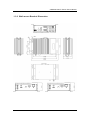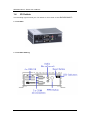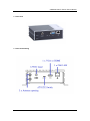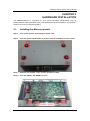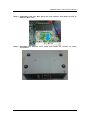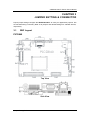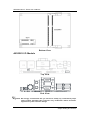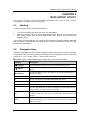
1
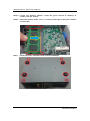
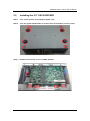
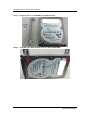
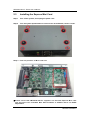
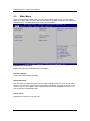
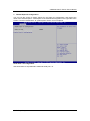
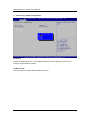
eBOX530-840-FL Series Embedded System User’s Manual Disclaimers This manual has been carefully checked and believed to contain accurate information. Axiomtek Co., Ltd. assumes no responsibility for any infringements of patents or any third party’s rights, and any liability arising from such use. Axiomtek does not warrant or assume any legal liability or responsibility for the accuracy, completeness or usefulness of any information in this document. Axiomtek does not make any commitment to update the information in this manual. Axiomtek reserves the right to change or revise this document and/or product at any time without notice. No part of this document may be reproduced, stored in a retrieval system, or transmitted, in any form or by any means, electronic, mechanical, photocopying, recording, or otherwise, without the prior written permission of Axiomtek Co., Ltd. Copyright 2015 Axiomtek Co., Ltd. All Rights Reserved Feb. 2015, Version A1 Printed in Taiwan ii Safety Precautions Before getting started, please read the following important safety precautions. 1. The eBOX530-840-FL does not come equipped with an operating system. An operating system must be loaded first before installing any software into the computer. 2. Be sure to ground yourself to prevent static charge when installing the internal components. Use a grounding wrist strap and place all electronic components in any static-shielded devices. Most electronic components are sensitive to static electrical charge. 3. Disconnect the power cord from the eBOX530-840-FL before making any installation. Be sure both the system and the external devices are turned OFF. Sudden surge of power could ruin sensitive components. Make sure the eBOX530-840-FL is properly grounded. 4. Make sure the voltage of the power source is correct before connecting the equipment to the power outlet. 5. Turn OFF the system power before cleaning. Clean the system using a cloth only. Do not spray any liquid cleaner directly onto the screen. 6. Do not leave this equipment in an uncontrolled environment where the storage temperature is below -40℃ or above 80℃. It may damage the equipment. 7. Do not open the system’s back cover. If opening the cover for maintenance is a must, only a trained technician is allowed to do so. Integrated circuits on computer boards are sensitive to static electricity. To avoid damaging chips from electrostatic discharge, observe the following precautions: Before handling a board or integrated circuit, touch an unpainted portion of the system unit chassis for a few seconds. This will help to discharge any static electricity on your body. When handling boards and components, wear a wrist-grounding strap, available from most electronic component stores. iii Classification 1. 2. 3. 4. iv Degree of production against electric shock : not classified Degree of protection against the ingress of water : IP40 Equipment not suitable for use in the presence of a flammable anesthetic mixture with air or with oxygen or nitrous oxide. Mode of operation : Continuous General Cleaning Tips You may need the following precautions before you begin to clean the computer. When you clean any single part or component for the computer, please read and understand the details below fully. When you need to clean the device, please rub it with a piece of dry cloth. 1. Be cautious of the tiny removable components when you use a vacuum cleaner to absorb the dirt on the floor. 2. Turn the system off before you start to clean up the component or computer. 3. Never drop the components inside the computer or get circuit board damp or wet. 4. Be cautious of all kinds of cleaning solvents or chemicals when you use it for the sake of cleaning. Some individuals may be allergic to the ingredients. 5. Try not to put any food, drink or cigarette around the computer. Cleaning Tools: Although many companies have created products to help improve the process of cleaning your computer and peripherals users can also use household items to clean their computers and peripherals. Below is a listing of items you may need or want to use while cleaning your computer or computer peripherals. Keep in mind that some components in your computer may only be able to be cleaned using a product designed for cleaning that component, if this is the case it will be mentioned in the cleaning. Cloth: A piece of cloth is the best tool to use when rubbing up a component. Although paper towels or tissues can be used on most hardware as well, we still recommend you to rub it with a piece of cloth. Water or rubbing alcohol: You may moisten a piece of cloth a bit with some water or rubbing alcohol and rub it on the computer. Unknown solvents may be harmful to the plastics parts. Vacuum cleaner: Absorb the dust, dirt, hair, cigarette particles, and other particles out of a computer can be one of the best methods of cleaning a computer. Over time these items can restrict the airflow in a computer and cause circuitry to corrode. Cotton swabs: Cotton swaps moistened with rubbing alcohol or water are excellent tools for wiping hard to reach areas in your keyboard, mouse, and other locations. Foam swabs: Whenever possible it is better to use lint free swabs such as foam swabs. Note: We strongly recommended that you should shut down the system before you start to clean any single components. Please follow the steps below: 1. 2. 3. 4. 5. Close all application programs Close operating software Turn off power switch Remove all device Pull out power cable v Scrap Computer Recycling If the computer equipment’s needs the maintenance or are beyond repair, we strongly recommended that you should inform your Axiomtek distributor as soon as possible for the suitable solution. For the computers that are no longer useful or no longer working well, please contact your Axiomtek distributor for recycling and we will make the proper arrangement. Trademarks Acknowledgments Axiomtek is a trademark of Axiomtek Co., Ltd. IBM, PC/AT, PS/2, VGA are trademarks of International Business Machines Corporation. ® ® Intel and Pentium are registered trademarks of Intel Corporation. MS-DOS, Microsoft C and QuickBasic are trademarks of Microsoft Corporation. Windows 8.1, Windows 7, Windows XPE, Windows XP, Windows WinCE embedded, Linux, MS-DOS, Microsoft C and Other brand names and trademarks are the properties and registered brands of their respective owners. vi Table of Contents Disclaimers .............................................................................................................. ii Safety Precautions ................................................................................................. iii Classification .......................................................................................................... iv General Cleaning Tips ............................................................................................ v Scrap Computer Recycling.................................................................................... vi CHAPTER 1 INTRODUCTION ................................................................................. 1 1.1 1.2 1.2.1 1.2.2 1.2.3 1.2.4 1.3 1.3.1 1.3.2 1.4 1.5 1.6 General Description ............................................................................ 1 System Specifications ........................................................................ 2 CPU .................................................................................................................... 2 I/O System ......................................................................................................... 2 System Specification ........................................................................................ 2 Driver CD Content ............................................................................................. 3 Dimensions ......................................................................................... 4 System Dimension ............................................................................................ 4 Wall mount Bracket Dimension ....................................................................... 5 I/O Outlets ........................................................................................... 6 Packing List ......................................................................................... 8 Model List ............................................................................................ 8 CHAPTER 2 HARDWARE INSTALLATION .......................................................... 9 2.1 2.2 2.3 Installing the Memory module............................................................ 9 Installing the 2.5” SATA HDD/SSD ................................................... 11 Installing the Express Mini Card ...................................................... 14 CHAPTER 3 JUMPER SETTING & CONNECTOR ............................................ 17 3.1 3.2 3.2.1 3.2.2 3.2.3 3.3 3.3.1 3.3.2 3.3.3 3.3.4 3.3.5 3.3.6 3.3.7 3.3.8 3.3.9 3.3.10 3.3.11 3.3.12 3.3.13 3.3.14 SBC Layout........................................................................................ 17 Jumper Setting Summary ................................................................. 19 Restore BIOS Optimal Defaults (JP5) ........................................................... 19 Auto Power On (SW1) .................................................................................... 20 COM1 Data/Power Selection (JP1 and JP2 by AX93283) ............................ 20 Connectors ........................................................................................ 21 AC-DC Jack Power In Connector .................................................................. 22 COM1 Serial Port Connector ......................................................................... 22 COM2 Serial Port Connector ......................................................................... 22 System Power Switch ..................................................................................... 23 USB Connector ............................................................................................... 23 LED Indicator................................................................................................... 23 Audio Connector ............................................................................................. 23 System Reset Switch ...................................................................................... 24 VGA Connector ............................................................................................... 24 HDMI Connector (Optional)............................................................................ 25 LAN Connector (LAN1) ................................................................................... 25 SATA Connector ............................................................................................. 26 SATA Power Connector.................................................................................. 26 Full-Size PCI Express Mini Card Slot (SCN1) ............................................... 27 vii CHAPTER 4 BIOS SETUP UTILITY ..................................................................... 29 4.1 4.2 4.3 4.4 4.5 4.6 4.7 4.8 Starting .............................................................................................. 29 Navigation Keys ................................................................................ 29 Main Menu ......................................................................................... 30 Advanced Menu................................................................................. 31 Chipset Menu .................................................................................... 42 Boot Menu ......................................................................................... 45 Security Menu ................................................................................... 46 Save & Exit Menu .............................................................................. 47 APPENDIX A WATCHDOG TIMER ....................................................................... 49 About Watchdog Timer .................................................................................... 49 How to Use Watchdog Timer ........................................................................... 49 Sample Program ............................................................................................... 50 viii eBOX530-840-FL Series User’s Manual CHAPTER 1 INTRODUCTION This chapter contains general information and detailed specifications of the eBOX530-840-FL. The Chapter 1 includes the following sections: 1.1 General Description System Specification Dimensions I/O Outlets Packing List Model List General Description The eBOX530-840-FL is an embedded system that supports onboard dual core Intel® Atom™ E3825 (1.33 GHz) single chip design to provide W indows 8.1, W indows 7 , W indows 8 Embedded, W indows 7 Embedded or Linux, suitable for the most endurable operation. It features fan less des ign with full feature I/O, one 204-pin unbuffered SO-DIMM socket for singe channel DDR3L-1066/1333 MHz memory, and enhanced system dependability by built-in W atchdog Timer. Features ® 1. Intel E3825 1.33 GHz dual core SoC 2. Maximum to 8GB DDR3L-1066/1333 memory for E3825 3. VGA or HDMI for display output 4. Supports 4 USB 2.0 ports 5. Supports 2 RS-232/422/485 6. Supports one 10/100/1000Mbps Ethernet ports (i210IT) 7. One 2.5” SATA HDD drive bay 8. One Full-Size Mini PCI Express Mini Card w/mSATA supported 9. Watchdog timer 10. 12V / 36W AC-DC Adapter 11. AT/ATX mode quick switch 12. Supports TPM 1.2 (ST ST33TPM12LPC) 13. Wide temperature: -20°C~60°C supported (with W.T. SSD & Memory) 14. Optional VESA/ DIN Rail /Wall Mounting kits Reliable and Stable Design The eBOX530-840-FL adopts the advanced cooling system and supporting the mSATA device, which makes it especially suitable for vibration environments, best for industrial automation, digital signage and gaming application. Embedded O.S. Supported The eBOX530-840-FL not only supports Windows 8.1, Windows 7, but also supports embedded OS, such as Windows 8 Embedded, Windows 7 Embedded, WinCE and Linux. Various Storage devices supported For storage device, the eBOX530-840-FL supports one 2.5" SATA storage drive bay and mSATA supported. Introduction 1 eBOX530-840-FL Series User’s Manual 1.2 System Specifications 1.2.1 CPU CPU ® TM Intel Atom dual core E3825 1.33GHz. BIOS American Megatrends Inc. UEFI (Unified Extensible Firmware Interface) BIOS. 16Mbit SPI Flash, DMI, Plug and Play. PXE Ethernet Boot ROM. System Memory One 204-pin unbuffered DDR3L SO-DIMM socket. (DDR3L Only) Maximum to 8GB DDR3L 1066/1333 MHz memory. 1.2.2 I/O System Two 9-pin D-Sub male connectors, COM1~COM2 for RS-232/422/485 One 15-pin D-Sub female connector for VGA, up to 1600 x 1200 @60Hz or One HDMI connector, up to 1920 x 1080 @60 Hz Two Audio connector (Mic-IN, Line-OUT), HD audio compliant with Realtek ALC662 One RJ-45 connector for 10/100/1000Base-T Ethernet i-210IT w/Wake-on-LAN and PXE Boot ROM Four USB ports with fuse protection and com plies with USB Spec. Rev. 2.0. One 12V DC Jack for power input connector Two Indicators (System Power, HDD Active) Two SMA type antenna opening One AT/ATX mode quick switch One PWR switch One Reset button 1.2.3 System Specification Watchdog Timer 1~255 seconds or minutes; up to 255 levels. Power Supply External 12V@3A, 36W AC/DC power adapter Operation Temperature -20℃ ~ 60℃ (-4 ºF ~ 140ºF), E3825 with W .T. SSD&RAM Storage Temperature Humidity 0.5kg(1.1lb) without package/ 0.6kg(1.32lb) with package Dimensions 2 3Grm w/ SSD™ (5-500Hz, X, Y, Z directions) Weight 10% ~ 90% (non-condensation) Vibration Endurance -40℃ ~ 80℃ (-40 ºF ~ 176ºF) 132mm (5.19”) (W) x 95.4mm (3.75”) (D) x 47.5mm(1.87") (H) Introduction eBOX530-840-FL Series User’s Manual 1.2.4 Driver CD Content Driver Audio Chipset Ethernet Graphic TPM Manual User Manual Quick Manual NOTE: All specifications and images are subject to change without notice. Introduction 3 eBOX530-840-FL Series User’s Manual 1.3 Dimensions The following diagrams show you dimensions and outlines of the eBOX530-840-FL. 1.3.1 System Dimension 4 Introduction eBOX530-840-FL Series User’s Manual 1.3.2 Wall mount Bracket Dimension Introduction 5 eBOX530-840-FL Series User’s Manual 1.4 I/O Outlets The following figures show you I/O outlets on front view of the eBOX530-840-FL. Front View Front View drawing 6 Introduction eBOX530-840-FL Series User’s Manual Rear View Rear View drawing Introduction 7 eBOX530-840-FL Series User’s Manual 1.5 Packing List The package bundled with your eBOX530-840-FL should contain the following items: eBOX530-840-FL System Unit x 1 eBOX530-840-FL Quick Manual x 1 CD x 1 (For Driver and User’s Manual) Screws pack x1 Foot pad x4 12V/36W AC-DC Adapter Wall-mount Brackets (optional) VESA-mount Bracket (optional) Din-rail Bracket (optional) 2.5” SATA Storage (optional) mSATA storage device (optional) DDR3L SODIMM (optional) WIFI/ 3G/ GPS Modules (optional) If you cannot find this package or any items are missing, please contact Axiomtek distributors immediately. 1.6 Model List eBOX530-840-FL-E3825-VGA -US eBOX530-840-FL-E3825-VGA -EU Fanless embedded system with Intel ® ATOM® E3825 1.33GHz dual core single chip design , VGA, 2 COM, 4 USB and US power cord Fanless embedded system with Intel ® ATOM® E3825 1.33GHz dual core single chip design , VGA, 2 COM, 4 USB and EU power cord eBOX530-840-FL-E3825-HDMI -US Fanless embedded system with Intel ® ATOM® E3825 1.33GHz dual core single chip design, HDMI, 2 COM, 4 USB and US power cord eBOX530-840-FL-E3825-HDMI -EU Fanless embedded system with Intel ® ATOM® E3825 1.33GHz dual core single chip design, HDMI, 2 COM, 4 USB and EU power cord 8 Introduction eBOX530-840-FL Series User’s Manual CHAPTER 2 HARDWARE INSTALLATION The eBOX530-840-FL is convenient for your various hardware configurations, such as Memory Module, HDD (Hard Disk Drive), SSD (Solid State Drive) and mSATA. The chapter 2 will show you how to install the hardware. 2.1 Installing the Memory module Step 1 Turn off the system, and unplug the power cord. Step 2 Turn the system upside down to locate screws at the bottom, loosen screws. Step 3 Remove the bottom cover and the bracket of HDD. Step 4 Find the DDR3L SO-DIMM position. Hardware Installation 9 eBOX530-840-FL Series User’s Manual Step 5 Locate the memory module, insert the gold colored of memory to contact into the socket. Step 6 Push the module down, until it is firmly seated by locking two latches on the sides. Step 7 10 Fasten all screws of bottom cover to finish installation. Hardware Installation eBOX530-840-FL Series User’s Manual 2.2 Installing the 2.5” SATA HDD/SSD Step 1 Turn off the system, and unplug the power cord. Step 2 Turn the system upside down to locate screws at the bottom, loosen screws. Step 3 Remove the bottom cover and HDD bracket. Hardware Installation 11 eBOX530-840-FL Series User’s Manual Step 4 Prepare your 2.5” HDD/SSD and HDD bracket. Step 5 12 Assembly the HDD bracket with 2.5”SATA SSD/HDD. Hardware Installation eBOX530-840-FL Series User’s Manual Step 6 Step 7 Please refer to below photo to connect SATA PWR and SATA signal cables. Fasten total four screws to fix HDD with main chassis. Step 8 Put the bottom cover back then fasten screws to finish the installation . Hardware Installation 13 eBOX530-840-FL Series User’s Manual 2.3 Installing the Express Mini Card Step 1 Turn off the system, and unplug the power cord. Step 2 Turn the system upside down to locate screws at the Bottom, loosen screws. Step 3 Find the position of Mini card slot. ※Please notice that eBOX530-840-FL supports one full-size Express Mini card slot and users can assemble Mini PCIe modules or mSATA device via BIOS adjustment. 14 Hardware Installation eBOX530-840-FL Series User’s Manual Step 4 Slide Mini Card into Mini Card slot with caution and fasten screw of Express Mini Card. Step 5 Assembly the bottom cover back and fasten all screws to finish installation. Hardware Installation 15 eBOX530-840-FL Series User’s Manual This page is intentionally left blank. 16 Hardware Installation eBOX530-840-FL Series User’s Manual CHAPTER 3 JUMPER SETTING & CONNECTOR Proper jumper settings configure the eBOX530-840-FL to meet your application purpose. We are herewith listing a summary table of all jumpers and default settings for onboard devices, respectively. 3.1 SBC Layout PICO840 Top View Side View Jumper Setting & Connector 17 eBOX530-840-FL Series User’s Manual Bottom View AX93283 I/O Module Top View Side View NOTE: We strongly recommended that you should not modify any unmentioned jumper setting without Axiomtek FAE’s instruction. Any modification without instruction might cause system to become damage. 18 Jumper Setting & Connector eBOX530-840-FL Series User’s Manual 3.2 Jumper Setting Summary Proper jumper settings configure the eBOX530-840-FL to meet your application purpose. We are herewith listing a summary table of all jumpers and default settings for onboard devices, respectively. PICO840 Main board Jumper Description JP5 SW 1 Jumper Setting Restore BIOS Optimal Defaults Default: Normal Operation Auto Power On Default: Disable 1-2 Close 1-2 Close Properly configure jumper settings on the AX93283 I/O board to meet your application purpose. Below you can find a summary table of all jumpers and onboard default settings. AX93283 I/O board Jumper Description Setting JP1 COM1 Data/+12V Power Selection Default: RS-232 Data CN3 Pin 18: RI 1-2 Close JP2 COM1 Data/+5V Power Selection Default: RS-232 Data CN3 DCD 1-2 Close Pin 10: NOTE: How to setup Jumpers The illustration shows how to set up jumpers. When the jumper cap is placed on pins, the jumper is “close”, if not, that means the jumper is “open”. [Open] 3.2.1 [Closed] [Pin1 -2 Closed] Restore BIOS Optimal Defaults (JP5) Put jumper clip to pin 2-3 for a few seconds then move it back to pin 1-2. Doing this procedure can restore BIOS optimal defaults. Function Setting Normal (Default) Restore BIOS defaults 1-2 close Jumper Setting & Connector optimal 2-3 close 19 eBOX530-840-FL Series User’s Manual 3.2.2 Auto Power On (SW1) If SW1 is enabled for power input, the system will be automatically power on without pressing soft power button. If SW1 is disabled for power input, it is necessary to manually press soft power button to power on the system. 3.2.3 Function Setting Disable auto power on (Default) Enable auto power on 1-2 close 2-3 close COM1 Data/Power Selection (JP1 and JP2 by AX93283) The COM1 port has +12V level power capability on RI and +5V level on DCD by setting JP1 and JP2, respectively. When this port is set to +12V or +5V level, please make sure its communication mode is RS-232. Function Data: Set CN3 pin 18 to RI (Default) Power: Set CN3 pin 18 to +12V level Function Data: Set CN3 pin 10 to DCD (Default) Power: Set CN3 pin 10 to +5V level 20 JP1 Setting 1-2 close 2-3 close JP2 Setting 1-2 close 2-3 close Jumper Setting & Connector eBOX530-840-FL Series User’s Manual 3.3 Connectors Connectors connect the board with other parts of the system. Loose or improper connection might cause problems. Make sure all connectors are properly and firmly connected. Here is a summary table shows you all connectors and button on the eBOX530-840-FL Series. Connectors Section AC-DC Jack Power In Connector 3.3.1 COM1 Serial Port Connector 3.3.2 COM2 Serial Port Connector 3.3.3 System Power Switch 3.3.4 USB Connector 3.3.5 LED Indicator 3.3.6 Audio Connector 3.3.7 System Reset Switch 33.8 VGA Connector 3.3.9 HDMI Connector (Optional) 3.3.10 Ethernet Connector (LAN1) 3.3.11 Serial ATA (SATA) Connector 3.3.12 SATA Power Connector 3.3.13 Full-Size Express Mini Card slot 3.3.14 Jumper Setting & Connector 21 eBOX530-840-FL Series User’s Manual 3.3.1 AC-DC Jack Power In Connector The system supports a DC12V DC-in Jack connector for system power input. Connect it to the power AC-DC 36W Adapter 3.3.2 Pin Signal 1 +12V 2 GND COM1 Serial Port Connector CN3 is the lower connector of the double-deck DB-9 connector. Only COM1 comes with power capability on DCD and RI pins by setting jumpers. The pin assignments of RS-232/422/485 are listed in table below. If you need COM1 port to support RS-422 or RS-485, please refer to section 4.4. 3.3.3 Pin RS-232 RS-422 RS-485 10 DCD TX- Data- 11 RXD TX+ Data+ 12 TXD RX+ N.C 13 DTR RX- N.C. 14 GND No use No use 15 DSR No use No use 16 RTS No use No use 17 CTS No use No use 18 RI No use No use COM2 Serial Port Connector CN4 is the upper connector of the double-deck DB-9 connector. The pin assignments of RS-232/422/485 are listed in table below. If you need COM2 port to support RS-422 or RS-485, please refer to section 4.4. 22 Pin RS-232 RS-422 RS-485 1 DCD TX- Data- 2 RXD TX+ Data+ 3 TXD RX+ N.C 4 DTR RX- N.C. 5 GND No use No use 6 DSR No use No use 7 RTS No use No use 8 CTS No use No use 9 RI No use No use Jumper Setting & Connector eBOX530-840-FL Series User’s Manual 3.3.4 System Power Switch This switch is for turning on/off the system power. 3.3.5 Function Description On Off Turn on/off system Keep system status USB Connector The Universal Serial Bus connectors are compliant with USB 2.0 (480Mbps), and ideally for installing USB peripherals such as keyboard, mouse, scanner, etc. Pin Signal USB Port 0 1 Pin Signal USB Port 1 5 USB VCC (+5V level) USB VCC (+5V level) 5 6 7 8 3.3.6 2 USB #0_D- 6 USB #1_D- 3 USB #0_D+ 7 USB #1_D+ 4 Ground (GND) 8 Ground (GND) 1 2 3 4 LED Indicator The red LED is linked to Hard Disk Drive (HDD) activity signal. LED flashes every time HDD is accessed. LED Color Description Red Hard disk drive activity Green Power on/off The power LED (green) lights up and will remain steady while the system is powered on. 3.3.7 Audio Connector This is audio jack with HD audio support. Install audio driver, and then attach audio devices to CN2. Pin Color Signal Green Line-out Pink MIC-in Jumper Setting & Connector 23 eBOX530-840-FL Series User’s Manual 3.3.8 System Reset Switch This switch reboots your computer without turning off the power supply. It is a better way to reboot your system for a longer life of the system power supply. 3.3.9 Function Description On Reset system Off Keep system status VGA Connector The VGA connector is a slim type 15-pin D-Sub connector which is common for the CRT VGA display. The VGA interface configuration can be configured via the software utility. 24 Pin Signal Pin Signal Pin Signal 1 Red 2 Green 3 Blue 4 N.C. 5 GND 6 DETECT 7 GND 8 GND 9 VCC 10 GND 11 N.C. 12 DDC DATA 13 Horizontal Sync 14 Vertical Sync 15 DDC CLK Jumper Setting & Connector eBOX530-840-FL Series User’s Manual 3.3.10 HDMI Connector (Optional) The HDMI (High-Definition Multimedia Interface) is a compact digital interface which is capable of transmitting high-definition video and high-resolution audio over a single cable. Its interface is available through connector CN10. Pin Signal Pin 1 HDMI OUT_DATA2+ 3 HDMI OUT_DATA2- 5 GND 7 HDMI OUT_DATA0+ 9 HDMI OUT_DATA0- Signal 2 GND 4 HDMI OUT_DATA1+ 6 HDMI OUT_DATA1- 8 GND 10 HDMI OUT_Clock+ 12 HDMI OUT_Clock- 11 GND 13 CEC 14 N.C. 15 HDMI OUT_SCL 16 HDMI OUT_SDA 17 GND 18 +5V 19 HDMI_HTPLG 3.3.11 LAN Connector (LAN1) The RJ-45 connector is for Ethernet. To connect th e board to a 1000/100/10 Base-T hub, just plug one end of the cable into connector and connect the other end (phone jack) to a 1000/100/10 -Base-T hub. Pin Signal Pin Signal L1 MDI0+ L5 MDI2- L2 MDI0- L6 MDI1- L3 MDI1+ L7 MDI3+ L4 MDI2+ L8 MDI3- A Active LED (Yellow) B 100 LAN LED (Green)/ 1000 LAN LED (Orange) Jumper Setting & Connector A B L8 L7 L6 L5 L4 L3 L2 L1 A B 25 eBOX530-840-FL Series User’s Manual 3.3.12 SATA Connector This Serial Advanced Technology Attachment (Serial ATA or SATA) connector is for high-speed SATA interface. It is a computer bus interface for connecting to devices such as hard disk drive. Pin 1 Signal GND SATA_TX+ 3 SATA_TX- 4 GND 5 SATA_RX- 6 SATA_RX+ 7 GND 3.3.13 SATA Power Connector Use CN8 for interfacing to SATA 2.5" HDD power supply. 26 Pin Signal 1 +12V level 2 GND 3 GND 4 +5V level Jumper Setting & Connector eBOX530-840-FL Series User’s Manual 3.3.14 Full-Size PCI Express Mini Card Slot (SCN1) This is a PCI-Express Mini Card connector on the bottom side applying to either PCIExpress or USB 2.0 or SATA (mSATA). It complies with PCI-Express Mini Card Spec. V1.2. It can also support mSATA cards. Please refer to BIOS setting to enable or disable mSATA support. Pin Signal Pin Signal 1 W AKE# 2 +3.3VSB 3 No use 4 GND 5 No use 6 +1.5V 7 CLKREQ# 8 No use 9 GND 10 No use 11 REFCLK- 12 No use 13 REFCLK+ 14 No use 15 GND 16 No use 17 No use 18 GND 19 No use 20 W _DISABLE# 21 GND 22 PERST# PE_RXN3/ 24 +3.3VSB 26 GND 23 25 SATA_RXP PE_RXP3/ SATA_RXN 27 GND 28 +1.5V 29 GND 30 SMB_CLK PE_TXN3/ 32 SMB_DATA 34 GND 31 33 SATA_TXN PE_TXP3/ SATA_TXP 35 GND 36 USB_D8- 37 GND 38 USB_D8+ 39 +3.3VSB 40 GND 41 +3.3VSB 42 No use 43 GND 44 No use 45 No use 46 No use 47 No use 48 +1.5V 49 No use 50 GND 51 No use 52 +3.3VSB Jumper Setting & Connector 27 eBOX530-840-FL Series User’s Manual This page is intentionally left blank. 28 Jumper Setting & Connector eBOX530-840-FL Series User’s Manual CHAPTER 4 BIOS SETUP UTILITY This chapter provides users with detailed description how to set up basic system configuration through the BIOS setup utility. 4.1 Starting To enter the setup screens, follow the steps below: 1. 2. Turn on the computer and press the <Del> key immediately. After you press the <Del> key, the main BIOS setup menu displays. You can access the other setup screens from the main BIOS setup menu, such as the Advanced and Chipset menus. It is strongly recommended that you should avoid changing the chipset’s defaults. Both AMI and your system manufacturer have carefully set up these defaults that provide the best performance and reliability. 4.2 Navigation Keys The BIOS setup/utility uses a key-based navigation system called hot keys. Most of the BIOS setup utility hot keys can be used at any time during the setup navigation process. These keys include <F1>, <F2>, <Enter>, <ESC>, <Arrow> keys, and so on. NOTE: Some of the navigation keys differ from one screen to another. Hot Keys Description Left/Right The Left and Right <Arrow> keys allow you to select a setup screen. Up/Down The Up and Down <Arrow> keys allow you to select a setup screen or subscreen. + Plus/Minus The Plus and Minus <Arrow> keys allow you to change the field value of a particular setup item. Tab The <Tab> key allows you to select setup fields. F1 The <F1> key allows you to display the General Help screen. F2 The <F2> key allows you to Load Previous Values. F3 The <F3> key allows you to Load Optimized Defaults. F4 The <F4> key allows you to save any changes you have made and exit Setup. Press the <F4> key to save your changes. Esc The <Esc> key allows you to discard any changes you have made and exit the Setup. Press the <Esc> key to exit the setup without saving your changes. Enter The <Enter> key allows you to display or change the setup option listed for a particular setup item. The <Enter> key can also allow you to display the setup sub- screens. BIOS Setup Utility 29 eBOX530-840-FL Series User’s Manual 4.3 Main Menu When you first enter the setup utility, you will enter the Main setup screen. You can always return to the Main setup screen by selecting the Main tab. System Time/Date can be set up as described below. The Main BIOS setup screen is shown below. BIOS/Memory Information Display the auto-detected BIOS/memory information. System Language Choose the system default language. System Date/Time Use this option to change the system time and date. Highlight System Time or System Date using the <Arrow> keys. Enter new values through the keyboard. Press the <Tab> key or the <Arrow> keys to move between fields. The date must be entered in MM/DD/YY format. The time is entered in HH:MM:SS format. Access Level Display the access level of current user. 30 BIOS Setup Utility eBOX530-840-FL Series User’s Manual 4.4 Advanced Menu The Advanced menu also allows users to set configuration of the CPU and other system devices. You can select any of the items in the left frame of the screen to go to the sub menus: ► ► ► ► ► ► ► ACPI Settings F81803 Super IO Configuration F81803 HW Monitor CPU Configuration IDE Configuration Trusted Computing USB Configuration For items marked with “”, please press <Enter> for more options. BIOS Setup Utility 31 eBOX530-840-FL Series User’s Manual ACPI Settings ACPI Sleep State When the sleep button is pressed, the system will be in the ACPI sleep state. The default is S3 (Suspend to RAM). 32 BIOS Setup Utility eBOX530-840-FL Series User’s Manual F81803 Super IO Configuration You can use this screen to select options for the Super IO Configuration, and change the value of the selected option. A description of the selected item appears on the right side of the screen. For items marked with “”, please press <Enter> for more options. Serial Port 1~2 Configuration Use these items to set parameters related to serial port 1~2. BIOS Setup Utility 33 eBOX530-840-FL Series User’s Manual Serial Port 1 (COM1) Configuration Serial Port Enable or disable serial port 1. The optimal setting for base I/O address is 3F8h and for interrupt request address is IRQ4. COM Port Type Use this option to set RS-232/RS-422/RS-485 mode. 34 BIOS Setup Utility eBOX530-840-FL Series User’s Manual Serial Port 2 (COM2) Configuration Serial Port Enable or disable serial port 2. The optimal setting for base I/O address is 2F8h and for interrupt request address is IRQ3. COM Port Type Use this option to set RS-232/RS-422/RS-485 mode. BIOS Setup Utility 35 eBOX530-840-FL Series User’s Manual F81801 H/W Monitor This screen monitors hardware health status. This screen displays the temperature of system and CPU, system voltages (VCORE and +5V). 36 BIOS Setup Utility eBOX530-840-FL Series User’s Manual CPU Configuration This screen shows the CPU Configuration. Socket 0 CPU Information This item is for socket 0 CPU information. Intel Virtualization Technology Enable or disable Intel Virtualization Technology. When enabled, a VMM can utilize the additional hardware capabilities. It allows a platform to run multiple operating systems and applications independently, hence enabling a single computer system to work as several virtual systems. BIOS Setup Utility 37 eBOX530-840-FL Series User’s Manual Socket 0 CPU Information This screen shows socket 0 CPU information. 38 BIOS Setup Utility eBOX530-840-FL Series User’s Manual IDE Configuration In the IDE Configuration menu, you can see the currently installed hardware in the SATA ports. During system boot up, the BIOS automatically detects the presence of SATA devices. Serial-ATA (SATA) Enable or disable the SATA Controller feature. The default is Enabled. SATA Mode Determine how SATA controller(s) operate. Operation mode options are IDE Mode and AHCI (Advanced Host Controller Interface) Mode . The default is AHCI Mode. Serial-ATA Port 0~1 Enable or disable the onboard SATA port 0~1. MiniCard Switch This option appears only after SATA Port 1 is enabled. The default is PCIE. If you intend to insert mSATA card to SCN1, please change setting to mSATA. BIOS Setup Utility 39 eBOX530-840-FL Series User’s Manual Trusted Computing This screen provides function for specifying the TPM settings. Security Device Support Enable or disable BIOS support for security device. The default setting is Enabled. Current Status Information Display current TPM status information. 40 BIOS Setup Utility eBOX530-840-FL Series User’s Manual USB Configuration USB Devices Display all detected USB devices. Legacy USB Support Use this item to enable or disable support for USB device on legacy operating system. The default setting is Enabled. Auto option disables legacy support if no USB devices are connected. Disable option will keep USB devices available only for EFI applications. BIOS Setup Utility 41 eBOX530-840-FL Series User’s Manual 4.5 Chipset Menu The Chipset menu allows users to change the advanced chipset settings. You can select any of the items in the left frame of the screen to go to the sub menus: ► North Bridge ► South Bridge For items marked with “”, please press <Enter> for more options. 42 BIOS Setup Utility eBOX530-840-FL Series User’s Manual North Bridge Memory Information Use this item to refer to the information related to system memory. BIOS Setup Utility 43 eBOX530-840-FL Series User’s Manual South Bridge This screen allows users to configure parameters of South Bridge chipset. Audio Controller Control detection of the Azalia device. Disabled - Azalia will be unconditionally disabled. Enabled - Azalia will be unconditionally enabled. 44 BIOS Setup Utility eBOX530-840-FL Series User’s Manual 4.6 Boot Menu The Boot menu allows users to change boot options of the system. Setup Prompt Timeout Number of seconds to wait for setup activation key. 65535(0xFFFF) means indefinite waiting. Bootup NumLock State Use this item to select the power-on state for the keyboard NumLock. Quiet Boot Select to display either POST output messages or a splash screen during boot-up. Launch PXE OpROM Use this item to enable or disable the boot ROM function of the onboard LAN chip when the system boots up. Boot Option Priorities These are settings for boot priority. Specify the boot device priority sequence from the available devices. BIOS Setup Utility 45 eBOX530-840-FL Series User’s Manual 4.7 Security Menu The Security menu allows users to change the security settings for the system. Administrator Password This item indicates whether an administrator password has been set (installed or uninstalled). User Password This item indicates whether an user password has been set (installed or uninstalled). 46 BIOS Setup Utility eBOX530-840-FL Series User’s Manual 4.8 Save & Exit Menu The Save & Exit menu allows users to load your system configuration with optimal or fail-safe default values. Save Changes and Exit When you have completed the system configuration changes, select this option to leave Setup and return to Main Menu. Select Save Changes and Exit from the Save & Exit menu and press <Enter>. Select Yes to save changes and exit. Discard Changes and Exit Select this option to quit Setup without making any permanent changes to the system configuration and return to Main Menu. Select Discard Changes and Exit from the Save & Exit menu and press <Enter>. Select Yes to discard changes and exit. Save Changes and Reset When you have completed the system configuration changes, select this option to leave Setup and reboot the computer so the new system configuration parameters can take effect. Select Save Changes and Reset from the Save & Exit menu and press <Enter>. Select Yes to save changes and reset. Discard Changes and Reset Select this option to quit Setup without making any permanent changes to the system configuration and reboot the computer. Select Discard Changes and Reset from the Save & Exit menu and press <Enter>. Select Yes to discard changes and reset. BIOS Setup Utility 47 eBOX530-840-FL Series User’s Manual Save Changes When you have completed the system configuration changes, select this option to save changes. Select Save Changes from the Save & Exit menu and press <Enter>. Select Yes to save changes. Discard Changes Select this option to quit Setup without making any permanent changes to the system configuration. Select Discard Changes from the Save & Exit menu and press <Enter>. Select Yes to discard changes. Restore Defaults It automatically sets all Setup options to a complete set of default settings when you select this option. Select Restore Defaults from the Save & Exit menu and press <Enter>. Save as User Defaults Select this option to save system configuration changes done so far as User Defaults. Select Save as User Defaults from the Save & Exit menu and press <Enter>. Restore User Defaults It automatically sets all Setup options to a complete set of User Defaults when you select this option. Select Restore User Defaults from the Save & Exit menu and press <Enter>. Boot Override Select a drive to immediately boot that device regardless of the current boot order. Launch EFI Shell from filesystem device Attempt to launch EFI Shell application (Shellx64.efi) from one of the available filesystem devices. 48 BIOS Setup Utility eBOX530-840-FL Series User’s Manual APPENDIX A WATCHDOG TIMER About Watchdog Timer Software stability is major issue in most application. Some embedded systems are not watched by human for 24 hours. It is usually too slow to wait for someone to reboot when computer hangs. The systems need to be able to reset automatically when things go wrong. The watchdog timer gives us solution. The watchdog timer is a counter that triggers a system reset when it counts down to zero from a preset value. The software starts counter with an initial value and must reset it periodically. If the counter ever reaches zero which means the software has crashed, the system will reboot. How to Use Watchdog Timer The I/O port base addresses of watchdog timer are 2E (hex) and 2F (hex). The 2E (hex) and 2F (hex) are address and data port respectively. Assume that program A is put in a loop that must execute at least once every 10ms. Initialize watchdog timer with a value bigger than 10ms. If the software has no problems; watchdog timer will never expire because software will always restart the counter before it reaches zero. Begin Next Enable and Initialize Watchdog Timer Next Program “A” Next Disable Watchdog Timer Next Watchdog Timer Begin Next Enable and Initialize Watchdog Timer Next Program “A” Next Reset Watchdog Timer Next 49 eBOX530-840-FL Series User’s Manual Sample Program Assembly sample code : ;Enable WDT: mov dx,2Eh mov al,87 out dx,al out dx,al ;Un-lock super I/O ;Select Logic device: mov dx,2Eh mov al,07h out dx,al mov dx,2Fh mov al,07h out dx,al ;Enable WDT base address: mov dx,2Eh mov al,30h out dx,al mov dx,2Fh mov al,01h out dx,al ;Activate WDT: mov dx,2Eh mov al,0F0h out dx,al mov dx,2Fh mov al,80h out dx,al ;Set base timer : mov 50 dx,2Eh Watchdog Timer eBOX530-840-FL Series User’s Manual mov al,0F6h out dx,al mov dx,2Fh mov al,Mh ;M=00h,01h,...FFh (hex),Value=0 to 255 out dx,al ;(see below Note) ;Set Second or Minute : mov dx,2Eh mov al,0F5h out dx,al mov dx,2Fh mov al,Nh out dx,al ;N=71h or 79h(see below Note) Note: If N=71h, the time base is set to second. M = time value 00: Time-out Disable 01: Time-out occurs after 1 second 02: Time-out occurs after 2 seconds 03: Time-out occurs after 3 seconds . . FFh: Time-out occurs after 255 seconds If N=79h, the time base is set to minute. M = time value 00: Time-out Disable 01: Time-out occurs after 1 minute 02: Time-out occurs after 2 minutes 03: Time-out occurs after 3 minutes . . FFh: Time-out occurs after 255 minutes Watchdog Timer 51