1
eBOX530-840-FL Series User’s Manual
3.2
Jumper Setting Summary
Proper jumper settings configure the eBOX530-840-FL to meet your application purpose. We
are herewith listing a summary table of all jumpers and default settings for onboard devices,
respectively.
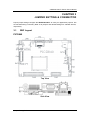
PICO840 Main board
Jumper
Description
JP5
SW 1
Jumper Setting
Restore BIOS Optimal Defaults
Default: Normal Operation
Auto Power On
Default: Disable
1-2 Close
1-2 Close
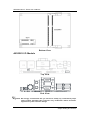
Properly configure jumper settings on the AX93283 I/O board to meet your application
purpose. Below you can find a summary table of all jumpers and onboard default settings.
AX93283 I/O board
Jumper
Description
Setting
JP1
COM1 Data/+12V Power Selection
Default: RS-232 Data
CN3 Pin 18: RI
1-2 Close
JP2
COM1 Data/+5V Power Selection
Default: RS-232 Data
CN3
DCD
1-2 Close
Pin
10:
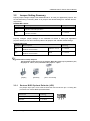
NOTE: How to setup Jumpers
The illustration shows how to set up jumpers. When the jumper cap is placed on pins,
the jumper is “close”, if not, that means the jumper is “open”.
[Open]
3.2.1
[Closed]
[Pin1 -2 Closed]
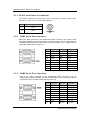
Restore BIOS Optimal Defaults (JP5)
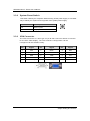
Put jumper clip to pin 2-3 for a few seconds then move it back to pin 1-2. Doing this
procedure can restore BIOS optimal defaults.
Function
Setting
Normal (Default)
Restore
BIOS
defaults
1-2 close
Jumper Setting & Connector
optimal
2-3 close
19