1
I
I
l
sd ce
Skillsr Lnage browsing supl)od auhmali.atly
picture
will
aulonratically
dating funcrion: Whcn you sph MtD.
adjust dircclion
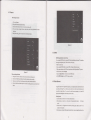
pr€view playable vid€o files. Ckick to select on€ of them lo be able to play th€
video file.
ilrc
ofrotalhn.
In thc
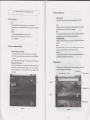
vids preview inErface,
€ditinavideo files
as shown in
press Menu
Fise
bson to
b€ able to appee the function window
6-3 below
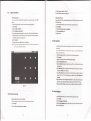
Figurc 6-2
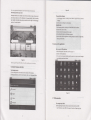
Edlt 3trd sel images
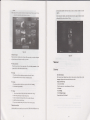
Press menu buton to display option ofmenu in tull screen mode, you can select the oprion
to edit md sefiing up the piclr€ according to you needs.
a
7
Slide presentrtion
Press the menu button to show menu options.
picrueswill
ften click stide pres€ntation. Alt
Internet
the
be to slid€ folder broadoastro disptay.
7.1 Browser
. Shrring
I.
Erter lnto
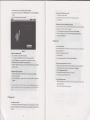
Press the menu bulton to display menu option. and then click,,share,,.
2. Thepicturc
will
homepaSe
a Rotrting
l.
homoprgG
Tte brcwstr always habitully open th€ last web uers have browsed th€ web,
share with your friends via f,-mait aMchment.
will
appetr
who it
enteN inlo the browser on boot.
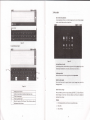
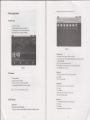
Ch.nge your Home Prge
Press lhe menu bufron to display menu
2. Click the left
oplion, and then click,'rotating,'.
l. Click
on the
bmwkr.
2- Press the main
ordght rotrfion.
menu,
popup senings menu of browser.
3. Click more.
a
4. Click Ssttngs.
Cuftlng
l.
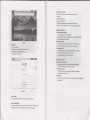
Pr€ss the menu bufion to display menu
oplion, and then click..cuning"
3. Click on culting device to dragout from cenlre, ro adjusl cudng size.
4. Adjusilhe size you wail. click save.
5.
lfyou
want
1o
abandon cuuing, click ,,give up,,back ro browsc piclures.
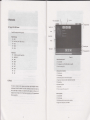
Vtdeo prevlew rnd phy
Afierlhe
media browser is opened, you can scan alt vidco files in rhc
5. Click Setlugs homeplge.
6. Inpul website,
2. Click on drag related region to adiust cufiif,s device.
MID
and the TF card.
ed click "emure".
the