1
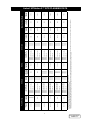
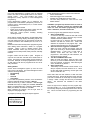
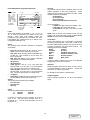
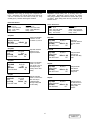
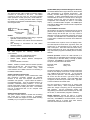
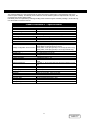
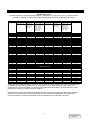
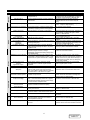
Alarm Messages, Meanings, and Corrective Actions
Battery
AC
Start-Up
MESSAGE
Start-Up Sequence Aborted
Incorrect phasing sequence of power conductors
wired to UPS.
Incorrect Input Frequency
Input power frequency outside acceptable range.
Input Power Out of Tolerance
Input power frequency outside acceptable range.
UPS battery supplying power to load equipment.
No corrective action required.
Battery Failed Test
Automatic Battery Test detects a weak battery.
Can’t execute battery test:
not recharged
Battery Date Expired
Battery discharged too recently to perform test.
Repeat the battery test via the LCD “Test Options”
menu selection. If battery fails again, contact
Liebert at 1-800-222-5877.
No corrective action required. UPS will perform
next scheduled battery test.
Contact Liebert at 1-800-222-5877 to replace
batteries.
Perform and orderly shutdown of load equipment
before time expires or shut off unnecessary load
equipment to extend battery time.
Upon return of power, start up UPS. The UPS
starts up by itself if Auto-Restart is enabled.
UPS On Battery Time
Remaining:
XX Minutes
Low Battery Shutdown
Bypass
WARNING: Load On Bypass
Bypass power out of
tolerance
Bypass out of Sync
Bypass Overload
Excessive Retransfer
Attempted
System Shutdown
Press ON to Restart System
UPS System
Output Undervoltage
Output Overvoltage
Overload Phase A
Overload Phase B
Output Overload
Fault: SYSTEM SHUTDOWN
Logic Error
External Shutdown
**
CORRECTIVE ACTION
Review and record all alarm messages. Perform
prescribed action for specified alarm. If Start up
still aborts, contact Liebert at 1-800-222-5877.
Disconnect power from the UPS and call a
qualified electrician to correct and verify the
wiring.
Select the correct frequency in the configuration
screen. Verify the utility frequency.
Site Wiring Error
Charger Battery Voltage High
System Shutdown Impending
Due to Overtemp
Dial-Out Attempt Failed
*
MEANING
The UPS detects a condition that prevents a
complete start-up.
Batteries are over 5 years old.
Battery discharging. UPS calculates and displays
remaining battery time.
UPS discharged battery to minimum allowable
voltage and automatically shut down. No power
supplied to load.
Battery voltage exceeds acceptable limits causing
automatic charger shutdown. Charger
automatically restarts when battery voltage return
to acceptable levels.
Load currently powered through bypass line due
to automatic or manual transfer to bypass. Load
unprotected from power disturbances or outages.
Bypass power voltage or frequency outside
acceptable limits. Automatic bypass transfer
prohibited.
At least one phase of bypass current overloaded.
UPS completed at least 15 attempts to retransfer
load from utility back to UPS in 20 minutes or
less. UPS unable to sustain load due to overload
or inverter failure. Load remains on bypass.
Power Factor Corrector detects temporary
condition at input of UPS.
UPS output voltage or current outside acceptable
limits. Load automatically transferred to bypass.
UPS attempts automatic retransfer when voltage
or current is within acceptable limits.
Overload. UPS automatically transfers load to
bypass if overload exceeds UPS capacity.
UPS detects and fault and shuts down resulting in
loss of power to load.
Automatic diagnostic testing detects a hardware
or software failure in UPS internal control system
External contact shuts down UPS through REPO.
UPS cabinet temperature above acceptable limits.
UPS automatically shuts down in 2 minutes if
over-temperature continues.
UPS unsuccessfully attempted to dial out due to
an event.
Contact Liebert at 1-800-222-5877 if this condition
persists for more than 2 minutes.
If automatic transfer to bypass, load returns to
UPS power control for most temporary conditions.
Review and record any other alarm messages. If
manual transfer to bypass, return to UPS power
control when possible.
Manual transfer to bypass not recommended.
Wait for bypass power to return.
Reduce the load.
Check other messages for inverter failure.
Determine cause of overload and reduce load.
Press ON button to restart system. If start-up
aborts, review and record alarm messages and
contact Liebert at 1-800-222-5877.
If UPS is unable to correct either one of these
conditions, contact Liebert at 1-800-222-5877.
Determine cause of overload and reduce load.
Review and record alarm messages and contact
Liebert at 1-800-327-4384
Contact Liebert at 1-800-222-5877
Start-up UPS after correcting cause of external
shut-down.
Check for restricted air flow or fan failure. If none,
contact Liebert at 1-800-222-5877
Usually, the dial-out phone line is simply busy.
Check for secure and correct modem connection.
37
DISCONTINUED
PRODUCT