1
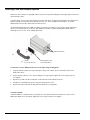
Stacking Plate and Handle Options
6000 Series device chassis are equipped with feet (on the lower panel) and dimples (on the upper panel) to allow for
quick stacking of units.
A rigid securing of two or more units together is possible with the use of optional stacking plate kits (190658A-01).
Each kit contains two stacking plates and eight screws (8-32 x .500 in., Phillips Flat, 82 Degree). If needed,
additional kits can be used to stack and secure more devices.
An optional handle kit (HA-210-5-BK) is available to provide a convenient way of carrying a single 6000 Series
device or a secured stacked set of devices. Each handle kit includes one black molded plastic handle and two
mounting screws (1/4-20 x 7/8 in., Phillips Pan Head).
6000 Series Devices
Handle
Stacking Plate (1 of 2)
(from kit HA-210-5-BK)
(from kit 190658A-01)
To attach two or more 6000 Series devices to each other using stacking plates:
1.
Align the bottom two holes of a plate (hole tapers facing out) with the top two center holes of the lower
6000 Series device.
2.
Secure the plate with two 8-32 x .500 in. Phillips screws (provided). Tighten the screws snug, but do not
over-tighten.
3.
Repeat steps 1 and 2 for the second plate, on the other side of the 6000 Series device.
4.
Attach the second 6000 Series device using the remaining four screws.
5.
Repeat these steps with other stacking plate kits and devices, as applicable.
To mount a handle:
Attach the handle to a 6000 Series device using the two outer holes on the device and the two 1/4-20 x 7/8 in.,
Phillips Pan Head screws (provided). Tighten the screws snug, but do not over-tighten.
1-4
General Information
User’s Manual