1
OPERATING THE SVU300
4-1. THE SVU300 FRONT PANEL
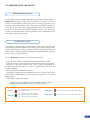
Overview
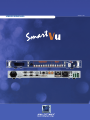
The highly intuitive front panel of the Smart Vu was designed by Analog Way engineers to simply and quickly
meet all of your event needs. Within minutes, you will be able to enjoy its full potential and easily parameter
most of its functions, without having to be an expert audio-visual engineer, leaving room for what is most
important to our users : concentrating on their event.
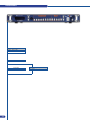
The Smart Vu front panel is comprised of several sections, each carefully labeled and self explanatory,
corresponding to all the machine’s versatile functions.
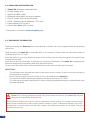
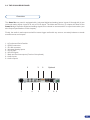
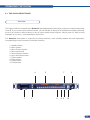
1: Standby button
2: Menu screen
3: Menu Control section 4: Menu scroll knob
5: Input Selection section
6: Layer Selection section
7: Freeze button
8: Effect button
9: Preset button
10: Take button
4
2
3
5
7
6
8 9
1
10
23