1
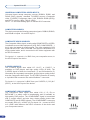
Inputs #1 to #5
UNIVERSAL COMPUTER & VIDEO INPUTS:
Universal Inputs accept computer sources (RGBHV, RGBS, and
RGsB (SOG) signals), standard TV/VIDEO sources (Composite
video, S.VIDEO), Component video (YUV, RGBS & RGsB (SOG)),
and HDTV sources (480p, 720p & 1080i).
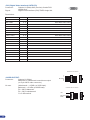
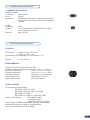
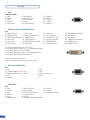
HD15 : 1 x Universal Analog input on female HD15 connector.
COMPUTER SOURCES:
The device accepts the following computer signals : RGBHV, RGB/S,
and RGsB on inputs 1-4 and DVI input 1.
COMPOSITE VIDEO SOURCES:
The Composite Video signal, usually called COMPOSITE or VIDEO,
is available on most video equipment (VCR, DVD, CAMCORDER…),
but is also the lowest in picture quality. The video standard of this
signal can be NTSC, PAL or SECAM. The signal is transmitted on a
single coaxial cable, and is connected to the video equipment with
an HD15 connector.
For inputs 1-4 : connect a 1 x BNC from your composite source, to
the HD15 input of the device.
S.VIDEO SOURCES:
The S.VIDEO signal, also called Y/C, HI-8™, or S.VHS™, is
available on DVD players and high quality VCRs (S.VHS). The
S.VIDEO signal in which the Luminance (Y) and Chrominance (C)
information are separately transmitted, gives a higher quality picture
than the Composite video signal. The S.VIDEO connector is usually
a 4 pin Mini-DIN connector also called Oshiden™ connector.
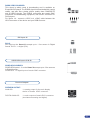
For inputs 1-4 : connect a 2 x BNC from your S.VIDEO, Y (G/Y) & C
(R/R-Y), to the HD15 input of the device.
COMPONENT VIDEO SOURCES:
The Component Video signal, also called YUV (Y, Pr, Pb) or
BETACAM™ is widely used in broadcasting and is available on
high-quality DVD players. The COMPONENT signal is transmitted
with 3 coaxial cables, and also has a better quality picture than
COMPOSITE and S.VIDEO signals. The COMPONENT connectors
are usually RCA (x3), or BNC (x3).For inputs 1-4 : connect a HD15
to 3 x BNC cable between the HD15 connector of the device and
your Component source.
20