1
Gill Instruments Ltd
_____________________________________________________________________________________________________________
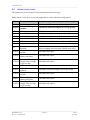
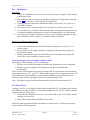
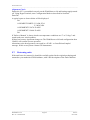
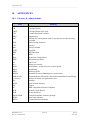
Contents
1.
2.
3.
4.
5.
FORWARD ..............................................................................................4
INTRODUCTION......................................................................................4
FAST TRACK SET-UP ............................................................................4
SPECIFICATION .....................................................................................5
PRE-INSTALLATION ..............................................................................6
5.1.
5.1.1
5.2.
5.3.
5.4.
Equipment supplied .......................................................................................... 6
WindObserver 90 Part Numbers. ...................................................................... 6
Packaging ......................................................................................................... 6
Installation requirements ................................................................................... 7
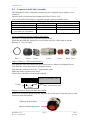
Connector and Cable Assembly. ....................................................................... 8
6.
INSTALLATION .....................................................................................10
6.1.
6.2.
6.3.
6.4.
6.5.
Installation Guidelines ..................................................................................... 10
Bench system test .......................................................................................... 11
Cabling ........................................................................................................... 11
Power supplies ............................................................................................... 12
Connections .................................................................................................... 13
Default Settings ....................................................................................................... 15
Connecting to a PC with a RS422 or RS485 input ................................................. 15
Networking units ..................................................................................................... 16
6.6.
Indoor Power and Communications Interface (Part 1189-PK-021) .................. 17
Connecting to a PCI Unit with RS422 input ............................................................ 17
PCI Electrical Power Requirements ........................................................................ 17
PCI Connector Pin and Cable assignments ........................................................... 18
Anemometer connector – 15 way skt ..................................................................... 18
Auxiliary Analogue Outputs – 9 way (Not Applicable) ............................................ 18
DC Supply – 4 way ................................................................................................. 18
RS 232 Output – 9 way Skt..................................................................................... 18
RS422 Network In – 9 way Skt ............................................................................... 19
RS422 Network Out – 9 way Plg ............................................................................ 19
6.7.
Using the WindObserver 90 with the Gill WindDisplay .................................... 20
6.8.
Mechanical installation .................................................................................... 22
Connecting to a Gill WindDisplay ........................................................................... 21
Orientation .............................................................................................................. 22
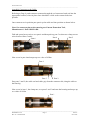
Mounting (Short and Long Mounts) ........................................................................ 22
Pipe Mounting (use with Pipe Mount) ..................................................................... 24
Custom Mount (Use with WindObserver No Mount Option) ................................... 24
Alignment ................................................................................................................ 25
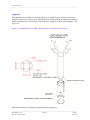
Figure 2a North Marker (Long Base Mount shown for illustrative purposes). ....... 25
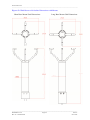
Figures 2b WindObserver 90 Outline Dimensions with Mounts ............................. 26
7.
MESSAGE FORMATS & OPTIONS ......................................................28
7.1.
7.2.
Wind Speed format ......................................................................................... 28
Output formats ................................................................................................ 28
7.3.
7.4.
7.5.
Networking...................................................................................................... 29
Units ............................................................................................................... 30
Output rate...................................................................................................... 30
7.6.
Averaging (Digital Data) .................................................................................. 30
Low wind speeds .................................................................................................... 28
Sample Average ..................................................................................................... 30
7.6.1 G Command Averaging. ................................................................................ 30
________________________________________________________________________________________________
WindObserver 90
Page 2
Issue A
Doc. No. 1390-PS-0041
Nov 2014