1
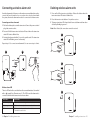
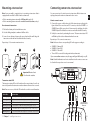
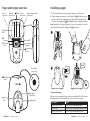
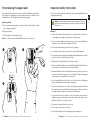
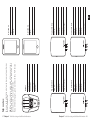
Personalizing the pager label Important safety instructions A personalized label makes it easier to identify the different pager alarms. Depending on configuration, you can write the name of the caretakers or the installed sensors. An extra label is included in the package. This section contains important information about safety, handling, disposal, recycling and warranty. Replacing a label 1 Remove the transparent plastic cover protecting the LED panel. Be careful not to damage the plastic. Notice: Read all safety information and operating instructions below before using the Amicus products. Keep the user manual for future use. 2 Replace the label. Warning! 3 Snap the plastic cover back into place. Failure to follow these safety instructions could result in fire, electric shock, or other injury or damage to the product or other property. Note: You can download and editable PDF version on our website. Do not use or store this product near any heat sources such as naked flames, radiators, ovens or other devices that produce heat. 1 2 Protect the cables from any potential source of damage. Use only the power supply and accessories specified in this manual. Disconnect the power supply from the mains during thunderstorms or if the product is not in use for a long period of time. If the product is dropped, always test it before using it. Please note that the deliberate or accidental switching off of the volume or power switch on the Pager can result in a missed alarm. Be aware that alarms can be missed if batteries run out, connectors become disconnected, or mobile systems are out of operation. Only refer damaged or faulty products to qualified service personnel. 3 Do not dismantle the product; there is a risk of electric shock. Tampering with or dismantling the product will void warranty. The product is intended to be used as a care alerting system but should not be used as the only security in life-threatening situations. This product does not replace the need for personal supervision of caretakers. The product has no power switch. In order to disconnect the product, the charger and power supply must be disconnected from the mains power. Make sure that these are easily accessible. The product is designed for indoors use only. Do not expose the product to moisture. Protect the product from shocks during storage and transport. 23 Chapter 4 Troubleshooting and additional information Chapter 4 Troubleshooting and additional information 24 EN