1
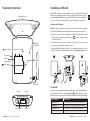
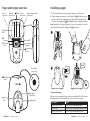
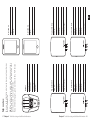
Transceiver overview
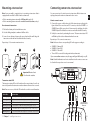
Installing a SIM card
With a GSM module you can receive alarms on your mobile phone. This is useful
when you are outside the pager’s radio range. The transceiver needs to be equipped with a Micro SIM card (not prepaid). The PIN code needs to be switched EN
off or set to 0000. To change the PIN code, see the operator’s user manual.
Removable cover
How to install a SIM card
Note: First, make sure the transceiver is disconnected from the power supply.
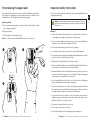
1 Attach the GSM antenna and pull out the battery tab on the transceiver.
2 Open the cover and remove the batteries. Insert the SIM card into the holder
in the battery compartment marked with a
-symbol. The symbol indicates the direction.
Wireless
alarm LED
3 Put the batteries back and close the lid. Connect the power cord to the
transceiver and plug it into the mains socket.
The status LED will blink in green every 15 s to show that the transceiver is connected to GSM. If it doesn’t blink within 2 min go to Troubleshooting on p 19.
Status LED
Test button
1
Battery
compartment
2
3
GSM LED
SIM card port
GSM
antenna
The GSM LED
Sensor 1
Power supply
5 Chapter 1 Installing a transceiver
Sensor 2
Sensor 3
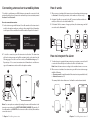
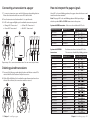
The transceiver is equipped with a status LED that shows the current GSM status.
It is located under the cover and marked with a -symbol. The LED shows e.g.
if the transceiver is connected to the GSM network and when it is transmitting.
If the GSM LED is
It means that
Blinking every 3 s
• The transceiver is connected to a GSM network.
Constantly lit
• The transceiver is texting and calling an assistant.
Blinking every 1 s
• The transceiver is searching for a GSM network.
Off
• The transceiver has no GSM module/ it’s out of order.
Chapter 1 Installing a transceiver 6