1
6
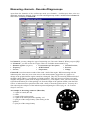
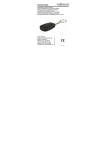
The front of the device
Diagnoskop KM E
Functional
control LED
Gniazdo uniwersalne
Sondy pojemn./ induk.
A
B
C
Universal
connector
IMPORTANT!!! Description of the functional control LED:
- Red colour means that the universal connector is active (in the recorder / diagnoscope modes).
Signals to Channels A and C are received only through this connector.
-Green colour means that the connectors of L&C probes are active (in the oscilloscope mode).
- LED does not produce light - active connectors A, B, C, D- induction LED, for the
recorder/diagnoscope modes or A and B for the oscilloscope mode.
Work modes
The "Diagnoskop" program has three work modes:
• oscilloscope,
• recorder,
• diagnoscope.
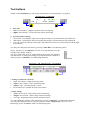
To choose one of the work modes, just press the "Work Mode"
button and select a demanded mode in the shown window. Each
mode has its own specific way of measuring.
Using the "oscilloscope" mode you may examine the highfrequency signals from two measuring channels.
Using the "recorder" mode you may conduct the recording up to 31.200 measurements (65 pages of
display) from four measuring channels. You have a choice of the measuring speed and you may
observe the measured values at real-time. It enables you to spot all the irregularities that occur during
measuring.
The "diagnoscope" mode resembles the "recorder" mode, but it uses only one cyclically "looped"
window of the display. It lets you examine the measurements constantly, when you do not need to
record such a great number of data.
You may also switch quickly from the diagnoscope mode to the recording of measurements (see
Measuring). In every work mode you may save the measurements on a disk, and later load and analyse
them.
Measuring
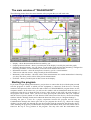
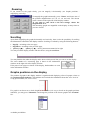
If you want to begin measuring in the "oscilloscope" mode, just press the "Start" button. It will
change then into the "Stop" button, which you can use to stop measuring. You may also do it by
pressing [Esc].
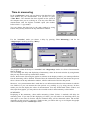
If you want to start measuring in the "recorder" mode, press "New Measuring" - you may choose
then how many measurements the program should make. When the measuring begins, you may use the
"Stop" / "Continue" buttons until the program completes the measurements.
In the "diagnoscope" mode the measurements are made in the same way as in the oscilloscope mode.
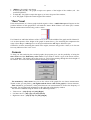
There is also an additional possibility of quick switching from the "diagnoscope" mode to the
recording of measurements - just press "Record Now!". The program will change the work mode into
the "recorder" and show a window of new measurements; you only have to accept their realization.
The program will automatically suggest recording of 5 pages of measuring, but you can change the
number just before the acceptance.
While the measurements are being made in the "oscilloscope" mode, using the mouse may be
difficult. If you want to change the settings, it would be easier to stop measuring by pressing [S] or
[Esc] at first.