1
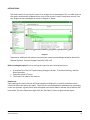
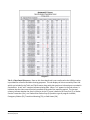
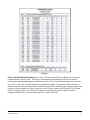
Diagram 5 Tab C – Client Detail (Diagram 5): Data on this client detail tab is not transferred to the HDX but rather is provided for reference and data cleaning purposes. This tab displays all clients sorted by Client Uid which are included in the Tab A and Tab B counts along with their pertinent information as recorded in ServicePoint. A red “null” notation indicates missing data. When “na” appears in the End column, it indicates that the client was still actively enrolled at the end of the reporting period. The last two columns indicate whether the client’s inclusion in the PIT count is based on an Entry Exit (E), a Shelter Service Transaction (Svc), or a ShelterPoint Shelter Stay (SH) and the type of program involved; Emergency Shelter (ES), Transitional Housing (TH), or Safe Haven (SH) Bowman Systems ART Gallery Report Page 7 of 18 0630 – Sheltered PIT Count v3