1
nel EQ) or the "Sends on Fader" feature. By pressing
the "Sends on Fader" button, the input faders send
the signal to the desired bus with the input fader
displaying the bus for that channel. If you select an
input channel, the eight group faders can be used
to set the bus sends from this channel; and vice
versa, if you select a mix bus, the 16 left input faders
are used to set the right mix for this bus. To avoid
confusion, the channel numbering appears in red at
the top left of the display by the "Sends on Fader"
button.
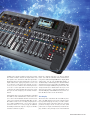
Immediately adjacent to the main display you'll find
the USB recorder and Main Bus section, where the
stereo Pan of the individual channels and mono bus
can be sent separately though the Main Bus encoder.
The USB recorder is for recording and playback of
stereo mixes in WAV format – an easy way to play intermission music or record your gig. In addition,
the USB port allows the import or export of mix files
and future firmware updates.
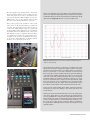
Below the channel strip there are sixteen channel
faders, each with its own Mute, Select and Solo buttons, plus a dedicated 6-digit LED meter display. Each
channel also gets its own backlit LCD display, or
”Scribble Strip”, which displays the channel number
and instrument icons, along with customizable channel names in 8 high-visibility background colors. The
32 Input channels are distributed in two layers: 1-16
and 17-32. Layer three controls 6 Aux Inputs, the 2channel USB player and 8 FX Returns. Layer four contains the Master faders of the 16 mix buses.
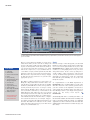
The Display
The visual center of the X32 is the 7" backlit day-viewable color TFT display (non-touch), which features
layer up/down and page select keys, as well as 8 function keys that lead to sub-menus. The user can make
parameter changes via the 6 rotary encoders (with
push feature for input confirmation) beneath the display, similar to the principle used on the Roland V
www.tools4music.de