1
AUTOMATIC SETUP
1.
2.
3.
4.
5.
6.
Ensure that the process is in normal conditions.
Make sure that the monitor has been powered for at least 15
minutes in order to warm up and stabilise.
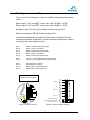
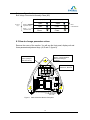
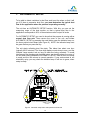
Press the AUTOMATIC SETUP BUTTON (the white button on
lower printed circuit board)
Make sure that green LED indicator turns red
Mount the cover of enclosure and tighten it and wait for about
45 minutes until the LED turns green indicating that the
Automatic Setup sequence has finished
The unit is ready to use
21