1
2
Dietrich, Whiteside
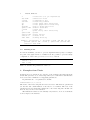
-I
-abs FILE
-c FILE
-cmd VAL
-ga
-gb
-gm FILE
-grshell VAL
-o FILE
-p
-parser VAL
-printer VAL
-timeout N
-wdir FILE
:
:
:
:
:
:
:
:
:
:
:
:
:
:
interactive (not yet implemented)
abstraction rules
configuration file
refactoring command
create graph after refactoring
create graph before refactoring
path to graph model files
GrShell executable
output file
print theory after refactoring
parser
pretty printer
timeout in ms
working directory
Example: java Refactor -I -abs FILE -c FILE -cmd VAL -ga -gb gm FILE -grshell VAL -o FILE -p -parser VAL -printer VAL timeout N -wdir FILE
1.2
Running Polar
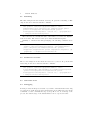
To run the POLAR, you have to provide arguments that specify for example
the path of the graph rewrite tool GrGen. It is also possible to provide a single
configuration of the form (parameter=value)*, such as
parser = hiscriptparser.HiscriptSuite
timeout = 4000
wdir = /tmp
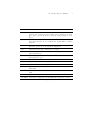
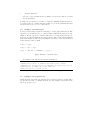
Table ?? describes the parameters of the tool.
2
Examples from Thesis
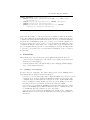
In this section, we describe how to run two of the example refactorings from the
thesis. The generalise tactic refactoring cannot yet be run in the batch interface
mode as we have a limitation on supplying parameters.
In particular, the -cmd parameter looks like
PLRenameLabel(10,10,\"a\")
The name of the refactoring rule is PLRenameLabel. The first two parameters
are the line and column number of the label to be renamed. The rest of the
parameters are the additional parameters to the refactoring rule. In this case
there is only one more: the new label.
The limitation is that we can currently only reference one node. It is future
work to improve the interface.