1
 Multicontroller Kit User Manual
Index 1. About multicontroller Development Kit 2. Pin Diagram of Sections 3. Programming the Onboard Microcontrollers 2
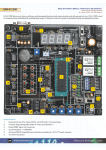
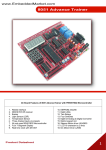
About Multicontroller Development Kit Multicontroller Development Kit is our oldest product offering. It has evolved over last 2 years. Initially Kit was designed for only 8051 microcontrollers. Later the PIC, AVR microcontrollers were supported. Now Multicontroller Development Kit completes most common microcontroller families by offering support to ARM in addition to classic 8051, AVR and PIC microcontrollers. Since beginning of our Multiprocessor product range, our emphasis was always on offering multiple microcontroller support on single development board with variety of famous interface circuits. Multicontroller Development Kit has always been a complete set of development system. ISP Programmers, IDEs, Compilers, Sample Source Code, Cables, Connectors and power supply are part of the standard packing. In export shipment, we do not include certain low cost – high weight accessories like cables. Power supplies are also not included as every country has unique wall mounting sockets. 3
Pin Diagrams of All Sections The Multiprocessor Trainer kit includes following sections on the Board: 1. Power Supply Section 2. LED Display 3. Seven Segment Display ‐ Four multiplexed 4. LCD/GLCD Display 5. 4x4 Matrix Keypad 6. Pulled Up/Pulled Down Push to On Switches 7. Relay 8. ADC0808 Interface 9. ULN2803 Based Stepper Motor Driver 10. L298 Based DC Motor Driver 11. TSOP1738 Based Object Sensor 12. IR Photo Sensor 13. LM35 Temperature Sensor 14. 2 General Purpose RS232 Interface 15. 433Mhz RF Module with Encoder‐Decoder 16. I2C Based Real time clock 17. SPI Based EEPROM 18. P89V51RD2BN and other Pin compatible 8051 Microcontrollers Development Board 19. ATMega32 & other Pin compatible AVR Microcontrollers Development Board 20. PIC18F4550 & other Pin compatible PIC Microcontrollers Development Board 21. LPC2148 and other Pin Compatible ARM7 Microcontrollers Development Board 4
1. Power Supply Section Note: Use only 9‐
12VDC ,1A Power Supply 2. LED Display LED_IN 1 2 3 4 L1 L2 L3 L4 LED_IN1 1 2 3 4 L5 L6 L7 L8 3. Seven Segment Display 7SEG_DATA 8 Seg A 7 Seg B 6 Seg C 5 Seg D 4 Seg E 3 Seg F 2 Seg G 1 DP 7SEG_CA1 4 DIS1 3 DIS2 2 DIS3 1 DIS4 5
4. LCD/GLCD Display [A]. Character LCD Connections LCD_DATA LCD_CTRL RS DB0 1 C/D RW DB1 2 R/W EN
DB2 3 EN NC
DB3 4 CS1 NC CS2 DB4 5 NC DB5 6 RES NC DB6 7 V0 DB7 8 Note: Connect JP3,JP1 & JP2 for LCD Contrast & Back Light [B]. Graphics LCD Connections LCD_DATA LCD_CTRL RS 1 DB0 C/D RW R/W 2 DB1 EN
3 DB2 EN CS1 CS1 4 DB3 CS2 5 DB4 CS2 +5V RES 6 DB5 NC
7 DB6 V0 8 DB7 Note: Disconnect JP3,JP1 & JP2. 5. 4x4 Matrix Keypad KP_ROW 1 R1 2 R2 3 R3 4 R4 KP_COL 1 2 3 4 C1 C2 C3 C4 6
6. Pull Up/Pull Down Push to On Switches Pull Up 1 2 3 4 S1 S2 S3 S4 Pull Down 1 2 3 4 S5 S6 S7 S8 7. Relay Module RELAY_OUT 1 NO 2 NC 7
8. ADC0808 Interface 9. ULN2803 Based Stepper Motor Driver ADC_IN1 ADC_DATA 1 IN3 1 D0 2 IN4 2 D1 3 IN5 3 D2 4 IN6 4 D3 5 IN7 5 D4 ADC_IN 6 D5 1 IN0 7 D6 2 IN1 8 D7 3 IN2 ADC_CLK ADC_ADD 1 SOC 1 ADD_C 2 EOC 2 ADD_B 3 ALE 3 ADD_A 4 OE 5 CLK STEPPER_IN 1 IN8 2 IN7 3 IN6 4 IN5 5 IN4 6 IN3 7 IN2 8 IN1 STEPPER_OUT 1 O1 2 O2 3 O3 4 O4 5 CD STEPPER_OUT1
1 O5 2 O6 3 O7 4 O8 5 CD Note: Connect JP4 to supply 12V to the motor. 8
10. L298 Based DC Motor Driver DC_INPUT 1 IN4 2 IN3 3 IN2 4 IN1 DC_EN 1 EN B 2 EN A J1 1 12V DMD_OUT1 1 O1 2 O2 DMD_OUT2 1 O4 2 O3 12V 1 GND 2 12V Note: Connect JP4 to supply 12V to Motor. 11. TSOP1738 Based Object Sensor J3 IR_OUT 1 12. IR Photo Sensor 1 J1 OUT 9
13. LM35 Temperature Sensor 1 J2 OUT 14. General Purpose RS232 Interface SERIAL_PORT 1 RX0 2 TX0 3 TX1 4 RX1 15. 433 MHz RF Module with Encoder‐Decoder RF‐Transmitter TX_ADD 1 A0 2 A1 3 A2 4 A3 5 A4 6 A5 7 A6 8 A7 TX_DATA 1 D8 2 D9 3 D10 4 D11 RF‐Receiver Note: JP7 needs to be connected To enable transmission else you can connect to MCU. 10
RF Receiver RX_ADD 1 A0 2 A1 3 A2 4 A3 5 A4 6 A5 7 A6 8 A7 RX_DATA 1 D8 2 D9 3 D10 4 D11 5 VT 16. I2C based Real Time Clock DS1307 RTC1 SQW SCL SDA 1 2 3 17. SPI EEPROM AT93C46 Note: Connect JP6 for VBAT Power. 11
18. P89V51RD2 & Other Pin Compatible 8051 Development Board PORT0 PORT1 1 P0.0 1 P1.7 2 P0.1 2 P1.6 3 P0.2 3 P1.5 4 P0.3 4 P1.4 5 P0.4 5 P1.3 6 P0.5 6 P1.2 7 P0.6 7 P1.1 8 P0.7 8 P1.0 PORT3 PORT2 1 P3.7 10 P2.0 2 P3.6 9 P2.1 3 P3.5 8 P2.2 4 P3.4 7 P2.3 5 P3.3 6 P2.4 6 P3.2 5 P2.5 7 P3.1 4 P2.6 8 P3.0 3 P2.7 19. ATmega32 & Other Pin Compatible AVR Development Board PORTA PORTB 1 PA.0 1 PB.7 2 PA.1 2 PB.6 3 PA.2 3 PB.5 4 PA.3 4 PB.4 5 PA.4 5 PB.3 6 PA.5 6 PB.2 7 PA.6 7 PB.1 8 PA.7 8 PB.0 PORTC PORTD 1 PC.7 1 PD.7 2 PC.6 2 PD.6 3 PC.5 3 PD.5 4 PC.4 4 PD.4 5 PC.3 5 PD.3 6 PC.2 6 PD.2 7 PC.1 7 PD.1 8 PC.0 8 PD.0 12
20. PIC18F4550 & Other Pin Compatible PIC Development Board PORTA 2 PA.0 3 PA.1 4 PA.2 5 PA.3 6 PA.4 7 PA.5 21. LPC2148 ARM7 Development Board PORTC 1 PC.0 2 PC.1 3 PC.2 4 PC.3 5 PC.4 6 PC.5 7 PC.6 8 PC.7 PORTB 1 PB.7 2 PB.6 3 PB.5 4 PB.4 5 PB.3 6 PB.2 7 PB.1 8 PB.0 PORTE 1 PE.0 2 PE.1 3 PE.2 PORTD 1 PD.0 2 PD.1 3 PD.2 4 PD.3 5 PD.4 6 PD.5 7 PD.6 8 PD.7 All Pins are given as per the Pin diagram given in Datasheet of LPC2148. 13
Programming P89V51RD2BN Microcontroller 1. Connect TX0 & RX0 Pin of Serial Communication Section to P3.0 & P3.1 Pin of P89V51RD2BN Microcontroller. 2. Open Flash Magic. 3. Select 8051 Family 4. Select 89V51 Microcontroller 14
5. Select COM Port. This port can be found in Device Manager Of your Windows XP Operating System. 6. Set Baud Rate at 9600 15
7. Now go to Advance Options from Main Menu. 8. Check Mark Half Duplex Communications Box. 16
9. Uncheck Use DTR to Control RST. 10. Select Hex File which you need to load. 11. Click Start Button. 12. It will ask Reset the Device into ISP Mode Now. 13. Press Reset Button and release it. Wait until it gets finished. 17
Programming AVR Atmega32 Microcontroller 1.
2.
3.
4.
5.
Open Pony Prog Software. Connect AVRISP programmer’s Pins to ISP Header for AVR on the Board. Connect Serial Cable to AVRISP programmer. Go to Setup Option from Main Menu. Go to Interface Setup. 6. Select Serial IO option. 7. Select SIProg API and COM Port. 18
8. Click Probe Button it should Display Test OK. 9. Now Select Calibration option from Setup Menu. 10. Click on Yes and wait until it Displays Calibration Ok. 19
11. Now select ATmega32 from Device Menu. 12. Open Device File(Hex File) from file Menu. 13. Click Program option from Command Menu and wait until it finishes. 14. You can also change Fuse Bits from Command Menu ‐> Security & Configuration Bits. For fuse settings please refer to device datasheets. 20
Programming PIC18F4550 Microcontroller 1. Connect PIC ICSP Programmer’s 6pin connector to ICSP header on board. 2. Now Open PicPgm Software. It will detect current Programmer as JDM Programmer and Microcontroller PIC18F4550. 3. Now browse the Hex file that you need to Load. 21
4. Set Fuse Bits as per your requirements from the Configuration Bits Tab. Please refer to device datasheet for Setting Fuse Bits. 5. Click on Program button and wail until it finishes programming. 22
Programming LPC2148 Microcontroller 1. Connect Serial Cable to UART0 Connector. 2. Set Auto_RST Jumper on Board. 3. Select Device Family of ARM7 4. Select LPC2148 Microcontroller 23
5. Select COM Port. Normally its COM1 in most Computers. Please check Device Manager for Available COM Ports. 6. Select 38400 Baud Rate. 24
7. Set Crystal Frequency to 12MHz. 8. Go to Option‐> Advance Options. 9. Check Mark High Speed Communications and Half Duplex Communications. 25
10. Go to Hardware Config Tab. Check Mark Use DTR & RTSto Control RST & ISP Pin and Keep RTS asserted while COM Port Open. Enter T1=100 & T2=200. 11. Browse Hex File. Click Start Button and wait until it finishes. 26