1
Connections and controls
7
Connections and controls
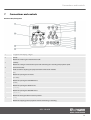
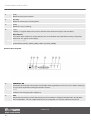
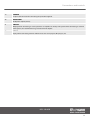
Drum module, front panel
1
7-segment LED display, 3 digits
2
[CLICK]
Button for switching the metronome on/off.
3
[TEMPO]
Button for setting the metronome speed and controlling the recording and playback speed.
4
[MASTER VOLUME]
Knob control for adjusting the playback volume of the drum module.
5
[KIT]
Button for opening the KIT menu.
6
[PATTERN]
Button for opening the PATTERN menu.
7
[VOICE]
Button for opening the VOICE menu.
8
[VOLUME]
Button for opening the VOLUME menu.
9
[DRUM OFF]
Button for muting the drum track of a pattern.
10
[STOP]
Button for stopping pattern playback and for terminating a recording.
MPS-250 USB
15