1
Operation
The accompaniment pattern always plays until the last bar during a
recording, independently of when you terminate your recording.
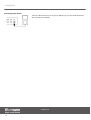
Recording with metronome
To make the metronome click during a recording, press the [CLICK] button after acti‐
vating the recording mode (signal LED of the button starts flashing). The clicking will
automatically set in with the recording.
The click sound is not recorded.
Terminating and playing back a recording
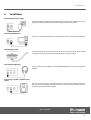
1.
Terminate your recording by pressing either the [RECORD] or the [STOP]
button.
ð The signal LED of the [RECORD] button is flashing.
2.
Save your recording by pressing the [SAVE] button.
ð The signal LED of the [RECORD] button goes out.
The signal LED of the [PATTERN] button lights up.
‘P51’ appears on the display.
Discarding or overwriting a recording
To discard your recording, press either the [KIT] or the [PATTERN] button to exit the
recording mode.
To overwrite your recording, start a new recording as described above.
8.2 Playing the pads
The bass drum, snare, hi-hat and cymbals of an analog drum set are replaced by pads
here. When you strike a pad, an integrated trigger produces the previously assigned
voice via the drum module. The harder you hit a pad, the louder the sound produced.
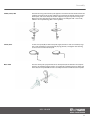
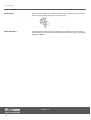
Toms
Tom pads have only one trigger and must be hit in the center in order to produce a
sound.
Crash and ride
Crash and ride pads have only one trigger and must be hit in the slightly thicker
rubber-coated zone to produce a sound.
MPS-250 USB
21