1
1.4
The line array
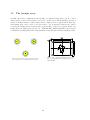
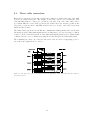
As with other array configurations the labeling of a physical radar sensor (A, B or C) is
defined by the connector the radar is connected to on the server. But the Line Array
requires that the physical radar sensor A is set using the web-interface as the functional
radar B and vice versa. This allows tilting the functional radar A (physical radar B) away
from vertical and by doing so forming a triangle with the radar foot prints on the water
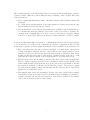
surface. The conventions for the radar physical definitions, functional definitions and tilt
angles are shown in Fig. 1.8.
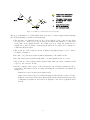
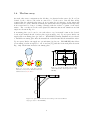
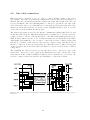
A mounting plate can be used to fix each radar to two horizontal beams at the desired
location (an example sketch of such a plate is given in Fig. 1.9). Upon request, Radac can
supply such a mounting plate (product no. WG-MP-EX). During installation it is advised
to install the mounting plate first, then install the radar antenna and then install the radar.
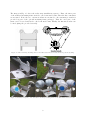
Upon request, Radac can supply an optional frame (product no. WG-MH-EX) that allows
for mounting a radar at angles 0, 5, 10, 15 and 20 [deg] with the horizontal plane shown in
Fig. 1.10). Each frame includes a mounting plate.
Figure 1.9: Optional mounting plate for an Ex.
certified WaveGuide Radar (product no. WGMP-EX).
Figure 1.8: Top view of the three physical
radars labeled A, B and C. With the functional
definitions labeled A, B and C.
Figure 1.10: Optional frame that allows mounting of the radar at different
angles (product no. WG-MH-EX).
9