1
Operation Manual EPST
5.4.
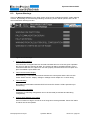
Bottom Hole assembly screen
Alternative to the manual input of KF and Cf, the EPST controller can also calculate the values of Kf
and Cf. For this calculation the configuring of the bottom hole assembly (BHA) and the drill string data
has to be inputted to the system. The input of data and the calculation of the tuning parameters is
done on the “BHA-entry” and “Drill Pipe-entry” screen (see chapter 5.5).
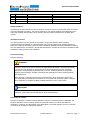
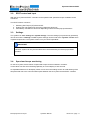
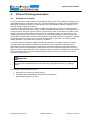
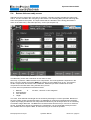
Figure 12: BHA Entry screen
The BHA entry screen has a maximum of four items to enter.
Obviously, in practice, a BHA will have more components. The most significant components in the
BHA, in terms of weigth and length, MUST be entered; such as HWDP and / or DC. The length of
smaller components, like the bit, motor, stabilizers, MWD and jars have to added to the main
components in the BHA when using the BHA entry screen.
For each item four parameters should be entered:
1.
2.
3.
4.
Material.
Outer diameter.
Inner diameter.
Length.
“No Item”, “Normal” or “Non-magnetic”
The outer, inner-diameter and length can be entered by selecting it’s numeric input field. Because of
the huge variety of BHA components there is no database of components implemented in the EPST
system. By lumping the BHA into four major items the BHA entry can be simple and it is not necessary
to maintain a large data base. The BHA items must be entered from the bit up! Item one is closest to
the bit! Unused items will not be included in the calculations. It is recommended to always use the
four available items to input the BHA, to make the tuning as accurate as possible.
Electroproject Soft Torque
Operation Manual
version 3.0 / page 21