1
C252
Network scanner operations
Contents
1
2
Introduction
1.1
Energy Star® ..................................................................................... 1-4
What is an ENERGY STAR® Product? .......................................... 1-4
1.2
Trademarks and registered trademarks......................................... 1-5
License information........................................................................ 1-5
OpenSSL Statement ...................................................................... 1-6
1.3
About this manual.............................................................................
Structure of the manual .................................................................
Notation..........................................................................................
Screens, windows and dialog boxes .............................................
1.4
Explanation of manual conventions..............................................
Safety advices..............................................................................
Sequence of action ......................................................................
Tips ..............................................................................................
Special text markings...................................................................
1-10
1-10
1-10
1-11
1-11
1.5
User manuals ..................................................................................
User manual [Copy Operations]...................................................
User manual [Network Scanner Operations] <this manual>........
User manual [Box Operations] .....................................................
User manual [Enlarge Display Operations] ..................................
User manual [FK-502 Facsimile Operations] ...............................
User manual [Network Facsimile Operations]..............................
User manual [Print Operations] ....................................................
1-12
1-12
1-12
1-12
1-12
1-12
1-12
1-13
1-9
1-9
1-9
1-9
Before using the scan functions
2.1
Environment required for using the scan functions ...................... 2-3
2.2
Available scanning functions...........................................................
Sending the scanned data in an e-mail message ..........................
Sending the scanned data as files (FTP)........................................
Sending the scanned data to a computer on the
network (SMB)................................................................................
Saving the scanned data in boxes.................................................
Using the machine as a scanner....................................................
bizhub C252
2-4
2-4
2-5
2-6
2-7
2-8
Contents-1
3
2.3
Settings for using network/scanning functions ............................. 2-9
Specifying network settings............................................................ 2-9
Registering destinations and specifying their settings ................. 2-10
Setting the from address .............................................................. 2-11
Specifying the scan settings......................................................... 2-11
Specifying program settings ......................................................... 2-12
Specifying default scan settings ................................................... 2-12
2.4
Connecting to the network............................................................. 2-13
Network connection...................................................................... 2-13
2.5
Flow chart of setup and scanning operations .............................. 2-14
Scanning documents
3.1
Control panel ..................................................................................... 3-3
3.2
Displaying the scan screen .............................................................. 3-6
3.3
Sending data in an e-mail message (Scan to e-mail)..................... 3-8
Scan to e-mail................................................................................. 3-8
Using programs .............................................................................. 3-8
Selecting group addresses ........................................................... 3-11
Selecting destinations from the address book ............................. 3-14
Searching the destination ............................................................. 3-16
To search the destination ............................................................. 3-18
Entering the addresses directly .................................................... 3-19
3.4
Sending data to a server (Scan to FTP)......................................... 3-22
Scan to FTP .................................................................................. 3-22
Using programs ............................................................................ 3-23
Selecting group addresses ........................................................... 3-25
Selecting destinations from the address book ............................. 3-28
Entering the addresses directly .................................................... 3-31
3.5
Sending data to a PC on the network (Scan to SMB) .................. 3-35
Scan to SMB................................................................................. 3-35
SMB transmission to Windows File Sharing
(Mac OS X)/Samba (Linux/Unix) ................................................... 3-35
SMB transmission to Windows 98 SE/Windows Me .................... 3-36
Using programs ............................................................................ 3-36
Selecting group addresses ........................................................... 3-38
Selecting destinations from the address book ............................. 3-41
Entering the addresses directly .................................................... 3-44
3.6
Specifying the scan settings .......................................................... 3-48
Available settings .......................................................................... 3-48
File type ........................................................................................ 3-50
To specify the file type settings .................................................... 3-52
Resolution ..................................................................................... 3-54
Contents-2
bizhub C252
4
Simplex/Duplex............................................................................
To specify the simplex/duplex setting .........................................
Original type .................................................................................
To specify the original type setting ..............................................
Scan size......................................................................................
To specify the scan size setting...................................................
Color.............................................................................................
To specify the color setting..........................................................
Background removal....................................................................
Original setting .............................................................................
To specify the original settings ....................................................
Book scanning (Application) ........................................................
To use the “Book Scan” function.................................................
Frame erase (Application) ............................................................
Annotation (Application) ...............................................................
Separate scan ..............................................................................
File name......................................................................................
To change the file name...............................................................
3-55
3-55
3-56
3-57
3-59
3-59
3-62
3-63
3-64
3-65
3-66
3-68
3-69
3-71
3-73
3-75
3-75
3-76
3.7
Checking the settings ....................................................................
Checking the settings ..................................................................
To check a job..............................................................................
Deleting unneeded destinations ..................................................
Specifying e-mail settings............................................................
To change the e-mail settings......................................................
3-77
3-77
3-78
3-82
3-84
3-85
3.8
Checking the scanner transmission log.......................................
Displaying the current jobs list.....................................................
Displaying the job history list .......................................................
Displayed information ..................................................................
3-86
3-86
3-87
3-88
Specifying settings from the control panel
4.1
Settings on the control panel .......................................................... 4-3
Utility types .................................................................................... 4-3
Other related settings..................................................................... 4-5
4.2
Displaying setup screens................................................................. 4-6
To display the scan screen ............................................................ 4-6
To display the user setting screen ................................................. 4-8
To display the administrator setting screen................................. 4-10
4.3
Registering abbreviated destinations...........................................
E-mail destinations.......................................................................
FTP destinations ..........................................................................
SMB destinations.........................................................................
Box destinations ..........................................................................
bizhub C252
4-12
4-12
4-15
4-19
4-23
Contents-3
4.4
Registering group destinations...................................................... 4-25
To register a group destination..................................................... 4-25
4.5
Registering program destinations ................................................. 4-27
To register a program destination................................................. 4-27
4.6
Specifying e-mail settings .............................................................. 4-30
Subject.......................................................................................... 4-30
Text ............................................................................................... 4-32
4.7
Setting the main scan mode screen .............................................. 4-34
Default tab .................................................................................... 4-34
Program default ............................................................................ 4-35
Address book default index .......................................................... 4-37
Address type symbol display........................................................ 4-39
4.8
Setting the save format of the data to be scanned...................... 4-40
JPEG compression level ............................................................... 4-40
To specify the compression level ................................................. 4-40
Black compression level ............................................................... 4-42
To specify the compression level ................................................. 4-42
TWAIN lock time ........................................................................... 4-44
4.9
One-touch registration list.............................................................. 4-46
Address book list .......................................................................... 4-46
Group list ...................................................................................... 4-48
Program list................................................................................... 4-50
E-mail subject/text list .................................................................. 4-52
4.10
Creating annotation user boxes..................................................... 4-54
To create annotation user boxes .................................................. 4-56
4.11
TCP/IP settings................................................................................ 4-59
Before specifying the settings ...................................................... 4-59
Items to be specified .................................................................... 4-60
To specify TCP/IP settings ........................................................... 4-62
IP filtering ...................................................................................... 4-66
RAW port no. ................................................................................ 4-68
4.12
NetWare settings ............................................................................. 4-69
NetWare parameters..................................................................... 4-69
To specify NetWare settings......................................................... 4-71
Status............................................................................................ 4-74
4.13
http server settings ......................................................................... 4-75
IPP and http parameters............................................................... 4-75
To specify IPP and http settings................................................... 4-76
Support operation......................................................................... 4-78
Printer information ........................................................................ 4-79
Contents-4
bizhub C252
4.14
FTP settings .................................................................................... 4-83
FTP parameters............................................................................ 4-83
To specify FTP settings................................................................ 4-84
4.15
SMB settings ................................................................................... 4-86
SMB parameters .......................................................................... 4-86
To specify SMB settings .............................................................. 4-88
4.16
AppleTalk settings .......................................................................... 4-91
AppleTalk Parameters.................................................................. 4-91
To specify AppleTalk settings ...................................................... 4-91
4.17
Enabling LDAP settings ................................................................. 4-93
Enabling LDAP parameters.......................................................... 4-93
To specify enabling LDAP settings .............................................. 4-93
4.18
Setting Up LDAP settings .............................................................. 4-95
LDAP server registration parameters ........................................... 4-95
To specify setting up LDAP settings............................................ 4-98
Initial setting for search details .................................................. 4-103
4.19
Search default setting .................................................................. 4-105
To specify the detect default server settings............................. 4-105
4.20
E-mail TX (SMTP) settings ...........................................................
E-mail TX (SMTP) parameters....................................................
To specify e-mail TX (SMTP) settings ........................................
SMTP server address.................................................................
SMTP detail................................................................................
SMTP authentication..................................................................
4-106
4-106
4-108
4-110
4-112
4-113
4.21
E-mail RX (POP) settings .............................................................
E-mail RX (POP) parameters......................................................
To specify e-mail RX (POP) settings ..........................................
POP server address ...................................................................
4-116
4-116
4-117
4-119
4.22
Device settings ............................................................................. 4-121
Device parameters ..................................................................... 4-121
To specify device settings ......................................................... 4-122
4.23
Time adjustment settings ............................................................
Time adjustment parameters .....................................................
To specify time adjustment settings ..........................................
NTP server address ...................................................................
4-123
4-123
4-124
4-125
4.24
Status notification settings..........................................................
Status notification parameters ...................................................
To specify status notification settings .......................................
Notification item setting .............................................................
4-127
4-127
4-128
4-129
bizhub C252
Contents-5
4.25
Total counter report setting ......................................................... 4-130
To specify the total counter report settings................................ 4-131
Schedule setting ......................................................................... 4-132
To specify the notification address settings ............................... 4-134
Notification address setting ........................................................ 4-134
4.26
PING confirmation ......................................................................... 4-136
PING confirmation parameters ................................................... 4-136
To specify PING confirmation settings ....................................... 4-136
PING TX address ........................................................................ 4-138
4.27
SLP settings ................................................................................... 4-140
To specify SLP settings .............................................................. 4-140
4.28
LPD settings................................................................................... 4-141
To specify LPD settings .............................................................. 4-141
4.29
Prefix/Suffix settings ..................................................................... 4-142
Prefix/Suffix parameters ............................................................. 4-142
To specify the prefix/suffix settings ............................................ 4-142
Prefix/Suffix setting..................................................................... 4-144
4.30
Job for the disable proof .............................................................. 4-146
To specify the job for the disable proof settings ........................ 4-146
4.31
SNMP settings ............................................................................... 4-148
SNMP parameters ...................................................................... 4-148
To specify SNMP settings .......................................................... 4-149
v1/v2c setting ............................................................................. 4-150
v3 setting .................................................................................... 4-151
To specify the v3 settings ........................................................... 4-152
4.32
Bonjour setting .............................................................................. 4-154
To specify the bonjour settings .................................................. 4-154
4.33
TCP socket setting ........................................................................ 4-156
To specify the TCP socket settings ............................................ 4-156
4.34
OpenAPI settings........................................................................... 4-158
Access setting ............................................................................ 4-158
Port no. ....................................................................................... 4-159
SSL ............................................................................................. 4-160
Authentication ............................................................................. 4-161
4.35
External server authentication ..................................................... 4-163
Using active directory ................................................................. 4-163
To specify the external server authentication settings ............... 4-165
Using Novell NDS ....................................................................... 4-169
To specify the settings for using Novell NDS ............................. 4-169
Using NTLM v1/NTLM v2 ........................................................... 4-171
To specify the settings for using NTLM v1/NTLM v2 ................. 4-171
Contents-6
bizhub C252
5
Specifying settings Using PageScope Web Connection
5.1
Items that can be specified using PageScope Web Connection . 5-3
User mode...................................................................................... 5-3
Administrator mode ....................................................................... 5-4
5.2
Using PageScope Web Connection ................................................
Operating environment ..................................................................
Accessing PageScope Web Connection .......................................
Page structure................................................................................
Web browser cache .......................................................................
For Internet Explorer ......................................................................
For Netscape Navigator .................................................................
5.3
Logging on and logging off............................................................
Logging off ...................................................................................
To log off ......................................................................................
Logging on to user mode (public user) ........................................
Logging on to user mode (registered user/box administrator) ....
To log on as a registered user/box administrator ........................
Logging on to administrator mode...............................................
To log on to administrator mode..................................................
5-10
5-10
5-11
5-13
5-15
5-15
5-17
5-17
5.4
User authentication (user mode)...................................................
Changing the user password .......................................................
To change the user password .....................................................
Checking the user registration information ..................................
5-20
5-20
5-20
5-21
5.5
Account track (user mode) ............................................................ 5-22
To check the account track information ...................................... 5-22
5.6
Address book ..................................................................................
Registering new destinations .......................................................
To register new destinations ........................................................
Editing abbreviated destinations..................................................
Deleting the address book ...........................................................
5.7
Group destination ........................................................................... 5-28
To register group destinations ..................................................... 5-29
5.8
Program registration ...................................................................... 5-31
To register new destinations ........................................................ 5-40
5.9
Temporary one-touch registration................................................ 5-42
To register temporary destinations .............................................. 5-43
5.10
Subject registration ........................................................................ 5-44
To register the subject ................................................................. 5-45
5.11
Text registration.............................................................................. 5-46
To register text ............................................................................. 5-47
bizhub C252
5-6
5-6
5-6
5-7
5-9
5-9
5-9
5-23
5-23
5-26
5-27
5-27
Contents-7
5.12
Administrator mode ........................................................................ 5-48
Basic operation ............................................................................. 5-48
5.13
Network TWAIN (administrator mode) .......................................... 5-49
Setting the operation lock time for TWAIN ................................... 5-49
5.14
User authentication (administrator mode) .................................... 5-50
User registration ........................................................................... 5-50
To register a user .......................................................................... 5-51
Checking or changing the registered user information................. 5-53
To check or change the registered user information .................... 5-54
To delete a registered user ........................................................... 5-56
Default function permission .......................................................... 5-58
To specify the default function permission settings ..................... 5-59
5.15
Account track registration (administrator mode)......................... 5-60
Account track registration............................................................. 5-60
To register an account .................................................................. 5-61
Checking or changing the registered account information........... 5-63
To check or change the registered account information.............. 5-64
To delete registered accounts ...................................................... 5-66
5.16
Application registration .................................................................. 5-67
Registering an application ............................................................ 5-68
New registration items of an application ...................................... 5-70
To register an application ............................................................. 5-72
Items that can be specified in edit application ............................. 5-76
To edit a registered application .................................................... 5-81
To delete a registered application ................................................ 5-84
5.17
Prefix/Suffix...................................................................................... 5-85
To register prefixes and suffixes................................................... 5-86
5.18
Import/Export................................................................................... 5-87
Importing....................................................................................... 5-87
Exporting....................................................................................... 5-87
5.19
Other ................................................................................................. 5-88
5.20
TCP/IP............................................................................................... 5-89
TCP/IP........................................................................................... 5-90
IP address filtering ........................................................................ 5-92
5.21
NetWare............................................................................................ 5-93
NetWare status ............................................................................. 5-95
5.22
IPP..................................................................................................... 5-96
5.23
FTP .................................................................................................... 5-98
FTP TX .......................................................................................... 5-98
FTP server..................................................................................... 5-99
Contents-8
bizhub C252
6
5.24
SNMP ............................................................................................. 5-100
5.25
SMB................................................................................................
WINS setting ..............................................................................
Client setting ..............................................................................
Print setting ................................................................................
5.26
AppleTalk....................................................................................... 5-106
5.27
Bonjour setting ............................................................................. 5-107
5.28
LDAP setting ................................................................................. 5-108
LDAP setting .............................................................................. 5-108
LDAP server registration ............................................................ 5-109
5.29
E-mail setting ................................................................................ 5-113
E-mail RX (POP) ......................................................................... 5-113
E-mail TX (SMTP) ....................................................................... 5-115
5.30
SSL/TLS .........................................................................................
SSL/TLS setting .........................................................................
To create a certificate ................................................................
SSL/TLS setting — Install a certificate ......................................
Set an encryption strength.........................................................
Remove a certificate ..................................................................
Set mode using SSL ..................................................................
Processing mode .......................................................................
To specify the mode using SSL .................................................
5-118
5-120
5-122
5-124
5-125
5-127
5-129
5-131
5-132
5.31
Authentication...............................................................................
User authentication/account track.............................................
To specify the user authentication and account track
settings.......................................................................................
Auto logout.................................................................................
5-133
5-133
5-102
5-102
5-103
5-105
5-134
5-135
5.32
OpenAPI......................................................................................... 5-136
5.33
TCP socket setting ....................................................................... 5-137
To specify the TCP socket settings ........................................... 5-138
Scan function troubleshooting
6.1
bizhub C252
Error list ............................................................................................. 6-3
Contents-9
7
Appendix
7.1
Product specifications ...................................................................... 7-3
Scanning functions ......................................................................... 7-3
Network function............................................................................. 7-4
Status indicators ............................................................................. 7-5
10/100Base-T UTP cable specifications ........................................ 7-5
7.2
Entering text....................................................................................... 7-6
To type text ..................................................................................... 7-8
List of available characters ............................................................. 7-8
7.3
Glossary.............................................................................................. 7-9
7.4
Index ................................................................................................. 7-15
Contents-10
bizhub C252
1
Introduction
Introduction
1
1
Introduction
Thank you for choosing this machine.
This user manual contains details on the operation of the network connection
and scanner functions of the bizhub C252, precautions on its use, and basic
troubleshooting procedures. In order to ensure that this machine is used
correctly and efficiently, carefully read this user manual before using the
machine. After reading the manual, store it in the designated holder so that
it can easily be referred to when questions or problems arise during
operation.
The illustrations used in this manual may appear slightly different from views
of the actual equipment.
bizhub C252
1-3
Introduction
1
1.1
Energy Star®
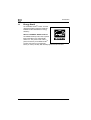
As an ENERGY STAR® Partner, we have
determined that this machine meets the
ENERGY STAR® Guidelines for energy
efficiency.
What is an ENERGY STAR® Product?
An ENERGY STAR® product has a special
feature that allows it to automatically
switch to a "low-power mode" after a
period of inactivity. An ENERGY STAR®
product uses energy more efficiently,
saves you money on utility bills and helps protect the environment.
1-4
bizhub C252
Introduction
1.2
1
Trademarks and registered trademarks
KONICA MINOLTA, KONICA MINOLTA Logo, and The essentials of imaging
are registered trademarks or trademarks of KONICA MINOLTA HOLDINGS,
INC.
PageScope and bizhub are registered trademarks or trademarks of KONICA
MINOLTA BUSINESS TECHNOLOGIES, INC.
Netscape Communications, the Netscape Communications logo, Netscape
Navigator, Netscape Communicator, and Netscape are trademarks of
Netscape Communications Corporation.
This machine and PageScope Box Operator are based in part on the work of
the Independent JPEG Group.
Compact-VJE
Copyright 1986-2003 VACS Corp.
RC4® is a registered trademark or trademark of RSA Security Inc. in the
United States and/or other countries.
RSA® is a registered trademark or trademark of RSA Security Inc. RSA
BSAFE® is a registered trademark or trademark of RSA Security Inc. in the
United States and/or other countries.
License information
This product includes RSA BSAFE
Cryptographic software from RSA Security
Inc.
bizhub C252
1-5
Introduction
1
OpenSSL Statement
OpenSSL License
Copyright © 1998-2000 The OpenSSL Project. All rights reserved.
Redistribution and use in source and binary forms, with or without
modification, are permitted provided that the following conditions are met:
1. Redistributions of source code must retain the above copyright notice,
this list of conditions and the following disclaimer.
2. Redistributions in binary form must reproduce the above copyright
notice, this list of conditions and the following disclaimer in the
documentation and/or other materials provided with the distribution.
3. All advertising materials mentioning features or use of this software must
display the following acknowledgment:
"This product includes software developed by the OpenSSL Project for
use in the OpenSSL Toolkit. (http://www.openssl.org/)"
4. The names "OpenSSL Toolkit" and "OpenSSL Project" must not be used
to endorse or promote products derived from this software without prior
written permission. For written permission, please contact [email protected].
5. Products derived from this software may not be called "OpenSSL" nor
may "OpenSSL" appear in their names without prior written permission
of the OpenSSL Project.
6. Redistributions of any form whatsoever must retain the following
acknowledgment:
"This product includes software developed by the OpenSSL Project for
use in the OpenSSL Toolkit (http://www.openssl.org/)"
THIS SOFTWARE IS PROVIDED BY THE OpenSSL PROJECT "AS IS" AND
ANY EXPRESSED OR IMPLIED WARRANTIES, INCLUDING, BUT NOT
LIMITED TO, THE IMPLIED WARRANTIES OF MERCHANTABILITY AND
FITNESS FOR A PARTICULAR PURPOSE ARE DISCLAIMED. IN NO EVENT
SHALL THE OpenSSL PROJECT OR ITS CONTRIBUTORS BE LIABLE FOR
ANY DIRECT, INDIRECT, INCIDENTAL, SPECIAL, EXEMPLARY, OR
CONSEQENTIAL DAMAGES (INCLUDING, BUT NOT LIMITED TO,
PROCUREMENT OF SUBSTITUTE GOODS OR SERVICES; LOSS OF USE,
DATA, OR PROFITS; OR BUSINESS INTERRUPTION) HOWEVER CAUSED
AND ON ANY THEORY OF LIABILITY, WHETHER IN CONTRACT, STRICT
LIABILITY, OR TORT (INCLUDING NEGLIGENCE OR OTHERWISE) ARISING
IN ANY WAY OUT OF THE USE OF THIS SOFTWARE, EVEN IF ADVISED OF
THE POSSIBILITY OF SUCH DAMAGE.
This product includes cryptographic software written by Eric Young
([email protected]). This product includes software written by Tim
Hudson ([email protected]).
1-6
bizhub C252
Introduction
1
Original SSLeay License
Copyright © 1995-1998 Eric Young ([email protected]) All rights reserved.
This package is an SSL implementation written by Eric Young
([email protected]).
The implementation was written so as to conform with Netscapes SSL.
This library is free for commercial and non-commercial use as long as the
following conditions are aheared to. The following conditions apply to all
code found in this distribution, be it the RC4, RSA, Ihash, DES, etc., code;
not just the SSL code.
The SSL documentation included with this distribution is covered by the
same copyright terms except that the holder is Tim Hudson
([email protected]).
Copyright remains Eric Young’s, and as such any Copyright notices in the
code are not to be removed. If this package is used in a product, Eric Young
should be given attribution as the author of the parts of the library used. This
can be in the form of a textual message at program startup or in
documentation (online or textual) provided with the package.
Redistribution and use in source and binary forms, with or without
modification, are permitted provided that the following conditions are met:
1. Redistributions of source code must retain the copyright notice, this list
of conditions and the following disclaimer.
2. Redistributions in binary form must reproduce the above copyright
notice, this list of conditions and the following disclaimer in the
documentation and/or other materials provided with the distribution.
3. All advertising materials mentioning features or use of this software must
display the following acknowledgement:
"This product includes cryptographic software written by Eric Young
([email protected])"
The word ‘cryptographic’ can be left out if the rouines from the library
being used are not cryptographic related.
4. If you include any Windows specific code (or a derivative thereof) from
the apps directory (application code) you must include an
acknowledgement:
"This product includes software written by Tin Hudson
([email protected])"
THIS SOFTWARE IS PROVIDED BY ERIC YOUNG "AS IS" AND ANY
EXPRESS OR IMPLIED WARRANTIES, INCLUDING, BUT NOT LIMITED TO,
THE IMPLIED WARRANTIES OF MERCHANTABILITY AND FITNESS FOR A
PARTICULAR PURPOSE ARE DISCLAIMED. IN NO EVENT SHALL THE
AUTHOR OR CONTRIBUTORS BE LIABLE FOR ANY DIRECT, INDIRECT,
INCIDENTAL, SPECIAL, EXEMPLARY, OR CONSEQUENTIAL DAMAGES
(INCLUDING, BUT NOT LIMITED TO, PROCUREMENT OF SUBSTITUTE
GOODS OR SERVICES; LOSS OF USE, DATA, OR PROFITS; OR BUSINESS
INTERRUPTION) HOWEVER CAUSED AND ON ANY THEORY OF
LIABILITY, WHETHER IN CONTRACT, STRICT LIABILITY, OR TORT
bizhub C252
1-7
1
Introduction
(INCLUDING NEGLIGENCE OR OTHERWISE) ARISING IN ANY WAY OUT
OF THE USE OF THIS SOFTWARE, EVEN IF ADVISED OF THE POSSIBILITY
OF SUCH DAMAGE.
The licence and distribution terms for any publically available version or
derivative of this code cannot be changed. i.e. this code cannot simply be
copied and put under another distribution licence [including the GNU Public
Licence.]
All other product names mentioned are trademarks or registered trademarks
of their respective companies
1-8
bizhub C252
Introduction
1.3
1
About this manual
This user manual covers the bizhub C252 network and scanning functions.
This section introduces the structure of the manual and notations used for
product names, etc.
This manual is intended for users who understand the basic operations of
computers and the machine. For operating procedures of the Windows or
Macintosh operating system and application programs, refer to the
respective manuals.
Structure of the manual
This manual consists of the following chapters.
Chapter "1 Introduction"
Chapter "2 Before using the scan functions"
Chapter "3 Scanning documents"
Chapter "4 Specifying settings from the control panel"
Chapter "5 Specifying settings Using PageScope Web Connection"
Chapter "6 Scan function troubleshooting"
Chapter "7 Appendix"
Lists the product specifications and the characters that can be entered from
the control panel.
Notation
Product name
Notation in the manual
bizhub C252
This machine, C252
Microsoft Windows 98
Windows 98
Microsoft Windows Me
Windows Me
Microsoft Windows NT 4.0
Windows NT 4.0
Microsoft Windows 2000
Windows 2000
Microsoft Windows XP
Windows XP
When the operating systems above are written
together
Windows 98/Me
Windows NT 4.0/2000/XP
Windows 98/Me/NT 4.0/2000/XP
Screens, windows and dialog boxes
The touch panel screens and PageScope Web Connection windows and
dialog boxes that appear in this manual show a machine with optional ADF
(automatic document feeder) DF-601 installed.
bizhub C252
1-9
Introduction
1
1.4
Explanation of manual conventions
The marks and text formats used in this manual are described below.
Safety advices
6 DANGER
Failure to observe instructions highlighted in this manner may result in
fatal or critical injuries in fact of electrical power.
%
Observe all dangers in order to prevent injuries.
7 WARNING
Failure to observe instructions highlighted in this manner may result in
serious injuries or property damage.
%
Observe all warnings in order to prevent injuries and to ensure safe use
of the machine.
7 CAUTION
Failure to observe instructions highlighted in this manner may result in
slight injuries or property damage.
%
Observe all cautions in order to prevent injuries and to ensure safe use
of the machine.
Sequence of action
1
The number 1 as formatted here
indicates the first step of a sequence
of actions.
2
Subsequent numbers as formatted
here indicate subsequent steps of a
sequence of actions.
An illustration inserted
here shows what operations
must be performed.
Text formatted in this style
provides additional assistance.
% Text formatted in this style describes the action that will ensure the
desired results are achieved.
?
1-10
bizhub C252
Introduction
1
Tips
2
Note
Text highlighted in this manner contains useful information and tips to
ensure safe use of the machine.
2
Reminder
Text highlighted in this manner contains information that should be
reminded.
!
Detail
Text highlighted in this manner contains references for more detailed
information.
Special text markings
[Stop] key
The names of keys on the control panel are written as shown above.
MACHINE SETTING
Display texts are written as shown above.
bizhub C252
1-11
Introduction
1
1.5
User manuals
The following user manuals have been prepared for this machine.
User manual [Copy Operations]
This manual contains details on basic operations and the operating
procedures for the various copy functions.
- Refer to this user manual for details on operating procedures for copy
functions, including precautions on installation/use, turning the machine
on/off, loading paper, and troubleshooting operations such as clearing
paper misfeeds.
User manual [Network Scanner Operations] <this manual>
This manual contains details on specifying network settings for standard
equipment and on operations for scanning functions.
- Refer to this user manual for details on operating procedures for network
functions and for using Scan to E-Mail, Scan to FTP and Scan to SMB.
User manual [Box Operations]
This manual contains details on operating procedures for using the boxes.
- Refer to this user manual for details on operating procedures for using
the boxes on the hard disk.
User manual [Enlarge Display Operations]
This manual contains details on operating procedures for using copy,
network scanner and fax functions in Enlarge Display mode.
- Refer to this user manual for details on operating procedures in Enlarge
Display mode.
User manual [FK-502 Facsimile Operations]
This manual contains details on operating procedures for faxing.
- Refer to this user manual for details on operating procedures for fax
functions when the fax kit is installed.
User manual [Network Facsimile Operations]
This manual contains details on operating procedures for network faxing.
- Refer to this user manual for details on operating procedures for using
the network fax functions (Internet faxing, SIP faxing and IP address
faxing).
1-12
bizhub C252
Introduction
1
User manual [Print Operations]
This manual contains details on operating procedures using the standard
built-in printer controller.
- For details on the printing functions, refer to user manual (PDF file) on
User Software CD-ROM.
bizhub C252
1-13
1
Introduction
1-14
bizhub C252
2
Before using the scan
functions
Before using the scan functions
2
Before using the scan functions
2.1
Environment required for using the scan functions
2
The following conditions are required to use the network and scanning
functions of this machine.
- The machine is connected to the network. (required)
The functions can be used over a TCP/IP network. For details on the
connection, refer to "Connecting to the network" on page 2-13. Also,
network parameters such as the IP address of this machine must be
specified in order to use the machine on the network. For details, refer to
"Settings for using network/scanning functions" on page 2-9.
- The driver software is installed on the computer.
In order to use this machine as a scanner, the dedicated
KONICA MINOLTA TWAIN must be installed. For details, refer to the
TWAIN driver manual that is on the User Software CD-ROM.
bizhub C252
2-3
Before using the scan functions
2
2.2
Available scanning functions
"Scanning" refers to the operation of reading the image of a document fed
through the ADF (optional) or placed on the original glass. The scanning
functions can be used to temporarily store the scanned data in the internal
memory of the machine and transmit the data in an e-mail message over the
network or upload the data to a file server.
In addition, the data can be stored on the internal hard disk of this machine.
This function can be used from the Box mode, which is described in the User
manual [Box Operations].
Furthermore, this machine can be used simply as a scanner.
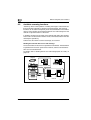
Sending the scanned data in an e-mail message
The scanned data can be sent to a specified e-mail address. The destination
is specified from the touch panel of this machine, and the scanned data is
sent as an e-mail attachment.
For details, refer to "Sending data in an e-mail message (Scan to e-mail)" on
page 3-8.
Original
Machine
E-mail reception
E-mail and scan data
Memory
SMTP server
POP server
Internet
2-4
bizhub C252
Before using the scan functions
2
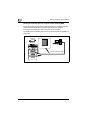
Sending the scanned data as files (FTP)
The scanned data is uploaded to a specified FTP server. The FTP server
address, login password, and other information are entered from the touch
panel of this machine.
The data files uploaded to the FTP server can be downloaded from a
computer on the network.
For details, refer to "Sending data to a server (Scan to FTP)" on page 3-22.
Original
Machine
Scan data
Download
Memory
FTP server
Internet
bizhub C252
2-5
Before using the scan functions
2
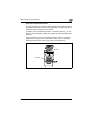
Sending the scanned data to a computer on the network (SMB)
The scanned data can be sent to a shared folder on a specified computer.
The name of the destination computer, login password, and other
information are entered from the touch panel of this machine.
For details, refer to "Sending data to a PC on the network (Scan to SMB)" on
page 3-35.
Original
Machine
Scan data
Memory
2-6
Save to a shared folder
bizhub C252
Before using the scan functions
2
Saving the scanned data in boxes
The scanned data can be saved in boxes created on the machine’s internal
hard disk. The data can be used in other applications. The file name can be
entered from the touch panel of the machine.
In addition, if the scanned data is saved in "Annotation User box", you can
deliver it over the Internet by adding any domain name and the delivery date
and time.
For the procedure to save in an annotation user box, refer to "Annotation
(Application)" on page 3-73. For saving other data in a box or reusing the
data that has been saved, refer to User manual "Box Operations".
Machine
Hard disk
bizhub C252
2-7
Before using the scan functions
2
Using the machine as a scanner
This machine can be used as a scanner. The scanner can be controlled from
a computer connected to the network, and the scanned image can be loaded
into an application on the computer to be processed.
For details, refer to the TWAIN driver manual that is on the User Software CDROM.
Original
Machine
Memory
2-8
bizhub C252
Before using the scan functions
2.3
2
Settings for using network/scanning functions
It is recommended that the settings described below be specified before
using the network/scanning functions. The network settings described in
"Specifying Network Settings" must be specified first. Set other items as
necessary.
!
Detail
For details on specifying network settings, refer to the chapters listed
below.
"TCP/IP settings" on page 4-59
"E-mail TX (SMTP) settings" on page 4-106
"5 Specifying settings Using PageScope Web Connection"
Specifying network settings
An IP address must be assigned to the machine and settings such as the
SMTP server must be specified to use the machine on the network. Be sure
to set them.
There are two methods for specifying settings. One method is to specify the
settings from the touch panel of this machine. The other method is to use
PageScope Web Connection from a Web browser on a computer on the
network.
bizhub C252
2-9
Before using the scan functions
2
Registering destinations and specifying their settings
The destinations (recipients) of scanned data must be registered.
The following registration methods are available.
- Register from the touch panel of the machine.
- Use PageScope Web Connection from a computer on the network.
The following types of destinations can be registered.
Type
Description
Abbreviated Destination
The destination can be selected with one button.
Group
Multiple destinations can be registered in groups. E-mail, FTP,
SMB, and box destinations can be registered together in a single
group.
2
Note
The destination can also be entered before scanning. This is called
"direct input". For details, refer to "Entering the addresses directly" on
page 3-19.
!
Detail
For details on registering destinations and specifying settings, refer to the
sections listed below.
"Registering abbreviated destinations" on page 4-12
"Registering group destinations" on page 4-25
2-10
bizhub C252
Before using the scan functions
2
Setting the from address
To perform Scan to E-Mail, the From address must be registered. The From
address is the address that indicates the sender when data is sent. Normally,
it is recommended that the e-mail address of administrator registration be
used.
If the e-mail address of administrator registration is not specified, the sender
e-mail address must be entered for each Scan to E-mail operation. Note that
Scan to E-Mail is not possible if the From address is not entered.
2
Note
When the user authentication setting is enabled, the e-mail address that
is specified for each user becomes the From address.
Specifying the scan settings
The following scan settings can be specifying when scanning a document.
These settings are specified from the touch panel of the machine.
Item
Description
File Type
Sets the file type to be saved.
Resolution
Sets the scan resolution.
Simplex/Duplex
Selects whether to scan one side of the document or both sides.
Original Type
Sets the type of image to be scanned.
Scan Size
Sets the size to be scanned.
Color
Sets the color of the scanned document.
Background Removal
Adjusts the density of the background (blank areas) of the document.
Original Setting
Specifies the type and characteristics of the loaded document.
Application
Provides functions for adjusting the print image, for example, for scanning books and for erasing the surrounding area.
!
Detail
For details on the scan settings, refer to "Specifying the scan settings" on
page 3-48.
bizhub C252
2-11
Before using the scan functions
2
Specifying program settings
The destination and scan settings can be registered together as a single
program. This is convenient for frequently scanning documents and sending
data under the same conditions.
These settings are specified from the touch panel of the machine.
!
Detail
For details, refer to "Registering program destinations" on page 4-27.
Specifying default scan settings
The settings that are selected when [Scan] in the control panel is touched
can be specified.
!
Detail
For details, refer to "Setting the save format of the data to be scanned"
on page 4-40.
2-12
bizhub C252
Before using the scan functions
2.4
2
Connecting to the network
The machine can be connected to the network.
2
Reminder
The machine can be connected via a parallel or USB connection
(optional). However, be sure to connect to the network to use the scanner
function.
Network connection
Connect a UTP cable (category 5 or later recommended) from the network to
the Ethernet connector on the machine.
bizhub C252
2-13
Before using the scan functions
2
2.5
Flow chart of setup and scanning operations
The sequence from the setup operations required to use the scanning
functions to the scanning operation is shown below.
Specify scan settings in the screen that appears after pressing the [Utility/Counter] key, then
touching [User Setting].
* Specify basic settings such as the format in which scanned data is saved. (Refer to "Setting
the main scan mode screen" on page 4-34 and "Setting the save format of the data to be
scanned" on page 4-40.)
Specify network settings in the screen that appears after pressing the [Utility/Counter] key, then
touching [Administrator Setting].
* Specify settings in order to use the machine on the network. (Refer to "TCP/IP settings" on
page 4-59, "NetWare settings" on page 4-69, "http server settings" on page 4-75, "FTP settings" on page 4-83, "SMB settings" on page 4-86, "AppleTalk settings" on page 4-91, "Enabling LDAP settings" on page 4-93, "Setting Up LDAP settings" on page 4-95, "Search default
setting" on page 4-105, "E-mail TX (SMTP) settings" on page 4-106, "E-mail RX (POP) settings"
on page 4-116, "Device settings" on page 4-121, "Time adjustment settings" on page 4-123,
"Status notification settings" on page 4-127, "Total counter report setting" on page 4-130,
"PING confirmation" on page 4-136, "SLP settings" on page 4-140, "LPD settings" on
page 4-141, "Prefix/Suffix settings" on page 4-142, "Job for the disable proof" on page 4-146,
"SNMP settings" on page 4-148, "Bonjour setting" on page 4-154, "TCP socket setting" on
page 4-156, "OpenAPI settings" on page 4-158, and "External server authentication" on
page 4-163.)
Register destinations in the screen that appears after pressing the [Utility/Counter] key.
* Specify e-mail addresses for e-mail transmissions, register FTP servers, and
specify destination computers. (Refer to "Registering abbreviated destinations" on page 4-12,
"Registering group destinations" on page 4-25, "Registering program destinations" on
page 4-27, and "Specifying e-mail settings" on page 4-30.)
Load the document.
Specify the destination.
Specify the scan settings (refer to page 3-48).
Press the [Start] key in the control panel.
2-14
bizhub C252
Before using the scan functions
2
The document is scanned, and the data is transmitted.
2
Note
Some settings that can be specified on the control panel can also be
specified from a computer over a network using PageScope Web
Connection. For details, refer to Chapter 4, "Specifying Settings Using
PageScope Web Connection".
bizhub C252
2-15
2
2-16
Before using the scan functions
bizhub C252
3
Scanning documents
Scanning documents
3
3
Scanning documents
3.1
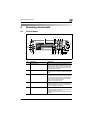
Control panel
1
2
3 4
5
6
7
8
9
10
24
23
11
22
12
21
20 19 18
17
16 15 14 13
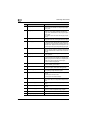
No.
Part name
Description
1
[Power Save] key
Press to enter Power Save mode. While the machine is in Power Save mode, the indicator on the
[Power Save] key lights up in green and the touch
panel goes off. To cancel Power Save mode, press
the [Power Save] key again.
2
Touch panel
Displays various screens and messages.
Specify the various settings by directly touching the
panel.
3
[Access] key
If user authentication or account track settings
have been applied, press this key after entering the
user name and password (for user authentication)
or the account name and password (for account
track) in order to use this machine.
This key is also used to log off.
4
[Box] key
Press to enter Box mode.
While the machine is in Box mode, the indicator on
the [Box] key lights up in green. For details, refer to
the User manual [Box Operations].
5
[Fax] key
Press to enter Fax mode.
While the machine is in Fax mode, the indicator on
the [Fax] key lights up in green.
For details, refer to the User manual [Facsimile Operations].
bizhub C252
3-3
Scanning documents
3
3-4
No.
Part name
Description
6
[Scan] key
Press to enter Scan mode. While the machine is in
Scan mode, the indicator on the [Scan] key lights
up in green.
7
[Copy] key
Press to enter Copy mode. (As a default, the machine is in Copy mode.) While the machine is in
Copy mode, the indicator on the [Copy] key lights
up in green.
For details, refer to the User manual [Copy Operations].
8
[Reset] key
Press to clear all settings (except programmed settings) entered in the control panel and touch panel.
9
[Interrupt] key
Press to enter Interrupt mode. While the machine is
in Interrupt mode, the indicator on the [Interrupt]
key lights up in green and the message "Now in Interrupt mode." appears on the touch panel. To cancel Interrupt mode, press the [Interrupt] key again.
10
Auxiliary power button
Press to turn on/off machine operations, for example, for copying, printing or scanning. When turned
off, the machine enters a state where it conserves
energy.
11
[Stop] key
Press the [Stop] key during scanning to stop the
scan operation.
12
[Start] key
Press to start scanning. When this machine is ready
to begin scanning, the indicator on the [Start] key
lights up in green. If the indicator on the [Start] key
lights up in orange, scanning cannot begin.
Press to restart a stopped job.
13
Main Power indicator
Lights up in green when the machine is turned on
with the auxiliary power button.
14
Data indicator
Flashes in green while a print job is being received.
Lights up in green when data is being printed.
15
[Proof Copy] key
Press to print a single proof copy to be checked before printing a large number of copies.
16
Keypad
Use to type in the number of copies to be produced.
Use to type in the zoom ratio.
Use to type in the various settings.
17
[C] (clear) key
Press to erase a value (such as the number of copies, a zoom ratio, or a size) entered using the keypad.
18
[Mode Check] key
Press to display screens showing the specified settings.
19
[Utility/Counter] key
Press to display the Utility screen and Meter Count
screen.
20
[Mode Memory] key
Press to register the desired copy settings as a program or to recall a registered copy program.
21
Contrast dial
Use to adjust the contrast of the touch panel.
22
[Enlarge Display] key
Press to enter Enlarge Display mode.
bizhub C252
Scanning documents
3
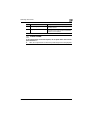
No.
Part name
Description
23
[Accessibility] key
Press to display the screen for specifying user accessibility functions.
24
[Help] key
Press to display the Help Main Menu screen, where
descriptions of the various functions and details of
operations can be displayed.
7 CAUTION
To prevent damage to the touch panel, do not push down on the touch
panel with force.
%
Also, do not push down on the touch panel using hard or sharp objects.
bizhub C252
3-5
Scanning documents
3
3.2
Displaying the scan screen
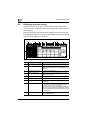
Display the Scan mode screen in order to perform scanning operations.
Turn the machine on. When the machine is ready to make copies, the Basic
screen appears.
Press the [Scan] key in the control panel to display the Scan mode screen.
The displayed functions and modes can be selected by gently touching the
buttons that are displayed in the screen.
2
3
4
5
6
7 8
9
10
1
11
3-6
No
Name
Description
1
Sub display area
This area displays destinations, etc.
2
[Job List] button
Displays jobs being performed and jobs being stored.
Various commands for checking and managing jobs are
available.
3
Date/Time display area
Displays the current date/time.
4
Message display area
Displays the machine status and details on operations
that must be performed.
5
[Program] button
Displays destinations that are registered in programs.
6
[Group] button
Displays destinations that are registered in groups.
7
[Address Book] button
Used to Search for destinations that are registered in the
address book.
8
[Direct Input] button
Used to type in the destination when performing Scan to
E-mail, Scan to FTP, or Scan to SMB operations or to select the box where the job is to be stored.
This button does not appear if the [Manual Destination Input] on the Security Details screen (displayed by touching
[Security Setting] on the Administrator Setting screen) is
set to "Restrict".
9
Available memory display
Shows the amount of available memory that is used during the scanning operation.
bizhub C252
Scanning documents
3
No
Name
Description
10
Address number display
area
Shows the number of specified addresses.
11
[Scan Settings] button
Used to specify scan settings.
bizhub C252
3-7
Scanning documents
3
3.3
Sending data in an e-mail message (Scan to e-mail)
Scan to e-mail
The Scan to E-mail operation is used to send images scanned on this
machine to an e-mail address as an attachment.
The methods described below are available for specifying the destination.
The methods can also be combined, for example, by selecting a group
destination, then adding other destinations through direct input.
2
Note
For the procedure for sending e-mail, refer to "Sending the scanned data
in an e-mail message" on page 2-4.
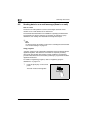
Using programs
"Program" refers to a set of destination addresses and scan settings that are
registered together. This feature is convenient for frequently scanning
documents and sending data under the same conditions. The following
procedure describes how to send data by selecting a program that has been
registered in advance.
For details on registering programs, refer to "Registering program
destinations" on page 4-27.
1
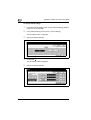
Press the [Scan] key on the control
panel.
The Scan mode screen appears.
3-8
bizhub C252
Scanning documents
2
3
Touch [Program].
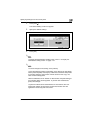
The selected destinations are listed under "Broadcast Destinations".
Other destination addresses can be added using the address book or
through direct input.
Only the destinations that can be specified are displayed. For example,
fax destinations are not displayed.
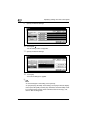
3
Touch [Scan Settings] to check the specified scan settings. The
specified settings can also be changed.
–
bizhub C252
For details on the scan settings, refer to "Specifying the scan
settings" on page 3-48.
3-9
Scanning documents
3
4
After checking the settings, touch [OK].
5
Load the document into the ADF (optional) or position it on the original
glass of the machine.
6
Press the [Start] key on the control panel.
The document is scanned, and the data is sent.
2
Note
Do not turn off the machine until the scanned jobs disappear from the job
list.
3-10
bizhub C252
Scanning documents
3
Selecting group addresses
"Group" refers to multiple destinations that are registered collectively. The
following procedure describes how to send data by selecting a group that
has been registered in advance.
For details on registering groups, refer to "Registering program destinations"
on page 4-27.
1
Press the [Scan] key on the control
panel.
The Scan mode screen appears.
2
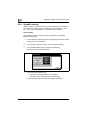
Touch [Group].
Touching the button for a group displays the list of members registered
in the group.
bizhub C252
3-11
Scanning documents
3
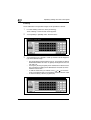
3
Select the desired destinations, and then touch [OK].
4
Touch [Scan Settings], and then specify the scan settings.
–
5
3-12
For details on the scan settings, refer to "Specifying the scan
settings" on page 3-48.
After specifying the settings, touch [OK].
bizhub C252
Scanning documents
3
6
Load the document into the ADF (optional) or position it on the original
glass of the machine.
7
Press the [Start] key on the control panel.
The document is scanned, and the data is sent.
2
Note
Do not turn off the machine until the scanned jobs disappear from the job
list.
bizhub C252
3-13
Scanning documents
3
Selecting destinations from the address book
"Address book" refers to the collection of destination addresses that were
registered in advance. The following procedure describes how to send data
by selecting destinations from the address book. Multiple addresses can be
specified simultaneously from the address book.
For details on registering addresses in the address book, refer to
"Registering abbreviated destinations" on page 4-12.
1
Press the [Scan] key on the control
panel.
The Scan mode screen appears.
2
Touch [Address Book].
The address book is displayed, and registered address names are
displayed by touching the corresponding index button.
Why is [LDAP Search] not displayed on the Address Book tab?
% If the [Manual Destination Input] on the Security Details screen
(displayed by touching [Security Setting] on the Administrator
Setting screen) is set to [Restrict], [LDAP Search] does not appear
on the Address Book tab.
?
To perform LDAP searches, what settings are required?
% Administrator settings such as the LDAP sever setting are required.
For details, refer to "Enabling LDAP settings" on page 4-93.
?
3-14
bizhub C252
Scanning documents
3
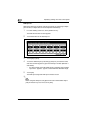
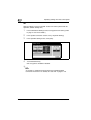
Touch the button for a destination to select it.
The selected buttons are highlighted, and the selected destinations are
listed under "Broadcast Destinations". Other destination addresses
can be added through direct input.
–
bizhub C252
3
If necessary, you can search for the destination. For details, refer to
"Searching the destination" on page 3-16.
3-15
Scanning documents
3
Searching the destination
The following methods are available for searching the destination.
- Detail Search: Searches the address by entering a section of the name or
description of the address.
- LDAP search: Searches the address that meets the conditions from the
addresses registered on the LDAP server.
A "Basic Search" in which a keyword is entered and a "Advanced Search" in
which multiple conditions are used to narrow down the search are available.
3-16
bizhub C252
Scanning documents
3
!
Detail
To perform LDAP searches, the LDAP server settings that are specified
in Administrator Setting are required. For details, refer to "Enabling LDAP
settings" on page 4-93.
Basic Search
Advanced Search
bizhub C252
3-17
Scanning documents
3
To search the destination
1
Touch [Scan Settings], and then specify the scan settings.
–
For details on the scan settings, refer to "Specifying the scan
settings" on page 3-48.
2
After specifying the settings, touch [OK].
3
Load the document into the ADF (optional) or position it on the original
glass of the machine.
4
Press the [Start] key on the control panel.
The document is scanned, and the data is sent.
2
Note
Do not turn off the machine until the scanned jobs disappear from the job
list.
3-18
bizhub C252
Scanning documents
3
Entering the addresses directly
"Direct input" refers to the operation of directly entering the destination
address from the machine’s control panel.
1
Press the [Scan] key on the control
panel.
The Scan mode screen appears.
2
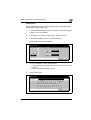
Touch [Direct Input], then [Scan to E-Mail].
A screen for entering the destination address appears.
?
%
bizhub C252
Why is the Direct Input tab not displayed?
If the [Manual Destination Input] on the Security Details screen
(displayed by touching [Security Setting] on the Administrator
Setting screen) is set to [Restrict], the Direct Input tab does not
appear.
3-19
Scanning documents
3
3
Enter the destination address, and then touch [OK].
–
To specify an additional address, touch [Next Dest.], and then
specify the address.
– Frequently entered user names and domain names can be
registered to be recalled and used again. First, prefixes and suffixes
must be registered in Administrator mode.
The addresses that were entered are listed under "Broadcast
Destinations".
3-20
bizhub C252
Scanning documents
4
3
Touch [Scan Settings], and then specify the scan settings.
–
For details on the scan settings, refer to "Specifying the scan
settings" on page 3-48.
5
After specifying the settings, touch [OK].
6
Load the document into the ADF (optional) or position it on the original
glass of the machine.
7
Press the [Start] key on the control panel.
The document is scanned, and the data is sent.
2
Note
Do not turn off the machine until the scanned jobs disappear from the job
list.
bizhub C252
3-21
Scanning documents
3
3.4
Sending data to a server (Scan to FTP)
Scan to FTP
The Scan to FTP operation can be used in a network environment with an
FTP server. The scanned data is sent to a specified folder in an FTP server
on the network.
This function is suitable for sending data of a large size such as highresolution images.
The methods described below are available for specifying the destination.
The methods can also be combined, for example, by selecting a group
destination, then adding other destinations through direct input.
Transmission may not be possible if the destination server has placed
limitations on the document name. Because the document name becomes
the file name at the time of transmission, consult your network administrator
when specifying the document name.
2
Note
If a mail server is available on the network, the e-mail notification function
can be used to send an e-mail message containing notification of the
storage location of the scan data. For details on the e-mail notification
function, refer to "Specifying e-mail settings" on page 3-84.
2
Note
For the FTP transmission procedure, refer to "Sending the scanned data
as files (FTP)" on page 2-5.
3-22
bizhub C252
Scanning documents
3
Using programs
"Program" refers to a set of destination FTP servers and scan settings that
are registered together. The following procedure describes how to send data
by selecting a program that has been registered in advance.
If a proxy server is available on the network, FTP servers on the Internet can
be accessed via a proxy server.
For details on registering programs, refer to "Registering program
destinations" on page 4-27.
1
Press the [Scan] key on the control
panel.
The Scan mode screen appears.
2
Touch [Program].
The selected destinations are listed under "Broadcast Destinations".
Other destination addresses can be added using the address book or
through direct input.
Only the destinations that can be specified are displayed. For example,
fax destinations are not displayed.
bizhub C252
3-23
Scanning documents
3
3
Touch [Scan Settings] to check the specified scan settings. The
specified settings can also be changed.
–
For details on the scan settings, refer to "Specifying the scan
settings" on page 3-48.
4
After specifying the settings, touch [OK].
5
Load the document into the ADF (optional) or position it on the original
glass of the machine.
6
Press the [Start] key on the control panel.
The document is scanned, and the data is sent.
2
Note
Do not turn off the machine until the scanned jobs disappear from the job
list.
3-24
bizhub C252
Scanning documents
3
Selecting group addresses
"Group" refers to multiple destinations that are registered collectively. The
following procedure describes how to send data by selecting a group that
has been registered in advance.
For details on registering groups, refer to "Registering group destinations"
on page 4-25.
1
Press the [Scan] key on the control
panel.
The Scan mode screen appears.
2
Touch [Group].
Touching the button for a group displays the list of members registered
in the group. Other destination addresses can be added using the
address book or through direct input.
bizhub C252
3-25
Scanning documents
3
3
Select the desired destination, and then touch [OK].
The selected destinations are listed under "Broadcast Destinations".
4
Touch [Scan Settings], and then specify the scan settings.
–
5
3-26
For details on the scan settings, refer to "Specifying the scan
settings" on page 3-48.
After specifying the settings, touch [OK].
bizhub C252
Scanning documents
3
6
Load the document into the ADF (optional) or position it on the original
glass of the machine.
7
Press the [Start] key on the control panel.
The document is scanned, and the data is sent.
2
Note
Do not turn off the machine until the scanned jobs disappear from the job
list.
bizhub C252
3-27
Scanning documents
3
Selecting destinations from the address book
"Address book" refers to the collection of destination addresses that were
registered in advance. The following procedure describes how to send data
by selecting destinations from the address book. Multiple addresses can be
specified simultaneously from the address book.
For details on registering addresses in the address book, refer to
"Registering abbreviated destinations" on page 4-12.
1
Press the [Scan] key on the control
panel.
The Scan mode screen appears.
2
3-28
Touch [Address Book].
The address book is displayed, and registered address names are
displayed by touching the corresponding index button.
bizhub C252
Scanning documents
?
%
3
3
How can the address book be searched for the desired address?
Touch [Detail Search] to search for addresses. The address book
can be searched for names or addresses.
Touch the button for a destination to select it.
The buttons are highlighted, and the selected destinations are listed
under "Broadcast Destinations". Other destinations can be added
through direct input.
bizhub C252
3-29
Scanning documents
3
4
Touch [Scan Settings], and then specify the scan settings.
–
For details on the scan settings, refer to "Specifying the scan
settings" on page 3-48.
5
After specifying the settings, touch [OK].
6
Load the document into the ADF (optional) or position it on the original
glass of the machine.
7
Press the [Start] key on the control panel.
The document is scanned, and the data is sent.
2
Note
Do not turn off the machine until the scanned jobs disappear from the job
list.
3-30
bizhub C252
Scanning documents
3
Entering the addresses directly
"Direct input" refers to the operation of directly inputting the destination
address from the machine’s control panel.
The following procedure describes how to directly specify an address.
1
Press the [Scan] key on the control
panel.
The Scan mode screen appears.
2
Touch [Direct Input], then [Scan to FTP].
A screen for entering the destination host name, destination folder, and
other information appears.
Why is the Direct Input tab not displayed?
% If the [Manual Destination Input] on the Security Details screen
(displayed by touching [Security Setting] on the Administrator
Setting screen) is set to [Restrict], the Direct Input tab does not
appear.
?
bizhub C252
3-31
Scanning documents
3
3
Enter the host name, destination folder, user name, and password.
–
–
–
–
4
Touch [Detail Setting], and then specify detailed FTP settings.
–
–
–
5
3-32
Host Name: Use the keyboard that appears in the touch panel to
specify the destination host name or IP address, and then touch
[OK].
Destination Folder: Use the keyboard that appears in the touch
panel to specify the path to the destination folder, and then touch
[OK].
User Name: Use the keyboard that appears in the touch panel to
specify the login user name, and then touch [OK].
Password: Use the keyboard that appears in the touch panel to
specify the password, and then touch [OK].
Port Number: Check the port number.
PASV mode: Select whether the PASV (passive) mode is used.
Touch [Yes] or [No].
Proxy: Select whether a proxy server is used. Touch [Yes] or [No].
Touch [OK].
bizhub C252
Scanning documents
6
3
Enter the destination Information, and then touch [OK].
–
To specify an additional address, touch [Next Dest.], and then
specify the address.
The addresses that were entered are listed under "Broadcast
Destinations".
7
bizhub C252
Touch [Scan Settings], and then specify the scan settings.
3-33
Scanning documents
3
–
For details on the scan settings, refer to "Specifying the scan
settings" on page 3-48.
8
After specifying the settings, touch [OK].
9
Load the document into the ADF (optional) or position it on the original
glass of the machine.
10
Press the [Start] key on the control panel.
The document is scanned, and the data is sent.
2
Note
Do not turn off the machine until the scanned jobs disappear from the job
list.
3-34
bizhub C252
Scanning documents
3.5
3
Sending data to a PC on the network (Scan to SMB)
Scan to SMB
The Scan to SMB operation can be used to directly send the scanned data
to a specific computer on the network.
To use the Scan to File (SMB) function, specify the Windows shared file
setting on the computer that is to receive the data in advance.
2
Reminder
To send to a Windows shared folder, enter the host name and folder
name using capital letters when registering the destination.
2
Note
For the SMB transmission procedure, refer to "Sending the scanned data
to a computer on the network (SMB)" on page 2-6.
SMB transmission to Windows File Sharing (Mac OS X)/Samba
(Linux/Unix)
When performing SMB transmission to Mac OS X, Linux, or Unix, the
conditions described below must be meet for the network settings and user
name. Change the settings according to the transmission environment.
Settings on this machine
- From [Administrator Setting] — [Network Setting] — [SMB Setting],
specify "v1" for the NTLM setting.
Settings on the server
- For the user name and shared folder names, enter 12 characters or less.
- When looking up a destination, the shared folder names are shown in
alphanumeric characters only. Sub-folder names can be shown in
characters other than alphanumeric characters.
- To lookup a destination, enter the user ID and password first.
2
Note
Samba is a program that provides services for SMB clients using Unix or
Linux. In Mac OS X, Samba is called "Windows File Sharing".
bizhub C252
3-35
Scanning documents
3
SMB transmission to Windows 98 SE/Windows Me
When SMB transmitting to Windows 98 SE/Windows Me, the network
settings must meet the conditions described below.
Settings on this machine
- From [Administrator Setting] — [Network Setting] — [SMB Setting],
specify "v1/v2" or "v1" for the NTLM setting.
Using programs
"Program" refers to a set of destination computers and scan settings that are
registered together. The following procedure describes how to send data by
selecting a program that has been registered in advance.
For details on registering programs, refer to "Registering program
destinations" on page 4-27.
1
Press the [Scan] key on the control
panel.
The Scan mode screen appears.
2
Touch [Program].
The selected destinations are listed under "Broadcast Destinations".
Other destination addresses can be added using the address book or
through direct input.
Only the destinations that can be specified are displayed. For example,
fax destinations are not displayed.
3-36
bizhub C252
Scanning documents
3
3
Touch [Scan Settings] to check the specified scan settings. The
specified settings can also be changed.
–
For details on the scan settings, refer to "Specifying the scan
settings" on page 3-48.
4
After checking the settings, touch [OK].
5
Load the document into the ADF (optional) or position it on the original
glass of the machine.
6
Press the [Start] key on the control panel.
The document is scanned, and the data is sent.
2
Note
Do not turn off the machine until the scanned jobs disappear from the job
list.
bizhub C252
3-37
Scanning documents
3
Selecting group addresses
"Group" refers to multiple destinations that are registered collectively. The
following procedure describes how to send data by selecting a group that
has been registered in advance.
For details on registering groups, refer to "Registering group destinations"
on page 4-25.
1
Press the [Scan] key on the control
panel.
The Scan mode screen appears.
2
Touch [Group].
Touching the button for a group displays the list of members registered
in the group. Other destination addresses can be added using the
address book or through direct input.
3-38
bizhub C252
Scanning documents
3
Select the desired destinations, and then touch [OK].
4
Touch [Scan Settings], and then specify the scan settings.
–
5
bizhub C252
3
For details on the scan settings, refer to "Specifying the scan
settings" on page 3-48.
After specifying the settings, touch [OK].
3-39
Scanning documents
3
6
Load the document into the ADF (optional) or position it on the original
glass of the machine.
7
Press the [Start] key on the control panel.
The document is scanned, and the data is sent.
2
Note
Do not turn off the machine until the scanned jobs disappear from the job
list.
3-40
bizhub C252
Scanning documents
3
Selecting destinations from the address book
"Address book" refers to the collection of destination addresses that were
registered in advance. The following procedure describes how to send data
by selecting destinations from the address book. Multiple addresses can be
specified simultaneously from the address book.
For details on registering addresses in the address book, refer to
"Registering abbreviated destinations" on page 4-12.
1
Press the [Scan] key on the control
panel.
The Scan mode screen appears.
2
bizhub C252
Touch [Address Book].
The address book is displayed, and registered address names are
displayed by touching the corresponding index button.
3-41
Scanning documents
3
?
%
3
How can the address book be searched for the desired address?
Touch [Detail Search] to search for addresses. The address book
can be searched for names or addresses.
Touch the button for a destination to select it.
The selected buttons are highlighted, and the selected destinations are
listed under "Broadcast Destinations". Other destinations can be
added through direct input.
3-42
bizhub C252
Scanning documents
4
3
Touch [Scan Settings], and then specify the scan settings.
–
For details on the scan settings, refer to "Specifying the scan
settings" on page 3-48.
5
After specifying the settings, touch [OK].
6
Load the document into the ADF (optional) or position it on the original
glass of the machine.
7
Press the [Start] key on the control panel.
The document is scanned, and the data is sent.
2
Note
Do not turn off the machine until the scanned jobs disappear from the job
list.
bizhub C252
3-43
Scanning documents
3
Entering the addresses directly
"Direct input" refers to the operation of directly inputting the destination
address from the machine’s control panel.
1
Press the [Scan] key on the control
panel.
The Scan mode screen appears.
2
Touch [Direct Input], then [Scan to SMB].
A screen for entering the destination host name, destination folder, and
other information appears.
Why is the Direct Input tab not displayed?
% If the [Manual Destination Input] on the Security Details screen
(displayed by touching [Security Setting] on the Administrator
Setting screen) is set to [Restrict], the Direct Input tab does not
appear.
?
3-44
bizhub C252
Scanning documents
3
Enter the destination information.
–
–
–
–
–
–
–
4
3
Host Name: Specify the destination host name (enter using capital
letters) or the IP address. Type in the destination name using the
keyboard, and then touch [OK].
Destination Folder: Enter the path to the destination folder using
capital letters.
User Name: Use the keyboard that appears in the touch panel to
specify the login user name, and then touch [OK].
Password: Use the keyboard that appears in the touch panel to
specify the password, and then touch [OK].
Reference: The folder structure of the connected computer can be
viewed. The destination folder can also be specified directly.
To specify an additional address, touch [Next Dest.], and then
specify the address.
To check the contents of the shared folders, touch [Reference].
Touch [OK].
The specified addresses are listed under "Broadcast Destinations".
bizhub C252
3-45
Scanning documents
3
5
Touch [Scan Settings], and then specify the scan settings.
–
For details on the scan settings, refer to "Specifying the scan
settings" on page 3-48.
6
After specifying the settings, touch [OK].
7
Load the document into the ADF (optional) or position it on the original
glass of the machine.
8
Press the [Start] key on the control panel.
The document is scanned, and the data is sent.
3-46
bizhub C252
Scanning documents
3
2
Note
Do not turn off the machine until the scanned jobs disappear from the job
list.
!
Detail
When a work group and computer that exceed the numbers described
below exist, browsing over the network (subnet) of this machine may not
be performed properly.
- Work group: 128
- Computer: 128
bizhub C252
3-47
Scanning documents
3
3.6
Specifying the scan settings
Available settings
Detailed scan settings can be specified by touching [Scan Settings] in the
Scan mode screen.
The settings that can be specified are as follows:
3-48
Item
Description
Reference
File Type
Selects the file type for saving the
scanned data.
"File type" on page 3-50
Resolution
Selects the scan resolution.
"Resolution" on page 3-54
Simplex/Duplex
Selects whether to scan one side of
the document or both sides.
"Simplex/Duplex" on page 3-55
Original Type
Sets the image type of the scanned
document.
"Original type" on page 3-56
Scan Size
Sets the paper size to be scanned.
"Scan size" on page 3-59
Color
Sets whether to scan in color or
black and white.
"Color" on page 3-62
Background
Removal
Adjusts the density of the background (blank areas) of the document.
"Background removal" on
page 3-64
Original Setting
Specifies the type of document that
is loaded, for example, if it contains
mixed sizes or is a thick document.
"Original setting" on page 3-65
Application
Provides functions for adjusting the
print image, for example, for scanning books and for erasing the surrounding area.
"Book scanning (Application)" on
page 3-68
"Frame erase (Application)" on
page 3-71
"Annotation (Application)" on
page 3-73
bizhub C252
Scanning documents
3
Item
Description
Reference
Separate Scan
The scan operation can be divided
into several sessions when all pages
of a document cannot be loaded
into the ADF (optional) or when
placing the document on the original glass. In addition, the documents can be scanned separately
according to their type, such as
when single-sided documents are
mixed with double-sided documents.
"Separate scan" on page 3-75
File Name
Changes the file name to be saved.
"File name" on page 3-75
bizhub C252
3-49
Scanning documents
3
File type
Select the file type for saving the scanned data. The following four file types
are available.
File type
Item
Description
PDF
Saves to the PDF format.
Compact PDF
Saves to the compressed PDF format. Used for full-color scan data, etc.
TIFF
Saves to the TIFF format.
JPEG
Saves to the JPEG format.
If "PDF" or "Compact PDF" is selected as the file type, you can specify the
encryption level. The settings that can be specified are described below.
Item
Description
Encryption Level
Select the encryption level.
Password
Enter the password that is required for opening data that is encrypted (up
to 32 alphanumeric characters). To confirm the password, enter the
password again.
Authority of the
Documents
Enter the password that is required for changing the authority of a document (up to 32 alphanumeric characters). To confirm the password, enter
the password again.
Some file types may not be available depending on the selected Color
setting. The possible combinations of the File Type and Color settings are
shown below.
!
Detail
For details on the Color settings, refer to "Color" on page 3-62.
3-50
bizhub C252
Scanning documents
3
2
Note
"Compact PDF" in File Type, and "Text" or "Dot Matrix" in Original Type
cannot be specified at the same time.
PDF
Auto
Full Color
Gray Scale
Black
Yes
Yes
Yes
Yes
Compact PDF
No
Yes
No
No
TIFF
No
No
No
Yes
JPEG
Yes
Yes
Yes
No
Also, grouping of the saved data can be specified.
Scan Setting
Item
Description
Single Page
A file is created for each page of the document.
Multi-Page
The entire scanned document is saved to a single file. This setting is not
selectable when [File Type] is JPEG.
bizhub C252
3-51
Scanning documents
3
To specify the file type settings
3-52
1
Touch [Scan Settings] in the Scan mode screen.
2
Touch [File Type].
3
Select the file type.
bizhub C252
Scanning documents
4
If [PDF] or [Compact PDF] is selected, touch [Encryption].
5
Specify the encryption settings.
6
Touch [OK].
7
Select the scan setting.
8
Touch [OK], and then touch [OK] in the next screen that appears.
bizhub C252
3
3-53
Scanning documents
3
Resolution
Set the scanning resolution to 200 dpi, 300 dpi, 400 dpi, or 600 dpi.
3-54
1
Touch [Scan Settings] in the Scan mode screen.
2
Touch [Resolution].
3
Select the resolution.
4
Touch [OK], and then touch [OK] in the next screen that appears.
bizhub C252
Scanning documents
3
Simplex/Duplex
Select whether to scan one side of the document or both sides.
Item
Description
1-Sided
Scans one side of the document.
2-Sided
Scans both sides of the document.
Cover + 2-Sided
Scans the first page of the document as the cover page only
on one side and scans the remaining pages on both sides.
To specify the simplex/duplex setting
1
Touch [Scan Settings] in the Scan mode screen.
2
Touch [Simplex/Duplex].
3
Select the scan type.
4
Touch [OK], and then touch [OK] in the next screen that appears.
bizhub C252
3-55
Scanning documents
3
Original type
Select the type according to the document. The following six image types are
available.
Item
Description
Text
Select for a document consisting only of text.
Text/Photo
Select for a document containing text and photo (half tone).
Photo
Select for a document containing only photos (half tone).
Dot Matrix
Select for a document with faint text.
Map
Select for a document with a lot of light halftone colors such
as a map.
Copied Paper
Select for a copied or printed document with uniform density.
If "Text/Photo" or "Photo" is selected, the photo type can also be specified.
Item
Description
Photo Paper
Specify this type for photos printed on photo paper.
Printed Photo
Specify this type for photos printed in books and magazines.
2
Note
"Compact PDF" in File Type, and "Text" or "Dot Matrix" in Original Type
cannot be specified at the same time.
3-56
bizhub C252
Scanning documents
3
To specify the original type setting
1
Touch [Scan Settings] in the Scan mode screen.
2
Touch [Original Type].
3
Select the image type.
bizhub C252
3-57
Scanning documents
3
3-58
4
If "Text/Photo" or "Photo" is selected, select the photo type, and then
touch [OK].
5
Touch [OK], and then touch [OK] in the next screen that appears.
bizhub C252
Scanning documents
3
Scan size
Set the paper size to be scanned.
The available scan sizes are as follows:
Item
Description
Auto
Detects the size of the first page of the loaded document.
Standard sizes
Select a standard size and direction.
Custom Size
Use to enter the dimensions of a custom size not available as
a standard size.
The lengths in the X and Y directions can be set within the
ranges of 2 in. to 17 in. and 2 in. to 11-11/16 in., respectively.
Photo Size
Use to select the photo size.
To specify the scan size setting
1
Touch [Scan Settings] in the Scan mode screen.
2
Touch [Scan Size].
3
Select the size and direction.
bizhub C252
3-59
Scanning documents
3
3-60
–
Select the size and direction of the paper to be scanned.
–
Touch [Custom Size] to display a screen for specifying the size.
Use the keypad or touch [-] and [+] to specify the size. Touch [¤] to
switch between the integer and the fraction. The integer can be
specified in increments of 1 inch, and the fraction can be specified
in increments of 1/16 in. Touch [OK].
bizhub C252
Scanning documents
–
4
bizhub C252
3
Touch [Photo Size] to display a screen for specifying the size.
Select the size and direction of the photo to be Scanned, and then
touch [OK].
Touch [OK], and then touch [OK] in the next screen that appears.
3-61
Scanning documents
3
Color
Set whether to scan in color or black and white. Select from the following four
types.
Item
Description
Auto
Automatically detects the color of the document and scans
accordingly.
Full Color
Scans at full color.
Gray Scale
Select this setting when the document is full of halftone colors
such as in a black-and-white photo.
Black
Select this setting when the white and black boundaries are
distinct such as in a line drawing.
Some color settings may not be available depending on the selected File
Type setting. The possible combinations of the File Type and Color settings
are shown below.
!
Detail
For details on the File Type settings, refer to "File type" on page 3-50.
PDF
3-62
Auto
Full Color
Gray
Scale
Black
Yes
Yes
Yes
Yes
Compact PDF
No
Yes
No
No
TIFF
No
No
No
Yes
JPEG
Yes
Yes
Yes
No
bizhub C252
Scanning documents
3
To specify the color setting
1
Touch [Scan Settings] in the Scan mode screen.
2
Touch [Color].
3
Select the color type.
4
Touch [OK], and then touch [OK] in the next screen that appears.
bizhub C252
3-63
Scanning documents
3
Background removal
Adjust the background density of the document during scanning. When
scanning a document on colored paper, the background may be dark in the
scan. In such cases, the background density can be adjusted.
1
Touch [Scan Settings] in the Scan mode screen.
2
Touch [Background Removal].
–
–
–
3
3-64
Touch [Auto] to adjust the background density automatically.
To select a specific density, touch [Lighter] or [Darker].
Touch [Std.] to select the default setting.
Touch [OK], and then touch [OK] in the next screen that appears.
bizhub C252
Scanning documents
3
Original setting
Specify the type of document that is loaded, for example, if it contains mixed
sizes or is a thick document.
2
Note
These functions can be combined.
Item
Description
Mixed Original
Select this setting when documents of different sizes are loaded into the ADF (optional). The scan speed is decreased since
the size of each page is detected before it is scanned.
Thick Original
Select this setting when Scanning a thick document.
Original Direction
Specifies the orientation of the document. The data is processed so that the top and bottom ends are correctly positioned when the document is scanned.
Bind
Specifies the binding position for punched holes and staples.
This function adjusts the binding position so that it is not reversed when a double-sided document is scanned.
Left: A document with a bind on the left side.
Top: A document with a bind on the top side.
Auto: If the length is 11-3/4 in. or less, the binding position is
along the long side of the paper. If the length is more than
11-3/4 in., the binding position is along the short side of the
paper.
bizhub C252
3-65
Scanning documents
3
To specify the original settings
1
Touch [Scan Settings] in the Scan mode screen.
2
Touch [Original Setting].
3
Specify the original settings.
–
3-66
If "Original Direction" is selected, a screen for selecting the
direction appears. Select the direction, and then touch [OK].
bizhub C252
Scanning documents
4
bizhub C252
3
–
To select the default settings, touch [Reset].
–
If "Bind" is selected, a screen for selecting the document binding
position appears. Select the binding position, and then touch [OK].
Touch [OK], and then touch [OK] in the next screen that appears.
3-67
Scanning documents
3
Book scanning (Application)
Select this function when scanning page spreads. The four scanning
methods listed below are available. In addition, frame erasing and center
erasing can be specified.
Item
Description
Book Spread
Scans a spread as one page.
Book Separation
Scans a spread as separate left and right pages (2 pages).
Front Cover
Scans the first page as a front cover.
Front and Back Cover
Scans the first page as the front cover page, the second page
as the back cover page, and the remaining pages as the main
body of the document.
Specify the spread document size for the scan size.
Shadows that occur from scanning page spreads can be erased from the
scans.
Item
Description
Erase
Erases the perimeter of the document. The width to be erased
can also be specified separately for the top, left, right, and
bottom sides within the range of 1/16 in. to 2 in.
Center Erase
Erases the shadow along the center binding. The width can be
set within the range of 1/16 in. to 1-3/16 in.
2
Note
If the width to be erased is specified using the Book Erase functions in
the Book Scanning screen, the same value is set for the "Erase" function
on the Application screen.
3-68
bizhub C252
Scanning documents
3
To use the “Book Scan” function
1
Touch [Scan Settings] in the Scan mode screen.
2
Touch [Application].
3
Touch [Book Scanning].
bizhub C252
3-69
Scanning documents
3
4
Specify the Book Scanning settings.
–
5
3-70
If "Book Separation", "Front Cover", and "Front and Back Cover"
are selected, select the binding direction.
Touch [OK], and then touch [OK] in the next two screens that appear.
bizhub C252
Scanning documents
3
Frame erase (Application)
Erases the perimeter of the document. The width to be erased can also be
specified separately for the top, left, right, and bottom sides within the range
of 1/16 in. to 2 in.
If the width to be erased is specified using the Book Erase functions in the
Book Scanning screen, the same value is set for the "Erase" function on the
Application screen.
1
Touch [Scan Settings] in the Scan mode screen.
2
Touch [Application].
3
Touch [Erase].
bizhub C252
3-71
Scanning documents
3
4
Specify the width to be erased.
–
–
–
5
3-72
To erase all sides with the same width, touch [Frame] and enter the
value.
To specify the width separately for the top, left, right, and bottom
sides, touch the corresponding button and enter the value. To
specify that no area is erased, touch [None].
For North American users, touch [¤] to switch between the integer
and the fraction.
Touch [OK], and then touch [OK] in the next two screens that appear.
bizhub C252
Scanning documents
3
Annotation (Application)
When saving a scanned document, add the preset domain name, sequence
number, date, and time, and then save the document in a box.
1
Touch [Scan Settings] in the Scan mode screen.
2
Touch [Application].
3
Touch [Annotation].
bizhub C252
3-73
Scanning documents
3
4
Select the saving destination for the annotation user box.
5
Touch [OK] three times.
2
Note
If selecting an annotation user box, the box that was selected in
[Broadcast Destinations] is added.
!
Detail
Only the PDF file format can be saved.
When saving data in an annotation user box, e-mail transmission, FTP
transmission, and SMB transmission can be specified at the same time.
2
Note
For delivering the data that was saved in a filing number box over the
Internet, refer to User manual [Box Operations].
For creating a filing number box, refer to "Creating annotation user
boxes" on page 4-54.
3-74
bizhub C252
Scanning documents
3
Separate scan
The scan operation can be divided into several sessions according to the
type of document being scanned, for example, when all pages of a
document cannot be loaded into the ADF (optional), when placing the
document on the original glass, or when single-sided documents are mixed
with double-sided documents. Touch [Separate Scan] in the Scan Settings
screen. The function is enabled when its button appears selected.
File name
You can change the file name to be saved.
!
Detail
If a file name is not specified when the data was scanned, it will
automatically be specified by combining the mode and the date and time
at the time the file was saved. For specifying the file name, refer to
"Specifying e-mail settings" on page 3-84.
2
Note
To clear all of the file names that are displayed, press the [C] (clear) key.
Up to 30 characters can be entered.
bizhub C252
3-75
Scanning documents
3
To change the file name
3-76
1
In the Scan mode screen, touch [Scan Settings].
2
Touch [File Name].
3
Type in the new file name using the keyboard that appears.
4
Touch [OK], and then touch [OK] in the next screen that appears.
bizhub C252
Scanning documents
3.7
3
Checking the settings
Checking the settings
The selected setting can be checked in detail. The destination can be
changed on this screen.
The settings that can be viewed and changed are as follows:
Item
Description
Type
Displays the type of transmission.
Name
Displays the registered destination name.
Dest.
Displays the destination file path or the e-mail address.
Edit
Touch to change the destination.
Set Dest.
Specify the notification destination for the e-mail message
that is sent when the data is transmitted, etc.
Save in Add. Book
Touch when the address is not registered in the address book
such as when the address is entered through direct input.
The notification destination cannot be specified when using Scan to E-mail.
2
Note
If Changing the "From" Address from [Administrator Setting] — [System
Setting] — [Restrict User Access] — [Restrict Access to job Setting] is
specified as restricted, direct input cannot be performed.
bizhub C252
3-77
Scanning documents
3
To check a job
1
Press the [Mode Check] key in the
control panel while the Scan mode
screen is displayed.
The Mode Check screen appears.
3-78
2
Select the desired job from the list of registered jobs.
3
Touch [Detail].
bizhub C252
Scanning documents
4
3
Check the details.
How do you correct the destination?
% Touch [Edit] to display the direct input screen on which the address
can be corrected. After correcting the destination, touch [OK].
?
?
%
bizhub C252
How do you specify the notification destination?
Touch [Set Dest.] to display the address book. Specify the
notification e-mail address from the address book or enter the
address directly, and then touch [OK].
3-79
Scanning documents
3
Can an address that is directly entered be registered in the address
book?
% To register the address to the address book, touch [Save in Add.
Book].
?
3-80
bizhub C252
Scanning documents
?
%
3
What type of information must be entered?
Touch [Index], and then specify the characters for indexing the
address in the address book. Touch [Name], and then enter the
name that is to be registered in the address book. After entering the
name, check it, and then touch [Yes].
5
After checking the information, touch [Close].
6
Touch [Close].
2
Note
When the settings are changed, the destination whose settings have
been changed is moved to the end of the list of registered destinations.
bizhub C252
3-81
Scanning documents
3
Deleting unneeded destinations
The selected destination can be deleted.
1
Press the [Mode Check] key in the
control panel while the Scan mode
screen is displayed.
The Mode Check screen appears.
2
Select the desired job from the list of registered jobs.
3
Touch [Delete].
A confirmation message appears.
3-82
bizhub C252
Scanning documents
4
Touch [Yes] to delete the job.
5
Touch [Close].
bizhub C252
3
3-83
Scanning documents
3
Specifying e-mail settings
When the data is sent, an e-mail containing information about the data, such
as the file name, can be sent to a specified e-mail address.
The file name is also used in Scan to FTP and Scan to SMB.
The settings that can be specified are as follows:
Item
Description
File Name
The name of the saved file is displayed. This file name is automatically displayed based on the settings specified in "Administrator Setting".
Up to 30 characters can be entered.
Subject
The information specified in Utility mode is automatically displayed. Touch [Direct Input] to change the information.
Up to 64 characters can be entered.
From
The administrator e-mail address specified in Utility mode is
automatically displayed. Touch [Direct Input] to change the information.
Text
The text specified in Utility mode is displayed. Touch [Direct
Input] to change the information.
Up to 256 characters can be entered.
The file name is assigned by combining the information below.
The name "SKMBT_C25204102315230" is explained below as an example.
3-84
Item
Description
S
Indicates the mode when the file was saved.
C: Copy
F: Fax
S: Scan
P: Printer
KMBT_C252
The name of the device that scanned the data. The factory default setting is "KMBT_C252". This name can be changed by
touching [Machine Name] under [Administrator/Machine Setting] on the Administrator Setting screen. Enter the name using up to 10 characters.
04102315230
Indicates the year (lower 2 digits), month, day, hour, and
minute when the data was scanned. The last digit is a sequence number when data is scanned consecutively in 1
minute.
_0001
Indicates the page number when multiple pages of data are
scanned. This number does not appear on the "File Name"
screen, but is automatically attached as part of the file name
when transmitted over the network. If a file name receive condition is placed on the server such as during a Scan to FTP operation, take this section of the name into account.
.JPG
The extension of the specified data type. These characters do
not appear on the "File Name" screen, but is automatically attached as part of the file name when transmitted over the network.
bizhub C252
Scanning documents
3
To change the e-mail settings
1
Press the [Mode Check] key in the
control panel while the Scan mode
screen is displayed.
The Mode Check screen appears.
2
Touch [E-Mail Setting].
A confirmation message appears.
3
Check the information and change it as necessary.
4
Touch [Close], and then touch [Close] in the next screen that appears.
bizhub C252
3-85
Scanning documents
3
3.8
Checking the scanner transmission log
A job list of scanner transmissions can be displayed from the control panel.
!
Detail
For details on the function of each button, refer to the User manual [Copy
Operations].
Displaying the current jobs list
1
Touch [Job List] on the control panel.
The Print tab of the Job List screen appears.
2
Touch [Scan].
The Current Jobs list of the Scan tab appears.
2
Note
The job list that is displayed first when [Scan] is touched is the Current
Jobs list.
There are no buttons for display modes in the Current Jobs list of the
Scan tab.
3-86
bizhub C252
Scanning documents
3
Displaying the job history list
1
Touch [Job List].
The Print tab of the Job List screen appears.
2
Touch [Scan].
The Current Jobs list of the Scan tab appears.
3
Touch [Job History].
The Active Jobs list appears in the Job History list of the Scan tab.
The first screen that appears when [Job History] is touched contains
the Active Jobs list.
4
Touch the button corresponding to the desired list.
–
Deleted Jobs: Displays only the jobs that were deleted before
completion.
– Finished Jobs: Displays only the jobs that were completed
normally.
– Active Jobs: Displays all jobs.
The Job History list is displayed.
bizhub C252
3-87
Scanning documents
3
Displayed information
The following information is displayed on the Scan tab of the Job List screen.
3-88
Item
Description
No.
Displays the job ID number that is assigned when a job is registered.
Type
Displays the transmission type.
Status (only on the Current
Jobs list)
Displays the job status.
Dest
Displays the destination.
Time Stored
Displays the time when the job was registered.
# of Pgs.
Displays the number of pages of the original.
Result (only on the Job History
list)
Displays the execution result of the job.
bizhub C252
4
Specifying settings from
the control panel
Specifying settings from the control panel
4
4
Specifying settings from the control
panel
4.1
Settings on the control panel
The Utility mode is used to specify basic settings for using the machine and
specifications for advanced functions.
This chapter explains how to set the scanner functions as well as utility
functions related to the network.
Utility types
The utility settings covered in this manual are as follows:
Item
Description
Reference
One-Touch Registration
Sets the scanner destinations.
Destinations such as programs,
groups, and abbreviated destinations can be registered.
"Registering abbreviated destinations" on page 4-12
"Registering group destinations"
on page 4-25
"Registering program destinations"
on page 4-27
"Specifying e-mail settings" on
page 4-30
User Setting
Specifies initial scanning settings
and the format of saved data.
"Setting the main scan mode
screen" on page 4-34
"Setting the save format of the data
to be scanned" on page 4-40
bizhub C252
4-3
Specifying settings from the control panel
4
4-4
Item
Description
Reference
Administrator Setting
Outputs the destinations, subjects, and text that are registered
in this machine in a list.
"One-touch registration list" on
page 4-46
Creates a filing number box.
"Creating annotation user boxes"
on page 4-54
Specifies basic settings to use the
machine on a network.
"TCP/IP settings" on page 4-59
"NetWare settings" on page 4-69
"http server settings" on page 4-75
"FTP settings" on page 4-83
"SMB settings" on page 4-86
"AppleTalk settings" on page 4-91
"Enabling LDAP settings" on
page 4-93
"Setting Up LDAP settings" on
page 4-95
"Search default setting" on
page 4-105
"E-mail TX (SMTP) settings" on
page 4-106
"E-mail RX (POP) settings" on
page 4-116
"Device settings" on page 4-121
"Time adjustment settings" on
page 4-123
"Status notification settings" on
page 4-127
"Total counter report setting" on
page 4-130
"PING confirmation" on
page 4-136
"SLP settings" on page 4-140
"LPD settings" on page 4-141
"Prefix/Suffix settings" on
page 4-142
"Job for the disable proof" on
page 4-146
"SNMP settings" on page 4-148
"Bonjour setting" on page 4-154
"TCP socket setting" on
page 4-156
"OpenAPI settings" on page 4-158
bizhub C252
Specifying settings from the control panel
4
Other related settings
Though the setup procedure is not covered in this manual, there are items
that are partially related to the scanning functions and network connection.
For details on these items, refer to the corresponding section in the User
manual [Copy Operations].
Item
Description
Reference
Administrator Registration
Scanned data cannot be sent by
E-mail if the administrator’s E-mail
address is not specified.
"Administrator Registration" in the
User manual [Copy Operations]
User Authentication
Setting
Scan operation cannot be performed if scan operation is prohibited in "User Registration".
"User Authentication/Account
Track" in the User manual [Copy
Operations]
bizhub C252
4-5
Specifying settings from the control panel
4
4.2
Displaying setup screens
To display the scan screen
1
Press the [Utility/Counter] key.
–
4-6
In Utility mode, an item can also
be selected by pressing the key
in the keypad for the number
beside the desired button. For [1
One-Touch Registration], press
the [1] key in the keypad.
2
Touch [1 One-Touch Registration].
3
Touch [1 Scan].
bizhub C252
Specifying settings from the control panel
4
The Scan screen appears.
2
Note
To quit specifying the Utility mode setting, touch [Exit] in the sub display
area or press the [Utility/Counter] key. Otherwise, cancel the Utility mode
by touching [Close] in each screen until the screen for the Copy, Fax,
Scan or Box mode appears.
bizhub C252
4-7
Specifying settings from the control panel
4
To display the user setting screen
1
Press the [Utility/Counter] key.
2
Touch [2 User Setting].
–
In Utility mode, an item can also be selected by pressing the key in
the keypad for the number beside the desired button. For "2 User
Setting", press the [2] key in the keypad.
The User Setting screen appears.
4-8
bizhub C252
Specifying settings from the control panel
4
2
Note
To quit specifying the Utility mode setting, touch [Exit] in the sub display
area or press the [Utility/Counter] key. Otherwise, cancel the Utility mode
by touching [Close] in each screen until the screen for the Copy, Fax,
Scan or Box mode appears.
bizhub C252
4-9
Specifying settings from the control panel
4
To display the administrator setting screen
1
Press the [Utility/Counter] key.
2
Touch [3 Administrator Setting].
–
3
4-10
In Utility mode, an item can also be selected by pressing the key in
the keypad for the number beside the desired button. For "3
Administrator Setting", press the [3] key in the keypad.
Type in the password, and then touch [OK].
bizhub C252
Specifying settings from the control panel
4
The Administrator Setting screen appears.
2
Note
To quit specifying the Utility mode setting, touch [Exit] in the sub display
area or press the [Utility/Counter] key. Otherwise, cancel the Utility mode
by touching [Close] in each screen until the screen for the Copy, Fax,
Scan or Box mode appears.
!
Detail
For the procedure to enter characters, refer to "Entering text" on
page 7-6.
bizhub C252
4-11
Specifying settings from the control panel
4
4.3
Registering abbreviated destinations
Abbreviated destinations can be specified. Up to 2000 destinations can be
registered.
E-mail destinations
E-mail addresses can be registered.
1
In the Scan screen, touch [1 Address Book]. (Refer to page 4-6 for
more details.)
2
Touch [1 E-Mail].
The E-Mail screen appears.
3
Touch [New].
The Register E-Mail Address screen appears.
4
4-12
Touch [Name] and type in the name using the keyboard that appears
on the screen.
bizhub C252
Specifying settings from the control panel
5
Touch [OK].
6
Touch [E-Mail Address] and type in the e-mail address using the
keyboard that appears on the screen.
7
Touch [OK].
8
Touch [Index] and touch the desired button.
–
–
–
–
9
4
This specifies the characters used to index the destination.
For destinations that are often used, specify [Main] at the same
time, and it will be easier to search.
If the first character of the name is a letter, the first character is
automatically registered as the indexing character.
The registration cannot be completed unless settings have been
specified for "Name" and "E-Mail Address".
Touch [OK], and then touch [OK] in the next screen that appears.
The e-mail destination is registered.
bizhub C252
4-13
Specifying settings from the control panel
4
!
Detail
To check the registered destination, touch the button for the destination,
and then touch [Check].
To change the registered destination settings, touch the button for the
desired destination, and then touch [Edit].
To delete the registered destination, touch the button for the desired
destination, and then touch [Delete].
2
Note
If [Registering and Changing Address] is restricted, use [One-Touch
Registration] in [Administrator Setting].
2
Note
To cancel changes to the setting, touch [Cancel].
To quit specifying the Utility mode setting, touch [Exit] in the sub display
area or press the [Utility/Counter] key. Otherwise, cancel the Utility mode
by touching [Close] in each screen until the screen for the Copy, Fax,
Scan or Box mode appears.
!
Detail
For the procedure to enter characters, refer to "Entering text" on
page 7-6.
4-14
bizhub C252
Specifying settings from the control panel
4
FTP destinations
FTP destinations can be registered.
1
In the Scan screen, touch [1 Address Book]. (Refer to page 4-6 for
more details.)
2
Touch [2 FTP].
The FTP screen appears.
3
Touch [New].
The Register FTP screen appears.
4
Touch [Name] and type in the name using the keyboard that appears
on the screen.
5
Touch [OK].
bizhub C252
4-15
Specifying settings from the control panel
4
6
Touch [Host Address].
–
–
–
–
–
–
4-16
Enter the host address or IP address.
To enter the host address, check that [Host Name Input] is
selected, and then type in the host address using the keyboard that
appears on the screen.
To enter the IP address, touch [IP Address Input], and then enter
the value. To change an entered value, touch [ ] or [ ] to move the
cursor to the desired position, and then type in the desired value.
If [IP Address Input] is touched after entering the host address, the
host address is cleared.
If the IP address is entered first, then [Host Name Input] is touched,
the IP address that was entered is displayed in the text box.
If selecting [Host Name Input], check that the DNS settings are
specified correctly before making the selection. For details, refer to
"TCP/IP settings" on page 4-59.
7
Touch [OK].
8
Touch [File Path] and type in the file path using the keyboard that
appears on the screen.
9
Touch [OK].
bizhub C252
Specifying settings from the control panel
4
10
Touch [ Back] or [Fwd. ].
11
Touch [User ID] and type in the user ID using the keyboard that appears
on the screen.
–
If the user ID is not to be registered, touch [anonymous] on the
Register FTP screen.
12
Touch [OK].
13
Touch [Password] and type in the password using the keyboard that
appears on the screen.
14
Touch [OK].
If the first character of the name is a letter, the first character is
automatically registered as the indexing character.
15
Touch [Index] and touch the desired button.
–
–
bizhub C252
This specifies the characters used to index the destination.
For destinations that are often used, specify [Main] at the same
time, and it will be easier to search.
4-17
Specifying settings from the control panel
4
16
Touch [OK].
17
Press the [C] (clear) key to erase the value, and then use the keypad to
type in the port number (between 1 and 65535).
–
–
–
18
To enable PASV mode, touch [PASV Mode].
To use a proxy server, touch [Proxy].
If a value outside of the allowable range is specified, the message
"Input Error" appears. Type in a value within the allowable range.
Touch [OK].
The FTP destination is registered.
2
Note
The registration cannot be completed unless settings have been
specified for "Name", "Host Address", "File Path", "User ID", and
"Password".
!
Detail
To check the registered destination, touch the button for the destination,
and then touch [Check Setting].
To change the registered destination settings, touch the button for the
desired destination, and then touch [Edit].
To delete the registered destination, touch the button for the desired
destination, and then touch [Delete].
2
Note
To cancel changes to the setting, touch [Cancel].
To quit specifying the Utility mode setting, touch [Exit] in the sub display
area or press the [Utility/Counter] key. Otherwise, cancel the Utility mode
by touching [Close] in each screen until the screen for the Copy, Fax,
Scan or Box mode appears.
!
Detail
For the procedure to enter characters, refer to "Entering text" on
page 7-6.
4-18
bizhub C252
Specifying settings from the control panel
4
SMB destinations
SMB destinations can be registered.
1
In the Scan screen, touch [1 Address Book]. (Refer to page 4-6 for
more details.)
2
Touch [3 SMB].
The SMB screen appears.
3
Touch [New].
The Register SMB screen appears.
4
Touch [Name] and type in the name using the keyboard that appears
on the screen.
5
Touch [OK].
bizhub C252
4-19
Specifying settings from the control panel
4
6
Touch [Host Address] and enter the host address or IP address.
–
–
–
–
–
4-20
To enter the host address, touch [Host Name Input], and then type
in the host address using the keyboard that appears on the screen.
To enter the IP address, touch [IP Address Input], and then enter
the value. To change an entered value, touch [ ] or [ ] to move the
cursor to the desired position, and then type in the desired value.
If [IP Address Input] is touched after entering the host address, the
host address is cleared.
If the IP address is entered first, then [Host Name Input] is touched,
the IP address that was entered is displayed in the text box.
Enter the host name and file path using capital letters.
7
Touch [OK].
8
Touch [File Path] and type in the file path using the keyboard that
appears on the screen.
9
Touch [OK].
10
Touch [ Back] or [Fwd. ].
11
Touch [User ID] and type in the user ID using the keyboard that appears
on the screen.
12
Touch [OK].
13
Touch [Password] and type in the password using the keyboard that
appears on the screen.
14
Touch [OK].
bizhub C252
Specifying settings from the control panel
15
Touch [Index] and touch the desired button.
–
–
–
–
16
4
This specifies the characters used to index the destination.
For destinations that are often used, specify [Main] at the same
time, and it will be easier to search.
If the first character of the name is a letter, the first character is
automatically registered as the indexing character.
The registration cannot be completed unless settings have been
specified for "Name", "Host Address", and "File Path".
Touch [OK], and then touch [OK] in the next screen that appears.
The SMB destination is registered.
!
Detail
To check the registered destination, touch the button for the destination,
and then touch [Check Setting].
To change the registered destination settings, touch the button for the
desired destination, and then touch [Edit].
To delete the registered destination, touch the button for the desired
destination, and then touch [Delete].
bizhub C252
4-21
Specifying settings from the control panel
4
2
Note
To cancel changes to the setting, touch [Cancel].
To quit specifying the Utility mode setting, touch [Exit] in the sub display
area or press the [Utility/Counter] key. Otherwise, cancel the Utility mode
by touching [Close] in each screen until the screen for the Copy, Fax,
Scan or Box mode appears.
!
Detail
For the procedure to enter characters, refer to "Entering text" on
page 7-6.
4-22
bizhub C252
Specifying settings from the control panel
4
Box destinations
Box destinations can be registered.
1
In the Scan screen, touch [1 Address Book]. (Refer to page 4-6 for
more details.)
2
Touch [4 User Box].
The User Box screen appears.
3
Touch [New].
The Register User Box screen appears.
4
Touch [Name] and type in the name using the keyboard that appears
on the screen.
5
Touch [OK].
6
Touch [User Box Name] and select the box.
bizhub C252
4-23
Specifying settings from the control panel
4
7
Touch [Index] and touch the desired button.
–
–
–
–
8
This specifies the characters used to index the destination.
For destinations that are often used, specify [Main] at the same
time, and it will be easier to search.
If the first character of the name is a letter, the first character is
automatically registered as the indexing character.
The registration cannot be completed unless settings have been
specified for "Name" and "User Box Name".
Touch [OK], and then touch [OK] in the next screen that appears.
The box destination is registered.
!
Detail
To check the registered destination, touch the button for the destination,
and then touch [Check Setting].
To change the registered destination settings, touch the button for the
desired destination, and then touch [Edit].
To delete the registered destination, touch the button for the desired
destination, and then touch [Delete].
2
Note
To cancel changes to the setting, touch [Cancel].
To quit specifying the Utility mode setting, touch [Exit] in the sub display
area or press the [Utility/Counter] key. Otherwise, cancel the Utility mode
by touching [Close] in each screen until the screen for the Copy, Fax,
Scan or Box mode appears.
!
Detail
To specify a user box name, boxes must be registered in advance. Refer
to the User manual [Box Operations] for more details.
!
Detail
For the procedure to enter characters, refer to "Entering text" on
page 7-6.
4-24
bizhub C252
Specifying settings from the control panel
4.4
4
Registering group destinations
Group destinations can be registered.
To register a group destination
1
In the Scan screen, touch [2 Group]. (Refer to page 4-6 for more
details.)
The Group screen appears.
2
Touch [New].
The Register Group screen appears.
3
Touch [Name] and type in the name using the keyboard that appears
on the screen.
4
Touch [OK].
bizhub C252
4-25
Specifying settings from the control panel
4
5
Touch [Destination].
–
–
6
Touch the desired button, and then select the destinations to be
registered.
Up to 100 groups can be registered. Up to 500 destinations can be
registered to one group.
Touch [Close].
–
–
7
To check the registered destinations, touch [Check Setting].
The registration cannot be completed unless settings have been
specified for "Name" and "Destination".
Touch [OK].
The group destination is registered.
!
Detail
To check the registered destination, touch the button for the destination,
and then touch [Check Setting].
To change the registered destination settings, touch the button for the
desired destination, and then touch [Edit].
To delete the registered destination, touch the button for the desired
destination, and then touch [Delete].
2
Note
To cancel changes to the setting, touch [Cancel].
To quit specifying the Utility mode setting, touch [Exit] in the sub display
area or press the [Utility/Counter] key. Otherwise, cancel the Utility mode
by touching [Close] in each screen until the screen for the Copy, Fax,
Scan or Box mode appears.
!
Detail
For the procedure to enter characters, refer to "Entering text" on
page 7-6.
4-26
bizhub C252
Specifying settings from the control panel
4.5
4
Registering program destinations
Program destinations can be registered.
To register a program destination
1
In the Scan screen, touch [3 Program]. (Refer to page 4-6 for more
details.)
2
Touch the button for the desired program number.
3
Touch [Edit].
The Program Setting screen appears.
4
Touch [Name] and type in the name using the keyboard that appears
on the screen.
5
Touch [OK].
bizhub C252
4-27
Specifying settings from the control panel
4
6
Touch [Destination].
–
–
7
To select from registered destinations:
Check that [Select from Address Book] is selected, touch the
button for the desired destination type, and then select the
destinations to be registered.
To enter the destinations directly:
Touch [Direct Input], touch the button for the desired destination
type, and then enter the destination to be registered.
Touch [Close].
–
–
8
To register scan settings, touch [Yes] beside "Scan Setting". For
details on the scan settings, refer to "Specifying the scan settings"
on page 3-48.
To register communication settings, touch [Yes] beside
"Communication Setting". Specify the file name for saving the file
and e-mail notification settings.
Touch [OK].
The program destination is registered.
2
Note
The registration cannot be completed unless settings have been
specified for "Name" and for "Destination", "Scan Setting", or
"Communication Setting".
!
Detail
To check the registered destination, touch the button for the destination,
and then touch [Check Setting].
To change the registered destination settings, touch the button for the
desired destination, and then touch [Edit].
To delete the registered destination, touch the button for the desired
destination, and then touch[Delete].
4-28
bizhub C252
Specifying settings from the control panel
4
2
Note
To cancel changes to the setting, touch [Cancel].
To quit specifying the Utility mode setting, touch [Exit] in the sub display
area or press the [Utility/Counter] key. Otherwise, cancel the Utility mode
by touching [Close] in each screen until the screen for the Copy, Fax,
Scan or Box mode appears.
!
Detail
For the procedure to enter characters, refer to "Entering text" on
page 7-6.
bizhub C252
4-29
Specifying settings from the control panel
4
4.6
Specifying e-mail settings
Up to 10 e-mail subjects and text can be registered.
Subject
E-Mail subjects can be registered.
1
In the Scan screen, touch [4 Subject/Text (for E-mail)]. (Refer to
page 4-6 for more details.)
2
Touch [1 Subject].
The E-Mail Title screen appears.
3
Touch [New].
The E-Mail Subject Registration screen appears.
4
4-30
Touch [Subject] and type in the subject using the keyboard that
appears on the screen.
bizhub C252
Specifying settings from the control panel
5
4
Touch [OK].
The E-Mail subject is registered.
2
Note
The registration cannot be completed unless a setting is specified for
"Subject".
!
Detail
To check the registered setting, touch the button for the desired subject,
and then touch [Details].
To delete the registered setting, touch the button for the desired subject,
and then touch [Delete].
2
Note
To cancel changes to the setting, touch [Cancel].
To quit specifying the Utility mode setting, touch [Exit] in the sub display
area or press the [Utility/Counter] key. Otherwise, cancel the Utility mode
by touching [Close] in each screen until the screen for the Copy, Fax,
Scan or Box mode appears.
!
Detail
For the procedure to enter characters, refer to "Entering text" on
page 7-6.
bizhub C252
4-31
Specifying settings from the control panel
4
Text
E-mail text can be registered. The settings that were registered when the
data was sent can be selected.
1
In the Scan screen, touch [4 Subject/Text (for E-mail)]. (Refer to
page 4-6 for more details.)
2
Touch [2 Text].
The E-Mail Text screen appears.
3
Touch [New].
The E-Mail Text Registration screen appears.
4
Touch [Text] and type in the text using the keyboard that appears on
the screen.
5
Touch [OK].
The e-mail text is registered.
4-32
bizhub C252
Specifying settings from the control panel
4
2
Note
The registration cannot be completed unless a setting is specified for
"Text".
!
Detail
To check the registered setting, touch the button for the desired text, and
then touch [Details].
To delete the registered setting, touch the button for the desired text, and
then touch [Delete].
2
Note
To cancel changes to the setting, touch [Cancel].
To quit specifying the Utility mode setting, touch [Exit] in the sub display
area or press the [Utility/Counter] key. Otherwise, cancel the Utility mode
by touching [Close] in each screen until the screen for the Copy, Fax,
Scan or Box mode appears.
!
Detail
For the procedure to enter characters, refer to "Entering text" on
page 7-6.
bizhub C252
4-33
Specifying settings from the control panel
4
4.7
Setting the main scan mode screen
Default tab
The default screen that appears in Scan mode can be specified. (Default
setting: Program)
4-34
1
In the User Setting screen, touch [2 Display Setting]. (Refer to page 4-8
for more details.)
2
Touch [2 Scan Basic Screen Default Setting].
3
Touch [Default Tab].
4
Touch the button for the desired setting.
bizhub C252
Specifying settings from the control panel
4
Program default
The default screen that appears in the Program tab in Scan mode can be
specified. (Default setting: PAGE1)
1
In the User Setting screen, touch [2 Display Setting].
–
To display the User Setting screen, refer to page 4-8.
2
Touch [2 Scan Basic Screen Default Setting].
3
Touch [Program Default].
4
Touch the button for the desired setting.
–
5
bizhub C252
Touch [
screen.
] or [
], and then touch the button for the desired
Touch [OK].
4-35
Specifying settings from the control panel
4
2
Note
To cancel changes to the setting, touch [Cancel].
4-36
bizhub C252
Specifying settings from the control panel
4
Address book default index
You can select the index type that is displayed in the address book. (Default
setting: Main)
1
In the User Setting screen, touch [2 Display Setting].
2
Touch [2 Scan Basic Screen Default Setting].
3
Touch [Address Book Default Index].
4
Touch the button for the desired setting.
5
Touch [OK].
bizhub C252
4-37
Specifying settings from the control panel
4
2
Note
To display the User Setting screen, refer to "To display the user setting
screen" on page 4-8.
2
Note
To cancel changes to the setting, touch [Cancel].
4-38
bizhub C252
Specifying settings from the control panel
4
Address type symbol display
You can specify whether to display the symbol of the address type. (Default
setting: ON)
1
In the User Setting screen, touch [2 Display Setting].
2
Touch [2 Scan Basic Screen Default Setting].
3
Touch [Address Type Symbol Display].
4
Touch the button for the desired setting.
2
Note
To display the User Setting screen, refer to "To display the user setting
screen" on page 4-8.
bizhub C252
4-39
Specifying settings from the control panel
4
4.8
Setting the save format of the data to be scanned
JPEG compression level
The JPEG compression level can be specified. (Default setting: Standard)
- [High Quality]: The data size is large, but the image is of high quality.
- [Standard]: The size and quality are between "High Quality" and "High
Compression".
- [High Compression]: The data size is small, but the image is of low
quality.
To specify the compression level
1
In the User Setting screen, touch [5 Scanner Setting].
–
4-40
To display the User Setting screen, refer to page 4-8.
2
Touch [JPEG Compression Level].
3
Touch the button for the desired setting.
bizhub C252
Specifying settings from the control panel
4
2
Note
To quit specifying the Utility mode setting, touch [Exit] in the sub display
area or press the [Utility/Counter] key. Otherwise, cancel the Utility mode
by touching [Close] in each screen until the screen for the Copy, Fax,
Scan or Box mode appears.
bizhub C252
4-41
Specifying settings from the control panel
4
Black compression level
The black compression level can be specified. (Default setting: MMR)
- [MH]: The data size is large.
- [MMR]: The data size is small.
To specify the compression level
1
In the User Setting screen, touch [5 Scanner Setting].
–
4-42
To display the User Setting screen, refer to page 4-8.
2
Touch [Black Compression Level].
3
Touch the button for the desired setting.
bizhub C252
Specifying settings from the control panel
4
2
Note
To quit specifying the Utility mode setting, touch [Exit] in the sub display
area or press the [Utility/Counter] key. Otherwise, cancel the Utility mode
by touching [Close] in each screen until the screen for the Copy, Fax,
Scan or Box mode appears.
When opening the saved data on a computer, MMR-compressed data
may not open depending on the application.
bizhub C252
4-43
Specifying settings from the control panel
4
TWAIN lock time
The machine’s operation lock time of the control panel during scanning
(excluding PUSH scan) can be specified (initial value: 120 seconds).
1
In the User Setting screen, touch [5 Scanner Setting].
–
To display the User Setting screen, refer to page 4-8.
2
Touch [TWAIN Lock Time].
3
Press the [C] (clear) key to erase the value, and then use the keypad to
type in a time period (between 30 and 300 seconds).
–
4
If a value outside of the allowable range is specified, the message
"Input Error" appears. Type in a value within the allowable range.
Touch [OK].
The TWAIN lock time is set.
4-44
bizhub C252
Specifying settings from the control panel
4
2
Note
To cancel changes to the setting, touch [Cancel].
To quit specifying the Utility mode setting, touch [Exit] in the sub display
area or press the [Utility/Counter] key. Otherwise, cancel the Utility mode
by touching [Close] in each screen until the screen for the Copy, Fax,
Scan or Box mode appears.
The lock that is activated from the computer when the KONICA MINOLTA
TWAIN is used is also automatically released at the specified time.
bizhub C252
4-45
Specifying settings from the control panel
4
4.9
One-touch registration list
You can output the destinations, subjects, and text that are registered in this
machine in a list.
The type of lists that can be output are described below.
Item
Description
Address Book List
Selects the address book type and outputs the contents of
up to 100 destinations.
Group List
Outputs up to 20 group destinations.
Program List
Selects the program destination type and outputs the contents of up to 50 destinations.
E-Mail Subject/Text List
Outputs the e-mail subjects and text that are registered on
this machine.
Address book list
4-46
1
In the Administrator Setting screen, touch [3 One-Touch Registration].
2
In the One-Touch Registration screen, touch [4 One-Touch
Registration List].
bizhub C252
Specifying settings from the control panel
4
3
Touch [1 Address Book List].
4
Select the registration number and destination type, and then touch
[Print].
2
Note
To display the Administrator Setting screen, refer to "To display the
administrator setting screen" on page 4-10.
bizhub C252
4-47
Specifying settings from the control panel
4
Group list
4-48
1
In the Administrator Setting screen, touch [3 One-Touch Registration].
2
In the One-Touch Registration screen, touch [4 One-Touch
Registration List].
3
Touch [2 Group List].
bizhub C252
Specifying settings from the control panel
4
4
Select the registration number, and then touch [Print].
2
Note
To display the Administrator Setting screen, refer to "To display the
administrator setting screen" on page 4-10.
bizhub C252
4-49
Specifying settings from the control panel
4
Program list
4-50
1
In the Administrator Setting screen, touch [3 One-Touch Registration].
2
In the One-Touch Registration screen, touch [4 One-Touch
Registration List].
3
Touch [3 Program List].
bizhub C252
Specifying settings from the control panel
4
4
Select the registration number and destination type, and then touch
[Print].
2
Note
To display the Administrator Setting screen, refer to "To display the
administrator setting screen" on page 4-10.
bizhub C252
4-51
Specifying settings from the control panel
4
E-mail subject/text list
4-52
1
In the Administrator Setting screen, touch [3 One-Touch Registration].
2
In the One-Touch Registration screen, touch [4 One-Touch
Registration List].
3
Touch [4 E-Mail Subject/Text List].
bizhub C252
Specifying settings from the control panel
4
4
Select the paper size, and simplex or duplex printing, and then press
[Start] key.
2
Note
To display the Administrator Setting screen, refer to "To display the
administrator setting screen" on page 4-10.
bizhub C252
4-53
Specifying settings from the control panel
4
4.10
Creating annotation user boxes
2
Note
Register the annotation user boxes from the Administrator Setting
screen.
To display the Administrator Setting screen, refer to "To display the
administrator setting screen" on page 4-10.
Settings can be specified for the following in Annotation User Box (1/3)
screen.
Item
Description
User Box No.
Touch [User Box No.], and then use the keypad to type in
the box number.
Name
Touch [Name], and then use the keyboard that appeared to
type in the box name.
Password
Touch [Password], and then use the keyboard that appeared to type in the password.
Settings can be specified for the following in Annotation User Box (2/3)
screen.
Item
Description
Count Up
Select whether the count for the number is formatted by
jobs or by pages.
Stamp Elements
4-54
Secondary
Field
Text can be added to the number that is printed. A maximum of 20 characters can be entered.
Date/Time
Select the format for the date and time that is printed.
Density
Select the density for the numbers that are printed.
Number Type
Select the output format (number of digits) for the numbers
that are printed.
Print Position
Select the printing position.
Primary Field
Text can be added. A maximum of 40 characters can be
entered.
bizhub C252
Specifying settings from the control panel
4
Settings can be specified for the following in Annotation User Box (3/3)
screen.
Item
Description
Auto Delete Document
Select the time until the document is deleted after it is
saved in the box.
2
Reminder
If "Password Rules" is set to "ON", a password containing less than 8
characters cannot be registered.
If a box password containing less than 8 characters has already been
registered, change the password so that it contains 8 characters before
setting "Password Rules" to "ON". For details on the password rules,
refer to the User manual [Copy Operations].
2
Reminder
The "Primary Field" text can be specified by the administrator when the
annotation user box is created. This text cannot be change during
routing.
bizhub C252
4-55
Specifying settings from the control panel
4
To create annotation user boxes
1
In the Administrator Setting screen, touch [3 One-Touch Registration].
2
Touch [3 User Box].
The User Box screen appears.
3
4-56
Touch [4 Annotation User Box].
bizhub C252
Specifying settings from the control panel
4
4
Touch [New].
The registration screen appears.
5
Specify the various settings for the box.
6
Touch [Fwd.].
Registration screen 2/3 appears.
bizhub C252
4-57
Specifying settings from the control panel
4
7
Specify the desired settings.
8
Touch [Fwd.].
Registration screen 3/3 appears.
9
Specify the desired settings.
10
Touch [OK].
11
Touch [Close].
The box is registered.
4-58
bizhub C252
Specifying settings from the control panel
4.11
4
TCP/IP settings
The settings for using the machine on a TCP/IP network can be specified.
To activate all network setting changes, turn the main power off and then
back on.
2
Reminder
When turning the main power switch OFF then ON, wait for 10 seconds
or longer before turning it ON again; otherwise the copier may not
function normally.
Before specifying the settings
When specifying TCP/IP settings, note the following points.
- If "DHCP Setting" is set to "ON", "IP Address", "Subnet Mask", and
"Default Gateway" are not available.
- When a DHCP server is used, the IP address, subnet mask, and default
gateway are assigned from the DHCP server. Therefore, there is no need
to specify these settings manually. However, note the following points.
- Check with your network administrator that the DHCP server is available.
If a DHCP server is not available, be sure to specify settings for "IP
Address", "Subnet Mask", and "Default Gateway".
- If the IP address and other settings are assigned by the DHCP server,
they may automatically be changed. If this happens, there is a possibility
that the machine on the network can no longer be specified using the IP
address. If "DHCP Setting" is set to "ON", it is recommended that the IP
address assigned to the machine be fixed by configuring the DHCP
server.
bizhub C252
4-59
Specifying settings from the control panel
4
Items to be specified
The following items are specified.
TCP/IP Setting screen 1/5
Item
Description
TCP/IP Setting
Specify whether to turn on the TCP/IP settings.
TCP/IP Setting screen 2/5
Item
Description
IP Definition Method
Select whether to directly input a fixed IP address or to automatically acquire an IP address.
IP Address
Set the machine’s IP address. Use the keypad to type in the
address.
Subnet Mask
Set the subnet mask of the network to which the machine
is to be connected. Use the keypad to type in the address.
Default Gateway
Set the default gateway of the network to which the machine is to be connected.
TCP/IP Setting screen 3/5
4-60
Item
Description
DNS Server Auto Obtain
Select whether to automatically acquire the DNS server.
Priority DNS Server
Set the primary DNS server address. Use the keypad to
type in the address.
Substitute 1 DNS Server
Set the substitute DNS server address. Use the keypad to
type in the address.
Substitute 2 DNS Server
Set the substitute DNS server address. Use the keypad to
type in the address.
bizhub C252
Specifying settings from the control panel
4
TCP/IP Setting screen 4/5
Item
Description
DNS Domain Auto Obtain
Select whether to automatically acquire the DNS domain
name.
DNS Default Domain Name
Enter the DNS default domain name. Use the keyboard that
appears in the touch panel to type in the name (up to 253
characters).
DNS Search Domain Name1-3
Enter the DNS search domain name. Use the keyboard that
appears in the touch panel to type in the name (up to 253
characters).
TCP/IP Setting screen 5/5
Item
Description
DynamicDNS Setting
If the DNS server being used supports the dynamic DNS
function, specify whether to enable a dynamic DNS.
Host Name
Use the keyboard on the control panel to type in the host
name of this machine.
IP Filtering
Sets IP address filtering. For details on specifying the setting, refer to "IP filtering" on page 4-66.
RAW Port No.
Specify the RAW port numbers for printing with a printer.
For details on specifying the setting, refer to "RAW port
no." on page 4-68.
2
Note
Be sure to enter the host name and domain name so that the total
number of characters entered is within 254 characters.
bizhub C252
4-61
Specifying settings from the control panel
4
To specify TCP/IP settings
1
In the Administrator Setting screen, touch [5 Network Setting]. (Refer to
page 4-10 for more details.)
2
In the Network Setting screen, touch [1 TCP/IP Setting].
TCP/IP Setting screen 1/5 appears.
3
Specify the desired settings.
4
Touch [Fwd. ].
TCP/IP Setting screen 2/5 appears.
5
4-62
Specify the desired settings.
bizhub C252
Specifying settings from the control panel
–
6
4
If [Auto Input] was selected under "IP Definition Method", specify
the automatic acquisition procedure, and then touch [OK].
Touch [Fwd. ].
TCP/IP Setting screen 3/5 appears.
7
Specify the desired settings.
8
Touch [Fwd. ].
TCP/IP Setting screen 4/5 appears.
bizhub C252
4-63
Specifying settings from the control panel
4
9
Specify the desired settings.
10
Touch [Fwd. ].
TCP/IP Setting screen 5/5 appears.
11
Specify the desired settings.
12
Touch [OK].
The TCP/IP settings are applied.
2
Note
To cancel changes to the setting, touch [Cancel].
To quit specifying the Utility mode setting, touch [Exit] in the sub display
area or press the [Utility/Counter] key. Otherwise, cancel the Utility mode
by touching [Close] in each screen until the screen for the Copy, Fax,
Scan or Box mode appears.
4-64
bizhub C252
Specifying settings from the control panel
4
2
Reminder
In order to apply the changes made to "IP Address", "Subnet Mask",
"Default Gateway", and "DHCP", the machine must be turned off, then
on again.
bizhub C252
4-65
Specifying settings from the control panel
4
IP filtering
The IP addresses in the specified ranges can be permitted or denied.
1
In TCP/IP Setting screen 5/5, touch [IP Filtering].
The IP Filtering > Permit Access screen appears.
2
Touch [Enable] or [Disable] under "Permit Access".
3
Touch the button for a set (Set 1 to Set 5), and then use the keypad to
type in the address range.
–
–
–
–
4-66
The range setting cannot include "0.0.0.0". For example, to specify
all addresses before 192.168.1.20, specify the range from 0.0.0.1 to
192.168.1.20.
Touch [Deny Access] to specify the IP addresses to refuse access.
The procedure for setting the IP addresses is the same as on the
Permit Access screen.
To edit the values that you entered, touch [ ] or [ ] to move the
cursor to the desired area, touch [Delete], and enter the new value.
To clear all values, press the [C] (clear) key.
bizhub C252
Specifying settings from the control panel
4
4
Touch [OK].
IP filtering is set.
2
Note
To cancel changes to the setting, touch [Cancel].
bizhub C252
4-67
Specifying settings from the control panel
4
RAW port no.
Specify the RAW port numbers used by the printer. By specifying multiple
port numbers, multiple data can be accepted simultaneously.
1
In TCP/IP Setting screen 5/5, touch [RAW Port No.].
The RAW Port Number screen appears.
2
Touch the button for the desired port.
3
Touch [ON] or [OFF].
4
To use the selected port, press the [C] (clear) key to erase the value,
and then use the keypad to type in the RAW port number (between 1
and 65535).
–
5
If a value outside of the allowable range is specified, the message
"Input Error" appears. Type in a value within the allowable range.
Touch [OK].
The RAW port usage and RAW port numbers are set.
2
Note
When using the RAW port, set [Spool Print Job in HDD before RIP] to
[ON]. A timeout may occur if it is set to [OFF].
4-68
bizhub C252
Specifying settings from the control panel
4.12
4
NetWare settings
The settings for using the machine on a NetWare network can be specified.
NetWare parameters
The NetWare settings are as follows:
NetWare Setting screen 1/5
Item
Description
IPX Setting
Specify whether to use IPX.
Ethernet Frame Type
Sets the frame type that is used for communications.
Authentication System
When [ON (External Server)] was selected in "User Authentication", specify whether to allow NDS authentication.
NetWare Setting screen 2/5
Item
Description
NetWare Print Mode
Select the print mode to be used.
Status
The NetWare status can be verified. For details on specifying the setting, refer to "Status" on page 4-74.
NetWare Setting screen 3/5
Item
Description
Print Server Name
Sets the printer server name. Use the keyboard that appears in the touch panel to type in the server name (up to
63 characters).
Print Server Password
Sets the password that is required when the print server
logs in to the file server. Use the keyboard that appears in
the touch panel to type in the password (up to 63 characters).
Polling Interval
Sets the interval for searching the print queue. To change
the interval, press the [C] (clear) key, and then use the keypad to type in the value (between 1 and 65535).
NDS/Bindery Setting
If bindery is disabled, only NDS is enabled. If bindery is enabled, both NDS and bindery are enabled.
bizhub C252
4-69
Specifying settings from the control panel
4
NetWare Setting screen 4/5
Item
Description
File Server Name
Sets the file server name to which the print server logs in.
Use the keyboard that appears in the touch panel to type in
the server name (up to 47 characters).
NDS Context Name
Sets the NDS context name. Use the keyboard that appears in the touch panel to type in the NDS context name
(up to 191 characters).
NDS Tree Name
Sets the NDS tree name. Use the keyboard that appears in
the touch panel to type in the NDS tree name (up to 63
characters).
NetWare Setting screen 5/5
4-70
Item
Description
Printer Name
Sets the printer name. Use the keyboard that appears in the
touch panel to type in the printer name (up to 63 characters).
Printer Number
Sets the printer number. To change the value, press the [C]
(clear) key, and then use the keypad to type in the value
(between 1 and 254).
bizhub C252
Specifying settings from the control panel
4
To specify NetWare settings
1
In the Administrator Setting screen, touch [5 Network Setting]. (Refer to
page 4-10 for more details.)
2
In the Network Setting screen, touch [2 NetWare Setting].
NetWare Setting screen 1/5 appears.
3
Specify the desired settings.
4
Touch [Fwd. ].
NetWare Setting screen 2/5 appears.
5
Specify the desired settings.
6
Touch [Fwd. ].
Pserver Setting screen 3/5 appears.
bizhub C252
4-71
Specifying settings from the control panel
4
7
Specify the desired settings.
8
Touch [Fwd. ].
Pserver Setting screen 4/5 appears.
9
Specify the desired settings.
10
Touch [Fwd. ].
Nprinter/Rprinter Setting screen 5/5 appears.
4-72
bizhub C252
Specifying settings from the control panel
11
Specify the desired settings.
12
Touch [OK].
4
The NetWare settings are applied.
2
Note
To cancel changes to the setting, touch [Cancel].
To quit specifying the Utility mode setting, touch [Exit] in the sub display
area or press the [Utility/Counter] key. Otherwise, cancel the Utility mode
by touching [Close] in each screen until the screen for the Copy, Fax,
Scan or Box mode appears.
bizhub C252
4-73
Specifying settings from the control panel
4
Status
The NetWare status can be verified.
1
In NetWare Setting screen 2/5, touch [Status].
The NetWare Status screen appears.
4-74
2
Touch [
3
Verify the NetWare status.
4
Touch [Close].
] or [
] to select the server to verify.
bizhub C252
Specifying settings from the control panel
4.13
4
http server settings
You can specify the http server settings, PageScope Web Connection
settings, and the IPP settings used by the printer of this machine.
IPP and http parameters
The IPP parameters are as follows:
http Server Setting screen 1/4
Item
Description
http Server Setting
Select whether to use the http server setting. If "OFF" is selected, the PageScope Web Connection and IPP print function cannot be used since the http server port (80) is closed.
PSWC Setting
Select whether to use PageScope Web Connection.
http Server Setting screen 2/4
Item
Description
IPP Setting
Specify whether to enable the IPP print function.
Accept IPP job
Set whether to accept IPP jobs.
Support Operation
Sets the operation support information. For details on
specifying the settings, refer to "Support operation" on
page 4-78.
Printer Information
Sets the printer information. For details on specifying the
settings, refer to "Printer information" on page 4-79.
http Server Setting screen 3/4
Item
Description
IPP Authentication
Select whether to perform IPP authentication.
Authentication System
Select the authentication method when performing IPP authentication.
http Server Setting screen 4/4
Item
Description
User Name
When performing IPP authentication, use the keyboard that
appears in the touch panel to type in each required item.
Password
realm
bizhub C252
4-75
Specifying settings from the control panel
4
To specify IPP and http settings
1
In the Administrator Setting screen, touch [5 Network Setting]. (Refer to
page 4-10 for more details.)
2
In the Network Setting screen, touch [3 http Server Setting].
The http Server Setting screen appears.
3
Specify the desired settings.
4
Touch [Fwd. ].
http Server Setting screen 2/4 appears.
5
Specify each item.
6
Touch [Fwd. ].
http Server Setting screen 3/4 appears.
4-76
bizhub C252
Specifying settings from the control panel
7
Specify each item.
8
Touch [Fwd. ].
4
http Server Setting screen 4/4 appears.
9
Specify the desired settings.
10
Touch [OK].
The IPP settings are applied.
2
Note
To cancel changes to the setting, touch [Cancel].
To quit specifying the Utility mode setting, touch [Exit] in the sub display
area or press the [Utility/Counter] key. Otherwise, cancel the Utility mode
by touching [Close] in each screen until the screen for the Copy, Fax,
Scan or Box mode appears.
bizhub C252
4-77
Specifying settings from the control panel
4
Support operation
Specify whether each function is supported in IPP communication.
[OFF]: Responds as not supported.
[ON]: Responds to communication. No response is returned for "Cancel
Job", "Open Job", and "Open Job Attributes".
1
On the IPP Setting screen, touch [Support Operation].
The Support Operation screen appears.
2
Touch [ON] or [OFF] for each item.
3
Touch [OK].
The operation support information is set.
2
Note
To cancel changes to the setting, touch [Cancel].
4-78
bizhub C252
Specifying settings from the control panel
4
Printer information
The printer information can be specified.
1
In the IPP Setting screen, touch [Printer Information].
Printer Information screen 1/2 appears.
2
Touch [Printer Name].
The Printer Name screen appears.
3
Type in the printer name (up to 127 characters).
4
Touch [OK].
– To cancel changes to the setting, touch [Cancel].
The printer name is set, and the Printer Information screen appears
again.
5
Touch [Printer Location].
The Printer Location screen appears.
bizhub C252
4-79
Specifying settings from the control panel
4
6
Type in the printer location (up to 127 characters).
7
Touch [OK].
– To cancel changes to the setting, touch [Cancel].
The printer location is set, the Printer Information screen appears
again.
8
Touch [Fwd. ].
Printer Information screen 2/2 appears.
4-80
bizhub C252
Specifying settings from the control panel
9
4
Touch [Printer Information].
The Printer Information screen appears.
10
Type in the printer information (up to 127 characters).
–
11
To cancel changes to the setting, touch [Cancel].
Touch [OK].
The printer information is set, the Printer Information screen appears
again.
12
In Printer Information screen 2/2, touch [Print URI].
The Print URI screen appears.
13
Check the print URIs.
14
Touch [Close].
The Printer Information screen appears again.
bizhub C252
4-81
Specifying settings from the control panel
4
15
Touch [Close].
!
Detail
For the procedure to enter characters, refer to "Entering text" on
page 7-6.
4-82
bizhub C252
Specifying settings from the control panel
4.14
4
FTP settings
Settings for sending scan data to FTP servers can be specified.
FTP parameters
The FTP parameters are as follows:
FTP Setting screen 1/3
Item
Description
Proxy Server Address
Sets the proxy server address. Use the keypad in the control panel to type in the address.
Proxy Port Number
Sets the port number of the proxy server. To change the
value, press the [C] (clear) key, and then use the keypad to
type in the value (between 1 and 65535).
FTP Setting screen 2/3
Item
Description
Port No.
Set the port number used to communicate with the FTP
server. To change the value, press the [C] (clear) key, and
then use the keypad to type in the value (between 1 and
65535).
Connection Timeout
If the transmission stops while uploading data to the FTP
server, the upload operation is automatically aborted after
a specified time elapses. Set the time from the point when
the transmission stops to the point when the upload operation is to be aborted. To change the value, press the [C]
(clear) key, and then use the keypad to type in the value
(between 5 and 300 seconds).
FTP Setting screen 3/3
Item
Description
FTP Client
Sets whether to use the Scan to FTP operation.
FTP Server
Specify whether to use this machine as an FTP server.
When using the copier as an FTP server, select "ON". When
using an application that links to the copier as an FTP client
of the copier, "ON" must be selected.
bizhub C252
4-83
Specifying settings from the control panel
4
To specify FTP settings
1
In the Administrator Setting screen, touch [5 Network Setting]. (Refer to
page 4-10 for more details.)
2
In the Network Setting screen, touch [4 FTP Setting].
FTP Setting screen 1/3 appears.
3
Specify the desired settings.
4
Touch [Fwd. ].
FTP Setting screen 2/3 appears.
5
Specify the desired settings.
6
Touch [Fwd. ].
FTP Setting screen 3/3 appears.
4-84
bizhub C252
Specifying settings from the control panel
7
Specify the desired settings.
8
Touch [OK].
4
The FTP settings are applied.
2
Note
To cancel changes to the setting, touch [Cancel].
To quit specifying the Utility mode setting, touch [Exit] in the sub display
area. Otherwise, cancel the Utility mode by touching [Close] in each
screen until the screen for the Copy, Fax, Scan or Box mode appears.
bizhub C252
4-85
Specifying settings from the control panel
4
4.15
SMB settings
You can specify the settings for sharing printers and sending files over a
network.
SMB parameters
The SMB parameters are as follows:
SMB Setting screen 1/4
Item
Description
Print Setting
Specifies whether to use the SMB port in Print mode.
NetBIOS Name
Sets the NetBIOS name. Use the keyboard that appears in
the touch panel to type in the NetBIOS name (up to 15
characters).
Print Service Name
Sets the printer service name. Use the keyboard that appears in the touch panel to type in the print service name
(up to 12 characters).
Workgroup
Sets the work group. Use the keyboard that appears in the
touch panel to type in the workgroup name (up to 15 characters).
WINS Setting screen 2/4
Item
Description
WINS Setting
Select whether to use the WINS function.
Auto Obtain Setting
Select whether to automatically acquire the IP address of
the WINS server from the DHCP server.
WINS Setting screen 3/4
4-86
Item
Description
WINS Server Address1-2
Specify the IP address of the WINS server.
bizhub C252
Specifying settings from the control panel
4
Client Setting screen 4/4
Item
Description
User Authentication (NTLM)
Select whether to use the user authentication with NTLM.
SMB TX Setting
Select whether to use the SMB transmission setting.
NTLM
Select the NTLM version to be used.
Select [v1/v2] or [v1] when using a computer over a network
that is running a Windows 98 SE or Windows Me operating
system.
Select [v1] when the Samba service is operating a server
over a network.
2
Note
When performing SMB scans (host name setting) via a router, specify the
WINS settings according to the SMB transmission settings.
bizhub C252
4-87
Specifying settings from the control panel
4
To specify SMB settings
1
In the Administrator Setting screen, touch [5 Network Setting]. (Refer to
page 4-10 for more details.)
2
In the Network Setting screen, touch [5 SMB Setting].
The SMB Setting screen (1/4) appears.
3
Specify the desired settings.
4
Touch [Fwd. ].
SMB Setting screen 2/4 appears.
5
Specify the desired settings.
6
Touch [Fwd. ].
SMB Setting screen 3/4 appears.
4-88
bizhub C252
Specifying settings from the control panel
7
Specify the desired settings.
8
Touch [Fwd. ].
4
SMB Setting screen 4/4 appears.
9
bizhub C252
Specify the desired settings.
4-89
Specifying settings from the control panel
4
10
Touch [OK].
The SMB settings are applied.
2
Note
To cancel changes to the setting, touch [Cancel].
To quit specifying the Utility mode setting, touch [Exit] in the sub display
area or press the [Utility/Counter] key. Otherwise, cancel the Utility mode
by touching [Close] in each screen until the screen for the Copy, Fax,
Scan or Box mode appears.
4-90
bizhub C252
Specifying settings from the control panel
4.16
4
AppleTalk settings
You can specify the settings for network printing using AppleTalk.
AppleTalk Parameters
The AppleTalk parameters are as follows:
Item
Description
AppleTalk Setting
Specify whether to turn on the AppleTalk settings.
Printer Name
Sets the name of this machine that appears on the AppleTalk network. Use the keyboard that appears in the touch
panel to type in the name (up to 31 characters).
Zone Name
Sets the name of the zone to which the machine is to be
connected. Use the keyboard that appears in the touch
panel to type in the zone name (up to 31 characters).
To specify AppleTalk settings
1
In the Administrator Setting screen, touch [5 Network Setting]. (Refer to
page 4-10 for more details.)
2
In the Network Setting screen, touch [6 AppleTalk Setting].
The AppleTalk Setting screen appears.
3
bizhub C252
Specify the desired settings.
4-91
Specifying settings from the control panel
4
4
Touch [OK].
The AppleTalk settings are applied.
2
Note
To cancel changes to the setting, touch [Cancel].
To quit specifying the Utility mode setting, touch [Exit] in the sub display
area or press the [Utility/Counter] key. Otherwise, cancel the Utility mode
by touching [Close] in each screen until the screen for the Copy, Fax,
Scan or Box mode appears.
4-92
bizhub C252
Specifying settings from the control panel
4.17
4
Enabling LDAP settings
The LDAP function to which the machine can connect and search and
retrieve information can be enabled/disabled.
Enabling LDAP parameters
The Enabling LDAP parameters are as follows:
Item
Description
LDAP Function
Set whether or not to use the LDAP function.
To specify enabling LDAP settings
1
In the Administrator Setting screen, touch [5 Network Setting]. (Refer to
page 4-10 for more details.)
2
In the Network Setting screen, touch [7 LDAP Setting].
3
In the LDAP Setting screen, touch [1 Enabling LDAP].
The Enabling LDAP screen appears.
4
Specify the desired settings.
5
Touch [OK].
The LDAP function is set.
bizhub C252
4-93
Specifying settings from the control panel
4
2
Note
To cancel changes to the setting, touch [Cancel].
To quit specifying the Utility mode setting, touch [Exit] in the sub display
area. Otherwise, cancel the Utility mode by touching [Close] in each
screen until the screen for the Copy, Fax, Scan or Box mode appears.
2
Reminder
If the LDAP server settings are not specified correctly, network failure
may occur. The server administrator should specify LDAP settings.
4-94
bizhub C252
Specifying settings from the control panel
4.18
4
Setting Up LDAP settings
The LDAP server can be registered and authentication settings can be
specified.
LDAP server registration parameters
The LDAP server registration parameters are as follows:
Setting Up LDAP screen 1/6
Item
Description
LDAP Server Name
Set the LDAP server name to be registered. Use the keyboard that appears in the touch panel to type in the server
name (up to 32 characters).
Max. Search Results
Set the maximum number of destinations to display after
searching. To change the value, press the [C] (clear) key,
and then use the keypad to type in the value (between 5
and 1000 destinations).
Timeout
Set the maximum wait time for the search operation. To
change the value, press the [C] (clear) key, and then use the
keypad to type in the value (between 5 and 300 seconds).
Initial Setting for Search Details
Specify the initial setting of the search conditions when
performing a detailed search. For details on specifying the
setting, refer to "Initial setting for search details" on
page 4-103.
Check Connection
Checks the connection to the LDAP server.
Reset All Settings
The LDAP server settings can be reset to the default settings that were specified at the factory.
When a reset confirmation message appears, touch [Yes].
bizhub C252
4-95
Specifying settings from the control panel
4
Setting Up LDAP screen 2/6
Item
Description
Server Address
Sets the IP address of the LDAP server. Use the keyboard
that appears in the touch panel to type in the address (up
to 255 characters).
Search Base
Specify the search starting point in the hierarchical structure that is arranged in the LDAP server. Searchers are performed by also including the lower sub-directories from the
starting point that was specified. Use the keyboard that appears in the touch panel to type in the address (up to 255
characters).
Check Connection*
Checks the connection to the LDAP server.
Reset All Settings
The LDAP server settings can be reset to their factory default.
When a reset confirmation message appears, touch [Yes].
* When [LDAP Function] is set to "ON" on the Enabling LDAP screen, the [Check Connection] key
is displayed only when [Manual Destination Input] is set to "Allow" on the Security Details
screen.
Setting Up LDAP screen 3/6
4-96
Item
Description
Enable SSL
Sets whether to use SSL (data encryption) when connecting to the LDAP server. When SSL is used, the content that
is sent is encrypted.
Port No.
Sets the port number of the LDAP server. To change the
value, press the [C] (clear) key, and then use the keypad to
type in the value (between 1 and 65535).
Port Number (SSL)
Specify the port number for using SSL. To change the value, press the [C] (clear) key, and then use the keypad to
type in the value (between 1 and 65535).
Check Connection
Checks the connection to the LDAP server.
Reset All Settings
The LDAP server settings can be reset to their factory default.
When a reset confirmation message appears, touch [Yes].
bizhub C252
Specifying settings from the control panel
4
Setting Up LDAP screen 4/6
Item
Description
Authentication Method
Select the authentication method used when logging on to
the LDAP server.
[anonymous]: An authentication method that does not require the user name and password Is specified to [anonymous], dynamic authentication is disabled.
[Simple]: A simple authentication method that requires the
user name and password. Take caution since the passwords can be leaked over the network.
[Digest-MD5]: An authentication method that can be used
on a typical LDAP server. If authentication fails using Digest-MD5, the authentication is performed by automatically switching to CRAM-MD5.
[GSS-SPNEGO]: An authentication method that can be
used with Active Directory in Windows (Kerberos authentication).
[NTLM v1] and [NTLM v2]: Standard authentication methods that can be used with Windows NT. Used for logging
on when sharing files and printers.
Setting Up LDAP screen 5/6
Item
Description
Select Server Authentication
Method
Select the method to be used during server authentication.
[Use The Setting Value]: Authenticates the settings specified in Setting Up LDAP screen 6/6.
[User Authentication]: Requires a user name and password
when using the LDAP search function. When logging on to
the copier with the external server authentication function,
the user name that was used when performing the external
server authentication is automatically entered in the LDAP
server login screen. The user name can also be changed.
[Dynamic Authentication]: Requires a user name and password when using the LDAP search function.
Use referral
Select whether to use the referral setting. When referral is
used, the search base that was specified in LDAP Sever
Setting searches the top and bottom levels as the starting
point.
bizhub C252
4-97
Specifying settings from the control panel
4
Setting Up LDAP screen 6/6
Item
Description
Login Name
Sets the login name used to connect to the LDAP server.
Use the keyboard that appears in the touch panel to type in
the name (up to 255 characters).
Password
Sets the password used to connect to the LDAP server.
Use the keyboard that appears in the touch panel to type in
the password (up to 128 characters).
Domain Name
Sets the domain name used to connect to the LDAP server
as necessary. Use the keyboard that appears in the touch
panel to type in the name (up to 64 characters).
Check Connection
Checks the connection to the LDAP server.
Reset All Settings
The LDAP server settings can be reset to their factory default.
When a reset confirmation message appears, touch [Yes].
To specify setting up LDAP settings
1
In the Administrator Setting screen, touch [5 Network Setting]. (Refer to
page 4-10 for more details.)
2
In the Network Setting screen, touch [7 LDAP Setting].
3
In the LDAP Setting screen, touch [2 Setting Up LDAP].
4
Touch the LDAP server button to register and specify the setting.
Setting Up LDAP screen 1/6 appears.
4-98
bizhub C252
Specifying settings from the control panel
5
Specify the desired settings.
6
Touch [Fwd. ].
4
Setting Up LDAP screen 2/6 appears.
7
Specify the desired settings.
8
Touch [Fwd. ].
Setting Up LDAP screen 3/6 appears.
bizhub C252
4-99
Specifying settings from the control panel
4
9
Specify the desired settings.
10
Touch [Fwd. ].
Setting Up LDAP screen 4/6 appears.
11
Specify the desired settings.
12
Touch [Fwd. ].
Setting Up LDAP screen 5/6 appears.
4-100
bizhub C252
Specifying settings from the control panel
13
Specify the desired setting.
14
Touch [Fwd. ].
4
Setting Up LDAP screen 6/6 appears.
15
Specify the desired settings.
16
Touch [OK].
The LDAP server registration and authentication are set.
2
Note
To cancel changes to the setting, touch [Cancel].
To quit specifying the Utility mode setting, touch [Exit] in the sub display
area or press the [Utility/Counter] key. Otherwise, cancel the Utility mode
by touching [Close] in each screen until the screen for the Copy, Fax,
Scan or Box mode appears.
bizhub C252
4-101
Specifying settings from the control panel
4
2
Reminder
If the LDAP server settings are not specified correctly, network failure
may occur. The server administrator should specify LDAP settings.
2
Note
Be sure to use an authentication method like the one that is used by the
LDAP server. For details, refer to the manual of the LDAP server being
used.
If the authentication method is specified as "GSS-SPNEGO", enter the
domain name for "Active Directory".
!
Detail
Depending on the authentication method, settings for the following
parameters must be set correctly on the Setting Up LDAP screen (6/6) in
order to perform the "Check Connection" operation.
For [Simple] and [DIGEST-MD5]: Login Name
For [GSS-SPNEGO]: Login Name and Domain Name
4-102
bizhub C252
Specifying settings from the control panel
4
Initial setting for search details
The initial setting of the search conditions when performing a detailed search
can be specified by "Name", "E-Mail", "Fax Number", "Last Name", "First
Name", "City", "Company Name", and "Department".
1
On the Setting Up LDAP screen, touch [Initial Setting for Search
Details].
The Initial Setting for Search Details screen appears.
2
Touch [Condition].
The Select Condition screen appears.
3
Touch [OR], [AND], [Begins With], or [Ends With].
4
Touch [OK].
–
The initial setting that is specified in "Initial Setting for Search
Details" can be changed when the user uses the LDAP search.
The selected condition is set.
bizhub C252
4-103
Specifying settings from the control panel
4
5
Touch [OK].
The Setting Up LDAP screen appears again.
2
Note
To cancel changes to the setting, touch [Cancel].
To quit specifying the Utility mode setting, touch [Exit] in the sub display
area or press the [Utility/Counter] key. Otherwise, cancel the Utility mode
by touching [Close] in each screen until the screen for the Copy, Fax,
Scan or Box mode appears.
4-104
bizhub C252
Specifying settings from the control panel
4.19
4
Search default setting
You can specify the LDAP server that is to perform searches by priority from
the registered LDAP servers.
To specify the detect default server settings
1
In the Administrator Setting screen, touch [5 Network Setting].
2
In the Network Setting screen, touch [7 LDAP Setting].
3
In the LDAP Setting screen, touch [3 Search Default Setting].
The Detect Default Setting screen appears.
4
Select the LDAP server that is to perform searches by priority.
5
Touch [OK].
2
Note
To cancel changes to the setting, touch [Cancel].
To quit specifying the Utility mode setting, touch [Exit] in the sub display
area or press the [Utility/Counter] key. Otherwise, cancel the Utility mode
by touching [Close] in each screen until the screen for the Copy, Fax,
Scan or Box mode appears.
bizhub C252
4-105
Specifying settings from the control panel
4
4.20
E-mail TX (SMTP) settings
Information such as the SMTP server that is required to send the data as an
e-mail attachment in Scan mode can be specified. Also, e-mail
authentication can be specified.
!
Detail
If running an antivirus program on the e-mail server, the binary division
function may not be able to be used. For details, ask the network
administrator.
To receive binary e-mails, an e-mail client that supports receiving
separated e-mail is required. Note that even if separated e-mail is
received it may not be combined depending on the e-mail client being
used.
E-mail TX (SMTP) parameters
The E-Mail TX (SMTP) parameters are as follows:
E-Mail TX (SMTP) screen 1/4
Item
Description
E-mail Send Setting
Specify whether to use an e-mail transmission.
Scan Send
Specify whether to use a scan transmission.
Status Notification Function
Specify whether to use the status notification function.
Total Counter Notifying Func.
Specify whether to use the total counter notification function.
Detail Setting
Specify the SMTP details. For details on specifying the setting, refer to "SMTP detail" on page 4-112.
E-Mail TX (SMTP) screen 2/4
4-106
Item
Description
SMTP Server Address
The SMTP server address used to send e-mail can be
specified. For details on specifying the settings, refer to
"SMTP server address" on page 4-110.
Binary Division
Sets whether to send large volume of e-mail in small sizes
and separated. Use to send data that has exceeded the
maximum capacity when the maximum capacity is limited
per e-mail on the e-mail server.
Divided Mail Size
Sets the divided data size when dividing the data to be
sent. To change the value, press the [C] (clear) key, and
then use the keypad to type in the value (between 100 and
15000 kb).
bizhub C252
Specifying settings from the control panel
4
E-Mail TX (SMTP) screen 3/4
Item
Description
Connection Timeout
If the operation delays while sending mail to the SMTP
server, mail transmission is automatically aborted after a
specified time elapses. Set the time from the point when
the transmission stops to the point when the mail transmission is to be aborted. To change the value, press the [C]
(clear) key, and then use the keypad to type in the value
(between 30 and 300 seconds).
Server Capacity
Sets the maximum capacity that the SMTP server can receive per mail. To change the value, press the [C] (clear)
key, and then use the keypad to type in the value (between
1 and 100 MB). To apply no restriction, touch [Unlimited].
E-Mail TX (SMTP) screen 4/4
Item
Description
SSL Settings
Specify whether to use SSL during e-mail transmission.
When SSL is used, the content that is sent is encrypted.
Port Number (SSL)
Specify the port number for using SSL. To change the value, touch [Input], press the [C] (clear) key, and then use the
keypad to type in the value (between 1 and 65535).
Port Number
Specify the port number for the e-mail transmission. To
change the value, touch [Input], press the [C] (clear) key,
and then use the keypad to type in the value (between 1
and 65535).
SMTP Detail screen
Item
Description
POP Before SMTP
Select whether to use POP Before SMTP authentication.
SMTP Authentication
Select whether to use SMTP authentication. If [ON] is
touched, the screen for entering the SMTP authentication
information appears. For details on specifying the setting,
refer to "SMTP authentication" on page 4-113.
POP Before SMTP Time
Specify if using POP Before SMTP authentication. To
change the value, press the [C] (clear) key, and then use the
keypad to type in the value (between 0 and 60 seconds).
bizhub C252
4-107
Specifying settings from the control panel
4
To specify e-mail TX (SMTP) settings
1
In the Administrator Setting screen, touch [5 Network Setting]. (Refer to
page 4-10 for more details.)
2
In the Network Setting screen, touch [8 E-Mail Setting].
3
In the E-Mail Setting screen, touch [1 E-Mail TX (SMTP)].
E-Mail TX (SMTP) screen 1/4 appears.
4
Specify the desired settings.
5
Touch [Fwd. ].
E-Mail TX (SMTP) screen 2/4 appears.
6
Specify the desired settings.
7
Touch [Fwd. ].
E-Mail TX (SMTP) screen 3/4 appears.
4-108
bizhub C252
Specifying settings from the control panel
8
Specify the desired settings.
9
Touch [Fwd. ].
4
E-Mail TX (SMTP) screen 4/4 appears.
10
Specify the desired settings.
11
Touch [OK].
The SMTP server information is set.
2
Note
To cancel changes to the setting, touch [Cancel].
To quit specifying the Utility mode setting, touch [Exit] in the sub display
area or press the [Utility/Counter] key. Otherwise, cancel the Utility mode
by touching [Close] in each screen until the screen for the Copy, Fax,
Scan or Box mode appears.
bizhub C252
4-109
Specifying settings from the control panel
4
SMTP server address
The SMTP server address used to send e-mail can be specified.
1
In the E-Mail TX (SMTP) screen 2/4, touch [Host Address].
The Host Address screen appears.
2
Touch [IP Address Input] or [Host Name Input].
–
–
–
3
Enter the host address (IP address or host name (up to 255
characters)).
–
–
4
To specify the host address with the IP address, touch [IP Address
Input].
To specify the host address with the host name, touch [Host Name
Input].
If selecting [Host Name Input], check that the DNS settings are
specified correctly before making the selection. For details, refer to
"TCP/IP settings" on page 4-59.
To edit the values that you entered with "IP Address Input", touch
[ ] or [ ] to move the cursor to the desired area, touch [Delete],
and enter the new value.
To clear all values, press the [C] (clear) key.
Touch [OK].
The SMTP server address is set.
4-110
bizhub C252
Specifying settings from the control panel
4
2
Note
To cancel changes to the setting, touch [Cancel].
If the host address exceeds 81 characters, touch [Details] to display the
Host Address Detail screen with the rest of the host addresses.
If the DNS setting is not specified correctly, the function does not work
properly even when the SMTP server name is entered. Refer to "TCP/IP
settings" on page 4-59 for details on the DNS settings.
!
Detail
For the procedure to enter characters using the keyboard that appears
on the screen, refer to "Entering text" on page 7-6.
bizhub C252
4-111
Specifying settings from the control panel
4
SMTP detail
You can specify the SMTP details.
1
In the E-Mail TX (SMTP) screen, touch [Detail Setting].
The SMTP Detail screen appears.
2
Specify the desired settings.
!
Detail
To perform user authentication with POP Before SMTP, the settings that
will allow POP to access the e-mail server must be specified. For details,
refer to "E-mail RX (POP) settings" on page 4-116.
4-112
bizhub C252
Specifying settings from the control panel
4
SMTP authentication
Specify when the authentication method is set to SMTP authentication.
1
In the SMTP Detail screen under SMTP Authentication, touch [ON].
The SMTP Authentication screen appears.
2
In the SMTP Authentication screen, touch [User ID].
The User ID screen appears.
3
Type in the user ID (up to 63 characters).
4
Touch [OK].
– To cancel changes to the setting, touch [Cancel].
The user ID is set, and the SMTP Authentication screen appears again.
5
In the SMTP Authentication screen, touch [Password].
The Password screen appears.
bizhub C252
4-113
Specifying settings from the control panel
4
6
Type in the password (up to 15 characters).
7
Touch [OK].
– To cancel changes to the setting, touch [Cancel].
The password is set, and the SMTP Authentication screen appears
again.
8
In the SMTP Authentication screen, touch [Domain Name].
The Domain Name screen appears.
9
Type in the domain name (up to 255 characters).
10
Touch [OK].
– To cancel changes to the setting, touch [Cancel].
The domain name is set, and the SMTP Authentication screen appears
again.
11
Touch [Close].
The SMTP Detail screen appears again.
4-114
bizhub C252
Specifying settings from the control panel
4
!
Detail
For the procedure to enter characters, refer to "Entering text" on
page 7-6.
bizhub C252
4-115
Specifying settings from the control panel
4
4.21
E-mail RX (POP) settings
You can specify the settings to perform the authentication of the e-mail
sender with POP Before SMTP.
E-mail RX (POP) parameters
The E-Mail RX (POP) parameters are as follows:
E-Mail RX (POP) screen 1/2
Item
Description
E-Mail RX Setting
Specify whether to enable authentication reception.
POP Server Address
Specify the address of the POP server to be used for authentication reception.
For details on specifying the settings, refer to "POP server
address" on page 4-119.
Login Name
Sets the login name used to connect to the POP server.
Use the keyboard that appears in the touch panel to type in
the login name (up to 63 characters).
Password
Sets the password used to connect to the POP server. Use
the keyboard that appears in the touch panel to type in the
password (up to 15 characters).
E-Mail RX (POP) screen 2/2
4-116
Item
Description
SSL Setting
Specify whether to use SSL in the authentication reception
time. When SSL is used, the content that is sent is encrypted.
Port Number (SSL)
Specify the port number for using SSL. To change the value, press the [C] (clear) key, and then use the keypad to
type in the value (between 1 and 65535).
bizhub C252
Specifying settings from the control panel
4
POP Detail screen
Item
Description
APOP Authentication
Sets whether to turn on authentication.
Port No.
Set the port number used to communicate with the POP
server. To change the value, press the [C] (clear) key, and
then use the keypad to type in the value (between 1 and
65535).
Connection Timeout
If the operation delays while receiving the authentication
from the POP server, e-mail reception is automatically
aborted after time elapses. Set the time from the point
when the reception stops to the point when the mail reception is to be aborted. To change the value, press the [C]
(clear) key, and then use the keypad to type in the value
(between 30 and 300 seconds).
To specify e-mail RX (POP) settings
1
In the Administrator Setting screen, touch [5 Network Setting]. (Refer to
page 4-10 for more details.)
2
In the Network Setting screen, touch [8 E-Mail Setting].
3
In the E-Mail Setting screen, touch [2 E-Mail RX (POP)].
The E-Mail RX (POP) screen 1/2 appears.
4
Specify the desired settings.
5
In the E-Mail RX (POP) screen, touch [Detail Setting].
The POP Detail screen appears.
bizhub C252
4-117
Specifying settings from the control panel
4
6
Specify the desired settings.
7
Touch [OK].
– To cancel changes to the setting, touch [Cancel].
The POP details are set, and the E-Mail RX (POP) screen appears
again.
8
Touch [Fwd. ].
E-Mail RX (POP) screen 2/2 appears.
9
Specify the desired settings.
10
Touch [OK].
The POP server information is set.
4-118
bizhub C252
Specifying settings from the control panel
4
POP server address
The POP server address that is used to receive e-mail can be specified.
1
In the E-Mail RX (POP) screen, touch [Host Address].
The Host Address screen appears.
2
Touch [IP Address Input] or [Host Name Input].
–
–
–
3
Enter the host address (IP address or host name (up to 255
characters)).
–
–
4
To specify the host address with the IP address, touch [IP Address
Input].
To specify the host address with the host name, touch [Host Name
Input].
If selecting [Host Name Input], check that the DNS settings are
specified correctly before making the selection. For details, refer to
"TCP/IP settings" on page 4-59.
To edit the values that you entered with "IP Address Input", touch
[ ] or [ ] to move the cursor to the desired area, touch [Delete],
and enter the new value.
To clear all values, press the [C] (clear) key.
Touch [OK].
–
–
To cancel changes to the setting, touch [Cancel].
If the host address exceeds 81 characters, touch [Details] to display
the Host Address Detail screen with the rest of the host addresses.
The POP server address is set.
bizhub C252
4-119
Specifying settings from the control panel
4
!
Detail
For the procedure to enter characters using the keyboard that appears
on the screen, refer to "Entering text" on page 7-6.
4-120
bizhub C252
Specifying settings from the control panel
4.22
4
Device settings
Device information can be set.
Device parameters
The device parameters are as follows:
Item
Description
Mac Address
Used to verify the machine’s Mac address.
Network Speed
Sets the network speed.
Be sure to turn the main power OFF and then back ON after
changing the setting.
2
Reminder
When turning the main power switch OFF then ON, wait for 10 seconds
or longer before turning it ON again; otherwise the copier may not
function normally.
The MAC address of this machine’s network card is displayed under
"MAC Address".
bizhub C252
4-121
Specifying settings from the control panel
4
To specify device settings
1
In the Administrator Setting screen, touch [5 Network Setting]. (Refer to
page 4-10 for more details.)
2
In the Network Setting screen, touch [9 Detail Setting].
3
In the Detail Setting screen, touch [1 Device Setting].
The Device Setting screen appears.
4
Specify the desired settings.
5
Touch [OK].
The device information is set.
2
Note
To cancel changes to the setting, touch [Cancel].
To quit specifying the Utility mode setting, touch [Exit] in the sub display
area or press the [Utility/Counter] key. Otherwise, cancel the Utility mode
by touching [Close] in each screen until the screen for the Copy, Fax,
Scan or Box mode appears.
4-122
bizhub C252
Specifying settings from the control panel
4.23
4
Time adjustment settings
The machine’s internal clock can be corrected via the network.
Time adjustment parameters
The time adjustment parameters are as follows:
Item
Description
NTP Setting
Specify whether to turn on the NTP.
NTP Server Address
Sets the IP address of the NTP server. For details on specifying the settings, refer to "NTP server address" on
page 4-125.
Port No.
Set the port number used to communicate with the NTP
server. To change the value, press the [C] (clear) key, and
then use the keypad to type in the value (between 1 and
65535).
After specifying this setting, touch [1 System Setting] in the Administrator
Setting, touch [3 Date/Time Setting], and then set the date.
Periodic automatic adjustment is not performed.
bizhub C252
4-123
Specifying settings from the control panel
4
To specify time adjustment settings
1
In the Administrator Setting screen, touch [5 Network Setting]. (Refer to
page 4-10 for more details.)
2
In the Network Setting screen, touch [9 Detail Setting].
3
In the Detail Setting screen, touch [2 Time Adjustment Setting].
The Time Adjustment Setting screen appears.
4
Specify the desired settings.
5
Touch [OK].
The device information is set.
2
Note
To cancel changes to the setting, touch [Cancel].
To quit specifying the Utility mode setting, touch [Exit] in the sub display
area or press the [Utility/Counter] key. Otherwise, cancel the Utility mode
by touching [Close] in each screen until the screen for the Copy, Fax,
Scan or Box mode appears.
4-124
bizhub C252
Specifying settings from the control panel
4
NTP server address
The IP address of the NTP server can be specified.
1
In the Time Adjustment Setting, touch [Host Address].
The Host Address screen appears.
2
Touch [IP Address Input] or [Host Name Input].
–
–
3
Enter the host address (IP address or host name (up to 255
characters)).
–
–
–
4
To specify the host address with the IP address, touch [IP Address
Input].
To specify the host address with the host name, touch [Host Name
Input].
To edit the values that you entered with "IP Address Input", touch
[ ] or [ ] to move the cursor to the desired area, touch [Delete],
and enter the new value.
To clear all values, press the [C] (clear) key.
If the host address exceeds 81 characters, touch [Details] to display
the Host Address Detail screen with the rest of the host addresses.
Touch [OK].
The NTP server address is set.
bizhub C252
4-125
Specifying settings from the control panel
4
2
Note
To cancel changes to the setting, touch [Cancel].
!
Detail
For the procedure to enter characters using the keyboard that appears
on the screen, refer to "Entering text" on page 7-6.
4-126
bizhub C252
Specifying settings from the control panel
4.24
4
Status notification settings
Settings for notifying the administrator of the machine’s status by e-mail can
be specified. The status notification is sent if the e-mail address is entered
and if any of the notification conditions are selected.
Status notification parameters
The status notification parameters are as follows:
Item
Description
Notification Address Setting
Sets the e-mail address where notification of the machine’s
status is to be sent. Use the keyboard that appears in the
touch panel to type in the e-mail address (up to 320 characters).
Notification Item Setting
Sets the conditions under which notification of the machine’s status is to be sent by email. For details on specifying the settings, refer to "Notification item setting" on
page 4-129.
Notification Time Setting
Sets the time when notification of the machine’s status is to
be sent. To change the value, press the [C] (clear) key, and
then use the keypad to type in the value (between 1 and 10
minutes).
Specify the "Printer Location" that is included in the e-mail text of the status
notification function in PageScope Web Connection. For details, refer to
"IPP" on page 5-96.
bizhub C252
4-127
Specifying settings from the control panel
4
To specify status notification settings
1
In the Administrator Setting screen, touch [5 Network Setting]. (Refer to
page 4-10 for more details.)
2
In the Network Setting screen, touch [9 Detail Setting].
3
In the Detail Setting screen, touch [3 Status Notification Setting].
–
To quit specifying the Utility mode setting, touch [Exit] in the sub
display area. Otherwise, cancel the Utility mode by touching [Close]
in each screen until the screen for the Copy, Fax, Scan or Box mode
appears.
– Refer to "E-mail TX (SMTP) parameters" on page 4-106 for more
details.
The Status Notification Setting screen appears.
4
4-128
Specify the desired settings.
bizhub C252
Specifying settings from the control panel
4
Notification item setting
The conditions under which notification of the machine’s status is to be sent
by e-mail can be specified.
1
In the Status Notification Setting screen, touch [2 Notification Item
Setting].
The Notification Item Setting screen appears.
2
Touch [ON] or [OFF] for each item.
3
Touch [OK].
– To cancel changes to the setting, touch [Cancel].
The conditions are set for sending notification of the machine’s status
by e-mail.
bizhub C252
4-129
Specifying settings from the control panel
4
4.25
Total counter report setting
You can specify the total counter notification schedule and notification
destination.
The settings that can be specified in the total counter screen are described
below.
4-130
Item
Description
Set Schedule
Specify the period for notifying the total counter. Two types
of notification schedules can be specified. For details on
specifying the setting, refer to "Schedule setting" on
page 4-132.
Set notification addresses.
Specify the e-mail address of the notification destination.
The schedule can also be specified per address. For details
on specifying the setting, refer to "Notification address setting" on page 4-134.
Device Nickname
Specify the model name that is included in the notification
e-mail. Use the keyboard that appears in the touch panel to
type in the model name (up to 20 characters).
[Send Now] button
Touch to send the current total counter to the notification
destination.
bizhub C252
Specifying settings from the control panel
4
To specify the total counter report settings
1
In the Administrator Setting screen, touch [5 Network Setting].
2
In the Network Setting screen, touch [9 Detail Setting].
3
In the Detail Setting screen, touch [4 Total Counter Report Setting].
The Total Counter Report Setting screen appears.
4
Specify the desired settings.
5
Touch [Close].
2
Note
To display the Administrator Setting screen, refer to "To display the
administrator setting screen" on page 4-10.
2
Note
To quit specifying the Utility mode setting, touch [Exit] in the sub display
area or press the [Utility/Counter] key. Otherwise, cancel the Utility mode
by touching [Close] in each screen until the screen for the Copy, Fax,
Scan or Box mode appears.
bizhub C252
4-131
Specifying settings from the control panel
4
Schedule setting
You can specify the schedule for sending the total counter. An example for
specifying "Schedule1" is described below.
The settings that can be specified are described below.
When "Daily" is specified as the notification period
Item
Description
Interval of Day(s)
Enter the days each month for sending the schedule. To
change the value, press the [C] (clear) key, and then use the
keypad to type in the value (between 1 and 31).
When "Weekly" is specified as the notification period
4-132
Item
Description
Interval of Week(s)
Enter the interval of weeks for sending the schedule. To
change the value, press the [C] (clear) key, and then use the
keypad to type in the value (between 1 and 6).
Day of the Week
Select the day of the week for sending the schedule.
bizhub C252
Specifying settings from the control panel
4
When "Monthly" is specified as the notification period
Item
Description
Interval of Month(s)
Enter the interval of months for sending the schedule. To
change the value, touch [Input], press the [C] (clear) key,
and then use the keypad to type in the value (between 1
and 6).
Date of the Month
Enter the date of the month for sending the schedule. To
change the value, touch [Input], press the [C] (clear) key,
and then use the keypad to type in the value (between 1
and 31).
bizhub C252
4-133
Specifying settings from the control panel
4
To specify the notification address settings
1
In the Total Counter Report Setting screen, touch [Schedule1].
The Schedule1 setting screen appears.
2
Specify the notification period.
3
Touch [OK].
The Total Counter Report Setting screen appears again.
2
Note
To cancel changes to the setting, touch [Cancel].
Notification address setting
You can specify the e-mail addresses for sending the total counter. You can
specify up to three addresses. An example for specifying "Address1" is
described below.
1
In the Total Counter Report Setting screen, touch [Address1].
The Address1 screen appears.
2
Touch [E-Mail Address Edit], and then use the keyboard that appears
to type in the e-mail address (up to 255 characters).
3
Touch [OK].
4
Touch [Schedule Setting].
The Schedule Setting screen appears.
4-134
bizhub C252
Specifying settings from the control panel
4
5
Select whether you want to use this schedule to send to this address.
6
Touch [OK], and then touch [OK] in the next screen that appears.
The Total Counter Report Setting screen appears again.
2
Note
To cancel changes to the setting, touch [Cancel].
bizhub C252
4-135
Specifying settings from the control panel
4
4.26
PING confirmation
Settings for checking the TCP/IP network using PING can be specified.
PING confirmation parameters
The PING Confirmation parameters are as follows:
Item
Description
PING TX Address
Sets the host address of the device to ping.
For details on specifying the settings, refer to "PING TX address" on page 4-138.
Check Connection
Sends a ping to check the connection.
To specify PING confirmation settings
1
In the Administrator Setting screen, touch [5 Network Setting]. (Refer to
page 4-10 for more details.)
2
In the Network Setting screen, touch [9 Detail Setting].
3
In the Detail Setting screen, touch [5 PING Confirmation].
The PING Confirmation screen appears.
4
4-136
Specify the desired settings.
bizhub C252
Specifying settings from the control panel
5
4
Touch [Close].
2
Note
To quit specifying the Utility mode setting, touch [Exit] in the sub display
area. Otherwise, cancel the Utility mode by touching [Close] in each
screen until the screen for the Copy, Fax, Scan or Box mode appears.
bizhub C252
4-137
Specifying settings from the control panel
4
PING TX address
The host address of the device to ping can be specified.
1
In the PING Confirmation screen, touch [Host Address].
The Host Address screen appears.
2
Touch [IP Address Input] or [Host Name Input].
–
–
–
3
Enter the host address (IP address or host name (up to 255
characters)).
–
–
–
4
To specify the host address with the IP address, touch [IP Address
Input].
To specify the host address with the host name, touch [Host Name
Input].
If selecting [Host Name Input], check that the DNS settings are
specified correctly before making the selection. For details, refer to
"TCP/IP settings" on page 4-59.
To edit the values that you entered with "IP Address Input", touch
[ ] or [ ] to move the cursor to the desired area, touch [Delete],
and enter the new value.
To clear all values, press the [C] (clear) key.
If the host address exceeds 81 characters, touch [Details] to display
the Host Address Detail screen with the rest of the host addresses.
Touch [OK].
The PING TX address is set.
4-138
bizhub C252
Specifying settings from the control panel
4
2
Note
To cancel changes to the setting, touch [Cancel].
!
Detail
For the procedure to enter characters using the keyboard that appears
on the screen, refer to "Entering text" on page 7-6.
bizhub C252
4-139
Specifying settings from the control panel
4
4.27
SLP settings
The use of SLP can be enabled or disabled. If set to "Enable", devices can
be searched using TWAIN. If set to "Disable", device cannot be searched.
To specify SLP settings
1
In the Administrator Setting screen, touch [5 Network Setting]. (Refer to
page 4-10 for more details.)
2
In the Network Setting screen, touch [9 Detail Setting].
3
In the Detail Setting screen, touch [6 SLP Setting].
The SLP Setting screen appears.
4
Touch [Enable] or [Disable].
5
Touch [OK].
The use of SLP is enabled or disabled.
2
Note
To cancel changes to the setting, touch [Cancel].
To quit specifying the Utility mode setting, touch [Exit] in the sub display
area. Otherwise, cancel the Utility mode by touching [Close] in each
screen until the screen for the Copy, Fax, Scan or Box mode appears.
4-140
bizhub C252
Specifying settings from the control panel
4.28
4
LPD settings
The use of LPD when printing can be enabled or disabled.
To specify LPD settings
1
In the Administrator Setting screen, touch [5 Network Setting]. (Refer to
page 4-10 for more details.)
2
In the Network Setting screen, touch [9 Detail Setting].
3
In the Detail Setting screen, touch [7 LPD Setting].
The LPD Setting screen appears.
4
Touch [Enable] or [Disable].
5
Touch [OK].
The use of LPD is enabled or disabled.
2
Note
To cancel changes to the setting, touch [Cancel].
To quit specifying the Utility mode setting, touch [Exit] in the sub display
area or press the [Utility/Counter] key. Otherwise, cancel the Utility mode
by touching [Close] in each screen until the screen for the Copy, Fax,
Scan or Box mode appears.
bizhub C252
4-141
Specifying settings from the control panel
4
4.29
Prefix/Suffix settings
The registered characters can be added to the e-mail address that is
specified when sending e-mail. This eliminates having to enter characters
that are often entered such as the same domain name.
Prefix/Suffix parameters
The prefix/suffix parameters are as follows:
Item
Description
ON/OFF Setting
E-mail addresses are registered with "Notification Address
Setting", a parameter for specifying notification of the machine’s status.
This parameter sets whether to enable the prefix/suffix
function.
Prefix/Suffix Setting
Registers the character strings that are used by the prefix/suffix function. For details on specifying the settings, refer to "Prefix/Suffix settings" on page 4-142.
To specify the prefix/suffix settings
1
In the Administrator Setting screen, touch [5 Network Setting]. (Refer to
page 4-10 for more details.)
2
In the Network Setting screen, touch [9 Detail Setting].
3
In the Detail Setting screen, touch [8 Prefix/Suffix Setting].
The Prefix/Suffix Setting screen appears.
4-142
bizhub C252
Specifying settings from the control panel
4
4
Specify the desired settings.
The prefix/suffix is set.
If [ON] is selected, continue with the registration of prefixes/suffixes.
2
Note
To quit specifying the Utility mode setting, touch [Exit] in the sub display
area or press the [Utility/Counter] key. Otherwise, cancel the Utility mode
by touching [Close] in each screen until the screen for the Copy, Fax,
Scan or Box mode appears.
bizhub C252
4-143
Specifying settings from the control panel
4
Prefix/Suffix setting
The character strings that are used by the prefix/suffix input function can be
registered.
1
In the Prefix/Suffix Setting screen, touch [2 Prefix/Suffix Setting].
The Prefix/Suffix Setting screen appears.
2
Touch [Prefix].
The Prefix screen appears.
3
Enter the character string that is to be used as a prefix (up to 20
characters).
–
4-144
For the procedure to enter characters, refer to "Entering text" on
page 7-6.
bizhub C252
Specifying settings from the control panel
4
4
Touch [OK].
– To cancel changes to the setting, touch [Cancel].
The prefix is set.
5
Touch [Suffix].
The Suffix screen appears.
6
Enter the character string that is to be used as a suffix (up to 64
characters).
–
7
For the procedure to enter characters, refer to "Entering text" on
page 7-6.
Touch [OK].
– To cancel changes to the setting, touch [Cancel].
The suffix is set.
8
Touch [Close].
2
Note
When [Administrator Setting] - [System Connection] - [Fax Server Setting]
is enabled, register the address to be added to the fax number in "01" of
"No.".
For the address to be registered, refer to instruction manual of the fax
server.
bizhub C252
4-145
Specifying settings from the control panel
4
4.30
Job for the disable proof
When this machine is to be connected to an SSL server as a client, you can
specify the operation method when the validation of the SSL server
certificate has expired.
Item
Description
Continue
The job continues even when the validation of a server certification has expired.
Delete the Job
The job is deleted when the validation of a server certification has expired.
2
Note
The functions that can be specified are described below.
SMTP over SSL
POP over SSL
LDAP over SSL
To specify the job for the disable proof settings
1
In the Administrator Setting screen, touch [5 Network Setting].
2
In the Network Setting screen, touch [9 Detail Setting].
3
In the Detail Setting screen, touch [9 Job for the disable proof].
The Job for the disable proof screen appears.
4-146
4
Select the job process method when disabled.
5
Touch [OK].
bizhub C252
Specifying settings from the control panel
4
2
Note
To display the Administrator Setting screen, refer to "To display the
administrator setting screen" on page 4-10.
2
Note
To cancel changes to the setting, touch [Cancel].
To quit specifying the Utility mode setting, touch [Exit] in the sub display
area or press the [Utility/Counter] key. Otherwise, cancel the Utility mode
by touching [Close] in each screen until the screen for the Copy, Fax,
Scan or Box mode appears.
bizhub C252
4-147
Specifying settings from the control panel
4
4.31
SNMP settings
SNMP settings can be specified.
SNMP parameters
The SNMP parameters are as follows:
Item
Description
SNMP Setting
Specify whether to use SNMP.
SNMP v1/v2c(IP)
Select whether to use SNMP v1/v2c (IP).
SNMP v3(IP)
Select whether to use SNMP v3 (IP).
SNMP v1(IPX)
Select whether to use SNMP v1 (IPX).
UDP Port Number
Specify the UDP port number. To change the value, press
the [C] (clear) key, and then use the keypad to type in the
value (between 1 and 65535).
[v1/v2c Setting]
Specify when you want to select v1 or v2c. For details on
specifying the setting, refer to "v1/v2c setting" on
page 4-150.
[v3 Setting]
Specify when v3 is selected. For details on specifying the
setting, refer to "v3 setting" on page 4-151.
The v1/v2c settings that can be specified are described below.
Item
4-148
Description
Write Setting
Specify whether to enable the write setting.
Read Community Name
Specify the read community name. The default setting is
"public". Use the keyboard that appears in the touch panel
to type in the read community name.
Write Community Name
Specify the write community name. The default setting is
"private". Use the keyboard that appears in the touch panel
to type in the write community name.
bizhub C252
Specifying settings from the control panel
4
To specify SNMP settings
1
In the Administrator Setting screen, touch [5 Network Setting]. (Refer to
page 4-10 for more details.)
2
In the Network Setting screen, touch [0 SNMP Setting].
The SNMP Setting screen appears.
3
Specify the desired settings.
4
Touch [OK].
The SNMP is set.
bizhub C252
4-149
Specifying settings from the control panel
4
v1/v2c setting
1
In the Network Setting screen, touch [v1/v2c Setting].
2
Specify the settings for v1/v2c.
3
Touch [OK].
The SNMP Setting screen appears again.
4-150
bizhub C252
Specifying settings from the control panel
4
v3 setting
The settings that can be specified are described below.
SNMP v3 Setting screen 1/3
Item
Description
Context Name
Specify the context name. Use the keyboard that appears
in the touch panel to type in the context name (up to 63
characters).
Discovery User
Select whether to enable the Discovery User setting.
Discovery User Name
Specify the discovery user name. Use the keyboard that
appears in the touch panel to type in the discovery user
name (up to 32 characters).
SNMP v3 Read Setting screen 2/3
Item
Description
Read User Name
Specify the read user name. Use the keyboard that appears
in the touch panel to type in the read user name (up to 32
characters).
Security Level
Select the authentication security level.
Read User Password
Specify the authentication password. Use the keyboard
that appears in the touch panel to enter each password for
the security level (up to 32 characters).
If "auth-password" is selected, enter the password only in
auth-password.
If "priv-password" is selected, enter both passwords.
SNMP v3 Write Setting screen 3/3
Item
Description
Write User Name
Specify the write user name. Use the keyboard that appears in the touch panel to type in the write user name (up
to 32 characters).
Security Level
Select the authentication security level.
Write User Password
Specify the authentication password. Use the keyboard
that appears in the touch panel to enter each password for
the security level (up to 32 characters).
If "auth-password" is selected, enter the password only in
auth-password.
If "priv-password" is selected, enter both passwords.
bizhub C252
4-151
Specifying settings from the control panel
4
To specify the v3 settings
1
In the Network Setting screen, touch [v3 Setting].
SNMP v3 Setting screen 1/3 appears.
2
Specify the desired settings.
3
Touch [Fwd. ].
SNMP v3 Setting screen 2/3 appears.
4
Specify the desired settings.
5
Touch [Fwd. ].
SNMP v3 Setting screen 3/3 appears.
4-152
bizhub C252
Specifying settings from the control panel
6
Specify the desired settings.
7
Touch [OK].
4
The SNMP Setting screen appears again.
2
Note
To cancel changes to the setting, touch [Cancel].
To quit specifying the Utility mode setting, touch [Exit] in the sub display
area or press the [Utility/Counter] key. Otherwise, cancel the Utility mode
by touching [Close] in each screen until the screen for the Copy, Fax,
Scan or Box mode appears.
bizhub C252
4-153
Specifying settings from the control panel
4
4.32
Bonjour setting
You can specify the Bonjour setting.
Bonjour Setting screen
Item
Description
Bonjour Setting
Select whether to enable the Bonjour setting. If "OFF" is selected under "TCP Socket Setting", some of the programs
on your computer may not be usable.
Bonjour Name
Specify the name that is used for the Bonjour setting. Use
the keyboard that appears in the touch panel to type in the
name (up to 63 characters).
To specify the bonjour settings
1
In the Administrator Setting screen, touch [5 Network Setting].
2
In the Network Setting screen, touch [Fwd. ], and then touch [1
Bonjour Setting].
The Bonjour Setting screen appears.
4-154
3
Specify the desired settings.
4
Touch [OK].
bizhub C252
Specifying settings from the control panel
4
2
Note
To display the Administrator Setting screen, refer to "To display the
administrator setting screen" on page 4-10.
2
Note
To cancel changes to the setting, touch [Cancel].
To quit specifying the Utility mode setting, touch [Exit] in the sub display
area or press the [Utility/Counter] key. Otherwise, cancel the Utility mode
by touching [Close] in each screen until the screen for the Copy, Fax,
Scan or Box mode appears.
bizhub C252
4-155
Specifying settings from the control panel
4
4.33
TCP socket setting
You can specify the TCP socket settings. The TCP socket is used for the
computer programs and the data transmission of this machine.
The settings that can be specified are described below.
TCP Socket Setting screen 1/2
Item
Description
TCP Socket Setting
Select whether to use the TCP socket setting. If "OFF" is
selected under "TCP Socket Setting", some of the programs on your computer may not be usable.
Port Number
Specify the port number that is used. To change the value,
press the [C] (clear) key, and then use the keypad to type in
the value (between 1 and 65535).
TCP Socket Setting screen 2/2
Item
Description
TCP Socket (ASCII Mode)
Select whether to use the TCP Socket (ASCII Mode) setting.
Port Number (ASCII Mode)
Specify the port number that is used with the ASCII mode.
To change the value, press the [C] (clear) key, and then use
the keypad to type in the value (between 1 and 65535).
To specify the TCP socket settings
1
In the Administrator Setting screen, touch [5 Network Setting].
2
In the Network Setting screen, touch [Fwd. ], and then touch [2 TCP
Socket Setting].
TCP Socket Setting screen 1/2 appears.
3
4-156
Specify the desired settings.
bizhub C252
Specifying settings from the control panel
4
4
Touch [Fwd. ].
TCP Socket Setting screen 2/2 appears.
5
Specify the desired settings.
6
Touch [OK].
2
Note
To display the Administrator Setting screen, refer to "To display the
administrator setting screen" on page 4-10.
2
Note
To cancel changes to the setting, touch [Cancel].
To quit specifying the Utility mode setting, touch [Exit] in the sub display
area or press the [Utility/Counter] key. Otherwise, cancel the Utility mode
by touching [Close] in each screen until the screen for the Copy, Fax,
Scan or Box mode appears.
When a certificate is set to "Enable" on this machine, the [SSL Setting] or
[Port Number (SSL)] screen appears. To perform SSL transmission,
specify the settings.
To perform external server authentication on this machine, the TCP
socket SSL settings are required to access this machine from the
application that is using the TCP socket.
bizhub C252
4-157
Specifying settings from the control panel
4
4.34
OpenAPI settings
Specify whether or not the interface is open to software with a function for
communicating with the copier. The settings for "Access Setting", "Port
No.", "SSL", and "Authentication" of OpenAPI can be changed.
Access setting
Sets whether to permit access from other systems that use OpenAPI.
(Default setting: Allow)
1
In the Administrator Setting screen, touch [System Connection]. (Refer
to page 4-10 for more details.)
2
In the System Connection screen, touch [1 OpenAPI Setting].
3
In the OpenAPI Setting screen, touch [Access Setting].
Buttons for selecting settings appear.
4
Touch the desired selection key.
– To permit access using OpenAPI, touch [Allow].
– To prohibit access using OpenAPI, touch [Restrict].
Access using OpenAPI is set to be permitted or prohibited.
4-158
bizhub C252
Specifying settings from the control panel
4
Port no.
Specify the port number that other systems access using OpenAPI (initial
port number: 50001, initial port number (SSL): 50003).
1
In the Administrator Setting screen, touch [System Connection]. (Refer
to page 4-10 for more details.)
2
In the System Connection screen, touch [1 OpenAPI Setting].
3
In the OpenAPI Setting screen, touch [Port No.].
The OpenAPI Port Setting screen appears.
4
Press the [C] (clear) key to erase the value, and then use the keypad to
type in the value (between 1 and 65535).
–
5
If a value outside of the allowable range is specified, the message
"Input Error" appears. Type in a value within the allowable range.
Touch [OK].
– To cancel changes to the setting, touch [Cancel].
The port number that other systems access using OpenAPI is set.
2
Note
If the port number for SSL communication is specified, the certificate
must be pre-installed from PageScope Web Connection. For details,
refer to "SSL/TLS" on page 5-118.
bizhub C252
4-159
Specifying settings from the control panel
4
SSL
Specify whether to encrypt with SSL access from other systems that use
OpenAPI. (Default setting: OFF)
1
In the Administrator Setting screen, touch [System Connection]. (Refer
to page 4-10 for more details.)
2
In the System Connection screen, touch [1 OpenAPI Setting].
3
In the OpenAPI Setting screen, touch [SSL].
4
Touch the desired key.
SSL encryption is enabled or disabled.
2
Note
To use SSL, a certificate must be issued from PageScope Web
Connection in advance. For details, see "SSL/TLS" on page 5-118.
4-160
bizhub C252
Specifying settings from the control panel
4
Authentication
Specify whether to use authentication for access from other systems that
use OpenAPI. (Default setting: ON)
1
In the Administrator Setting screen, touch [System Connection]. (Refer
to page 4-10 for more details.)
2
In the System Connection screen, touch [1 OpenAPI Setting].
3
In the OpenAPI Setting screen, touch [Authentication].
The OpenAPI Setting screen appears.
4
Touch the desired key under "Authentication".
–
–
5
bizhub C252
If "ON" is selected, proceed to step 5 and enter the login name and
password.
If "OFF" is selected, proceed to step 9.
Touch [Login Name].
4-161
Specifying settings from the control panel
4
6
Enter the login name (up to 8 characters), and then touch [OK].
The login name is set.
7
Touch [Password].
8
Enter the password (up to 8 characters), and then touch [OK].
The user password is set.
9
Touch [OK].
The authentication function when OpenAPI is used is set.
2
Note
To cancel changes to the setting, touch [Cancel].
!
Detail
For the procedure to enter characters, refer to "Entering text" on
page 7-6.
4-162
bizhub C252
Specifying settings from the control panel
4.35
4
External server authentication
If performing user authentication using an external server, multiple settings
are required depending on the type of server being used. Specify the settings
by using the following procedure as reference.
You can specify the external server authentication settings according to the
network environment that is to be used.
Item
Description (reference)
Active Directory
Specify when using Windows 2000 Server, 2003 Server.
NTLM v1 or NTLM v2
Specify when using Windows NT 4.0 Server. NTLM v2 is
available from Windows NT 4.0 (Service Pack 4).
NDS
Specify when using NetWare 5.1 or NetWare 6.0.
2
Note
In the future, the operating system may be updated or a new operating
system may be released. For details, refer to the manual of the operating
system.
Using active directory
Before specifying the settings, prepare the information described below.
- Administrator password (required)
- MFP IP address (required)
- Subnet mask (required)
- Default gateway
- Priority DNS server address (required)
- Substitute 1 DNS server address
- Substitute 2 DNS server address
- DNS default domain name
- DNS host name
- Active Directory default domain name (required)
- NTP server (Time Adjustment Setting) address
- List of the users for authentication (required)
bizhub C252
4-163
Specifying settings from the control panel
4
!
Detail
When "Active Directory" is selected under "External Server
Authentication", specify a password with one character or more. If a
password is not specified, authentication will fail.
Do not use " ” " and "+" in the external server password. For details on
the operating conditions of an external server, ask the network
administrator.
If "Password Rules" is enabled, a password with less than 8 characters
cannot be registered. For details on the password rules, refer to User
manual [Copy Operations].
To perform user authentication by using an external server, touch [ON
(External Server)], and then specify the server type. Up to 20 servers can
be registered in "Active Directory".
When "Active Directory" is specified, [Domain Name] is displayed in the
User Authentication screen and you can log in by selecting a server from
the servers registered in "Active Directory".
4-164
bizhub C252
Specifying settings from the control panel
4
To specify the external server authentication settings
1
Display the Administrator Setting screen.
2
In TCP/IP Setting screen 2/5 from the Network Setting screen, specify
the following settings.
–
–
–
3
In TCP/IP Setting screen 3/5 from the Network Setting screen, specify
the following settings. Specify the DNS server that is connected to
"Active Directory".
–
–
–
bizhub C252
IP Address
Subnet Mask
Default Gateway
Priority DNS Server
Substitute 1 DNS Server
Substitute 2 DNS Server
4-165
Specifying settings from the control panel
4
4
In TCP/IP Setting screen 4/5 from the Network Setting screen, specify
the following settings.
–
5
In TCP/IP Setting screen 5/5 from the Network Setting screen, specify
the following settings as necessary.
–
–
4-166
DNS Default Domain Name
Dynamic DNS
Host Name
bizhub C252
Specifying settings from the control panel
6
bizhub C252
4
In [Administrator Setting] — [User Authentication/Account Track] —
[Authentication Method], specify the following settings.
–
Specify "On (External Server)" in User Authentication.
–
Specify "Active Directory" in External Server Type.
–
–
Specify the domain name and the default setting.
For "Active Directory", select the domain name from multiple
names.
4-167
Specifying settings from the control panel
4
7
In [Administrator Setting] — [1 System Setting] — [3 Date/Time
Setting], specify the following settings.
–
Specify the current time and time zone.
2
Note
To display the Administrator Setting screen, refer to "To display the
administrator setting screen" on page 4-10.
For the TCP/IP setting procedure, refer to "TCP/IP settings" on
page 4-59.
For the user authentication and account track setting procedure, refer to
User manual [Copy Operations].
For the date and time setting procedure, refer to User manual [Copy
Operations].
2
Note
If the NTP server (Time Adjustment Setting) settings are specified, the
exact time can be set on this machine over a network. For details, refer
to "Time adjustment settings" on page 4-123.
4-168
bizhub C252
Specifying settings from the control panel
4
Using Novell NDS
Before specifying the settings, prepare the information described below. The
settings can be specified with Novell NDS Netware Server 4.0 or later.
- Administrator password (required)
- Default NDS tree name (required)
- Default NDS context name (required)
- List of the users for authentication (required)
!
Detail
Do not use " ” " and "+" in the external server password. For details on
the operating conditions of an external server, ask the network
administrator.
If "Password Rules" is enabled, a password with less than 8 characters
cannot be registered. For details on the password rules, refer to User
manual [Copy Operations].
To specify the settings for using Novell NDS
1
Display the Administrator Setting screen.
2
In [Administrator Setting] — [User Authentication/Account Track] —
[Authentication Method], specify the following settings.
–
bizhub C252
Specify "On (External Server)" in User Authentication.
4-169
Specifying settings from the control panel
4
–
Specify "NDS" in External Server Type.
–
Enter the NDS server tree name and context name.
2
Note
To display the Administrator Setting screen, refer to "To display the
administrator setting screen" on page 4-10.
For the user authentication and account track setting procedure, refer to
User manual [Copy Operations].
4-170
bizhub C252
Specifying settings from the control panel
4
Using NTLM v1/NTLM v2
Before specifying the settings, prepare the information described below.
- Administrator password (required)
- Default domain name (required)
- List of the users for authentication (required)
!
Detail
Do not use " ” " and "+" in the external server password. For details on
the operating conditions of an external server, ask the network
administrator.
If "Password Rules" is enabled, a password with less than 8 characters
cannot be registered. For details on the password rules, refer to User
manual [Copy Operations].
To specify the settings for using NTLM v1/NTLM v2
1
Display the Administrator Setting screen.
2
In [Administrator Setting] — [User Authentication/Account Track] —
[Authentication Method], specify the following settings.
–
bizhub C252
Specify "On (External Server)" in User Authentication.
4-171
Specifying settings from the control panel
4
–
Specify "NTLM v1" or "NTLM v2" in External Server Type.
–
Enter the default domain name.
2
Note
To display the Administrator Setting screen, refer to "To display the
administrator setting screen" on page 4-10.
For the user authentication and account track setting procedure, refer to
User manual [Copy Operations].
2
Note
NTLM v2 is available from Windows NT 4.0 (Service Pack 4).
4-172
bizhub C252
5
Specifying settings Using
PageScope Web
Connection
Specifying settings Using PageScope Web Connection
5
Specifying settings Using PageScope
Web Connection
5.1
Items that can be specified using PageScope Web
Connection
5
PageScope Web Connection is a device management utility supported by
the HTTP server built into the device. Using a Web browser on a computer
connected to the network, machine settings can be specified from
PageScope Web Connection.
When changing settings, operations such as typing text can be performed
more easily from your computer.
The following network and Scan function settings can be specified.
User mode
The following settings can be specified by all users.
Item
System tab
Scan tab
bizhub C252
Description
User Authentication User Password
Change
The setting can be specified when logged in
with user authentication. The password of the
currently logged in user can be changed.
User Authentication User Information
The user information can be viewed when
logged in with user authentication. The information of the currently logged in user can be
checked.
Account Track Information
The information of a registered account can be
checked.
Address Book
Registers abbreviated destinations in the address book.
Group
Registers multiple destinations as a single destination.
Program
Registers scan settings in addition to destinations.
Temporary OneTouch
Registers temporary destinations.
Subject
Selects or edits the subject used by the e-mail
function.
Text
Selects or edits the body text used by the e-mail
function.
5-3
Specifying settings Using PageScope Web Connection
5
Administrator mode
The following more advanced settings can be specified by the administrator.
Item
System tab
Scan tab
Network tab
5-4
Description
Network TWAIN
Sets the control panel lock time when using the
TWAIN scan function from the computer.
User Authentication
— User Registration
Adds and registers new users.
User Authentication
— Default Function
Permission
Specifies whether to allow the functions that
can be operated by a registered user.
Account Track Information
Adds and registers new accounts.
Prefix/Suffix
Registers the prefix and suffix that are provided
as destination information when sending e-mail.
Import/Export
Imports or exports the address book data.
Other
Sets access restrictions on the address book.
TCP/IP Setting
Specifies TCP/IP settings.
IP Filtering
Sets the IP address filter function.
NetWare Setting
Specifies NetWare settings.
NetWare Status
Used to check the NetWare status.
IPP Setting
Specifies IPP print settings.
FTP Setting — TX
Specifies client settings such as the FTP proxy
server.
FTP Setting — Server
Specifies FTP server settings.
SNMP Setting
Specifies SNMP settings.
SMB Setting —
WINS Setting
Specifies the WINS settings.
SMB Setting —
Client Setting
Specifies the client settings such as the server
being used.
SMB Setting —
Print Setting
Specifies SMB print settings.
Apple Talk Setting
Specifies AppleTalk settings.
Bonjour Setting
Specifies the Bonjour settings.
LDAP Setting
Specifies settings for connecting to the LDAP
server.
LDAP Server Registration
Register the LDAP server for performing searches.
Email Setting —
E-Mail RX (SMTP)
Specifies the e-mail authentication settings.
E-Mail Setting —
E-Mail TX (SMTP)
Specifies e-mail send settings.
bizhub C252
Specifying settings Using PageScope Web Connection
Item
bizhub C252
5
Description
E-Mail Setting —
I-Fax Custom Setting
Specifies the settings when using the Internet
fax function. For details, refer to User manual
[Facsimile Operations].
Network Fax Setting
Specifies the settings when using the network
fax function. For details, refer to User manual
[Facsimile Operations].
SSL/TLS
Specifies SSL/TLS settings. The procedure to
create certificates is also explained.
SSL/TLS —
Processing Method
Specifies the job processing method when SSL
certificate is disabled.
Authentication —
User Authentication/Account Track
Specifies the user authentication and account
track settings.
Authentication —
Auto Logout
Specifies the auto logout time for the Administrator mode and User mode.
OpenAPI Setting
Sets OpenAPI.
TCP Socket Setting
Specifies the TCP socket settings.
5-5
Specifying settings Using PageScope Web Connection
5
5.2
Using PageScope Web Connection
Operating environment
Item
Operating environment
Network
Ethernet (TCP/IP)
Computer application program
Compatible Web browsers:
Microsoft Internet Explorer Ver.6 or later recommended (*)
(JavaScript enabled and Cookie enabled),
Netscape Navigator Ver.7.02 or later
(JavaScript enabled and Cookie enabled)
Macromedia® Flash® (plug-in version 7.0 or later required if
"Flash" is selected as the display format)
(*) If Internet Explorer Ver. 5.5 is being used, Microsoft XML
parser MSXML3.X must be installed.
!
Detail
PageScope Web Connection is a device management utility supported
by the HTTP server built into the device.
Using a Web browser on a computer connected to the network, machine
settings can be specified from PageScope Web Connection.
For details on the display formats, refer to "Logging on and logging off"
on page 5-10.
Accessing PageScope Web Connection
PageScope Web Connection can be accessed directly from a Web browser.
1
Start the Web browser.
2
In the Address bar, type the IP address of this machine, and then press
the [Enter] key.
!
Detail
Below is the URL after SSL/TLS is enabled.
https://<IP_address_of_the_machine>/Redirected to "https://" even if
"http://" is entered.
2
Note
If user authentication is enabled, a page for entering the user name and
password appears before you can operate the machine.
5-6
bizhub C252
Specifying settings Using PageScope Web Connection
5
Page structure
The page that appears immediately after PageScope Web Connection is
accessed is called the User mode page.
The configuration of the PageScope Web Connection page is shown below.
5
6
1
2
3
4
10
7
8
9
11
12
No.
Item
Description
1
KONICA MINOLTA Logo
Click the logo to go to the Konica Minolta Web site at the
following URL.
http://konicaminolta.com/
2
PageScope Web Connection Logo
Click the logo to display the version information of PageScope Web Connection.
3
Login mode
Displays the current login mode (public, registered user,
administrator). Displays the current login mode (public,
registered user, Account name, administrator, box administrator).
4
[Logout] button
Click to log out of the current mode.
bizhub C252
5-7
Specifying settings Using PageScope Web Connection
5
No.
Item
Description
5
Status Display
The statuses of this machine’s printer section and scanner section are displayed using icons.
6
Message Display
If an error occurred in the machine, the status of the malfunction/error and other error information are displayed.
7
Help
The page specified in "Online Manual URL" is displayed.
For details, refer to the User manual [Print Operations].
8
Refresh button
Click to update the displayed page.
9
Device Name
Displays the device name that is currently being accessed.
10
Tabs
Select the category of the page to be displayed. The following tabs are displayed in User mode.
• System
• Job
• User Box
• Print
• Scan
11
Menus
Information and settings for the selected tab are listed.
The menu that appears differs depending on the tab that
is selected.
12
Information and Settings
Display
Details of the item selected from the menu are displayed.
!
Detail
For each login method, refer to "Logging on and logging off" on
page 5-10.
5-8
bizhub C252
Specifying settings Using PageScope Web Connection
5
Web browser cache
The newest information may not appear in the PageScope Web Connection
pages because older versions of pages are saved in the cache for the Web
browser. In addition, the following problems may occur when the cache is
used.
When using PageScope Web Connection, disable the cache for the Web
browser.
!
Detail
If the utility is used with the cache enabled and Administrator mode was
timed out, the timeout page may appear even after the utility is accessed
again. In addition, since the machine’s control panel remains locked and
cannot be used, the machine must be restarted. In order to avoid this
problem, disable the cache.
2
Note
The menus and commands may vary depending on the Web browser
version. For details, refer to the Help for the Web browser.
For Internet Explorer
1
On the "Tools" menu, click "Internet Options".
2
On the General tab, click [Settings] under "Temporary Internet files".
3
Select "Every visit to the page", and then click [OK].
For Netscape Navigator
1
On the "Edit" menu, click "Preferences".
2
In the "Category" box, click "Advanced", then "Cache".
3
Under "Compare the page in the cache to the page on the network",
select "Every time I view the page".
bizhub C252
5-9
Specifying settings Using PageScope Web Connection
5
5.3
Logging on and logging off
When PageScope Web Connection is accessed, the page for a public user
appears. In order to log on as a registered user or an administrator when user
authentication is performed, it is necessary to log off first, then log on again.
Logging off
2
Note
When logged on, a timeout occurs and you will automatically be logged
off if no operation is performed for a specified length of time.
The timeout period for User mode and Administrator mode can be
specified in the page that appears by clicking "Authentication (Network
Tab)", then "Auto Logout" in Administrator mode.
5-10
bizhub C252
Specifying settings Using PageScope Web Connection
5
To log off
1
bizhub C252
Click [Logout] at the upper left of the window.
5-11
5
Specifying settings Using PageScope Web Connection
The user is logged off, and the Login page appears.
5-12
bizhub C252
Specifying settings Using PageScope Web Connection
5
Logging on to user mode (public user)
There are two procedures for logging on to User mode: one for a registered
user and one for a public user. If user authentication is not performed, log on
as a public user.
1
In the Login page, select "Public User".
–
bizhub C252
If necessary, select the language and display format.
5-13
Specifying settings Using PageScope Web Connection
5
2
Click [Login].
The User mode page appears.
2
Note
If "Flash" is selected as the display format, the following will appear using
the Flash feature. Flash Player is required to use the Flash feature.
Status icons and messages
Page display when "Input Tray" is selected in the menu below "Device
Information" on the System tab
Page display of the Job tab
If a screen reading software is used, we recommend selecting "HTML" as
the display format.
5-14
bizhub C252
Specifying settings Using PageScope Web Connection
5
Logging on to user mode (registered user/box administrator)
There are two procedures for logging on to User mode: one for a registered
user and one for a public user. The following procedure describes how to
perform user authentication and log on with a specific user name.
2
Note
Click the icon to the right of the "User Name" box, and then select a user
name from the list.
To log on as a registered user/box administrator
1
In the Login page, type the user name and the password.
–
–
bizhub C252
To log in as the box administrator, type "boxadmin" in User Name
and type the password specified in "Specifying Box Administrator
Settings" in Password.
If necessary, select the language and display format.
5-15
Specifying settings Using PageScope Web Connection
5
2
Click [Login].
The User mode page appears.
2
Note
If "Prohibit Functions when Auth. Error" in Administrator mode is set to
"Mode 2" and a user enters an incorrect password the specified number
of times, that user is locked out and can no longer use the machine.
Contact the administrator to cancel operation restrictions.
If a screen reading software is used, we recommend selecting "HTML" as
the display format.
For specifying the box administrator settings, refer to User manual [Box
Operations].
5-16
bizhub C252
Specifying settings Using PageScope Web Connection
5
Logging on to administrator mode
In order to specify system and network settings, log on to Administrator
mode.
2
Note
When logged on to Administrator mode, the control panel of this machine
is locked and cannot be used.
Depending on the status of the machine, you may not be able to log on
to Administrator mode.
To log on to administrator mode
1
In the Login page, select "Administrator".
–
bizhub C252
If necessary, select the language and display format.
5-17
Specifying settings Using PageScope Web Connection
5
2
Type in the password for the machine’s administrator, and then click
[OK].
The Administrator mode page appears.
5-18
bizhub C252
Specifying settings Using PageScope Web Connection
5
2
Reminder
If "Prohibit Functions when Auth. Error" in Administrator mode is set to
"Mode 2" and an incorrect administrator password is entered the
specified number of times, it is no longer possible to enter Administrator
mode. For details on the "Prohibit Functions when Auth. Error"
parameter, refer to the User manual [Copy Operations].
If a screen reading software is used, we recommend selecting "HTML" as
the display format.
bizhub C252
5-19
Specifying settings Using PageScope Web Connection
5
5.4
User authentication (user mode)
Changing the user password
The setting can be specified when logged in with user authentication. The
password of the currently logged in user can be changed.
The settings that can be specified are described below.
Item
Description
Current Password
Enter the current password.
New Password
Enter the new password (up to 31 characters).
Retype New Password
Reenter the password for confirmation.
To change the user password
5-20
1
On the System tab, click [User Authentication].
2
Enter the required settings.
3
Click the [Apply] button.
4
Click the [OK] button.
bizhub C252
Specifying settings Using PageScope Web Connection
5
Checking the user registration information
The user information can be viewed when logged in with user authentication.
The information of the currently logged in user can be checked.
1
On the System tab, click [User Information].
2
Check the details.
bizhub C252
5-21
Specifying settings Using PageScope Web Connection
5
5.5
Account track (user mode)
You can check the account information when performing account track
authentication. The information of the currently logged in account can be
checked.
To check the account track information
5-22
1
On the System tab, click [Account Track Information].
2
Check the information.
bizhub C252
Specifying settings Using PageScope Web Connection
5.6
5
Address book
Registering new destinations
New destinations can be registered for the scanning functions.
The Scan tab appears only when registrations by users are permitted.
Registering New Address Books
Click the Scan tab, and then click "Address Book".
Abbreviated destinations can be edited or registered.
The information to be entered is as follows:
When "E-Mail" is selected
Item
Description
Name
Enter the name of the destination (up to 24 characters).
Index
Select the search word for searching destinations.
E-Mail Address
Enter the destination e-mail address (up to 320 characters).
When "FTP" is selected
Item
Description
Name
Enter the name of the destination (up to 24 characters).
Index
Select the search word for searching destinations.
Host Address
Enter the IP address or host name of the destination FTP server (up to 63 characters). When entering the host name, select
the "Please check to enter host name." check box.
File Path
Enter the destination file path (up to 96 characters).
User ID
Enter the user ID (up to 47 characters).
Password
Enter the password (up to 31 characters).
anonymous
Select whether to enable "ON" or "OFF".
PASV Mode
Select whether to enable "ON" or "OFF".
Proxy
Select whether to enable "ON" or "OFF".
Port Number
Enter the port number (input range: 1 to 65535, default value:
21)
bizhub C252
5-23
Specifying settings Using PageScope Web Connection
5
When "SMB" is selected
Item
Description
Name
Enter the name of the destination (up to 24 characters).
Index
Select the search word for searching destinations.
Host Address
Enter the IP address or host name of the destination computer
(up to 255 characters). Enter the host name using capital letters. When entering the host name, select the "Please check
to enter host name." check box.
File Path
Enter the destination file path using capital letters (up to 255
characters).
User ID
Enter the user ID of the destination computer (up to 127 characters).
Password
Enter the password used to log on to the destination computer (up to 14 characters).
When "User Box" is selected
5-24
Item
Description
Name
Enter the name of the destination (up to 24 characters).
Index
Select the search word for searching destinations.
User Box No.
Enter the destination box number (input range: 1 to
999999999)
Click , and then select the box number from the list.
bizhub C252
Specifying settings Using PageScope Web Connection
5
A setting edit page appears and the settings can be changed. The items are
the same as those used in registration.
bizhub C252
5-25
Specifying settings Using PageScope Web Connection
5
To register new destinations
1
Click [New Registration].
A page for selecting the transmission mode appears.
2
Select the transmission mode and click [Next].
The registration page appears.
3
5-26
Enter the settings, and click [Apply].
bizhub C252
Specifying settings Using PageScope Web Connection
5
Editing abbreviated destinations
Click
of the address you want to change.
Deleting the address book
1
Click
of the address you want to delete.
A confirmation page appears.
2
bizhub C252
To delete, click the [OK] button.
5-27
5
5.7
Specifying settings Using PageScope Web Connection
Group destination
Click the Scan tab, and then click "Group".
Multiple destinations registered in the abbreviated destination list can be
registered as a group.
5-28
bizhub C252
Specifying settings Using PageScope Web Connection
5
To register group destinations
1
Click [New Registration].
The registration page appears.
2
Select "Store Scanner", and then click [Next] button.
3
Enter the Name.
bizhub C252
5-29
Specifying settings Using PageScope Web Connection
5
4
For each transmission mode, select the destinations.
–
–
5-30
Click
.
Select the desired destinations to be registered to the group from
the Abbreviated Destination List, and click [Apply].
bizhub C252
Specifying settings Using PageScope Web Connection
5.8
5
Program registration
Click the Scan tab, and then click "Program".
The information to be entered is as follows:
When "E-mail: Scan" is selected
Item
Description
No.
Enter the registration number.
Name
Enter the registration name (up to 24 characters).
Select from Address
Book
Click , and then select the destination from the list to display the
one-touch lists.
E-Mail Address
Enter the destination e-mail address directly. (up to 320 characters).
Resolution
Select the resolution.
File Type
Select the file format.
Scan Setting
Select the unit of the data to be saved.
Subject
Specify the subject (Not Specified, 1 to 10). When "Not Specified" was
selected, the default title is used. Click
to check the contents.
Text
Specify the text (Not Specified, 1 to 10). When "Not Specified" was selected, the default text is used. Click
to check the contents.
Simplex/Duplex
Select "1-Sided", "2-Sided", or "Cover + 2-Sided".
Original Type
Select the quality of the original such as text or photo.
Color
Select the color mode. The file formats that can be saved may be limited depending on the color settings. For details, refer to "File type" on
page 3-50.
Separate Scan
Select "ON" or "OFF".
Background Removal
Adjust the background darkness.
Scan Size
Select the original size ("Auto", "Standard Size", "Custom Size").
For "Custom Size", specify the horizontal and vertical scanning sizes.
File Name
Enter the file name (up to 30 characters).
Original Direction
Select the orientation of the original document.
Bind
Select the original binding position.
Special Original
Specify whether to specify a mixed original document.
Thick Original
Select whether to enable a thick original document.
Book Scanning
Select whether to enable book scanning.
Method
If book scanning is enabled, select the scanning method type.
Center Erase
When Book Copy is enabled, specify the width of the center of the
spread document to be erased.
Bind Direction
If book scanning is enabled, select the binding direction.
Erase
Specify the width of the perimeter of the document to be erased.
bizhub C252
5-31
Specifying settings Using PageScope Web Connection
5
When "FTP: Scan" is selected
5-32
Item
Description
No.
Enter the registration number.
Name
Enter the registration name (up to 24 characters).
Select from Address
Book
Click , and then select the destination from the list to display the
one-touch lists.
Direct Input
Directly enter the destination. Specify settings for the following.
Host Address
File Path
User ID
Password
anonymous
PASV Mode
Proxy
Port Number
When entering the host name, select the "Please check to enter host
name." check box.
Resolution
Select the resolution.
File Type
Select the file format.
Scan Setting
Select the unit of the data to be saved.
Simplex/Duplex
Enter the destination e-mail address directly.
Original Type
Select the quality of the original such as text or photo.
Color
Select the color mode. The file formats that can be saved may be limited depending on the color settings. For details, refer to "File type" on
page 3-50.
Separate Scan
Select "ON" or "OFF".
Background Removal
Adjust the background density.
Scan Size
Select the original size ("Auto", "Standard Size", "Custom Size").
For "Custom Size", specify the horizontal and vertical scanning sizes.
E-Mail Notification
The upload destination of the file can be notified to the specified address.
Destination
Click
File Name
Enter the file name (up to 30 characters).
to select the notification addresses.
Original Direction
Select the orientation of the original document.
Bind
Select the original binding position.
Special Original
Specify whether to specify a mixed original document.
Thick Original
Select whether to enable a thick original document.
Book Scanning
Select whether to enable book scanning.
Method
If book scanning is enabled, select the scanning method type.
Center Erase
When Book Copy is enabled, specify the width of the center of the
spread document to be erased.
Bind Direction
If book scanning is enabled, select the binding direction.
bizhub C252
Specifying settings Using PageScope Web Connection
5
Item
Description
Erase
Specify the width of the perimeter of the document to be erased.
bizhub C252
5-33
Specifying settings Using PageScope Web Connection
5
When "SMB: Scan" is selected
Item
5-34
Description
No.
Enter the registration number.
Name
Enter the registration name (up to 24 characters).
Select from Address Book
Click , and then select the destination from the list to display the one-touch lists.
Direct Input
Directly enter the destination. Specify settings for the following.
Host Address (Enter using capital letters.)
File Path (Enter using capital letters.)
User ID
Password
When entering the host name, select the "Please check to enter host name." check box.
Resolution
Select the resolution.
File Type
Select the file format.
Scan Setting
Select the unit of the data to be saved.
Simplex/Duplex
Select "1-Sided", "2-Sided", or "Cover + 2-Sided".
Original Type
Select the quality of the original such as text or photo.
Color
Select the color mode. The file formats that can be saved may
be limited depending on the color settings. For details, refer to
"File type" on page 3-50.
Separate Scan
Select "ON" or "OFF".
Background Removal
Adjust the background darkness.
Scan Size
Select the original size ("Auto", "Standard Size", "Custom
Size").
For "Custom Size", specify the horizontal and vertical scanning sizes.
E-Mail Notification
The upload destination of the file can be notified to the specified address.
Destination
Click
File Name
Enter the file name (up to 30 characters).
to select the notification addresses.
Original Direction
Select the orientation of the original document.
Bind
Select the original binding position.
Special Original
Specify whether to specify a mixed original document.
Thick Original
Select whether to enable a thick original document.
Book Scanning
Select whether to enable book scanning.
Method
If book scanning is enabled, select the scanning method type.
Center Erase
When Book Copy is enabled, specify the width of the center
of the spread document to be erased.
Bind Direction
If book scanning is enabled, select the binding direction.
bizhub C252
Specifying settings Using PageScope Web Connection
5
Item
Description
Erase
Specify the width of the perimeter of the document to be
erased.
bizhub C252
5-35
Specifying settings Using PageScope Web Connection
5
When "User Box: Scan" is selected
Item
5-36
Description
No.
Enter the registration number.
Name
Enter the registration name (up to 24 characters).
Select from Address Book
Enter the destination e-mail address directly.
Direct Input
Directly enter the destination box number (input range: 1 to
999999999).
Resolution
Select the resolution.
File Type
Select the file format.
Scan Setting
Select the unit of the data to be saved.
Simplex/Duplex
Select "1-Sided", "2-Sided", or "Cover + 2-Sided".
Original Type
Select the quality of the original such as text or photo.
Color
Select the color mode. The file formats that can be saved may
be limited depending on the color settings. For details, refer to
"File type" on page 3-50.
Separate Scan
Select "ON" or "OFF".
Background Removal
Adjust the background darkness.
Scan Size
Select the original size ("Auto", "Standard Size", "Custom
Size").
For "Custom Size", specify the horizontal and vertical scanning sizes.
E-Mail Notification
The upload destination of the file can be notified to the specified address.
Destination
Click the list button to select the notification addresses.
File Name
Enter the file name (up to 30 characters).
Original Direction
Select the orientation of the original document.
Bind
Select the original binding position.
Special Original
Specify whether to specify a mixed original document.
Thick Original
Select whether to enable a thick original document.
Book Scanning
Select whether to enable book scanning.
Method
If book scanning is enabled, select the scanning method type.
Center Erase
When Book Copy is enabled, specify the width of the center
of the spread document to be erased.
Bind Direction
If book scanning is enabled, select the binding direction.
Erase
Specify the width of the perimeter of the document to be
erased.
bizhub C252
Specifying settings Using PageScope Web Connection
5
When "Group: Scan" is selected
Item
Description
No.
Enter the registration number.
Name
Enter the registration name (up to 24 characters).
Group
Click , and then select a group destination from the list to
display the group number.
Resolution
Select the resolution.
File Type
Select the file format.
Scan Setting
Select the unit of the data to be saved.
Subject
Specify the subject (Not Specified, 1 to 10). When "Not Specified" was selected, the default title is used. Click
to check
the contents.
Text
Specify the text (Not Specified, 1 to 10). When "Not Specified"
was selected, the default text is used. Click
to check the
contents.
Simplex/Duplex
Select "1-Sided", "2-Sided", or "Cover + 2-Sided".
Original Type
Select the quality of the original such as text or photo.
Color
Select the color mode. The file formats that can be saved may
be limited depending on the color settings. For details, refer to
"File type" on page 3-50.
Separate Scan
Select "ON" or "OFF".
Background Removal
Adjust the background darkness.
Scan Size
Select the original size ("Auto", "Standard Size", "Custom
Size").
For "Custom Size", specify the horizontal and vertical scanning sizes.
E-Mail Notification
The upload destination of the file can be notified to the specified address.
Destination
Click
to select the notification addresses.
File Name
Enter the file name (up to 30 characters).
Original Direction
Select the orientation of the original document.
Bind
Select the original binding position.
Special Original
Specify whether to specify a mixed original document.
Thick Original
Select whether to enable a thick original document.
Book Scanning
Select whether to enable book scanning.
Method
If book scanning is enabled, select the scanning method type.
Center Erase
When Book Copy is enabled, specify the width of the center
of the spread document to be erased.
Bind Direction
If book scanning is enabled, select the binding direction.
Erase
Specify the width of the perimeter of the document to be
erased.
bizhub C252
5-37
Specifying settings Using PageScope Web Connection
5
When "No Destination (Store Scanner)" is selected
Item
5-38
Description
No.
Enter the registration number.
Name
Enter the registration name (up to 24 characters).
Resolution
Select the resolution.
File Type
Select the file format.
Scan Setting
Select the unit of the data to be saved.
Simplex/Duplex
Select "1-Sided", "2-Sided", or "Cover + 2-Sided".
Original Type
Select the quality of the original such as text or photo.
Color
Select the color mode. The file formats that can be saved may
be limited depending on the color settings. For details, refer to
"File type" on page 3-50.
Separate Scan
Select "ON" or "OFF".
Background Removal
Adjust the background density.
Scan Size
Select the original size ("Auto", "Standard Size", "Custom
Size").
For "Custom Size", specify the horizontal and vertical scanning sizes.
E-Mail Notification
The upload destination of the file can be notified to the specified address.
Destination
Click
File Name
Enter the file name (up to 30 characters).
to select the notification addresses.
Original Direction
Select the orientation of the original document.
Bind
Select the original binding position.
Special Original
Specify whether to specify a mixed original document.
Thick Original
Select whether to enable a thick original document.
Book Scanning
Select whether to enable book scanning.
Method
If book scanning is enabled, select the scanning method type.
Center Erase
When Book Copy is enabled, specify the width of the center
of the spread document to be erased.
Bind Direction
If book scanning is enabled, select the binding direction.
Erase
Specify the width of the perimeter of the document to be
erased.
bizhub C252
Specifying settings Using PageScope Web Connection
5
Multiple destinations registered in the abbreviated destination list can be
registered as a program.
bizhub C252
5-39
Specifying settings Using PageScope Web Connection
5
To register new destinations
1
Click [New Registration].
A page for selecting the transmission mode appears.
2
Select the transmission mode and click [Next].
The registration page appears.
5-40
bizhub C252
Specifying settings Using PageScope Web Connection
3
bizhub C252
5
Enter the settings, and click [Apply].
5-41
5
5.9
Specifying settings Using PageScope Web Connection
Temporary one-touch registration
Click the Scan tab, and then click "Temporary One-Touch".
Temporary destinations can be registered.
5-42
bizhub C252
Specifying settings Using PageScope Web Connection
5
To register temporary destinations
1
Click [New Registration].
A page for selecting the transmission mode appears.
2
Select the transmission mode and click [Next].
The registration page appears.
3
Enter the settings, and click [Apply].
The details of the settings are the same as those for program
registrations.
For details, see "Program registration" on page 5-31.
2
Note
To specifying a registered temporary destination, select the address from
[Index List] — [Temporary One-Touch] on the control panel of this
machine.
bizhub C252
5-43
5
5.10
Specifying settings Using PageScope Web Connection
Subject registration
Click the Scan tab, and then click "Subject".
Up to 10 subjects that can be used when sending e-mail can be registered.
5-44
bizhub C252
Specifying settings Using PageScope Web Connection
5
To register the subject
When sending e-mail with a fixed subject
0 Click "E-Mail Default" to select it.
1
Click
beside the subject to be registered or edited.
The registration page appears.
2
bizhub C252
Enter the subject, and click [Apply].
5-45
5
5.11
Specifying settings Using PageScope Web Connection
Text registration
Click the Scan tab, and then click "Text".
Up to 10 text messages that can be used when sending e-mail can be
registered.
5-46
bizhub C252
Specifying settings Using PageScope Web Connection
5
To register text
When sending e-mail with a fixed text message
0 Click "E-Mail Default" to select it.
1
Click
beside the text to be registered or edited.
The registration page appears.
2
bizhub C252
Enter the text, and click [Apply].
5-47
Specifying settings Using PageScope Web Connection
5
5.12
Administrator mode
In Administrator mode, you can perform system configuration of the
machine. Six tabs (System, Job, Box, Print, Scan and Network) are available.
For the procedure to log on to Administrator mode, refer to "Logging on to
administrator mode" on page 5-17.
Basic operation
5-48
1
Click the appropriate tab and select the function from the menu on the
left.
2
Set the items that appear through direct input or by selecting from the
drop-down list.
3
Click [Apply] to apply the settings.
bizhub C252
Specifying settings Using PageScope Web Connection
5.13
5
Network TWAIN (administrator mode)
Setting the operation lock time for TWAIN
The machine’s operation lock time of the control panel during scanning
(excluding PUSH scan) can be specified. Enter the lock time in the range of
30 to 300 seconds.
%
bizhub C252
Enter the time, and click [Apply].
5-49
Specifying settings Using PageScope Web Connection
5
5.14
User authentication (administrator mode)
User registration
You can specify the setting when performing user authentication. Register
the users that can log in.
The settings that can be specified are described below.
Item
5-50
Description
No.
Enter the user registration number.
User Name
Enter the user name.
E-Mail Address
Enter the user e-mail address.
User Password
Enter the user password.
Retype User Password
Reenter the password for confirmation.
Account Name
When performing account track, select the name of the account. Click
and select the name from the list.
Function Permission
Specify whether to allow the operations described below.
Copy
Scan
Fax
Print
User Box
Print Scan/Fax from Box
Output Permission (Print)
Specify whether to allow the output of the documents described below.
Color
Black
Output Permission (Transmission)
Specify whether to allow the transmission of color documents.
Max. Allowance Set (Total Allowance)
Specify whether to enable the limit of the number of sheets
used for copying and printing. If "Enable" is specified, enter
the maximum value (between 1 and 9999999).
Max. Allowance Set (Individual
Allowance)
Specify whether to enable the limit of the number of sheets
used for color and black and white copying and printing. If
"Enable" is specified, enter the maximum value (between 1
and 9999999).
bizhub C252
Specifying settings Using PageScope Web Connection
5
To register a user
1
On the System tab, click [User Authentication].
2
Click the [New Registration] button.
bizhub C252
5-51
Specifying settings Using PageScope Web Connection
5
5-52
3
Specify the required settings.
4
Click the [Apply] button.
5
Click the [OK] button.
bizhub C252
Specifying settings Using PageScope Web Connection
5
Checking or changing the registered user information
You can check or change the registered user information. The following
settings can be specified.
Item
Description
No.
Displays the user registration number.
User Name
Enter the user name.
E-Mail Address
Enter the user e-mail address.
Change User Password
Select when changing the user password.
User Password
Enter the user password.
Retype User Password
Reenter the password for confirmation.
Account Name
When performing account track, select the name of the account. Click
and select the name from the list.
Function Permission
Specify whether to allow the operations described below.
Copy
Scan
Fax
Print
User Box
Print Scan/Fax from Box
Output Permission (Print)
Specify whether to allow the output of the documents described below.
Color
Black
Output Permission (Transmission)
Specify whether to allow the transmission of color documents.
Max. Allowance Set (Total Allowance)
Specify whether to enable the limit of the number of sheets
used for copying and printing. If "Enable" is specified, enter
the maximum value (between 1 and 9999999).
Max. Allowance Set (Individual
Allowance)
Specify whether to enable the limit of the number of sheets
used for color and black and white copying and printing. If
"Enable" is specified, enter the maximum value (between 1
and 9999999).
bizhub C252
5-53
Specifying settings Using PageScope Web Connection
5
To check or change the registered user information
5-54
1
On the System tab, click [User Authentication].
2
Click
in the user list for the user you want to check.
bizhub C252
Specifying settings Using PageScope Web Connection
3
Check the registration information and change it as necessary.
4
Click the [Apply] button.
bizhub C252
5
5-55
Specifying settings Using PageScope Web Connection
5
To delete a registered user
5-56
1
On the System tab, click [User Authentication].
2
Click
in the user list for the user you want to delete.
bizhub C252
Specifying settings Using PageScope Web Connection
3
bizhub C252
5
Check the message, and then click the [OK] button.
5-57
Specifying settings Using PageScope Web Connection
5
Default function permission
You can specify the permissions for the operating functions for all registered
users.
The settings that can be specified are described below.
5-58
Item
Description
Copy
Specify whether to allow the copy function.
Scan
Specify whether to allow the scan function.
Print
Specify whether to allow the print function.
User Box
Specify whether to allow the save user box function and the
edit user box function.
Print Scan/Fax from Box
Specify whether to allow the printing of received faxes.
bizhub C252
Specifying settings Using PageScope Web Connection
5
To specify the default function permission settings
1
On the System tab, click [User Authentication].
2
Click [Default Function Permission].
3
Specify the required settings.
4
Click the [Apply] button.
5
Click the [OK] button.
bizhub C252
5-59
Specifying settings Using PageScope Web Connection
5
5.15
Account track registration (administrator mode)
Account track registration
You can specify the settings when performing account track authentication.
Register the account that can log in.
The settings that can be specified are described below.
Item
5-60
Description
No.
Enter the account registration number.
Account Name
Enter the account name (up to 8 characters).
Password
Enter the account password (up to 8 characters).
Retype Password
Reenter the password for confirmation.
Output Permission (Print)
Specify whether to allow the output of the documents described below.
Color
Black
Output Permission (Transmission)
Specify whether to allow the transmission of color documents.
Max. Allowance Set (Total Allowance)
Specify whether to enable the limit of the number of sheets
used for copying and printing. If "Enable" is specified, enter
the maximum value (between 1 and 9999999).
Max. Allowance Set (Individual
Allowance)
Specify whether to enable the limit of the number of sheets
used for color and black and white copying and printing. If
"Enable" is specified, enter the maximum value (between 1
and 9999999).
bizhub C252
Specifying settings Using PageScope Web Connection
5
To register an account
1
On the System tab, click [Account Track Registration].
2
Click the [New Registration] button.
bizhub C252
5-61
Specifying settings Using PageScope Web Connection
5
5-62
3
Specify the desired settings.
4
Click the [Apply] button.
5
Click the [OK] button.
bizhub C252
Specifying settings Using PageScope Web Connection
5
Checking or changing the registered account information
The settings that can be checked or changed are described below.
Item
Description
No.
Displays the account registration number.
Account Name
Enter the account name (up to 8 characters).
Password is changed.
Select when changing the password.
Password
Enter the new account password (up to 8 characters).
Retype Password
Reenter the password for confirmation.
Output Permission (Print)
Specify whether to allow the output of the documents described below.
Color
Black
Output Permission (Transmission)
Specify whether to allow the transmission of color documents.
Max. Allowance Set (Total Allowance)
Specify whether to enable the limit of the number of sheets
used for copying and printing. If "Enable" is specified, enter
the maximum value (between 1 and 9999999).
Max. Allowance Set (Individual
Allowance)
Specify whether to enable the limit of the number of sheets
used for color and black and white copying and printing. If
"Enable" is specified, enter the maximum value (between 1
and 9999999).
bizhub C252
5-63
Specifying settings Using PageScope Web Connection
5
To check or change the registered account information
5-64
1
On the System tab, click [User Authentication].
2
Click
in the account list for the account you want to check.
bizhub C252
Specifying settings Using PageScope Web Connection
3
Check the registration information and change it as necessary.
4
Click the [Apply] button.
bizhub C252
5
5-65
Specifying settings Using PageScope Web Connection
5
To delete registered accounts
5-66
1
On the System tab, click [User Authentication].
2
Click
3
Check the message, and then click the [OK] button.
in the account list for the account you want to delete.
bizhub C252
Specifying settings Using PageScope Web Connection
5.16
5
Application registration
When using an application, such as Right Fax Server that is registered on an
external server, you can register the settings and server address of the
application. By registering an application and server, you can automatically
connect to and use the server of the application that was selected.
2
Note
An application can be registered only when the following two conditions
are met.
When the fax kit is not installed.
When Internet fax is disabled.
bizhub C252
5-67
Specifying settings Using PageScope Web Connection
5
Registering an application
You can register up to 5 applications and servers in Application Registration.
You can specify settings such as custom items according to the contents of
the registered application. The following templates are available in
PageScope Web Connection. Various custom items have been pre-specified
for each application in the templates.
2
Note
When not using a template, specify the details of the custom items
manually.
For walk up fax
No.
Button name
Function name
Keyboard
type
Default
value
Option
setting
1
Sender Name (CS)
Name
ASCII
Walkup
-
2
FAX Number (CS)
PersonalFaxNumber
ASCII
-
-
3
TEL Number (CS)
PersonalVoiceNumber
ASCII
-
-
4
Subject
Subject
ASCII
-
-
5
Billing Code 1
BillingCode1
ASCII
-
-
6
Billing Code 2
BillingCode2
ASCII
-
-
For fax with account
5-68
No.
Button name
Function name
Keyboard
type
Default
value
Option
setting
1
Sender Name (CS)
Name
ASCII
-
-
2
User ID
ID
ASCII
Walkup
-
3
Password
Password
ASCII
-
-
4
Password Auth#
Authentication
-
-
None
5
Subject
Subject
ASCII
-
-
6
Billing Code 1
BillingCode1
ASCII
-
-
7
Billing Code 2
BillingCode2
ASCII
-
-
8
CoverSheet Type
CoverSheet
ASCII
-
-
9
Hold For Preview
HoldForPreview
-
-
False
bizhub C252
Specifying settings Using PageScope Web Connection
5
For secure docs
No.
Button name
Function name
Keyboard
type
Default
value
Option
setting
1
User ID
ID
ASCII
Walkup
-
2
Password
Password
ASCII
-
-
3
Password Auth#
Authentication
-
-
None
4
Subject
Subject
ASCII
-
-
5
Billing Code 1
BillingCode1
ASCII
-
-
6
Billing Code 2
BillingCode2
ASCII
-
-
7
CoverSheet Type
CoverSheet
ASCII
-
-
8
Document PW
DocumentPassword
ASCII
-
-
9
Delivery Method
Delivery
-
-
Secure
For Certified Delivery
No.
Button name
Function name
Keyboard
type
Default
value
Option
setting
1
User ID
ID
ASCII
Walkup
-
2
Password
Password
ASCII
-
-
3
Password Auth#
Authentication
-
-
None
4
Subject
Subject
ASCII
-
-
5
Billing Code 1
BillingCode1
ASCII
-
-
6
Billing Code 2
BillingCode2
ASCII
-
-
7
CoverSheet Type
CoverSheet
ASCII
-
-
8
Document PW
DocumentPassword
ASCII
-
-
9
Delivery Method
Delivery
-
-
Certified
bizhub C252
5-69
Specifying settings Using PageScope Web Connection
5
New registration items of an application
When registering an application, the items that can be input are described
below.
Item
Description
No.
Displays the application registration number that was selected.
Application Name
Enter the application name (up to 16 characters).
Host Address
Enter the host address of the server that is registered to the
application (up to 15 characters).
File Path
Enter the application file path (up to 96 characters).
User ID
Enter the user ID for logging in to the server (up to 47 characters).
Password
Enter the password for logging in to the server (up to 31 characters).
anonymous
Select whether to enable anonymous.
PASV Mode
Select whether to enable the PASV mode.
Proxy
Select whether to enable proxy.
Port No.
Enter the port number (input range: 1 to 65535).
In addition, enter the settings described below to specify custom items.
5-70
Item
Description
Custom Item List
Displays the custom items, button name, and default value if
a template was selected. Click
of the item to be added or
changed.
bizhub C252
Specifying settings Using PageScope Web Connection
5
You can specify the details of each function button as described below.
Item
Description
No.
Displays the number of the item that was selected.
Button Name
Enter the button name (up to 16 characters).
Function Name
Select ID, Name, GeneralFaxNumber, GeneralVoiceNumber,
PersonalFaxNumber, PersonalVoiceNumber, Password, Authentication, Subject, DelaySendDateTime, BillingCode1,
BillingCode2, CoverSheet, DocumentPassword, Delivery,
HoldForPreview, or TimeoutDateTime as the function name.
Message on Panel
Enter the name to be displayed on the MFP panel (up to 32
characters).
Display Method
Select Enable, Enable Function (MFP Panel Input Required),
Disable, or Do Not Display as the display method.
Default Value
Enter the default value. To hide the default value, select "Input
string shown as ****".
Keyboard Type
Select ASCII as the keyboard type.
Options (When Authentication
is enabled.)
Select None or Password.
Options (When Delivery is enabled.)
Select Normal, Secure, Certified, and Secure Certified.
Options (When Hold For Preview is enabled.)
Select Yes or No.
Input Type
Select Year/Month/Day/Hour/Minute.
Default
Select Device Time or Not Specify.
2
Note
The number of characters that can be input in the default value may vary
depending on the function that was selected.
bizhub C252
5-71
Specifying settings Using PageScope Web Connection
5
To register an application
1
Select the application to be registered and click the [Registration/Edit]
button.
–
2
5-72
"Not Registered" is displayed for applications that are not
registered.
Select the template type, and then click the [Next] button.
bizhub C252
Specifying settings Using PageScope Web Connection
3
bizhub C252
5
Specify the application settings, and then click the [Next] button.
5-73
Specifying settings Using PageScope Web Connection
5
4
5-74
Specify the settings of the button custom items.
bizhub C252
Specifying settings Using PageScope Web Connection
5
5
Click
to specify the details of each function. When the settings are
specified, click the [Apply] button.
6
Click the [Apply] button.
7
Click the [OK] button.
bizhub C252
5-75
Specifying settings Using PageScope Web Connection
5
Items that can be specified in edit application
You can specify the settings for each item described below in Edit
Application.
Application Setting
5-76
Item
Description
No.
Displays the application registration number that was selected.
Application Name
Enter the application name (up to 16 characters).
bizhub C252
Specifying settings Using PageScope Web Connection
5
Server Setting
Item
Description
Host Address
Enter the host address of the server that is registered to the
application (up to 15 characters).
File Path
Enter the application file path (up to 96 characters).
User ID
Enter the user ID for logging in to the server (up to 47 characters).
Password
Enter the password for logging in to the server (up to 31 characters).
anonymous
Select whether to enable anonymous.
PASV Mode
Select whether to enable the PASV mode.
Proxy
Select whether to enable proxy.
Port No.
Enter the port number (input range: 1 to 65535).
bizhub C252
5-77
Specifying settings Using PageScope Web Connection
5
Custom Setting
5-78
Item
Description
Custom Item List
Displays the custom items, button name, and default value if
a template was selected. Click
of the item to be added or
changed.
bizhub C252
Specifying settings Using PageScope Web Connection
5
Scan Setting
Item
Description
Resolution
Select to enable the resolution setting, and select Normal or
Fine as the resolution.
File Type
Select to enable the file type setting, and select PDF or TIFF
as the file type.
bizhub C252
5-79
Specifying settings Using PageScope Web Connection
5
Notification Setting
5-80
Item
Description
Print Notification
Select to notify when printing.
Port No.
Enter the port number (input range: 1 to 65535).
Queue Name
Enter the queue name (up to 32 characters).
Notification Event
Select Error, Success, or Always as the notification event
type.
E-Mail Address
Select to perform e-mail notifications, and enter the destination e-mail address (up to 32 characters).
Notification Event
Select Error, Success, or Always as the notification event
type.
File Name
Select to notify the file name.
Notification Event
Select Error, Success, or Always as the notification event
type.
bizhub C252
Specifying settings Using PageScope Web Connection
5
To edit a registered application
1
bizhub C252
Select the application to be edited, and click the [Registration/Edit]
button.
5-81
Specifying settings Using PageScope Web Connection
5
5-82
2
Select the type of item to be edited, and then click the [Next] button.
3
Specify the settings.
bizhub C252
Specifying settings Using PageScope Web Connection
4
Click the [Apply] button.
5
Click the [OK] button.
bizhub C252
5
5-83
Specifying settings Using PageScope Web Connection
5
To delete a registered application
1
Select the application to be deleted, and click the [Delete] button.
2
Check the setting, and then click the [OK] button.
The application name changes to "Not Registered".
5-84
bizhub C252
Specifying settings Using PageScope Web Connection
5.17
5
Prefix/Suffix
The prefix and suffix that are provided as destination information when
sending e-mail can be registered. If address book registration by users is
disabled, the address book registration menu appears.
bizhub C252
5-85
Specifying settings Using PageScope Web Connection
5
To register prefixes and suffixes
1
Click
beside the prefix/suffix to be registered or edited.
The registration page appears.
2
5-86
Specify the prefix/suffix, and click [Apply].
Item
Description
Prefix
Registers a prefix (setting: up to 20 characters).
Suffix
Registers a suffix (setting: up to 64 characters).
bizhub C252
Specifying settings Using PageScope Web Connection
5.18
5
Import/Export
Used to import address book data from the computer or export the
machine’s address book.
Importing
%
Click [Browse...], select the address book data to be imported, and
click [Import].
Exporting
%
bizhub C252
Click the destination data to be exported, and then click [Export].
5-87
Specifying settings Using PageScope Web Connection
5
5.19
Other
Specify address book restrictions.
5-88
Item
Description
Prohibit User Operation
Specify whether to permit destination registration by users.
bizhub C252
Specifying settings Using PageScope Web Connection
5.20
5
TCP/IP
2
Reminder
To activate all network setting changes, turn the main power off and then
back on.
When turning the main power switch OFF then ON, wait for 10 seconds
or longer before turning it ON again; otherwise the copier may not
function normally.
bizhub C252
5-89
Specifying settings Using PageScope Web Connection
5
TCP/IP
Specify TCP/IP settings.
5-90
bizhub C252
Specifying settings Using PageScope Web Connection
5
Item
Description
TCP/IP
Enables/disables TCP/IP.
Network Speed
Specify the transmission speed.
IP Address Setting Method
Select the IP address setting method.
IP Address
Specify the machine’s IP address (syntax: "***.***.***.***"
where the input range for *** is 0 to 255).
Subnet Mask
Specify the subnet mask of the target network (syntax:
"***.***.***.***" where the input range for *** is 0 to 255).
Default Gateway
Specify the default gateway of the target network (syntax:
"***.***.***.***" where the input range for *** is 0 to 255).
RAW Port Number 1
Specify the RAW port number (input range: 1 to 65535).
RAW Port Number 2
RAW Port Number 3
RAW Port Number 4
RAW Port Number 5
RAW Port Number 6
Dynamic DNS Setting
Specify whether to use the dynamic DNS setting.
Host Name
Enter the host name (up to 63 characters).
DNS Domain Auto Obtain
Specify whether to enable the automatic acquisition of the
DNS domain name.
DNS Default Domain Name
Enter the DNS default domain name (up to 254 characters including the characters for the host name).
DNS Search Domain Name1-3
Enter the DNS search domain name (up to 254 characters including the characters for the host name).
DNS Server Auto Obtain
Specify whether to enable the automatic acquisition of the
DNS server.
Primary DNS Server
Enter the priority DNS server address (syntax: ***.***.***.***
where the input range for *** is 0 to 255).
Secondary DNS Server1-2
Enter the substitute DNS server address (syntax: ***.***.***.***
where the input range for *** is 0 to 255).
SLP
Enables/disables SLP.
LPD
Enables/disables LPD.
bizhub C252
5-91
Specifying settings Using PageScope Web Connection
5
IP address filtering
Specify the IP address filter function.
Access restrictions can be applied by specifying the host IP address.
5-92
Item
Description
Permit Access
Enables/disables the access permission address setting, and
enter the addresses to be permitted (syntax: "***.***.***.***"
where the input range for *** is 0 to 255).
Deny Access
Enables/disables the access refusal address setting, and enter the addresses to be refused (syntax: "***.***.***.***" where
the input range for *** is 0 to 255).
bizhub C252
Specifying settings Using PageScope Web Connection
5.21
5
NetWare
Specify NetWare settings.
bizhub C252
5-93
Specifying settings Using PageScope Web Connection
5
5-94
Item
Description
IPX Setting
Specify whether to enable the IPX setting.
Ethernet Frame Type
Select the frame type.
NetWare Print Mode
Specify the printer server print mode by selecting "OFF",
"Pserver", "Nprinter", or "Rprinter".
Print Server Name
Enter the print server name (up to 63 characters excluding : ;
, * [ ] < > | + = ?.).
Print Server Password
Enter the print server password (up to 63 characters).
Polling Interval
Enter the print queue scan rate (input range: 1 to 65535 seconds).
Bindery/NDS Setting
Select "NDS" or "NDS/Bindery".
File Server Name
Enter the Bindery file server name (up to 47 characters excluding / \ : ; , * [ ] < > | + = ? .).
NDS Context Name
Enter the NDS context name (up to 191 characters excluding
/ \ : ; , * [ ] < > | + = ? ).
NDS Tree Name
Enter the NDS tree name (up to 63 characters excluding / \ : ;
, * [ ] < > | + = ? .).
Printer Name
Enter the Nprinter/Rprinter name (up to 63 characters excluding / \ : ; , * [ ] < > | + = ? .).
Printer Number
Enter the Nprinter/Rprinter printer number (input range: 0 to
255).
Authentication System
Select whether to use the authentication system setting.
bizhub C252
Specifying settings Using PageScope Web Connection
5
NetWare status
The NetWare server and queue names can be displayed to show the
NetWare connection status.
bizhub C252
5-95
Specifying settings Using PageScope Web Connection
5
5.22
IPP
Specify the IPP print settings.
5-96
bizhub C252
Specifying settings Using PageScope Web Connection
Item
5
Description
IPP Setting
Specify whether to enable the IPP print function.
Printer Name
Enter the printer name (up to 127 alphanumeric characters,
hyphen, and underscore).
Printer Location
Enter the printer location (up to 127 characters). The contents
entered in "Print Location" are included in the status notification e-mails. For the status notification details, refer to "Status
notification settings" on page 4-127.
Printer Information
Enter the printer information (up to 127 characters).
Printer URI
Displays the URI of the printer that can print using IPP.
Support Operation
Specifies the print operations supported by IPP from the list
of items.
Print Job
Valid Job
Cancel Job
Open Job Attributes
Open Job
Open Printer Attributes
IPP Authentication Setting
Select when performing IPP authentication and specify the
setting described below.
Authentication Method
User Name
Password
realm
bizhub C252
5-97
Specifying settings Using PageScope Web Connection
5
5.23
FTP
FTP TX
Specify client settings such as the FTP proxy server.
5-98
Item
Description
FTP TX
Specify whether to use this machine as an FTP server.
Proxy Server Address
Enter the proxy server address (syntax: "***.***.***.***" where
the input range of *** is 0 to 255). Select to enter the host
name.
Proxy Server Port Number
Enter the proxy server port number (input range: 1 to 65535).
Connection Timeout
Specify the connection timeout of the FTP server (input range:
5 to 300 seconds).
Port No.
Enter the port number (input range: 1 to 65535).
bizhub C252
Specifying settings Using PageScope Web Connection
5
FTP server
Specify FTP server settings.
Item
Description
FTP Server
Specify the FTP server setting to "ON" or "OFF".
bizhub C252
5-99
Specifying settings Using PageScope Web Connection
5
5.24
SNMP
Specify SNMP settings.
5-100
bizhub C252
Specifying settings Using PageScope Web Connection
5
Item
Description
SNMP
Specify whether to use SNMP. Also, select the SNMP type to
be used from the list of items.
SNMPv1/v2c (IP)
SNMPv3 (IP)
SNMPv1 (IPX)
UDP Port Setting
Enter the UDP port number (input range: 1 to 65535).
SNMP v1/v2c Setting
Enter the community name for reading and writing. (up to 15
characters)
SNMP v3 Setting
Specify each setting described below.
Context Name
Discovery User Name
Read User Name, Security Level, auth-password, priv-password
Write User Name, Security Level, auth-password, priv-password
bizhub C252
5-101
Specifying settings Using PageScope Web Connection
5
5.25
SMB
WINS setting
You can specify SMB WINS settings.
Item
Description
WINS
Specify whether to use WINS.
Auto Obtain Setting
Specify whether to enable the automatic acquisition of WINS.
WINS Server Address1
Enter the WINS server address (syntax: ***.***.***.*** where the
input range for *** is 0 to 255).
WINS Server Address2
2
Note
When performing SMB scans (host name setting) via a router, specify the
WINS settings according to the SMB transmission settings in [SMB
Setting] - [Client Setting].
5-102
bizhub C252
Specifying settings Using PageScope Web Connection
5
Client setting
Specify SMB scan settings.
Item
Description
SMB TX
Specify whether to use SMB transmission.
NTLM Setting
Select the NTLM version to be used.
Select [v1/v2] or [v1] when using a computer over a network
that is running a Windows 98 SE or Windows Me operating
system.
Select [v1] when the Samba service is operating a server over
a network.
User Authentication (NTLM)
Specify whether to use user authentication with NTLM.
bizhub C252
5-103
Specifying settings Using PageScope Web Connection
5
2
Note
To use the SMB (NTLM) of the external server authentication, [Scan
Setting] or [Print Setting] must be turned ON.
2
Note
NTLMv2 is available from Windows NT 4.0 (Service Pack 4).
5-104
bizhub C252
Specifying settings Using PageScope Web Connection
5
Print setting
Specify SMB print settings.
Item
Description
SMB Print
Specify whether to use the SMB printing (Windows printing)
service.
NetBIOS Name
Enter the NetBIOS name (up to 15 characters).
Print Service Name
Enter the print service name (up to 12 characters).
Workgroup
Enter the work group name (up to 15 characters).
bizhub C252
5-105
Specifying settings Using PageScope Web Connection
5
5.26
AppleTalk
Specify AppleTalk settings.
Item
5-106
Description
AppleTalk
Specify whether to use AppleTalk.
Printer Name
Enter the print name (up to 31 characters excluding = ~).
Zone Name
Enter the zone name (up to 31 characters).
Current Zone
Displays the current zone.
bizhub C252
Specifying settings Using PageScope Web Connection
5.27
5
Bonjour setting
You can specify the Bonjour settings.
Item
Description
Bonjour
Specify whether to use the Bonjour setting.
Bonjour Name
Specify the device name that is used with Bonjour (up to 31
characters).
bizhub C252
5-107
Specifying settings Using PageScope Web Connection
5
5.28
LDAP setting
LDAP setting
Specify whether to use the LDAP setting.
5-108
bizhub C252
Specifying settings Using PageScope Web Connection
5
LDAP server registration
1
On the Network tab, click [LDAP Setting].
2
Click [LDAP Server Registration].
3
Click
–
bizhub C252
of the server to be registered.
You can specify 5 LDAP servers.
5-109
Specifying settings Using PageScope Web Connection
5
4
5-110
Specify the desired settings.
bizhub C252
Specifying settings Using PageScope Web Connection
5
!
Detail
The setting that must be specified vary depending on the authentication
method. If "anonymous" is selected, settings for "Domain Name", "Login
Name", and "Password" are not required.
2
Reminder
If the LDAP server settings are not specified correctly, network failure
may occur. The server administrator should specify LDAP settings.
2
Note
Be sure to use an authentication method like the one that is used by the
LDAP server. For details, refer to the manual of the LDAP server being
used.
If the authentication method is specified as "GSS-SPNEGO", enter the
domain name for "Active Directory".
bizhub C252
5-111
Specifying settings Using PageScope Web Connection
5
5-112
Item
Description
No.
Displays the LDAP server number.
LDAP Server Name
Enter the LDAP server name.
Server Address
Enter the LDAP server address (syntax: "***.***.***.***" or
FQDN where the input range of *** is 0 to 255). Symbols "-"
and "." can be used.
Port No.
Enter the port number used to communicate with the LDAP
server (input range: 1 to 65535).
Enable SSL/Port No. (SSL)
Specify whether to perform communications with the LDAP
server using SSL/TLS.
Search Base
Enter the search start point of the LDAP search (up to 255
characters).
Timeout
Enter the LDAP search timeout (input range: 5 to 300 seconds).
Max Search Results
Enter the maximum number of hits to be received as the LDAP
search result (input range: 5 to 1000).
Authentication Method
Set the LDAP authentication method.
Login Name
Enter the login name if authentication is not set to "anonymous" (up to 255 characters).
Password
Enter the password if authentication is not set to "anonymous" (up to 128 characters).
Domain Name
Enter the domain name if authentication is set to "GSS-SPNEGO" (up to 64 characters).
Select Server Authentication
Method
Select the LDAP server authentication method.
Use Referral
Specify whether to use the referral setting. When referral is
used, the search base that was specified in LDAP Sever Setting searches the top and bottom levels as the starting point.
Initial Setting for Search Details
Specify the conditions to perform LDAP detailed searches.
Select OR, AND, Begins With, or Ends With for Name, E-Mail,
Fax Number, Last Name, First Name, City, Company Name,
and Department.
[Check Connection] button
Click to check the connection to the LDAP server using the
specified settings.
bizhub C252
Specifying settings Using PageScope Web Connection
5.29
5
E-mail setting
E-mail RX (POP)
You can specify the settings to perform the authentication of the e-mail
sender with POP Before SMTP.
Item
Description
E-Mail RX Setting
Specify whether to use the e-mail reception setting.
POP Server Address
Enter the receiving POP server address (syntax: "***.***.***.***"
or FQDN where the input range of *** is 0 to 255). When entering the host name, select the "Please check to enter host
name." check box.
Login Name
Enter the user name used to log on to the POP server (up to
63 characters).
Password
Enter the password for logging on to the POP server (up to 15
alphanumeric characters).
APOP Authentication
Enables/disables APOP authentication.
Connection Timeout
Specify the connection timeout of the server (input range: 30
to 300 seconds).
Port No.
Enter the server port number (input range: 1 to 65535).
bizhub C252
5-113
Specifying settings Using PageScope Web Connection
5
Item
Description
Use SSL/TLS
Port No. (SSL/TLS)
Select to use SSL/TLS. Also, enter the port number to be
used.
Auto Receive Check
Select whether to enable Auto-RX Check for e-mails received.
Polling Interval
If "Enable" was selected in Auto-RX Check, specify the polling
interval time (input range: 1 to 60 minutes).
2
Note
If selecting [Host Name Input], check that the DNS settings are specified
correctly before making the selection. For details, refer to "TCP/IP" on
page 5-89.
5-114
bizhub C252
Specifying settings Using PageScope Web Connection
5
E-mail TX (SMTP)
Specify e-mail send settings.
bizhub C252
5-115
Specifying settings Using PageScope Web Connection
5
5-116
Item
Description
E-Mail TX Setting
Specify whether to use the e-mail transmission setting.
Scan to E-Mail
Specify whether to use Scan to E-Mail.
E-Mail Notification
Specify whether to use the e-mail notification function.
Meter Counter Notification
Specify whether to use the total counter notification function.
SMTP Server Address
Enter the sending SMTP server address (syntax: "***.***.***.***"
or FQDN where the input range of *** is 0 to 255).
When entering the host name, select the "Please check to enter host name." check box.
Port No.
Enter the server port number (input range: 1 to 65535).
Use SSL/TLS
Port No. (SSL/TLS)
Specify whether to use SSL/TLS during e-mail transmission.
To use, select the check box, and then type in the port
number.
Connection Timeout
Specify the connection timeout of the server (input range: 30
to 300 seconds).
Max Mail Size
Specify whether to limit the size of e-mail transmissions.
Server Capacity
Enter the SMTP server capacity when mail size restriction is
enabled (input range: 1 to 100 MB).
Admin. E-Mail Address
Enter the From address for scanner transmissions and the
From address when user authentication is disabled (up to 320
characters).
Device Mail Address
Enter the device address (up to 320 characters).
POP Before SMTP
Specify whether to use POP Before SMTP.
POP Before SMTP Time
Enter the POP Before SMTP time (input range: 0 to 60 seconds).
SMTP Authentication
Select whether to use SMTP server authentication.
User ID
Enter the user ID when performing SMTP server authentication (up to 63 characters).
Password
Enter the password for SMTP server authentication (up to 15
characters).
Domain Name
Enter the SMTP server domain name.
Binary Division
Specify whether to send large volume of e-mail in small sizes
and separated. Use to send data that has exceeded the maximum capacity when the maximum capacity is limited per email on the e-mail server.
Divided Mail Size
Enter the division size for binary files (input range: 100 to
15000 KB).
bizhub C252
Specifying settings Using PageScope Web Connection
5
!
Detail
If running an antivirus program on the e-mail server, the binary division
function may not be able to be used. For details, ask the network
administrator.
To receive binary e-mails, an e-mail client that supports receiving
separated e-mail is required. Note that even if separated e-mail is
received it may not be combined depending on the e-mail client being
used.
2
Note
If selecting [Host Name Input], check that the DNS settings are specified
correctly before making the selection. For details, refer to "TCP/IP" on
page 5-89.
!
Detail
To perform user authentication with POP Before SMTP, the settings that
will allow POP to access the e-mail server must be specified. For details,
refer to "E-mail RX (POP)" on page 5-113.
bizhub C252
5-117
Specifying settings Using PageScope Web Connection
5
5.30
SSL/TLS
Specify SSL/TLS settings. When SSL/TLS is enabled, the communication
between the machine and the client computer is encrypted to prevent
information leakage such as passwords and transmitted data.
If a certificate is installed, the following page appears.
2
Note
The displayed information varies depending on the registered
information.
5-118
bizhub C252
Specifying settings Using PageScope Web Connection
5
If a certificate is not installed, the following page appears.
If you create a self-signed certificate or obtain and install a certificate from a
Certificate Authority, SSL/TLS is enabled.
Click [Setting] to change certificate information, delete certificates, or create
new certificates.
bizhub C252
5-119
Specifying settings Using PageScope Web Connection
5
SSL/TLS setting
If "Create a self-signed Certificate" is selected, settings for the following
need to be entered.
To create your own certificate, select "Create a self-signed Certificate".
5-120
Item
Description
Common Name
The machine’s IP address or domain name is displayed. The
settings when this machine is accessed are displayed.
Organization
Enter the organization name used to create an organization
certificate (up to 63 ASCII characters).
Organization Unit
Enter the department name used to create a department certificate (up to 63 ASCII characters).
Locality
Enter the city name used to create a city certificate (up to 127
ASCII characters).
State/Province
Enter the state/province name used to create a state/province
certificate (up to 127 ASCII characters).
Country
Enter a country code (2 characters) defined by ISO3166 for
creating a country certificate.
United States: US, United Kingdom: GB, Italy: IT, Australia:
AU, Netherlands: NL, Canada: CA, Spain: ES, Czech Republic: CZ, China: CN, Denmark: DK, Germany: DE, Japan: JP,
France: FR, Belgium: BE, Russia: RU
Validity Start Date
Enter the validity start date. The date/time when this page is
opened is displayed.
Validity Period
Enter the validity period of the certificate as a number of days
from the validity start date (input range: 1 to 3650 days).
Encryption Strength
Specify the encryption type.
Mode using SSL/TLS
Specify the mode using SSL/TLS.
bizhub C252
Specifying settings Using PageScope Web Connection
5
If "Request a Certificate" is selected, settings for the following need to be
entered.
To request a certificate from the certificate authority, select "Request a
Certificate".
Item
Description
Common Name
The machine’s IP address or domain name is displayed. The
settings when this machine is accessed are displayed.
Organization Name
Enter the organization name used to create an organization
certificate (up to 63 ASCII characters).
Organization Unit
Enter the department name used to create a department certificate (up to 63 ASCII characters).
Locality
Enter the city/village name used to create a city/village certificate (up to 127 ASCII characters).
State/Province
Enter the state/province name used to create a state/province
certificate (up to 127 ASCII characters).
Country
Enter a country code (2 characters) defined by ISO3166 for
creating a country certificate.
United States: US, United Kingdom: GB, Italy: IT, Australia:
AU, Netherlands: NL, Canada: CA, Spain: ES, Czech Republic: CZ, China: CN, Denmark: DK, Germany: DE, Japan: JP,
France: FR, Belgium: BE, Russia: RU
bizhub C252
5-121
Specifying settings Using PageScope Web Connection
5
To create a certificate
1
Click [Setting].
A page for selecting the function appears.
2
Select "Create a self-signed Certificate" or "Request a Certificate", and
then click [Next].
The registration page appears.
5-122
bizhub C252
Specifying settings Using PageScope Web Connection
3
5
Specify the desired settings.
Example for Create a self-signed Certificate
4
Click [Apply] or [Next].
A certificate can be registered or obtained.
–
–
5
bizhub C252
If a request was made for a certificate, proceed to step 5.
If a self-signed certificate was created, the procedure ends here.
Save or copy the displayed certificate information.
Continue to install the certificate.
5-123
Specifying settings Using PageScope Web Connection
5
SSL/TLS setting — Install a certificate
Install the certificate issued by the Certificate Authority.
1
Click [Setting].
A page for selecting the function appears.
2
Select "Install a Certificate", and then click [Next].
A text input page appears.
3
Copy the issued certificate information and paste in the text. Then,
click [Next].
4
Select the encryption level and operation mode, and then click the
[Install] button.
2
Reminder
If a new certificate has been created, log out once from Administrator
mode.
5-124
bizhub C252
Specifying settings Using PageScope Web Connection
5
Set an encryption strength
1
bizhub C252
In the SSL/TLS page, select "Set an Encryption Strength", and then
click the [Next] button.
5-125
Specifying settings Using PageScope Web Connection
5
2
5-126
Select the encryption strength, and then click the [Apply] button.
bizhub C252
Specifying settings Using PageScope Web Connection
5
Remove a certificate
1
bizhub C252
In the SSL/TLS page, select "Remove a Certificate", and then click the
[Next] button.
5-127
Specifying settings Using PageScope Web Connection
5
2
5-128
Check the message, and then click the [OK] button.
bizhub C252
Specifying settings Using PageScope Web Connection
5
Set mode using SSL
Select the mode using SSL.
1
bizhub C252
In the SSL/TLS page, select "Set Mode using SSL", and then click the
[Next] button.
5-129
Specifying settings Using PageScope Web Connection
5
2
5-130
Select the mode using SSL, and then click the [Apply] button.
bizhub C252
Specifying settings Using PageScope Web Connection
5
Processing mode
When this machine is to be connected to an SSL server as a client, you can
specify the operation method when the validation of the SSL server
certificate has expired.
Item
Description
Continue
The job continues even when the validation of a server certification has expired.
Delete the Job
The job is deleted when the validation of a server certification
has expired.
2
Note
The functions that can be specified are described below.
SMTP over SSL
POP over SSL
LDAP over SSL
bizhub C252
5-131
Specifying settings Using PageScope Web Connection
5
To specify the mode using SSL
5-132
1
On the Network tab, click [SSL/TLS].
2
Click [Processing Method].
3
Select the processing method, and then click the [Apply] button.
bizhub C252
Specifying settings Using PageScope Web Connection
5.31
5
Authentication
User authentication/account track
The settings that can be specified are described below.
Item
Description
User Authentication
Select "OFF", "ON (External Server)", or "ON (MFP)" as the
user authentication type.
Public User Access
If performing user authentication, specify whether to allow
public users.
External Server Authentication
If performing external server authentication, select the server
type.
Active Directory - Default Domain Name
Enter the default domain name for Active Directory.
NTLM - Default Domain Name
Enter the default domain name for NTLM.
NDS - Default NDS Tree Name
Enter the default NDS tree name for NDS.
NDS - Default NDS Context
Name
Enter the default NDS context name for NDS.
Account Track
Select whether to perform account track.
Account Track Input Method
Select the account track authentication method.
Synchronize User Authentication & Account Track
Select whether to synchronize the authentication of user authentication and account track.
Number of Counters Assigned
for Users
Enter the number of counters assigned for users (input range:
1 to 999).
When # of Jobs Reach Maximum
Specify the operation when the number of sheets for copying
and printing reach the specified maximum value.
bizhub C252
5-133
Specifying settings Using PageScope Web Connection
5
To specify the user authentication and account track settings
5-134
1
On the Network tab, click [Authentication].
2
Enter the required settings.
3
Click the [Apply] button.
bizhub C252
Specifying settings Using PageScope Web Connection
5
Auto logout
Specify auto logout settings for Administrator mode and User mode.
If no operation is performed within the specified time, the administrator or
user is automatically logged out.
Item
Description
Admin Mode Logout Time
Enter the auto logout time (input range: 1 to 10, 20, 30, 40, 50,
60 minutes).
User Mode Logout Time
Enter the auto logout time (input range: 1 to 10, 20, 30, 40, 50,
60 minutes).
bizhub C252
5-135
Specifying settings Using PageScope Web Connection
5
5.32
OpenAPI
Specify OpenAPI.
5-136
Item
Description
Port No.
Enter the port number (input range: 1 to 65535).
Use SSL/TLS
Port No. (SSL/TLS)
Specifies whether to use SSL/TLS. To use, select the check
box, and then type in the port number.
bizhub C252
Specifying settings Using PageScope Web Connection
5.33
5
TCP socket setting
You can specify TCP socket settings.
The settings that can be specified are described below.
Item
Description
TCP Socket
Specify whether to use a TCP socket.
Port No.
Enter the port number (input range: 1 to 65535).
Use SSL/TLS
Select to use SSL/TLS.
Port No. (SSL/TLS)
Enter the port number for SSL/TLS (input range: 1 to 65535).
TCP Socket (ASCII Mode)
Specify whether to use a TCP socket in the ASCII mode.
Port No. (ASCII Mode)
Enter the port number (input range: 1 to 65535).
2
Reminder
When changing the TCP socket settings, be sure to turn the power of this
machine off, then on again.
When turning the main power switch to "OFF", then to "ON", wait 10
seconds or more before turning the switch to "ON" again; otherwise, this
machine may not function normally.
bizhub C252
5-137
Specifying settings Using PageScope Web Connection
5
To specify the TCP socket settings
5-138
1
On the Network tab, click [TCP Socket Setting].
2
Enter the required settings.
3
Click the [Apply] button.
bizhub C252
6
Scan function
troubleshooting
Scan function troubleshooting
6
6
Scan function troubleshooting
6.1
Error list
If an error message appears, take action as described below.
Message
Cause and remedy
Cannot connect to the
network.
A connection to the network could not be established. Check if the
network cable is correctly connected. In addition, check that the Network Setting parameters on the Administrator Setting screen have
been correctly specified.
The destination cannot
be selected because the
number of destinations
has exceeded the max.
number of broadcasting
possible.
The number of destinations specified exceeds the number possible
for a broadcast transmission. Reduce the number of broadcast destinations, or send the transmission in multiple batches.
Image could not be
saved in User Box due to
insufficient capacity in
HDD. Please check Job
History.
The hard disk is full. Delete unnecessary data, and then try saving the
image.
The number of User Box
has reached its maximum.
The number of user boxes that can be registered has reached the
maximum number possible. Delete unnecessary user boxes, and
then try registering new boxes.
The number of documents in User Box has
reached its maximum.
The number of documents that can be saved in a user box has
reached the maximum number possible. Delete unnecessary documents, and then try saving the document.
The number of jobs has
reached its maximum.
Please wait until a job is
completed.
The number of jobs that can be programmed has reached the maximum number possible. Wait until a job has been completed, or delete a current job.
bizhub C252
6-3
6
6-4
Scan function troubleshooting
bizhub C252
7
Appendix
Appendix
7
7
Appendix
7.1
Product specifications
Scanning functions
Item
Specifications
Scan Speed
600 dpi 25 pages/minute (A4)
Scannable Range
Same as the copier
(11 × 17 maximum)
Functions
Scan to E-Mail
Scan to FTP
Scan to SMB
Save in User BOX
Scanner Resolution
200/300/400/600 dpi
Scannable Paper Size
11 × 17 w to 8-1/2 × 11 w/v, 5-1/2 × 8-1/2 w,
A3 w to A5 w
Special Functions
"Mixed Original", "Thick Original", "Bind", "Erase" (frame
erasing), "Center Erase", "Original Direction"
bizhub C252
7-3
Appendix
7
Network function
Item
Specifications
Type
Embedded
Frame Type
IEEE802.2/802.3/Ethernet II/IEEE802.3SNAP
Cable Type
10Base-T/100Base-TX
Connector
RJ-45
Supported Protocols
TCP/IP (BOOTP, ARP, ICMP, DHCP, SNMP, HTTP, FTP,
SMTP, POP, IPP, SMB, LPD, SLP, SSL), IPX/SPX, AppleTalk (EtherTalk), and LDAP
Compatible LDAP Servers
OpenLDAP 2.0.27, Active Directory, Exchange5.5,
Netscape/iPlanet Directory Server, Novell Netware5
NDS, Novell eDirectory 8.6/8.7, and LotusDominoServer*
Supported LDAP Protocol
LDAP Protocol Version 3 (Version 2 not supported)
Compatible SSL Versions
SSL2, SSL3, and TLS1.0 (An x.509 certificate must be installed on the server.)
Multiprotocol
Auto detection
Network Setting Tool
(General Purpose)
Network Setup
Network Setting Tool (Dedicated)
Web browser (Netscape Navigator, Internet Explorer)
Operating Environment
Temperature 32 to 122°F
Humidity 5% to 80%
Status Indicators
1 green LED and 1 orange LED
Setup
Saved to non-volatile memory
* If you set the search condition to "OR" or "END" when using the Lotus Domino Server, it will not
work properly.
2
Note
In order to incorporate improvements, these product specifications are
subject to change without notice
7-4
bizhub C252
Appendix
7
Status indicators
Indicator lit/off
Network status
Green indicator lit
Link established
Green indicator blinking
Transmitting/receiving data
Orange indicator lit
Network data rate at 100 Mbps
Orange indicator blinking
Transmitting/receiving data at 100 Mbps
Orange indicator off
Network data rate at 10 Mbps
10/100Base-T UTP cable specifications
General Ethernet standards apply when connecting a 10/100Base-T UTP
cable to an RJ-45 connector on the network. Use cables of Category 5 or
better (depends on the length).
Pin No.
Color
8
Blue/White
7
Blue
6
Orange/White
5
Green/White
4
Green
3
Orange
Receive+
2
Brown/White
Transmit-
1
Brown
Transmit+
bizhub C252
Ethernet
Receive-
7-5
Appendix
7
7.2
Entering text
The following procedure describes how to use the keyboard that appears in
the touch panel for typing in the names of registered accounts and custom
paper sizes. The keypad can also be used to type in numbers.
Any of the following keyboards may appear.
Example
Password input screen:
Screen for entering the name of a custom paper size:
7-6
bizhub C252
Appendix
7
Touching [Shift] switches the keyboard display between lowercase letters
(numbers) and uppercase letters (symbols).
bizhub C252
7-7
Appendix
7
To type text
%
Touch the button for the desired character from the keyboard that
appeared.
– To type in uppercase letters or symbols, touch [Shift].
– Numbers can also be typed in with the keypad.
The entered characters appear in the text box.
2
Note
To cancel changes to the settings, touch [Cancel].
To clear all entered text, press the [C] (clear) key.
!
Detail
To change a character in the entered text, touch [ ] or [. ] to move the
cursor to the character to be changed, touch [Delete], and then type in
the desired letter or number.
List of available characters
Alphanumeric
characters/
symbols
7-8
bizhub C252
Appendix
7.3
7
Glossary
Term
Definition
10Base-T/100BaseTX/1000Base-T
An Ethernet standard, which is a cable consisting of twisted copper
wire pairs. The transmission speed of 10Base-T is 10 Mbps, of
100Base-TX is 100 Mbps, and of 1000Base-T is 1000 Mbps.
Active Directory
A service that manages all information such as hardware resources
for servers, clients, and printers on a network supported by Microsoft and the attributes and access permissions of the users
anonymous FTP
While normal FTP sites are protected by an account name and password, this type of FTP site can be used by anyone without a password by simply entering "anonymous" as the account name.
APOP
Abbreviation for Authenticated Post Office Protocol. An authentication method with encrypted passwords, which results in increased
safety, as compared to the usual unencrypted passwords used by
POP to retrieve e-mail messages
AppleTalk
A generic name for the protocol suite developed by Apple Computer
for computer networking
Auto IP
A function for automatically acquiring the IP address. If acquisition
of the IP address failed with DHCP, an IP address is acquired from
the address space of 169.254.0.0.
bit
Abbreviation for Binary Digit. The smallest unit of information (data
quantity) on a computer or printer. Displays data using 0 or 1.
BMP
Abbreviation for Bitmap. A file format for saving image data which
uses the .bmp extension. Commonly used on Windows platforms.
You can specify the color depth from monochrome (2 values) to full
color (16,777,216 colors). Images are not usually compressed when
saved.
Bonjour
Macintosh network technology for automatically detecting devices
connected to the network and for specifying settings. Previously
called "Rendezvous", the name was changed to "Bonjour" starting
with Mac OS X v10.4.
Byte
Unit of information (data quantity) on a computer or printer. Configured as 1 byte equals 8 bits.
Client
A computer that uses the services provided by a server through a
network
Compact PDF
Compression method for reducing the data amount using the PDF
format when converting color documents to data.
The highest compression efficiency is achieved by identifying the
text and image regions and using the resolution and compression
method most appropriate for each region.
The compact PDF format can be selected when converting documents to data using the scanning functions of this machine.
Contrast
The difference in intensity between the light and dark parts of the image (light/dark variation). An image with little light/dark variation is
said to have a low contrast, and an image with large light/dark variation is said to have a high contrast.
CSV
Abbreviation for Comma Separated Values. One of the formats for
saving database or spreadsheet data as a text file. (The file extension
is ".csv".) The data, which is separated by commas (as the delimiter),
can be shared by different applications.
bizhub C252
7-9
Appendix
7
7-10
Term
Definition
Default
The initial settings. The settings first selected when the machine is
turned on, or the settings first specified when the function is selected.
Default Gateway
A device, such as a computer or router, used as a "gateway" to access computers not on the same LAN.
Density
An indication of the amount of darkness in the image.
DHCP
Abbreviation for Dynamic Host Configuration Protocol. A protocol in
which a client computer on a TCP/IP network automatically specifies
the network settings from the server. With collective management of
the IP address for DHCP clients on the DHCP server, you can avoid
duplication of an address and you can build a network easily.
DNS
Abbreviation for Domain Name System. A system that acquires the
supported IP addresses from host names in a network environment.
DNS allows the user to access other computers over a network by
specifying host names, instead of difficult to memorize and understand IP addresses.
DPI (dpi)
Abbreviation for Dots Per Inch. A resolution unit used by printers and
scanners. Indicates how many dots per inch are represented in an
image. The higher the value, the higher the resolution.
Driver
Software that works as a bridge between a computer and a peripheral device.
Dynamic authentication
(LDAP setting)
An authentication method option for connecting to the LDAP server
from the multifunctional product. Select this option if the name and
password for logging on to the LDAP server must be entered each
time by the user when referencing the destination information from
the LDAP server.
Ethernet
LAN transmission line standard
File Extension
The characters added to the file name in order to differentiate file formats. The file extension is added after a period, for example, ".bmp"
or ".jpg".
FTP
Abbreviation for File Transfer Protocol. A protocol for transferring
files over the Internet or an intranet on the TCP/IP network.
Gateway
Hardware and software used as the point where a network is connected to a network. A gateway also changes data formats, addresses, and protocols according to the connected network.
Gradation
The light and dark levels of an image. As the number increases,
smoother brightness variations can be reproduced.
Grayscale
Monochrome image expressive form using the gradation information
from black to white.
GSS-SPNEGO/Simple/Digest MD5
Authentication methods for logging on to the LDAP server. The authentication method (GSS-SPENGO, SIMPLE or Digest MD5) for the
LDAP server differs depending on the server being used and the
server settings.
Halftone
The method of producing the light and dark parts of an image
through varying sizes of black and white dots.
Hard Disk
Large capacity storage device for storing data. The data can be
stored even if the power is turned off.
Host Name
Displayed name of a device over a network
bizhub C252
Appendix
7
Term
Definition
HTTP
Abbreviation for HyperText Transfer Protocol. A protocol used to
send and receive data between a Web server and a client (Web
browser). Documents containing images, recordings, and video clips
can be exchanged with the expressive form information.
ICM
Abbreviation for Image Color Management. The color management
system used by Windows. Color differences of input/output devices,
such as monitors, scanners and printers, are adjusted to reproduce
colors so that they are nearly the same on any device.
IMAP
Abbreviation for Internet Message Access Protocol. The protocol for
retrieving e-mail messages with the function for managing mailboxes
on the server. Currently, IMAP4 (the fourth version of IMAP) is most
often used.
Install
To install hardware, operating systems, applications, printer drivers
on to a computer.
IPP
Abbreviation for Internet Printing Protocol. A protocol that sends and
receives print data and controls printers over the Internet on a
TCP/IP network. Data can also be sent to printers in remote areas to
print over the Internet.
IPX
A protocol used with NetWare and works at the network layer of the
OSI reference model.
IP Address
A code (address) that is used to identify individual network devices
over the Internet. A maximum of three digits for four numbers are
displayed such as 192.168.1.10. IP addresses are assigned to devices, including computers, which are connected to the Internet.
J2RE
Abbreviation for Java 2 Runtime Environment. One type of JavaVirtual Machine (Java VM) in a program operating environment written
in the object-oriented language Java, developed by Sun Microsystems. This is required to run applications that were created with
Java.
Java
A programming language developed by Sun Microsystems that runs
on most computers regardless of the installed hardware and operating system. However, in order to run Java applications, an operating
environment called "Java Virtual Machine (Java VM)" is required.
JPEG
Abbreviation for Joint Photographic Experts Group. One of the file
formats for saving image data. (The file extension is ".jpg".) The compression ratio is roughly 1/10 to 1/100. This format uses an effective
method in the compression of continuous-tone images, such as
photographs.
Kerberos
A type of network authentication system used by Windows 2000 or
later. Used in Active Directory authentication. Users can be safely
and efficiently authenticated with a two-phase authentication (user
logon and network resource usage) on a dependable site set up on
the network.
LAN
Abbreviation for Local Area Network. A network which connects
computers on the same floor, in the same building, or in neighboring
buildings.
LDAP
Abbreviation for Lightweight Directory Access Protocol. On a TCP/IP
network, such as the Internet or an intranet, this protocol is used to
access a database for managing environment information and the email addresses of network users.
bizhub C252
7-11
Appendix
7
7-12
Term
Definition
LPD
Abbreviation for Line Printer Daemon. A printer protocol that uses
TCP/IP and is platform-independent. Originally developed for BSD
UNIX, it has become the standard printing protocol and can be used
with any general computer.
LPR/LPD
Abbreviation for Line Printer Request/Line Printer Daemon. A printing method over a network in a Windows NT system or UNIX system.
Using TCP/IP, you can output print data from Windows or Unix to a
printer over a network.
Macromedia® Flash®
Software developed by Macromedia, Inc. and used to create data
combining vector-graphic animation and sound, and the format of
this data file. The bidirectional content can be manipulated using a
keyboard and a mouse. The files can be kept relatively compact, and
they can be accessed with the Web browser plug-in.
MAC Address
Abbreviation for Media Access Control address. With a special ID
number for each Ethernet card, data can be sent and received between the cards. A number consists of 48 bits. The first 24 bits consist of a special number for each manufacture controlling and
assigning IEEE. The last 24 bits consist of a number that the manufacturer assigns uniquely to the card.
Memory
Storage device for storing data temporally. When the power is
turned off the data may or may not be erased.
MH
Abbreviation for Modified Huffman. A data compression encoding
method for fax transmissions. Documents containing mostly text are
compressed to about 1/10 their original size.
MIB
Abbreviation for Management Information Base. In a TCP/IP transmission, this uses SNMP to define the management information format for a group of network devices. There are two formats: the
manufacturer-specific private MIB and the standardized MIB.
MMR
Abbreviation for Modified Modified Read. A data compression encoding method for fax transmissions. Documents containing mostly
text are compressed to about 1/20 their original size.
NetBEUI
Abbreviation for NetBIOS Extended User Interface. A network protocol developed by IBM. By simply specifying the computer name, you
can build a small-scale network.
NetWare
Network operating system developed by Novell. NetWare IPX/SPX
is used as the communication protocol.
NTLM
Abbreviation for NT LAN Manager. User authentication method used
by Windows NT or later. With the MD4 and MD5 encoding methods,
passwords are encoded.
NTP
Abbreviation for Network Time Protocol. The protocol for correctly
adjusting the computer’s internal clock over the network. In a hierarchical method, the time is adjusted with the server at the highest level using GPS to acquire the correct time, which is then referenced by
each lower level host.
OCR
Abbreviation for Optical Character Reader. A device or software that
converts handwritten or printed documents to text data by optically
scanning it and, through comparison with a previously stored pattern, specifies the characters.
OS
Abbreviation for Operating System. Basic software for controlling
the system of a computer.
bizhub C252
Appendix
7
Term
Definition
PASV
Abbreviation for PASsiVe. A mode for connecting to an FTP server
from within a firewall. If this mode is not specified, the firewall will be
considered inaccessible and the connection will be terminated, preventing the file from being sent.
Peer-to-peer
A network format that allows connected devices to communicate
without using a dedicated server
PDF
Abbreviation for Portable Document Format. An electronically formatted document which uses the .pdf extension. Based on the PostScript format, you can use the free Adobe Acrobat Reader software
to view documents.
Pixel
An image pixel. The smallest unit of an image.
POP
Abbreviation for Post Office Protocol. A protocol for retrieving e-mail
messages from a mail server. Currently, POP3 (the third version of
POP) is most often used.
POP Before SMTP
A user authentication method for sending e-mail messages. First,
the reception operation is performed and the user is authenticated
by the POP server. Then, IP addresses where the user was successfully authenticated by the POP server are permitted to use the SMTP
server. This method prevents third parties without permission to use
the mail server from sending mail messages.
Port Number
The number that identifies the transmission port for each process
running on a computer on the network. The same port cannot be
used by multiple processes
Proxy Server
A server that is installed to act as an intermediary connection between each client and different servers to effectively ensure security
over the entire system for Internet connections
RAW port number
The TCP port number used when the RAW protocol is selected for
Windows TCP printing. Usually set to 9100.
realm (IIP setting)
Region for performing security functions. This is constructed of authentication information such as the user name and password, and
defines the security rules in the region.
referral setting (LDAP
setting)
If there is no corresponding data on the LDAP server searched for
the destination, specify which LDAP server should be searched next
or specify an LDAP server. Specify whether or not the multifunctional
product searches this specified LDAP server.
Resolution
Displays the ability to reproduce the details of images and print matter correctly
Preview
A function that allows you to view an image before processing a print
or scan job
Property
Attribute information
When using a printer driver, various functions can be specified in the
file properties.
In the file properties, you can check the attribute information of the
file.
Protocol
The rules that allow computers to communicate with other computers or peripheral devices.
Samba
UNIX server software that uses SMB (Server Message Block) so that
UNIX system resources can be used from a Windows environment.
bizhub C252
7-13
Appendix
7
7-14
Term
Definition
Scanning
With the scanning operation of the scanner, an image is read while
the row of image sensors is gradually moved. The direction that the
image sensors are moved is called the main scanning direction, and
the direction in which the image sensors are arranged is called the
sub-scanning direction.
Screen Frequency
Indicates the density of dots used to create the image.
Single-Page TIFF
A single TIFF file that contains only a single page.
SLP
Abbreviation for Service Location Protocol. Services on a TCP/IP
network and clients are automatically searched for.
SMB
Abbreviation for Server Message Block. A protocol that shares files
and printers over a network and which is mainly used by Microsoft
Windows.
SMTP
Abbreviation for Simple Mail Transfer Protocol. A protocol for sending and forwarding e-mail.
SNMP
Abbreviation for Simple Network Management Protocol. A management protocol in a network environment using TCP/IP.
SSL/TLS
Abbreviation for Secure Socket Layer/Transport Layer Security. The
encoding method for safely transmitting data between the Web server and browser.
Subnet Mask
The unit used to divide a TCP/IP network into small networks (subnetworks). It is used to identify the bits in a network address that are
higher than the IP address.
TCP/IP
Abbreviation for Transmission Control Protocol/Internet Protocol.
The de facto standard protocol used by the Internet that uses IP addresses to identify each network device.
TCP Socket
Indicates that API for the network is used with TCP/IP. A transmission route is opened using this socket to input and output normal
files.
TIFF
Abbreviation for Tagged Image File Format. One of the file formats
for saving image data. (The file extension is ".tif".) Depending on the
tag indicating the data type, information for various image formats
can be saved in a single image data.
Thumbnail
A small image that shows the contents of the image or document file
(the image displayed when the file was opened).
TWAIN
The interface standard for imaging devices, such as scanners and
digital cameras, and for applications, such as graphics software. In
order to use a TWAIN-compliant device, the TWAIN driver is required.
USB
Abbreviation for Universal Serial Bus. A general interface standard
for connecting a mouse, printer, and other devices to a computer.
Uninstall
To delete software installed on a computer.
Web Browser
Software such as Internet Explorer and Netscape Navigator for viewing Web pages.
WINS
Abbreviation for Windows Internet Naming Service. A service for recalling named servers for the conversion of computer names and IP
address in a Windows environment.
Zone
A name given in an AppleTalk network. This is used to group multiple
devices on an AppleTalk network.
bizhub C252
Appendix
7
7.4
Index
A
Color settings 3-62
Compact PDF 3-51
Connecting to network 2-13
Abbreviated destinations 4-12
Control panel 3-3, 4-3
Access setting 4-158
Current jobs list 3-86
Account track information 5-22
Account track registration 5-60
D
Address book 3-14, 3-28, 3-41,
Data formats 4-40
4-37, 5-23, 5-87
Default scan settings 2-12
Address book list 4-46
Default tab 4-34
Address direct input 3-19, 3-31,
Deleting destinations 3-82
3-44
Destination deletion 3-82
Address type symbol display 4-39
Destination registration 2-10, 4-12
Administrator mode 5-17
Destination settings 2-10, 4-12
Administrator mode auto logout
Device settings 4-121
5-135
Administrator mode settings via
PageScope Web Connection 5-4
Duplex/simplex setting 3-55
Administrator setting screen 4-10
E
Annotation 3-73
E-mail destination registration 4-12
Annotation user box 4-54
E-mail RX (POP) settings 4-116,
AppleTalk settings 4-91, 5-106
5-113
Application registration 5-67
E-mail settings 3-84, 4-30
Authentication setting 4-113, 4-161
E-mail subject registration 4-30,
Auto logout 5-135
5-44
B
E-Mail subject/text list 4-52
E-mail text registration 4-32, 5-46
Background removal setting 3-64
E-mail TX (SMTP) settings 4-106,
Black compression level 4-42
5-115
Bonjour setting 4-154
Energy Star 1-4
Book scanning 3-68
Entering text 7-6
Box administrator 5-15
Erasing frames 3-71
Box destination registration 4-23
Error list 6-3
C
7-15
Direct input 3-19, 3-31, 3-44
Export/import address book 5-87
Cache setting 5-9
F
Certificate creation 5-122
File type settings 3-52
Certificate installation 5-124
File types 3-50
Checking job details 3-78
Frame erase 3-71
bizhub C252
Appendix
7
FTP destination registration 4-15
Network settings 2-9
FTP server settings 5-99
Network TWAIN 5-49
FTP settings 4-83, 5-99
Notification item settings 4-129
G
NTP server address setting 4-125
Group 5-28
O
Group addresses 3-11, 3-25, 3-38
One-Touch registration list 4-46
Group destination registration 4-25,
OpenAPI access setting 4-158
5-28
OpenAPI authentication setting
Group list 4-48
4-161
H
http server setting 4-75
OpenAPI port number 4-159
OpenAPI settings 4-158, 5-136
OpenAPI SSL setting 4-160
I
Original settings 3-66
Import/export address book 5-87
Original type setting 3-57
IP address filtering 4-66, 5-92
IPP print settings 4-75, 5-96
IPP support operations 4-78
J
Job detail check 3-78
Job for the disable proof 4-146
Job history list 3-87
JPEG compression level 4-40
P
PageScope CD 1-12
PageScope Web Connection
access 5-6
PageScope Web Connection user
mode page 5-7
PING confirmation settings 4-136
PING TX address setting 4-138
POP server address setting 4-119
L
POP settings 4-116, 5-113
LDAP server registration 4-95
Port number 4-68, 4-159
LDAP settings 4-95
Prefix/suffix settings 4-142, 5-85
LDAP settings (enabling) 4-93
Print settings 4-75, 5-96, 5-105
Logging out automatically 5-135
Printer information 4-79
Login 5-13, 5-15, 5-17
Printer name 4-79
Logout 5-10
Program 5-31
LPD settings 4-141
Program default 4-35
N
Program destination registration
NetWare settings 4-69, 5-93
4-27, 5-31, 5-40
Program list 4-50
NetWare status 4-74, 5-95
Program settings 2-12
Network connection 2-13
Programs 3-8, 3-23, 3-36
Network error list 6-3
Public user 5-13
bizhub C252
7-16
Appendix
7
R
Search conditions 4-103
RAW port number 4-68
Search default setting 4-105
Registered user 5-15
Sending data to FTP server 2-5,
Registering box destinations 4-23
Registering destinations 2-10, 4-12
Registering e-mail destinations 4-12
Registering e-mail subjects 4-30,
5-44
Registering e-mail text 4-32, 5-46
Registering FTP destinations 4-15
Registering group destinations
4-25, 5-28
Sending data via e-mail 2-4, 3-8
Sending data via network (SMB)
2-6, 3-35
Separate scan 3-75
Simplex/duplex setting 3-55
SLP settings 4-140
SMB destination registration 4-19
SMB print settings 5-105
Registering LDAP servers 4-95
SMB settings 4-86, 5-105
Registering program destinations
SMTP authentication setting 4-113
4-27, 5-31, 5-40
SMTP detail 4-112
Registering scan destinations 5-26
SMTP server address setting 4-110
Registering SMB destinations 4-19
SMTP settings 4-106, 5-115
Registering temporary destinations
SNMP settings 4-148, 5-100
5-42
Specifications 7-3
Resolution setting 3-54
SSL setting 4-160
S
SSL/TLS settings 5-118
Saving data in boxes 2-7
Scan basic screen 4-34
Scan data formats 4-40
Scan destination registration 5-26
Status notification settings 4-127
Support operations 4-78
System configuration using
administrator mode 5-48
Scan screen 3-6, 4-6
T
Scan settings 2-11, 2-12, 3-48
TCP socket setting 4-156
Scan size setting 3-59
TCP/IP settings 4-59, 4-62, 5-90
Scan to e-mail 2-4, 3-8
Temporary destination registration
Scan to FTP 2-5, 3-22
5-42
Scan to SMB 2-6, 3-35
Text entry 7-6
Scanner transmission log 3-86
Time adjustment settings 4-123
Scanning functions 2-4
Total counter notification setting
Scanning page spreads 3-68
Scanning separately 3-75
7-17
3-22
4-130
TWAIN lock time 4-44, 5-49
bizhub C252
Appendix
7
U
Uploading data to FTP server 2-5,
3-22
User authentication 5-20, 5-50
User manuals 1-12
User mode auto logout 5-135
User mode settings via PageScope
Web Connection 5-3
User setting screen 4-8
W
Web browser cache setting 5-9
bizhub C252
7-18